Textures not working in Daz via Blender via Meshy
 tam_c3df5332fc
Posts: 143
tam_c3df5332fc
Posts: 143
Hey everyone,
I have been using Meshy to make uniforms and miscellaneous items for my Daz scenes
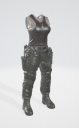
As you can see by the first image, Meshy does a pretty good job with not only the shape but the textures
EDIT: Meshy gives you the ability to take any object and split it into parts, which allows me to manipulate these parts in Blender
From there I take the obj file into Blender so that I can align all the parts with a G8F model that I had exported from Daz
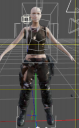
As you can see with the second image, I can apply the Transfer Utility and the obj file can move right along with G8F
Where I have the issue is with the textures. Sometimes I have very little issues, I go to the Surfaces tab, select all the "parts" and change the base color image to include the texture file that Meshy made
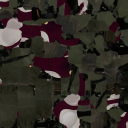
I know that when you look at it, that it seems like it is a mess but that is the file that obj file is using to create what you see in the first image which is what you see when you open the obj file in 3D viewer
How is it possible to be so accurate in the 3D viewer and then turn out like the second image
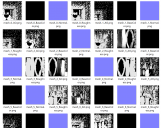
I have tried in Blender to bake the textures, but it just creates these black and white base color images - see the forth image
As usual, thanks in advance

Daz 3D is part of 
Connect
DAZ Productions, Inc.
7533 S Center View Ct #4664
West Jordan, UT 84084
Licensing Agreement | Terms of Service | Privacy Policy | EULA
© 2026 Daz Productions Inc. All Rights Reserved.
Comments
are they textures or vertex colours
I don't use Blender but regardless the object needs UV mapping and the textures baked if vertex colours
Also, I do know GLB which I recall Meshy uses, doesn't export a separate texture but importing into other programs a map is created in my case Twinmotion, Unreal engine and PCon planner
Blender I have always had issues exporting maps for anything so no help there
I know this is the Blender forum so hopefully someone can help, I am only speaking as someone who has used Meshy
Thank you for your response @WendyLuvsCatz
In Meshy, after you create your object, you click on the object in the right pain, then in the middle section, if you click on the object, then you will see a button "Texture" from there it creates another object that has textures
You can then download the new object with the textures and in the zip file you will see the texture file that it used - that is the third image that I uploaded for this post
so, have you changed that texture that you cannot use it in DAZ studio manually adding it
I am aware one can download textures and other formats from Meshy
was just trying to find out what's changed in Blender