added jcms driving me crazy!!
 ainuke
Posts: 91
ainuke
Posts: 91
For quite some time (months) I've had a persistent problem with jcms being added to my figure whenever I use a pose. There's a multitude that are being added that are for characters that are NOT for the selected character, or for any character in the scene. For the enclosed image, I have taken a new scene and added a fresh Gen 9 DAZ figure from Starter Essentials; no materials, just the figure, and posed with pose #26.
Selecting "Currently Used" section of the Parameters Pane, I see many "body_cbs_" morphs, which I expect are the stock DAZ jcms. Also present are morphs from Caleb, Beverly9, Jason, MWFiora, Marcus, CBSMary, NW Damira (all zeros), Neva, Rachel, Ryan, and Tania. Some are zeroed out, most are minor 1-10% additions, and some are 75-100%. Needless to say, the joints look terrible, and going through morph-by-morph and removing (set to zero) is beyond tedious and time-consuming. Most times I go through and remove all the morphs +50% and greater that aren't named for the character chosen, and my poses return to something usable.
What is causing this behavior and how can I stop it? This happens on both DAZ4 and DAZ6 equally.
Thanks in advance! -Erik

Daz 3D is part of 
Connect
DAZ Productions, Inc.
7533 S Center View Ct #4664
West Jordan, UT 84084
Licensing Agreement | Terms of Service | Privacy Policy | EULA
© 2026 Daz Productions Inc. All Rights Reserved.
Comments
All those named characters do not have their joint corrective morphs tied to their specific characters' bodies. So they fire whenever you use any G9. You can uninstall them(the problematic characters) from your library and/or file tickets with Daz support to get those character products updated.
I filed a ticket recently on Beverly 9, was told they knew there was an issue and support closed my ticket. So your mileage may vary regarding fixes.
You can also go through the process of fixing them yourself(where you add the specific character's body to the cbs 2nd controller).
https://www.daz3d.com/forums/discussion/743756/corrective-morph-problem?
thank you so much for the push in the right direction!!
but what a mess... adding the character body to the 2nd controller does work. Unsure how to "save Morph Assets", but I guess I'll figure it out.
You'll want to select the option to Save Modified Assets and then check off the ones you changed when the window pops up with, well, modified assets. :) Don't select all of them, just the ones you changed.
Many of those characters are cheap inexpensive DO bighead morphs. imo, not worth the disk space.
3DU Finger Focus has a similar error. I had to add the Controllers 2nd Stage (Multiply/Divide) to 3duJCMFF_Index1Bend50_r.
Yikes, thanks for the warning on that one. It was on my list of stuff to buy... not anymore.
Is there a list of known assets with issues?
Thank you.
(I didn't understood why I could not find the faulty property but there is a n between Bend and 50)
I didn't see the problem before reading barbult's message, but it's easy to fix on our end: it's just dragging and dropping a property and saving 3duJCMFF_Index1Bendn50_r.
It'l likely took longer to submit a ticket to ask for a fix on the PA side, than to fix it ourself.
Thanks for the Heads up on this, after I fixed that one, on a hunch I decided to look at the rest of the "3djuJCMFF's" because if one is broke.....
I found these are missing both the 1st AND 2nd stage Controllers:
3duJCMFF_Index1Bendp95_r
3duJCMFF_Mid1Bendp95_r
These are missing the 1st Stage Controller:
3duJCMFF_IndexBend_r
3duJCMFF_MidBend_r
3duJCMFF_PinkyBend_r
3duJCMFF_RingBend_r
To fix those last four you need to have the Right Hand Bone Selected on the G9 as the [A] Attributes you need to drag for each finger are under Pose Controls, so you will not see them in parameters with just the G9 Selected. (Example: Label "Right Index Finger Bend" Name"body_ctrl_rIndexBend", Drag that to the 1st Stage of "3duJCMFF_IndexBend_r" in Property Hierarchy Pane (edit mode on in parameters of course to be able to drag it, Then do the same for the other 3 fingers... IF you want to fix them yourself.)
Also while saving make sure to set Author to 3DU, and Product to FingerFocus, (and the correct Drive where your G9 Base is if you are using multiple drives) then scroll down to "Hidden/Base Correctives/3DU/FingerFocus" and select the ones you fixed. I'm not trying to explain this to you specifically Barbult, as you clearly already know how to correctly save modified JCM's, this is for others who don't, and might just save them under their own author name and "product".
************************WARNING ADDED LATER********************
Trying to manually fix "3duJCMFF_Index1Bendp95_r " mentioined above will actually make the JCM Destructive as the Morph itself is not correct as Barbult points out below, thus MORE steps are required for a true fix...
I use turbo loader to disable such morphs or just delete these jcms.
I had a similar problem until about two days ago.
I have many morphs that cause more subtle problems and I hadn't even noticed them, but E3D Alina caused some very obvious issues. I found that there was a thread about this - that is just shy of 3 years old - with the poster saying they'd file a ticket about it.
I tried the method of updating the 2nd stage controllers described above, but couldn't get it to save in such a way that the fix would persist between scenes (I am sure I did something wrong).
I found another thread which outlined a different method which worked for me. Maybe it has other unintended consequences, but for now it seems to have fixed the problem without much effort.
Thank you for the other problematic morphs, but is there a reason for not using Save Modified Assets?
It should be faster than saving using the Modifier Asset entry, because it will replace the files already existing (it will use our name as the author name but will not move files so it should not be a problem, as long we're saving only the files we modified to fix this problem).
Ugh, I bought that just yesterday because it was in Outlet or Quick Grab or something.
I really should have learned from how many tickets I've previously had to put in on 3DU's stuff that their links are often set up wrong.
Anyway, I've fixed all of these on my end and put in a ticket in the hopes it'll get fixed for others.
Thanks for the extensive effort you put in to track all those down.
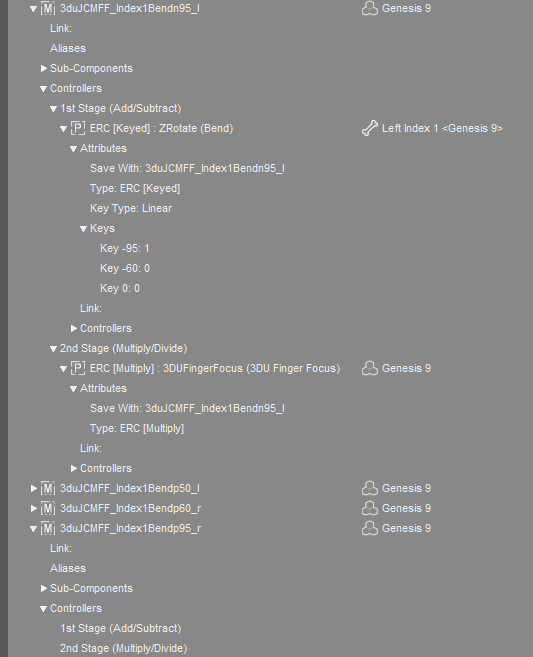
@mrpenguin76 The Finger Focus problem appears to be actually worse that just missing 1st and/or 2nd stage controllers. The keyed attributes are missing, at least on some. Here is a comparison of you the left and right Index1Bend95 are set up. The right morph doesn't seem to be setup at all as delivered in the product. I think this is getting beyond what I know how to fix myself.
Some of the right side Finger Focus correction morphs also affect vertices on the left side. Using 3DU's own Scene Tools 4 morph utilities shows this clearly. I don't know if this is related to the other errors about the right index1 bend morph not having it 1st and 2nd stage controllers and keyed attributes set, or whether this is just another error in the same morph. It is as though the development of these right side morphs was started and not finished before release.
I'm thinking about returning this. It is just too frustratingly broken. I've never had much luck getting 3DU product errors fixed in any reasonable (or ever) timeframe.
It used not to be selective, which meant it could crate new problems by overwriting things that were legitimately in a non-zero state or whatever. Now that we can be selective that isn't a certain issue, but it is still a bit risky iin terms of user error.
Remeber that is content was installed using Connect (through Daz Studio) then saved assets won't override those unless you copy the files to the /data/cloud/1_SKU/ folder location for the product.
Yep I see exactly what you are saying when I right clicked the "3duJCMFF_Index1Bendp95_r" parameter,and chose "Select Morph Vertices (with Geo Editor in Vertex mode) . So it looks like the morph itself is bad too and will need to be updated as well as KEYED correctly, as and example I put both hands in "Grasp 100%" and the "3duJCMFF_Index1Bendp95_l" for the Left Index did not fire (ie remained zero) while the "3duJCMFF_Index1Bendp95_r" fired at 100% and turned both the left and right index fingers into "Hooks". I left a warning in my post above too.
@Elor As Richard mentioned, I've had some "Unintend Consequenses" with saving that way (due to similar to what is being discussed here where morphs were active that should not be, and not necessarily just JCMs) so it is the safest way to know that you are saving ONLY what you have modified.
Well, aside from the apparently far more extensive issues also disclosed in this thread... personally, I don't buy assets if I know there are issues with them that I have to fix. I've spent enough of my life fixing problems that ought to have been the responsibility of the person who created them. Having to so in order to use a product I paid to have fun with (and in this case that was supposed to solve a problem, not create one!) just puts me in a foul mood.
Kitbashing is one thing, and so is discovering an issue in a newly released product with a PA who cares about and is dedicated to fixing any errors that come up (I recognize that stuff can get missed, and some things just don't show up until the users get their hands on it). This doesn't fall into either of those, though. I'll save/spend my money for something that works as advertised.
easiest fix: uninstall and ask for refund
I found I had bought https://www.daz3d.com/finger-focus--automatic-joint-correction-for-genesis-9 and there was no link to this thread. I am going to come back here when I am more awake to figure out how to fix my product. But a link should help others find this thread.
Well I am in the process of uninstalling Finger Focus from my Runtime. I found I had bought it on 23 May 2026 so I am still in the 30 day window for a request to Customer Support.
Finger Focus has such a slider, but that doesn't fix any of the morph errors in the product, unfortunately. I did submit a help request about the problems.
Thank you :)
I understand, doubly so now that the problem is much more extensive than initially though.
I'm out of the refund window, so I'll have to see how to fix these problems myself (I will also see if I find the time to file a ticket).
Speaking of fixing the problem: does someone know how to create the missing keyed part of some of the properties? Adding controllers or removing deltas from a morph (as long as it's not an HD morph of course) are both something I know how to do, but the keyed part, I have never done it and I don't know where to start.
I don't know how to create the keyed part. It has something to do with keys on the timeline.
There appear to be more problems with morphs from one side modifying vertices on the opposite side, This time I noticed that a LEFT side morph 3duJCMFF_Index1Bendn60_l modifies vertices on the RIGHT side also. And the vertices on the right side aren't even a mirror of the vertices that are modified on the left side. Earlier, we found problems with the morphs for the right side, but now the left side also has problems.
EDIT: And correspondingly, 3duJCMFF_Index1Bendp60_r modifies vertices on the LEFT side also. (Hmm I can't reproduce this error now.Anyone else see this problem with the 3duJCMFF_Index1Bendp60_r?)
I don't know any reason that bending a finger on one hand should affect the opposite hand. These morphs must both be wrong.
No it doesnt. (I mean, theoretically you can ERC freeze from timeline but that's not how one would do this).
Keyed method for ERC is very simple.
[Value 1] : [Value 2]
which means, when the controller is at [Value 1] the subcomponent will become [Value 2].
e.g., it will be staged in Keys like:
0: 0
0.5: 0.9
1.0: 1.0
That would be an example for two parameters that go from 0.0 to 1.0
For a joint it might be in degrees like:
-95:0
0: 0
30: 1.0
You add a new key by clicking the [+]
You would need to know what the vendor intended as the keys for the controller. If you have the correct values for the mirrored side, then you can make an informed guess that it would be mirror on the other side. But if you do not know what the vendor intended, then you would have to guess as to where it starts and finishes for the range of motion of the joint/controller. You can infer this from the name of the morph as to where its max "peaks" but may not be clear if it gets dialled out beyond the peak and when it should start (again in this example it might be clear, but more generally speaking it may not be clear). Given the other problems with the product you are all talking about, just uninstall.
For controller "Type" on the 1st Stage Controller, you can choose between different controller types - Add, Subtract, Keyed.
Just like on 2nd Stage Controller, you can choose between Multiply or Divide.
Click on 'Type' and choose the option. Perhaps it involves right-clicking to bring up the options.
Im not at computer. attaching Allstereo's guide for reference, which should have everything one needs to know about ERC options and settings.