Problem with stuck Compatibility Type and weird metadata
 vwrangler
Posts: 5,053
vwrangler
Posts: 5,053
Ran across an odd issue with the IDG Photographer's Toolkit cameras.https://www.daz3d.com/ig-photographers-toolbox-cinematic-cameras-2
I was using them in a scene in the next-to-last DS6 beta (I haven't updated because of all the Texture-Shaded drawstyle issue people are reporting with the last beta and release version.) I was using them in a scene with plenty of open space -- the characters were outside. I moved the cameras to new positions, still with nothing but open space around them. Suddenly, the cameras rendered black. No matter what I did. Saved the scene, reopened in Studio 4.24 without moving the cameras. In 4.24, they rendered just fine. However, that's not quite the issue I'm reporting. (Since I'm possibly two versions behind on DS6, I don't know that I can report it reasonably.)
I remembered seeing a post about stuck compatibilty types, and on a whim, decided to check. Sure enough, Compatibility Type is very incorrect on the IGPT Cameras. (Moderno Casa came out a full year ahead of the Photographer's Toolkit.)
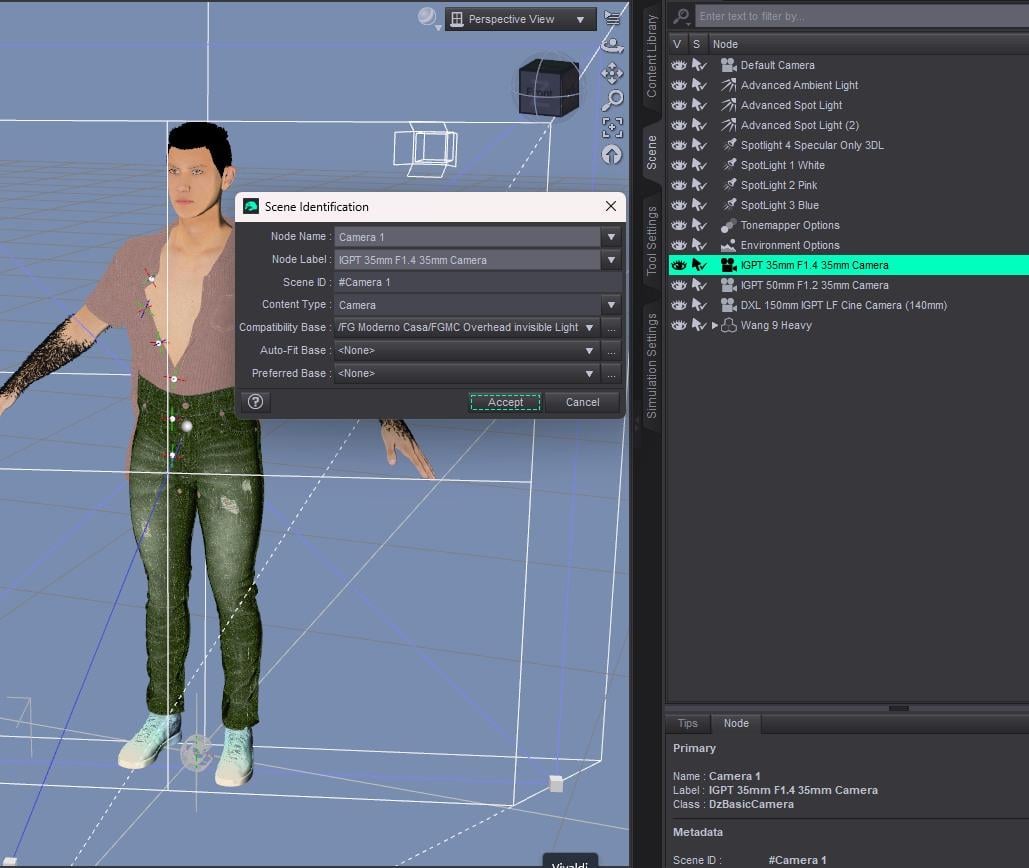
Moreover, all three IGPT cameras have Node Name "Camera 1" and scene ID "#Camera 1". Surely, none of that can be right -- they can't all be Camera 1. And Compatibility Type for a camera should be "None".
I thought that maybe the janky Compatibility type was causing problems in Studio 6 that Studio 4.24 was able to ignore -- maybe it thinks the cameras are in Moderno Casa and there's a wall there -- so I tried to change the Compatibility Type of all three cameras. However, they seem to be stuck. I change the type to None, click Accept, then open Edit/Scene Identification again, and the Compatibility Type is back to Moderno Casa.
Is there any way to change any of this other than in Scene Identification?
(I know I should file a ticket, but between the new Studio release and the well-documented issues with tech support, that does seem like it wouldn't be addressed any time soon.)

Daz 3D is part of 
Connect
DAZ Productions, Inc.
7533 S Center View Ct #4664
West Jordan, UT 84084
Licensing Agreement | Terms of Service | Privacy Policy | EULA
© 2026 Daz Productions Inc. All Rights Reserved.
Comments
Well, one of them is setting the Compatibilty Base to the other's assets. The timing of the releases might not matter if the earlier one gets updated at some point after the later one. The Compatibility Bases are pretty much permanent unless changed to something else, or are removed from the database. In this case, removal is needed, plus some maintenace on the offending metadata file. I suspect the Moderno Casa is the culprit since it was apprently used as the default base when the metadata was created while some of those cameras were in the scene.
If you have Moderno Casa installed, it will be fairly straightforward. Load a scene or object from Moderno Casa, go to Edit->Scene Identification and click the ellipsis at the right of the Compatibility Base selection drop-down list. In the dialog, search for FG Moderno Casa (or whatever was used, usually the product name), and expand the list if not already so. Delete any sub-compatibility bases that are from the bespoke Photographers Toolbox (cameras, lights, etc.)
To prevent it from re-entering the system in case you re-install the product, edit the metadata file to remove those same references and replace the file in the package. Hopefully no other products have been contaminated the same way.
If you do not have Moderno Casa, it will be a little more involved. I helped another user with a similar problem not long ago. You can follow the conversation here ([Solved] Metadata: how to remove a wrong Scene ID from a Compatibility Base ?) instead of repeating the whole process.
I do have Moderno Casa installed. However, for some reason, when I expand the FG Moderno Casa section, the IGPT Cameras aren't listed. In fact, all of Moderno Casa itself was, very technically, improperly set -- every item in that product lists as the compatibility base the FGMC Overhead Invisible Light, which can't possibly be accurate. (I wouldn't have thought architecture needed a compatibility base, to be honest.)
I wound up deleting the Overhead Invisible Light from the compatibility base altogether, which fixed Moderno Casa itself, sort of -- everything in that set now lists "FG Moderno Casa" as a compatibility base, rather than the Overhead Invisible Light, which I guess is an improvement. And it was removed from the cameras at the same time, which is good.
Now I just have to figure out why all of the cameras are identifying as Camera 1, and if that makes any difference for anything.
Thank you so much for your help! It wouldn't have occurred to me that you could delete a compatibility base like that.
EDIT: Looked inside the DSX for the Cameras, and no ObjectCompatibility section is included. In Moderno Casa's DSX, however ... there's an entire section of ObjectCompatibility, and with the sole exception of the Outdoor Pool, every single item lists the overhead invisible light as a compatibility base. It also has a Camera 1, which explains part of why it was getting grabbed by the Photographers Toolkit Cameras.
I think I'm going to take a bit of a risk and delete the entire ObjectCompatibility section of Moderno Casa. I can't see any real reason why it should be there, and it will keep cameras in other sets from being grabbed. If it actually damages something, I can always just reinstall Moderno Casa.
You can safely delete the unneeded object compatibilites, but keep those used by Moderno Casa. Any object should have a compatibility base to which other assets, like material presets, can be made compatible with.
Ah, didn't think of that.
As it turns out, Moderno Casa doesn't have any materials but those it auto-applies on load -- no materials folder or anything -- so hopefully, it'll be OK.
The reason why you couldn't set that problematic camera's Compatibility Base to None is because that FG Moderno Casa/FGMC Overhead Invisible Light is assigned as a "Vendor Compatibility"... but you can simply delete it in the list of Compatibility Base. The "camera SceneID" issue can be fixed.
Then delete the section of wrongly-assigned compatibilities reletated to cameras in DSX file as you said, then re-import the metadata of FG Moderno Casa.
Got it. Thank you so much!
Thank goodness for you smart, experienced, helpful people in the forum!