[Solved] Metadata: how to remove a wrong Scene ID from a Compatibility Base ?
 Elor
Posts: 4,230
Elor
Posts: 4,230
Hello,
Currently, in the database of my Daz installation, Genesis 9 Base is linked to two Scenes IDs:
- /data/DAZ 3D/Genesis 9/Base/Genesis9.dsf#Genesis9
- /data/Daz 3D/Product/G9Dragon/Genesis9.dsf#Genesis9
The first one is the intended one, and the second is bogus.
I think I have identified which product is responsible for that bogus link (Marley HD is the only one with the second Scene ID in its .dsx file in the package downloaded from Daz):
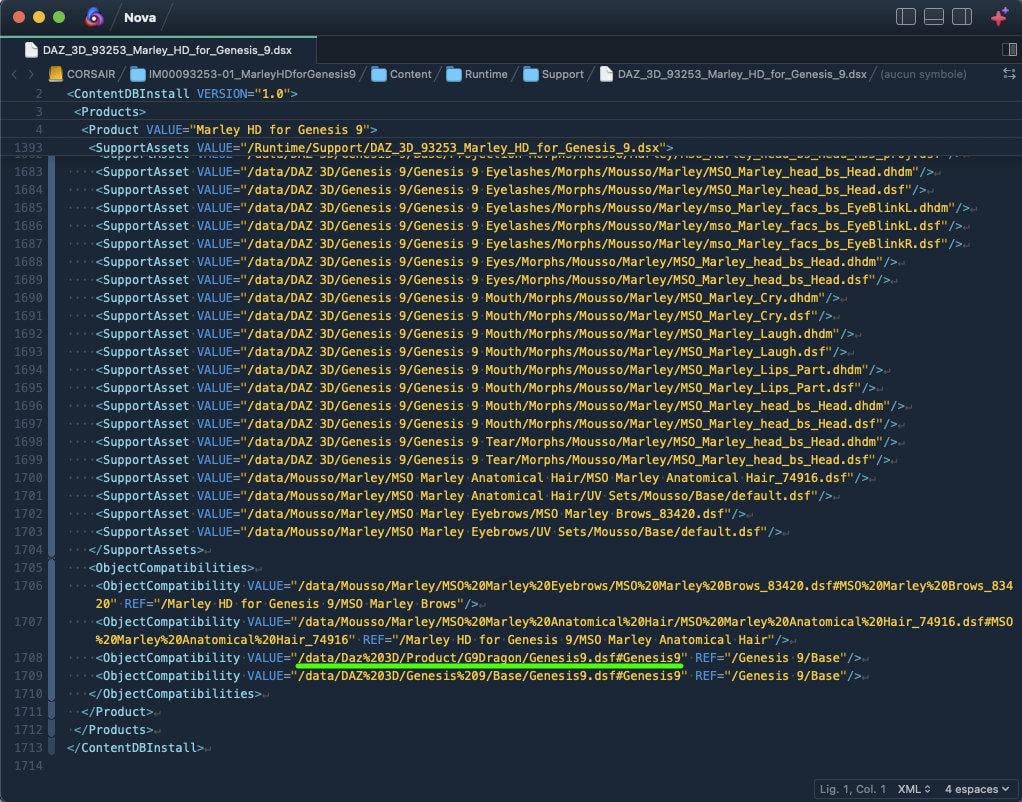
I removed all products with a mention of the G9Dragon Scene ID using DIM, then removed all of them through the Products listing from the Content Library but that problematic link is still here as shown on this screenshot of the metadata editor, opened with Genesis 9 selected in the scene:
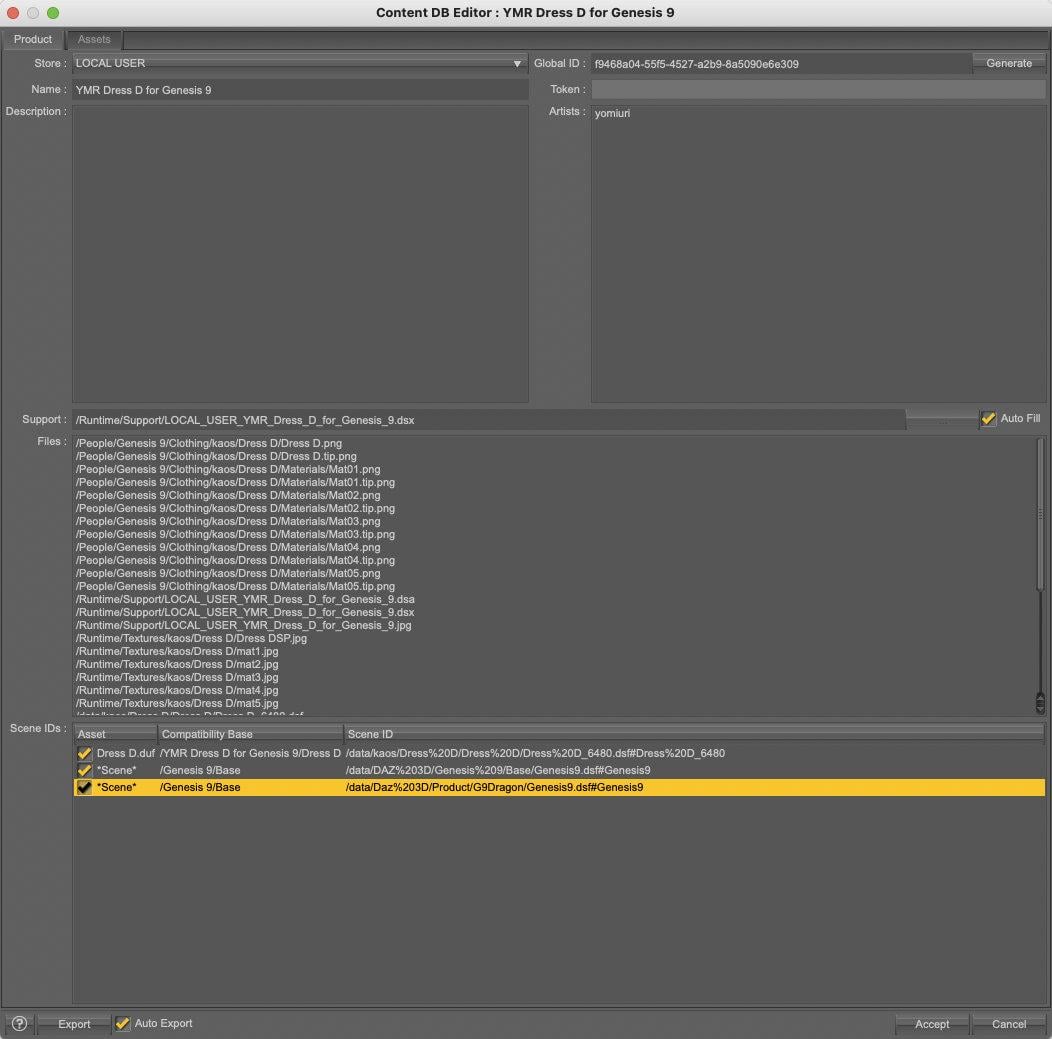
How to remove the link between Genesis 9 Base and the bogus Scene ID so that it doesn't appear in the metadata editor when I'm opening it with Genesis 9 selected?

Daz 3D is part of 
Connect
DAZ Productions, Inc.
7533 S Center View Ct #4664
West Jordan, UT 84084
Licensing Agreement | Terms of Service | Privacy Policy | EULA
© 2026 Daz Productions Inc. All Rights Reserved.
Comments
Just saw this one. I have had similar conflicts in the past, but I do not have this particular product. As you have realized, the metadata file cannot undo Compatibility Base assignments once they are made. What you do is load Genesis 9, then select Edit->Scene Identification. In the dialog, look for Compatibility Base. Click the ellipsis at the far right. This will open the list of all defined compatibility bases. Search for the erroneous string (G9Dragon) (I can't recall if it would be a Compatibility Base of its own or a Sub-Compatibility Base under Genesis 9) and delete the bad reference. This will clear the entry from the database. (There are other ways to access the "Choose a Compatibility Base" dialog)
Don't forget to delete the line from the metadata file, or it will get back in if ever you re-install or re-import metadata.
If you mess it up, you can re-install Genesis 9 Starter Essentials (or re-load the metadata from DIM) to reset any missing parts.
Thank you but G9Dragon is not a Compatibility Base: it won't appear in the list, and doesn't, I checked
It's part of the path of geometry file someone at Daz wrongly linked with the compatibility base 'Genesis 9/Base' and I don't know how to unlink it: since then, I also tried to remove Genesis 9 Starter Essentials, but the problem is still here.
To make the matter worse, they did a similar mistake Z Bending Down Pose Partials Mega Set: through this product, they linked 'Genesis 3/Female' with two hairs products (I think, considering the name of the files) on top of having the usual Scene ID for 'Genesis 3/Female' (a scene ID that is not needed at all because poses don't have Compatibility Bases)
I also have a similar problem with 'Genesis 8/Female' but I have yet to be able to identify which product is reponsible: I searched for them inside all .dsx files with metadata I have and none have the bogus scenes IDs in them. My current guess is the problem is from products refunded since December 2025 because I created metadata for a Genesis 8 Female character before December 2025 and there is no bogus Scene IDs here and I saw them.
I don't think it's a problem related to other stores, because most of them don't provide metadata and when they do, I'm usually redoing them because most of the time, they are bad.
And I don't think it's a mistake I made while creating metadata, because how could I link a Compatibility Base with geometry files I don't own or knew about in the first place, to say nothing of the fact that if it was a mistake I did, I should see the bogus scene IDs linked to 'Genesis 8/Female' in my metadata files and I don't.
Edit : I just identified the product responsible for the problem for Genesis 8/Female.
It's Absinthe for Genesis 8 Female. I just don't get why I didn't see the problem when I created metadata at the end of 2025 because it's a freebie from September 2025.
I have the same data in my version of Absinthe. That comes directly from DAZ, so we both could not have made the same mistake.
I found another product with similar statements, but much worse. Melantha Witch and Beauty for Genesis 8.1 Female(s). It is the only Gendragon3D character I have, yet it touches all Gendragon3D characters, notably the eyebrows, plus a few others that are not even Daz products.
I had to check my notes, and recalled the same problem with Greenzkin Orc. I did not have the product at the time, but it was defined in a similar way in many places. The problem was that the left side of the object compatibility statement did not exist (no such object), so it did not show up in the uber list of compatibility bases. My solution was to redefine the errant assignments to a dummy base, and then delete the dummy base from the list, then remove the bad references from all metadata files that have them.
Here is the thread that outlines the process Greenzkin Infiltration - Daz 3D Forums. You should be able to adapt it easily. I have done it several other times, too.
Oh, it's very clever trick, I wish I thought about it.
Thank you for sharing it!
I'll edit the problematic .dsx files (and open a ticket, hoping for a fix), but in the meantime, I did it the following way (so I only have to deal with one product and not three):
1. I created a dummy.duf file in an empty library (not sure if it's really needed or if Daz Studio will accept to create a product without any file in the directory)
2. I created a product called Dummy Dummy (then changed it to '0 Dummy Dummy', thinking it would appear at the top of the reimport windows, but I forgot that it's sorted by store first and I have other stores in my database that DAZ3D and Local_User, so a better product is likely Z Dummy Dummy, no relation to Zeddicuss at all, I could also try to make it a DAZ3D product, but I prefer to avoid using the Daz3D store outside of products transfered from elsewhere and distributed without any metadata)
3. I loaded Genesis 3 Female, Genesis 8 Female and Genesis 9 Base (Dev version for G8F and G9, to load them a bit faster) and I selected them in the scene tab.
I opened the metadata data editor, unselected the correct Compatibility Bases, to prevent them from being saved in my dummy product, and saved the metadata (the screenshot was taken while the product was called Dummy Dummy):
4. I opened LOCAL_USER_0_Dummy_Dummy.dsx in my text editor (that file is located in ~/My Documents/DAZ 3D/Daz Studio/My Library/Runtime/Support on my Mac, I suppose it's in a similar place on a Windows computer) and replaced any mention of Genesis 9/Base by Dummy/DummyG9, and so on eve if I don't think it's necessary (if you really want to go as fast as possible, in other word without even to type Dummy to search the root compatibility base, just use 000 Dummy as a root compatibility base, it's very likely to be the first visible).
5. I re-imported 0 Dummy Dummy and voila, Genesis 3/Female, Genesis 8/Female and Genesis 9/Base were back to only use their intended Scene IDs.
6. Then I removed the Dummy root compatibility base, which removed the sub ones in the process, then the dummy product and I got back to a cleaner database
Thank you again, it was driving me crazy.
Now I just have to alert the nice person who shared free Yoga poses for G9 on Renderhub and who likely has Marley installed too because in the provided metadata, the problematic Scene ID from Marley appears.
If anyone has the same set of bugged metadata, I can share my Dummy Dummy product if they don't want to do the whole process themselves (but it's a minute or two if you know your way around the metadata editor).
Great! (Now I have to clean up my own stuff...)