Blender Modifiers to Daz3d
 aidanthomas77
Posts: 0
aidanthomas77
Posts: 0
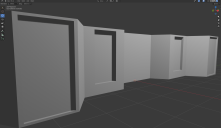
Hello, I am Prepping a Structure in Blender to export to Daz3d, I have the Boolean Modifier (Difference) Applied to some of the Meshes and when I import the Structure into Daz3D as an Obj the Modifiers Disappear. As a Note I have the Option "Apply Modifiers" Enabled when Exporting From Blender, But the same Problem still Occurs.
{1DCB07A9-D7B5-4FDC-8688-191240324BF2}.png
2096 x 1216 - 1M

Daz 3D is part of 
Connect
DAZ Productions, Inc.
7533 S Center View Ct #4664
West Jordan, UT 84084
Licensing Agreement | Terms of Service | Privacy Policy | EULA
© 2026 Daz Productions Inc. All Rights Reserved.
Comments
From the semantics of "Apply Modifiers", I too would think that would work. But there is "space" in there for a Blender dev to have a different interpretation.
But what I would think doesn't have that space would be copying the object, applying the modifiers manually on the copy, and then exporting that?
This phrasing is odd. What does this acutally mean - "disappear"?
And what is "the modifiers" in this description?
a) The resulting mesh that the boolean modifier produced in Blender?
b) Or you think the modifier should carry over into Daz?
If (a) above, does this mean you cant see any mesh in your scene? If so, click the focus button to focus on it. It probably imported at too large or too small size.
or if (a) above, and the boolean is messed up, it could be because the boolean produced n-gons, and daz will not render n-gons properly. If that's the problem you need to triangulate before import to Daz.
if (b) above, then obviously that is not going to happen.
But yeah, try what mysteristhepoint said (apply within the modifer stack before export rather than applying via the export dialog)
Booleans will typically result in ngons, daz studio is more limited than blender handling ngons, thus not everything will import fine. Below an example that's similar to your scene, where daz studio fails to compute the geometry. One workaround is to triangulate before export, or use the triangulate option in the obj exporter.