Diffeomorphic and dforce Togatta Hair For Genesis 8
 Misarmor
Posts: 43
Misarmor
Posts: 43
Hey there!
As the title says, I'm trying to make the Togatta work with Diffeomorphic. My main (and only, really) issue is with the texture (or general color). I just can't make the color appear only on the top like it would be on DAZ studio.
At first, the hair appears all black, with no texture. That seems to be because the hair curves get imported (or exported?) without volume. They only seem to be 1 vertex thick, so each strand don't have any faces to display the hair texture on, and that's even with checking the "render line tesselation sides" like the tutorial here says: https://diffeomorphic.blogspot.com/p/hair-version-15.html.
Anyway, a few months ago I actually gave the hair some volume (I don't remember exactly how as this was months ago, something to do with converting the hair to curves and then hair curves maybe?), but the best result I got was this:
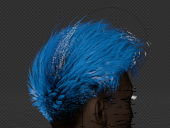
As you can see, it's blue everywhere instead of being black on the sides, and blue on the top.
Here's how the shader editor looks like:
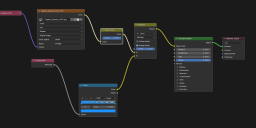
So if anybody has any ideas, they're very welcome.

Daz 3D is part of 
Connect
DAZ Productions, Inc.
7533 S Center View Ct #4664
West Jordan, UT 84084
Licensing Agreement | Terms of Service | Privacy Policy | EULA
© 2026 Daz Productions Inc. All Rights Reserved.
Comments
I had a look at it. The Togatta hair includes a opacity map for the strands, which is not clear how it is used as strands don't have a uv map, also the uv map is not displayed in daz studio. Thus the hair uv map is not imported in blender and the hair is fully rendered, instead of part of it.
This is another case where the hair conversion from daz to blender doesn't work fine and some editing is necessary by hand. You could separate the hair you want for a different color.
Yes, that's what I was worried about. I figured the UV map wouldn't work in covering the head properly like it would in DAZ studio. The opacity map *is* imported in Blender though, as you can see on the texture node screenshot I sent, it's probably not used the same way because of the reason mentioned above. :(
I suppose I didn't think of sepparating the mesh tho, this could be a great idea. I'll try doing that :)
update. workaround.
It seems using "particles" instead of "hair curves" works fine. That is, in blender "particles" generate from the scalp, and use the scalp uv map to tint the hair, this way it is possible to make furred animals as tigers for example. I'm not sure if the same can be done with "hair curves", which seem to be separate objects and don't refer to the scalp uv map. Will investigate further and let you know what I find.
Ah yes, I suppose tracing the UV map on the scalp and building the particles from there would work, good thinking!
update. Now I seem to understand how textures work with hair curves, so togatta or furred animals can have a texture with hair curves as well. Reported to Thomas for the fix.
https://bitbucket.org/Diffeomorphic/import_daz/issues/2637/
p.s. Until this is fixed, you can fit it by hand by choosing the "curves" deform and unlink the textures uvs, as also explained in the issue linked above.
Thanks. With all due respect, you're the top G.
update. This is fixed in the last commit, now textured hairs as togatta work fine both with particles and curves. In the process some improvements were done too. I want to stress here that Thomas is making all the code work, I just help with some ideas where I can.
https://bitbucket.org/Diffeomorphic/import_daz/issues/2637/
https://bitbucket.org/Diffeomorphic/import_daz/downloads/
You both are exceptional. Daz should thank you for helping to transfer Daz content to Blender and thus extending the usability.
Two top Gs, then. I wouldn't have been able to explain issues and propose fixes like you have, I just don't have the 3D experience. Thanks a ton for your help :)
Hey there, sorry to reopen this topic so late.
I'm having issues with the hair, still. Basically, there seems to be some randomness involved with how the UV works.
Sometimes it works well, like here:
And sometimes, I get this:
As you can see, there is only color at the very end of the hair, for some reason. Note that one the first try, the hair guide also had that same issue (I had converted it as well), but not the hair itself...
The hair materials seem to be the exact same, I even tried changing materials to the buggy hair from the normal one, and it didn't fix anything.
Would love to get your input about that :)
SOLUTION: Okay, apparently you need to select the hair cap when you use "Make hair" and not "human" as the program suggests
I agrre "human" is not a too smart name, it means the "hair base", which can be the figure for fur or the hair cap for hairs.
Thanks for the clarification :)