
Daz 3D is part of 
Connect
DAZ Productions, Inc.
7533 S Center View Ct #4664
West Jordan, UT 84084
Licensing Agreement | Terms of Service | Privacy Policy | EULA
© 2026 Daz Productions Inc. All Rights Reserved.
Comments
Thank you for the flattery!
The problem I had originally was working out exactly which marker or markers I needed to place - I was getting error messages and nothing was generating in my first few attempts. The next try I got much more than I wanted - I managed to generate (all in one operation) a basic LowPi crowd PLUS an Area based crowd PLUS the formation I thought I was setting up. (See the images attached) Finally I got the formation only (from the image in my post above)
So I'm not sure that I'm on top of it all yet, but hope to have time to play more tomorrow.
For formations or LowPi here you only need LP Formation Marker or LP LowPi Here Marker unless you want other crowds as well.
Make sure you have Crowd Generator 1.4.0.1 though.
Yes, I've got the latest update version. When I originally got nothing generated I went overboard on the markers .
.
The latest attempt I just used a "LowPi Here" marker, which did work as expected. I've only had success with PhilW's presets so far, but hope to spend tomorrow building my own formations from scratch. The Manual looks very comprehensive so I am feeling optimistic.
Thanks, I really try to write the manuals they way I would like them, not a pure function by function decription, but flow through the work, learning as you go.
Well so much for plans.
I started up my DS PC only to have it run an almost half-hour Check Disk of the main partition of my hard drive (where half my content resides) which spat out a few broken file messages. After a restart it then set up a temporary profile for me, missing all my shortcuts etc.
I restarted again and it did a Check Disk on the small partition of the drive where my userdata lives - spitting out another few file fragments.
It seems my profile is terminally lost, so I set up a new id and copied all relevant files across from a backup. Started DS and all my add-ons were AWOL, as was my Content Library setup. So instead of a happy afternoon trying out LowPi formations I spent it recovering to where I was two days ago.
I have the nasty feeling that my hardware is almost at breaking point - well it is over 13 years old - and I'm going to have to bite the bullet and look for a new desktop machine.
Sorry for the rant, I'm not very happy.
Sorry to hear about your hardware issues, never fun, and specially now with these exterme memory prices.
Maybe you could get by with just a new hard drive for now.
Maybe, but I'm stuck on Windows 7 with that machine (not good enough for Win11) and my motherboard won't take a better GPU that the GTX1030 2GB I have, so I've been stuck on CPU rendering for a couple of years. High time I upgraded. It's just annoying if my old PC breaks before I can choose another! (Luckily I have my Win11 laptop so at least I can stay connected)
RePopPlus is released: https://www.daz3d.com/lowpi-crowd-generation-repopplus
In my cart now. And the promo pictures helped me to understand what I didn't understand the other day when I read about it here. It is just my stupid brain not clicking on to just words. But the pictures worked wonderfully Totte.
A picture says more than 1024 words / old nerd saying
It made it safely into my Runtime. Yesterday and today has been a challenge for me and my computers. I can barely figure out how to open DAZ, but I did make sure all systems were ready to go after the latest Mac OS update. Even expected the crash but was surprised when it was triggered by touching the 'Info' tab in
And here is another important and very useful tool for your LowPi work, LowPi Reposition Crowd
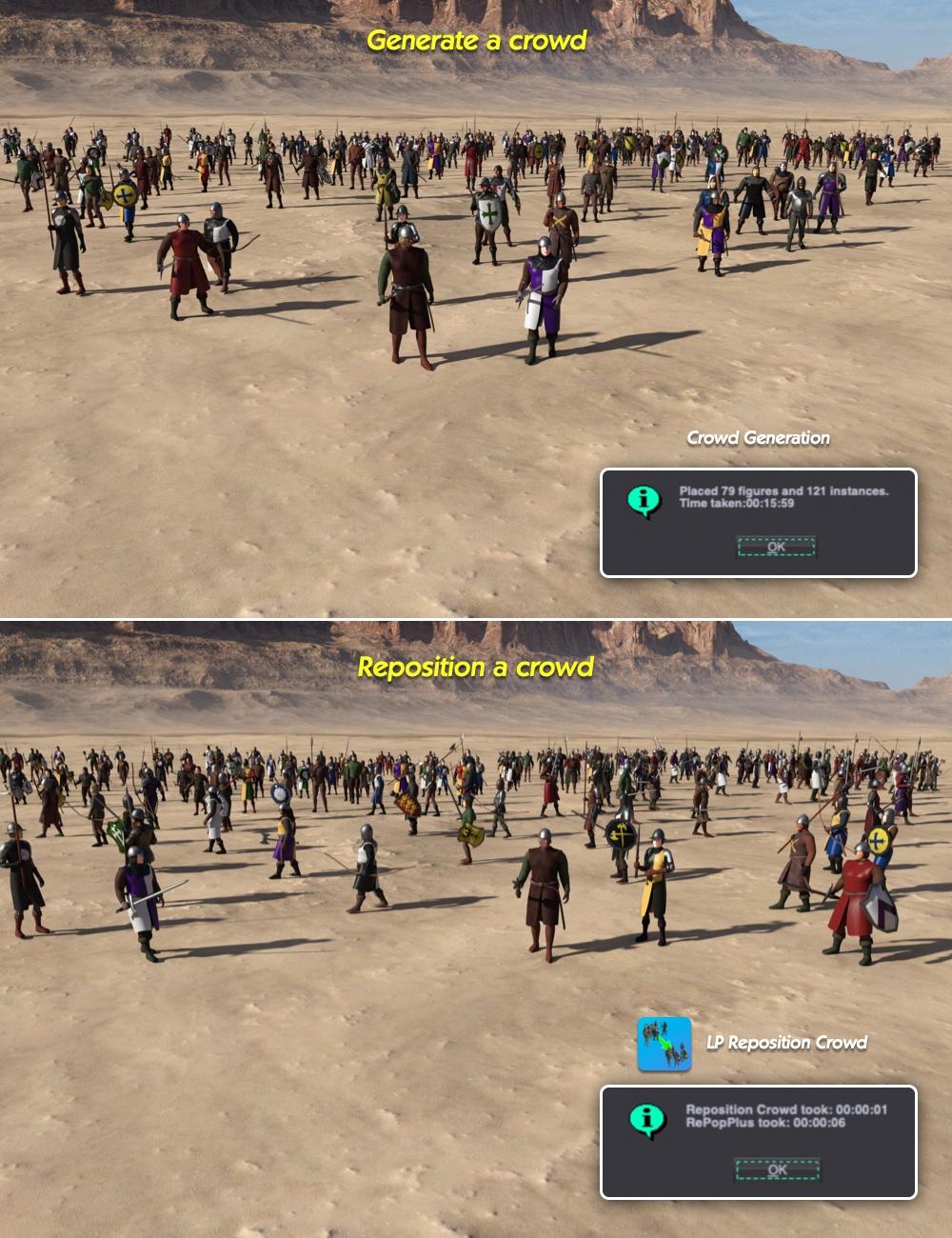
https://www.daz3d.com/lowpi-reposition-crowd
Oh, that is amazing. I already have so many such scene subsets. :)
Cart.
Sorry, I'm running into problems with this again.
I do have the Formation package installed, but it's not showing up as tabs in the Crowd Generator script (which is what I believe to be the necessary V1.4.0.1), and while the Formation manual states that I need to have Extensions enabled, I can find no details in either the Formation or the Crowd generator manual about how one does activate extensions.
Unlike the earlier problem I had with Hedgemaker, it doesn't seem to be a misplaced .DLL thing, as there are no .DLLs I can find in the Formations ZIP package.
Basically "LP Set Externsions On" is required to run to enable any extensions, extensions are "all or nothing".
Ah, right, that's an option in the Plus product, one of the places I didn't think to look.
On of the reasons they all have a depenency chain ending with PopPlus, a lot of the foundations for extensions are in it.
Is there a plan ready for Daz2026 and the Low Pi scripts and dependend plugins? I wouldn't be surprised if you just can't say anything for some reason.
There is a plan, but as long as DS 6 in evolving plugins cannot be released. Scripts needs a bit of love too, so debating with myself if I should go all plugin for speed.
I've tested on DS 6 and it's ( or was when I tested) about twice the speed to DS4 populating crowds.
I did not know, that DS 6 is faster than DS 4. Good to know and thanks for sharing this information.
Simulating on Daz2026 is also faster, especially timeline sims.
It's a subtle use, but I did get Formations working, and it's been used to do much of the filling out of the shelves in the background here (with very scaled down LowPis where I've put gaming bases under them).
Perfect use for it, apert from reenacments, this was one of the uses I though about.
I've been eyeing this cool product for a long time, but I haven't bought it yet because the characters aren't realistic enough. Then I suddenly thought, what if I could put on a real face myself? Or add patterns to the clothing? I want to confirm before buying whether I can replace the UV map myself to make it more realistic, because I'm not quite clear on how this product works.
The LowPi model has no mouth geometry or eye geometry. They are just painted on. It has no individual fingers. I call them "mitten hands". The way I make the characters more realistic is by fitting a Genesis skin to them, as if it were clothing, and making the LowPi underneath invisible. Example That LowPi also has converted hair and clothing.
You can create you own clothing materials for the existing clothing. Or you can convert clothing for other Daz figures to fit LowPi. I usually decimate the clothing I convert to reduce the number of polygons in a scene with lots of LowPis wearing lots of different clothing.
This thread has lots of examples of what I have done with LowPi. I even make them ride horses and bikes.
As of this time, the LowPi scripts and tools haven't been released for DS6, so plan to use the system in DS4 for now.
I understand that the entire face is just a painting; what I mean is, is it possible to replace this painting? For example, I render a face and then use Photoshop to replace the original face?
I've seen the second image. How was this done? Does it increase the hardware load too much?
I think I understand now, is it similar to a geoshell-like bodysuit?
This product seems to have far exceeded my expectations. I've decided to buy it first and then research it further. Thank you for your answer.
You can replace the entire LowPi with the another figure, or try to parent the other head to LowPi and hide its own head.
I use mostly original LowPi with some helmets or not showing their faces.
The hands of original LowPi I also try not to show in my renders, because of their look.
I only use Lowpi when they can get blurry in depth of field.
The face is just a texture. Any and all textures can always be edited.
I did a simple test today, and it is indeed possible to change the texture, but it is difficult to find the correct UV position, and the face area is too small, resulting in too low resolution to make it look like a human face. There are also issues with the basic colors. I will try other methods another day.