DAZ to Unity - blendshapes missing
 sarge
Posts: 0
sarge
Posts: 0
Hi everyone.
Unity 2022.3.5f1 - Blender 3.6 - Daz Studio 4.2.1
Model https://www.daz3d.com/emotiguy
What i am trying to achieve:
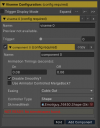
in Unity i want to use a 3D character which is lip synced with the Asset "SALSA V2.0". that asset looks for a shape with a skinnedmesh and also blendshapes to apply visemes on. "Salsaconfig.png"
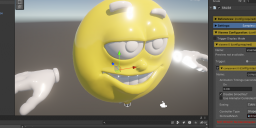
Using the DAZ to Unity bridge i am missing the blendshapes in the 3D import. "Emoti_wo_blendshapes.png"
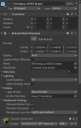
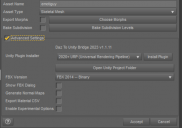
the configuration for the bridge: "DazBridgeConf.png"
I also tried to export it to .fbx but with the exact same result. Attempting to get the needed information imported into unity i did as suggested here: https://www.daz3d.com/forums/discussion/522456/daz3d-blender-unity-skinned-meshes-and-blendshapes and copied the .blend file of the model into the correspoding Asset folder. once again it looks exactly the same as the other attempts and misses the blendshapes. "Emoti_wo_blendshapes_blend.png"
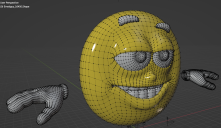
in blender the model works fine and i am able to apply any changes i want to. thats where it got its nose from :) "EmotiInBlender.png"
the same model was used in the examples of the SALSA asset https://www.youtube.com/watch?v=VLwL0Xbpeqk&t=126s, so there is a feasibilty done already.

Daz 3D is part of 
Connect
DAZ Productions, Inc.
7533 S Center View Ct #4664
West Jordan, UT 84084
Licensing Agreement | Terms of Service | Privacy Policy | EULA
© 2026 Daz Productions Inc. All Rights Reserved.
Comments
Have you added the morphs to the export? I think it says there are 12 compatible phenome moprhs... I can see a 0, F and TH etc..
See my image where they are added to the export
i stumbled over the morph export shortly after posting here ... but still no luck
the project in Unity is 3D URP, as a side note.
when i select the head only in the Daz scene the output in Unity doesnt show anything. "DazHeadOnly.png"
when i dont select annything in the Daz scene i get the whole emoti guy exported. in both i ticked the same 3 morphs to be exported as well. as Asset type a tried "Skeletal Mesh" and "Static Mesh". "DazToUnity_URP.png"
either way the export is lacking blendshapes. "DazToUnity_URP_result.png"
2nd solution with fbx
there is a way apperently to check if your export has blenshapes in it with blender https://www.youtube.com/watch?v=1tVHEU4d2EU i tried it out already and my list is empty :( so something is maybe fishy at the export itself. i used a fbx export with some rules to get the 3 mouth shapes O, F and TH. which would also work as a solution if the bridge is somehow not working for me. "DazExportRules.png"
Sorry, As you say the fbx export seems to be the cluprit (and that is used in the bridge also).
I would guess that as the morphs seem to be attached to the head in Daz, they are then not coming through.
Maybe poser person may be able to shed some light into exporting like @WendyLuvsCatz
I made some "progess" or at least have more insight now.
following https://www.daz3d.com/forums/discussion/394681/export-all-morphs-how i can adjust the rules for a fbx export to get any available morph. "DazFBXAllMorphs.png"
with that i finally got some blendshapes ... but only 5 -_- "DazEmoti_w_blendshapes.png" . this is also not changing no matter what i select in the Daz scene.
that result is also matching with blender where "Shape Keys" shows me the exact same 5 morphs. so something is clearly happening there but most of the morphs are just not included in the export file.
is there something from the Daz Installation Manager (DIM) a have to install to support the Daz export? these are all the packets i have "DIM_Installs.png"
When I go to Shaping Tab for emotiguy in Daz all the Morphs are hidden, when I unhide them they work, but yeah they don't export as Blendshapes even through bridge when selected.
This is a Legacy Figure (Poser), so maybe they don't work with the Export FBX or Bridge, you can see it is a CR2 not a DUF. I have never done anything to make these work better in Daz, because well I never use older Poser figures in Unity, so if you want to do this maybe Google for converting Poser CR2 to Daz Studio DUF or put a question up on the Commons where the experts may answer about exporting morphs on Poser legacy figures or converting them.
Try exporting a standard gen 8 character with visemes and you might have more luck. At least you'll know it's the old model that might be at fault. You can use Salsa one click to setup the lip syncing automagically.
@aweswan thats what i already tried and it works fine with any morph available. but i didnt set it up with in salsa - gues it would work since the blendshapes are visible and usable in Unity.
@ARealiti I read something similar and there was the suggestion to export it in poser. but that only adds another software which i maybe wont work with and makes things more complicated.
I finally got emoti guy in Unity working:
there is a blender file "made" by this guy: https://www.youtube.com/watch?v=fuGi_knr70k&t=17s. in the comments is a link to download emoti guy for blender with a ton of other stuff and most importantly, all the morphs or "Shape Keys" as they are called in blender. from here i just had to get rig of anything i dont need, export it as fbx and import into unity.
Oneclick does not work on here! but with the available tutorials for SALA its easily doable.