• Daz 3D
  • Shop
  • 3D Software
    • Daz Studio Premier
    • Daz Studio
    • Install Manager
    • Partnerships
    • AI Training data
    • Exporters
    • Daz to Roblox
    • Daz to Maya
    • Daz to Blender
    • Daz to Unreal
    • Daz to Unity
    • Daz to 3ds Max
    • Daz to Cinema 4D
  • 3D Models
    • Genesis 9
    • Genesis 8.1
    • Free 3D Models
  • Community
    • Gallery
    • Forums
    • Blog
    • Press
    • Help
  • Memberships
    • Daz Premier
    • Daz Plus
    • Daz Base
    • Compare
  • Download Studio
ADVANCED SEARCH
  • Menu
  • Daz 3D
ADVANCED SEARCH
Add image
  • Shop
  • 3d Software
    • Daz Studio Premier
    • Daz Studio
    • Install Manager
    • Partnerships
    • AI Training data
    • Exporters
    • Daz to Roblox
    • Daz to Maya
    • Daz to Blender
    • Daz to Unreal
    • Daz to Unity
    • Daz to 3ds Max
    • Daz to Cinema 4D
  • 3D Models
    • Genesis 9
    • Genesis 8.1
    • Free 3D Models
  • Community
    • Our Community
    • Gallery
    • Forums
    • Blog
    • Press
    • Help
  • Memberships
    • Daz Premier
    • Daz Plus
    • Daz Base
    • Compare

Notifications

You currently have no notifications.

Loading...
    • Categories
    • Recent Discussions
Daz 3D Forums > 3rd Party Software > Blender Discussion

[?] DAZ3D > Blender > Unity (Skinned Meshes and Blendshapes)

rick4filesrick4files Posts: 0
September 2021 in Blender Discussion

Hi everyone. I'm looking for a specific solution, creating FBX models from DAZ3D... but where I can keep the model with "skinned meshes" and "blendshapes." This works with the FBX export option (directly from DAZ3D to .fbx file). But, I'm wanting to be able to edit the model more in Blender before exporting it to an FBX file, that I'll use in Unity. 

I know there is a "Unity Bridge," but I'm looking for more control with Blender, so that I can do things like delete vertices/faces and subdivide/smooth vertices (in Blender), before sending the .fbx file to Unity. 

I'm using Mac OS by the way. Also:
- Daz-to-Blender version 2.4.0 
- Blender 2.92.0
- Unity 2019.4.22f1

So... I don't know if this is possible or not. I've tried doing this: 

  1. In DazStudio (Blender Bridge version): Scripts > Bridges > Blender > Daz to Blender
    • check the box "Include Morphs" (while also selecting the morphs wanted under "Choose Morphs")
  2. In Blender: File > Export > FBX (.fbx)
    • (I don't see any options relating to blendshapes during this part of the process)
  3. (Import the .fbx file into Unity)

Then, in Unity, the model does still have a "skinned mesh," but the blendshapes are not included. 

I attached an image of what it looks like in the "Inspector" (in Unity) when the Blendshapes are included in an FBX file. 
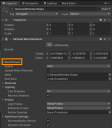
 

Screen Shot 2021-09-26 at 7.44.44 AM.png
533 x 608 - 71K

Comments

  • margravemargrave Posts: 1,822
    September 2021

    Don't bother. Tweak the model in Blender and then just open the Blend file with Unity.

    Unity - Manual: Support for proprietary model file formats (unity3d.com)

Sign In or Register to comment.
Adding to Cart…

Daz 3D is part of Tafi

Connect

DAZ Productions, Inc.
7533 S Center View Ct #4664
West Jordan, UT 84084

HELP

Contact Us

Tutorials

Help Center

Sell Your 3D Content

Affiliate Program

Documentation Center

Open Source

Consent Preferences

JOIN DAZ

Memberships

Blog

About Us

Press

Careers

Bridges

Community

In the Studio

Gallery

Forum

DAZ STORE

Shop

Freebies

Published Artists

Licensing Agreement | Terms of Service | Privacy Policy | EULA

© 2025 Daz Productions Inc. All Rights Reserved.

