• Daz 3D
  • Shop
  • 3D Software
    • Daz Studio Premier
    • Daz Studio
    • Install Manager
    • Partnerships
    • AI Training data
    • Exporters
    • Daz to Roblox
    • Daz to Maya
    • Daz to Blender
    • Daz to Unreal
    • Daz to Unity
    • Daz to 3ds Max
    • Daz to Cinema 4D
  • 3D Models
    • Genesis 9
    • Genesis 8.1
    • Free 3D Models
  • Community
    • Gallery
    • Forums
    • Blog
    • Press
    • Help
  • Memberships
    • Daz Premier
    • Daz Plus
    • Daz Base
    • Compare
  • Download Studio
ADVANCED SEARCH
  • Menu
  • AI SEARCH BETA
  • Daz 3D
ADVANCED SEARCH
Add image
  • Shop
  • 3d Software
    • Daz Studio Premier
    • Daz Studio
    • Install Manager
    • Partnerships
    • AI Training data
    • Exporters
    • Daz to Roblox
    • Daz to Maya
    • Daz to Blender
    • Daz to Unreal
    • Daz to Unity
    • Daz to 3ds Max
    • Daz to Cinema 4D
  • 3D Models
    • Genesis 9
    • Genesis 8.1
    • Free 3D Models
  • Community
    • Our Community
    • Gallery
    • Forums
    • Blog
    • Press
    • Help
  • Memberships
    • Daz Premier
    • Daz Plus
    • Daz Base
    • Compare

Notifications

You currently have no notifications.

Loading...
    • Categories
    • Recent Discussions
Daz 3D Forums > 3rd Party Software > Blender Discussion

How do I make sabertooth teeth for HiveWire Tiger for Daz3D?

SasaSasa Posts: 15
February 2023 in Blender Discussion
Hello everyone, I am here to request add on how to properly sculp sabertooth teeth I can scale a bit size wise for the product HiveWire Tiger located here: https://www.renderosity.com/rr/mod/bcs/hivewire-tiger/144304/ I am hoping it will look something like this: © National Geographic Thank you for reading!
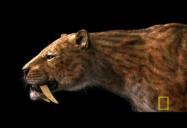
02935_01_sabertooth_07200480.jpg
380 x 260 - 12K

Comments

  • felisfelis Posts: 5,401
    February 2023 edited February 2023

    I would model it instead of sculpting it.

    Added: I have no idea of actual dimensions of a saber tooth, but a quick version could look like this.

    Saber_tooth.PNG
    599 x 703 - 100K
    Post edited by felis on February 2023
  • 3WC3WC Posts: 1,126
    February 2023

    https://community.hivewire3d.com/threads/saber-tooth-morph-for-hw-big-cat.4607/post-228776


    SaberTooth.png
    622 x 774 - 663K
  • SasaSasa Posts: 15
    February 2023 edited February 2023

    3WC said:

    https://community.hivewire3d.com/threads/saber-tooth-morph-for-hw-big-cat.4607/post-228776


    Hiya! I replied to you on the other thread but I agreed with the other persons reply. Its a bit too thin for it to fit a sabertooths teefers. Thank you tho!


    felis said:

    I would model it instead of sculpting it.

    Added: I have no idea of actual dimensions of a saber tooth, but a quick version could look like this.

    That looks great! I am not exactly sure how to model it though... :/

    Post edited by Sasa on February 2023
  • felisfelis Posts: 5,401
    February 2023

    I don't know how familiar with blender you are.

    I did the following.

    I added a cylinder with 16 verteces and no end caps, and scaled it down to the base size, which I choose was 2 cm.

    Then I extruded it upwards till around 8 cm.

    Then I filled the upper end cap with quads, and with proportional editing and small radius i pulled it upward a bit.

    Then I scaled the top in so I had the general shape, and then added loopcuts.

    Then I smoothed it the loop tools > Relax

    That gave me the straight tooth to the left.

    Then I duplicated it, placed the 3d cursor at the bottom, and with the top vertex selected, and proportional editing enabled, I rotated in the Y direction and got the final result.

    All in all, less than 5 minutes.

    Saber_tooth2.PNG
    872 x 665 - 173K
  • SasaSasa Posts: 15
    February 2023
    felis said:

    I don't know how familiar with blender you are.

    I did the following.

    I added a cylinder with 16 verteces and no end caps, and scaled it down to the base size, which I choose was 2 cm.

    Then I extruded it upwards till around 8 cm.

    Then I filled the upper end cap with quads, and with proportional editing and small radius i pulled it upward a bit.

    Then I scaled the top in so I had the general shape, and then added loopcuts.

    Then I smoothed it the loop tools > Relax

    That gave me the straight tooth to the left.

    Then I duplicated it, placed the 3d cursor at the bottom, and with the top vertex selected, and proportional editing enabled, I rotated in the Y direction and got the final result.

    All in all, less than 5 minutes.

    Ive never made anything in blender tbh... Is it possible you could share that file? (⁠;⁠ŏ⁠﹏⁠ŏ⁠)
  • felisfelis Posts: 5,401
    February 2023

    I have attached the obj file.
    You must be aware of that blender and Daz Studio differs in world orientation and scale.
    Daz Studio has X-Y as a flat picture and Z is depth, while blender has X-Y as the ground-plane and Z as height.
    Daz Studio has 1 cm as unit size, while blender has 1 m.
    For my obj I use Daz Studio orientation and blender scale, so in order to import in Daz Studio I use the attached settings for import into Daz Studio.
    The object will load at world origin. To place it I recommend Universal Tool, and in Tool Settings set it to use object coordinates. It will make it easier to position (I don't have the Hivewire Tiger). You might want to scale it too.
    When you have placed one tooth, duplicate it. And to mirror along the X-axis use the values from the first tooth as
    Translate: -X, Y, Z. Rotate: X, Y, -Z
    And when placed parent them both to the head. I would assume that that should work.

    DS_import.PNG
    365 x 370 - 14K
    zip
    zip
    Sabertooth.zip
    7K
Sign In or Register to comment.
Adding to Cart…

Daz 3D is part of Tafi

Connect

DAZ Productions, Inc.
7533 S Center View Ct #4664
West Jordan, UT 84084

HELP

Contact Us

Tutorials

Help Center

Sell Your 3D Content

Affiliate Program

Documentation Center

Open Source

Consent Preferences

JOIN DAZ

Memberships

Blog

About Us

Press

Careers

Bridges

Community

In the Studio

Gallery

Forum

DAZ STORE

Shop

Freebies

Published Artists

Licensing Agreement | Terms of Service | Privacy Policy | EULA

© 2025 Daz Productions Inc. All Rights Reserved.
