[Diffeo] Geo Shell stocking renders only normal map
 acdum1857
Posts: 105
acdum1857
Posts: 105
Figure : G8F
Item : Stocking Settings For G3F G8F (01 Sheer)
Export : Export To Blender (not HD)
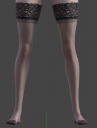
Image 1: Rendering in Daz
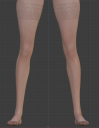
Image 2 : (EEVEE) only normal map is rendered (same for Cycles)
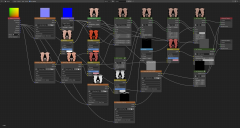
Image 3: Nodes in Legs
Image 4: Warning after import
I'm not familiar with Blender's advanced procedural texturing, but I know the basic texture structure.
So I tried changing the settings to render the texture properly, but it didn't work.
Please advise what is wrong.
1.png
1197 x 1581 - 603K
2.png
1101 x 1422 - 1M
3.png
3840 x 2049 - 1M

4.png
656 x 321 - 43K

Daz 3D is part of 
Connect
DAZ Productions, Inc.
7533 S Center View Ct #4664
West Jordan, UT 84084
Licensing Agreement | Terms of Service | Privacy Policy | EULA
© 2026 Daz Productions Inc. All Rights Reserved.
Comments
As for the warnings some minimum quality settings are required for cycles and eevee and the scene lights for the rendering to work fine. You can choose to warn or update in the global settings panel.
https://diffeomorphic.blogspot.com/p/global-settings-version-16.html
As for the stocking it's not a geoshell. The artist is using the metallic flakes section of the uber shader in a very "strange" way. Specifically the density is set to 100 in order to get the opaque part of the stocking. This would normally be done with the cutout section or a geoshell.
I'll see what I can do for the metallic flakes, but this will take some time and I don't grant anything since as I said this is a very "strange" way to use it.
https://www.renderosity.com/rr/mod/bcs/stocking-settings-for-g3f-g8f/124513
As a side note the daz bridge 2.4.0 doesn't get this material too. Not that the daz bridge is too smart about materials in general.
Meanwhile as a workaround you can add a geoshell yourself using the cutout section with the stocking mask. This will export fine. Example scene included stocking-fix.duf.
As a side note, as for diffeomorphic, geoshells work "better" in blender than in daz studio itself. Because in blender they are implemented as a material layer, that's not possible in the uber shader and that's why shells are used instead. Thus in blender you don't get the typical shells "artifacts" as unwanted shadows casted from the shell, or a possible pokethrough of the shell geometry.
Following your last comment, I made a shell and put all the textures in it, then I imported it through Diffeo and rendered it.

The results were very satisfactory. (Image 1)
The offset is also adjustable, so I think the shell is a much better way.
I really appreciate your advice and work.
One more question.
I tested 'Mystique 2 for Genesis 8 Female(s)' and found that the material was not rendering properly. (Image 3)
So, I increased the normal map intensity in the node, but there was no change.
I guess the roughness was probably not translated properly.
Do I have to add related nodes or do I just need to set some simple settings?
As for mystique it is hard to tell what/if is wrong. For a start are you sure you use the same lights ? Because from your pictures it doesn't seem so. Just export the default hdri with no other lights and compare the renderings. Then it may also be the tone mapping. You should compare with something else in the scene that could provide you some reference, not just the dress alone especially if it's black/white.