• Daz 3D
  • Shop
  • 3D Software
    • Daz Studio Premier
    • Daz Studio
    • Install Manager
    • Partnerships
    • AI Training data
    • Exporters
    • Daz to Roblox
    • Daz to Maya
    • Daz to Blender
    • Daz to Unreal
    • Daz to Unity
    • Daz to 3ds Max
    • Daz to Cinema 4D
  • 3D Models
    • Genesis 9
    • Genesis 8.1
    • Free 3D Models
  • Community
    • Gallery
    • Forums
    • Blog
    • Press
    • Help
  • Memberships
    • Daz Premier
    • Daz Plus
    • Daz Base
    • Compare
  • Download Studio
ADVANCED SEARCH
  • Menu
  • Daz 3D
ADVANCED SEARCH
Add image
  • Shop
  • 3d Software
    • Daz Studio Premier
    • Daz Studio
    • Install Manager
    • Partnerships
    • AI Training data
    • Exporters
    • Daz to Roblox
    • Daz to Maya
    • Daz to Blender
    • Daz to Unreal
    • Daz to Unity
    • Daz to 3ds Max
    • Daz to Cinema 4D
  • 3D Models
    • Genesis 9
    • Genesis 8.1
    • Free 3D Models
  • Community
    • Our Community
    • Gallery
    • Forums
    • Blog
    • Press
    • Help
  • Memberships
    • Daz Premier
    • Daz Plus
    • Daz Base
    • Compare

Notifications

You currently have no notifications.

Loading...
    • Categories
    • Recent Discussions
Daz 3D Forums > 3rd Party Software > Blender Discussion

Strange blue tint on nails and skin?

dorfkiddorfkid Posts: 9
September 2021 edited September 2021 in Blender Discussion

Hey guys,

So I am using the official DAZ > Blender bridge with the Araminta HD Character.
If I render the image in Blender there is a strange blue "glow" around skin borders and also the nails look blue and totally off.

For this scene I am only using one white light and cycles render with 512 samples.
LOD 1 or 2 (tried both)

I put in some close ups of the render so you can see what I am talking about.
Any ideas why this happens?
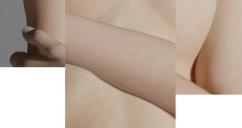
Unbenannt-2.jpg
565 x 299 - 67K
Post edited by Richard Haseltine on September 2021

Comments

  • dorfkiddorfkid Posts: 9
    September 2021

    Since there is no answer yet I tried out another character (Fabian HD) and its the same issue.
    See the photo attached, ignore the eyelashes, its about this blue tint (viewport in blender, but render looks the same).

    Any ideas?

    Screenshot (99).png
    1496 x 796 - 1M
  • RL_MediaRL_Media Posts: 339
    September 2021 edited September 2021

    You would probably get more help in the blender section. Off the top of my head, I think it's a problem with the way random walk calculates.

    Post edited by RL_Media on September 2021
  • CHWTCHWT Posts: 1,186
    September 2021
    RL_Media said:

    You would probably get more help in the blender section. Off the top of my head, I think it's a problem with the way random walk calculates.

    I agree. Some users may tweak (or even set their own) the materials in Blender.
  • Richard HaseltineRichard Haseltine Posts: 107,890
    September 2021

    Moved to Blender Discussion and duplicate thread removed - if you wish to move a thread please edit the first post rather than starting a new one.

  • Krys KryngleKrys Kryngle Posts: 311
    September 2021 edited September 2021

    CHWT said:

    RL_Media said:

    You would probably get more help in the blender section. Off the top of my head, I think it's a problem with the way random walk calculates.

    I agree. Some users may tweak (or even set their own) the materials in Blender.

    Yes, it is caused by the random walk SSS.  If you switch to Christensen-Burley in the principled BSDF, you won't have this issue but the SSS won't be nearly as good.  To avoid it you'll need to avoid having intersecting meshes as much as possible.  Anytime the character mesh intersects with itself you will see the greenish blue tint.  I have not figured out how to avoid it at the fingernails and toenails yet other than to edit in post processing.  For areas like arm and leg intersection, you can sculpt it using inflate and crease to reduce the unwanted color.

    Post edited by Richard Haseltine on September 2021
  • dorfkiddorfkid Posts: 9
    September 2021

    thank you Krys, this helps a lot!

Sign In or Register to comment.
Adding to Cart…

Daz 3D is part of Tafi

Connect

DAZ Productions, Inc.
7533 S Center View Ct #4664
West Jordan, UT 84084

HELP

Contact Us

Tutorials

Help Center

Sell Your 3D Content

Affiliate Program

Documentation Center

Open Source

Consent Preferences

JOIN DAZ

Memberships

Blog

About Us

Press

Careers

Bridges

Community

In the Studio

Gallery

Forum

DAZ STORE

Shop

Freebies

Published Artists

Licensing Agreement | Terms of Service | Privacy Policy | EULA

© 2025 Daz Productions Inc. All Rights Reserved.
