How long does it take you to load G8F?
 algovincian
Posts: 2,700
algovincian
Posts: 2,700
I'm curious . . . what are everybody's load times for G8F?
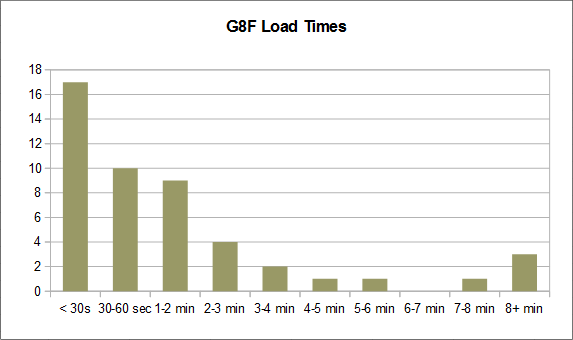
Here's the current data based on people's answers as of March 12, 2021:
If you could, launch DS fresh (whatever version you're running) and time how long it takes to load G8F.
I know there are a lot of variables involved like your hardware, size of your library, version of DS, etc. It would be interesting/useful to look into how all those factors effect load times, but for now, let's keep it simple and just see what kind of load times for G8F people are dealing with.
I have a fairly large library (though I know there are others with much larger) and have invested heavily in G8F. For this test, I'm running 4.14.08 on a 4.5 year-old box:
G8F Load Time: 1 min 31 secs.
Thanks in advance to anyone willing to take a few minutes and share their own experience.
- Greg

Daz 3D is part of 
Connect
DAZ Productions, Inc.
7533 S Center View Ct #4664
West Jordan, UT 84084
Licensing Agreement | Terms of Service | Privacy Policy | EULA
© 2026 Daz Productions Inc. All Rights Reserved.
Comments
2 minutes, 55 seconds.
I have observed that G8 takes longer depending on the number of characters you have installed. Presumably that time is take to load in all the morphs.
That being said, according to Smart Content I have 685 G8F characters currently installed.
Windows 10 Pro, i9 9900k CPU @3.6 Ghz, 32G RAM.
in carrara about half a minute. but i dont have much in morphs for g8.
genesis1 takes a lot longer
1 minute and 26 secs, then again I have over 300 GF8 characters, over 4 runtimes and quite a few morph packs. System is a 6700K with 16 gb DDR, no SSDs, Win 10 pro and a 2080ti. I am also still running DS version 4.12.0.86
1 minute 15 seconds for the G8F base female (i timed it with a stopwatch from double-click on the figure to load complete - the log file claimed it took only 1 min 10.9 sec).
I have 185 characters installed and several morphs sets, including a lot of morphs converted over from G3F and some from G2F.
I'm on Windows 7 Pro, i7-3770 3.40 GHz CPU, 32 GB RAM (8-year-old PC)
ETA: DS version 4.15.0.2 Beta
After the great reinstall of 2021, and fixing all my log errors, it took 53 seconds from clicking the icon to seeing g8f in viewport. Log file says 2021-03-05 12:15:47.697 File loaded in 0 min 47.3 sec.
I have somewhere around 200 character morph sets installed I think. Hard to be accurate as I didn't install the user facing files for a bunch, just the data folder to get the shapes. I left out all the stuff I never really used like centaurs and other furry type character sets. I will install those in a temp runtime if I ever actually want to use them some day. I have 30 expression sets installed, and removed all the other expressions that came with pose sets and only a few random expressions to clean up my expression dial section lol.
Operating System
Windows 10 Enterprise LTSC 64-bit Custom
CPU
AMD Ryzen 5 2600X 33 °C
RAM
48.0GB Dual-Channel Unknown @ 1064MHz (15-15-15-36)
Motherboard
Gigabyte Technology Co. Ltd. B450 AORUS PRO WIFI-CF (AM4) 29 °C
Graphics
4095MB NVIDIA GeForce GTX 1070 (MSI) 57 °C
4095MB NVIDIA GeForce RTX 2080 SUPER (MSI) 34 °C
SLI Disabled
Storage
3726GB Seagate ST4000DM004-2CV104 (SATA ) 28 °C
7452GB Seagate ST8000DM004-2CX188 (SATA ) 28 °C
2794GB Seagate ST3000DM008-2DM166 (SATA ) 26 °C
3726GB Seagate ST4000DM004-2CV104 (SATA ) 27 °C
232GB Samsung SSD 960 EVO 250GB (Unknown (SSD))
12 seconds
About 35 seconds...I do need to go through and uninstall characters that I know I'll never use.
About 2min15, but I have my library on a Synology NAS, so network connection speed is one of the limiting factors, plus the numebr of characters.
About 30-40 seconds
LOL! I had do just that I had quite a haram going. I'm down to just the characters I use a lot. I had to do the same thing with a lot of stuff like interiors, cars and clothing.
7 minutes and 38 seconds. I usually go make coffee or something to eat...
17 seconds. I have 46 characters, all standard daz3d ones through DAZconnect. Still running on DS4.10.
I did a bit of research into this as I wanted to try and speed up load times.
I think the bottleneck is because loading a figure or any content appears to be a single threaded cpu operation. At least it seems that way for me.
You could probably check this by checking your resource monitor during a load, but what I see is one of my 16 threads at 100% until the loading is complete.
When it comes to loading figures, the more morphs it loads, the more the single thread has to do to find them all etc. So one option is to remove all the characters installed that you don't need, and simply add them back when you do need them. You could even move them to another runtime and add / remove that to Daz Studio library as needed (but bare in mind if they are not loaded in, you won't have access to the dials of those characters etc). Also bare in mind, removing G3 figures won't speed up the loading time of G8.
On the hardware front, having the most expensive threadripper for example may actually be counter-intuative and if your only interest is faster load times, single threaded performance seems to be key.
This is just from what I have seen based on a few tests, so please take that info with a pinch of salt. It may well only apply to me and my wifes PC setup. At some point I plan to upgrade our CPU's to the new Ryzens which will have a good comination of single-thread performance and good overall performance.
Hope that helps :)
I have my library installed on a 5TB USB3 drive which makes it easy to run DIM and download on another machine. I could shuffle some things around to make some space on an internal drive for my library and see exactly if/how that effects G8F load times. It'll be a lot of shuffling, though!
- Greg
Not worth the effort, your USB drive is fast enough not to be the limiting factor.
Wow . . . that would be enough to drive me to drink - hope you put a little Bailey's in there ;)
There was a time a while back (when I had less content) that G8F was taking 8+ minutes to load for me. Drove me crazy and I stopped using DS altogether because of it. Turned out to be one morph package that was the culprit. Never did find out exactly what the issue was, but un-installing it did the trick and got my load times back down to around 30 seconds.
- Greg
21 seconds in DS 4.15
I never use G8, but I tried merging a base G8F into an existing scene and it was almost instantaneous. Like 2 seconds or something.
It's loading off an SSD, so maybe that's why? But how can it take many minutes for some?
For G8M 8.1 it took 8 seconds rather than the 21 seconds for G8F 8.1, so I guess it depends on how many character morphs need to be loaded.
7.2 seconds, but then I only have 13 female characters. G8M on the other hand takes 24.9 seconds, and i only have 112 male characters installed. and this is in 4.11.
1 minute and 55 seconds.
Daz Studio 4.15
It depends on how many G8F characters you have installed and how many G8F morphs you have...so if you don't have anything beyond the base G8F, it would be very fast to load.
Thanks to everybody who has taken the time to test how long it takes to load G8F and post your times - please keep 'em coming!
While we wait for more people to (hopefully) chime in, here's a quick graph of the results so far:
I'll stick a copy in the first post and try to keep it updated.
- Greg
25 seconds to load G8F Basic Female
So I found a Monique/Alondra 8 whatever that is, I assume it's a G8? And I applied a bunch of morphs after selecting the character in the scene and filter by content so it shows only (?) the G8 morphs, and applied a bunch, then saved as an Actor, and reloaded, it again it was a couple seconds.
I must be doing something wrong.
But I assume the moral of the story is use an SSD to load your content cuz it's faster, right?
6.1 seconds, but I only have around 60 characters and a couple of morphs packages (200plus, shapeshift, aging details, the base morphs).
For me just a couple of seconds as I don't have much, but I do have one log file from someone else where it took 69 min 43.6 sec to load G8F, with a little help from me he got it down to about 30 minutes.
How do you get anything done with 30 minute load times?
We're not talking about how many morphs are applied to a figure that gets saved as an actor, but rather how many characters are installed. And we're not talking about one, but rather hundreds of characters - each with many morphs.
I'm also not sure that the load times increase linearly. For example, assuming somewhat similar hardware, it's hard to believe that Wonderland (458s) has 5x as many characters installed as I do (91s). I'm also not sure how much of the time is spent reading/writing to disk. These are 2 things I'd like to run experiments to determine.
- Greg