• Daz 3D
  • Shop
  • 3D Software
    • Daz Studio Premier
    • Daz Studio
    • Install Manager
    • Partnerships
    • AI Training data
    • Exporters
    • Daz to Roblox
    • Daz to Maya
    • Daz to Blender
    • Daz to Unreal
    • Daz to Unity
    • Daz to 3ds Max
    • Daz to Cinema 4D
  • 3D Models
    • Genesis 9
    • Genesis 8.1
    • Free 3D Models
  • Community
    • Gallery
    • Forums
    • Blog
    • Press
    • Help
  • Memberships
    • Daz Premier
    • Daz Plus
    • Daz Base
    • Compare
  • Download Studio
ADVANCED SEARCH
  • Menu
  • Daz 3D
ADVANCED SEARCH
Add image
  • Shop
  • 3d Software
    • Daz Studio Premier
    • Daz Studio
    • Install Manager
    • Partnerships
    • AI Training data
    • Exporters
    • Daz to Roblox
    • Daz to Maya
    • Daz to Blender
    • Daz to Unreal
    • Daz to Unity
    • Daz to 3ds Max
    • Daz to Cinema 4D
  • 3D Models
    • Genesis 9
    • Genesis 8.1
    • Free 3D Models
  • Community
    • Our Community
    • Gallery
    • Forums
    • Blog
    • Press
    • Help
  • Memberships
    • Daz Premier
    • Daz Plus
    • Daz Base
    • Compare

Notifications

You currently have no notifications.

Loading...
    • Categories
    • Recent Discussions
Daz 3D Forums > 3rd Party Software > Blender Discussion

Animation deformation with DAZ to Blender bridge

olilambertolilambert Posts: 3
February 2021 in Blender Discussion

Hello,

I am testing the export from DAZ to Blender and I can't have it right in blender. Look at the attached picture, there is obviously something going wrong  (visible aclearly with the legs).

I am using DAZ 4.15 and Blender 2.91.2 with "DAZ to blender" bridge.

Here are the basic steps used to reproduce:

  • Insert Genesis 8 basic female
  • Choose "Crouh and jump g8f" animation
  • Bake animation to studio keyframe
  • Use "DAZ to blender" to get everything in blender
  • The screnshots are showing frame 15 of the animation (same viewpoint)

I really appreciate both blender and DAZ. I hope someone has the explanation to the phenomenon and know how to avoid it.

Best regards,

Olivier
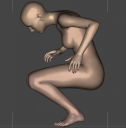


DAZ.png
903 x 917 - 553K
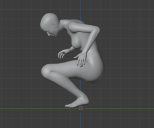
Blender.png
830 x 688 - 151K

Comments

  • TheMysteryIsThePointTheMysteryIsThePoint Posts: 3,217
    February 2021 edited February 2021

    You have to load the JCMs. I forget how; but I think it's under the Corrections tab.

    Post edited by TheMysteryIsThePoint on February 2021
  • olilambertolilambert Posts: 3
    February 2021

    Thanks for the information. I have searched but did not found how to load the JCMs... I did not find any "Corrections tab" either.

    I have searched this forum about JCMs but could not find anything related to the DAZ to blender bridge: perhaps it is related to another plugin? 

    Any help would be appreciated.

  • olilambertolilambert Posts: 3
    February 2021

    Ok, I found the solution. 

    I had to include the morphs while using the bridge.

    I needed to select Genesis in the list and click Accept (see attached file). After that, the animation was going Ok without any deformation.

    Thanks again to TheMysteryisThePoint for the hint (from, JCMs, I made the link to standard morphs and finally got the solution).

    Untitled.png
    302 x 554 - 15K
Sign In or Register to comment.
Adding to Cart…

Daz 3D is part of Tafi

Connect

DAZ Productions, Inc.
7533 S Center View Ct #4664
West Jordan, UT 84084

HELP

Contact Us

Tutorials

Help Center

Sell Your 3D Content

Affiliate Program

Documentation Center

Open Source

Consent Preferences

JOIN DAZ

Memberships

Blog

About Us

Press

Careers

Bridges

Community

In the Studio

Gallery

Forum

DAZ STORE

Shop

Freebies

Published Artists

Licensing Agreement | Terms of Service | Privacy Policy | EULA

© 2025 Daz Productions Inc. All Rights Reserved.
