Marigold hair glitch.
 Malandar
Posts: 777
Malandar
Posts: 777
in The Commons
I am using Marigold hair on this character and I have no idea what is going on with the lines over her left eyebrow, no clue what it is, I look at the scene before rendering and it's not there... Anyone ever come across something like this? And hide Marigold hair and the problem is gone, so it is something with Marigold hair. Anyone else ever have this happen to them?
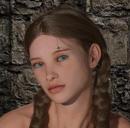
Girl.jpg
383 x 377 - 156K

Daz 3D is part of 
Connect
DAZ Productions, Inc.
7533 S Center View Ct #4664
West Jordan, UT 84084
Licensing Agreement | Terms of Service | Privacy Policy | EULA
© 2026 Daz Productions Inc. All Rights Reserved.
Comments
This is a fairly common issue:
https://www.daz3d.com/forums/discussion/199696/black-lines-on-hair-skull-cap-solved
https://www.daz3d.com/forums/discussion/comment/5082136/
https://www.daz3d.com/forums/discussion/368191/black-lines-spot-on-forehead-issue
https://www.daz3d.com/forums/discussion/238696/hairstyle-is-being-uncooperative-showing-in-the-forehead
https://www.daz3d.com/forums/discussion/279566/hair-causing-artefacts-on-forehead
https://www.daz3d.com/forums/discussion/257261/lines-on-the-temples-and-now-cheek
https://www.daz3d.com/forums/discussion/282401/weird-clipping-on-forehead
https://www.daz3d.com/forums/discussion/399861/squiggly-dark-lines-on-forehead-g8f
Apparently this is caused by the skull cap/hair cap intersecting the mesh of the character. There seem to be several "fixes" for this, but essentially you'll want to get the skull cap pulled away from the head enough so that it's not colliding with the character's mesh.
You can usually do that by making the cap visible and using the included morphs to enlarge the cap. After the cap is enlarged enough to not be intersecting the character's mesh, you can make it invisible again and it should then render without the black lines.
So that's what it is, Is this something new? I don't remember ever seeing this problem before, and I know I have used Marigold hair in the past and didn't have this issue.
I have noticed that it seems to be an issue that affects 4.11 and 4.12. Because I noticed that rendering the Rose Hair in 4.10 there is no line but rendering the same hair in 4.11 the line is there. And seems to mostly affect OOT hairs for some reason.
Adjust-ForeheadDepth
This is the adjustment morph you need to use. I own this hair and it's one of my favorites.
Yeah, I found that 14% is the number I needed to fix the issue.