Lines on the temples and now cheek...
 Griffin Avid
Posts: 3,890
Griffin Avid
Posts: 3,890
I asked before, but I can't find that post.
Every so often I get little lines and marks around the temples and forehead of the characters.
Now I've got them showing up in the cheeks.
What does it look like?
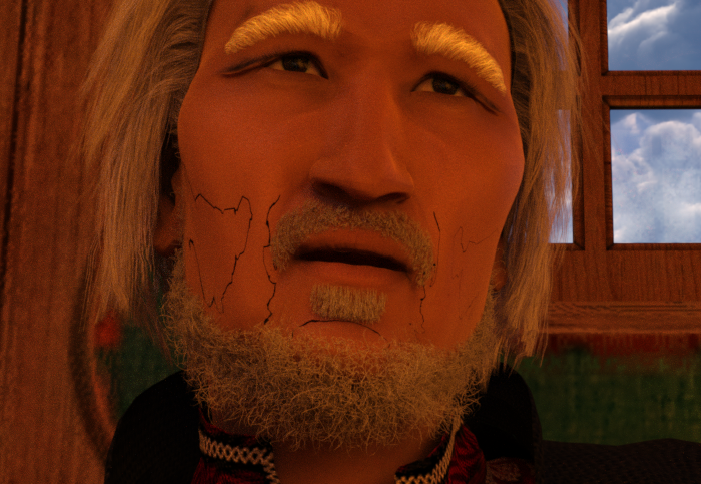
Someone took a ballpoint pen and drew little squiggles on the face of the figures.
Anyone know what causes this and how to get rid of it?
Only shows up during renders.
Capture_Cheeky.PNG
701 x 484 - 821K
Capture_Cheeky.PNG
701 x 484 - 821K
Post edited by Griffin Avid on

Daz 3D is part of 
Connect
DAZ Productions, Inc.
7533 S Center View Ct #4664
West Jordan, UT 84084
Licensing Agreement | Terms of Service | Privacy Policy | EULA
© 2026 Daz Productions Inc. All Rights Reserved.
Comments
It looks like the edge of the skullcap section of the hair (or beardy equivalent). Are you rendering in Iray or 3delight?
Iray, sir.
Which beard set is it? Does it come with Iray materials?
That was Killmonger beard set. I also have a ticket submitted for that product since many of the shaders do not change the color of the beard.
But this has happened before- with different sets of hair. Always iray materials/shaders.
It may be too general, but this thread is probably a good place to start https://www.daz3d.com/forums/viewthread/53879/P60/
This has happened to me twice. After making sure my niece didn't write on my monitor I discovered if I increased the figures scale (V8) by 1% it went away. Hope it works for you.
Jim