Cape with fur
 dannagiusy64
Posts: 477
dannagiusy64
Posts: 477
in The Commons
I purchased the bundle of this product.
https://www.daz3d.com/dforce-classic-fur-cape-and-textures-bundle
I can't put the fur in the cape. I clicked in each material, the color changes but the fur does not come out. Here's how you see it. can anyone help me understand how it works? I add that there is a pdf with tutorial, but it only explains how to perform the dforce. Thanks
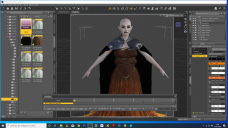
Screenshot 2020-01-31 23.39.05.png
1920 x 1080 - 728K

Daz 3D is part of 
Connect
DAZ Productions, Inc.
7533 S Center View Ct #4664
West Jordan, UT 84084
Licensing Agreement | Terms of Service | Privacy Policy | EULA
© 2026 Daz Productions Inc. All Rights Reserved.
Comments
Strand-based hair will only show in the render.
Okay, thanks, let's try it now
If you change the Viewport Line Tessellation Sides to 2 or more in the parameters tab, it usually shows in the iray preview mode.
Or set Parameter > General > Simulation > Hair > Pre Render (PR) to "On" for the fur.
Fantastic, thanks. They are seen only during rendering
it is visible only during rendering. They are not seen with the iray preview