Coming Soon™ Collective3d Neighborhood! [COMMERCIAL]
 Collective3d
Posts: 446
Collective3d
Posts: 446
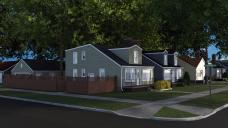
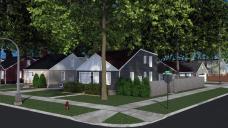
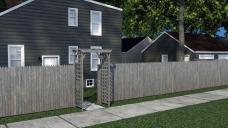
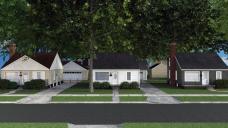
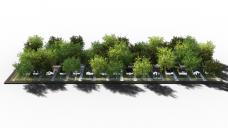
This project has been in the works, going through various design phases, since I started publishing with Daz in 2013. This spring I finally decided to just get down to it and get the thing built. The Collective3d Neighborhood is a fully realized residential city block featuring 30 houses, 30 garages, all lawns, driveways, and sidewalks, 45 trees, more than 100 shrubs, utility poles with lines dropping down to each house, street signs, street lights, and a fire hydrant. Every lot is surrounded by a chain link fence with working gate, and the end houses have board fences, one with a gate and another with an open arch. Each house and garage can be loaded in separately to be used on their own.
Collective3d Neighborhood is being released in 3 parts, each representing a third of the block (10 houses and garages apiece) as well as in a bundle that contains the entire thing in one shot. One end of the block features corner lots and a side street; the other ends abruptly, and is where the first expansion will fit, featuring a row of 5 old fashioned farmhouses, turned 90 degrees to the bungalows behind them.
The release date for Collective3d Neighborhood is soon™. Hope everyone enjoys it!

Daz 3D is part of 
Connect
DAZ Productions, Inc.
7533 S Center View Ct #4664
West Jordan, UT 84084
Licensing Agreement | Terms of Service | Privacy Policy | EULA
© 2026 Daz Productions Inc. All Rights Reserved.
Comments
Oh my......... This will be awesome!
very nice ...
omg I definitely need to start saving now. Question. Are any of the houses/yard/garages modular even just in the ability to turn them on and off/hide them. Like for doing the closer scenes and such without taking up the extra memory having the whole 10 houses would take up or having the navigate the camera angles needed to look at a house from the side?
As far as the entire scene goes, from a global aspect, you can load it 1/3 at a time to save memory space, and you can also toggle the individual trees and shrubs off and on to suit whatever you need. The houses themselves can also be turned off individually to make room for cameras. They can also be loaded independently of everything else.
Wow! This looks awesome! Can't wait!
I rather expect to see Wally and the Beaver, or Richie Cunningham, Potsie and Ralph Malph walk into view.
Sincerely,
Bill
I think my uncle's wife's stepsister and her husband lived in that neighborhood.
Hopefully the second expansion will include a cul-de-sac section...... and a curved section maybe? The idea of being able to build an entire subdivision with these is quite enticing.....
can the houses be entered? open the doors/windows? are in the house walls and stairs? sure, there is no furniture, but it would be nice if this product would offer an empty interior architecture
I definitely want to do a cul de sac.
There are no interiors with this set; however, those who own the old Blue Collar Bungalow may be able to fit it into place of one of the houses on this block. They are generally the same size and shape.
Wow...impressive :)
Laurie
Will there be alternative textures? For example, faded paint or fences? It all looks very shiny and new, which would suit some renders, though most homes are less pretty. Then again, someone else could produce add-on textures for a project this big.
Sounds cool and will be utterly too expensive for me to ever buy it...
okay no interiors BUT can the doors open? or the windows?
Sigh. I'm afraid that really lowers the "must buy" factor for me. I have a lot of full neighborhoods in my runtimes, but if the doors and garages can't be opened and at least rudimentary sets put inside, I find I rarely use them except as far background items. You might want to consider building one or two articulated house shells that fit into the neighborhood as an add-on down the line.
The foundations, siding, and fences are actually quite grungy. The siding can be recolored using the diffuse channel color.
The doors and windows are not rigged to be opened, but an intrepid kitbasher could easily select the geometry, hide it, and then insert an appropriate door or window from Create a Room XPack 3. It has been designed to work with that set in that way. You could also use Create a Room XPack 3 to built a more or less full interior, although the exterior walls are black on the inside. A little creativity would be necessary.
...I was just going to ask about that. Thanks . Are the streetlights also modular if you want to use a different style light pole?
The streetlights are separate objects that can be replaced with your own as well. The ones that come with the scene have a light parented to them as well.
...nice I have an old "harp" styled street lamp like we had in Milwaukee where I grew up that would fit perfectly with the look of the houses.
Similar questions to some that have been asked...
Spent lot of time landscaping/window dressing “Modern House” & making ground, plant instances, etc for “Farm House.” Saved as subsets, they are very convenient.
1.) Could entire "Modern House" subset (house, garage, fence, etc) be used in “Neighborhood” product, or I’d run into problems with street, driveway & so on?
2.) Correct in understanding, if I have ‘Build a Room’ packs, just make the doors, etc., on ‘shell’ buildings disappear and replace them if want open occasional garage, window dressing, etc?
thanks
--Bruce
PS: another vote for a Cul de sac!
Well that'll work too ,thank you
Wow! All I can say is WOW!
Wonderful stuff
The neighborhood style is a little older than I'd prefer (i.e. the typical 60's - 70's suburban sprawl) but it's good enough to become a must-buy for me. I'd love to see a T-intersection to help handle those long views down a street that have to end somehow. A cul-de-sac is not nearly as common my city as a T-intersection.
Building on what Dragonfly_2004 mentioned, the shots you've included above are a little too clean. Adding some patches of leaves or weeds would help break up those perfect lawns. Similarly, if the street pavement had some cracks and patches it would up the realism a lot. Same for a bit of dirt along the edges of the sidewalks, especially at intersections where people naturally take shortcuts and wear out the grass.
Looking forward to seeing this, I use your Create-A-Room XPack 3 all the time!
Edit: Any chance of making the black interior side of the shell walls a separate material zone? Then the user could change them to something that more closely matches whatever interior walls they add. Just a thought.
That's great thanks so much, and for the quick answer as well. This is definitely worth saving for. If I can't get it straight away I will as soon as I have the money. I have so many ideas for this.
Yep, you can definitely just plug those right in!
You may be able to fake something with the Modern Home series -- they are designed to be seamlessly integrated with each other -- but the integration with the overall Neighborhood won't be seamless. For the first expansion I am planning a row of 5 houses in the Modern Home style that will fit into this scene seamlessly. In fact, my original intent was just to discontinue the existing Modern Homes, and re-make them with fresh geometry and textures and Iray materials just for the expansion, but Daz talked me out of that (conflicts with people who own the originals, etc). So it will be 5 new houses in the arts and crafts style.
If you want to make the doors in these houses open, what you'll do is use the geometry editor tool in Daz Studio to select one face on the door, expand the selection until the whole thing is selected, and then select "hide selected geometry". Do the same thing with the door frame. Then just load in your favorite door and frame from Create a Room and slide it into place. Everything should be almost exactly the right size to fit (in fact, the doors I used on these houses are the Create a Room XPack 3 doors, with geometry stripped out on the inside to lessen the polygon load). You could do the same thing with the lower sashes of the windows.
Actually, the neighborhood this is based on was built in the 1940s in Detroit, right after the kit house craze came to an end.
At this point, there's zero chance of making any changes to the set itself -- it's been through QA and been packaged up and has a scheduled release date. But it is possible I could make a decal set for things like cracks. I'd probably do something like that as a freebie.
The way the houses are built, the "shell" of the exterior walls is six inches thick and the entire thing is textured with one material zone, "Base," which is black by default. If you were to use Create a Room to build an interior, I would suggest remaking the house entirely with that, and using Neighborhood for exterior shots, and Create a Room for interior shots. However, if you wanted, for example, to have a shot into a house through an open door, you could always build a partial interior with Create a Room, and then change the color of "Base" to white (or whatever your wall color is). The "Base" material is only visible as the plane blocking the inside of the foundation windows. Otherwise, anything that has "Base" applied to it cannot be seen from outside the house.
Thanks to everyone for the kind feedback!
Want it!
I don't know about the rest of you guys, but I use A Touch of Dirt on EVERYTHING....lol. It really helps a lot, though the extra geoshell meshes might be too much for some computers. ;)
Laurie
Yup, it looks very similar to the post-war houses built in my area to meet the needs of all the returning servicemen. As mentioned, not quite the ideal style (time period) for the type of suburban renders I was thinking about, but better than anything else I've seen in the store. Glad to hear it's already in the queue for release, really looking forward to it!
Thanks for the touch of dirt suggestion Laurie, I'll have to look into that.
Here's a standalone render of a house and its matching garage. Hopefully shows off a bit more of the dirt and grunge that's present on the shingles, siding, and concrete.