

Stonemason, Please Stop.

13

Comments

  • HorusRaHorusRa Posts: 1,664
    edited March 2019

    .

    Post edited by HorusRa on
  • SzarkSzark Posts: 10,634

    yep kit bash https://www.daz3d.com/gallery/#images/6139/ Urban F 3 and 4, Urban Sprawl 2, Greeble Blocks 2. Maybe one day I might finsh it. 

  • HorusRaHorusRa Posts: 1,664
    edited March 2019

    .

    Post edited by HorusRa on
  • HorusRaHorusRa Posts: 1,664
    edited March 2019

    .

    Post edited by HorusRa on
  • SzarkSzark Posts: 10,634

    thanks yeah it some years old. I was thinking of redoing it all in Iray and then completing it. I converted the scene as soon as the DUF format came out to make it easy to redo all my content handling. 

  • HorusRaHorusRa Posts: 1,664
    edited March 2019

    .

    Post edited by HorusRa on
  • SzarkSzark Posts: 10,634
    edited March 2017

    I think I made an Iray Emissive Shader preset to deal with the windows on this image http://itiseyemeeszark.deviantart.com/art/Utopia-Labs-Add-653121261

    Post edited by Szark on
  • HorusRaHorusRa Posts: 1,664
    edited March 2019

    .

    Post edited by HorusRa on
  • HorusRa said:
    Szark said:

    I think I made an Iray Emissive Shader preset to deal with the windows on this image http://itiseyemeeszark.deviantart.com/art/Utopia-Labs-Add-653121261 ;

    404 on that url.

    Works better without the semicolon at the end :)

    http://itiseyemeeszark.deviantart.com/art/Utopia-Labs-Add-653121261

  • HorusRaHorusRa Posts: 1,664
    edited March 2019

    .

    Post edited by HorusRa on
  • SzarkSzark Posts: 10,634

    Windows yes but if you want a glass like look then a GeoShell might the thrick and make the windows glass. I haven't tried it myself but it should work. I will take longer to render through glass but it should help with getting a 

  • HorusRaHorusRa Posts: 1,664
    edited March 2019

    .

    Post edited by HorusRa on
  • MelanieLMelanieL Posts: 7,712
    HorusRa said:
    Szark said:

    Windows yes but if you want a glass like look then a GeoShell might the thrick and make the windows glass. I haven't tried it myself but it should work. I will take longer to render through glass but it should help with getting a

    heh, was trying to make a purchase and the 'Add To Cart' button would not do anything, click but it added nothing to the cart and didnt go to the next ck out page either, had to switch to Firefox instead. Weird.
    ​I have never made a geoshell, but I would think it would.

    I'm getting this too on Internet Explorer - I found out by accident that if the url starts http then the button isn't working for me, but if I change it to https then it does - I'm not sure why but that is a workaround I think.

  • barbultbarbult Posts: 26,160
    edited March 2017

    Are there any cameras or environment settings for Urban Future 5?

    Edit: I mean render settings. The environment itself didn't seem to load any of either one.

    Post edited by barbult on
  • KnittingmommyKnittingmommy Posts: 8,191
    edited March 2017

    No, I don't think there are any cameras.  None loaded with it.  My install just has the two preloads one for Iray and one for 3Delight.  I like adding my cameras as I go, though, so I don't usually use the cameras that come with a set unless it has atmospheric effects.  I haven't even found the 2 fog props that Stonemason mentioned in another thread.  I would love to know where I find those because I'm not seeing them.

    Post edited by Knittingmommy on
  • barbultbarbult Posts: 26,160

    @Knittingmommy, do you have a link to the other thread?

  • AineAine Posts: 34

    Don't know about a 'fog' prop, but did find two 'steam' props in the loading

  • kaotkblisskaotkbliss Posts: 2,914

    One of the Steam props load near the short dead-end road near the middle of the scene

  • dreamfarmerdreamfarmer Posts: 2,128

    I was very impressed by wallpaper detailing.

    Urban Future Wallpaper.png
    600 x 600 - 496K
  • timetwisttimetwist Posts: 52
    edited March 2017

    Urban Future 5 seems to only have one Iray and one 3Delight icon which are used to load the entire scene.  I found no methods for loading individual props other than opening up the everything and then grabbing what you need.  With that said, there are a ton of urban props here (signs, trash cans, fire escape, scattered trash, street lights, graffiti, pylons, vents, cables, etc.) which you could easily use for kit-bashing.

    There are no included cameras, standard lights, or render settings.  There are however a massive amount of emissive meshes.  The render settings mentioned here and here by ile-avalon work very well to make use of the lighting that is baked into the surfaces.

    Overall, if you use the environment settings from this thread, you won't be disappointed with the purchase.

    Post edited by timetwist on
  • Rashad CarterRashad Carter Posts: 1,830
    edited March 2017
    Lindsey said:
    Thank you ile-avalon, for posting your Iray render setting suggestions.  I had no idea a scene can be manipulated so much with just adjustments to the default render settings. I had no clue that lighting details such as the building windows were present.
    Lindsey said:
    For those wondering, the HDR is from Dreamlight's Streets by Asia II by Night with the Dome Rotation Y set to 30. Rather then risk changes to the render settings by applying it's Render-Setting preset,  the HDR was applied manually to the Environment Map.

    You're welcome :)

    If you go on wikipedia, you can found a table with the Exposure Values for various lightning conditions:
    https://en.wikipedia.org/wiki/Exposure_value

    As you can see on the wiki, an Exposure Value of 13 is for a daylight scene (cloudy bright with no shadows), with this settings many emissive can be lost or poor. If you want use correctly an emissive, you must reduce the Exposure Value
    As soon you test a product, if the scene is dark, if the emissives seem not works, reduce the Exposure. ;-)

    For an daylight outdoor scene without emissive, I use the default setting (Ev13)
    For an daylight outdoor scene with shadows and/or emissive, I reduce the Ev (8 to 10)
    For an night outdoor scene, my Ev is between 7 and 10
    For an indoor scene with an open side where environment map can entrace, my Ev is between 6 and 8
    For a closed scene without environment map, my Ev is between 4 and 7.

    It's the base, after you can play with the ISO and the White Point...

    For the Environment Map Intensity, the rule is simple, for each Ev point that you have reduce, you divide the Environment Map Intensity by 2.
    Example, if you set your Ev at 12, you force your Environment Map Intensity at 0.5 ; for an Ev at 11, your intensity is at 0.250 ; ...

    Of course, all this is if the product use realistic values for the lights. Currently, we can found many product where the lights have been volontary amplificated for working with the default value. Personnaly I think it's a mistake to amplify the light, but it's more simple for the user who don't know how works the Tone Mapping Settings... :-)

    Several examples :

    Stonemason's Container Zone, first rend with default value, second rend with an Ev at 8.

    Stonemason's Venezia Suite, I have add characters for see the influence of lights on them.
    First rend with default value and defaut Environment Map, the interior is to dark and emissive seem not working.
    Second rend, a daylight version with an Ev at 7 and Environment Map intensity at 0.016. The scene is dark, but with more time it can be corrected with a better ISO and an White Point adjustement.
    Last rend, a night version, for this one I have doing several correction, the background emissive color have been adjusted with a dark blue color for create a night background, and the default environment map have been replace by a night environment map. Ev at 6 and Environment Map intensity at 0.008.

    Sorry for my english :)

    Very interesting and useful information. So the Exposure controls in Iray seem to operate to the way they work in some other engines. Lower Expsores seem to produce brighter images, and higher exposure settings mean that less light is being collected. The inverse manner of this control would have driven me crazy without your explanation. Thanks!!

    Post edited by Chohole on
  • SzarkSzark Posts: 10,634

    I only use Exposure Settings now, unless I am matching a photo then I use real world camera settings like ISO, shutter speed etc.

  • KnittingmommyKnittingmommy Posts: 8,191
    Aine said:

    Don't know about a 'fog' prop, but did find two 'steam' props in the loading

    Ah, it probably was steam.  I just haven't found them yet.


    One of the Steam props load near the short dead-end road near the middle of the scene

    I'll look over there.  Thanks!  I haven't explored the whole set yet.  It's big.


  • KnittingmommyKnittingmommy Posts: 8,191
    timetwist said:

    Urban Future 5 seems to only have one Iray and one 3Delight icon which are used to load the entire scene.  I found no methods for loading individual props other than opening up the everything and then grabbing what you need.  With that said, there are a ton of urban props here (signs, trash cans, fire escape, scattered trash, street lights, graffiti, pylons, vents, cables, etc.) which you could easily use for kit-bashing.

    I actually don't mind that.  It's easy enough to save out a single prop as a prop asset myself.  Just select it and tell DS what to do with it.

    timetwist said:

    There are no included cameras, standard lights, or render settings.  There are however a massive amount of emissive meshes.  The render settings mentioned here and here by ile-avalon work very well to make use of the lighting that is baked into the surfaces.

    Overall, if you use the environment settings from this thread, you won't be disappointed with the purchase.

    Nope, I'm certainly not disappointed at all!  Been waiting for this forever seems like and I'm very happy with it!  :)

  • SpottedKittySpottedKitty Posts: 7,232
    MelanieL said:
    I'm getting this too on Internet Explorer - I found out by accident that if the url starts http then the button isn't working for me, but if I change it to https then it does - I'm not sure why but that is a workaround I think.

    The whole store is being converted to https for better security and better compliance with modern standards. Looks like there's a few glitches while that's being worked on. FWIW I've had no problems in Firefox.

  • KnittingmommyKnittingmommy Posts: 8,191
    Aine said:

    Don't know about a 'fog' prop, but did find two 'steam' props in the loading

    Ah, it probably was steam.  I just haven't found them yet.


    One of the Steam props load near the short dead-end road near the middle of the scene

    I'll look over there.  Thanks!  I haven't explored the whole set yet.  It's big.


    Ah, the second steam prop!  It's in the little alley near where the big billboard is with the girl's face.  Not sure if there are only two or if there is a third one as the steam found is steamprop2 and steamprop3.  Not sure if there is a steamprop1 or not.

  • Ye gods, Stonemason; do you ever sleep? Or are you part cat or something?


    Not that I'm complaining, mind you; though my wishlist seems to be growing as fast I shrink it when it comes to your stuff.

  • JazzyBearJazzyBear Posts: 805

    Thanks for the Scene and thanks for the Exposure settings. This scene maxes out my PC! (Larger Attached)


    Urban-Future-Night-Scene-1.png
    1200 x 675 - 2M
  • barbultbarbult Posts: 26,160
    edited March 2017

    Thank you all for the tips. They helped a lot. Here I added a couple Urban Sprawl 2 and 3 elements.
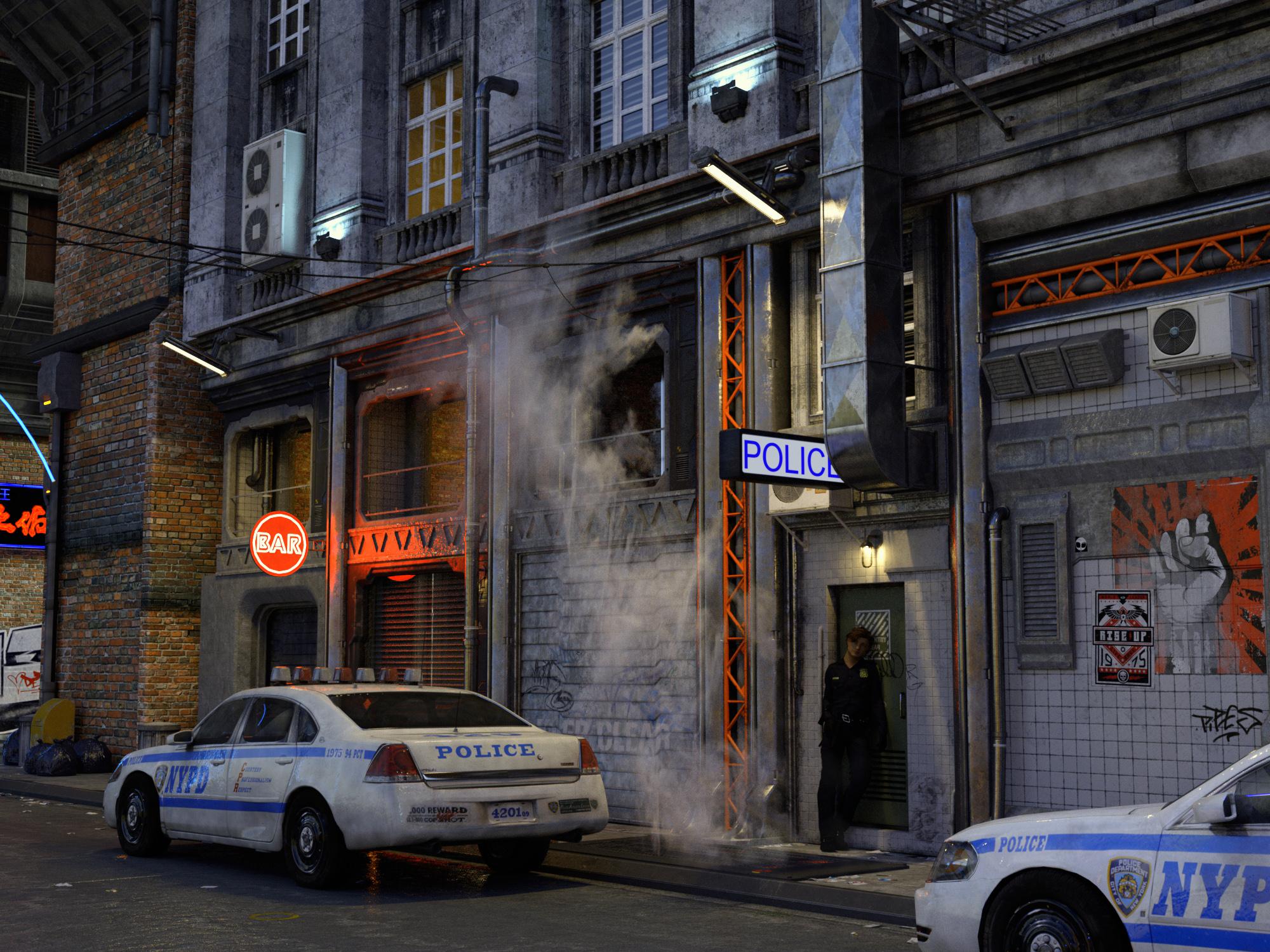
    Urban Future 5 Police_008 PS.jpg
    2000 x 1500 - 2M
    Post edited by barbult on
  • algovincianalgovincian Posts: 2,664
    barbult said:

    Thank you all for the tips. They helped a lot. Here I added a couple Urban Sprawl 2 and 3 elements.

    This looks amazing, Barbult! 

    - Greg

Sign In or Register to comment.