-
SOLUTIONS for Installation of DAZ Studio 4.20 Pro to Blender 3.1.0
The installation of Daz to Blender seems a nightmare to a lot of people. Personally, I reinstalled it several times, using DIM and Daz Central, and I was unable to find a dtb folder or Daz to Blender.dsa file on my drive...
[Released] Turbo Loader for Genesis 8 and 8.1 [Commercial]RiverSoftArt said:
johnjohn808 said:
I purchased 7 days ago so I assume that I have v1.1, but everything shows up as unknown.
So I logged in through Daz Studio, updated the database, then ran the scan.
Everything still shows up as unknown.
The product still works though.
I have all of my assets on an external hard drive, and everything was installed manually as I dont use DIM or Daz Central.
The version number will show up in the header of the Turbo Loader Manager.
Not using DIM or Daz Central? I don't know if that is keeping DS from recognizing any product, but probably
 . I do not know how to fix that. If DS doesn't know any of the products, the script has to make a guess.
Where is your database located? How did you install DAz Studio and PostgreSQL?
[Released] Turbo Loader for Genesis 8 and 8.1 [Commercial]johnjohn808 said:
I purchased 7 days ago so I assume that I have v1.1, but everything shows up as unknown.
So I logged in through Daz Studio, updated the database, then ran the scan.
Everything still shows up as unknown.
The product still works though.
I have all of my assets on an external hard drive, and everything was installed manually as I dont use DIM or Daz Central.
The version number will show up in the header of the Turbo Loader Manager.
Not using DIM or Daz Central? I don't know if that is keeping DS from recognizing any product, but probably
. I do not know how to fix that. If DS doesn't know any of the products, the script has to make a guess.[Released] Turbo Loader for Genesis 8 and 8.1 [Commercial]I purchased 7 days ago so I assume that I have v1.1, but everything shows up as unknown.
So I logged in through Daz Studio, updated the database, then ran the scan.
Everything still shows up as unknown.
The product still works though.
I have all of my assets on an external hard drive, and everything was installed manually as I dont use DIM or Daz Central.
Deleted My DAZ Connect LibraryIceCrMn said:
Should be here.
You are a STAR, now I can install it the way I like to install content without DIM or Central or Connect.
I will uninstall the default Resources that I installed with DIM a short while ago. :)
Transferring installed models and created scenes to a different computer.The content directories will have all the actual content, and daz Studio stores only relative locations within the content directories so they should work on a new machien even in a new location or with new names.
The database lives in the folder specified in Edit>Preferences (Daz Studio>Preferences for a Mac) - it should be backed up only when Daz Studio, Carrara, and the Daz installers are all closed. Alternativels, categories and so on (but ot groups, such as the New marker) can be backed up to the content directory (the forst Daz Studio content directory) via the Content Library option menu - the lined/hamburger button in tbe top corner, or right-click the tab) > Content DB Maintenance, check export userdata, and metadata from installed products (except those isntalled through Daz Studio) and from same dialogue Import Metadata can then be used to recover the data from the exported files - but you do have to remember to do this, it isn't automated.
Install Manager and daz Central keep a separate list of what they have isntalled, as they do need the absolute location rather than just the relative location within the content directory. This is done via the .dsx files in the Manifests folder - you can transfer that to a new system, but if the names or locations of the content directories do not match they will not be able to uninstall existing files 9which may sometimes be an issue for updates) unless you manually edit the paths in the .dsx files.
My model when imported it become original black male model.danielbui78 said:
kylepham214 said:
I'm stuck at this step after export from daz to cinema4d , after I clicked to imported model from daz it only show original male model in black . I have try it several times to install and uninstall the plug in but it didn't work.
Before that I was worry because my daz studio don't have script to use ( daz to cinema4d bridge ) then I saw your very new post , I follow exactly the video but it still didn't work.
Hope you can help me with this. Thank you
Hi Kyle,
I posted a new bugfix that is not yet on Daz Central yet, so you will have to manually download and install it: https://github.com/daz3d/DazToC4D/releases/tag/2022.1.8
It should fix problems for people with custom Documents folders, as long as you are using Cinem4D R23 and above. (Currently working on adding support for older versions that use Python 2.)
Thank you so much for your help . I think I have try this with manually install ( throuhgt your tutorials on youtube ) but it still have them same problem when import from c4d. Is it possible if you can update full step by step from insallation daz studio to importing model in cinema4d , I have follow the step carefully and I have try multiple ways but it doesn't work .
My model when imported it become original black male model.kylepham214 said:
I'm stuck at this step after export from daz to cinema4d , after I clicked to imported model from daz it only show original male model in black . I have try it several times to install and uninstall the plug in but it didn't work.
Before that I was worry because my daz studio don't have script to use ( daz to cinema4d bridge ) then I saw your very new post , I follow exactly the video but it still didn't work.
Hope you can help me with this. Thank you
Hi Kyle,
I posted a new bugfix that is not yet on Daz Central yet, so you will have to manually download and install it: https://github.com/daz3d/DazToC4D/releases/tag/2022.1.8
It should fix problems for people with custom Documents folders, as long as you are using Cinem4D R23 and above. (Currently working on adding support for older versions that use Python 2.)
[Solved. Probably.] I guess this is a rigging question...?So when you convert a primitive object into a figure, it adds a bone and from there you build a skeleton. I've watched enough YouTube videos to get the basics, but they have nothing to say about what you do when something goes unexpectedly. I can't find anything comprehensive about how to use these tools. Does anyone know what I did wrong to get the bounding box in this screen capture to do whatever it's doing? How do I fix it?
I guess I don't understand a few other things too, like... does the first parent bone have to exert rotational influence on anything, in order for the child bones to do so? Do the child bones have to start where their parent bones end? Can they start at the parent bone's mid-point? Can they be disconnected entirely? Suppose for example I'm building a saddle and I want to rig the stirrups and straps. Nothing else on the saddle needs to move, so do I really need one central bone and a bunch of unused bones reaching down to the top of the stirrup straps?
Genesis 8.1 renders in whiteYou don't ever have to use Daz Central to intall anything. All your products, including the program are available in your product library. You can however only get the most current version of DS, which is v4.20. https://www.daz3d.com/downloader/customer/files#prod_13176 Make sure you install the Default Resources as well, since that contains the new PBR Shader that 8.1 needs.
Daz to Maya Bridge - Meet the Teamdanielbui78 said:
danrita13 said:
Hi @DazSam
Having an issue installing DAZ2Maya Bridge. First thing I did was install via Daz Central, but nothing showed up in my daz studio app (v 4.20.02) so I uninstalled and instead downloaded from the github. I downloaded the dzmayabridge.dll file and placed it in C:\Daz 3D\Applications\64-bit\DAZ 3D\DAZStudio4\plugins and then launched DAZ Studio. Still nothing. What am i doing wrong here?
Thanks much,
Dan Rita
The DazToMaya Bridge has been rewritten and redesigned. I'm working on making video tutorials. Please make sure you follow the installation and usage instructions:
Thanks so much! Got it all figured out now and working.
OFFICIAL DazToUnreal Bridge (SEPTEMBER UPDATE): What's New and How To Use ItThe September Update for the DazToUnreal Bridge is now available on Daz Central and Daz Install Manager. Here is what's new:
- Hotfix for Mac embedded installers not working
- Fixed morph undo issues (distorted faces on export)
- New geograft material support, preliminary support for geograft morphs (exported blendshapes)
- Updated Help Text, Integrated latest Daz Bridge Library and David V. Updates
- Added a setting for combining identical materials automatically.
- Update Genesis8BaseSkeleton.uasset
- Added support for Material Packs
- Added filters for preventing UE5 assets from getting included in the UE4 packages
- Unreal side support for new animation export
- Added basic head and eye controls to Genesis8ControlRig
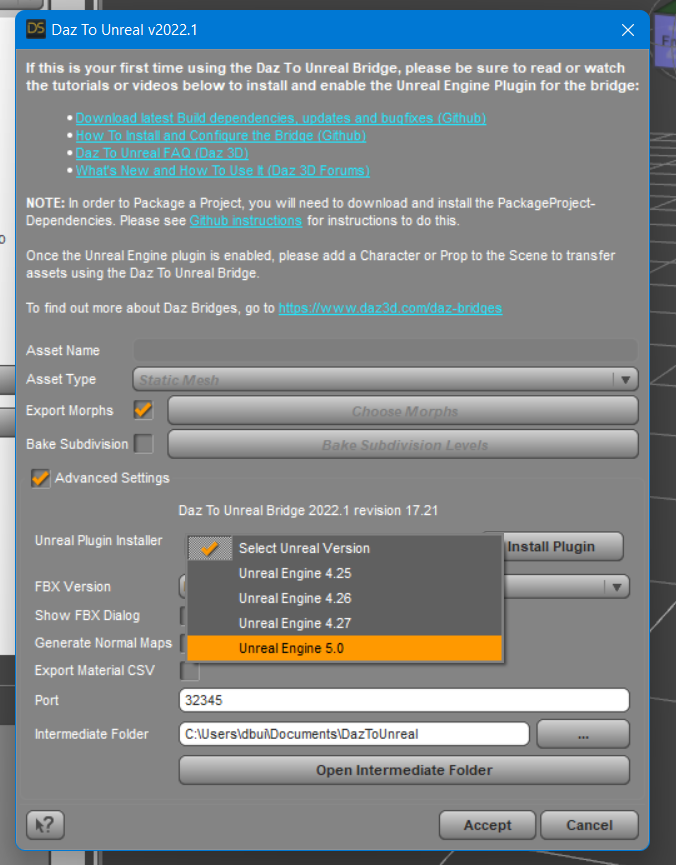
About version differences: The updated version numbers for both the Daz Studio Plugin and the Unreal Engine Plugin from Daz are now both 2022.1. The version number for the updated Daz Studio plugin can be found selecting File->Send To->Daz to Unreal and then opening the Advanced Settings box. The version number for the Unreal Plugin can be found by selecting Edit -> Plugins then selecting DazToUnreal. Both Daz Studio and Unreal Engine plugins have the changes from David Vodhanel's github updates up to July 6, 2022.
The installation steps for the DazToUnreal Bridge have changed. In order to complete the install, please follow the steps below to install the Unreal Plugin for the version of Unreal Engine that you are using.
How to Install the Unreal Plugin
- The Daz Studio plugin now comes embedded with an installer for the Unreal Engine. From the DazToUnreal Bridge Dialog, there is now a section in the Advanced Settings for Installing the Unreal Engine plugin.
- Select your Unreal Engine version from the drop down menu.
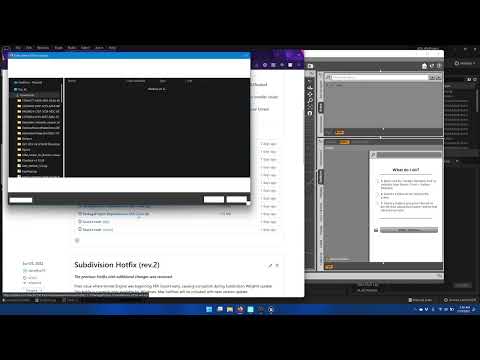
- Then click the "Install Plugin" button. You will see a window popup to choose a folder destination to install the Unreal Engine plugin. You may choose either the folder where you installed Unreal Engine or your Unreal Project folder.
- Click "Select Folder". You will see a confirmation dialog stating if the plugin installation was successful.
Note: You should only install the Unreal Engine plugin in one place (Engine or Project plugins folder). If you wish to change the location where you installed the plugin, just delete the Plugins\DazToUnreal or Engine\Plugins\Marketplace\DazToUnreal folder.
How to Install the Package Project Dependencies
In order to Package a Project, you will need to install the corresponding version of the PackageProject files for your version of Unreal Engine.
- Go to the Release page
- Select one of the PackageProject-Dependencies-UE***.zip files that matches your version of Unreal Engine.
- Download and unzip the contents into a temporary folder. In the temporary folder, there should now be a folder named DazToUnreal.
- Copy this folder to where you installed the Unreal Engine plugin, either Engine\Plugins\Marketplace or <UnrealProject>\Plugins. If you are asked to Merge and/or Replace the existing DazToUnreal folder, click Yes.
- Do not copy it inside the existing DazToUnreal plugins folder. If you accidentally copied the new folder inside the existing folder, just delete the DazToUnreal\DazToUnreal folder and try again.
- When successful, you should now have a folder inside the original DazToUnreal plugins folder named Intermediate, example: <UnrealProject>\Plugins\DazToUnreal\Intermediate\.
You can find out more about DazToUnreal Bridge and Daz Bridges from these resources:
- Download latest updates and bugfixes (Daz3d Github Releases)
- DazToUnreal Bridge Github Main page
- How to Install DazToUnreal Bridge
- How to Use DazToUnreal Bridge
- DazToUnreal FAQ
- Daz Bridges
Help explaining Directory ManagementWill look into Daz Central, if anything comes up i'm gonna look for a solution on these forums probably.
Genesis 8.1 renders in whiteI thought so. Now I must find the time and patience to install a newer version of DAZ without DAZ Central:)
But that´s a problem for another time...
Thanks guys
OFFICIAL DazToCinema4D Bridge 2022 (SEPTEMBER UPDATE): What's New and How To Use ItThe September Update for the DazToCinema4D Bridge is now available on Daz Central and Daz Install Manager. It has some changes to the UI which may take users familiar with the old version time to get used to. Here's what's new:
- Fixed several bone-rotation bugs on import
- Now allows option for no bone-rotation changes
- Updated to latest Daz Bridge Library v2.2
- Fixes morph undo bug (distorted face after exporting)
- Geograft material support
- Preliminary steps for Geograft Morph support (exported blendshapes
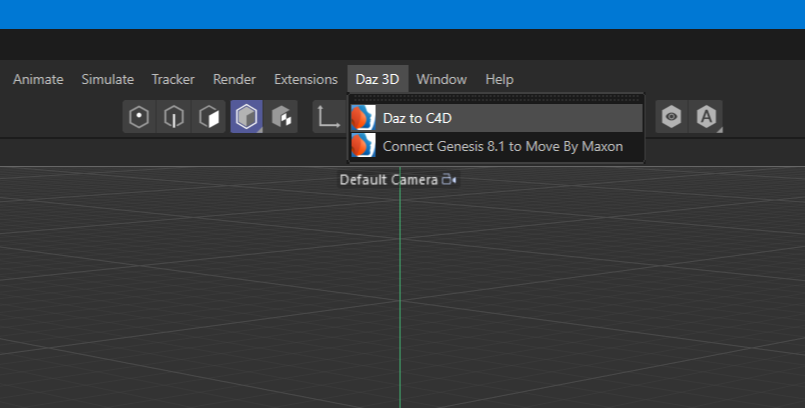
New Menu Location:
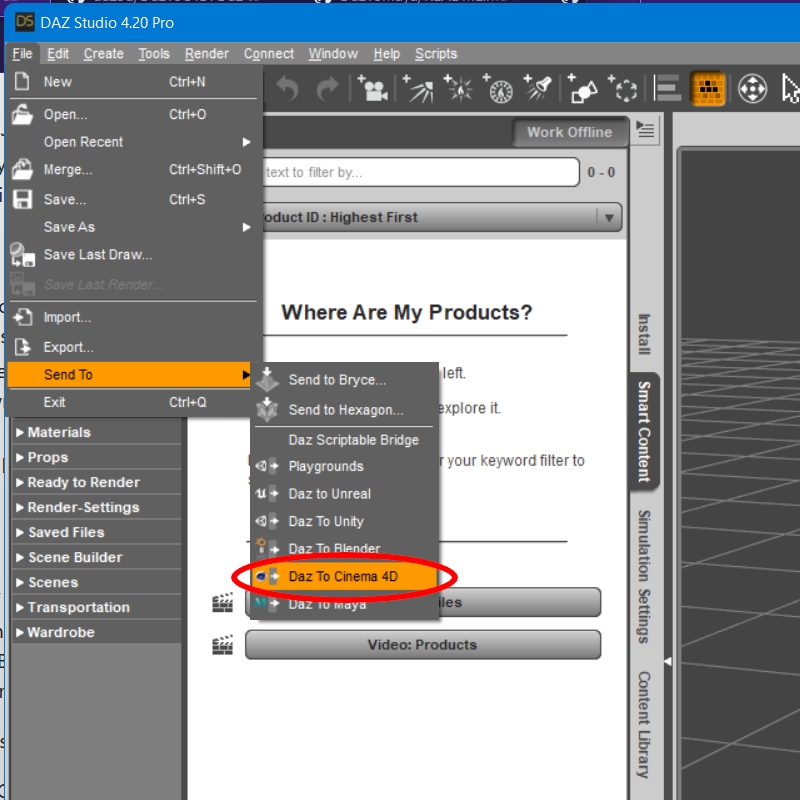
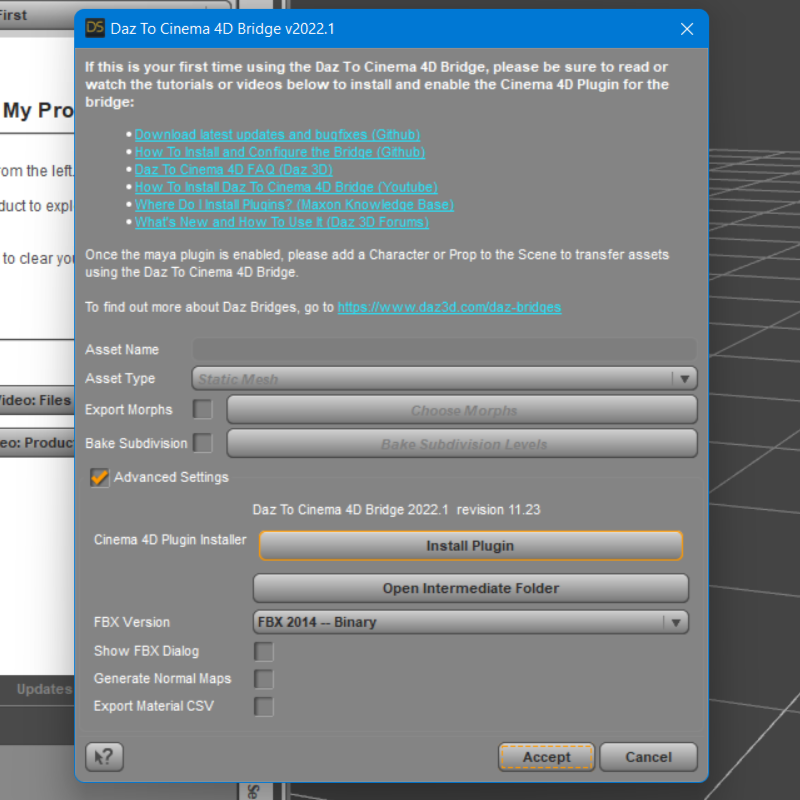
You will need to install the Cinema4D Plugin using the new integrated Cinema4D Plugin Installer. Access this from the Advanced Settings box of the new DazToCinema4D Bridge UI.
How to Install the Cinema 4D Plugin
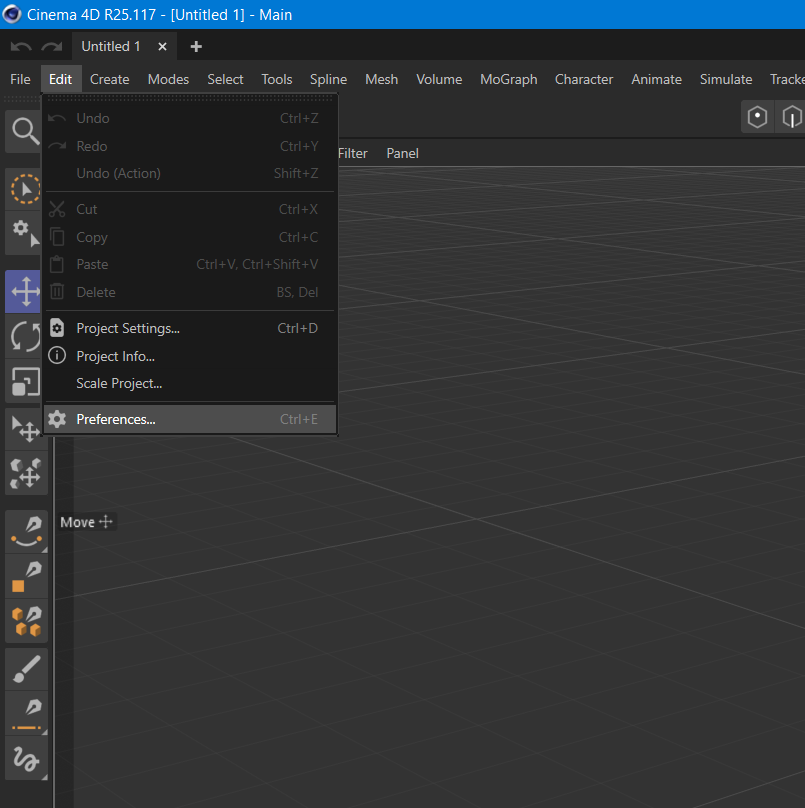
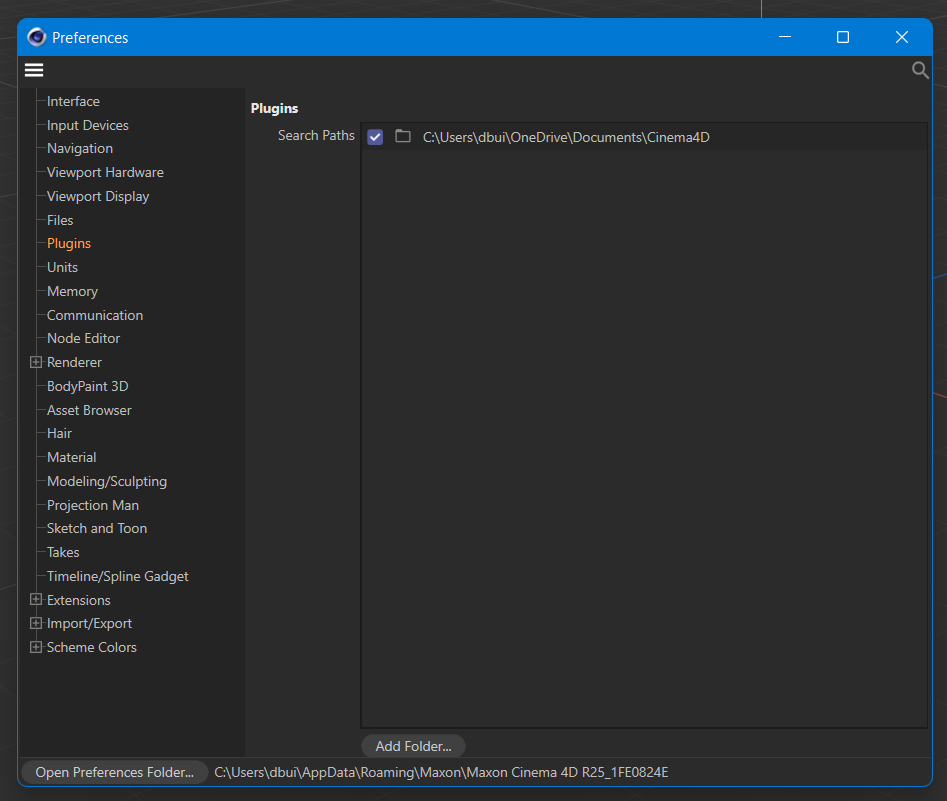
- Cinema 4D no longer requires a Plugins subfolder in the location where Cinema 4D was installed. Since R20, users should set a plugins path inside the Cinema 4D Preferences window and install plugins to that folder. We recommend creating a "\Documents\Cinema4D\Plugins" folder in your user's home folder and selecting that as the Plugins path in Cinema 4D. Please refer to this link for more information: Where do I install plugins? - Cinema 4D Knowledge Base
- The Daz Studio Plugin comes embedded with an installer for the Cinema 4D plugin. From the Daz To Cinema 4D Bridge Dialog, there is now section in the Advanced Settings section for Installing the Cinema 4D Plugin.
- Click the "Install Plugin" button. You will see a window popup to choose a folder to install the Cinema 4D plugin.
- Navigate to the plugins folder path which you set from the Cinema 4D Preferences window, and click "Select Folder". You will then see a confirmation dialog stating if the plugin installation was successful.
- If Cinema 4D is running, you will need to restart for the Daz To Cinema 4D Bridge plugin to load.
- In Cinema 4D, you should now see "Daz 3D" in the Cinema 4D main menu.
You can find more information about the updated DazToCinema4D Bridge with these resources:
- Download latest updates and bugfixes (Github)
- Daz To Cinema 4D Bridge FAQ (daz3d.com)
- Daz To Cinema 4D Bridge on Github
- How to Install Daz To Cinema 4D (Github Readme)
- Where do I install Plugins for Cinema 4D? (Maxon Knowledge Base)
- How to Use Daz To Cinema 4D (Github Readme)
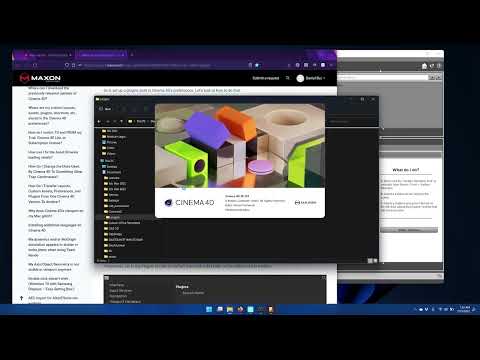
How to Install and Configure Daz To Cinema4D 2022
 OFFICIAL DazToMaya Bridge 2022 (SEPTEMBER UPDATE): What's New and How To Use It
The September Update for the DazToMaya Bridge is now available on Daz Central and Daz Install Manager. It has some changes to the UI which may take users familiar with the old version time to get used to. Here's what's new:
- Updated to latest Daz Bridge Library v2.2
- Fixes morph undo bug (distorted faces on export)
- Geograft Material support
- Prelim steps for supporting Geograft morphs (exported blendshapes)
New Menu Location:
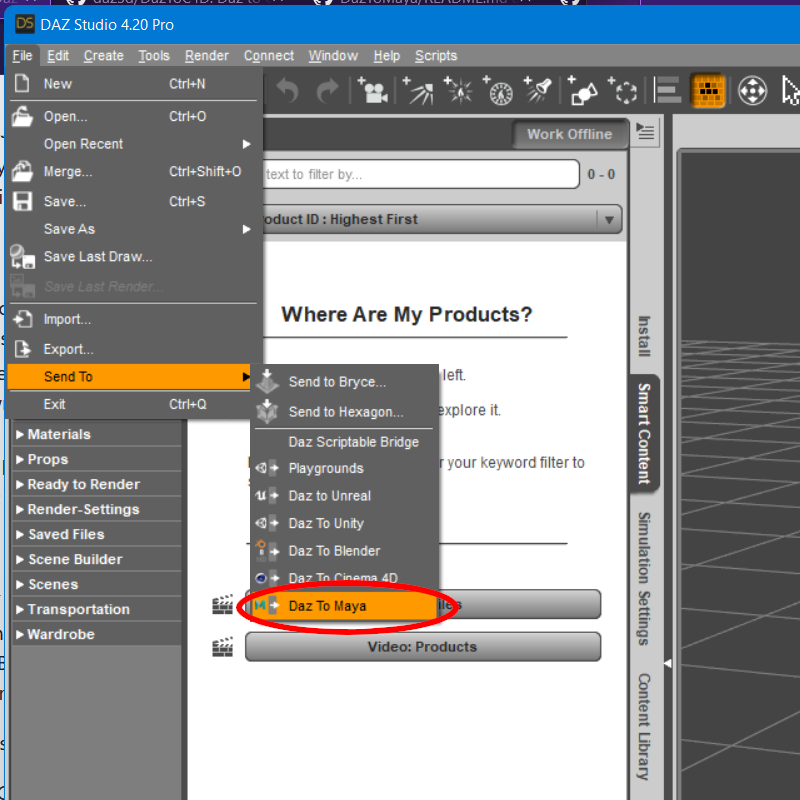
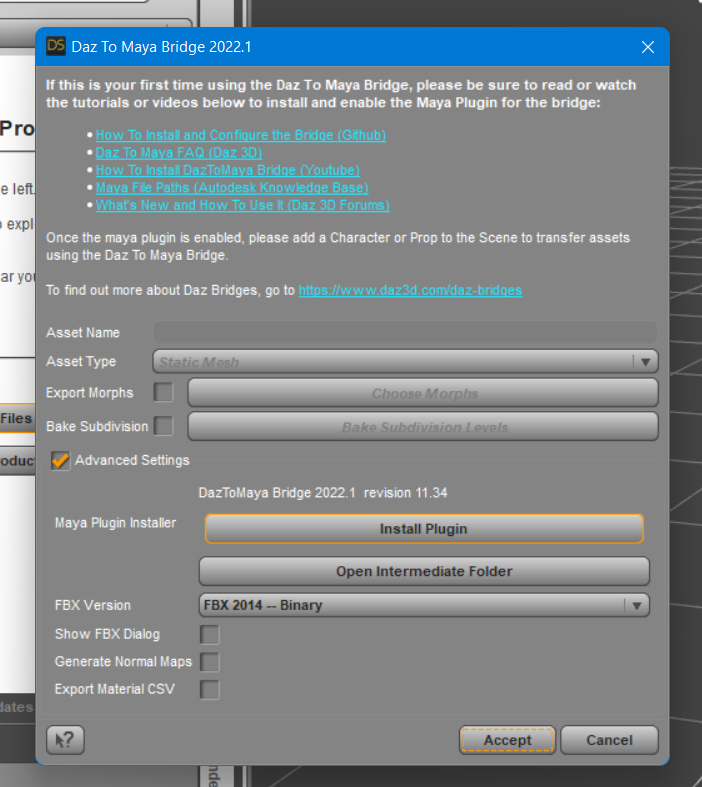
You will need to install the Maya Plugin using the new integrated Maya Plugin Installer. Access this from the Advanced Settings box of the new DazToMaya Bridge UI.
How to Install the Maya Plugin
- The Daz Studio Plugin comes embedded with an installer for the Maya Bridge module. From the Daz To Maya Bridge dialog, there is now section in the Advanced Settings section for Installing the Maya module.
- Click the “Install Plugin” button. You will see a window popup to choose a folder to install the Maya module. The starting folder should be the default location for maya plugins and modules.
- On Windows, the path to install modules should be “Documents\maya\modules”. On Mac, the path should be “/Users//Library/Preferences/Autodesk/maya/modules”.
- For most Maya setups, you should be able to just click “Select Folder”. You will then see a confirmation dialog stating if the plugin installation was successful.
- If Maya is running, you will need to restart for the Daz To Maya Bridge module to load.
- In Maya, you should now see a “DazToMaya” tab in the Maya Shelf toolbar. Click this tab to find the DazToMaya options.
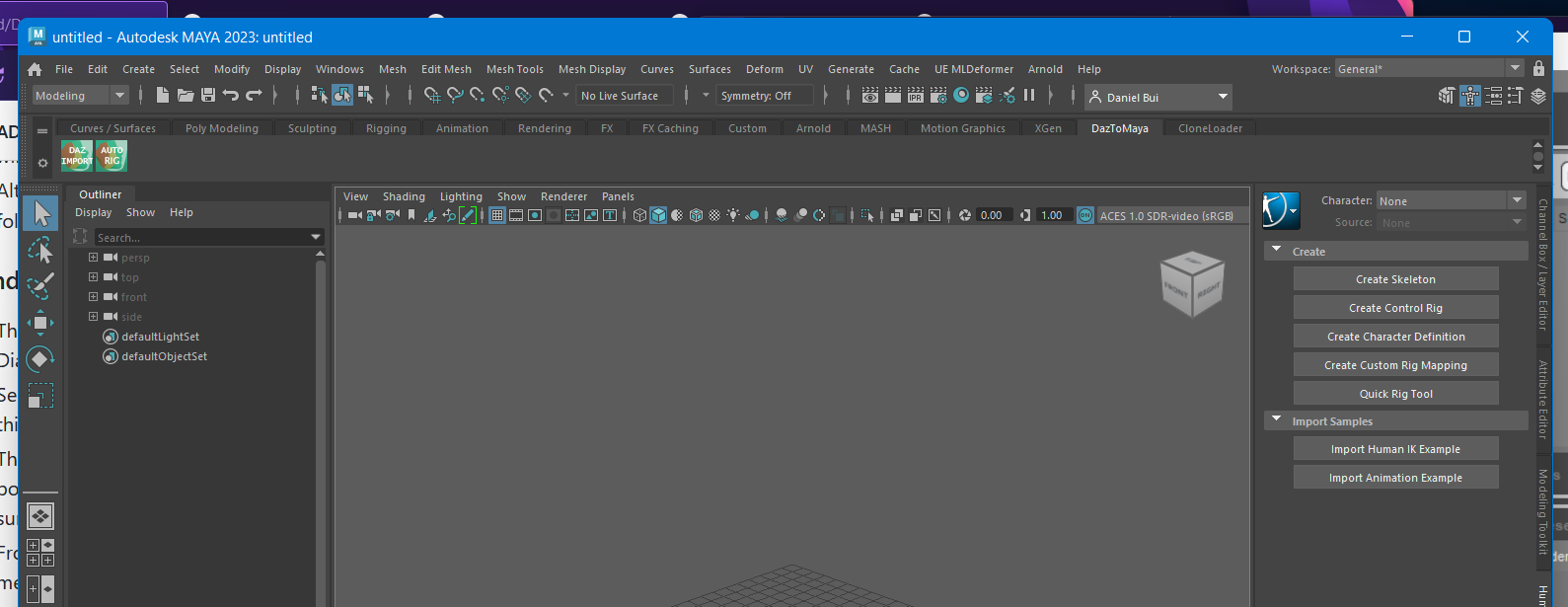
- If you have tabs disabled in the Maya Shelf, you may need to click the “cog” icon and select “Shelf Tabs” to find and select the “DazToMaya” tab.
- From the DazToMaya tab of the Shelf, you should now see an icon for “DAZ IMPORT”. You are done installing Daz To Maya Bridge!
- If you recieve an error when trying to click the "DAZ IMPORT" icon, make sure you have PyMEL installed.
You can find more information about the updated DazToMaya Bridge with these resources:
- DazToMaya Bridge on Github
- Installation Instructions for DazToMaya Bridge (Githhub)
- How to use the DazToMaya Bridge (Github)
- Download the latest updates and bugfixes (Github Release Page)
- DazToMaya FAQ (daz3d.com)
How to Install DazToMaya Bridge v2022
More tutorials coming soon...
Help explaining Directory ManagementDaz Central just takes a single path and places everything in a sub-folder of that, Install Manager allows setting individual locations for each type of file in its advanced settings.
Genesis 8.1 renders in whiteI haven´t used DAZ in a while (1 year or so) and all the new stuff Genesis 8.1 related is rendering completely white.
I am still running on DAZ 4.12 Pro, Windows 10.
I do not intend to install DAZ Central.
Any help will be appreciated.
Help explaining Directory ManagementI assume that in Daz Central you can see the path to the manifest files.
If so, try to open one in a text editor, and you should be able to find the path to where the product is installed.
Help explaining Directory ManagementSo configure the Daz Central to know the new path? that can be done, but idk about the Manifest files.
Daz 3D is part of

Connect
DAZ Productions, Inc.
7533 S Center View Ct #4664
West Jordan, UT 84084Licensing Agreement | Terms of Service | Privacy Policy | EULA
© 2026 Daz Productions Inc. All Rights Reserved.