-
Diffeomorphic DAZ Importer version 1.6.0 released
Padone said:
@plsgohots A more detailed and precise description would help. Anyway mhx has limits to transfer the animation back to daz studio since it uses a different structure than the daz rig and some retargeting is needed. To retarget by hand you can use any retargeting tool available for blender there are many.
Or you can animate with the simple-ik rig that uses the exact daz rig so no retageting is needed.
Thank you so much, retargeting and this plugin for blender works great! I'm just not quite sure if I've set bones for retargeting correctly, have you tried doing that? Maybe you can share the config? Anyway, thank you very much!
Ryilee for Genesis 8.1 females breaks fingernails on base G8.1PerttiA said:
To fix any ill-behaving (non-zero default value) morphs, do as follows;
1. Open DS and load "Genesis 8.1 Basic Female" (to an empty scene)
2. Right Click at Parameters Tab->Preferences->Choose "Show Hidden Properties" (part 3 zeroes only 'visible' dials)
3. Right Click at Parameters Tab->Zero->Zero Figure (Zeroes the value of all the 'visible' dials)
4. Right Click at Parameters Tab->Memorize->Memorize Figure (Sets the current value of all the dials as their default value)
5. Edit->Save As->Support Asset->Save Modified Assets (Writes the changed default value to the morph files that were changed)When saving "Modified Assets" DS shows a dialog and asks for confirmation;
"The following file(s) will be permanently modified:" - "Accept/Cancel" - Choose "Accept"You sir are a life saver. lol.
Earring with joints - how to rig?Use the Transfer utility, then use the Joint Editor to remove unwanted bones and add the new ones specific to the earrings (right-click menu), and then edit the weights.
Custom sculpt expressions?
It's really difficult to spot, and sometimes you only know once you've purchased a product. I know I have mistaken one product once, and fortunately I was able to return it. DAZ return policy us really great.Rakete said:I am wondering myself how to spot actual morphs as opposed to just poses that move the face bones.
What about these?
https://www.daz3d.com/venus-smile-for-genesis-81-female
https://www.daz3d.com/venus-smile-for-genesis-8-female
They look to me like they would be custom morphs, but there is no way to really tell or is there?
EDIT: In the "What's Included and Features" section it says both "Expressions" and "Morphs", I interpret that as the product contains some expression sliders, and those control a couple of custom sculpted morphs.
I only discovered the Unique Smile product by accident. Sometimes it's also helpful to just look at the promo images. The posed expressions look similar, while of course custom sculpted expression morphs can bring out results that you cannot achieve with poses and moving facial bones.
The product you linked looks like pose expressions to me, together with some adjustment morphs. The expression themselves don't look like a custom sculpt morph to me but I could be wrong.
Earring with joints - how to rig?I'm creating an earring with three "parts" connected by joints. I was able to create the joints, use the weigth map editor, etc, and make each part rotate/move independly. I also know how to use the transfer utility to "rig" a static, one-part earring to the G8F. My question is: how do I rig a jointed earring? If I use the Transfer Utility after creating the earring "bones", they are lost and replaced by the figure bones; if I do the transfer BEFORE, the earring inherits several bones from the figures in places that have nothing to do with the real joints.
Thanks!
XTransfer Module 1- Genesis 3 to Genesis 8 Morph Converter (Commercial)MickeyHo said:
Richard Haseltine said:
MickeyHo said:
Is there an easy way to remove the prefix XT- on the morphs? I mean the labels of the morphs, not just the file names of the morphs. Some poses include morphs as well but I think the prefix XT- makes them unusable.
Any slider label can be edited by clicking the gear icon on the right of the slider>Parameter Settings, then editing the label field (leave the name alone though). If the issue is having XT-Whatever (2) then first open the Parameter pane's option menu (the lined/hamburger button in the top corner, or right-click the tab) and disable Preferences>Consolidate Proerpties.
Thanks. Well I was thinking along the lines of batch editing but I guess this is the only way. One more question. After I edit the names/labels, if I want to save them for new figures, should I save them as Morph Assets?
File>Save As>Support Assets>Save Modified Assets - if you want to do that i would advise using the dev Build preset for the figure, to make sure that the only changes saved are the ones you made.
Transfer a character morph to her fibermesh hairlaura_59982ad1 said:
Hello,
Followed your advice and the result looks better.
Thanks for the tip
Hi,
I've never used autofit. I'm a 3D modeler and I've been working for a while on clothes that I'd like to sell soon on DAZ stores. I usually go with the Transfer Utility.
I searched for Autofit but Google results take me to places where autofit is mainly used to automatically fit/convert older clothing to fit onto the new Genesis figure. Auto-fit window pops-up by itself in those tutorials. But I can't figure out how to open that Auto-fit window for a totally custom made cloth/hair/accessory, etc.
Could you please tell me how you did that for your fibermesh hair ? Thanks.
Celebrity Look-a-Likes for 3D figures part 3WandW said:
Shinteo's Bianca Helen is now available for download. Apparently she is a Playboy model, so don't search at work...
https://www.patreon.com/posts/bianca-helen-for-63564084
Puredigital101 has a Greta Thunberg morph for G8F ...
https://sharecg.com/v/98863/gallery/5/3D-Model/Greta
They also have several other morphs that I don't recognise; does anyone see any resemblences in this group?
https://sharecg.com/pf/full_uploads.php?pf_user_name=puredigital101XTransfer Module 1- Genesis 3 to Genesis 8 Morph Converter (Commercial)Richard Haseltine said:
MickeyHo said:
Is there an easy way to remove the prefix XT- on the morphs? I mean the labels of the morphs, not just the file names of the morphs. Some poses include morphs as well but I think the prefix XT- makes them unusable.
Any slider label can be edited by clicking the gear icon on the right of the slider>Parameter Settings, then editing the label field (leave the name alone though). If the issue is having XT-Whatever (2) then first open the Parameter pane's option menu (the lined/hamburger button in the top corner, or right-click the tab) and disable Preferences>Consolidate Proerpties.
Thanks. Well I was thinking along the lines of batch editing but I guess this is the only way. One more question. After I edit the names/labels, if I want to save them for new figures, should I save them as Morph Assets?
AOBB's head morph Serene for G8.1F. No materials or textures included.A new head morph for your asset collection - Serene for G8.1F. Commercial and noncommercial use.
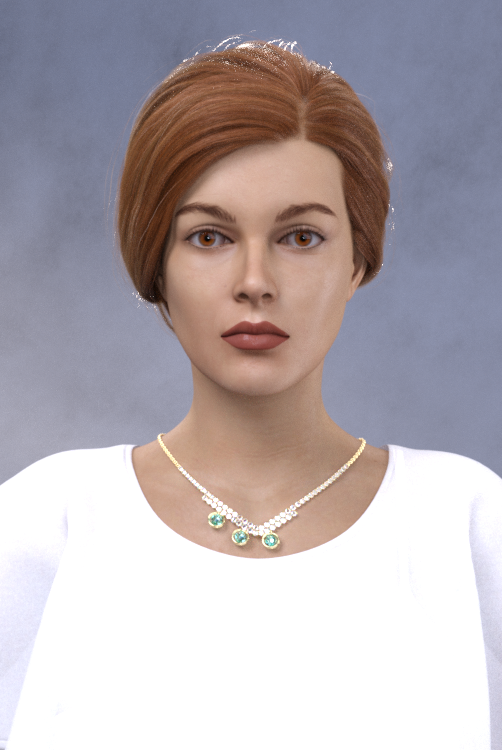


Assets used in promo images (all for G8.*F):
Whitney Outfit
SP Hair 017
Beautiful Brows II (Brow1)
Lashes Utilities
Natural Eyes II
Background and lighting - BOSS Portrait Light Set
I've read once in a book this description: "Her face was like an endless landscape". I immediately got the sense of openness, calmness and beauty of that woman. I tried to convey those same characteristics in Serene.
I hope you like her. If there are any issues with the morph, please let me know.
Enjoy!
AOBB
Why the Reading Asset ; Clearing the scene and Deleteing Objects are so slow ?@Spacious : I see ! That might be that. I'll keep this in mind.
It seems to use only 4 cores for some tasks and then it dispatch with the others after a while ... that's weird.@PerttiA : yeah I have quite a lot of morphs. I might have "conflicted" morph.
Hours to load ? 8 min wait wasn't so bad after all lol.@aedonix : I think that could be one of the big reason why it is so slow to load.
I have definitly a lot of assets (including my DazCustom folder).
I don't want to uninstall them ... I feel like I might need them one day or another.Does anyone tried windows 11 yet ? I was wondering if microsoft has done something to boost up the dispatch CPU tasks that could benefit daz3D.
converted G3 to G2 male mophs not workingm300 said:
Richard Haseltine said:
You could apply the morph, set the resolution to base (Parameters pane>Mesh Resolutuion group), then export as OBJ and in the options dialogue pick the daz Studio preset and the option to export only the selected geometry. Then you could use Edit>Figure>Moprh Loader Pro (or Advanced), select the Daz Studio preset, and select the exported OBJ, and load it to get an SD version of the shape - which could be converted. However, this would lose all links to JCMs and so on - extra morphs that trigger when the main shape is applied and a particular bend or other shape is applied. You could figure out what was missing, manually set and export them, and load them as new morphs. You'd also have to redo and joint centre adjustments, and then use ERC Freeze to link those to the morph and the Property Hierarchy to reconnect the JCMs. With the original to act as an example that would be entirely possible, but a lot of work.
it is sounds like a lot of work but if i get what i want then it will be worth it, thanks.
IT WORKED! THE MORPH LOOKS GREAT THANK YOU SO MUCH FOR YOUR HELP!!!
Great, I'm relieved I didn't send you on a wild goose chase
Rec 2020 turns Reds Black? Any fix?I agree with Richard. As I understand it exr is in linear color space, that means all the possible physics values so an "unlimited" gamut. Think of it as the raw rendering buffer before color mapping. Then color mapping is the transfer function from the linear space to the output space, mostly srgb for normal monitors.
converted G3 to G2 male mophs not workingRichard Haseltine said:
You could apply the morph, set the resolution to base (Parameters pane>Mesh Resolutuion group), then export as OBJ and in the options dialogue pick the daz Studio preset and the option to export only the selected geometry. Then you could use Edit>Figure>Moprh Loader Pro (or Advanced), select the Daz Studio preset, and select the exported OBJ, and load it to get an SD version of the shape - which could be converted. However, this would lose all links to JCMs and so on - extra morphs that trigger when the main shape is applied and a particular bend or other shape is applied. You could figure out what was missing, manually set and export them, and load them as new morphs. You'd also have to redo and joint centre adjustments, and then use ERC Freeze to link those to the morph and the Property Hierarchy to reconnect the JCMs. With the original to act as an example that would be entirely possible, but a lot of work.
it is sounds like a lot of work but if i get what i want then it will be worth it, thanks.
IT WORKED! THE MORPH LOOKS GREAT THANK YOU SO MUCH FOR YOUR HELP!!!
Problem with Royal Eastern Dragon: Wings and LAMH Manetags_art said:
So, running into a couple of issues. I'm trying to do a cover for a book by a friend of mine, which requires a dragon with a mane and wings. The DAZ Dragon 3 and the Royal Eastern LAMH mane sounded like the perfect combo.
1) I can't load the LAMH mane on the DD3; it loads an entirely new Royal Eastern dragon figure.
Okay, so I'll just load that, says me. (See attachment DSRE LAMH Load. Please note the apparent missing files. I have a Mac with OS 10.13.6 installed - side note, does the general DS4.10 latest update work with OS 10.14.1? I've been holding off on updating, because I want to get this cover done!)
So, I've saved that figure (without doing any other changes, save the name in the scene), and reloaded it. (See attachment DSRE LAMH Saved.) No problem.
Then, I need to get the wings back on, and remove the tendrils. Due to previous experience, I just render the tendrils invisible, then delete the "Wingless Dragon" figure parented to the Royal Eastern Dragon, here named Candle. Save it, fine. Then to check it, I clear the scene (wait for DS to finish quitting on me, and bring it back up again), and reload the scene.
2) The mane hair is crazily all over the dragon figure (see DSRE LAMH Reload 2 - With Removed Wingless).
Problem. This is what I really need help with - how can I prevent this from happening, while still having both wings and mane?
Also, another issue I ran into (but didn't take screenshots for, because of the freezing going on); when I tried to apply any morphs/shaping to the Candle (aka Royal Eastern Dragon) figure, DS basically froze (with, you know, the colourful spinning Mac wheel), and then quit. I tried doing the body weight morph for the full figure the first time, and then I clicked on head to do the horn morphs (because Candle has heavy horns) the second time, and as soon as those things were done... bam. Frozen DS, spinning wheel, nothing to do but wait for it to quit unexpectedly.
Help, please!
(Thankfully, I do have the background scenery I can work on in the meantime, but I'd like to get the dragon issue fixed as soon as possible. Thanks!)
Do you have an account on your system named Admin? I can't tell you what support told me When I Put the in Ticket about this, hasn't been solved yet. Even if you set up your machine with Admin you get this, So you still get an error. You can apply textures after it loads.
Celebrity Look-a-Likes for 3D figures part 3Shinteo's Bianca Helen is now available for download. Apparently she is a Playboy model, so don't search at work...
https://www.patreon.com/posts/bianca-helen-for-63564084
Puredigital101 has a Greta Thunberg morph for G8F ...
https://sharecg.com/v/98863/gallery/5/3D-Model/Greta
They also have several other morphs that I don't recognise; does anyone see any resemblences in this group?
https://sharecg.com/pf/full_uploads.php?pf_user_name=puredigital101New! Novica & Forum Members Tips & Product Reviews Pt 14How do I look?
I actually didn't use anything from the Little Gentleman package (morphs for G2). I just autofit the original suit to G8M and applied a head morph and some Growing Up to G8M. The suit adjusted to Growing Up morphs with auto follow. It has some distortion, especially the buttons. The 3Delight materials were bad looking in Iray. I applied shaders. But, from a distance, it look surprisingly good for such and old product.
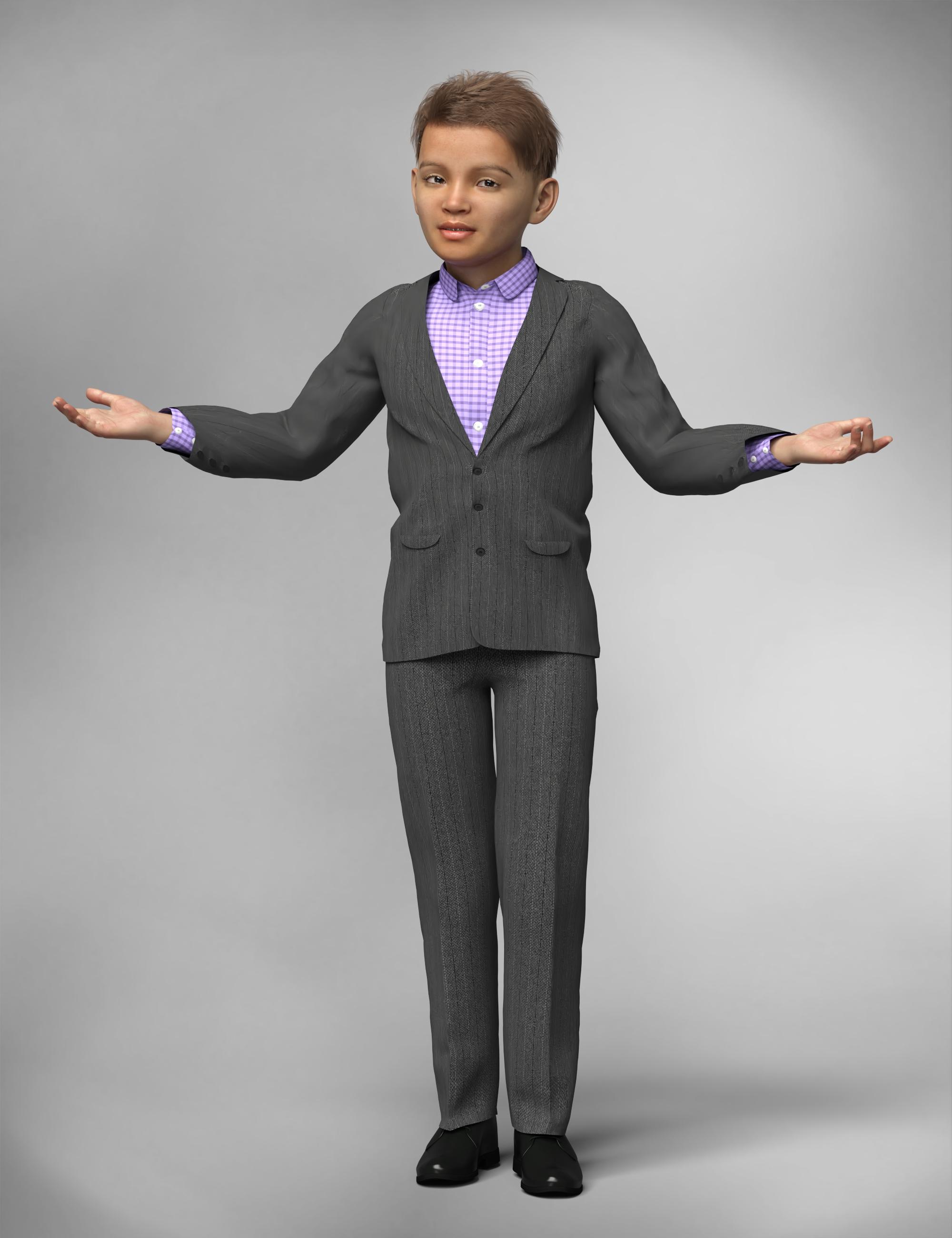 AOBB's The Scandinavian for G8.1M head morph. No materials nor textures.
Fair warning - I am fixing all the head morphs I have uploaded so far starting with the Hollywood Glamour series. I'm fixing those weird teeth. I don't know how I could have missed that. So far I have done all the gents from the HG collection, the Astronaut and the Debutante. I have changed a little bit the shape of Debonair's head and made his eyelids thicker but it is still the same face. I also moved The Astronaut's jaw a little bit back and made his lips bigger, however all those changes are subtle.
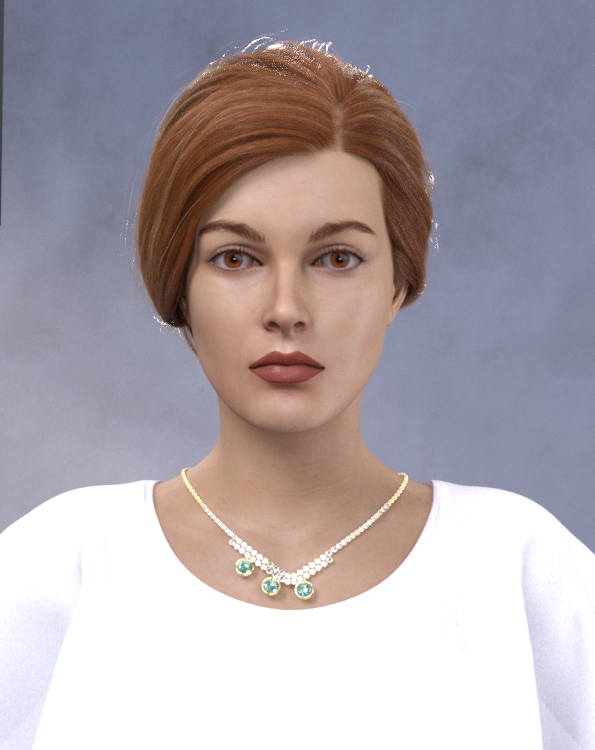
I have also finished the G8.1F head morph of the lady whose render I posted before. I called her Serene. Here is a promo image of her (she looks much different than in the previous image even though I have only widened her jaw somewhat):
I'm lucky that the guest that is visiting us is very understanding plus I work mainly at night when she's sleeping...

Stay tuned and if you are reading this, please don't download the old morphs that came before The Scandinavian, because the upgraded versions will arrive all in one thread pretty soon (including the new lady)!
Cheers,
AOBB
converted G3 to G2 male mophs not workingYou could apply the morph, set the resolution to base (Parameters pane>Mesh Resolutuion group), then export as OBJ and in the options dialogue pick the daz Studio preset and the option to export only the selected geometry. Then you could use Edit>Figure>Moprh Loader Pro (or Advanced), select the Daz Studio preset, and select the exported OBJ, and load it to get an SD version of the shape - which could be converted. However, this would lose all links to JCMs and so on - extra morphs that trigger when the main shape is applied and a particular bend or other shape is applied. You could figure out what was missing, manually set and export them, and load them as new morphs. You'd also have to redo and joint centre adjustments, and then use ERC Freeze to link those to the morph and the Property Hierarchy to reconnect the JCMs. With the original to act as an example that would be entirely possible, but a lot of work.
converted G3 to G2 male mophs not workingRichard Haseltine said:
Please do not multi-post, I've left this one as a courtesy to those who replied even though it is not the first.
Please don't use whatever you used to compose the first post - it came in with light text on a dark ground.
Please do not post images of textures, nude figures.
-----------------------------
An HD morph, which is accessibly only for Daz PAs making content for the store, moves the virtual vertices created by the SubD process. Standard morphs move only the vertices of the base cage mesh to which SubD is applied to smooth out the final shape.
sorry about that i never posted in here so i got a little confused won't happen again, and thanks for answering!
after some reading I realise that these morphs cannot be converted but isnt there a way to maybe copy the shape of the body and face without the HD details i would have really like to use them in g2?
sorry about the 2 extra masseges it got duplicated for some reason
Daz 3D is part of

Connect
DAZ Productions, Inc.
7533 S Center View Ct #4664
West Jordan, UT 84084Licensing Agreement | Terms of Service | Privacy Policy | EULA
© 2026 Daz Productions Inc. All Rights Reserved.