-
Novica & Forum Members Tips & Product Reviews Pt 11
...talking about products that pleasantly surprised--well, this is not a new/recent release but I don't recall anyone reviewing or discussing it in this thread and it IS ON SALE now in the MM artists catalogs: PINE GROVE by Andrey Pestryakov.
The trouble with densely vegetated realistic landscapes is all that messy green stuff is costly in resource-terms. And instancing is typically the antidote, but when people make these sets they don't always create the sets/presets in ways that are useful as might be to the user. Many sets let you turn off ALL of THIS TREE/PLANT or ALL of THAT TREE/PLANT or turn on/off all trees or all ground cover grasses or whatever-- but which diminishes the entire scene, when WHAT WOULD BE MOST USEFUL is the ability to turn off ONLY WHAT STUFF IS OUTSIDE YOUR CAMERA"s VIEW, or in quadrant x, say.
UGH, yes, you can delete ALL the instanced stuff and manually replant/instance the prop plants/trees that come with the product, or create scatter maps and use an instancing product if you have one of them, and then create your own presets. But hey, one of the points of buying a product is to not have to build --or rebuild--the environment yourself. :) I had a streak of landscape products I purchased that simply weren't useful for me for what I wanted to do without essentially stripping and rebuilding them-- so much time!-- so I was reluctant to buy Pine Grove until a while back when I really needed a pine-tree, scrubbly environment that I could emulate north east/central florida with. HAPPY I GAVE IN!
Andrey P 's PINE GROVE lets you toggle on/off 3 Levels of vegetation/trees, like some instancing-heavy sets do, to reduce preview lag and let you work in the scene easier with clear sightlines and more light, and then activate them again for rendertime. Andrey THOUGHTFULLY also added the instanced PINE TREES (and their costly needles, which can be separately toggled on/off!) in specific clusters grouped throughout the set. This means the dense and costly trees can be selected in small sets scattered through the landscapes and turned off or on-- instead of ALL ON or OFF. This made it possible to trim out a few trees in a scene I was working on to allow me to control the view, have space for other props, and manage my resources used by the scene, in just a few clicks, instead of having to remake the whole thing myself. That scene I was setting up was a night scene and the set looks beautiful at night with the reflections in the water....and I'll mention that the water seemed to hit a very nice balance in being rippled enough to make clear it is water, but not so rippled that it becomes obtrusive, and looks wonderful in my renders, day or night. So anyone needing a versatile landscape product with a river/stream feature, consider Pine Grove! EDITED TO ADD: PS: AP also added a meaningful detail in the set, answering one of my pet peeves with so many sets, in that the landscape on the paths and at shoreline becomes darker and muddy looking as it nears the water, like in real life.
~GenAnnouncing: Daz Deals Browser Add-onView All Artists link does show up, but the URL I get is https://www.daz3d.com/shop/#filter_vendor=^^^^^^^^^^^^^^^^^^^^^^^^^^^^^^^^^^^^^^^^^^^^^^^^^^^^^^^^^^^^^^^^^^^^^^^^^^^^^^^^^^^^^^^^^^^^^^^^^^^^^^^^^^^^^^^^^^^^^^^^^^^^^^^^^^^^^^^^^^^^^^^^^^^^^^^^^^^^^^^^^^^^^^^^^^^^^^^^^^^^^^^^^^^^^^^^^^^^^^^^^^^^^^^^^^^^^^^^^^^^^^^^^^^^^^^^^^^^^^&filter_new=0&filtered=1
which doesn't work, of course.
Try this:
I did it in TextPad using a bunch of search, replace, copy, etc.
Man, I gotta learn Javascript.
Edit: Nevermind, my link still doesn't show all the items that should be available.
 medieval lands product
I was able to convert this set over to Poser & 3dl Materials pretty easy and it looks pretty good . but you have to manually change the mats the set only came with iray mats
Here is a sample of one of my test renders using Glassye poser skydome Another beautiful product by Andrey Pestryakov
click for full size its a huge render
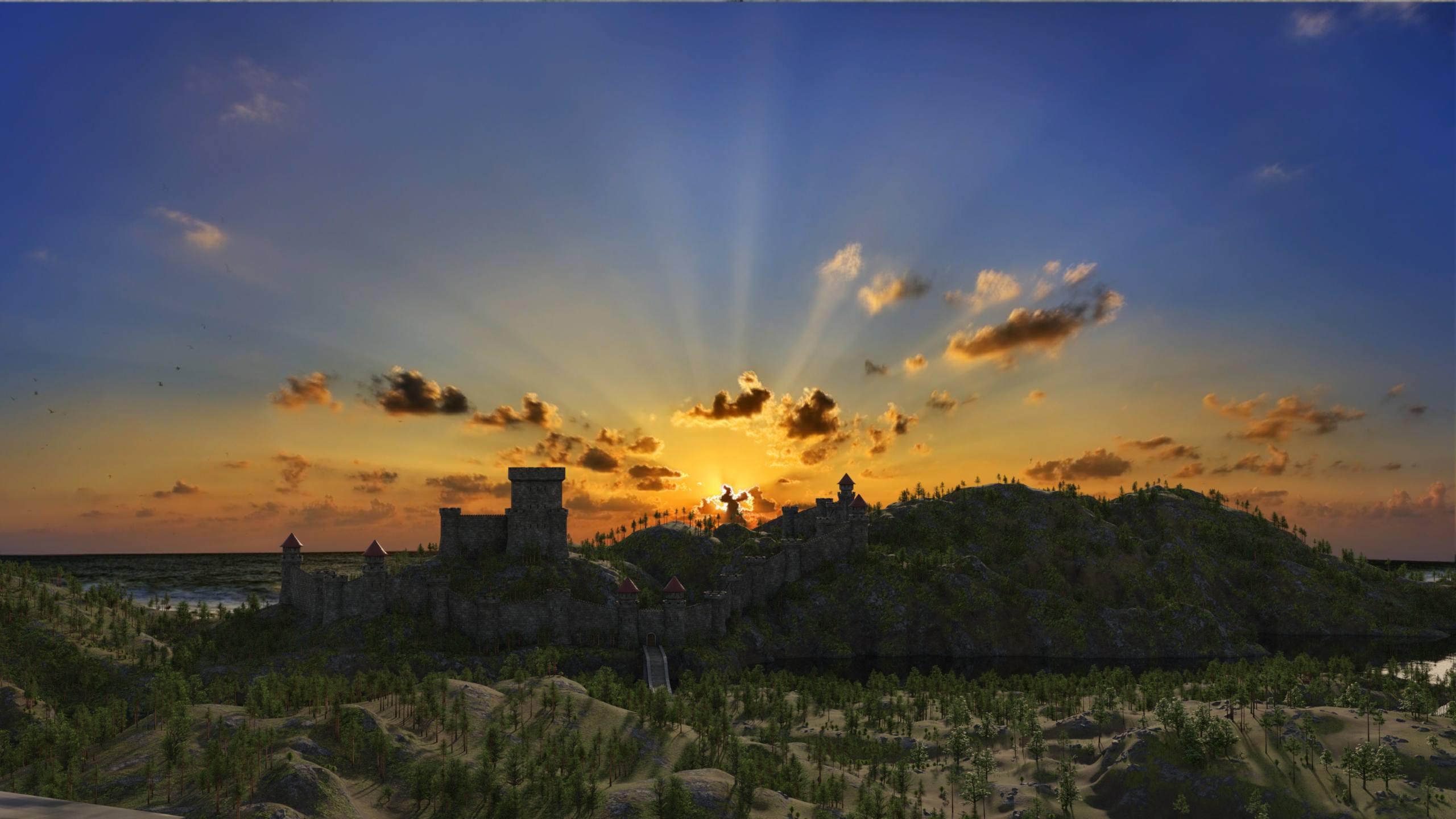
What a wonderful job you did, Ivy! I'm not sure I'm willing to spend the time to convert the materials for the set, but you made me think about it ;-) Love the skydome, too - isn't it amazing how the right sky can be the feather in the cap?
Art of the PromoAndrey Pestryakov's Medieval lands is just majestics with the castles and terrain. Creative way of generating a large epic environment to tell a story. Details up close cool visuals on the horizon.
 Moving around huge environments
I like to leave the character in place at 0,0.
Group the entire scenery set. Make sure you group the cameras and lights with the set, but not the character.
then using the top view, I rotate and move it to match how I want the background behind the character to besome pose set will reset the character position to 0,0 so it's easier to just leave it there to begin with and adjust the background.
That is an interesting way of doing it as I TRIED to move the character manuallly as I wanted to position her where the windmills are and seemed to take forever to move to just half the distance. I didn't think about the top down perspective. Worse, I have moved entire sets before. I guess I didn't try it with this one because it was so big. But if that works fine and is much faster, Iam definitely going to give it a shot. BTW, do you have some rendering tips in that I could render a bit quicker? I have noticed my render times with this environment shot up quite a bit. I just really like the way this environment looks and as I mentioned above it is chock full of photo opps. I know that Andrey said most of the outlying textures are low-res, but I tried a render and it still looks good even up close. But I have noticed that doors are not to scale, but that is fine. Having a somewhat close up shot WILL work, at least in the windmill area. I have not tried the castle or the tower yet, but given the info you provided I am certainly going to explore around this environment more.
Lyoness, interesting decision!

Jukingeo, in the top view, the viewing angle of the camera is clearly visible. You can move the character to this camera space in the top view, then switch to camera view and set the character more accurately.
This would work too provided there is a faster way to move the character. But from the sound of it, I think Lyoness' might be faster. I am not sure how my computer will handle moving such a large environment. But as she pointed out, I have done smaller environments that way already. But for the most part, an environment is usually centered around the main photographing area anyway. So I just mostly rotate it around to position it. This would be the first time where I would want to move a character (or environment) such a great distance.
BTW, as I said above, if you ever do a winter version of this with the river frozen over and such, I would definitely get it. This is a beautiful environment and I hope to see more like this from you in the future.
Thanks!
Geo
medieval lands productI was able to convert this set over to Poser & 3dl Materials pretty easy and it looks pretty good . but you have to manually change the mats the set only came with iray mats
Here is a sample of one of my test renders using Glassye poser skydome Another beautiful product by Andrey Pestryakov
click for full size its a huge render
Moving around huge environmentsYes, this scene is completely three-dimensional and large.
I want to clarify that objects that are at a great distance (trees, a castle) are lowpoly objects and will not look good if the camera is close.
To move quickly, I recommend covering the whole territory in one screen in a top view, and putting cameras where it is being trumpeted.
Thank you for that info, but how about moving characters? Can that be done in a similar fashion?
BTW, Great job on this, it is a beautiful setting with many photo opp points. It is a little hard on my computer and renders take a while, but I guess that is to be expected with something this size. Do you plan to make a winter overlay for this as this would look incredible with a dusting of snow on it?
Geo
I like to leave the character in place at 0,0.
Group the entire scenery set. Make sure you group the cameras and lights with the set, but not the character.
then using the top view, I rotate and move it to match how I want the background behind the character to besome pose set will reset the character position to 0,0 so it's easier to just leave it there to begin with and adjust the background.
Moving around huge environmentsYes, this scene is completely three-dimensional and large.
I want to clarify that objects that are at a great distance (trees, a castle) are lowpoly objects and will not look good if the camera is close.
To move quickly, I recommend covering the whole territory in one screen in a top view, and putting cameras where it is being trumpeted.
Thank you for that info, but how about moving characters? Can that be done in a similar fashion?
BTW, Great job on this, it is a beautiful setting with many photo opp points. It is a little hard on my computer and renders take a while, but I guess that is to be expected with something this size. Do you plan to make a winter overlay for this as this would look incredible with a dusting of snow on it?
Geo
Primal Thunder - dForce Primal Scream Outfit Textures [Commercial]Items Used in Promos (In Order as Seen On Product Page):
Promo 1:
Clothing:
dForce Primal Scream Outfit for Genesis 8 Female(s) by IgnisSerpentus - https://www.daz3d.com/dforce-primal-scream-outfit-for-genesis-8-females
Primal Thunder - dForce Primal Scream Outfit Textures by ARTCollaborations - https://www.daz3d.com/primal-thunder--dforce-primal-scream-outfit-texturesCharacter:
Ekaterina for Genesis 8 Female by Daz 3D and Mousso - https://www.daz3d.com/ekaterina-for-genesis-8-female
Hair:
Linda Ponytail Hair for Genesis 3 and 8 Female(s) by outoftouch - https://www.daz3d.com/linda-ponytail-hair-for-genesis-3-and-8-female-s
Environment:
The Enchanted Forest by Stonemason - https://www.daz3d.com/the-enchanted-forest
Cat:
Daz Big Cat 2 by Daz 3D - https://www.daz3d.com/daz-big-cat-2
Real Fur for DAZ Big Cat 2 by Allessandro_AM and Kendall Sears - https://www.daz3d.com/woolly-mammoth-by-am
LAMH 2 Iray Catalyzer by Allessandro_AM - https://www.daz3d.com/lamh-2-iray-catalyzer
OR
Look At My Hair by Allessandro_AM and Kendall Sears - https://www.daz3d.com/look-at-my-hair
OR
Look at my Hair FREE Player by Allessandro_AM and Kendall Sears https://www.daz3d.com/look-at-my-hair-free-playerPose:
Z The Chosen One - Poses and Expressions for Genesis 8 Female and Gia 8 by Daz 3D and Zeddicuss - https://www.daz3d.com/z-the-chosen-one--poses-and-expressions-for-genesis-8-female-and-gia-8
Promo 2:
Clothing:
dForce Primal Scream Outfit for Genesis 8 Female(s) by IgnisSerpentus - https://www.daz3d.com/dforce-primal-scream-outfit-for-genesis-8-females
Primal Thunder - dForce Primal Scream Outfit Textures by ARTCollaborations - https://www.daz3d.com/primal-thunder--dforce-primal-scream-outfit-texturesCharacter:
Ekaterina for Genesis 8 Female by Daz 3D and Mousso - https://www.daz3d.com/ekaterina-for-genesis-8-female
Hair:
Vertigo Ponytail by Daz 3D and goldtassel - https://www.daz3d.com/vertigo-ponytail-for-genesis-8-female-s
Backlight - Hair Shaders for Iray by chevybabe25 - https://www.daz3d.com/backlight--hair-shaders-for-iray-
Flower from Nights of Romance by ARTCollaborations - https://www.daz3d.com/nights-of-romanceEnvironment:
Silverthorn Fortress Pool Chamber by Daz 3D and Nightshift3D - https://www.daz3d.com/silverthorn-fortress-pool-chamber
Candles from Nights of Romance by ARTCollaborations - https://www.daz3d.com/nights-of-romancePose:
Z The Chosen One - Poses and Expressions for Genesis 8 Female and Gia 8 by Daz 3D and Zeddicuss - https://www.daz3d.com/z-the-chosen-one--poses-and-expressions-for-genesis-8-female-and-gia-8
Promo 3:
Clothing:
dForce Primal Scream Outfit for Genesis 8 Female(s) by IgnisSerpentus - https://www.daz3d.com/dforce-primal-scream-outfit-for-genesis-8-females
Primal Thunder - dForce Primal Scream Outfit Textures by ARTCollaborations - https://www.daz3d.com/primal-thunder--dforce-primal-scream-outfit-texturesCharacter:
Rylee for Genesis 8 Female by Daz 3D and Mousso - https://www.daz3d.com/rylee-for-genesis-8-female
Hair:
Layla Hair for Genesis 3 & 8 Female(s) by Daz 3D and AprilYSH - https://www.daz3d.com/layla-hair-for-genesis-3--8-females
Environment:
Hidden Waterfall Pool by Daz 3D, David Brinnen, and ForbiddenWhispers - https://www.daz3d.com/hidden-waterfall-pool
Ancient Rites by ARTCollaborations - No Longer AvailableDragon:
Daz Dragon 3 Pro Bundle by Daz 3D - https://www.daz3d.com/daz-dragon-3-pro-bundle
Crystal Dragon for the Daz Dragon 3 by Daz 3D - https://www.daz3d.com/crystal-dragon-for-the-daz-dragon-3Pose:
Z The Chosen One - Poses and Expressions for Genesis 8 Female and Gia 8 by Daz 3D and Zeddicuss - https://www.daz3d.com/z-the-chosen-one--poses-and-expressions-for-genesis-8-female-and-gia-8
Promo 4:
Character:
Ekaterina for Genesis 8 Female by Daz 3D and Mousso - https://www.daz3d.com/ekaterina-for-genesis-8-female
Clothing:
dForce Primal Scream Outfit for Genesis 8 Female(s) by IgnisSerpentus - https://www.daz3d.com/dforce-primal-scream-outfit-for-genesis-8-females
Primal Thunder - dForce Primal Scream Outfit Textures by ARTCollaborations - https://www.daz3d.com/primal-thunder--dforce-primal-scream-outfit-texturesHair:
Linda Ponytail Hair for Genesis 3 and 8 Female(s) by outoftouch - https://www.daz3d.com/linda-ponytail-hair-for-genesis-3-and-8-female-s
Environment:
The Enchanted Forest by Stonemason - https://www.daz3d.com/the-enchanted-forest
Cat:
Daz Big Cat 2 by Daz 3D - https://www.daz3d.com/daz-big-cat-2
Real Fur for DAZ Big Cat 2 by Allessandro_AM and Kendall Sears - https://www.daz3d.com/woolly-mammoth-by-am
LAMH 2 Iray Catalyzer by Allessandro_AM - https://www.daz3d.com/lamh-2-iray-catalyzer
OR
Look At My Hair by Allessandro_AM and Kendall Sears - https://www.daz3d.com/look-at-my-hair
OR
Look at my Hair FREE Player by Allessandro_AM and Kendall Sears https://www.daz3d.com/look-at-my-hair-free-playerPose:
Z The Chosen One - Poses and Expressions for Genesis 8 Female and Gia 8 by Daz 3D and Zeddicuss - https://www.daz3d.com/z-the-chosen-one--poses-and-expressions-for-genesis-8-female-and-gia-8
Promo 5:
Clothing:
dForce Primal Scream Outfit for Genesis 8 Female(s) by IgnisSerpentus - https://www.daz3d.com/dforce-primal-scream-outfit-for-genesis-8-females
Primal Thunder - dForce Primal Scream Outfit Textures by ARTCollaborations - https://www.daz3d.com/primal-thunder--dforce-primal-scream-outfit-texturesCharacter:
Reese HD for Genesis 8 Female by Daz 3D and Mousso - https://www.daz3d.com/reese-hd-for-genesis-8-female
Hair:
Delphi Hair for Genesis 3 & 8 Female(s) by AprilYSH - https://www.daz3d.com/delphi-hair-for-genesis-3--8-females
Backlight - Hair Shaders for Iray by chevybabe25 - https://www.daz3d.com/backlight--hair-shaders-for-iray-Environment:
Cozy Winter by Andrey Pestryakov and Peanterra - https://www.daz3d.com/cozy-winter
Woolly Mammoth:
Woolly Mammoth by AM by Allessandro_AM - https://www.daz3d.com/woolly-mammoth-by-am
Indian Elephant by AM by Allessandro_AM - https://www.daz3d.com/indian-elephant-by-am
Look At My Hair by Allessandro_AM and Kendall Sears - https://www.daz3d.com/look-at-my-hair
OR
Look at my Hair FREE Player by Allessandro_AM and Kendall Sears https://www.daz3d.com/look-at-my-hair-free-playerPose:
Subtle Poses For Victoria 8 by Elele - https://www.daz3d.com/subtle-poses-for-victoria-8
Promo 6:
Clothing:
dForce Primal Scream Outfit for Genesis 8 Female(s) by IgnisSerpentus - https://www.daz3d.com/dforce-primal-scream-outfit-for-genesis-8-females
Primal Thunder - dForce Primal Scream Outfit Textures by ARTCollaborations - https://www.daz3d.com/primal-thunder--dforce-primal-scream-outfit-texturesCharacter:
Albany HD for Genesis 8 Female by Mousso - https://www.daz3d.com/albany-hd-for-genesis-8-female
Hair:
Leony Wet and Dry Ponytail Hair for Genesis 3 and 8 Female(s) by outoftouch - https://www.daz3d.com/leony-wet-and-dry-ponytail-hair-for-genesis-3-and-8-females
Environment
Muelsfell Modular Hellscape by E-Arkham - https://www.daz3d.com/muelsfell-modular-hellscape
Horse:
Daz Horse 2 by Daz 3D - https://www.daz3d.com/daz-horse-2
HD Dark Knight for DAZ Horse 2 by Linday - https://www.daz3d.com/hd-dark-knight-for-daz-horse-2
HD Dark Knight Horse Texture Expansion by Linday - https://www.daz3d.com/hd-dark-knight-horse-texture-expansionPose:
Subtle Poses For Victoria 8 by Elele - https://www.daz3d.com/subtle-poses-for-victoria-8
Promo 7:
Clothing:
dForce Primal Scream Outfit for Genesis 8 Female(s) by IgnisSerpentus - https://www.daz3d.com/dforce-primal-scream-outfit-for-genesis-8-females
Primal Thunder - dForce Primal Scream Outfit Textures by ARTCollaborations - https://www.daz3d.com/primal-thunder--dforce-primal-scream-outfit-textures
Teen Kitty Outfit for Genesis 8 Female(s) by Daz 3D, Anna Benjamin, and Nikisatez - https://www.daz3d.com/teen-kitty-outfit-for-genesis-8-female-sCharacter:
Raquel HD For Genesis 3 and 8 Female by Daz 3D and Mousso - https://www.daz3d.com/raquel-hd-for-genesis-3-and-8-female
Ekaterina for Genesis 8 Female by Daz 3D and Mousso - https://www.daz3d.com/ekaterina-for-genesis-8-female
Victoria 8 by Daz 3D - https://www.daz3d.com/victoria-8Hair:
Ainsley Hair for Genesis 3 & 8 Female(s) by AprilYSH - https://www.daz3d.com/ainsley-hair-for-genesis-3--8-females
Channen Hair for Genesis 3 & 8 Female(s) by Daz 3D and AprilYSH - https://www.daz3d.com/channen-hair-for-genesis-3--8-females
Delphi Hair for Genesis 3 & 8 Female(s) by AprilYSH - https://www.daz3d.com/delphi-hair-for-genesis-3--8-femalesEnvironment:
Secret Garden Shaded Haven by Daz 3D, ForbiddenWhispers, and FWDesign - https://www.daz3d.com/secret-garden-shaded-haven
Pose:
Subtle Poses For Victoria 8 by Elele - https://www.daz3d.com/subtle-poses-for-victoria-8
Everyday Poses and Expressions for Genesis 8 Female and Gia 8 by Daz 3D and Capsces Digital Ink - https://www.daz3d.com/everyday-poses-and-expressions-for-genesis-8-female-and-gia-8
Subtle Poses For Victoria 8 by Elele - https://www.daz3d.com/subtle-poses-for-victoria-8Promo 8:
Clothing:
dForce Primal Scream Outfit for Genesis 8 Female(s) by IgnisSerpentus - https://www.daz3d.com/dforce-primal-scream-outfit-for-genesis-8-females
Primal Thunder - dForce Primal Scream Outfit Textures by ARTCollaborations - https://www.daz3d.com/primal-thunder--dforce-primal-scream-outfit-textures
Goth Outfit for Genesis 8 Female(s) by Daz 3d, Anna Benjamin, and Mada - https://www.daz3d.com/goth-outfit-for-genesis-8-female-sCharacter:
Ekaterina for Genesis 8 Female by Daz 3D and Mousso - https://www.daz3d.com/ekaterina-for-genesis-8-female
Hair:
Delphi Hair for Genesis 3 & 8 Female(s) by AprilYSH - https://www.daz3d.com/delphi-hair-for-genesis-3--8-females
Backlight - Hair Shaders for Iray by chevybabe25 - https://www.daz3d.com/backlight--hair-shaders-for-iray-Environment:
The Private Library by Stonemason - https://www.daz3d.com/the-private-library
Candle and Wine Glass from Nights of Romance by ARTCollaborations - https://www.daz3d.com/nights-of-romancePose:
Nights of Romance by ARTCollaborations - https://www.daz3d.com/nights-of-romance
Generously Donated to the Pack by Elliandra - https://www.daz3d.com/elliandraPromo 9 - 36:
Clothing:
dForce Primal Scream Outfit for Genesis 8 Female(s) by IgnisSerpentus - https://www.daz3d.com/dforce-primal-scream-outfit-for-genesis-8-females
Primal Thunder - dForce Primal Scream Outfit Textures by ARTCollaborations - https://www.daz3d.com/primal-thunder--dforce-primal-scream-outfit-texturesCharacter:
Ekaterina for Genesis 8 Female by Daz 3D and Mousso - https://www.daz3d.com/ekaterina-for-genesis-8-female
Hair:
Ainsley Hair for Genesis 3 & 8 Female(s) by AprilYSH - https://www.daz3d.com/ainsley-hair-for-genesis-3--8-females
Pose:
Subtle Poses For Victoria 8 by Elele (Some not all) - https://www.daz3d.com/subtle-poses-for-victoria-8
Probably some other sets but I sadly lost track...Show Us Your Iray Renders. Part VII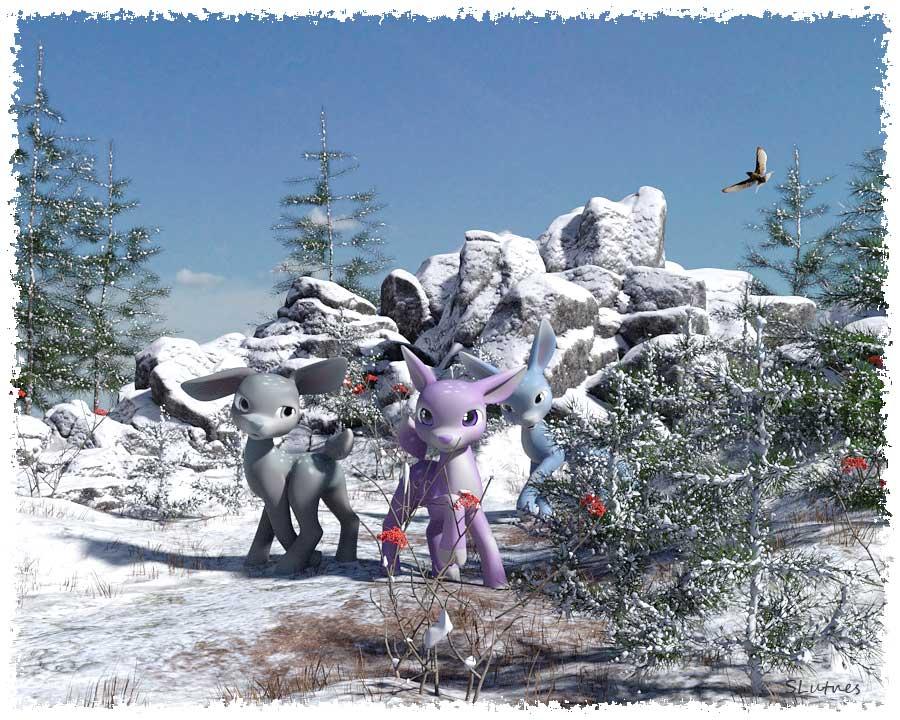
This is LadyLittleFox's Precious (deer) and Pestryakov Cozy Winter. It went over my 8Gig 1080 but still took only 11 minutes to render.
Suggestions for jungle setting?Maybe here:
Not So Fast 2! Main List~ Please-NO POSTS!Props
Cable Car Ansiko
Croquet Set ARTCollab
Cuban Patio (Tricycle/Cart) Ansikof
Eternal Slumber (Glass Lid Casket) ARTCollabns./Elliandra/NeilV 1
Ferry Boat Ansiko
Flower Cart (Cart) Age of Armour
Fountain of Health art-feld
Hammocks Ansiko
Haunted Toys (Jack In The Box) ARTCollab
Hooded Beach Chair Ansiko
Hoppy Easter Treats (Bunny Group) ARTCollab
Hot Air Balloon ARTCollab
Island Walkway Pontoon/Poses (hanging chair/pillows) Ansiko
Insalubrious Sanctuary (Bathtub) Ansiko
La Guillotine Ansiko
Ladybird Ansiko
Lawn Tools And Poses (Gen8M/F) (Leaf Blower) Age of Armour/DimensionTheory/Feral Fey
Lemonade Stand (Atticus Bones)
Medieval Training (Training Dummy) Atticus Bones
Medina Souk 1 (Market Stall/Canopy)
Nature-Water Plants (Water Lily/Leaf) Andrey Pestryakov
Party Time Balloons (Heart & Star Balloons)
Pirate Accessories (Cannon) ARTCollab
Pirate Treasure Chest, Coins, and Flag (Pirate Flag) Age of Armour
Puppy Playtime Props (Doghouse) ARTCollab
Road Trip Hippy Van (Van) Ansiko
Salem Props And Poses (Pillory) Ansiko
Sci-fi Drone 02 AcharyaPolina
SCI FI Marina: The Yacht (Yacht) Ansiko
Seatoy Ansiko
Shabby Chic Birdcage Anima Gemini/ RuntimeDNA
Strongboxes, Locks, And Keys (2 Chests) Age of Armour
Table Tennis ARTCollab
Templar Chamber (Bed/Curtains)
The Base Camp Part 1 (Gas Station Pumps) Ansiko
The Dungeon Props (Ball & Chain) ARTCollaborations/NeilV 1
The Raft Ansiko
Tiki Island (Tiki 2 Evil) ARTCollab
Toll Booth ARTCollab
Wagon Trail 1 (Wagon) ARTCollabSets
Aguja Undersea Environment (Arki)
Alien Place Andrey Pestryakov/Peanterra
Amphibian Pond Alessandro_AM
Ancient Ruins Andrey Pestryakov/Peanterra
Antarctica Expedition: The Ship Ansiko
Antebellum Mansion Aurelio
Beyond The Clock Ansiko
Chinese Garden Andrey Pestryakov
Crypt of the Recumbents (minimum 1 recumbent required) Ansiko
DM's Le Santuaire Anna Benjamin/Danie/marforno
Dystopia Streetscapes: Corner A Ajax/Moebius87
Eco Building Andrey Pestryakov/Peanterra
Frozen World- Icy Lake And Iray HDRI Aako
Green Cave Andrey Pestryakov
Harem Ansiko
Hidden Burial Ground Andrey Pestryakov/Peanterra
Infernal Place Andrey Pestryakov
Lifeguard Station Ansiko
Low Tide Andrey Pestryakov
Medina Ansiko
Mediterranean Courtyard And Towers Age of Armour
Modern Museum Age of Armour/Dimension Theory
Modern Washroom Alibama
Newsstand Ansiko
New York Brownstones Aurelio
Nihi Sumbra Cabana Ansiko
On The Beach Ansiko
On The Shore Andrey Pestryakov/Peanterra
Play Video Games art-feld
Public Pool Ansiko
Rock Bar Ansiko
Ruins The First Snow Andrey Pestryakov/Peanterra
Sci-Fi Surgery Room Ansiko
Sci-Fi Training Center Ansiko
SF Panorama Room Aako
The Cargo Hold ARTCollaborations/NeilV 1
The Dungeon ARTCollaborations/NeilV 1
The Mad Lab ARTCollaborations/NeilV 1
The Old Barn Age of Armour
Traditional Chinese Study Room Alibama
Tuscan Villa Aurelio
Venice Aurelio
Workshop Workbench (and Tools) AnsikoWho Are Some of Your Favorite PA's?- Deviney is the undisputed king of Photoshop brushes
- Colm Jackson for Terradome 3, Bokeh Studio, Pro Studio, and Render Studio light sets
- Dreamlight for his specialized light sets and tutorials
- AntFarm for the unique fantasy & sci-fi props and sets like Sci-Fi Black Market Alley, Jungle Temple, Land of Iron Orcs, and included light sets and cameras
- Orestes Graphics for the great HDRIs and sci-fi/fantasy props like Hall of Ancients and Wraithgate
- MortemVetus for his Terradome 3 morphs and TerraLuna3
- DimensionTheory for Skies of iRadiance, iRadiance Light Probes, and Tonal Rage
- Mousso for the amazing characters like Joanna for G3F/G8F
- RawArt for the great fantasy characters like Orc Brute for G8M
- Petipet for anything sci-fi
- Andrey Pestryakov for all the great Nature props and sets like Mountain Trail and Ancient Ruins
- Hinkypunk for the awesome fantasy characters like Nargol and Aunrae
- Fred Winkler Art for his awesome fantasy characters like Galan, Saida, and Chara
- Kool for Astrid Elf, hair, and Elf Armor
- IgnisSerpentus for all the amazing unique fantasy clothing and included poses
- Parris for the awesome IBL Master so I can see and rotate the HDRI in Texture Shaded mode
- Every Stonemason set, which also include cameras and lights
- Marshian for the great unique light sets like Rim Light Rig Iray and Reflective Radiance for 3Delight
- SickleYield for the awesome Beautiful Skin products and People of Earth faces
- KindredArts for Ghost Lights!
And so many more!
[Released] Mossy Hollow BotanicaYes I have ieas for some forest sets, not sure how big I can go without bringing Studio to a halt.
But I have an idea how to do this:
You are doing modules.
Each modules is 30x30m and have a scattered vegetation. The vegetation is not visible in the studio! That means you see in the studio only one of each plant.
That will allow us to use many modules withouth a big performance impact in the studio.
But the solution has a catch: It's diffuclt to set the characters in the scene when you don't see where the trees and shrubbery are.
My suggestion for this is, each module has an Gemoetry Shell with a texture which shows where the vegetation is (e.g. a green dot is tree, a yellow dot is shrubbery, a grey dot a big stone and white is empty or grass). The Geometry Shell is invisible as default. You just turn it on if you need it for position and posing your props.
There are differnt modules, like:
- dense forest- light forest
- clearing
- Hill
- Mountain (and modules for connecting a mointain module to a flat module)
- Modules with paths and modules where the path ends
- Lake
- a smal river
But let's get to the clou. There is a script similar like the script from https://www.daz3d.com/auto-paverwhich lets you design your own forrest (by selecting the modules in the edtior).
The prodcut would be perfect if there are also some "random modules". They are only aviable in the "Wood designer" script and set on random places trees and plants. The geometry shell texture shows only the places which are empty. That means they are different random modules which differes in the predifned empty places.
This would be the perfect wood consturction set ;)The issue of how to avoid viewport lag has come up several times with Howie's Harpwood Trail set. The attached jpeg shows Tango Alpha's solution to this specific problem. Perhaps a similar solution could be used with Mossy Hollow?
Peanterra and Andrej Pestryakov adopted a slightly different technique with the recent Bend of the River set. The high poly vegetation can be switched off when composing the scene and then switched back on for the final render, assuming a tree doesn't then appear in an inconvenient spot.
Cheers,
Alex.
Brad Carsten - Books and Tutorials.Hi everyone. I've been using DS to create book covers and promotional images for a while now, and I decided it was time to stop lurking and to carve away a small space to put up some of my musings and artwork. I also thought it may be fun to show you how I create some of them. I've learned so much from everyone, and that's my way of paying it forward.
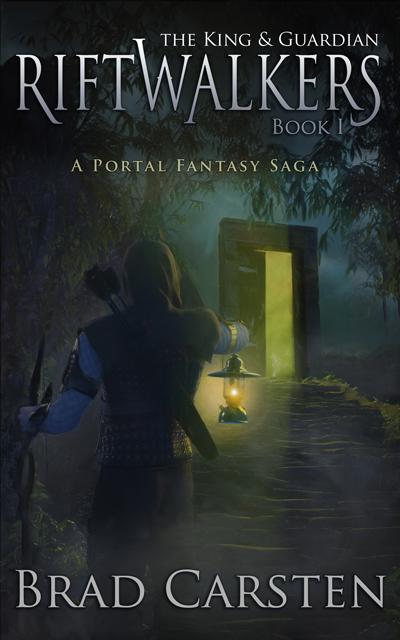
The first is the original cover for Riftwalkers: The King and Guardian. It's a Portal fantasy novel (People finding a doorway from our world into a fantasy world) I wanted to emphasise the Portal on the cover, so that people know what it is just by looking at it, and I also wanted it to have that painted look of those books from the 90's, because that's what inspired the novel.
Unfortunately, this image is a little dark when you look at it alongside some of the other images on Amazon, so I'm in the process of redoing it. I have however already created the tutorial, so I'll post it, and then show you the changes once I'm done with them.
First up is the finished image.
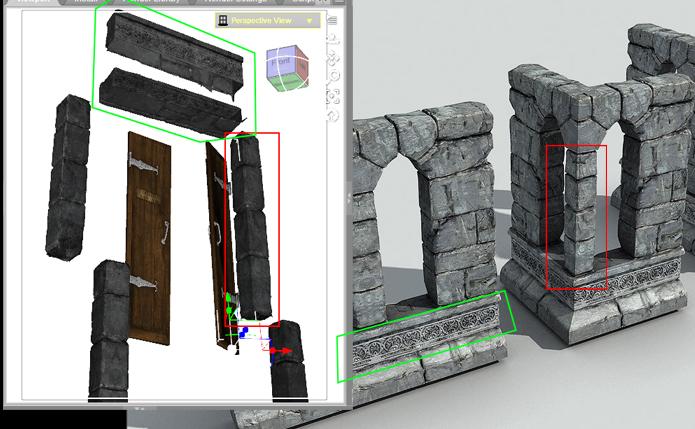
I wanted the doorway to have depth, so that you can see that there isn't anything behind it.
To do that, I exported StoneMasons's gothic ruins into Blender and cut away the highlighted pieces. I realised the undersides of the lintel are hollow, so I simply duplicated it, turned it on its side and popped it into place. Crude, but it doesn't matter because it's going to be in the distance.
Those amazing doors were taken from Jack Tomlin's A Curious Pub.
The scene is Andrey Pestryakov's Stairs and Rocks. I took out the default trees and replaced them with Stonemason's Jungle construction kit so that they would hang over the doorway, creating a tunnel.
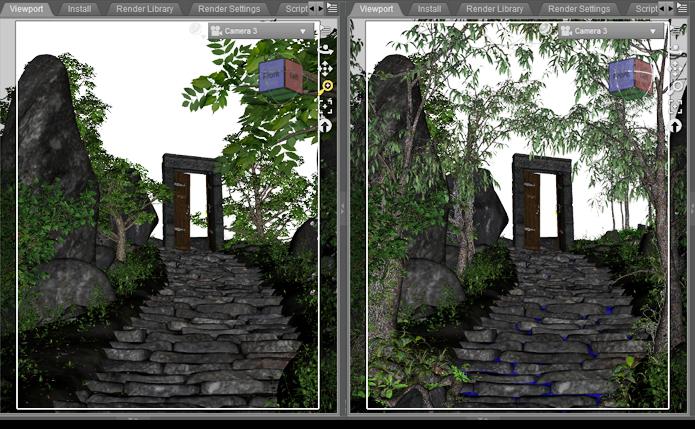
Next up was a pic of some stormy clouds for the background. Clouds are so good at creating drama in a scene.
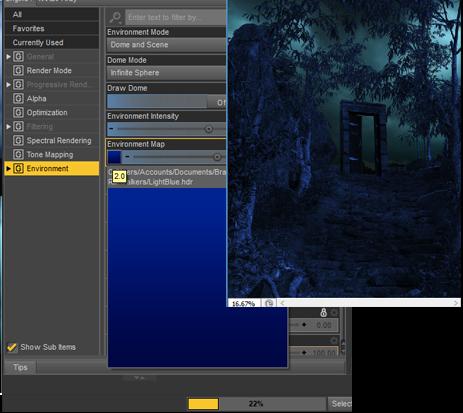
I then created a blue HDRI and used that as the environment light to render out a blue layer. This will be the night base that we'll build everything else on.
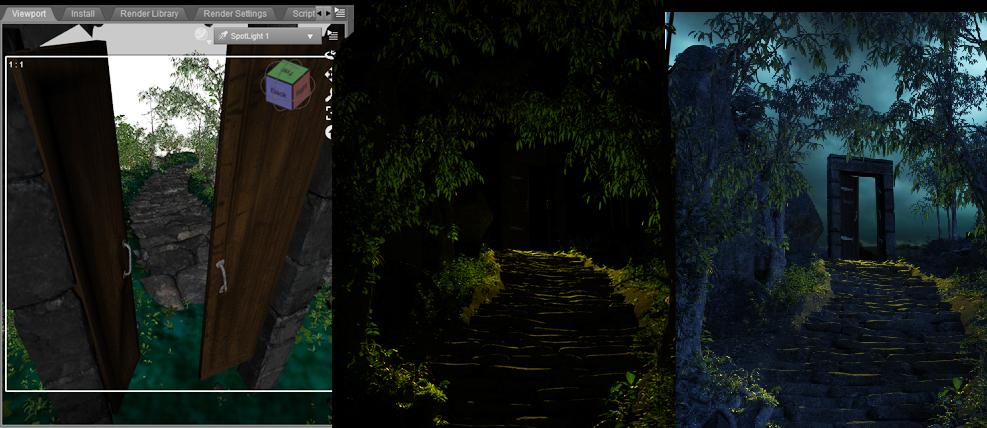
Next, I positioned a yellow spotlight behind the doors and rendered out a layer with nothing but the yellow light.
In PS I dropped that on top of the blue layer, and changed the opacity to 70% and the blending mode to "screen." This combines the two layers, giving you the flexibility to adjust either layer without having to render the scene over and over again. It wasn't bright enough so I duplicated the layer, doubling the strength and that gave the blue a rich yellow tint.
 Report sales errors here. Missed it? No worries. "There's Always Another Sale™"
The Build your own flash sale is supposed to for any artist item that is not on sale but when I try to use an item such as SY Supermorpher that is not new and not on sale the coupon doesn't work. In short Sickleyeild's store seems to have been omited from the sale. Can this be fixed before the sale ends?
Thanks
I can't get the flash sale to work either, I have 3 things from
Andrey Pestryakov store in my cart and there's no reduction on them.
Working for me on three non-new items from his store.
The Build your own flash sale is supposed to for any artist item that is not on sale but when I try to use an item such as SY Supermorpher that is not new and not on sale the coupon doesn't work. In short Sickleyeild's store seems to have been omited from the sale. Can this be fixed before the sale ends?
Thanks
I see this, will report
It seems that you can have only the 3 items in the cart to get the code to work anything else and the code comes up as not valid.
Report sales errors here. Missed it? No worries. "There's Always Another Sale™"The Build your own flash sale is supposed to for any artist item that is not on sale but when I try to use an item such as SY Supermorpher that is not new and not on sale the coupon doesn't work. In short Sickleyeild's store seems to have been omited from the sale. Can this be fixed before the sale ends?
Thanks
I can't get the flash sale to work either, I have 3 things from
Andrey Pestryakov store in my cart and there's no reduction on them.
Working for me on three non-new items from his store.
The Build your own flash sale is supposed to for any artist item that is not on sale but when I try to use an item such as SY Supermorpher that is not new and not on sale the coupon doesn't work. In short Sickleyeild's store seems to have been omited from the sale. Can this be fixed before the sale ends?
Thanks
I see this, will report
Report sales errors here. Missed it? No worries. "There's Always Another Sale™"The Build your own flash sale is supposed to for any artist item that is not on sale but when I try to use an item such as SY Supermorpher that is not new and not on sale the coupon doesn't work. In short Sickleyeild's store seems to have been omited from the sale. Can this be fixed before the sale ends?
Thanks
I can't get the flash sale to work either, I have 3 things from
Andrey Pestryakov store in my cart and there's no reduction on them.
Works fine here.
Report sales errors here. Missed it? No worries. "There's Always Another Sale™"The Build your own flash sale is supposed to for any artist item that is not on sale but when I try to use an item such as SY Supermorpher that is not new and not on sale the coupon doesn't work. In short Sickleyeild's store seems to have been omited from the sale. Can this be fixed before the sale ends?
Thanks
I can't get the flash sale to work either, I have 3 things from
Andrey Pestryakov store in my cart and there's no reduction on them.
Report sales errors here. Missed it? No worries. "There's Always Another Sale™"But 60%-off-with-new-purchase isn't available everytime a PA has a new release, and flash sales are unpredictable, so this might be the best chance for a while to get something you've had your eye on for a good, flat discount, especially for the rarer vendors.
It is for me.. I picked up some nice things from Andrey Pestryakov and Polish (I almost never see discounted except certain times of year like March Madness) that are no longer on sale today.. Looks like the PC content is still on sale.
BTW what is the "PA Festival"? never heard of it.
Welcome to the crazy world of Daz, @Rasberri. And welcome to the forums.
To date, Daz has three "event" sales each year, named sales that last a full month, (sometimes, usually, a bit longer.) The first is in March and called March Madness, or MM for short. The second is the PA Festival. During MM and the PA Festival, there will be, (usually are,) several days of "Catch Up" where all the items that have cycled off, (3 day cycle,) will be on sale at the intro price, and the all of the back catalog products throughout the store will be discounted. (In my experience, that means 50% off, but Daz likes to surprise us from time to time.)
The last "event" of the year, always held in October, is the PC Anniversary sale, which is a minimum of 4 weeks. During this sale, you will get the best bargains if you are a PC+ Member. If you are not, be on the lookout over the next few months for a sale price on the Annual membership. It is well worth it at full price, but Daz usually puts it on sale several times a year. Last summer, it was even at 50% off for non-members.
Traditionally, the PA Festival goes long, pushing the PC Anniversary sale into November to reach the 4 weeks. Then the holiday sales get started, usually with a "kick off," (my interpretation,) over the Thanksgiving weekend and Black Friday. While the holiday sales are not an event per se, Daz usually goes the extra mile to make the period between Thanksgiving and the end of the year something special.
So hold onto your hat, it's all but non-stop bombardment of great products at great prices from September 1st through the end of December.
Wow! Best description ever and thanks. Gotta make money reserved for the "ber" months lol. So much on my wishlist now, at least 2,571 lol.
You're welcome.

Daz 3D is part of

Connect
DAZ Productions, Inc.
7533 S Center View Ct #4664
West Jordan, UT 84084Licensing Agreement | Terms of Service | Privacy Policy | EULA
© 2026 Daz Productions Inc. All Rights Reserved.