-
G8F Limping Poses
I threatened to offer a crutch. So here it is:
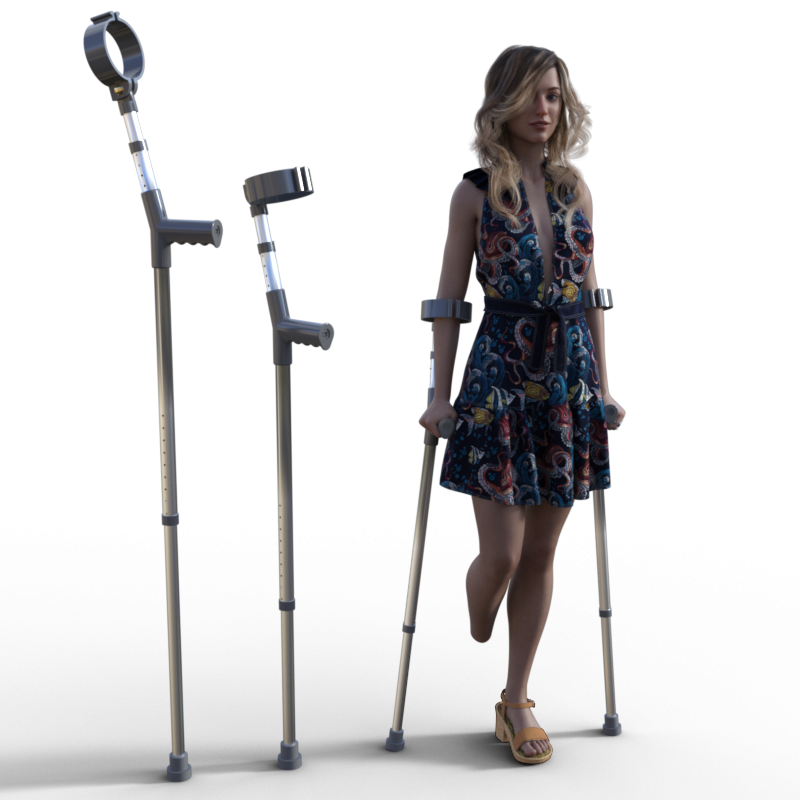
The crutch comes with two wearable presets, to fit them to left and right hands. There is a pose and mirror. The crutch has two morphs, the upper and lower sections, can be lengthened in 1cm increments. The top of the arm support can rotate through 90 degrees. There is a problem with the arm support that I don't know how to fix. If the top morph is non-zero, the arm support pivot drifts away from where it should be. To cure, reset the top morph to zero.
Anyway, I hope you find the crutches useful.
Regards,
Richard
Duplicate formulas found error after clean upFormulas are the links between proeprties, e.g. a body morph moving the joint centres so that the reshaped limbs bend in the right place. If there are two links with the same names at both ends then you will get that error, and only one of the links will load. It is important to try to make sure that your morphs have unique names (names rather than labels are the issue, so you can bung a fairly ugly prefix in front but tstill give the slider a more user-friendly label).
Duplicate formulas found error after clean upIssue resolved. It had something to do with renaming a custom morph of mine. Changed the name back and all seems fine.
Ooooh, how about that! Just in time!Petercat said:
ashley_a7119b30 said:
Ok might be a little Late but did someone say Treecat I was going a radom search for Daz3d Treecat one can only Dream can't do and Honorverse Render with out a Treecat :)
I suspect that creating a three-legged animal would be difficult, and not generate enough sales.
That's why we see so many things that are copies of existing objects.
If I have a space ship in my webcomic, for example, someone is bound to point out that it's from
such-and-such sci fi series. I have a copy of the Enterprise that I don't dare use, for example.
Maybe someone could start with the G3 Centaur and morph it into a cat figure.Treecats are Hexapeds, as in 6 not 4 limbs, or to be more accurate 3 pairs of limbs.
Ooooh, how about that! Just in time!ashley_a7119b30 said:
Ok might be a little Late but did someone say Treecat I was going a radom search for Daz3d Treecat one can only Dream can't do and Honorverse Render with out a Treecat :)
I suspect that creating a six-legged animal would be difficult, and not generate enough sales.
That's why we see so many things that are copies of existing objects.
If I have a space ship in my webcomic, for example, someone is bound to point out that it's from
such-and-such sci fi series. I have a copy of the Enterprise that I don't dare use, for example.
Maybe someone could start with the G3 Centaur and morph it into a cat figure.DAZ Speed - Any plans on improving this?Chumly said:
Hmmmm....
I gotta wonder though. I would have hoped that speeding up the morph loading solution and/or moving to a multi-thread approach would be a top priority for Daz, but I am getting more skeptical....
I would like to think that when RiverSoftArt approached DAZ with his pitch for the Turboloader suite, that Daz would have told him... "We don't feel that that would be a good use of your time and effort, because DAZ 5.0 is going to solve all those problems and your product will be redundant in 11 months..."
Maybe that conversation happened...RiverSoft?
But it probably didn't, so either DAZ 5 fixes these issues and Riversoft will have an unneccessary product, or DAZ 5 Doesn't fix these issues at all.... No offense to RiverSoft, but I am hoping that it is the former.I created the Turbo Loader for G8 product and submitted (never pitched the idea to Daz beforehand). If they had told me that DS5 will solve this (they did not say anything either way), I would have asked them to still accept the product unless DS5 release was right around the corner (which it wasn't). I am fine with releasing a product that might be obsolete if it is at least 6 months out. To be clear, Daz has not told me anything about DS5 and its capabilities. As a software developer for a long time, I ignore feature sets until I have a solid beta. Things change too much for me beforehand to waste time programming towards a feature that might never be released (or released anytime soon). Even knowing that DS5 might or will break some of the older scripts, I am ignoring it for now until it actually happens. What the final script interface will be will change too much to worry about it.
DAZ Speed - Any plans on improving this?Hmmmm....
I gotta wonder though. I would have hoped that speeding up the morph loading solution and/or moving to a multi-thread approach would be a top priority for Daz, but I am getting more skeptical....
I would like to think that when RiverSoftArt approached DAZ with his pitch for the Turboloader suite, that Daz would have told him... "We don't feel that that would be a good use of your time and effort, because DAZ 5.0 is going to solve all those problems and your product will be redundant in 11 months..."
Maybe that conversation happened...RiverSoft?
But it probably didn't, so either DAZ 5 fixes these issues and Riversoft will have an unneccessary product, or DAZ 5 Doesn't fix these issues at all.... No offense to RiverSoft, but I am hoping that it is the former.AOBB's head morph Violet for G8.1F based on Elizabeth Taylor. No materials nor textures.Wow, I didn't expect I would make this head morph so fast! One day - that is a record of mine! It was so easy to make it, I'm totally dumbfounded.

Anyway, I present you Violet:
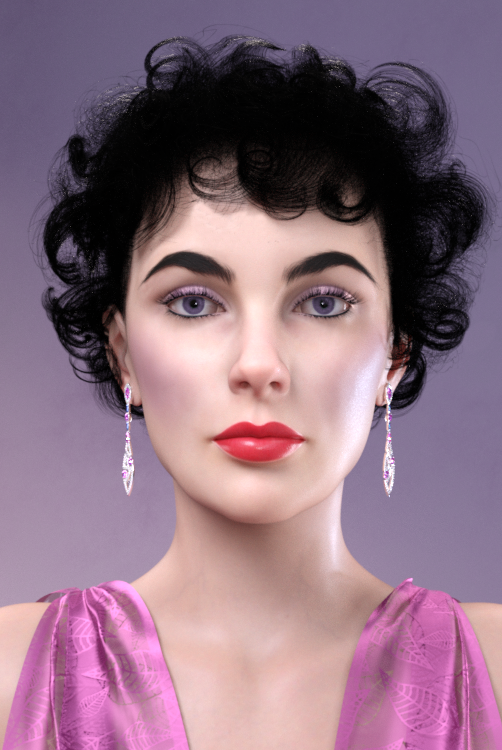
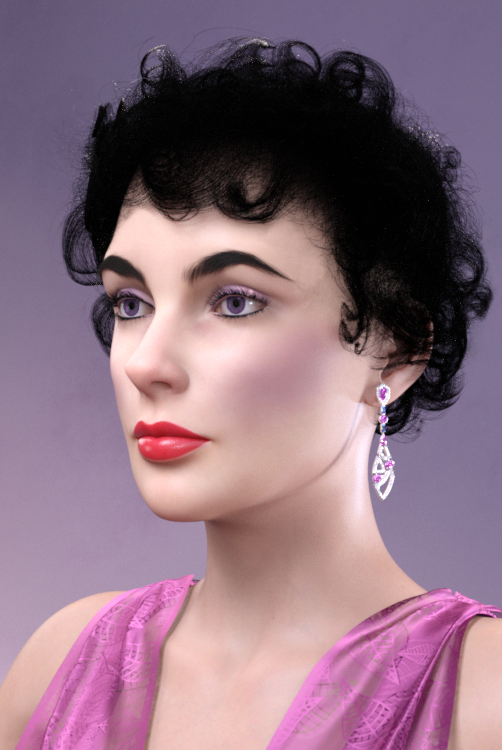

Please, noncommercial use only!
Assets used in the promo images:
Adrian Fishtail Gown for G8.*F
Jewelled Excellence – Earrings 3 for G3,8F
Cute Baby Hairs for G8F
Beautiful Brows II for G8.*F (Brow8, Brow10)
Lashes Utilities for G2,3,8.*
BOSS Pro Light Set for Portraits & Promos
MSO Rain HD for G8.1F (PBR skin material)
MSO Mina HD for G8.1F (lip material)
Ultimate PBR Shader Makeup for G8.1F
Materials Wizard for G8.*F
Per usual - please indulge me and post your renderings with Violet in this thread for me and everyone else to enjoy!
BTW: The name Violet for this head morph came from the myth that Elizabeth Taylor had violet eyes. They were actually blue but my character is true to the myth!

Enjoy, guys!
Cheers,
AOBB
Convert Genesis 8.1 model morph to 8.0cprc4080 said:
How do you transfer 8.1 to 8 I need to know please.
What do you want to transfer, morph, textures, wearables and why?
Convert Genesis 8.1 model morph to 8.0How do you transfer 8.1 to 8 I need to know please.
AIUTO...CHI CONOSCE L’ITALIANO? PARTE TREDICIAnfy said:
@Tiziano: ho provato tutti e tre le "app" (FaceGen, Face Transfer, Headshop) e quasi paradossalmente quella che mio piace di più è Face Transfer integrata in DAZ Studio, però con l'acquisto da un lato del modulo per creazioni illimitate e senza watermark (Face Transfer Unlimited) e - dall'altro - del per me fondamentale Face Transfer Shapes for Genesis 8 che "corregge" in qualche modo la vista laterale che Face Transfer - basandosi su una sola immagine frontale - non può interpretare.
Magari dico cose ovvie per te, in tal caso scusami!
Nono, grazie a tutti delle info. Cercherò di fare qualche esperimento.
AIUTO...CHI CONOSCE L’ITALIANO? PARTE TREDICI@Tiziano: ho provato tutti e tre le "app" (FaceGen, Face Transfer, Headshop) e quasi paradossalmente quella che mio piace di più è Face Transfer integrata in DAZ Studio, però con l'acquisto da un lato del modulo per creazioni illimitate e senza watermark (Face Transfer Unlimited) e - dall'altro - del per me fondamentale Face Transfer Shapes for Genesis 8 che "corregge" in qualche modo la vista laterale che Face Transfer - basandosi su una sola immagine frontale - non può interpretare.
Magari dico cose ovvie per te, in tal caso scusami!
Prominent/Bucked Teeth - the best way to do this?Seven193 said:
I think that's up to you. There are morphs for the skull, and morphs for the skin. You can find good reference pictures if you Google for 'overbite skull'. If you move the jaw, I think the skin is going to automatically move too, as the skin follows the bone to some extent. So, I would setup the bone morphs first to see what the jaw looks like, before moving on to the skin morphs. BTW, you can turn off the visibility of the face skin in Daz Studio to see the skull better for jaw alignment.
i was a bit disappointed that i'd made my head morph (jaw) a little understated and was planning on re-doing it, i'm ashamed to say that it didn't occur to me until just now to break the limit on my first attempt and set the new limit to 200% - that seems to work ok and doesn't look too unnatural, and though i'll never dial it to 200%, 120 -150 are quite possible. at least that's one thing i don't have to re-do.
on the teeth i had made a small increase in the gap between them, but because the morph is so extreme, you never get to see the gap because the morph is always dialed in very low. so that one i *will* have to re-do. one day. not today.
I managed to spot an excellent reference in Rogue One the other night, a good clear segment of Ms. Jones from the side showing the mouth both closed and slightly open, confirming my guess as to what should be where
with apologies to Mara, my poor figure who is suffering so much in the name of science, this is the current state of my morph set - i'll re-do the teeth but the rest can stay as is.
AIUTO...CHI CONOSCE L’ITALIANO? PARTE TREDICI@Tiziano
Non penso che esistano.. potresti ricrearli con Face Transfer o Headshop.
Prova prima a vedere se riesci a trovare le foto di reference per poter usare i plugin
Diffeomorphic DAZ Importer version 1.6.0 released@wolf359 I was looking at a youtube video about that the other day, glad to know that it's a must have. I'll snag that for sure this week now, thanks for the recommendation!
@Padone I just checked Blender and yeah, the make bones posable is automatically checked for me when I click easy import, I know I didn't uncheck it. Like I said, the face moved just fine, the eyes just reset after I added in the facecap FACS file and tried to adjust a morph afterwards. But as long as I don't move a morph, it works as intended.
EULA Update & Editorial Licenses Coming to DazRichard Haseltine said:
Most of the Flipped Normals content already has a non-commercial use clause, stated oin the product page. The old Anne Marie Goddard Digital Clone for Victoria 3 had some limitations, also stated on the product page.
Honestly, I have no idea what Flipped Normals means by "Non-Commercial Use", which is part of why I've never bought any of it. They're tutorials - am I supposed to forget everything I've learned from them if I ever start a commercial project?
Seriously, what does "non-commercial use only" mean as far as a tutorial?
~~~~~
As far as the Anne Marie Goddard Clone, that's no longer for sale on the store, and the fact that Daz *used* to sell a product with additional restrictions doesn't necessarily mean that it's a good idea to do so again.
Tthe use of Daz products is already extremely confusing to a newcomer, and the number of times on Discord I've had to go through the difference between standard and interactive licences, or "no, Victoria 4 isn't a Genesis 8 morph", or "That character's built off Michael 8, you'll need him too to get the results as in the promos", or "no, you're not allowed to do that, that involves sharing the mesh files", or "No, Olympia 7 is a Genesis 3 character, there was no Genesis 7"...
... at least one thing that was extremely simple about the default licences for an asset was that "As long as all that leaves your computer is pixels you've rendered, you've basically got free reign". Render it in DS, render it in Unreal, render it in Blender, modify it, combine it, make seventeen backups, sell the work, put your renders in an erotic game... as long as it wasn't otherwise illegal, the simplicity of how permissive the licence was was one of the major selling points at Daz.Given the level of confusion that already exists, I think it's extremely important that every possible step is made to keep it simple for newcomers.

(xkcd by Randall Munroe is licensed under a Creative Commons Attribution-NonCommercial 2.5 Licence)Recommendations for G8f Free Lip MorphsHello -
As the subject says, I'm developing a G8F character that needs some facial features augmentation, but not enough to justify the purchase of an expensive lip morph kit. Anyone have any recommendations for filling out lips a bit?
Thank you!
Morph Loader Pro - my custom preset is not shownRichard Haseltine said:
As the video shows, you need to right-click on the morph with the options you wish to make a preset.
Thank you so much, Richard. It turned out to be so simple and I couldn't figure it out on my own
 Now I know it!
  Diffeomorphic DAZ Importer version 1.6.0 released
I'm just wondering if anyone has had this problem with using FACS along with the gaze controller with the MHX rig. So I animated my character's body and then I animated her gaze to be exactly where I want it. I have gaze set to 0 to follow the head because I want her eyes to stay if the head moves, no problems yet. Then I add in the facecap file wtih FACS and turn off every checkmark, including eye rotation because I don't want anything messing with any keyframe on the body or eyes. No problems again, the FACS come in and her eyelids, mouth, cheeks, everything is working fine and her eyes still follow the gaze controller. Perfect, everything is looking exactly how I want it to. Then I want to go into the FACS morphs and manually keyframe the tongue to move when it should when she's talking since that never really transfers over with facecap, even in Daz, and then as soon as I move the tongue morph (or actually I discovered upon more testing that it's any morph be it her body, face, visimes, FACS, whatever) the eyes immediately jump to the neutral position and I can't move them anymore. I re-opened the scene, tried it again and her eyes were perfect before I touched a morph and then they went back to neutral. So I'm wondering if there's a setting somewhere that I'm not aware of that would give me back control of the eyes if I move a morph, or is it just the way it is and I have to adjust everything like the tongue and make sure it's perfect before I run the facecap file? That's what I ended up doing with her tongue, but it's pretty rough trying to guess how high to bring it up without seeing the mouth open and lip formation. I guess I could key the mouth open and delete that right after before running the FACS facecap file.
If this doesn't make sense, I can do a screen recording tonight when I'm done with work to show. And I'm using Blender 3.0 and Diffeo 1.6.2.1040 If this is fixed with a newer version of the plugin, if there is a new version since mid June, I'll just deal with it for this project as I've had things change on me in the past if I update plug-ins mid project and things didn't quite match up as they were material-wise. Just curious if this is known or not. Thank you!
AIUTO...CHI CONOSCE L’ITALIANO? PARTE TREDICI@Cornelius
Innanzitutto benvenuto.
Ribadisco anche io cosa ti ha detto @Imago... dipende da cosa vuoi farci.
La 3060 avendo 12GB immagazzina più asset in memoria (modelli e texture) e dunque permette di gestire scene "enormi" ma renderizza più lenta rispetto la TI (che ha invece più processori) che avendo meno memoria può contenere scene meno pesanti.Dipende da cosa usi di solito della libreria DAZ: se usi personaggi come Victoria/Michael 4, Genesis 1/2/3 e relativi vestiti/accessori puoi usare la TI perchè i modelli e le texture non sono così pesanti e dunque 8 GB ti bastano (a meno che non fai render di quartieri), inoltre la TI ti fa renderizzare il tutto più velocemente con Iray.
Se invece usi i Genesis 8/8.1 con i morph HD (che moltiplicano di 4 o anche 16 volte il numero di facce) e poi usi i vestiti con Dforce e ambientazioni con texture da 8-16k dovresti usare una scheda video in grado di contenere questi GB anche se renderizzerai ad una velocità minore. Ricordati che puoi sempre spezzare il render in più parti e poi ricomporlo con Photoshop (personaggio + sfondo) o puoi usare plugin per ridurre le texture e il numero di poligoni (Decimator della DAZ).
Infine usi Iray in versione interattiva (real time)? Se si la TI velocizza l'anteprima.
Come vedi entrambe hanno vantaggi e svantaggi.. ma sta a te sceglierla in base all'uso che ne farai.Daz 3D is part of

Connect
DAZ Productions, Inc.
7533 S Center View Ct #4664
West Jordan, UT 84084Licensing Agreement | Terms of Service | Privacy Policy | EULA
© 2026 Daz Productions Inc. All Rights Reserved.