-
Diffeomorphic - Shoes or Footwear Tutorial Anywhere?
On the contrary, changing the rest pose will allow your pose set to work on every footwear, as relative pose for the footwear. Provided you make the pose set with the standard figure. If you instead want the pose set to ignore the foot pose then yes it's selected bones.
However, personally I don't use that workflow as I rather export one figure for every dress, also because I can delete not visible geometries that way. In one story I rarely need more than two or three versions of the same character so this is the easy way for me. Also I generally don't use the daz pose sets, or import them from the daz library if really need to. Reason is the blender pose sets are specific to a single rig, while daz poses can be imported on any rig.
{Diffeomorphic} HD Import Results in Blender Not Responding, More Often Than NotPadone said:
To give advice we have to start somewhere, try to make a case as simple as possible which doesn't work for you, so we can look at it. Or you can also check if there's some evident difference between the cases that work and those that don't.
I was thinking about this.
What usually does not work: dForce hair. I don't know if I have ever gotten an import to complete when dForce hair (and to be clear, we're talking about stand based hair, not sheet hair with dForce applied).
What did work: character with a full outfit of Luthbel armor, no dForce hair or geocrafts.
/edit, of course as soon as I posted this I was able to import the character I most wanted in HD with all his body hair intact.
Diffeomorphic - Shoes or Footwear Tutorial Anywhere?I'm still struggling with wrapping my head around transferring footwear to another model, ie: My custom textured Blender Model. I import the Daz character, custom texture it. Apply outfits with shoes in Daz, import it into Blender with Diffeo.. then I'm LOST.
I need a way to change armature whithout having to mess with the rest pose and all, so I can import various outfits and just pick the right foot POSE for the different shoes/boots. The outfits themselves are zero problem, but dealing with footwear is 100% problems.
Does anyone have a tutorial or link to one that could help me get a grasp on this? Currently running Blender 5.1.2 w/Diffeo 5.1.0
There's Always Another Sale Thread -- Discussions Only Pt 6SilverGirl said:
memcneil70 said:
If you are a Mac user and want to use Filament, DS6 is your only choice. In DIM I am seeing more and more products being updated weekly now that DS6 is more stable. I also can start projects in DS4 and then save and open in DS6 when I am ready for a faster render.
Does DS6 render faster for Iray too? My CPU is newish (2023) but not exactly top of the line, and it struggles with some scenes.
ETA (now that I'm on my computer and can look):
graphics card: NVIDIA GeForce RTX 3060 (12 GB)
processor: 3th Gen Intel(R) Core(TM) i7-13700 (2.10 GHz)
installed RAM: 16.0 GB (15.7 GB usable)
OS: Win11
-- if that's relevantI have to be honest that my main computer is my MacMini M4 64GB. My Win11 with an RTX 4090 is to keep me relevant after my Win10s with GTX1060 and GTX1060Ti and no longer supported by anyone. (I hate that because the Win10 laptop is the only one that allows me to fully correct my metadata when it is totally screwed up.)
During summer I only run one computer at a time due to heat build-up in my room. So other than keeping the Win11 updated with Windows update and DIM, I am not using it.
But Window users seem to get good performance. Best idea is to create your render in DS4 if you need plug-ins/scripts not yet updated, save, close and then close DS and reboot your computer. Reopen, open the file in DS6, immediately go to render, making sure your set-up is still correct and start.
Depending on complexity of scene it can take as little as a few seconds or as long as hours (Macs). If you can depreciate any unnecessary textures that might be stressing your system, do so. Me, I just eat the time and do something else in the meantime. I have tested some of my renders in both DS4 and DS6 on the Mac and sometimes not seen much difference, but have not done so on the latest DS6 Beta that came out this past week.
Having errors with Crop Top Outfit by 3DStyleFinally bought this product after contemplating for so long, just for it to not work properly.
I mainly bought this for the top, and the top itself loads fine, but when trying to apply materials using the content library, I can an error telling me to check the log file, and the log file says this:
"2026-07-31 11:31:29.713 [INFO] :: Prepare asset load (merge): /People/Genesis 9/Clothing/Daz Originals/Crop Top Outfit/Materials/CTO Gold and Black/CTO Crop Top Gold.duf
2026-07-31 11:31:29.713 [INFO] :: Locking viewport redraw...
2026-07-31 11:31:29.713 [INFO] :: Viewport redraw locked.
2026-07-31 11:31:29.762 [VERBOSE] :: Native format content directories: 3
2026-07-31 11:31:29.762 [VERBOSE] :: Poser format content directories: 2
2026-07-31 11:31:29.762 [VERBOSE] :: Other import format content directories: 0
2026-07-31 11:31:29.762 [INFO] :: Begin asset load (merge): /People/Genesis 9/Clothing/Daz Originals/Crop Top Outfit/Materials/CTO Gold and Black/CTO Crop Top Gold.duf
2026-07-31 11:31:29.767 [INFO] :: Determining missing assets...
2026-07-31 11:31:29.793 [WARNING] :: Invalid hierarchy for selected node(s) and "preset_hierarchical_material" type; no root(s) found.
2026-07-31 11:31:29.793 [WARNING] :: Error loading asset: C:/Users/Public/Documents/My Daz Stuff/People/Genesis 9/Clothing/Daz Originals/Crop Top Outfit/Materials/CTO Gold and Black/CTO Crop Top Gold.duf
Operation failed
2026-07-31 11:31:30.242 [INFO] :: Unlocking viewport redraw...
2026-07-31 11:31:30.242 [INFO] :: Viewport redraw unlocked.
2026-07-31 11:31:30.714 Iray [INFO] - IRAY:RENDER :: 1.0 IRAY rend info : Received update to 00844 iterations after 34.391 s.
2026-07-31 11:31:34.171 Iray [INFO] - IRAY:RENDER :: 1.0 IRAY rend info : Received update to 00935 iterations after 37.849 s.
"
I even tried just loading the top by itself in a new scene and then tried to apply the materials and it still won't work. I don't want to manually apply them, so does anyone who owns this product know what's going on?{Diffeomorphic} HD Import Results in Blender Not Responding, More Often Than NotI don't know why. It's probably me. Maybe I'm doing something I shouldn't, or there are steps I am supposed to do that I am missing. But probably 7 times out of 10, Blender hangs somewhere during the process (Not Responding, never comes back).
Any tips or anything I can look at (I've read over the documentation available a couple times, but maybe I missed something)?
TurboMetaBot Metadata BrowserHello All,
Looking for feedback on an open-source plugin I'm developing. It's basically a swiss army knife for browsing through smart content.
Beta is available at the gh page https://github.com/TurboMetaBot/turbometabot-metadata-browser
See it in action here: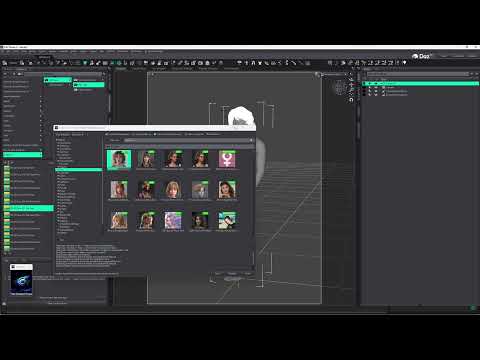 [Released] Ultimate Zero [Commercial]
crosswind said:
We've already said they lack of metadata, that's why they don't appear in Smart Content. Daz should fix the metadata. I'm also a heavy user of Smart Content so I fixed them in the first place anyway.
You did, but there is a difference between "they don't appear in Smart Content because they don't have metadata" (implying default) and "Daz changed something that affected/removed the metadata."
I'm glad you fixed them, but I don't really have enough time nor the will to actually learn how to fix metadata, especially that it wasn't me who broke it, and Daz doesn't sell products as "DIY metadata" but as "metadata included." ;)And as I said above, one problematic script makes all scripts not work in DS 4.24. RiverSoft Art is fixing it... I believe.
Yup. I saw that. As I said above, I was just adding a data point.
[Released] Ultimate Zero [Commercial]joanna said:
crosswind said:
You can find all the scripts in Content Library, under : your Daz Library\Scripts\RiverSoft Art\Ultimate Zero.
You only see 3 scripts in Smart Content... because other 11 scripts have no metadata. If you categorize the scritps, you'll be able to see them all in there ~~
I pretty much never use content library (I think only two products are an exception), and I used all those scripts in the past, so they were definitely in the smart content. They aren't now.
And as Barbult said, they still don't work.We've already said they lack of metadata, that's why they don't appear in Smart Content. Daz should fix the metadata. I'm also a heavy user of Smart Content so I fixed them in the first place anyway.
And as I said above, one problematic script makes all scripts not work in DS 4.24. RiverSoft Art is fixing it... I believe.
[Released] Ultimate Zero [Commercial]crosswind said:
You can find all the scripts in Content Library, under : your Daz Library\Scripts\RiverSoft Art\Ultimate Zero.
You only see 3 scripts in Smart Content... because other 11 scripts have no metadata. If you categorize the scritps, you'll be able to see them all in there ~~
I pretty much never use content library (I think only two products are an exception), and I used all those scripts in the past, so they were definitely in the smart content. They aren't now.
And as Barbult said, they still don't work.Released: HedgeMaker [Commercial]Elor said:
I didn't think it was possible to have a mistake in the name of the package but not in the name of the product (likely because the script I'm using to create package does get all the needed informations inside the .dsx files containing all the metadata), but yes, I saw the problem in DIM.
As plugins are much more special when packaging, a lot of manual steps are involved.
Released: HedgeMaker [Commercial]I didn't think it was possible to have a mistake in the name of the package but not in the name of the product (likely because the script I'm using to create package does get all the needed informations inside the .dsx files containing all the metadata), but yes, I saw the problem in DIM.
[Released] Ultimate Zero [Commercial]joanna said:
Jumped in here hoping that I'd see a solution to my problem (Ultimate Zero not working in the DS 4.24.0.4), and I see others have the same issue. So adding a data point: when I opened it today, I only had icons for 3 scripts visible in Smart Content (Ultimate Zero Selected, Ultimate Zero Turn Locks Off, and Ultimate Zero Turn Locks On), and I thought that maybe something glitched somewhere, so I unistalled it and reinstalled it. Same result. When I tried to use the Ultimate Zero Selected, an error pops up and the log file says:
2026-07-29 18:58:52.312 [WARNING] :: Failed to load script: F:/My DAZ 3D Library/scripts/riversoft art/ultimate zero/ultimate zero selected.dse
And I have no idea where the other utilities went (they aren't in the product library either).You can find all the scripts in Content Library, under : your Daz Library\Scripts\RiverSoft Art\Ultimate Zero.
You only see 3 scripts in Smart Content... because other 11 scripts have no metadata. If you categorize the scritps, you'll be able to see them all in there ~~
Released: HedgeMaker [Commercial]jmucchiello said:
I have a question. Is there a resource anywhere with Set Builder sets premade for other artists' plant assets? I don't mean providing the assets. I mean somewhere I can get Hedgemaker - Set Builder sets for products like the various Martin J Frost plant products. Basically so I don't have to import them all, name them correctly, etc. :)
Thanks in advance.
Sorry I missed this question was when the forums were buggy, Yes, Martin J Frost has several premade sets with his Hedgerow Kits
MimicMolly's Renders & WIPsThis is a screenshot of the jacket map. (The soft color block is from a camo design I have completed. I just need to do the boots, belt, necklace and top.) I am mostly working on it in 2D art apps, because that's what I'm most comfortable in. The purpose of this project was for me to have something in my 3D renders that I could say that I 100% created it. Even though, at this point, it's just a lot of copy-pasting and rotating. I do import into 3DCoat to try to get the seams lined up, but most of the touch ups are by hand.
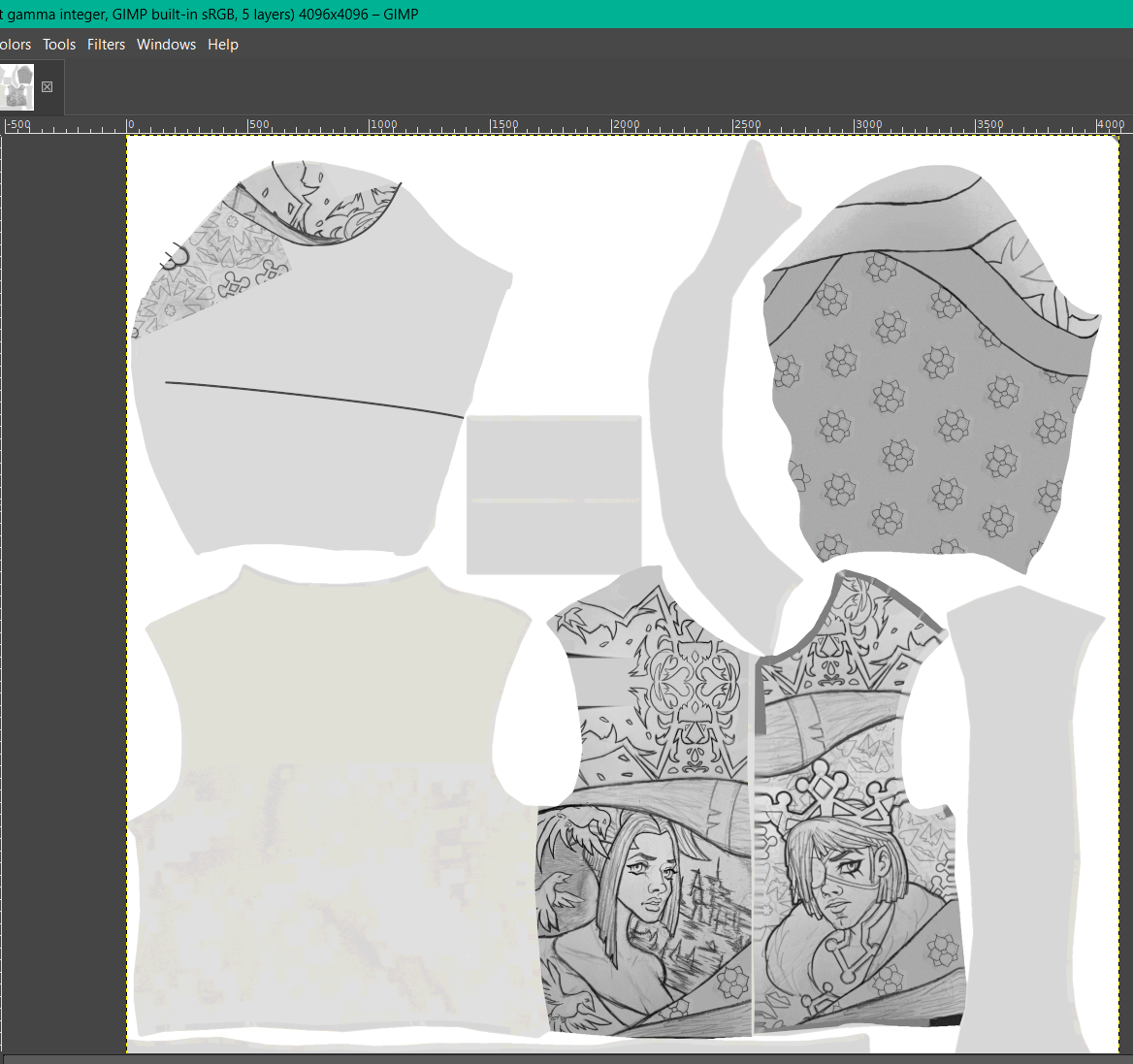
I tend to color my more detailed work in an unconventional manner. Most people tend to discard any pencil sketch they do, after digitally lining their work. In this particular workflow, I colorize the pencil sketch and paint onto it more, since I want it to further blend together. I even add noise to the purely digital parts just so they could mimic the paper texture, and blend seamlessly together. Nowadays, I tend to have a "big" art project that utilizes this workflow and it seems this jacket is that big project. Unfortunate, because I love posting these to my main DeviantART gallery.
TBF, I think most DAZ texture artists who do freestyle drawings for their textures tend to do tattoos than complicated doodles like I'm doing. The closest I have seen that I can prove to you is the octopus tattoo of Maxx HD Mega Pack for Brute 8.
[Released] Ultimate Zero [Commercial]And, yes, the metadata in the update is garbage. It includes Asset definition for only three scripts and does not even indicate compatibility with Genesis 9.
EDIT: After restoring from NAS backup from yesterday, I see that the old metadata is not completely right either. The Ultimate Zero Head is not included in the Product section and does not have metadata for category, type, compatibility, etc. The old metadata does not show compatibility with Genesis 9 either. I never noticed the missing Head script in the Product or custom actions.
Older version of DAZ StudioI can't help you with obtaining Daz Studio 4.12 (I don't think anyone legally can share it with you aside from Daz themselves)... But are you sure you can't save a custom G1 character as a morph asset?
Using Daz3D version 4.24.3... I've just loaded a Genesis 1 female character into the scene... Changed her Resolution Level to Base, then exported to Obj, imported her into Blender (keeping vert order) and morphed her nose to be more like pinnokio as a test, then exported her to obj (keeping vert order in tact). Then used Morph Loader Pro to import her (with Reverse Deformations: YES, since the G1 female is already an active morph, but if you just use the base G1 model then you might not need that)... Then I went to: "File -> Save As -> Support Asset -> Modifier Asset", checked the morph I had just imported with Morph Loader pro and saved it.
Starting a new scene and loading the G1 female model, makes the morph available (I hadn't changed anything so it was under "Morphs -> Morph Loader"), and when I open GenX and select the Genesis figure the morph is visible under the "(geometry) geometry" group and I can check it...
I'll admit I haven't actually tested a conversion to Genesis 3... But GenX at least sees the morph and Daz3D also let's me dial the morph in. So the morph seems to be working inside of Daz3D at the very least.
Diffeomorphic Add-ons Version 5.2.0 ReleasedKeep getting this message when I import into Blender from Daz and try to change the Daz rig to Rigify.
Blender 5.1.0, Diffeomorphic 5.2.0, MacOS running Tahoe 26.x
Has not worked for any Blender version past 4.5 for me.
[Released] Content Wizard [Commercial]RiverSoft Art said:
The message is telling you that CW detected the metadata that Daz Studio already has for this file, presumably when you first installed it with CW. I would not overwrite your configuration file with it.
Hmmm. The problem here is it doesn't seem to matter if I select "Overwrite" or "skip" the result is the same. No category or compatability data in the table view. Sometimes it works and restores the previously entered settings but most of the time it doesn't. No error messages.
[Released] Content Wizard [Commercial]Alric said:
Still fighting with it. I have more info though. I was trying to re-open a saved project but it looses all the settings on loading. When I try to re-analyze the file is says that previous metadata has been found. I select "overwrite" and all the settings are lost. So I tried it again but paid close attention to the pop-up messages. Thje first screen shot shows the message but note that the "category" is blank...
Looking in the text file the category is not blank, see second screenshot. I have also just attached the whole config file. Is there something wrong with it?
The message is telling you that CW detected the metadata that Daz Studio already has for this file, presumably when you first installed it with CW. I would not overwrite your configuration file with it.
Daz 3D is part of

Connect
DAZ Productions, Inc.
7533 S Center View Ct #4664
West Jordan, UT 84084Licensing Agreement | Terms of Service | Privacy Policy | EULA
© 2026 Daz Productions Inc. All Rights Reserved.