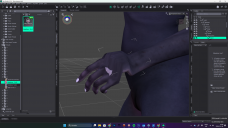
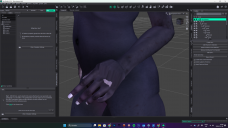
Imported Poser (.pz3) model messed-up hands
 gyflora993
Posts: 0
gyflora993
Posts: 0
Hi guys,
I would need a little help in fixing this. I created my custom model in Poser Pro (and a LOT of work went into it, so starting over is a very last resort), and I tried importing it in different ways and formats, and so far I've found the best result to be when I simply import the Poser scene file with the .pz3 extension.
I'm completely new to DAZ 3D, so I know very little, and I can't even begin to guess where one would go to try and fix this. I tried scaling and messing with some parameters but I haven't found anything that affected this.I have no other issues with the model as far as I can tell, which is admittedly not very far.
Anyone has any ideas? Thank you!

Daz 3D is part of 
Connect
DAZ Productions, Inc.
7533 S Center View Ct #4664
West Jordan, UT 84084
Licensing Agreement | Terms of Service | Privacy Policy | EULA
© 2026 Daz Productions Inc. All Rights Reserved.
Comments
Fow which figure? If it is using Poser's weight maping, or the new joint parameters added in Poser 8 or thereabouts, DS won't be able to read it properly
I have had that with a Poser characters on occasion.
It is unexpected xtrans, ytrans or ztrans values. As these parameters are hidden, you will need to do the following:
I have seen it more often with the finger joints being displaced, but I'm pretty sure it's the same fault.
Hope that helps
Regards,
Richard