-
Brawl poses
This may prove tough to find at this point. There were certainly more m4 fighting combat pose sets available ten years ago. There is this: Michael 4 Comic Combat | Daz 3D
Daz Studio basic installation questionYes and no, assuming that is in a folder selected as a Poser format content directory - they are Michael 4 files, but theya re not "user-facing" files (they are the system thata llows additional morph packs to be added to the figure). Character>Daz People wiould have the user-facing files for loading the figure, with Pose>Daz's Michael 4 having a lot of the others. They should be availble in Daz Studio, via the Content Library pane Poser Formats>folder you installed to>Figures>Daz People (confusingly, in Poser the Character folder appears as Figures - and faces appears as Expressions as I recall).
Solved! - IRAY Uber Surface help pleaseYou're not going to believe this...
I'm not even sure I beleive this. And I still want to tweak it - but on a whim, I tried something...and it looks like it WORKED!! I remembered that Michael 4 has a "mapless" material setting, so I just selected all the hair and applied it. Here's how it turned out. I'll leave this here in case anyone else is having this trouble and I'll come back after I've messed with it if I can get it better...but right now, I'm happy.
 Victorian ice skating
Morning Eros!
The clothing is going to depend on which figures you are wanting in your scene! As for the Male and Female versions that is up to the Artist who created the product. Sometimes you can get the flat footed shoes to work on both figures but it can take some fiddling.
The Genesis, Genesis 2, Genesis 3, Genesis 8/8.1 and Genesis 9 Starter Essentials are all included free with Daz Studio so should be in your account for download either manually or via DIM.
If you have the older generations like Victoria 4 and Michael 4 there are tons of clothing options in DAZ+ (little purple + sign under the store thumbnail images) as the Victorian/Steam Punk was really heavily supported for them! The only downside for those is that V4/M4 were created with Poser files that do still work in Studio but some may or may not have Iray materials in the products so that would be something you would want to check on.
If you don't mind a little extra work to get the clothing you want onto the figure(s) you want you could also check out the RSSY series of clothing and hair converters available. I have them and they work really well except for shoes ... sometimes those don't work but that is expected usually.
ElliDaz Studio basic installation questionCan you find the files you installed in the Content Library under Poser Formats (Michael 4 is Poser files, mainly)?
Daz Studio basic installation questionI'm having an issue with my Michael 4.
It's simply not either downloading or installing. (see screen shots)
I've contacted DAZ, but they just refer me to a page that's supposed to solve problems. Only it doesn't solve this one.
If anybody can help, I'D REALLY APPRECIATE IT! - Thanks.
We need a "substance designer" within DazI have been asking for Michael 4 for Genesis 9 for a while now and everyone said it would be impossible to do.
it's actually not hard to do just cannot be done to be sold by anyone without DAZ's permission
anyone with R3DS, Faceform, Wrap3D or whatever they are calling it now could do it
(I don't have that software but it looks pretty accurate on YouTube tutorials for any vaguely humanoid mesh)
We need a "substance designer" within DazUncannyValet said:
fbx cant be expected to be a perfect universal bridge between different softwares. We need some way, when importing files, to define how we import textures and which slots they would go into in our PBR/Iray Uber shaders etc. Even if it involved some planning and renaming files to follow scripting convention, I would be happy with that.
Hopefully Daz will get USD exporter, so we can move stuff from Daz to other software easily, and if it gets USD importer, then we can bring into Daz easily (but i doubt we will get importer to be fair).
As to texture painting in Daz, there are some multilayer shaders that allow you to have multiple tiled textures layered over eachother using masks for each layer. We can technically paint a mask in Daz, using SBH Editor, but I wont go into that. Of course it pales in comparison to what you can do in dedicated texturing software like Substance suite softwares, or even Blender which mainly just has vastly superior texturing capabilities because of a vastly superior shader editor.
I have been asking for Michael 4 for Genesis 9 for a while now and everyone said it would be impossible to do.
Well, "Character Creator" did it and according to them, they only have a small crew of programmers.
While Bryce and Hexagon languish in neglect for many years.
Daz as a company has a good number of times more revenue than Reallusion.
Michael 4 not only imported into CC4 it was two buttons I needed to click and FBX importer miraculously worked with no fuss. Daz crashes if I try and reimport anything back.
I could put imported Genesis 9 clothing on M4 immediately had him come alive and blink and completely refit him with a new skin textures including eyes hair morphs etc.
So when they say characters can't be reimported back into Daz I don't believe it.
These same characters can be imported into Unreal, Blender, Maya, Unity and a ton more. Daz is not listed.
And Bryce needs multi-processor rendering and Hexagon mesh editing tools should have been integrated into Daz long ago.
Embergen is coming out with a landscape generator... So I guess I will be using that. I am guessing that Daz will probably be the only program not listed to be compatible with Embergen landscapes. Bryce renders too slow with only 4 processors allowed... And the landscape grayscale bitmaps Bryce generates are actually still fantastic! The UI is glitchy like Hexagon, needed to be refaced long ago. These exterior programs would be been nice additions to Daz (with a few more like texture painting).
The software side of the Daz Studio experience needs more focus. I like what they are doing, we just need more. A lot more.
One thing I will say in Daz' favor, the program is rock solid and rarely ever crashes.
CC4 and Unreal crash on a regular basis (many times a day). In my experience, Blender rarely ever crashes.
Geogen, now available, (what Bryce is not).
When did you come to DAZ?Dartanbeck said:
True. But by the time I started following them, I don't recall if V3 had come out already or not, but it was already Daz 3d by then. My 3D Mentor who bought me a copy of Poser 5 turned me onto the Daz 3d site. I think I even got V2 and V3 for free (at different points in time). For the longest time I had my hands full with nothing but the free stuff I could get from Daz 3d and elsewhere along with the digital Ton of stuff that came with Poser :)
Yeah this is similar to how I found them. My first purchase from December 2005 has DAZ Studio 2.3.3.146 in it. I was using Poser 5 I think... was a member of whatever the Subscription thing was at Content Paradise (back then they mailed MONTHY CDs. Can you IMAGINE? LoL). I am pretty sure I got clued into D.A.Z. with its old logo (and the periods) from people there. I found out their software was free. I remember thinking "Yeah but how long will that last?" not realizing the content was the bread and butter. The second I used Daz Studio, I was like, omg, this is SOOO much easier to use than Poser.
As for V2 and 3 free, yeah they for sure were. I can see the purchase in my history. When I came back in 2011, all that stuff was free. My purchase from 6-1-2011 ($0.00)
- DAZ Studio 4.5.1.56 & DAZ Studio 3.1.2.32 (?? Not sure what that is about)
- 'Millennium Woman' Victoria 1
- Aiko 4 Base
- Stephanie 4 Elite Base
- Michael 4 Base
- the Girl 4 Base
- Victoria 4.2 Base
- Aiko (Anime/Manga Character)
- Victoria 3.0 Base
- Stephanie
- Victoria 2.0
- Stephanie 3.0 Petite Base
It also had a heap of those old Dystopia Blocks in there.
When did you come to DAZ?Man... This is going to make me feel old.
It was 2008. Victoria 4 was new(ish). Michael 4 wasn't even made yet. Daz3D was Digital Art Zone (I think). Daz Studio was just a small "viewer" more than it was a complete rendering software package, but it was free - and getting better...
I stumbled into it when I went looking for free 3D modeling software (which it wasn't) and was amazed that I didn't actually *have* to learn to model to create 3D images...
The rest is a long story no one wants to hear... LOL

 Conversuion of Poser clothes to DAZ clothes?
Poser clothes, or any other Poser items for that matter, work in Daz Studio natively. You will probably need autofit clone/s or a converter like these offered by Riversoft Arts & Sickleyield, if the clothing was made for an older generation than you want to use the items on. For example, if the Poser clothing was for Victoria 4 or Michael 4 and you use Genesis 8 figures. When it comes to shaders/textures, older Poser content usually has optimized DS MATs for 3DL render engine & you may need to apply the base Iray shader at the least.
When installed with DIM (unsure about Daz Central), you will find the content in a separate main directory. I can't recall the exact name but it includes Poser in the name.
File structure is different; look under Figures/Clothing/Artist or Figures/Clothing/Model name for the mesh. Materials are usually found in either separate Materials or Poses folder (often with MAT in the file name to distinguish from figure poses).
Note on Poser dynamic clothes: I recall reading here that these items often dForce well, but you'd have to experiment with settings, since of course it won't have any built in.
When did you come to DAZ?I've been following Daz 3d since before V3, so contrary to what some have said - it really was Daz 3d when they started.
I became a member of the store and the Platinum Club around 2009 according to my account. But it feels like it was earlier than that. However, back in the day we didn't have to become members to get freebies, which I started getting just before V3 came out.
In 2009 or 2010 I became a PC member, bought a book called "Figures. Characters and Avatars", by Les Paredew, which came with Daz Studio 3.something (free version), Hexagon 2 and Carrara 6.5 Pro and also a bunch of free Daz 3d content. At the same time I bought the upgrade from Carrara 6.5 Pro to 7 Pro, which came with a free upgrade to Carrara 8 Pro once it comes out, and acces to the Carrara 8 Pro Beta test.
Carrara 8 was the first Carrara that was 64 bit, so I installed the Beta and never went back.
Of course Carrara users "know" that you cannot animate in Daz Studio, so I never really tried until just a couple years ago. They were right, to a point. But I've unlocked that door and have been having a Blast animating in Daz Studio ever since! Loving my Iray!
Hey Original poster,
It's a great plan to discover Genesis 2 and everything that works with it.
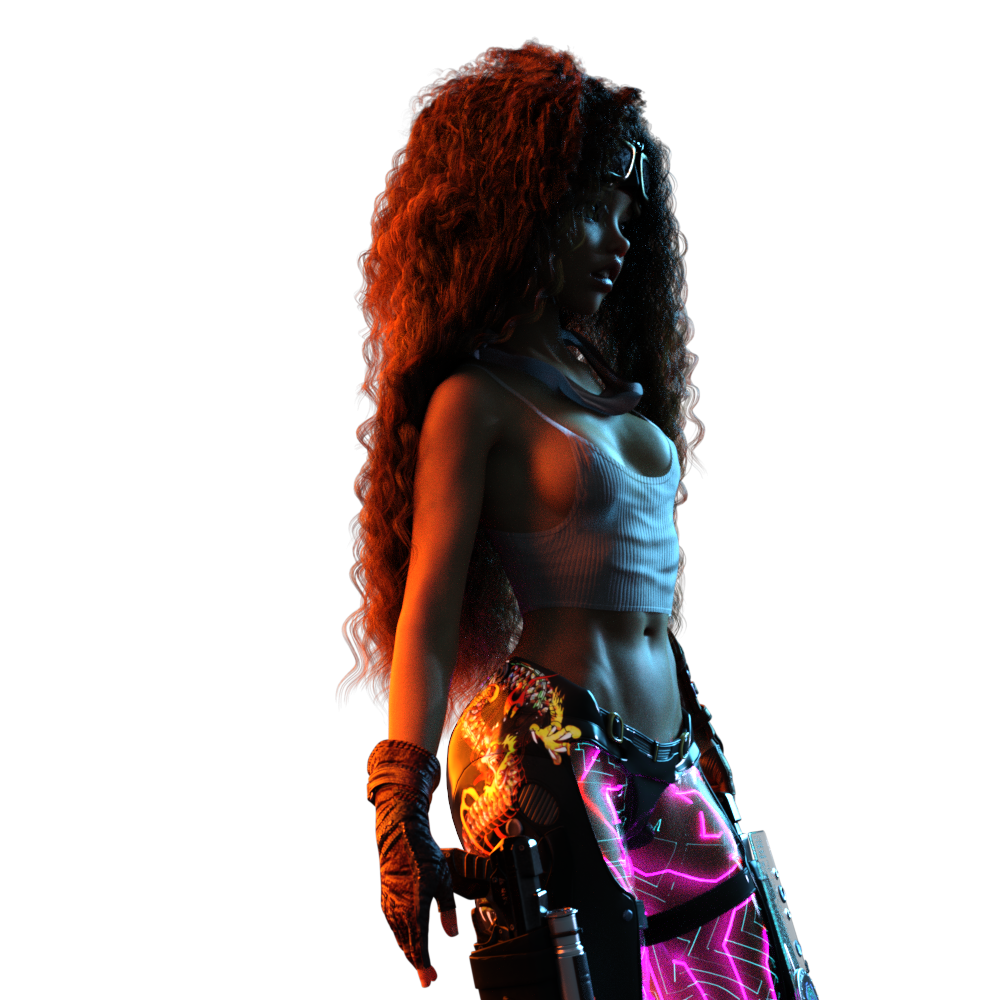
I still use a Lot of my older stuff from V3 and M3 and their families all the way up the chain. I have eventually purchased all of the various Clones to fit other generation's clothing and hair, etc., to other generations and love doing that! Rosie 8 (my super hero on the left) wears clothes from all generations between M3 and V3 through Genesis 9. All of them!
In my animations, I use any and all generations for the other actors - whomever fits the bill on the day. Sometimes it's Michael 4. Other times I'll fill the scene with Genesis 1 figures. I use a Lot of Predatron's LoRez figure on a daily basis. Very cool kits that, once we own Loretta and Lorenzo, have a bazillion options! For example, LoRez MU Workers come complete as they are, but they can use all of the various shapes and textures from Loretta (Female MU Worker) and Lorenzo (Male). The same applies for All of the rest of the human Predatron LoRez series.
When Carrara 8.5 was in public beta, I was overwhelmed with Genesis 1 and how Amazing that figure is. As it was new, I collected every monster, creature and animal pack they sold for it. Well, almost every one. I have a Lot of them! And I find them to be truly invaluable to this day! It's really quite easy for me to make them work with Iray.
Even generations before that. I still use DzFire's Cyborg for M4 and he holds up well today - same goes for RawArt's amazing M4 creatures.
With Bone Minion, I collect even the oldest of animated pose files - and they are Excellent to work with! Since I began my journey before Genesis 1, I have all of GoFigure and Reisormocap's animation packs from that era and since. So animating all of these generations is as simple as having the right Bone Minion, so I buy them by the bundle! :)
about the GIF below - a Genesis 1 figure with Classic Long and Curly Hair with dForce for Genesis 8 Female - rendered using the Free Tier of OctaneRender for Daz Studio
3D Comic Book Tips And Picturesmmitchell_houston said:
One of my more recent illustrations.
Created as the cover for a fanzine, this illustration shows that there's still plenty of life in Michael 4, who is the base figure for both Cap and the Skull. Created by compositing multiple b&w renders created in Poser 13. Clean up was in Clip Studio Paint, and the color was added using Retro Supply Co.'s ColorLab brushes. This was created for print, so the halftones were set up for that purpose. Unfortunately, they sometimes look a little weird when resized for display online. If you'd like to see the color dots in more detail, open it to 100%.
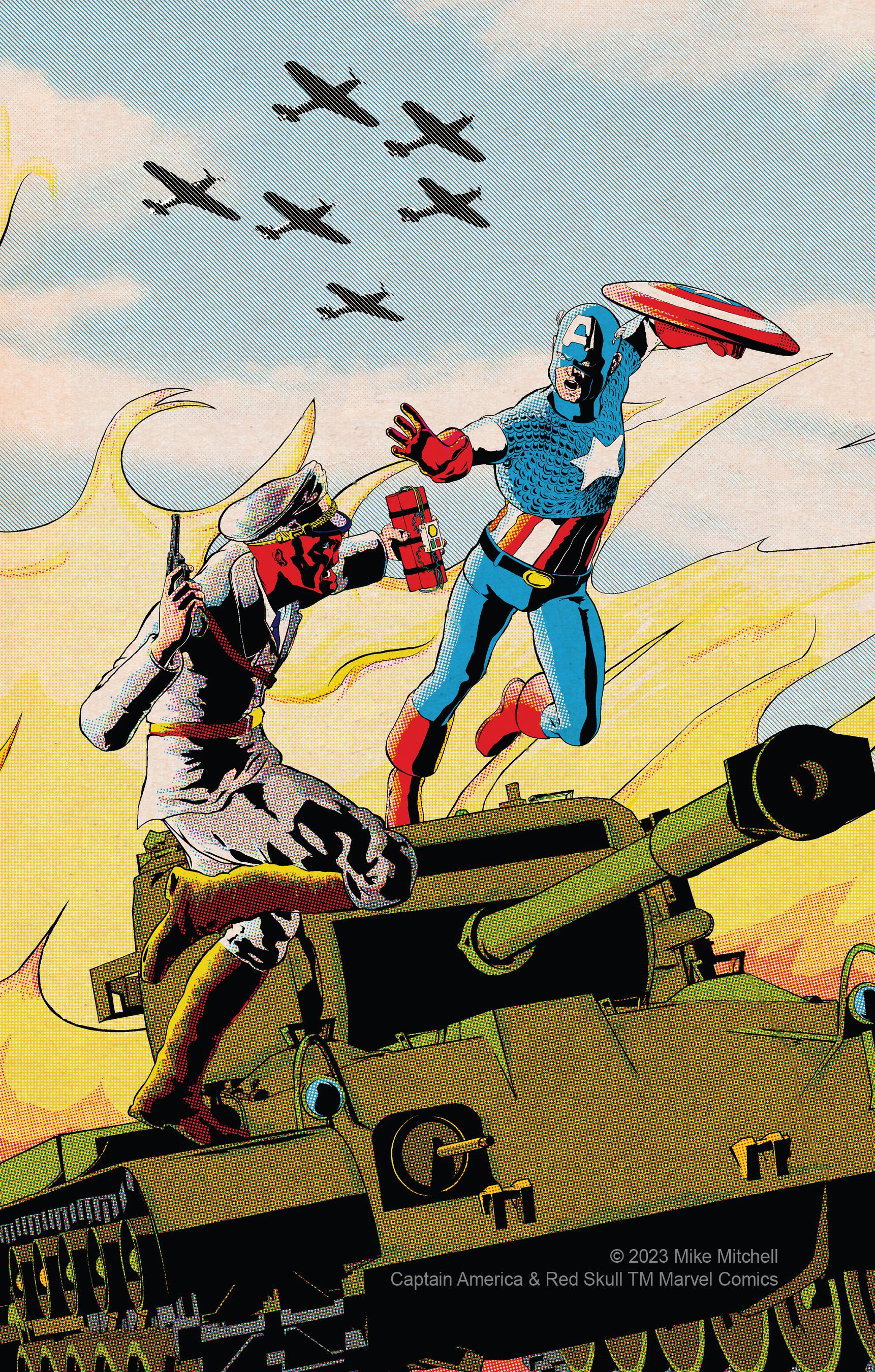
Really impressed and admire the work you put into this and how you pulled off the look. Good job!
Merging actors - educational purposesI am not sure why you are getting the poke-through, then.
Both Victoria 4 adn Michael 4 have underwear painted on their default materials - there is an All natural preset, which makes the areas skin-like (but doesn't add any nipple detail).
Merging actors - educational purposesWhich Skeelton are you using, the Michael 4 Skeelton includes 2 figures - one for Poser, one for Daz Studio.
Merging actors - educational purposesHowdy members.
To introduce myself, as requested : I'am a "fresh new" DAZ user. Doing Poser many years ago, C4d user, Blender user too. I am a "multi-role" person, I own my video studio and gear (sony fx6, phantom4pv2... Resolve dedicated MacPro... and so on) working on video production since ...1992.
I bought Michael 4 and his stuff : skeleton, anatomics, muscles to make educational animations (mostly for osteopathic teaching). I must use mixed animated actors to show the body envelope and the bones inside. When merging, I saw a displacement between body and some bones (feets, knees). As the attached image shows (follow the red arrows). Fixing on a still is easy, but in complex animation is not.
Any direction to guide me would be very appreciated. Best regards.
Tutorial: Making TriAx Figures from Old Parametric CharactersHow often have you wanted to use your old Generation 3 or Generation 4 content but been put off by things like poke through, not having just the perfect content or even by the fact the clothing you want to use is for the wrong figure?
Well, now you can update a character like A3 to have most of the benefits of Generation 7 (Genesis 3) or Generation 8 (Genesis 8) characters. The benefits you can have are:
- Wearing almost all Generation 3 clothing (A3, V3, M3, H3, GND2, GV3 & IV)
- Wearing most G3F and G3M clothing & hair by creating an Autofit Clone
- Wearing most G8F and G8M clothing & hair by creating an Autofit Clone
- Be able to morph from A3 into V3 into M3 into H3 etc
- Have the clothing follow the morphs
- Update the skin to Iray with a material setting (requires DAZ High Res V3 texture)
The tutorial is a 69 page pdf giving step by step instructions and illustrations at every step. You can do it yourself. I include shaping poses for V3 and M3 to create basic Autofit Clones for G3F, G3M, G8F and G8M clothing, and explain how to do it yourself while referring to Catherine's tutorial for how to create much better modeller aided clones.
The tutorial does not cover improving the joint geometry of the old parametric characters, as that's outside the scope of this tutorial which is to convert an old parametric character into a character that can take advantage of the biggest improvements that DS has brought to the Genesis range of figures - autofit & autofollow.
The Tutorial goes through the process with A3. It can be done with V3, GV3, V4, M4, M3 etc. Any Pre-Genesis parametric character can be converted in the same way to take advantage of the same things. The image below shows TriAx A3 wearing G8F Rhiannon's Crux Attitude bottoms, Top is G3F Rhiannon's Crux Attitude top, the hair is G3F, and the shoes came from PoserDazFreebies for V3.
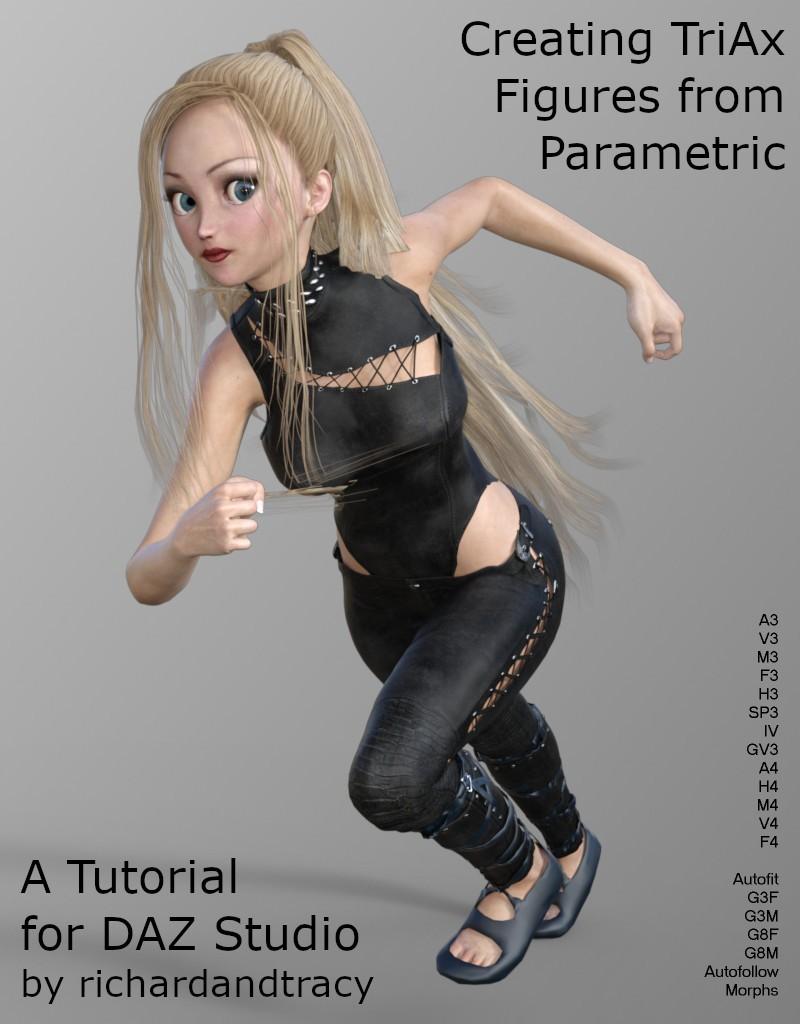
And here is another I prepared earlier, Glamorous Vicki 3 (a V3 variant by Jim Burton) wearing a G8F Kaftan.
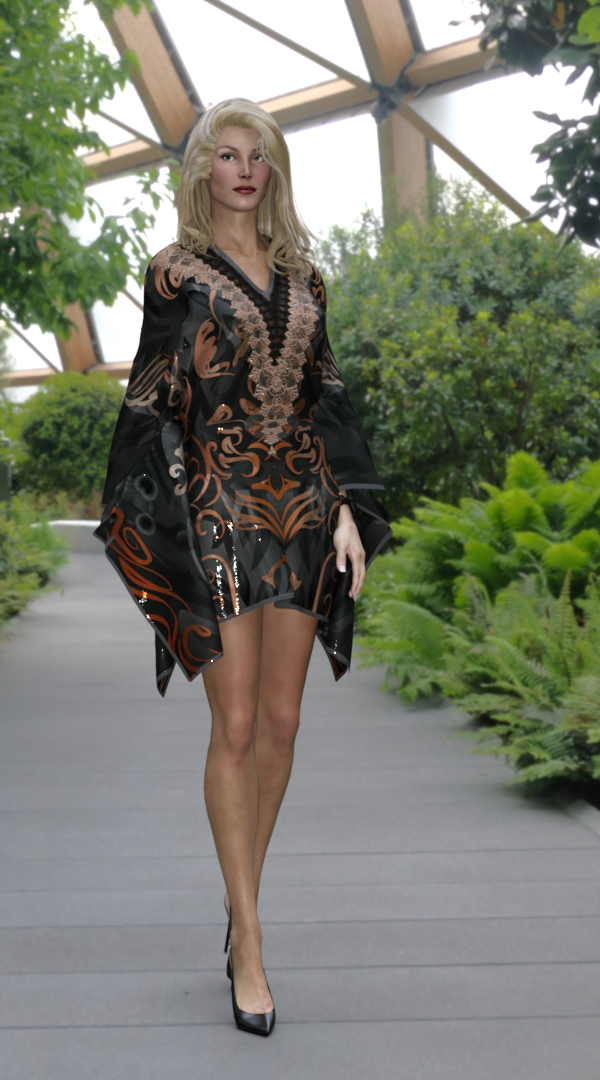
I hope you find it useful, and look forward to a revival of old content.
Regards,
Richard
Edited to add: See here for M3 and V3 poses to help make M4 & V4 autofit clones and a medium res material preset for V3 materials.
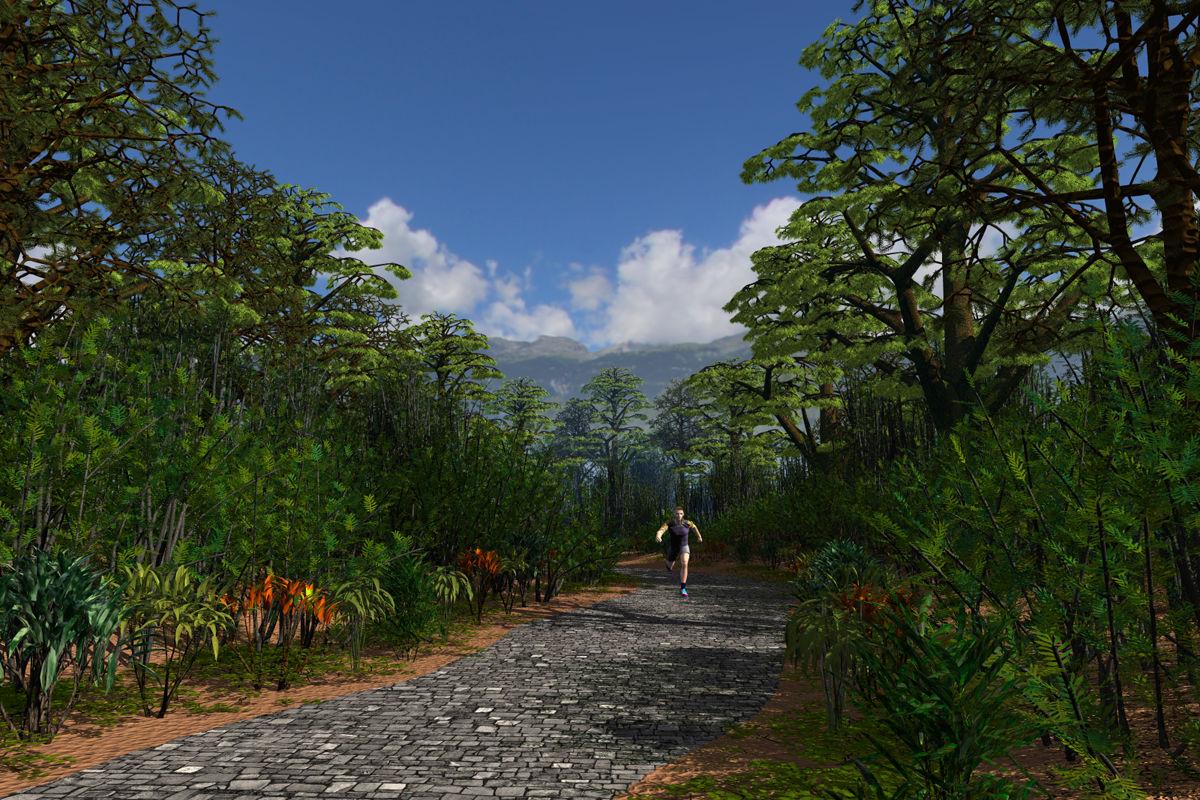
Show Us Your Bryce Renders Part 13A self made terrain with a material from HRT-4. The material of the cobbled pavement is by and from Marco Schneider aka c-ram. The trees are BTO's -- the plants are trees too, from Vegetation and the jogger is Michael 4. Backdrop, clouds and ambient light by an HDRI from Integrated RTR Environments & Light and the key light by the sun.
 Is my computer adequate to do animation in DS?
It depends on what you are after. If you want photorealism with recent generations (7,8,8.1,9) then it looks like you would severely stress your system. If you use early generations (3,4,5,6) or you want a more cartoony effect it might do okay.
The rendering industry has changed a lot in 20 years. With Michael 4, graphic cards were almost unknown, so 6 GB-V is great. WIth Michael 9 and the much larger maps involved 6 GB-V is quite limiting.
3D Comic Book Tips And PicturesOne of my more recent illustrations.
Created as the cover for a fanzine, this illustration shows that there's still plenty of life in Michael 4, who is the base figure for both Cap and the Skull. Created by compositing multiple b&w renders created in Poser 13. Clean up was in Clip Studio Paint, and the color was added using Retro Supply Co.'s ColorLab brushes. This was created for print, so the halftones were set up for that purpose. Unfortunately, they sometimes look a little weird when resized for display online. If you'd like to see the color dots in more detail, open it to 100%.
Daz 3D is part of

Connect
DAZ Productions, Inc.
7533 S Center View Ct #4664
West Jordan, UT 84084Licensing Agreement | Terms of Service | Privacy Policy | EULA
© 2026 Daz Productions Inc. All Rights Reserved.