-
Metadata missing
I've asked for this before, but lately this has been happening to me far more often. I get a product and there is no metadata assigned to it so it's practically useless since I will forget I have it after a month or two. If Daz, not the artist is supposed to be adding the metadata, why has the isntances of this gone up 800% recently and no one has done anything about it? I took a look at my lost and found and has more items in than my unfiltered materials folder do which SHOULD be my largest folder. does anyone else have else have Slightshot Swim G8F and is it missing it's metadata?
maybe it's not metadata... maybe that's the wrong term, but it doesn't associate with character models, materials, or wardrobe.copying keyframessadly you need someone with AniLip, I don't own it either, the regular lipsync saves keyframes as does PoseRecorder but I have no idea what Anilip does
I even looked at it today in the 80% off for 2 sale and passed on it

I can do all the microsoft TTS voices with Balabolka and a Registry hack and use them in Lipsync so never saw the need
and with the new FBX import I can even import my iClone6 bespoke retargetted bone based expression editor animations
The New Mac FAQI uninstalled and then reinstalled DS 4.24.0.3 to get Bone minion to work. But I hit a snag. If anyone has the time to help, please go to the link above and read my post and look at the files I uploaded. I did keep the "cms" and replaced it in my ~ Library after reinstallation; and I did go to the "content library" pane, where I clicked the menu icon and chose "Content DB Maintenance," after which I clicked the "Re-import Metadata." I thought that was all I needed to do.
I'm stuck. Hope someone can help. This is the first time I've tried uninstalling and then reinstalling DS. I did not describe the whole thing that's at the link above, so I don't think this is a double post. I am just trying to attract MacIntosh users who could help. Maybe windows people could just as well, but I don't know.
Will DAZ ever improve animating?I really hope that either GoFigure themselves make aniMate 2 compliant for Daz Studio 2025, or that Daz 3D buys aniMate 2 from GoFigure so that they can tool it into Daz Studio 2025 permanently.
Check the DS 2025 Alpha “evergreen” thread
AniMate 2 for DS alpha is listed as pending.The Upper Tier Physics tools are where its at if you want to really get into this stuff - interactions between two or more figures, interacting with objects, ragdoll or not... this stuff is Insanely Awesome!
You should really have a look at the Auto tweening feature in the latest build
its like magic!!
What is most amazing this software is how it manages to be useful to nearly every Character animation ecosystem.
I recently migrated over to the toon shaded VROID “V-tuber” anime figures ,that I Import to Blender (via a free addon), for NPR anime style production.
As Cascadeur is strongly geared towards realtime video game animation all I have to do is export to a game rig format
(unity or UE)
and my characters rigging is auto recognized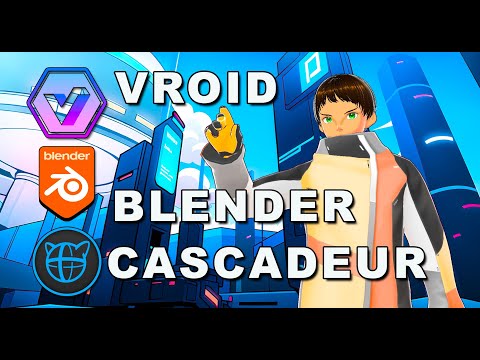
Also Cascadeur addresses many of the long time problems with Iclone's motion clip system.specifically the issue of sharp 90 degree turns ,while moving ,always looking robotic by default.
But a quick round trip to Cascadeur’s Autophysics fixes that as well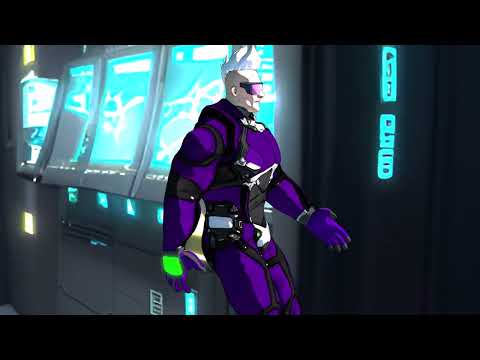 [Released] FAST Animation Studio Tools!!! Official support thread [Commercial]
Sorry it took a little bit to get to you, We've been so busy and this is new but now we know to check this page consistently...
Please realize if we're ever late replying here you could always send a message here and that goes right to our email account which gives us an audible warning when we get an email so then we could consistently know and check that.
https://fast-blender-add-ons.com/support/
About your question...
For shells, please see Diffeomorphic’s official Shell Editor page:
https://bitbucket.org/Diffeomorphic/import_daz/wiki/Features/Shell%20Editor
FAST bundles and uses Diffeomorphic API, Our add-on keeps it installed for you so the Diffeomorphic panels are always available. that means all of the features of the add-on are always available and shell behavior follows what’s described there... Using their API we upgraded their import system heavily, You could automatically add lip-sync animation on import and mixamo animations on import for instance... and we also made the import DAZ materials button they offer quite a bit better as now it works on multiple objects... We also provide extra functionality for creating Blender morphs in Daz easily and tons more stuff... Anything you would like to know just ask we provide over 600 operators that improve literally everything in Blender... In a nutshell the DAZ import system is awesome that we offer but we improve literally everything that you do after that and allow you could create and render up to two minutes of scenes per day using DAZ characters which no other add-on does.AFAIKIf the shells functionality feels confusing, I’m happy to help research it with you. Just tell me which DAZ characters you’re using and the effects you want (e.g., overlays, stacks, special materials), and I’ll read up and make sure this will work for your case.
For a quick overview of what FAST does, please check the images on our DAZ Store page—they give a broad summary.
And if you want me to look into a specific setup or result, say the word and I’ll dig in next.
Also any other questions at all you have about the add-on feel free to ask and I'll help you with those as well.
[Released] Blender to Daz Studio Plugin released!!! Official support thread [Commercial]Hi all, I have submitted version 3.8.61 to the PA portal, it should hopefully be available within a few days.
Release notes:
1) Merge Textures Width and Height property added.
2) Scale As Percent option added.
3) If the file is not saved, the user now gets a prompt to save in any location of choice rather than in the temp file.
4) Progress bar added during the import.
5) The plugin now supports larger files.
6) Hair particle bug on export fixed.Best wishes,
Matronius
Will DAZ ever improve animating?What I love about the Cascadeur Membership plans:
Free:
The free version works incredibly well to help get your feet wet learning the tools, following tutorials, and making - even saving animations. Genesis 8 and 9 FBX are automatically recognized and, when I asked the developers, they said that they do intend to eventually support more of the earlier generations. In the meantime, their auto-rigging tool is really quite nice!
So even though we cannot export animations back out of Cascadeur, the Free tier is an invaluable way to discover whether or not the software is a good fit - and if you want to create you own motions... the answer to that question will be a resounding Yes - so it's always a great move for them to offer this - and they always will. Kudos to them for that decision!
Indy:
The way I'm using Cascadeur, I really could get by nicely with this tier. I wanted to have the ability to explore the Pro Tier tools and features, so my beloved Rosie allowed me to get two years of Pro. But the Indy version grants the Amazing "Command > Send to DAZ" feature. It's an FBX that would be like what we'd get from Mixamo, except that this one has our own custom work. Just save that as a Pose and aniBlock... Bam. Done.
Many of the upper tier features can be held off until we really need them. In the meantime, Indie tier offers an incredibly fair plan to support development as we animate like mad and send our work into Daz 3D - or wherever you choose.
Pro:
Well, Pro is Pro. And Pro is Everything. Including expedious support.
Cascadeur Team is CONSTANTLY developing the software - pushing the boundaries and always making things easier and more powerful all at the same time. Pro gets us a front-row seat to all of it.
The Upper Tier Physics tools are where its at if you want to really get into this stuff - interactions between two or more figures, interacting with objects, ragdoll or not... this stuff is Insanely Awesome!
Retargeting really comes in handy if you like to shop at other places that sell Motion Capture, since most don't usually support Daz 3D figures. MoCap Online told me that it was too costly to retarget their motions to the Daz 3D figures, so what we have in the store is it. At least for now. So if you want more of their cool stuff, Cascadeur Pro offers the means to retarget, and MoCap Online's FBX is fully recognized by Cascadeur upon import. I've checked!
All of it:
No matter the tier - even if we might have not even downloaded it yet, their YouTube channel and Doscuments Section at their website is a spectacular arena of animation study Bliss! The reason that they have the tweeners that they have available is because that's what They need to use - so we have the high-end tweener interpolations as well as a new one that the CTO thought made more sense for certain situations - and That's Awesome!!!
Thank goodness for the time needed to simulate hair because that's the sort of moment that I use to just absorb some of that stuff. So much of it becomes more and more clear to me the more times I watch the same thing over again - so I do. And then I watch it Again!!!
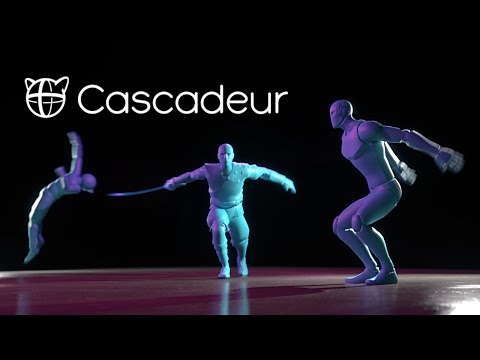
Even this quick, early promo video continually remionds me of how amazing this software really is!
 DAZ Billboards in Blender?
@Hurdy3d
All I can find for Blender are contemporary crowd assets.
I need medieval times crowds.@Padone
I figured, but thought it wouldn't hurt to ask anyway. Thanks.
Push comes to shove, I'll set up the camera and billboards in DS and import them into Blender.
It's just a lot less flexible that way.DAZ Billboards in Blender?1. create in blender a plaine
2. copy with strg + alt + c the locations (XYZ) of the cameras in the n panel ("Item" tab)
3. paste it with strg + alt + v to the planes location
4. do the same rotation
5. now the plane should have the same position and rotation as the camera
6. export the plane as obj
7. import the plane to DAZ
8. In DAZ, manually adjust the camera like the plane
9. Now you can create in DAZ your billboards, run the script and than export the billboards to your scene in Blender.
DAZ Billboards in Blender?Hi,
Is there a way to import billboards into Blender and still change the viewing angles?
I like the RiversoftArts billboards which come with scripts to rotate and align them to a camera.
The answer is probably 'No', but I figured I'd ask anyway. You never know.
I couldn't find similar non-contemporary assets for Blender.Thanks!
Will DAZ ever improve animating?Nice video on importing from cascadeur back to DS

Any animation I import or make in Cascadeur seems to not be affected.
Yet thousands of people using the software are somehow getting the secondary physics to work.
here is a very quick and dirty example where I applied secondary physics only to the arms & hands. you can see the hands are more “floppy” on the physics preview character.It’s a deep program with alot of power& complexity so dig in and learn those settings
it will be worth it trust me. Bryce Freebies - Bunyip02 Blender models
rosseliani said:
Thank you so much for the freebies, I just wonder how to import them in Daz Studio.
Regards,
Rosselani
There is a lovely Bryce community for doing Bryce renders - but if you insist on DAZ Studio being your preferred workspace there is an export out of Bryce that you can do.
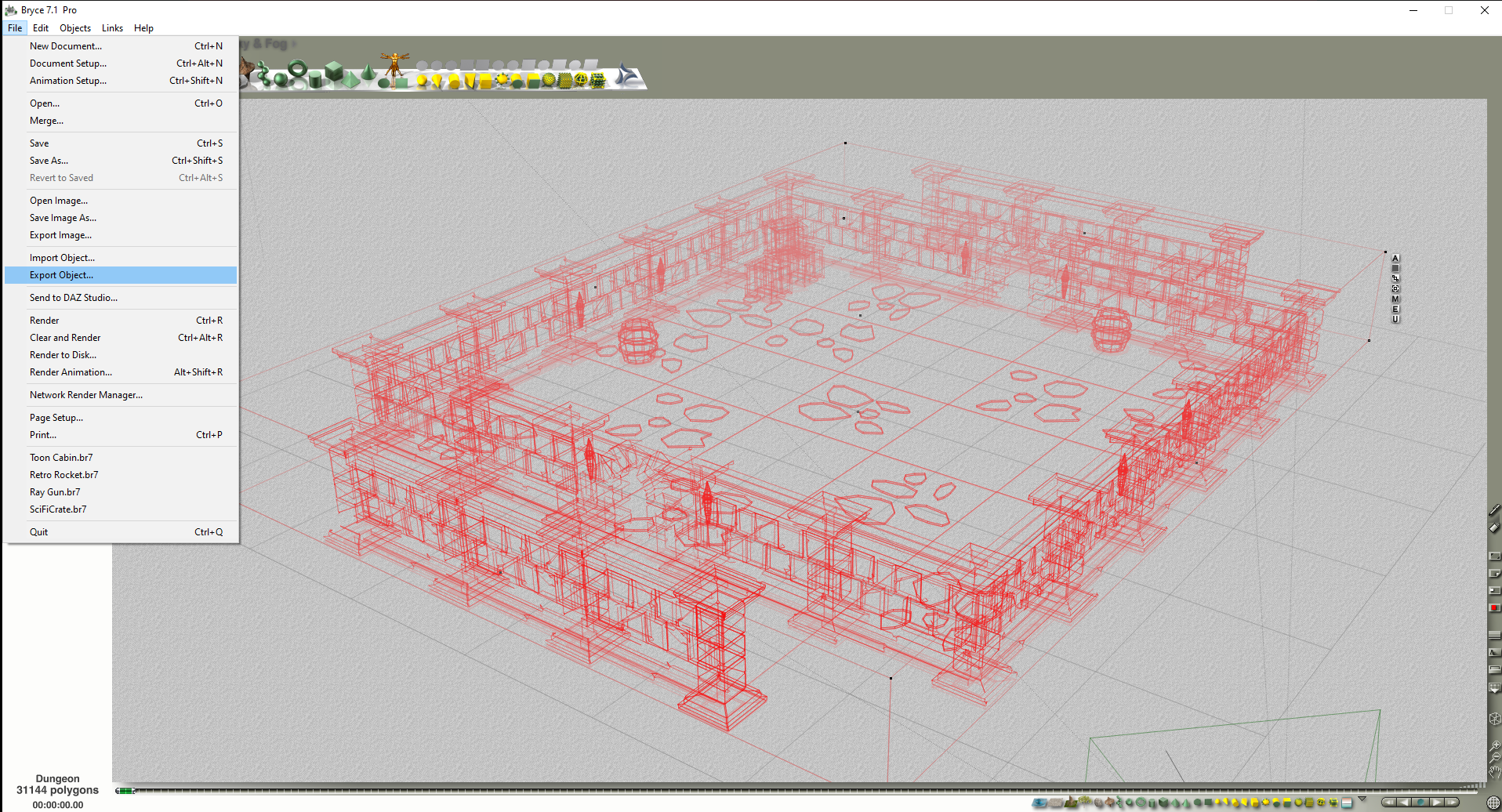
Click on File, choose Export Object
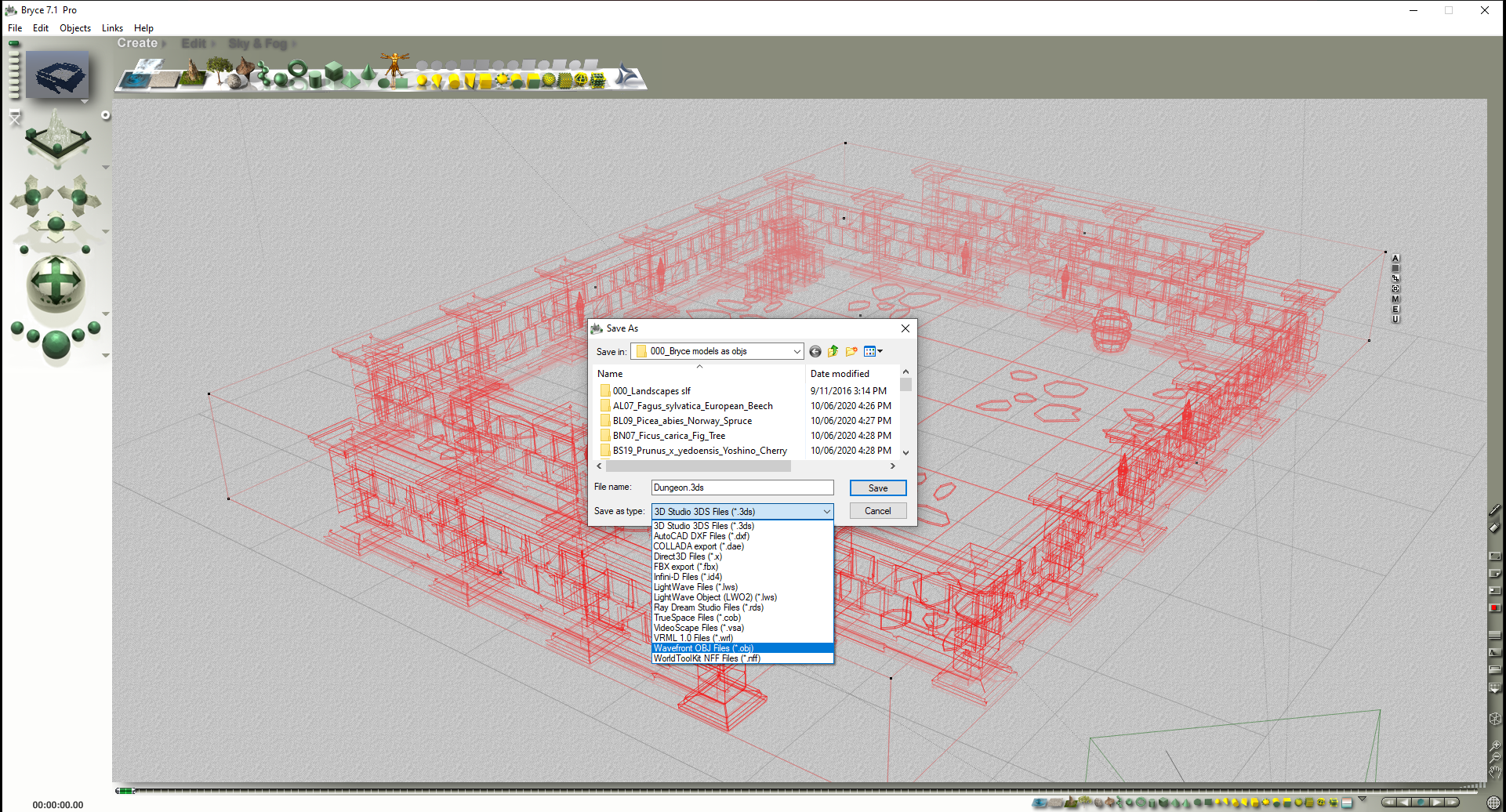
There are a number of export formats to choose from.

You can also export Terrains

Increase Grid Triangulation (not too much or it will crash), choose Size, choose Format, hit the tick button.
Have exported objects to Carrara, but also spend time in Bryce doing renders - have fun !
Will DAZ ever improve animating?wolf359 said:
with utterly incorrect settings which is why your animation had ZERO secondary physics.
What could I made utterly wrong if I followed the tutorials from the Cascadeur channel on youtube?
They say: Import your model, rig it, disable the "autopose" if you don't want them, pose your char, set the tweener, activate the Autophisics, Secondary motion and set the values. Isn't the right procedure? Did I missed something?
I can even see the "center of mass" green arrow go up and down indicating that the secondary motion is active but limbs and head stayis where they are with no influence. I'm pretty sure I set the values on the bones.
Any animation I import or make in Cascadeur seems to not be affected.
Bryce Freebies - Bunyip02 Blender modelsThank you so much for the freebies, I just wonder how to import them in Daz Studio.
Regards,
Rosselani
Old User, old version of Studio HelpBut it is failiong on all saved scenes? Or all content, regardless of whether it is a scene or a Poser Import or Daz Studio Format load?
The new "blender to Daz plugin"evacyn said:
It works really well with KitBash stuff. You can download the native Blender files from Kitbash, and it keeps the textures without any additional work to import them individually. Definitely the coolest thing I've bought here in a long time.

@evacyn, I'm wondering: Do you have to save the buildings separately to separate the buildings, or are they already separate on import? I've been using Poser 11 Pro's FBX to get KB3D into Studio, and the real tedium is separating the buildings, as Wendy said. Thanks for testing this!
Old User, old version of Studio HelpHi all,
I am still on version 3.1 of Daz Studio because I never wanted to upgrade as I am only a very casual user. I last used Daz Studio around a month ago and everything loaded and worked properly as it has done for many years. Now, however, very few of my scenes load in. They will get to 100% but Studio will hang and then crash (closes) to desktop. If someone would kindly look through the log file and possibly point me in a direction to fix any issues. I've downgraded and upgraded GPU drivers (RTX 3080ti) but to no avail. This is a sudden issue and although I recently re-installed windows 10, I have done so many times before without issue. I simply can't understand what is missing or happening that causes a crash.
I did install the most recent version of Studio but loading an old scene crashed studio with an error once at 100%.
Opening file Bot.daz...
Reading Bot.daz
Loaded image V4LanaFaceM1.jpg
Loaded image Inked_Vol8_Tat24.jpg
Loaded image V4LanaFaceM1_!Tattoo 24.dsi
Loaded image Inked_Vol8_Tat24.jpg
Loaded image V4LanaFaceM1_!Tattoo 24_!Tattoo 24.dsi
Loaded image Inked_Vol8_Tat24.jpg
Loaded image V4LanaFaceM1_!Tattoo 24_!Tattoo 24_!Tattoo 24.dsi
Loaded image Inked_Vol8_Tat24.jpg
Loaded image V4LanaFaceM1_!Tattoo 24_!Tattoo 24_!Tattoo 24_!Tattoo 24.dsi
Loaded image Inked_Vol8_Tat24.jpg
Loaded image V4LanaFaceM1_!Tattoo 24_!Tattoo 24_!Tattoo 24_!Tattoo 24_!Tattoo 24.dsi
Loaded image New Spec Map private 2.bmp
Ran tdlmake on image L:/Daz/Clothes - Bodysuit - cybersuit/Runtime/Textures/Ra Graphics/Cyber Suit Mark II/Cybersuit-Torso-bump.jpg
Ran tdlmake on image L:/Daz/Char - Young AnuV4A4/runtime/textures/FrejaSveva/Anu/FRAnuTorsoS.jpg
Ran tdlmake on image L:/Daz/Clothes - Bodysuit - cybersuit/Runtime/Textures/Ra Graphics/Cyber Suit Mark II/Cybersuit-Torso-White.jpg
Ran tdlmake on image L:/Daz/Clothes - High Heels - Arrin Noemi High Heel/Runtime/Textures/Arrin/V4GlamourNoemi/GN_Refl512_1.jpg
Ran tdlmake on image L:/Daz/Clothes - Bodysuit - cybersuit/Runtime/Textures/Ra Graphics/Cyber Suit Mark II/Cybersuit-Torso-Fab-bump.jpg
Ran tdlmake on image C:/Users/sneak/Documents/DAZ 3D/Studio3/content/Runtime/textures/DAZ/Characters/MilWom/V4/MLIE/V4LanaTorsoMbutt2 brown tanned.jpg
Ran tdlmake on image L:/Daz/Studio/content/Runtime/textures/DAZ/Characters/MilWom/V4/V4LanaTorsoB.jpg
Ran tdlmake on image L:/Daz/Clothes - Bodysuit - cybersuit/Runtime/Textures/Ra Graphics/Cyber Suit Mark II/Blue-Cybersuit-Torso.jpg
Ran tdlmake on image L:/Daz/Char - Exciting Mouth/Runtime/textures/ava_odnajdy/EM_4generationPack/EM_4generationPack_TX.jpg
Ran tdlmake on image L:/Daz/Char - Exciting Mouth/Runtime/textures/ava_odnajdy/EM_4generationPack/EM_4generationPack_Bump.jpg
Ran tdlmake on image L:/Daz/Studio/content/Runtime/textures/DAZ/Characters/MilWom/V4/V4LanaInMouthB.jpg
Ran tdlmake on image L:/Daz/Char - Finnia for V4/Runtime/Textures/RMFinnia/RMFniaLsh2.jpg
Ran tdlmake on image L:/Daz/Studio/content/Runtime/textures/DAZ/Characters/MilWom/V4/V4LanaTR.jpg
Ran tdlmake on image L:/Daz/Clothes - Bodysuit - cybersuit/Runtime/Textures/Ra Graphics/Cyber Suit Mark II/Cybersuit-Torso-White other2.jpg
Ran tdlmake on image C:/Users/sneak/Documents/DAZ 3D/Studio3/content/Runtime/textures/DAZ/Characters/MilWom/V4/V4LanaFaceB1.jpg
+++++++++++++++ DAZ Studio 3.1.2.32 starting +++++++++++++++++
DAZ Studio Raw Version: 50397728
Qt Version: 4.5.2
Running on Windows Unknown, Build 9200, No Service Pack Installed
Total Physical Memory: 32686 Mb (34273816576)
Available Physical Memory: 20481 Mb (21476339712)
Total Virtual Memory: 134217727 Mb (140737488224256)
Available Virtual Memory: 134213391 Mb (140732940754944)
Current Memory Usage: 37%
Fri 8. Aug 17:06:50 2025
Temp folder: C:/Users/sneak/AppData/Roaming/DAZ 3D/Studio3/temp
Total temp disk size: 231710 Mb, Available: 121529 Mb
Locale: en_GB
No translator found.
Reading style definition L:/Daz/Studio/resources/style/Carrara.style
Creating managers
Reading help file L:/Daz/Studio/resources/dazhelp.dsh
Reading help file L:/Daz/Studio/resources/hexbridge.dsh
Reading help file L:/Daz/Studio/resources/lipsync.dsh
Reading help file L:/Daz/Studio/resources/optitexcloth.dsh
Reading help file L:/Daz/Studio/resources/puppeteer.dsh
WARNING: .\interface\dialogs\dzbasicdialog.cpp(176): No parent specified for DzBasicDialog!
Scanning import folders
Scanning content folders
Supported OpenGL extensions:
GL_AMD_multi_draw_indirect : NOT INITIALIZED
GL_AMD_seamless_cubemap_per_texture : NOT INITIALIZED
GL_AMD_vertex_shader_viewport_index : NOT INITIALIZED
GL_AMD_vertex_shader_layer : NOT INITIALIZED
GL_ARB_arrays_of_arrays : NOT INITIALIZED
GL_ARB_base_instance : NOT INITIALIZED
GL_ARB_bindless_texture : NOT INITIALIZED
GL_ARB_blend_func_extended : NOT INITIALIZED
GL_ARB_buffer_storage : NOT INITIALIZED
GL_ARB_clear_buffer_object : NOT INITIALIZED
GL_ARB_clear_texture : NOT INITIALIZED
GL_ARB_clip_control : NOT INITIALIZED
GL_ARB_color_buffer_float : NOT INITIALIZED
GL_ARB_compatibility : NOT INITIALIZED
GL_ARB_compressed_texture_pixel_storage : NOT INITIALIZED
GL_ARB_conservative_depth : NOT INITIALIZED
GL_ARB_compute_shader : NOT INITIALIZED
GL_ARB_compute_variable_group_size : NOT INITIALIZED
GL_ARB_conditional_render_inverted : NOT INITIALIZED
GL_ARB_copy_buffer : NOT INITIALIZED
GL_ARB_copy_image : NOT INITIALIZED
GL_ARB_cull_distance : NOT INITIALIZED
GL_ARB_debug_output : NOT INITIALIZED
GL_ARB_depth_buffer_float : NOT INITIALIZED
GL_ARB_depth_clamp : NOT INITIALIZED
GL_ARB_depth_texture
GL_ARB_derivative_control : NOT INITIALIZED
GL_ARB_direct_state_access : NOT INITIALIZED
GL_ARB_draw_buffers : NOT INITIALIZED
GL_ARB_draw_buffers_blend : NOT INITIALIZED
GL_ARB_draw_indirect : NOT INITIALIZED
GL_ARB_draw_elements_base_vertex : NOT INITIALIZED
GL_ARB_draw_instanced : NOT INITIALIZED
GL_ARB_enhanced_layouts : NOT INITIALIZED
GL_ARB_ES2_compatibility : NOT INITIALIZED
GL_ARB_ES3_compatibility : NOT INITIALIZED
GL_ARB_ES3_1_compatibility : NOT INITIALIZED
GL_ARB_ES3_2_compatibility : NOT INITIALIZED
GL_ARB_explicit_attrib_location : NOT INITIALIZED
GL_ARB_explicit_uniform_location : NOT INITIALIZED
GL_ARB_fragment_coord_conventions : NOT INITIALIZED
GL_ARB_fragment_layer_viewport : NOT INITIALIZED
GL_ARB_fragment_program
GL_ARB_fragment_program_shadow
GL_ARB_fragment_shader
GL_ARB_fragment_shader_interlock : NOT INITIALIZED
GL_ARB_framebuffer_no_attachments : NOT INITIALIZED
GL_ARB_framebuffer_object : NOT INITIALIZED
GL_ARB_framebuffer_sRGB : NOT INITIALIZED
GL_ARB_geometry_shader4 : NOT INITIALIZED
GL_ARB_get_program_binary : NOT INITIALIZED
GL_ARB_get_texture_sub_image : NOT INITIALIZED
GL_ARB_gl_spirv : NOT INITIALIZED
GL_ARB_gpu_shader5 : NOT INITIALIZED
GL_ARB_gpu_shader_fp64 : NOT INITIALIZED
GL_ARB_gpu_shader_int64 : NOT INITIALIZED
GL_ARB_half_float_pixel : NOT INITIALIZED
GL_ARB_half_float_vertex : NOT INITIALIZED
GL_ARB_imaging : NOT INITIALIZED
GL_ARB_indirect_parameters : NOT INITIALIZED
GL_ARB_instanced_arrays : NOT INITIALIZED
GL_ARB_internalformat_query : NOT INITIALIZED
GL_ARB_internalformat_query2 : NOT INITIALIZED
GL_ARB_invalidate_subdata : NOT INITIALIZED
GL_ARB_map_buffer_alignment : NOT INITIALIZED
GL_ARB_map_buffer_range : NOT INITIALIZED
GL_ARB_multi_bind : NOT INITIALIZED
GL_ARB_multi_draw_indirect : NOT INITIALIZED
GL_ARB_multisample
GL_ARB_multitexture
GL_ARB_occlusion_query
GL_ARB_occlusion_query2 : NOT INITIALIZED
GL_ARB_parallel_shader_compile : NOT INITIALIZED
GL_ARB_pipeline_statistics_query : NOT INITIALIZED
GL_ARB_pixel_buffer_object : NOT INITIALIZED
GL_ARB_point_parameters
GL_ARB_point_sprite
GL_ARB_polygon_offset_clamp : NOT INITIALIZED
GL_ARB_post_depth_coverage : NOT INITIALIZED
GL_ARB_program_interface_query : NOT INITIALIZED
GL_ARB_provoking_vertex : NOT INITIALIZED
GL_ARB_query_buffer_object : NOT INITIALIZED
GL_ARB_robust_buffer_access_behavior : NOT INITIALIZED
GL_ARB_robustness : NOT INITIALIZED
GL_ARB_sample_locations : NOT INITIALIZED
GL_ARB_sample_shading : NOT INITIALIZED
GL_ARB_sampler_objects : NOT INITIALIZED
GL_ARB_seamless_cube_map : NOT INITIALIZED
GL_ARB_seamless_cubemap_per_texture : NOT INITIALIZED
GL_ARB_separate_shader_objects : NOT INITIALIZED
GL_ARB_shader_atomic_counter_ops : NOT INITIALIZED
GL_ARB_shader_atomic_counters : NOT INITIALIZED
GL_ARB_shader_ballot : NOT INITIALIZED
GL_ARB_shader_bit_encoding : NOT INITIALIZED
GL_ARB_shader_clock : NOT INITIALIZED
GL_ARB_shader_draw_parameters : NOT INITIALIZED
GL_ARB_shader_group_vote : NOT INITIALIZED
GL_ARB_shader_image_load_store : NOT INITIALIZED
GL_ARB_shader_image_size : NOT INITIALIZED
GL_ARB_shader_objects
GL_ARB_shader_precision : NOT INITIALIZED
GL_ARB_shader_storage_buffer_object : NOT INITIALIZED
GL_ARB_shader_subroutine : NOT INITIALIZED
GL_ARB_shader_texture_image_samples : NOT INITIALIZED
GL_ARB_shader_texture_lod : NOT INITIALIZED
GL_ARB_shading_language_100
GL_ARB_shader_viewport_layer_array : NOT INITIALIZED
GL_ARB_shading_language_420pack : NOT INITIALIZED
GL_ARB_shading_language_include : NOT INITIALIZED
GL_ARB_shading_language_packing : NOT INITIALIZED
GL_ARB_shadow
GL_ARB_sparse_buffer : NOT INITIALIZED
GL_ARB_sparse_texture : NOT INITIALIZED
GL_ARB_sparse_texture2 : NOT INITIALIZED
GL_ARB_sparse_texture_clamp : NOT INITIALIZED
GL_ARB_spirv_extensions : NOT INITIALIZED
GL_ARB_stencil_texturing : NOT INITIALIZED
GL_ARB_sync : NOT INITIALIZED
GL_ARB_tessellation_shader : NOT INITIALIZED
GL_ARB_texture_barrier : NOT INITIALIZED
GL_ARB_texture_border_clamp
GL_ARB_texture_buffer_object : NOT INITIALIZED
GL_ARB_texture_buffer_object_rgb32 : NOT INITIALIZED
GL_ARB_texture_buffer_range : NOT INITIALIZED
GL_ARB_texture_compression
GL_ARB_texture_compression_bptc : NOT INITIALIZED
GL_ARB_texture_compression_rgtc : NOT INITIALIZED
GL_ARB_texture_cube_map
GL_ARB_texture_cube_map_array : NOT INITIALIZED
GL_ARB_texture_env_add
GL_ARB_texture_env_combine
GL_ARB_texture_env_crossbar : NOT INITIALIZED
GL_ARB_texture_env_dot3
GL_ARB_texture_filter_anisotropic : NOT INITIALIZED
GL_ARB_texture_filter_minmax : NOT INITIALIZED
GL_ARB_texture_float : NOT INITIALIZED
GL_ARB_texture_gather : NOT INITIALIZED
GL_ARB_texture_mirror_clamp_to_edge : NOT INITIALIZED
GL_ARB_texture_mirrored_repeat
GL_ARB_texture_multisample : NOT INITIALIZED
GL_ARB_texture_non_power_of_two
GL_ARB_texture_query_levels : NOT INITIALIZED
GL_ARB_texture_query_lod : NOT INITIALIZED
GL_ARB_texture_rectangle : NOT INITIALIZED
GL_ARB_texture_rg : NOT INITIALIZED
GL_ARB_texture_rgb10_a2ui : NOT INITIALIZED
GL_ARB_texture_stencil8 : NOT INITIALIZED
GL_ARB_texture_storage : NOT INITIALIZED
GL_ARB_texture_storage_multisample : NOT INITIALIZED
GL_ARB_texture_swizzle : NOT INITIALIZED
GL_ARB_texture_view : NOT INITIALIZED
GL_ARB_timer_query : NOT INITIALIZED
GL_ARB_transform_feedback2 : NOT INITIALIZED
GL_ARB_transform_feedback3 : NOT INITIALIZED
GL_ARB_transform_feedback_instanced : NOT INITIALIZED
GL_ARB_transform_feedback_overflow_query : NOT INITIALIZED
GL_ARB_transpose_matrix
GL_ARB_uniform_buffer_object : NOT INITIALIZED
GL_ARB_vertex_array_bgra : NOT INITIALIZED
GL_ARB_vertex_array_object : NOT INITIALIZED
GL_ARB_vertex_attrib_64bit : NOT INITIALIZED
GL_ARB_vertex_attrib_binding : NOT INITIALIZED
GL_ARB_vertex_buffer_object
GL_ARB_vertex_program
GL_ARB_vertex_shader
GL_ARB_vertex_type_10f_11f_11f_rev : NOT INITIALIZED
GL_ARB_vertex_type_2_10_10_10_rev : NOT INITIALIZED
GL_ARB_viewport_array : NOT INITIALIZED
GL_ARB_window_pos
GL_ATI_draw_buffers
GL_ATI_texture_float
GL_ATI_texture_mirror_once : NOT INITIALIZED
GL_S3_s3tc : NOT INITIALIZED
GL_EXT_texture_env_add
GL_EXT_abgr
GL_EXT_bgra
GL_EXT_bindable_uniform : NOT INITIALIZED
GL_EXT_blend_color
GL_EXT_blend_equation_separate
GL_EXT_blend_func_separate
GL_EXT_blend_minmax
GL_EXT_blend_subtract
GL_EXT_compiled_vertex_array
GL_EXT_Cg_shader
GL_EXT_depth_bounds_test
GL_EXT_direct_state_access : NOT INITIALIZED
GL_EXT_draw_buffers2 : NOT INITIALIZED
GL_EXT_draw_instanced : NOT INITIALIZED
GL_EXT_draw_range_elements
GL_EXT_fog_coord
GL_EXT_framebuffer_blit : NOT INITIALIZED
GL_EXT_framebuffer_multisample : NOT INITIALIZED
GL_EXTX_framebuffer_mixed_formats : NOT INITIALIZED
GL_EXT_framebuffer_multisample_blit_scaled : NOT INITIALIZED
GL_EXT_framebuffer_object : NOT INITIALIZED
GL_EXT_framebuffer_sRGB : NOT INITIALIZED
GL_EXT_geometry_shader4 : NOT INITIALIZED
GL_EXT_gpu_program_parameters : NOT INITIALIZED
GL_EXT_gpu_shader4 : NOT INITIALIZED
GL_EXT_multi_draw_arrays
GL_EXT_multiview_texture_multisample : NOT INITIALIZED
GL_EXT_multiview_timer_query : NOT INITIALIZED
GL_EXT_packed_depth_stencil : NOT INITIALIZED
GL_EXT_packed_float : NOT INITIALIZED
GL_EXT_packed_pixels
GL_EXT_pixel_buffer_object
GL_EXT_point_parameters
GL_EXT_polygon_offset_clamp : NOT INITIALIZED
GL_EXT_post_depth_coverage : NOT INITIALIZED
GL_EXT_provoking_vertex : NOT INITIALIZED
GL_EXT_raster_multisample : NOT INITIALIZED
GL_EXT_rescale_normal
GL_EXT_secondary_color
GL_EXT_separate_shader_objects : NOT INITIALIZED
GL_EXT_separate_specular_color
GL_EXT_shader_image_load_formatted : NOT INITIALIZED
GL_EXT_shader_image_load_store : NOT INITIALIZED
GL_EXT_shader_integer_mix : NOT INITIALIZED
GL_EXT_shadow_funcs
GL_EXT_sparse_texture2 : NOT INITIALIZED
GL_EXT_stencil_two_side
GL_EXT_stencil_wrap
GL_EXT_texture3D
GL_EXT_texture_array : NOT INITIALIZED
GL_EXT_texture_buffer_object : NOT INITIALIZED
GL_EXT_texture_compression_dxt1 : NOT INITIALIZED
GL_EXT_texture_compression_latc : NOT INITIALIZED
GL_EXT_texture_compression_rgtc : NOT INITIALIZED
GL_EXT_texture_compression_s3tc
GL_EXT_texture_cube_map : NOT INITIALIZED
GL_EXT_texture_edge_clamp : NOT INITIALIZED
GL_EXT_texture_env_combine
GL_EXT_texture_env_dot3
GL_EXT_texture_filter_anisotropic
GL_EXT_texture_filter_minmax : NOT INITIALIZED
GL_EXT_texture_integer : NOT INITIALIZED
GL_EXT_texture_lod : NOT INITIALIZED
GL_EXT_texture_lod_bias
GL_EXT_texture_mirror_clamp : NOT INITIALIZED
GL_EXT_texture_object
GL_EXT_texture_shadow_lod : NOT INITIALIZED
GL_EXT_texture_shared_exponent : NOT INITIALIZED
GL_EXT_texture_sRGB : NOT INITIALIZED
GL_EXT_texture_sRGB_R8 : NOT INITIALIZED
GL_EXT_texture_sRGB_decode : NOT INITIALIZED
GL_EXT_texture_storage : NOT INITIALIZED
GL_EXT_texture_swizzle : NOT INITIALIZED
GL_EXT_timer_query : NOT INITIALIZED
GL_EXT_transform_feedback2 : NOT INITIALIZED
GL_EXT_vertex_array
GL_EXT_vertex_array_bgra : NOT INITIALIZED
GL_EXT_vertex_attrib_64bit : NOT INITIALIZED
GL_EXT_window_rectangles : NOT INITIALIZED
GL_EXT_import_sync_object : NOT INITIALIZED
GL_IBM_rasterpos_clip : NOT INITIALIZED
GL_IBM_texture_mirrored_repeat
GL_KHR_context_flush_control : NOT INITIALIZED
GL_KHR_debug : NOT INITIALIZED
GL_EXT_memory_object : NOT INITIALIZED
GL_EXT_memory_object_win32 : NOT INITIALIZED
GL_NV_memory_object_sparse : NOT INITIALIZED
GL_EXT_win32_keyed_mutex : NOT INITIALIZED
GL_KHR_parallel_shader_compile : NOT INITIALIZED
GL_KHR_no_error : NOT INITIALIZED
GL_KHR_robust_buffer_access_behavior : NOT INITIALIZED
GL_KHR_robustness : NOT INITIALIZED
GL_EXT_semaphore : NOT INITIALIZED
GL_EXT_semaphore_win32 : NOT INITIALIZED
GL_NV_timeline_semaphore : NOT INITIALIZED
GL_KHR_shader_subgroup : NOT INITIALIZED
GL_KTX_buffer_region : NOT INITIALIZED
GL_NV_alpha_to_coverage_dither_control : NOT INITIALIZED
GL_NV_bindless_multi_draw_indirect : NOT INITIALIZED
GL_NV_bindless_multi_draw_indirect_count : NOT INITIALIZED
GL_NV_bindless_texture : NOT INITIALIZED
GL_NV_blend_equation_advanced : NOT INITIALIZED
GL_NV_blend_equation_advanced_coherent : NOT INITIALIZED
GL_NVX_blend_equation_advanced_multi_draw_buffers : NOT INITIALIZED
GL_NV_blend_minmax_factor : NOT INITIALIZED
GL_NV_blend_square
GL_NV_clip_space_w_scaling : NOT INITIALIZED
GL_NV_command_list : NOT INITIALIZED
GL_NV_compute_program5 : NOT INITIALIZED
GL_NV_compute_shader_derivatives : NOT INITIALIZED
GL_NV_conditional_render : NOT INITIALIZED
GL_NV_conservative_raster : NOT INITIALIZED
GL_NV_conservative_raster_dilate : NOT INITIALIZED
GL_NV_conservative_raster_pre_snap : NOT INITIALIZED
GL_NV_conservative_raster_pre_snap_triangles : NOT INITIALIZED
GL_NV_conservative_raster_underestimation : NOT INITIALIZED
GL_NV_copy_depth_to_color
GL_NV_copy_image : NOT INITIALIZED
GL_NV_depth_buffer_float : NOT INITIALIZED
GL_NV_depth_clamp
GL_NV_draw_texture : NOT INITIALIZED
GL_NV_draw_vulkan_image : NOT INITIALIZED
GL_NV_ES1_1_compatibility : NOT INITIALIZED
GL_NV_ES3_1_compatibility : NOT INITIALIZED
GL_NV_explicit_multisample : NOT INITIALIZED
GL_NV_feature_query : NOT INITIALIZED
GL_NV_fence
GL_NV_fill_rectangle : NOT INITIALIZED
GL_NV_float_buffer
GL_NV_fog_distance
GL_NV_fragment_coverage_to_color : NOT INITIALIZED
GL_NV_fragment_program
GL_NV_fragment_program_option : NOT INITIALIZED
GL_NV_fragment_program2
GL_NV_fragment_shader_barycentric : NOT INITIALIZED
GL_NV_fragment_shader_interlock : NOT INITIALIZED
GL_NV_framebuffer_mixed_samples : NOT INITIALIZED
GL_NV_framebuffer_multisample_coverage : NOT INITIALIZED
GL_NV_geometry_shader4 : NOT INITIALIZED
GL_NV_geometry_shader_passthrough : NOT INITIALIZED
GL_NV_gpu_program4 : NOT INITIALIZED
GL_NV_internalformat_sample_query : NOT INITIALIZED
GL_NV_gpu_program4_1 : NOT INITIALIZED
GL_NV_gpu_program5 : NOT INITIALIZED
GL_NV_gpu_program5_mem_extended : NOT INITIALIZED
GL_NV_gpu_program_fp64 : NOT INITIALIZED
GL_NV_gpu_program_multiview : NOT INITIALIZED
GL_NV_gpu_shader5 : NOT INITIALIZED
GL_NV_half_float
GL_NV_light_max_exponent
GL_NV_memory_attachment : NOT INITIALIZED
GL_NV_mesh_shader : NOT INITIALIZED
GL_NV_multisample_coverage : NOT INITIALIZED
GL_NV_multisample_filter_hint
GL_NV_occlusion_query
GL_NV_packed_depth_stencil
GL_NV_parameter_buffer_object : NOT INITIALIZED
GL_NV_parameter_buffer_object2 : NOT INITIALIZED
GL_NV_path_rendering : NOT INITIALIZED
GL_NV_path_rendering_shared_edge : NOT INITIALIZED
GL_NV_pixel_data_range
GL_NV_point_sprite
GL_NV_primitive_restart
GL_NV_primitive_shading_rate : NOT INITIALIZED
GL_NV_query_resource : NOT INITIALIZED
GL_NV_query_resource_tag : NOT INITIALIZED
GL_NV_register_combiners
GL_NV_register_combiners2
GL_NV_representative_fragment_test : NOT INITIALIZED
GL_NV_sample_locations : NOT INITIALIZED
GL_NV_sample_mask_override_coverage : NOT INITIALIZED
GL_NV_scissor_exclusive : NOT INITIALIZED
GL_NV_shader_atomic_counters : NOT INITIALIZED
GL_NV_shader_atomic_float : NOT INITIALIZED
GL_NV_shader_atomic_float64 : NOT INITIALIZED
GL_NV_shader_atomic_fp16_vector : NOT INITIALIZED
GL_NV_shader_atomic_int64 : NOT INITIALIZED
GL_NV_shader_buffer_load : NOT INITIALIZED
GL_NV_shader_storage_buffer_object : NOT INITIALIZED
GL_NV_shader_subgroup_partitioned : NOT INITIALIZED
GL_NV_shader_texture_footprint : NOT INITIALIZED
GL_NV_shading_rate_image : NOT INITIALIZED
GL_NV_stereo_view_rendering : NOT INITIALIZED
GL_NV_texgen_reflection
GL_NV_texture_barrier : NOT INITIALIZED
GL_NV_texture_compression_vtc
GL_NV_texture_dirty_tile_map : NOT INITIALIZED
GL_NV_texture_env_combine4
GL_NV_texture_multisample : NOT INITIALIZED
GL_NV_texture_rectangle
GL_NV_texture_rectangle_compressed : NOT INITIALIZED
GL_NV_texture_shader
GL_NV_texture_shader2
GL_NV_texture_shader3
GL_NV_transform_feedback : NOT INITIALIZED
GL_NV_transform_feedback2 : NOT INITIALIZED
GL_NV_uniform_buffer_unified_memory : NOT INITIALIZED
GL_NV_uniform_buffer_std430_layout : NOT INITIALIZED
GL_NV_vertex_array_range
GL_NV_vertex_array_range2
GL_NV_vertex_attrib_integer_64bit : NOT INITIALIZED
GL_NV_vertex_buffer_unified_memory : NOT INITIALIZED
GL_NV_vertex_program
GL_NV_vertex_program1_1 : NOT INITIALIZED
GL_NV_vertex_program2 : NOT INITIALIZED
GL_NV_vertex_program2_option : NOT INITIALIZED
GL_NV_vertex_program3 : NOT INITIALIZED
GL_NV_viewport_array2 : NOT INITIALIZED
GL_NV_viewport_swizzle : NOT INITIALIZED
GL_NVX_conditional_render
GL_NVX_linked_gpu_multicast : NOT INITIALIZED
GL_NV_gpu_multicast : NOT INITIALIZED
GL_NVX_gpu_multicast2 : NOT INITIALIZED
GL_NVX_progress_fence : NOT INITIALIZED
GL_NVX_gpu_memory_info : NOT INITIALIZED
GL_NVX_multigpu_info : NOT INITIALIZED
GL_NVX_nvenc_interop : NOT INITIALIZED
GL_NV_shader_thread_group : NOT INITIALIZED
GL_NV_shader_thread_shuffle : NOT INITIALIZED
GL_KHR_blend_equation_advanced : NOT INITIALIZED
GL_KHR_blend_equation_advanced_coherent : NOT INITIALIZED
GL_OVR_multiview : NOT INITIALIZED
GL_OVR_multiview2 : NOT INITIALIZED
GL_SGIS_generate_mipmap : NOT INITIALIZED
GL_SGIS_texture_lod : NOT INITIALIZED
GL_SGIX_depth_texture : NOT INITIALIZED
GL_SGIX_shadow : NOT INITIALIZED
GL_SUN_slice_accum : NOT INITIALIZED
GL_WIN_swap_hint : NOT INITIALIZED
WGL_EXT_swap_control
: NOT INITIALIZED
WGL_ARB_buffer_region
WGL_ARB_create_context : NOT INITIALIZED
WGL_ARB_create_context_no_error : NOT INITIALIZED
WGL_ARB_create_context_profile : NOT INITIALIZED
WGL_ARB_create_context_robustness : NOT INITIALIZED
WGL_ARB_context_flush_control : NOT INITIALIZED
WGL_ARB_extensions_string
WGL_ARB_make_current_read : NOT INITIALIZED
WGL_ARB_multisample : NOT INITIALIZED
WGL_ARB_pbuffer
WGL_ARB_pixel_format
WGL_ARB_pixel_format_float : NOT INITIALIZED
WGL_ARB_render_texture
WGL_ATI_pixel_format_float
WGL_EXT_colorspace : NOT INITIALIZED
WGL_EXT_create_context_es_profile : NOT INITIALIZED
WGL_EXT_create_context_es2_profile : NOT INITIALIZED
WGL_EXT_extensions_string
WGL_EXT_framebuffer_sRGB : NOT INITIALIZED
WGL_EXT_pixel_format_packed_float : NOT INITIALIZED
WGL_EXT_swap_control
WGL_EXT_swap_control_tear : NOT INITIALIZED
WGL_NVX_DX_interop : NOT INITIALIZED
WGL_NV_DX_interop : NOT INITIALIZED
WGL_NV_DX_interop2 : NOT INITIALIZED
WGL_NV_copy_image : NOT INITIALIZED
WGL_NV_delay_before_swap : NOT INITIALIZED
WGL_NV_float_buffer
WGL_NV_multisample_coverage : NOT INITIALIZED
WGL_NV_multigpu_context : NOT INITIALIZED
WGL_NV_render_depth_texture
WGL_NV_render_texture_rectangle
: NOT INITIALIZED
OpenGL features for current hardware:
OpenGL provider: NVIDIA Corporation
OpenGL renderer: NVIDIA GeForce RTX 3080 Ti/PCIe/SSE2
OpenGL version: 4.6.0
Maximum number of lights: 8
Number of auxiliary buffers: 4
Number of texture units: 4
Depth buffer bit resolution: 24
Maximum OpenGL texture size: 32768 x 32768
Current OpenGL Texture Quality Setting: Good Performance
RGBA color bitplane resolutions: 8 8 8 0
GLSL version: 4.60 NVIDIA
Shadow mapping supported
VBO supported
Clearing the Scene...
*** Scene Cleared ***
Loading plugins:
daznews.dll
dz3dconnexion.dll
dz3dmouse.dll
dzalignace.dll
dzautoshaderbakeractions.dll
dzbrycebridge.dll
dzbvh.dll
dzcolladax.dll
dzcomponents.dll
dzdelightrenderer.dll
dzdformeditor.dll
dzdynlod.dll
dzeasyloader.dll
dzfbxexporter.dll
dzfiguremixer.dll
dzhexagonbridge.dll
dzimageio.dll
dzmanualshaderbaker.dll
dzmaptransfer.dll
dzmorphfollower.dll
dzobjexporter.dll
dzprimitives.dll
dzpuppeteer.dll
dzpz3importer.dll
dzquickstart.dll
dzrenderedit.dll
dzsavefilters.dll
dzsceneinfo.dll
dzscriptedrenderer.dll
dzscriptedsteps.dll
dzshaderbaker.dll
dzshaderbuilder.dll
dzshadermixerbase.dll
dzshadermixergui.dll
dzspotrendertool.dll
dzstartupwizard.dll
dzu3dexporter.dll
dzwinvideo.dll
MoodMaster.dll
dzpowerpose.dll
Total class factories: 687
WARNING: 3DConnexion Plug-in Error: Could not create Device, CoCreateInstance failed
3D mouse support library could not be loaded.
Creating interface
Successfully created OpenGL viewport for view1.
Successfully created OpenGL viewport for view2.
Successfully created OpenGL viewport for view3.
Successfully created OpenGL viewport for view4.
Executing startup script...
Started in: L:/Daz/Studio
DAZ Studio Started
Creating Pixel Buffer
Pixel buffer - Width: 1024 Height: 1024
Compiling OpenGL Shader...
Fragment Shader:
Fragment Shader compiled successfully.
Linking Shader:
Shader Program successfully linked.
WARNING: Unrecognised OpenGL version
Content Labeling StandardsI actually started thinking about it from a different direction. Rather than focusing trying to wrangle a content schema on top of the existing content management system (i.e. it's a lot of work and gets out of sync too quickly once you have a large library), I'm wondering if it might be simpler to use an LLM toolchain to vectorize your content information and then just ask the LLM the questions you wanted to ask in plain language and get back a response that tells you what content you own, what content is availble from the store, etc.
For example, if I ask: "Do I have any Victorian steampunk vehicles in my collection?" can return content that was explicitly categorized as vehicles, but also can return content that was not but can be inferred as such from the product description and other metadata. I suppose you could also expand it to include the entire Daz catalog so it could also return information about products you don't own as well. :-) -- Hmmm, maybe for Version 2.
Anyway, I'm starting to tinker with a system to parse content and make it available for LLM search, with links to "apply" the content potentially. I think I have the bare bones of a project plan, so time to start experimenting. I'll post here if anything comes of it, for those that are interested. And if you're interested in being a tester (assuming it gets that far) let me know. :-)
The new DAZ to Blender PluginDBlendRMaster said:
Singular3D said:
Elor said:
TheNathanParable said:
I'm really confused. So is the FAST animation studio tools just the free Diffeomorphic plugin bundled with a bunch of other addons? The diffeomorphic website doesn't mention anything about it, but i'm assuming they must have permission.
I don't know if the FAST animation studio tools is what you think it is (I don't do animation) but if I'm reading diffeomorphic's website correctly, diffeomorphic is shared under a GPL2 licence so someone doesn't need permissions to include it in another product:
https://en.wikipedia.org/wiki/GNU_General_Public_License#Terms_and_conditions
GPLv2 is a viral license and it might be necessary to release combined code under GPLv2 as well.
There is the term 'larger work' in the GPL terms.Oh, yes — the FAST Animation Studio Tools add-on is completely GPL-licensed. Every Python file in the add-on (and the add-on’s base folder) includes the GPL v3-or-later license notice. Since Diffeomorphic is licensed under GPL v2 or later, it’s compatible with GPL v3 as well — so it’s perfectly fine to include it inside another GPL-licensed add-on... I also got a nod from developers that they weren't offended that I was doing this... I report issues when I get them and send feature request in fact in diffeomorphic the activate diffuse texture that's my feature request It's based on some code I wrote a while back and also the current state of the I think it's the import daz materials and actually probably quite a bit more... Not to take anything away from the developers of diffeomorphic their add-on is one of the most genius and best maintained and their support offering is definitely one of the best in the business.
"I'm really confused. So is the FAST animation studio tools just the free Diffeomorphic plugin bundled with a bunch of other addons? The diffeomorphic website doesn't mention anything about it, but i'm assuming they must have permission."....
TheNathanParable About the couple sentences previous to this ...
Thanks for joining into the conversation, I hope this answers your questions...
FAST Animation Studio Tools isn’t simply the free Diffeomorphic add-on bundled with other scripts — it’s a fully integrated, production-grade pipeline for Blender with around 600 custom operators we wrote ourselves. We’ve wrapped and extended Diffeomorphic’s Easy Import DAZ and Import DAZ Materials features into a much faster and more capable import system. For example, during import you can optionally add a Mixamo animation, a pose preset animation, or an Azure Lip Sync animation (similar to DAZ Mimic) so that the character arrives in Blender already moving and speaking your chosen dialogue.
We also bundle the Rokoko add-on for retargeting, but redesigned it so Mixamo-to-DAZ retargeting works correctly every time with no manual tweaking. The Rokoko add-on is free for anyone to download, update, or fork from GitHub. On top of that, we include the Mixamo add-on — while Mixamo itself is free on Adobe’s website, starting with Blender 3.6 they stopped updating the add-on, so we took over, made it more reliable, added new features (including a bulk Mixamo downloader), and now ship it as Mixamo Pro inside FAST. Diffeomorphic, Rokoko, and Mixamo are all completely free, GPL-licensed add-ons that anyone can download at any time, so bundling them doesn’t hurt anyone — it simply makes our pipeline more seamless. We’ve confirmed with the Diffeomorphic developers that they’re fine with this approach — they created an API specifically for others to build upon, and bundling the add-on is the logical way to make that API work out of the box.
Beyond imports, FAST streamlines every stage of scene creation — from animation editing, lighting, and camera work to scene organization and rendering. It includes one-click restarts, automatic optimization of Blender’s default settings, a collection-based scene system, and full AWS Deadline Studio integration for parallel rendering. That means you can output at least two minutes of finished Cycles scenes per day — something not feasible in DAZ Studio alone, where rendering the same amount of content could take over 60 hours. With FAST, you can get it done in about three hours without even using your own computer.
If you have any more questions feel free to ask or send them here:
The new DAZ to Blender PluginSingular3D said:
Elor said:
TheNathanParable said:
I'm really confused. So is the FAST animation studio tools just the free Diffeomorphic plugin bundled with a bunch of other addons? The diffeomorphic website doesn't mention anything about it, but i'm assuming they must have permission.
I don't know if the FAST animation studio tools is what you think it is (I don't do animation) but if I'm reading diffeomorphic's website correctly, diffeomorphic is shared under a GPL2 licence so someone doesn't need permissions to include it in another product:
https://en.wikipedia.org/wiki/GNU_General_Public_License#Terms_and_conditions
GPLv2 is a viral license and it might be necessary to release combined code under GPLv2 as well.
There is the term 'larger work' in the GPL terms.Oh, yes — the FAST Animation Studio Tools add-on is completely GPL-licensed. Every Python file in the add-on (and the add-on’s base folder) includes the GPL v3-or-later license notice. Since Diffeomorphic is licensed under GPL v2 or later, it’s compatible with GPL v3 as well — so it’s perfectly fine to include it inside another GPL-licensed add-on... I also got a nod from developers that they weren't offended that I was doing this... I report issues when I get them and send feature request in fact in diffeomorphic the activate diffuse texture that's my feature request It's based on some code I wrote a while back and also the current state of the I think it's the import daz materials and actually probably quite a bit more... Not to take anything away from the developers of diffeomorphic their add-on is one of the most genius and best maintained and their support offering is definitely one of the best in the business.
(Eited by mod to fix quote)
Daz 3D is part of

Connect
DAZ Productions, Inc.
7533 S Center View Ct #4664
West Jordan, UT 84084Licensing Agreement | Terms of Service | Privacy Policy | EULA
© 2026 Daz Productions Inc. All Rights Reserved.