DAZ Billboards in Blender?
 DrGonzo62
Posts: 423
DrGonzo62
Posts: 423
Hi,
Is there a way to import billboards into Blender and still change the viewing angles?
I like the RiversoftArts billboards which come with scripts to rotate and align them to a camera.
The answer is probably 'No', but I figured I'd ask anyway. You never know.
I couldn't find similar non-contemporary assets for Blender.
Thanks!
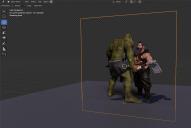
Billboard.jpg
1406 x 943 - 228K

Daz 3D is part of 
Connect
DAZ Productions, Inc.
7533 S Center View Ct #4664
West Jordan, UT 84084
Licensing Agreement | Terms of Service | Privacy Policy | EULA
© 2026 Daz Productions Inc. All Rights Reserved.
Comments
1. create in blender a plaine
2. copy with strg + alt + c the locations (XYZ) of the cameras in the n panel ("Item" tab)
3. paste it with strg + alt + v to the planes location
4. do the same rotation
5. now the plane should have the same position and rotation as the camera
6. export the plane as obj
7. import the plane to DAZ
8. In DAZ, manually adjust the camera like the plane
9. Now you can create in DAZ your billboards, run the script and than export the billboards to your scene in Blender.
Thanks for the info!
I guess I was hoping to be able to adjust the viewing angle inside of Blender instead.
But that would require the same DAZ rotation script functionality in Blender I guess.
Not sure, but constrains "track to" doesn't help?
I believe what the DAZ script does is changing the image texture on the billboard based on the selected viewing angle.
So that functionality would have to be replicated in Blender.
I was hoping that such a script already exists, considering how useful billboards are for dense population renders using DoF.
in Blender, you don't need billboards. There are better alternatives, like https://superhivemarket.com/products/procedural-crowds or https://www.blenderkit.com/?query=order:-bookmarks+author_id:1639511
A damped track will folow the camera but not align with the camera plane. You can use a copy rotation on YZ instead, after rotating the plane on X to make it stand up. Picture attached. Once you setup the first plane you can copy constraints to the others by selecting them all.
object > constraints > copy to selected
As for importing the script to change the image based on the camera angle that's not possible.
@Hurdy3d
All I can find for Blender are contemporary crowd assets.
I need medieval times crowds.
@Padone
I figured, but thought it wouldn't hurt to ask anyway. Thanks.
Push comes to shove, I'll set up the camera and billboards in DS and import them into Blender.
It's just a lot less flexible that way.
https://3dprop.store/library/boundles/bundle?id=11
https://3dprop.store/library/boundles/bundle?id=9
https://3dprop.store/library/boundles/bundle?id=8
Thanks, those look great! I'll check 'em out.
wThis could be done in the material with drivers and constraints. You really need to know you way around Blender for somthign like this. Would be some thing like setting the texture node to Image Sequence and then using drivers to change the frame used based on the objects world rotation. Then constaining the objects rotation to the cameras position. At least in theory anyway, something liek that is where I woudl start. However depending on the resolution of the textures it could be detrimental to rendering in Blender becaue textures eat up VRAM while polygons are cheap. unless you are rendering on CPU then ram limits don't matter.... for the most part.