-
[Released] Blender to Daz Studio Plugin released!!! Official support thread [Commercial]
I have also found some informations in the Blender manual.
https://docs.blender.org/manual/en/latest/addons/import_export/scene_fbx.html
They also mention some problems with import of FBX to Blender.
I am trying to import FBX with Humanoid animations from Unity.
[Released] Blender to Daz Studio Plugin released!!! Official support thread [Commercial]Hi @Artini, please DM me as I need additional details to be able to help. Also, please note that FBX import is notoriously messy and buggy, so I do wonder if the issue is just the FBX format rather than anything else. I will wait for your message. Best wishes. MatroniusImporting DAZ Decals into Blender?update. The uv decals are now implemented and the Dega wounds seem to import fine, let us know if there's other products using uv decals I didn't find any. Please note that blender doesn't have the notion of uv clipping so the implementation is limited, but seems to work fine nonetheless. For now please do not download the last commit as there's code from an external contributor that has to be fixed, so get the commit below for uv decals.
https://bitbucket.org/Diffeomorphic/import_daz/get/1a13113816bebec91a7bac54948c3da4310b1f0b.zip
update. The last commit is now safe to get.
https://bitbucket.org/Diffeomorphic/import_daz/downloads/
I'm new to this and don't know how to import an object along with its texture.A bit of a tutorial - hopefully Horo might chip in with a good recommendation for an advance tutorial on the subject.
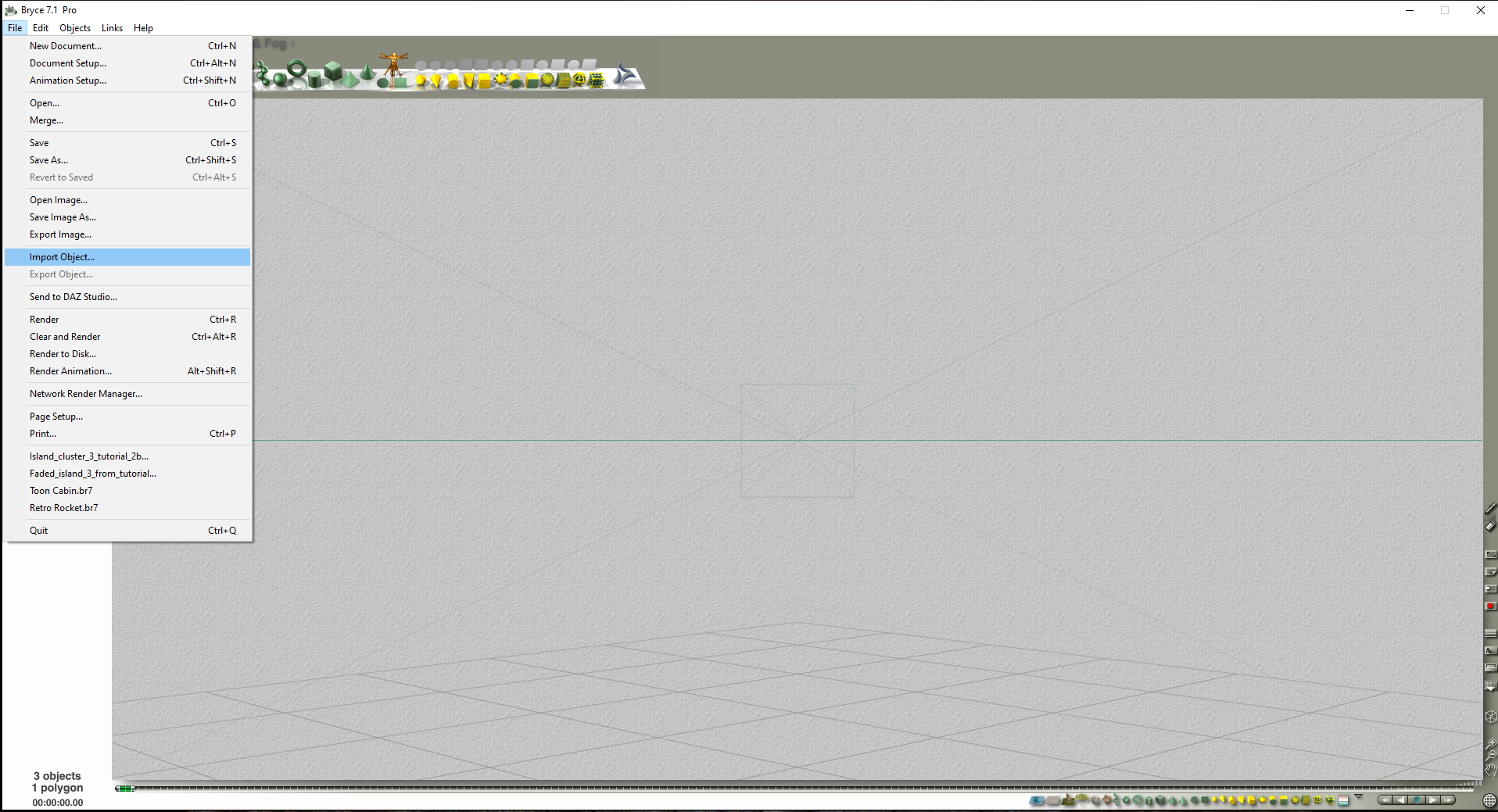
Click on File then Import Object
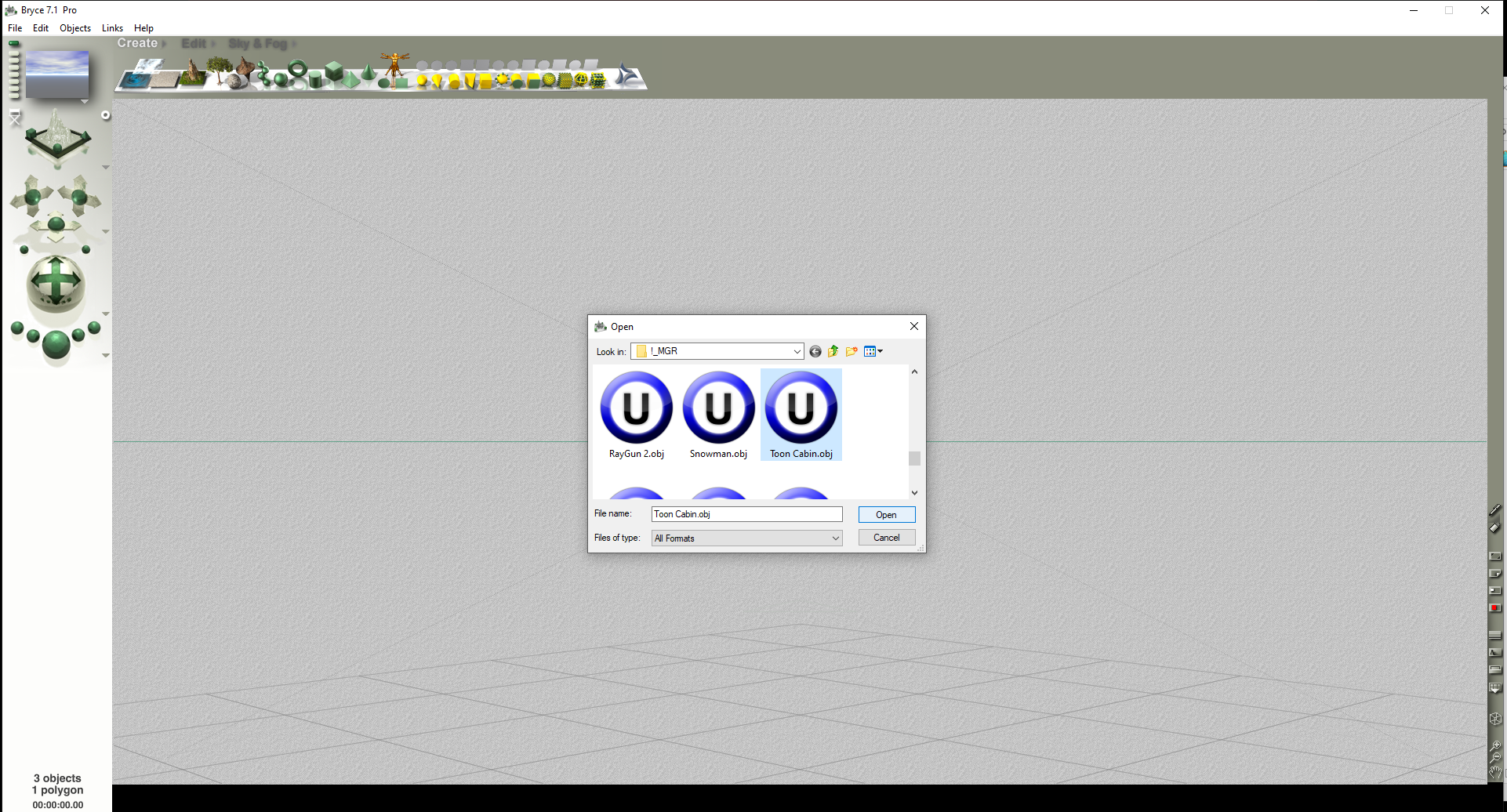
Locate obj file
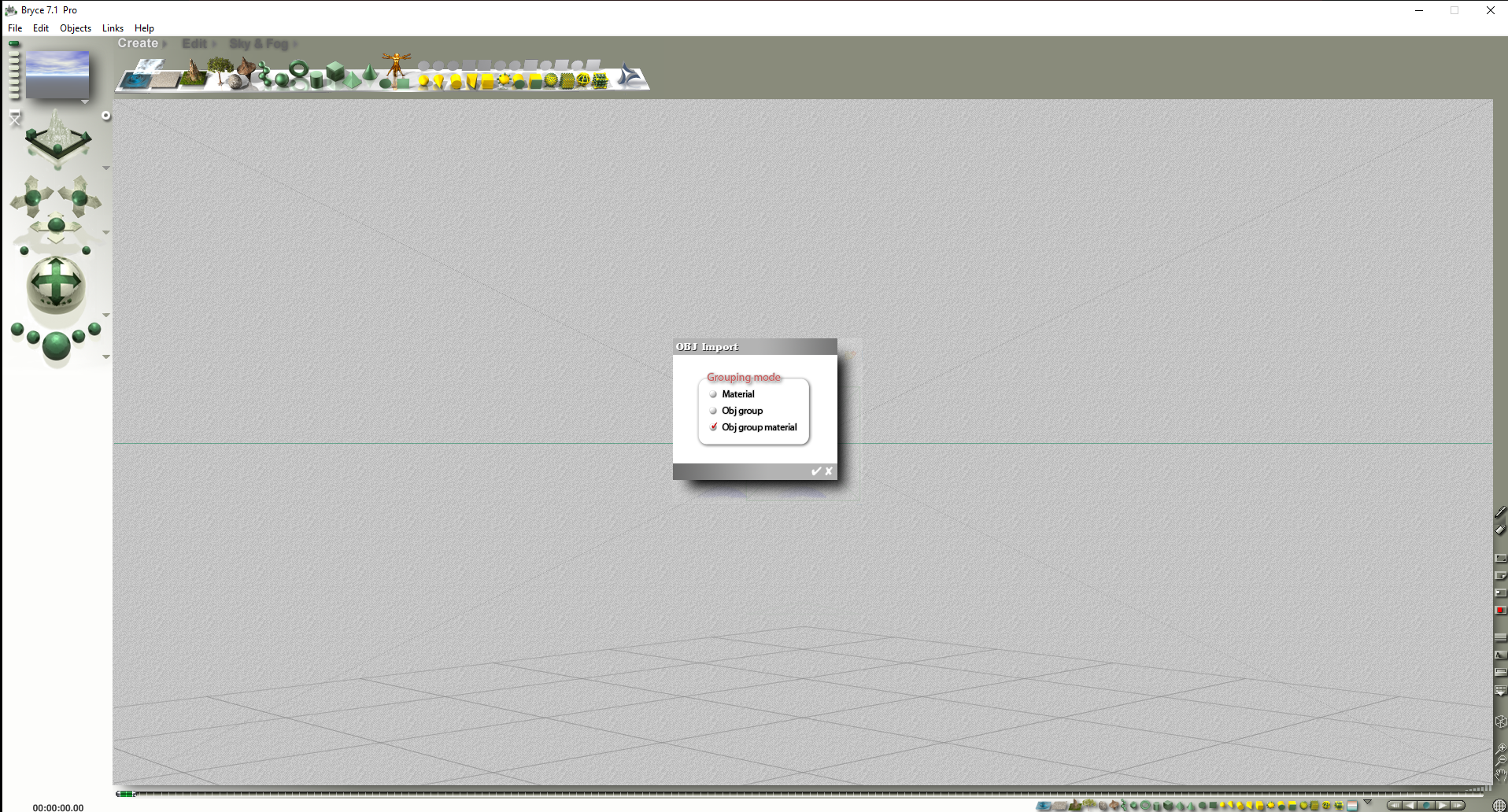
Click on Obj group material
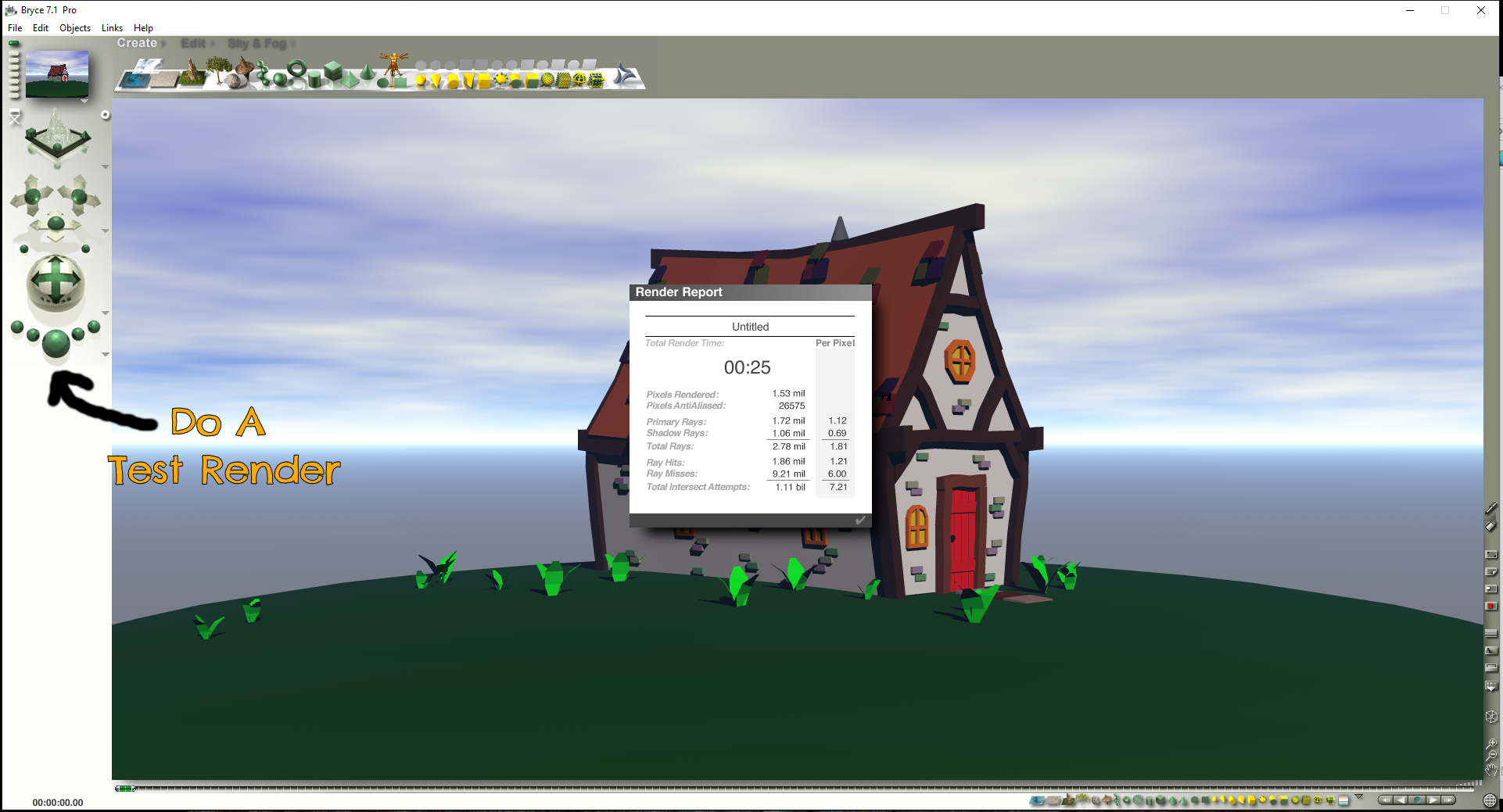
Do a test render
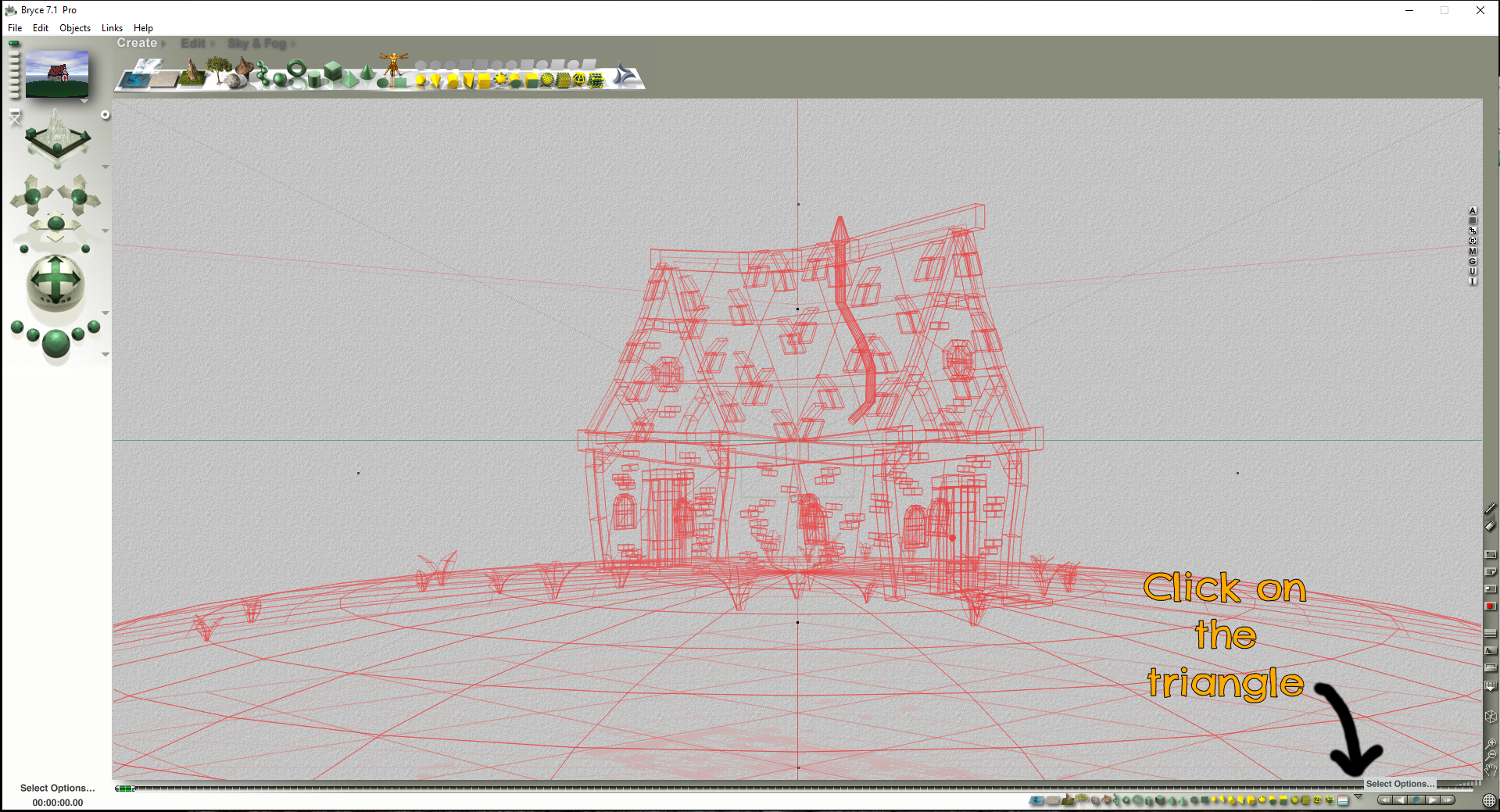
Some objs have multiple elements, to find out, click on the triangle
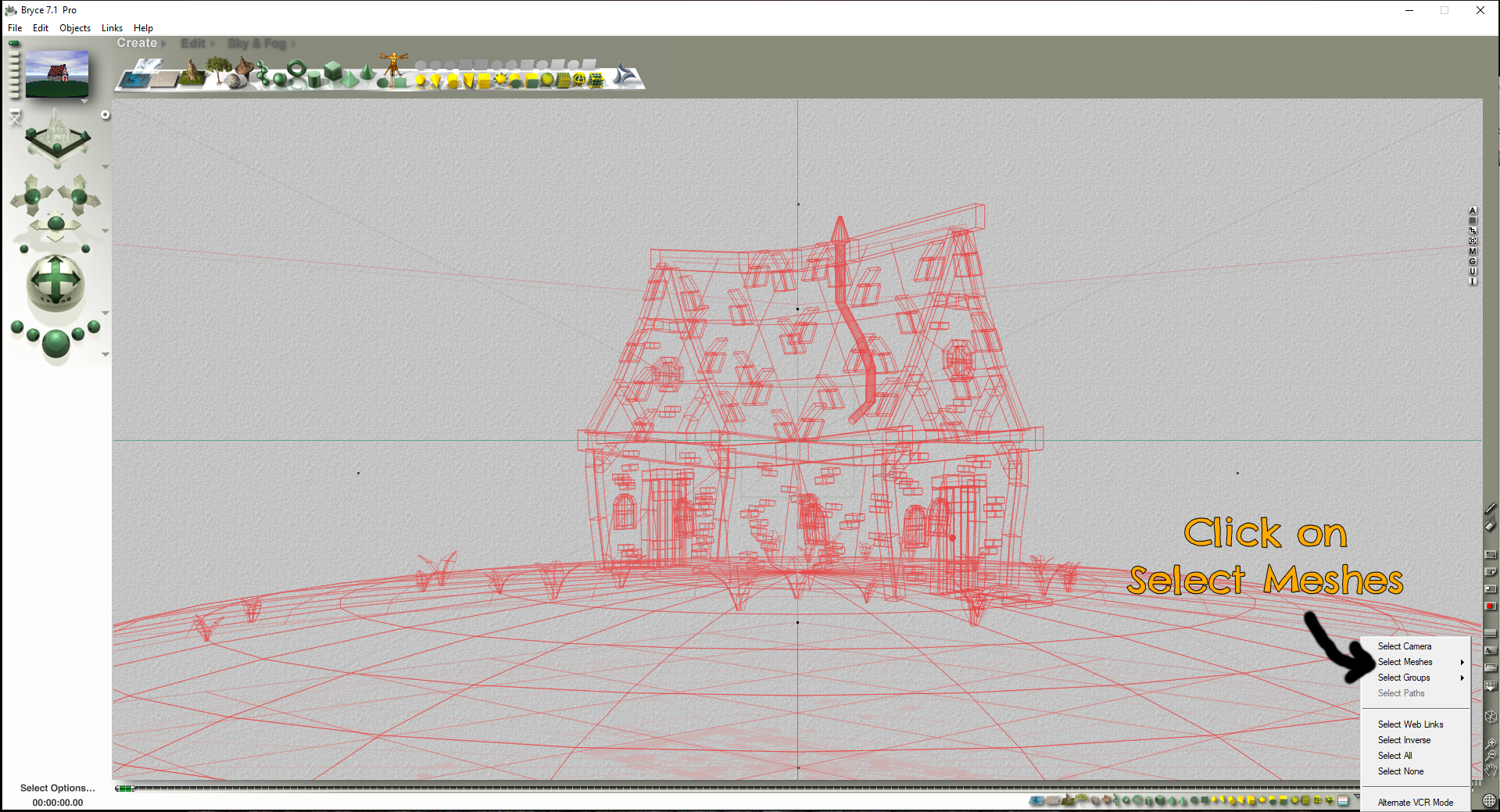
Click on Select Meshes
How do I export Gen9 w high heels to Blender to .glb?I assume the way you exported G9 in DS was to export to Blender File (*.blend)... If so, there're two ways you can make it:
1) Since "Export to *.blend file" uses DTB bridge, you need to check Include Animation (i.e. pose data will be included...) in FBX Export Options dialogue when exporting the figure ~~
2) Or, if you don't want to Include Animation... before Export to Blender file, you need to Bake Joint Rotations in DS > Joint Editor tool.Then open *.blenb file, go for the process of export / import *.glb format.
I'm new to this and don't know how to import an object along with its texture.When I import this object together with the .mtl file, the textures do not load correctly. I think this problem is due to my lack of experience with the program. I would appreciate your help.
dforce to create a mesh?Technically, you certainly can place another object with denser mesh, then add a dForce modifier to simulate it... like a shrinkwrap on the ground prop.
But a simpler way is that you can just convert the ground prop to SubD + add more SubD levels, export / import OBJ ~~ That shouldn't change its shape at all ~~
PA Names as part of product namebarbult said:
Ron Knights said:
Richard, that link was useless to me. It's the kind of thing written for computer programmers, or people with more technical understanding than me.
It would be better to have a series of documents or translations, written in "plain English," for people like me.
*****Edited to add****
Please call me Ron.
Richard's link about relabeling is only for DS 2025 Alpha, not DS 4.24. So I suspect that linked information doesn't apply to your current situation anyway, no matter how it would be phrased. In the future, when DS6 is released, it might be a helpful feature.
The main bit for end-users would be
Added a “Relabel…” action to the context menu of containers types that support being relabled in the “Content Library” pane
Products
Added a “Relabel…” action to the context menu of assets in the “Content Library” pane
Valid metadata is required
Not available for symbolic linksWhich tells you can right click on assets (files) and some containers (product foiders) in the Content Library to allow changing their label (display "name"). It works through their database entries, it isn't renaming stuff on disc, so it won't be useful if you have broken that for a product (unless you add your own anew). It's in the current 2025 Alpha, if you have that and want to try it out.
UltraScenery - new(er) territory [Commercial]As a more than 50% of my content comes from non-DAZ sources I don't think there's a lot of point to having DIM to be honest. The other stuff rarely has Metadata, and I've worked out a library system that works fairly well for me. DIM won't look for updates on DA or Rendo (especially as the machine is offline due to location in the house ((brick walls blanketing the wi-fi)) ), so I remain unconvinced. Regards, RichardUltraScatter2 - Now in store!Thanks. I'm glad that Daz is capable of doing this type of high-end stuff. I'd like to see a tile import feature tool for Daz. With tile import, I can import tiled terrains and create vast landscapes. For now, I have to import each tile one by one and manually line them up.Cannot find Victoria 4.2 in my daz libraryHi, I have installed and reinstalled my v4 with all the morhs again and again but it just does not show up in my content library on my daz studio 4.24. The name shows up but there's nothing inside.
I can import her from my poser 11 but I can't load any morphs onto her.
Any ideas?
Can't Open My Longtime DAZ Account on New ComputerRichard Haseltine said:
Connect installs won't transfer to a new system without reinstalling (if the files are in the correct place they should need only checking, not literal downloading, but it can still take a while) or copying the database over (which might be better avoided this time). If you logged in and had Update Metadata checked (it is off by default) you should see everything in the Install pane. Since DS is now logging in it may be worth t rying DIM again (if you use DIM then the only reason to have DS working online is for Premier exclusives - to use the plug-ins, and to get the exclusive shapes for the featured characters).
Well, I copied over the database onto my new computer's harddrive anyway because I can;t coonect a mouse and an external drive to it at the same time, and I need that mouse. So now all my immediate needs are downloaded, I can still install products I never installed beforeat will while running DAZ or simply install them from DIM now that I am using a computer with enough TB to hold it all, and hooray! I finally figurede out how to access my files and use DAZ like normal. I am even managing to access my account here and using my new computer to post here; something I was unable to do before. I may still need some help doen the line if I run into any new problems but the main crisis has been solved.My sincere thanks to everyone who replied to my post here. You are all lifesavers. Because I would have likely gone cuckoo if this crisis kept up for too much longer. Using DAZ Studio is often a regular part of my part and just the thought of being unable to access it when I feel the need to render just drives me bonkers. Now I can breathe again! :-)
(Edited by mod to fix quote)
Mesh grabber for Daz 2025 Alpha?Richard Haseltine said:
crosswind said:
Richard Haseltine said:
crosswind said:
joshua.r.fletcher said:
Has anyone found a reliable solution for this? I can't get the export/import approach to work, and I don't think there's a premier alpha version yet?
No solution for MG within Alpha version so far...
As far as we understand it only the Geometry Sculptor will be getting further development.
There's no separate Premier Alpha version but Alpha version per se supports Premier tier. You just log in with your account to verify Premier membership, then you can use Geometry Sculptor for Premier.
If so, at the end of the day... we who ever bought MG plugins are not able to use them anymore in DS 2025 ? or in other words we have to always keep using DS 4.24 if we have no Premier membership ?
How can we claim the right ?
You can use DS 4 to make morphs, which will then work in 2025.
I knew that ~~ but it's always a pity that what we ever bought cannot work in the brand new DS 6.x
Mesh grabber for Daz 2025 Alpha?crosswind said:
Richard Haseltine said:
crosswind said:
joshua.r.fletcher said:
Has anyone found a reliable solution for this? I can't get the export/import approach to work, and I don't think there's a premier alpha version yet?
No solution for MG within Alpha version so far...
As far as we understand it only the Geometry Sculptor will be getting further development.
There's no separate Premier Alpha version but Alpha version per se supports Premier tier. You just log in with your account to verify Premier membership, then you can use Geometry Sculptor for Premier.
If so, at the end of the day... we who ever bought MG plugins are not able to use them anymore in DS 2025 ? or in other words we have to always keep using DS 4.24 if we have no Premier membership ?
How can we claim the right ?
You can use DS 4 to make morphs, which will then work in 2025.
Can't Open My Longtime DAZ Account on New ComputerConnect installs won't transfer to a new system without reinstalling (if the files are in the correct place they should need only checking, not literal downloading, but it can still take a while) or copying the database over (which might be better avoided this time). If you logged in and had Update Metadata checked (it is off by default) you should see everything in the Install pane. Since DS is now logging in it may be worth t rying DIM again (if you use DIM then the only reason to have DS working online is for Premier exclusives - to use the plug-ins, and to get the exclusive shapes for the featured characters).
Mesh grabber for Daz 2025 Alpha?Richard Haseltine said:
crosswind said:
joshua.r.fletcher said:
Has anyone found a reliable solution for this? I can't get the export/import approach to work, and I don't think there's a premier alpha version yet?
No solution for MG within Alpha version so far...
As far as we understand it only the Geometry Sculptor will be getting further development.
There's no separate Premier Alpha version but Alpha version per se supports Premier tier. You just log in with your account to verify Premier membership, then you can use Geometry Sculptor for Premier.
If so, at the end of the day... we who ever bought MG plugins are not able to use them anymore in DS 2025 ? or in other words we have to always keep using DS 4.24 if we have no Premier membership ?
How can we claim the right ?
PA Names as part of product namegcjellyfish said:
I can sympathise with the frustration. Speaking solely for myself ...
The folder naming convention exists to prevent namespace conflicts, as is a hard requirement that we PAs have to adhere to in order to sell products on the Daz store. And I agree that it is necessary to avoid accidental path/name duplication beteen products from different PAs with similarly named characters or whatever. This ensures that products sold on the Daz store will work, even if vendors on other storefronts name their characters the same as a different character sold in the Daz store. So, I completely support that requirement.
File names within product folders are now also required to have PA/Product initials/names at the beginning. Historically, this was not the case, and older products mostly don't do this. Unfortunately, this convention makes it harder to read the file names within the content pane since file names are truncated due to the limited width of the pane and the columnar layout of files within it. Essentially, all file names show the (IMO) useless part of the file name and, if you're lucky, only a few characters of the important part of the file name are visible. As a user, I find this unhelpful and frustrating. As a PA, I would prefer not to degrade (IMO) the experience for my customers, but I am obligated to follow the store rules. Some other PAs like and agree with the convention, and the folks at Daz obviously agree with them.
So, why does this rule exist? I have had it explained to me (by another PA) that the inclusion of PA names/initials is to help facilitate ordering product search results within Daz Studio for a given PA, not just the individual file name. It is necessary because search within DS content library seems to be based largely on a simple text string comparison within the file name itself. So, they have to jam in information about both the file and PA into one field to make this work. The net result being that the file names become harder to read and use within the application which is the universal cost of making search more useful for people who want to limit results to a particular PA/product, (but also less useful to people who don't want the results to be limited to a particular PA/Product).
As a database and web developer in my real job, I personally find this approach to search quite frustrating. It would be much better to avoid relying on a string naming convention to facilitate this functionality. It would make more sense to provide an explicit results filtering system that could be used to explictly filter results by one or more PA names, or one or more product name once the file text comparison is made. Rather like how you can filter search results on storefronts like Amazon to limit the overwhelming list of results by price range, or by manufacturer, or by some other criteria. Of course, this might not work well for products from other storefronts since DS would not have the product metadata (smart content etc) to draw from (that said, the PA-folder name could potentially work as a surrogate). However, the current system also does not work well for products from other storefronts who are not required to use the file naming convention. And since products from other storefronts do not require this convention, this ironically makes files from other stores easier to read within the Daz Studio content pane than products from the Daz store itself. This fact makes me gnash my teeth a bit, since I'm a PA who sells on the Daz store and I WANT the Daz store products to do well and be the best, most user friendly, products in the larger market. So, I feel that this file naming convention disadvantages my product in the marketplace.
So,if it were up to me, I would like to see Daz developers overhaul the search within Daz Studio to include an explicit search results filtering system and to do away with the file naming convention that makes reading the meaningful part of file names difficult for our customers. But it is not up to me. And some other PAs seem horrified at the idea of changing it, as they seem personally wedded to the existing naming convention. So, I've largely given up trying to discuss the issue. I do my best to make my products as useful as I can in other ways and hope my customers understand that the file naming convention is not my choice as a PA.
Smart Content has long had a range of search otpions, those in the Content Library have been expanded
http://docs.daz3d.com/doku.php/public/software/dazstudio/4/referenceguide/interface/panes/content_library/advanced_filtering/start
http://docs.daz3d.com/doku.php/public/software/dazstudio/4/referenceguide/interface/panes/smart_content/advanced_filtering/startA find in page for "Content Library" and/or "Advanced Filtering" in these pages will show how the chnages have been added
https://www.daz3d.com/forums/discussion/714286/daz-studio-4-24-0-x-highlights
http://docs.daz3d.com/doku.php/public/software/dazstudio/4/change_log_4_24_0_3Mesh grabber for Daz 2025 Alpha?crosswind said:
joshua.r.fletcher said:
Has anyone found a reliable solution for this? I can't get the export/import approach to work, and I don't think there's a premier alpha version yet?
No solution for MG within Alpha version so far...
As far as we understand it only the Geometry Sculptor will be getting further development.
There's no separate Premier Alpha version but Alpha version per se supports Premier tier. You just log in with your account to verify Premier membership, then you can use Geometry Sculptor for Premier.
PA Names as part of product nameI can sympathise with the frustration. Speaking solely for myself ...
The folder naming convention exists to prevent namespace conflicts, as is a hard requirement that we PAs have to adhere to in order to sell products on the Daz store. And I agree that it is necessary to avoid accidental path/name duplication beteen products from different PAs with similarly named characters or whatever. This ensures that products sold on the Daz store will work, even if vendors on other storefronts name their characters the same as a different character sold in the Daz store. So, I completely support that requirement.
File names within product folders are now also required to have PA/Product initials/names at the beginning. Historically, this was not the case, and older products mostly don't do this. Unfortunately, this convention makes it harder to read the file names within the content pane since file names are truncated due to the limited width of the pane and the columnar layout of files within it. Essentially, all file names show the (IMO) useless part of the file name and, if you're lucky, only a few characters of the important part of the file name are visible. As a user, I find this unhelpful and frustrating. As a PA, I would prefer not to degrade (IMO) the experience for my customers, but I am obligated to follow the store rules. Some other PAs like and agree with the convention, and the folks at Daz obviously agree with them.
So, why does this rule exist? I have had it explained to me (by another PA) that the inclusion of PA names/initials is to help facilitate ordering product search results within Daz Studio for a given PA, not just the individual file name. It is necessary because search within DS content library seems to be based largely on a simple text string comparison within the file name itself. So, they have to jam in information about both the file and PA into one field to make this work. The net result being that the file names become harder to read and use within the application which is the universal cost of making search more useful for people who want to limit results to a particular PA/product, (but also less useful to people who don't want the results to be limited to a particular PA/Product).
As a database and web developer in my real job, I personally find this approach to search quite frustrating. It would be much better to avoid relying on a string naming convention to facilitate this functionality. It would make more sense to provide an explicit results filtering system that could be used to explictly filter results by one or more PA names, or one or more product name once the file text comparison is made. Rather like how you can filter search results on storefronts like Amazon to limit the overwhelming list of results by price range, or by manufacturer, or by some other criteria. Of course, this might not work well for products from other storefronts since DS would not have the product metadata (smart content etc) to draw from (that said, the PA-folder name could potentially work as a surrogate). However, the current system also does not work well for products from other storefronts who are not required to use the file naming convention. And since products from other storefronts do not require this convention, this ironically makes files from other stores easier to read within the Daz Studio content pane than products from the Daz store itself. This fact makes me gnash my teeth a bit, since I'm a PA who sells on the Daz store and I WANT the Daz store products to do well and be the best, most user friendly, products in the larger market. So, I feel that this file naming convention disadvantages my product in the marketplace.
So,if it were up to me, I would like to see Daz developers overhaul the search within Daz Studio to include an explicit search results filtering system and to do away with the file naming convention that makes reading the meaningful part of file names difficult for our customers. But it is not up to me. And some other PAs seem horrified at the idea of changing it, as they seem personally wedded to the existing naming convention. So, I've largely given up trying to discuss the issue. I do my best to make my products as useful as I can in other ways and hope my customers understand that the file naming convention is not my choice as a PA.
Mesh grabber for Daz 2025 Alpha?crosswind said:
joshua.r.fletcher said:
Has anyone found a reliable solution for this? I can't get the export/import approach to work, and I don't think there's a premier alpha version yet?
No solution for MG within Alpha version so far...
There's no separate Premier Alpha version but Alpha version per se supports Premier tier. You just log in with your account to verify Premier membership, then you can use Geometry Sculptor for Premier.
Ah got it. Thank you!
Daz 3D is part of

Connect
DAZ Productions, Inc.
7533 S Center View Ct #4664
West Jordan, UT 84084Licensing Agreement | Terms of Service | Privacy Policy | EULA
© 2026 Daz Productions Inc. All Rights Reserved.