-
Ice Dragon Art A Glimpse Into My World
Well I think I finally have everything the way it should be. I did get 4.24 working again, the alpha is working and so is 4.10. I do want to comment on some things. Because I have a 5060 rtx card, I can only render with the cpu for 4.24 and 4.10. Can't use most of the scripts or plug ins in the Alpha. Again, no big deal, do it in 4.24 and move it over. Well.... its not quite so simple. The alpha is not recognizing the files for the skin builder when saved with a character in a scene subset. Also not a big deal but you do have to import your scene, then go to the materials folder where those skins are stored and re apply. Again, no big deal unless you don't know. So, now you know lol.
Also, none of the converted characters (G2f and g3f to G8F) will transfer to the Alpha. For me, this is not a big deal, my CPU will render most anything so I can render it in 4.24 it just takes a little bit longer, but it can definitely be a problem if you have a machine that struggles in CPU.
Why when I click on this teeth shape nothing happen? (have picture)Hey everyone.
Wanted to ask I try some new teeth morph and the color work perfect but the shape teeth don't . anyone know why? Thanks :3g9 pupil size adjustment? in base essentials or require extra morph pakcrosswind said:
You can increase G9's pupils size by using the morph property: Eye Pupils Dilate that comes from G9 Starter Essentials package ~~
dim says all 4 gen starters installed and no sign of it
closest I can find is " facs_bs_EyePupilsDilate" gen 9>gen9 eyes>morphs>FACS>facs_bs_EyePupilsDilate.
but it doesn't show up in parameters or shaping?
Can you find it and give me it's exact location where it's found?Daz to Blender HD morphsHi everyone, I've recently gotten into Daz (it's been really fun learning a lot of new things). I'm trying to add HD navel morphs to my G9 model. The morph looks best at viewport subdivision level 3. What would be the best way to export this into Blender using the Diffeomorphic addon? I've tried exporting normally, but the morph doesn't appear. If I export with the HD checkbox (without HD convention) checked, it just creates two models in Blender that look identical-and neither has the HD navel morphs(nor do they have MultiResolution modifier). I've read through many of the Diffeomorphic addon explanations on this topic, but most of them are outdated and werent clear enough atleast for me. I'd really appreciate any help, especially step-by-step guide, so that I can always revist it. if possible. Thanks in advance! Sorry, I'm sure this has been asked countless times.January 2026 - Daz 3D New User Challenge - Composition, Instancing, and DuplicationPoisoned Mind said:
I wanted to try this challenge to get some input. The character was instanced with the head gear attached. Daveyabbo's DA-15Y Lvl 4 HD Morph for Genesis 8 Female(s), Ansiko's Surgical Strike, Feng's Skyrail Bridge. Off set instances slightly.
that is a very good idea and I love the fade out into the background. I have the feeling the focus on the first one could be a bit sharper or give a little more free room without the green mist for the distance to the first one
g9 pupil size adjustment? in base essentials or require extra morph pakYou can increase G9's pupils size by using the morph property: Eye Pupils Dilate that comes from G9 Starter Essentials package ~~
g9 pupil size adjustment? in base essentials or require extra morph pakdoesn't seem to be in base morphs eyes>pupil slit is only one with pupil in it.
----
The 8 to 9 converter worked well, now just stuck on a couple detailsLet's appreciate/discuss today's new releases - more ongoinger threadNewGuy said:
Nice work @Matt_Castle and thank you for the support. I imagine they would port well to Genesis 8, especially if you are using Mattymanx's Genesis 9 Clones for All.
Well, my methods are more robust than regular autofit clones (I can actually convert/transfer bend correctives), but yeah, as a general thing I imagine that these wouldn't auto-fit too badly (the main trouble areas with autofit tend to be the armpits, groin and sometimes collars, and these aren't in those areas.
The fit shapes are definitely the most time consuming part of the process. I can see why most PAs don't produce an exhaustive list of supported shapes.
I have methods I'm working on that *mostly* auto-generate fits, but I need to update my templates for tighter fitting clothes, so that's on my to-do list first.
What is doing this?The issues looks like the partial influence on the vertices of toes coming from a full body morph or partial body morphs ~ I used to encounter the similar issues on some products coming from 3rd-parties sites...
You can easily test it by zeroing out the FBMs or PBMs that you dialed on the character, one by one ~~ If you can identify the culprit morph, you can fix it by Geometry Editor > Vertext Selection mode > Clear Selected Deltas from Favorites ~
Eduardo 9I also thought him to be be Edward Norton ((Eduardo) from Fight Club & Primal Fear (Twilight). He's spot on and earlier forum post description of him looking like a whiner that's exactly his personality in the opening of Fight Club. I have never heard of Diego Luna mentioned earlier so I looked up his photos and he looks similar to Edward Norton too, so I see why some think Eduardo was modelled after Diego Luna as well. In any case, this is a unique DAZ character, it lists an asymmmetry morph so that's not a usual thing either in the character bundles, quite different, but I'll get it next month, unless a Toon 9 or Girl 9 bundle comes in before March as this month I'm getting Wendy 9 HD Character Bundle | Daz 3D before she's removed from the Premeire list.
Eduardo 9Skin looks 8.1. And his morph has an unfinished, uncanny nature (somewhat stylistic?) that reminds me of Jazz 8.1, Pablo 8.1, or Hans 8.1. Not even the excellent Daz promo artists were able to consistently bring him to verisimilitude (although a couple did); so, I probably won't be able to either.
Subject: Missing "Clear Selected Deltas from Selected Morph(s)" in latest DS version?Thank you for the clarification! I might have misremembered how the menu worked in my older version. I will try adding the morph to "Favorites" first and then see if I can clear the deltas. Your advice was very helpful. Thank you again!
Looking for help saving Face Transfer 2 texturesHello. Here is what I do when creating new characters (YMMV). I have a long, complicated process that is beyond your initial question ("Where are my texture files?"), so I'll go through what I do, to the point where your files are saved in a permanent form.
Step 1. Create your new Face Transfer 2 figure from your source image. Here, I'm adding a new character from my cast.
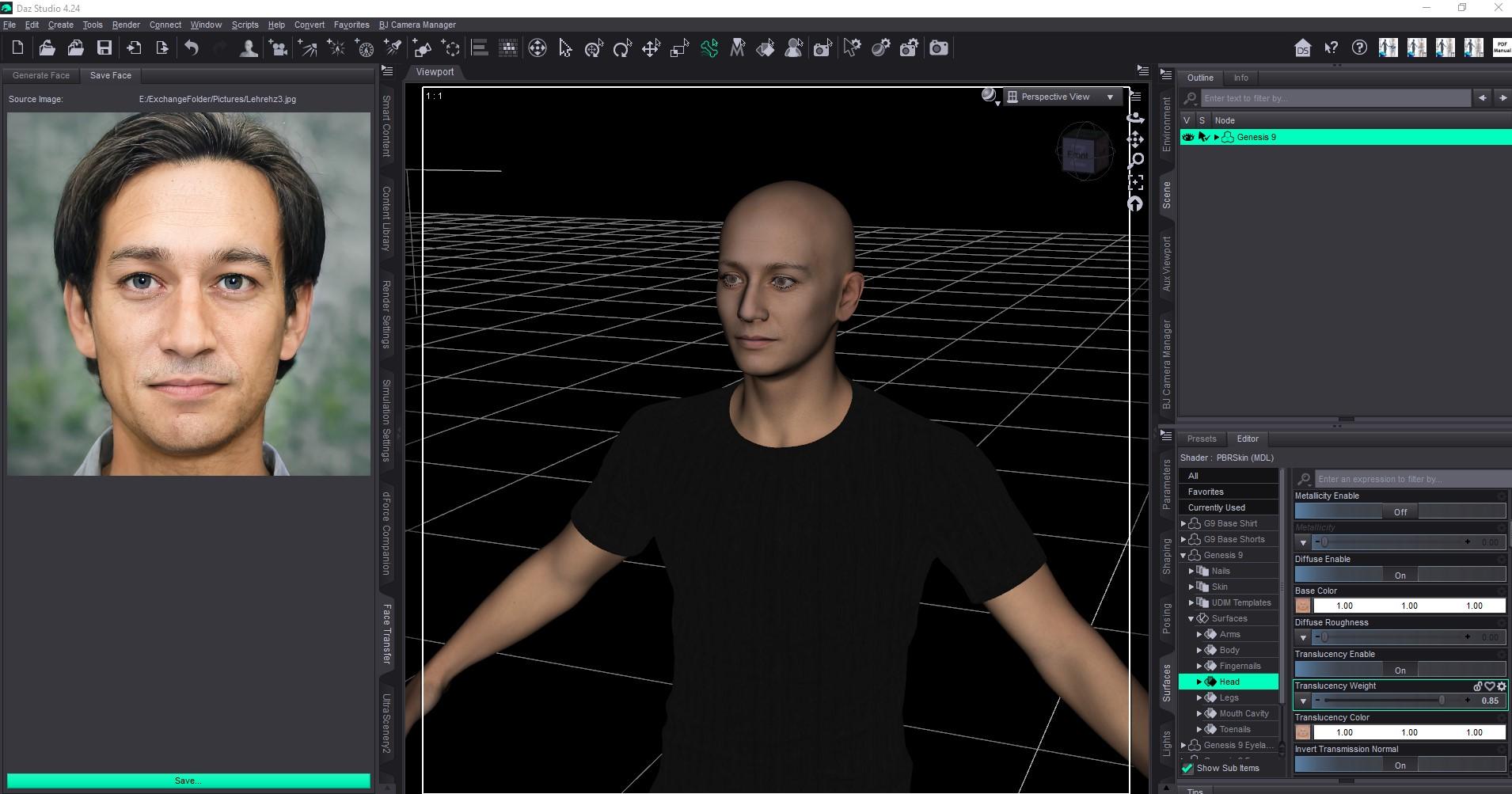
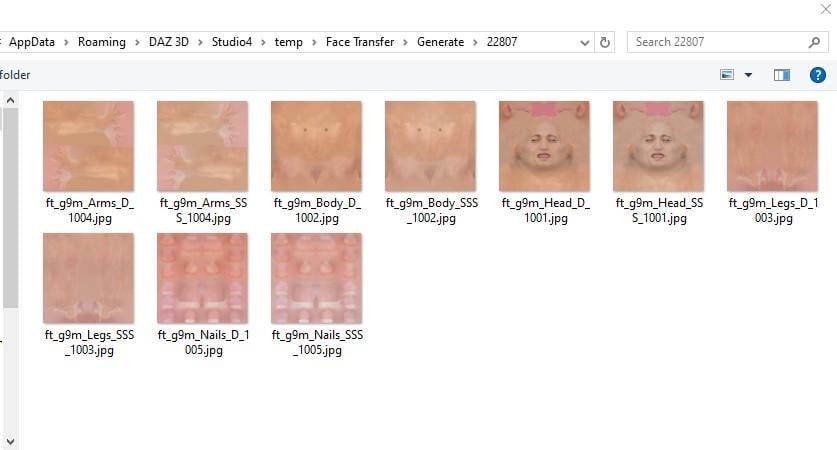
Step 2. If you select your Genesis 9 figure in the Scene (upper right) and go to the Surfaces tab and go to the path seen in my first screen shot (Genesis 9 -> Surfaces -> a body part: Arms, Body, Head, Legs, Fingernails/Toenails), you'll find all the items related to that surface. If you look in Base Color or Translucency color, there's a map showing the texture, but if you hover over it, or click on it, you'll see that it goes to a temp location. Here's mine - yours will be specific to your Daz installation. These are temp files and will disappear shortly.
Step 3. My next step when creating a new character, is to Save. You may need to click "More" (where it says "Less" in this screen shot) to see all these options, but it's clear what's going on here. I'm telling it where to save the textures (a custom folder on my E drive) and I've provided a name that I use for various purposes - naming the texture and other tasks further downstream in my character creation. What you - or anyone else - would select here will vary depending on your Daz installation and your preferences, but you can see where this is going.
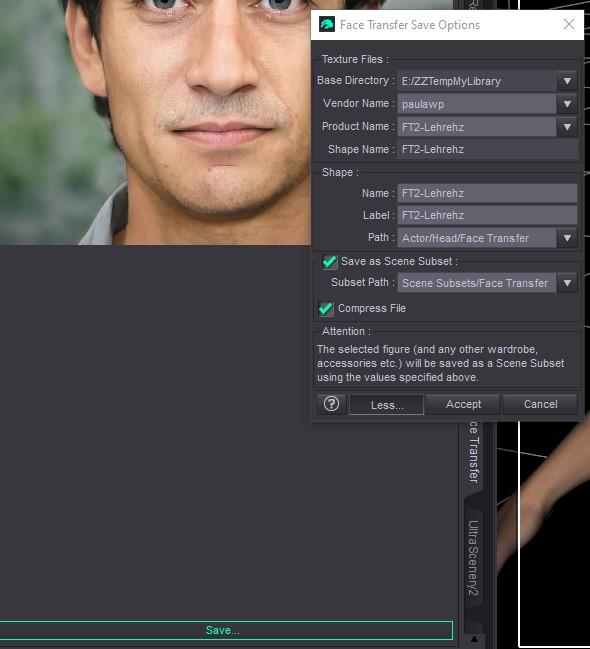
Step 4. Once I set this up and save it, the texture files are saved in the folder as configured, and the textures on the Genesis 9 figure now reference the permanently named files.

Test it out and see what works for your needs. If you get into character creation with FT2, there's lots more you could do, but I'll just stop here to make sure that helps out with your actual question.
Feel free to visit my "Marahzen's Musings" thread linked in my signature if you want the grand tour and endless minutiae from the beginning (my beginning) in terms of creating characters.
Looking for help saving Face Transfer 2 texturesHello. I use FT2 frequently. I'm not able to get to my art computer right now, but can provide steps later today.
It sounds like you might not be saving the transfer. The textures are only temp files until you do.
Looking for help saving Face Transfer 2 texturesHi everyone, I’m hoping someone more experienced with Face Transfer 2 might be able to help me, as I’m a bit stuck and would be extremely grateful for any guidance. I’m having trouble permanently saving the textures generated by Face Transfer 2. At the moment, no matter what I try, the textures don’t seem to persist — only the morphs are saved, and the images appear to remain temporarily associated with the figure rather than being written out and reusable. Here’s what I’ve already tried: Saving via the Save option under the Image tab in the Face Transfer 2 pane Save As → Figure/Prop Asset Save As → Material Preset Save As → Character Preset Save As → Scene Subset In all cases, the morphs save correctly, but the textures do not seem to be preserved in a way that survives loading into a new scene. I’ve also tested this on both: DAZ Studio Premier 4.24.0.4 DAZ Studio Premier 2025 Alpha Unfortunately, the behavior is the same in both versions. I’m sure I’m either missing a step or misunderstanding how Face Transfer 2 is intended to handle texture saving, so if anyone could point me in the right direction — or let me know if this is expected behavior and how others work around it — I would truly appreciate it. Thank you very much for taking the time to read this, and thanks in advance for any help or insight you’re willing to share.Looking for help saving Face Transfer 2 texturesHi everyone, I’m hoping someone more experienced with Face Transfer 2 might be able to help me, as I’m a bit stuck and would be extremely grateful for any guidance. I’m having trouble permanently saving the textures generated by Face Transfer 2. At the moment, no matter what I try, the textures don’t seem to persist — only the morphs are saved, and the images appear to remain temporarily associated with the figure rather than being written out and reusable. Here’s what I’ve already tried: Saving via the Save option under the Image tab in the Face Transfer 2 pane Save As → Figure/Prop Asset Save As → Material Preset Save As → Character Preset Save As → Scene Subset In all cases, the morphs save correctly, but the textures do not seem to be preserved in a way that survives loading into a new scene. I’ve also tested this on both: DAZ Studio Premier 4.24.0.4 DAZ Studio Premier 2025 Alpha Unfortunately, the behavior is the same in both versions. I’m sure I’m either missing a step or misunderstanding how Face Transfer 2 is intended to handle texture saving, so if anyone could point me in the right direction — or let me know if this is expected behavior and how others work around it — I would truly appreciate it. Thank you very much for taking the time to read this, and thanks in advance for any help or insight you’re willing to share.January 2026 - Daz 3D New User Challenge - Composition, Instancing, and DuplicationI wanted to try this challenge to get some input. The character was instanced with the head gear attached. Daveyabbo's DA-15Y Lvl 4 HD Morph for Genesis 8 Female(s), Ansiko's Surgical Strike, Feng's Skyrail Bridge. Off set instances slightly.
Do Victoria 4 and Michael 4 Not Work In The Alpha VersionAh, it appears the script is in the older DS 1/2 format and the new DS 2025 lacks the converter for that - DS 4 would auto-convert. f you uninstall Power Loader and run the /runtme/libraries/!Daz/DzCretaeExPFiles-v4.bat flefrom a file browser the figure shoudl load, though you won't of course get the ease of use options for seelcting morphs/morph sets on load.
Do Victoria 4 and Michael 4 Not Work In The Alpha Versionmight just be Powerloader
may need to load the cr2 and add morph injections manually like one does in Poser
Subject: Missing "Clear Selected Deltas from Selected Morph(s)" in latest DS version?ontent: Hi, I'm trying to edit a morph using Geometry Editor. I have selected vertices, but I cannot find the "Clear Selected Deltas from Selected Morph(s)" option anywhere in the right-click menu or Edit menu. Even in the F3 (Customize) panel, searching for "Delta" only shows "Clear Selected Deltas from Favorites."
Did the name of this function change in the latest version? Or is it moved to a different menu? I am using a custom morph loaded via Morph Loader Pro. Any help would be appreciated!
I am using an AI to translate this message as I only speak Japanese. I would appreciate your kind assistance and patience.
Daz 3D is part of

Connect
DAZ Productions, Inc.
7533 S Center View Ct #4664
West Jordan, UT 84084Licensing Agreement | Terms of Service | Privacy Policy | EULA
© 2026 Daz Productions Inc. All Rights Reserved.