-
Free Flexion Enhancement for G8/8.1F. Also SWM Flex Vein Control
terry_duquette said:
I don't see any attached picture, but it sounds like you didn't download/install the other file, there is the SWM Control, and the main one is the Duq7 Flexion, that is where all the missing sliders would be. TD
I think DAZ forum seem to have problem posting screenshot this morning, and yes you were right! I missed 1 file, now I have everything intact! and just wow~ what can I say, this is the best bicep morph solution for G8F period. I can never thank you enough friend :D Can't wait to see what you can do with G9
bicep peak for Genesis characterarne207 said:
Genesis 9 seems like a step backwards in that regard, G8 and 8.1 were advertised as improvements in terms of muscle contraction. What is needed here is a muscle morph pack, and so far there isn't any. We'll have to see what turns up eventually, especially since apparently there are Ivar 9 and Freja 9 characters on the way that will probably be pretty beefy.
Right now you can either try post-render work with something like Photoshop or mess around with ManFridays Mesh Grabber tool -> https://www.daz3d.com/mesh-grabber-win
Big yes, I noticed that too, default mesh on G8M/F’s arms seem to have minimum human muscle retraction that respect human anatomy, with great 3rd party support products over the years, it's close to perfection (only if AME female version did release) but G9 mesh just totally ignored the human muscle retraction altogether, big reason I'm not very into G9 at its current state
To OP, forum user terry_duquette just uploaded an extremely useful tool (currently free) that enchance the bicep morph for G8F, you will get that realistic bump and split, that's the best solution I found so far for G8F, highly recommanded
For Male, you will have to use AME, most realistic G8M muscle morph https://www.daz3d.com/auto-muscle-enhancer-hd-for-genesis-8-males
Other way to do realistic G8F bicep morph is to use G8M as base than use transgender tool and abrunch normal map turn him into G8F's likeness.
GenX2 Genesis Basic Child to G3M transfer arrives UPSIDE DOWN! :OI've just tried converting Genesis Basic Child over into Genesis 3, setting to Create single morph, using GenX2. I then loaded the resulting shape on G3M, and he has arrived UPSIDE DOWN, underneath the ground plane. The flipping heck is going on here, and how do I correct this? 0o
I also tried converting as Selected morphs (with defaults), and I don't see any other shapes showing up in the Generation X section.
(Looks more closely) Okay, for some reason, Scale transferred over as -84% instead of 84%, so I took the negative out and he's now right side up. Why is it transferring from Genesis to G3 with a negative scale?

Edit to add: On the other hand, I went to apply a pose onto the character, and he suddenly went back under the floor and was now all pretzil-twisted into curving ribbons. 0o Clearly I'm going about this wrong.
Are "floods" in style right now, or what?Cybersox said:
AllenArt said:
Please forgive me for my choice of words, but "floods" are always what we called really short hems that didn't even reach the tops of the shoes. I've been seeing a lot of 3D clothing with really short hems and wondered if it was in style or something. Hopefully it's not....yikes.
As far as 3D clothing goes, I think it's at least partially a way to avoid having to deal with potential collisons of the dress and the tops of the feet and ankles, which is also what I suspect to be the cause for the disproportinate proportion of shorts vs full length pants in 3D male outfits. Sure, it's something that CAN be done, but it takes extra time and time is money...
That's what I thought too, but I'm not buying highwater pants for men. Fit Control has a lengthen morph, but I think it also lowers the crotch.
Trying to GenX2 Maddie onto a G3F characterMaddie isn't a morph, Maddie is a base figure - GenX transfers morphs, not the base shape. I don't know if this would work but you could try exporting Maddie as OBJ, load as a morph for the base adult female of that generation, and then GenX thata cross - but expect to have to do some fairly extensive tidying up idf it does work.
Free Flexion Enhancement for G8/8.1F. Also SWM Flex Vein Controlterry_duquette said:
windli3356 said:
You are doing god's work my friend, I can never thank you enough, can't wait to play around with it. and my apology for not being active on this forum to discuss the problem I created
hope I can acheive good result on native G8F as it did on my G8M to G8F with AME
This is my G8M to G8F result vs my current best bicep on native G8F (haven't used your tool yet)
Hope these tools meet your need. Just glad you got my message. You didn't really create the problem, it was always there, I am working hard on some G9 files also. The Base model Flexions don't contract, so you get this LONG Bicep that then makes the arm look like a noodle, just my take on it. I will publish my G9 files when I get something I can live with. TD
Thanks! wow~ G9 can't wait! would be even happier if you put that up for sale, I'd be the first in line to buy it :D I can see it's alot of work put into it, don't want see you end up empty handed
Question on this G8 tool you uploaded, I can only find 2 of your morph slider so far (as shown in attached) would love to try out "base flex control", "split bicep present", "split bicep control" and "SG flex add" :D what did I do wrong?
New! Novica & Forum Members Tips & Product Reviews Pt 14I have them, finally tested the girl. I had to load the base figure, apply the morph, and then adjust the head. As was said at the time, you can use character sliders to change the kids to look as you wish, and change their textures... She was okay for what she was designed for, to bring a Gen 4 Kid up to G8. I didn't try a Gen 4 outfit on her though.
Can't remember which computer I used to test her, but if it was the MacBook Pro, can't get in there right now. Apple forced me to update to Ventura and I am trying to get DAZ and DIM to work again. In the middle of backing up my DIM files before I uninstall it. I can't get it to let me work offline, it is totally borked. Going to get fresh installs.
Auto Muscle Enhancer HD [Commercial]wow~ I'm so glad this topic is still ongoing.
After playing with AME for a little bit, I was finally able to get that realistic bicep bump I always wanted on my G8/8.1 female, but the effort to achieve good result is too overwhelming, to convert AME morphed male to female, certain body parts always need to be adjusted to look feminine, ,the file size in the end could close to 1G due to combination of numerous morph, normal map and hair product merged together. It's a shame that AME female version never saw the light of the day so it could save creators so much trouble.
Recently I was able to get that perfect bicep bump on native G8/8.1 female too, but the muscle definition and vein detail still aren't anywhere near as realistic as AME has to offer (for those into low bodyfat female bodybuilder contest shape)
Here's hoping some genius would come up with something similar to AME on G9, so far, G8/8.1's eco system + flexibility is too big too good to beat
XTransfer Module 1- Genesis 3 to Genesis 8 Morph Converter (Commercial)Like for instance, if all I want to do is transfer over specific characters like Victoria 7, Ophelia 7, Michael 7, Ivan 7, and PA characters like Henryk for Michael 7, will I be able to do this in 4.21.05 and higher?
G8.1 Character morph crosstalk?So, I hope I get all the details right. I have my :ibrary in an external garddrive to save space. I recently purches Baku (From Daz) which is ag*.1 male figure. It works fine. EXCEPT every other g8.1 charcter loads with the Baku head and body morphs loaded up at 100%. This isn't a problem with the males as the Baku sliders are there and I just dial them back to zero. BUT, for the females, there are no sliders....nothing for me to dial back to zero, and it affects ALL my g*.1 female characters. I tried uninstalling Baku, I searched for all Baku files and manually deleted them, I searched inside the data folder for G8.1 fermale morphs and there were no Baku morphs there. I'm at a loss guys. Any help would be appreciated.
[SOLVED] Use my custom preset?Is your character's shape a custom morph you created, or a preset using existing morphs? In the second case, do you want it to be available as a dial on new figures, or do you simply want to be able to apply the same values on a new figure?
Import body morphs from DAZ Studio to BlenderCornelius said:
lilweep said:
Desired Resolution = usually would be Base Resolution but can be High Resolution if you want (up to you and your limitations of what youre doing), but you have to keep the same throughout process
in Daz:
Load Gen 3 and set Resolution to "Desired Resolution"Export Gen 3 figure as obj (only export the Gen 3 figure, no eyelashes, no hair, no tearline etc)
Load the morph you want at the same "Desired Resolution"
Export Gen 3 morphed figure as obj (only export the Gen 3 figure, no eyelashes, no hair, no tearline etc)
in Blender:
Load both Objs you exported
Do the Join as Shapes process outlined earlier
Under Shapekeys, dial in the shape
For the work I'm supposed to do, I only need the body without the head, since the shape of the head and face shouldn't be changed.
If I import the entire Genesis it will change the shape of the face too, right?No, if you make no changes to the shape of the head the head will be unchanged by the morph (and it won't interfere with any other head morphs - morphs just stack).
Anyway, great explanation!
 Face Transfer On Genesis 8.1
Also, https://www.daz3d.com/forums/discussion/486896/how-to-use-face-transfer-with-genesis-8-1-characters
Import body morphs from DAZ Studio to Blenderlilweep said:
Desired Resolution = usually would be Base Resolution but can be High Resolution if you want (up to you and your limitations of what youre doing), but you have to keep the same throughout process
in Daz:
Load Gen 3 and set Resolution to "Desired Resolution"Export Gen 3 figure as obj (only export the Gen 3 figure, no eyelashes, no hair, no tearline etc)
Load the morph you want at the same "Desired Resolution"
Export Gen 3 morphed figure as obj (only export the Gen 3 figure, no eyelashes, no hair, no tearline etc)
in Blender:
Load both Objs you exported
Do the Join as Shapes process outlined earlier
Under Shapekeys, dial in the shape
For the work I'm supposed to do, I only need the body without the head, since the shape of the head and face shouldn't be changed.
If I import the entire Genesis it will change the shape of the face too, right?
Anyway, great explanation!Shape Splitter - Divide, Combine and Save (The new version is already available. 1.2.1)[Commercial]CGI3DM said:
When saving the morph you have the option to activate the automatic adjustment of the rigging.
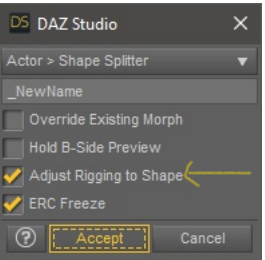
In the tests carried out I have not had any problems with the rigging of saved morphs. The result (mix) of the rigging should be the same that Daz Studio uses for all its figures (very good).
But, if there were unexpected results depending on how different the two morphs are. You have the option of combining the 2 morphs into one(new) and making the correction with "Adjust Rigging to Shape"
So it sounds to me like Shape Splitter does not copy "rigging A+B" from the original mixed morph version of the character, but instead just runs the "Adjust Rigging to Shape" function on the merged morph version.
It leaves me wondering why nobody has ever made a script that copies the rigging exactly from the mixed morph version over to the singular merged morph version. Is that actually a very difficult thing to code?
Well, chances are just hitting the merged morph version with "Adjust Rigging to Shape" is acceptable in most cases, even for me. But I've been getting weird results on G8F thumbs and eyes that "Adjust Rigging to Shape" does not fix. I've heard that the eye problem is common for faces that have undergone some radical morphing; or the morphs that make the face got transferred by products like X-Transfer.
Well, I sure do feel tempted to buy Shape Splitter to easily do good head splits. I'm just trying to understand the possible limitations.
Shape Splitter - Divide, Combine and Save (The new version is already available. 1.2.1)[Commercial]When saving the morph you have the option to activate the automatic adjustment of the rigging.
In the tests carried out I have not had any problems with the rigging of saved morphs. The result (mix) of the rigging should be the same that Daz Studio uses for all its figures (very good).
But, if there were unexpected results depending on how different the two morphs are. You have the option of combining the 2 morphs into one(new) and making the correction with "Adjust Rigging to Shape"
Import body morphs from DAZ Studio to BlenderDesired Resolution = usually would be Base Resolution but can be High Resolution if you want (up to you and your limitations of what youre doing), but you have to keep the same throughout process
in Daz:
Load Gen 3 and set Resolution to "Desired Resolution"Export Gen 3 figure as obj (only export the Gen 3 figure, no eyelashes, no hair, no tearline etc)
Load the morph you want at the same "Desired Resolution"
Export Gen 3 morphed figure as obj (only export the Gen 3 figure, no eyelashes, no hair, no tearline etc)
in Blender:
Load both Objs you exported
Do the Join as Shapes process outlined earlier
Under Shapekeys, dial in the shape
Shape Splitter - Divide, Combine and Save (The new version is already available. 1.2.1)[Commercial]When combining morphs with Shape Splitter, to what degree is the rigging preserved?
If Morph A changes the rigging, and Morph B changes the same rigging, the rigging for the two morphs together has a unique rigging produced by both morphs. Call this “rigging A+B”.
If I use Shape Splitter’s combining feature to unify Morphs A and B, will the resulting rigging be exactly equal to “rigging A+B”?
Or, could the resulting rigging be slightly different from “rigging A+B”?
Genesis 9 bug...just wondering if I'm alone...Pardon me but using an alternative option does not equate to a solution. The zero figure option (which works with all previous figures) is a workflow norm for most of us. Honestly "reset" and other options does not always fully zero (and I mean absolute zero) a figure out (previous ones) so at times the zero figure is the only method to completely turn off all the myriad of options that are on by default - which is an imperative function for those of us who make exportable morph targets. So this is clearly a problem and bug. The answer is not to work around it. Working around it is a method of coping while the bug gets fixed. I'm still waiting since December 19th for a response from DAZ technical support. I really feel I'm just being ignored as usual because it's a known bug and they don't have a fix for it. If an option in Studio does not work with a DAZ figure and utterly turns off functionality indefinitely for that figure if applied - that's a bug. Why do all companies just ignore failures these days and refuse to even acknowledge an issue let alone try and openly fix it? So I guess my report will be utterly ignored indefinitely. Not surprised.
Well anyway, using zero figure option turns off the BJC's for your Genesis 9 figures and you can't turn them back on. I'm going to see what NORTHOF45 is talking about.
By the way, everyone likes to go on and on about BJC's but all they are - is simple corrective morphs that are hidden by default and are paired (controlled) by the movement dials. There's nothing magical about them. They are just bending correction morphs and Genesis figures are riddled with them and they are generally hidden by default - and this is why Genesis figures get slow to load and move after you've installed a large number of custom figures. Moving activates these morphs - so the more there are installed, the more computing power needed for the moving dials to work. Base joint correctives - fancy name for not so fancy of a thing.
Assortment of Beards/Mustaches/Facial HairBest of luck with that. Not sure Cararra can do it, but many transfer to blender then to Daz, mind you morphs and bones would have to be recreated, 2 things I haven't learned yet lol
Daz 3D is part of

Connect
DAZ Productions, Inc.
7533 S Center View Ct #4664
West Jordan, UT 84084Licensing Agreement | Terms of Service | Privacy Policy | EULA
© 2026 Daz Productions Inc. All Rights Reserved.