-
Daz 3D Introduces dForce Physics Engine
Thank you for helping me out.I found the sliders and now its play time;)
correct workflow = add dForce Modifier to only the fabric? i have 3 material in surface pane: Fabric, Loops and metals ( minidress from: Timeless Outfit for Victoria 7)
Making a Simple Clothing ItemFirstBastion, I'm so pleased that you took time to look at the video and for the helpful advice which I'll look into.
I'm particularly delighted because, after the first test in Poser of the aniblock motion on the child version of Victoria, I looked for some props in my runtime to give her some surroundings.
I came up with the story from there. It involves a couple of mischievous children in a graveyard at Halloween. Your 'Old Man With A Lantern Statue' is the other character in the scene!
It is a great prop, guaranteed to add an atmosphere to many kinds of scene. Here, he is a ghostly figure. I've uploaded a shot from my Poser attempts where he can be seen. Here you can see the problem of the aniblocks starting at the same spot:
Another upload shows a little better than before how I have more control over the figures' positions using Carrara - and the renders are super-fast compared to Poser's Firefly on my machine.
https://www.youtube.com/watch?v=7t9m2WsCq74&feature=youtu.be
In this video with four children, the two smaller ones were created by exporting one of the original figures as .FBX and then re-importing the .FBX into Carrara. I could scale it and move it around as shown in the vid.
Thanks again.
Just remembered to mention - I heartily recommend the VWD program for cloth and Hair simulations. It's just that in this case Poser's capable cloth room is good enough for my simple home-made stuff.
Released: Easier Pose Creation for Victoria 8A new pack of Easier Pose Creation has arrived, this time for Victoria 8, with over 600 possible combinations, you can create your own poses in seconds. This pack contains 25 lower body poses for Victoria 8 (+25 mirror), 25 upper body poses (+25 mirror) and 25 full body poses (+25 mirror). As a bonus, this pack includes all the poses adapted for Genesis 8 female, this means you get 150 extra pose presents.
How does it work? Just load your favorite top and bottom poses, mixing the different parts and trying different combinations.
When you load a partial upper pose, you are NOT going to lose the lower pose or expression previously loaded, and vice versa, if you load a partial lower pose, you are NOT going to lose the upper pose. This lets you save time adjusting just small details pedending of the combination used, additionally gives you the chance to try different possibilities to get a new pose quickly, without wasting time to adjust your character to the floor or begin a pose from zero.
If you have questions just let me know :)
https://www.daz3d.com/easier-pose-creation-for-victoria-8
The older generation: Victoria 2/3, Michael 2/3 and their children rendersI can see that I'll have to post my image here too...
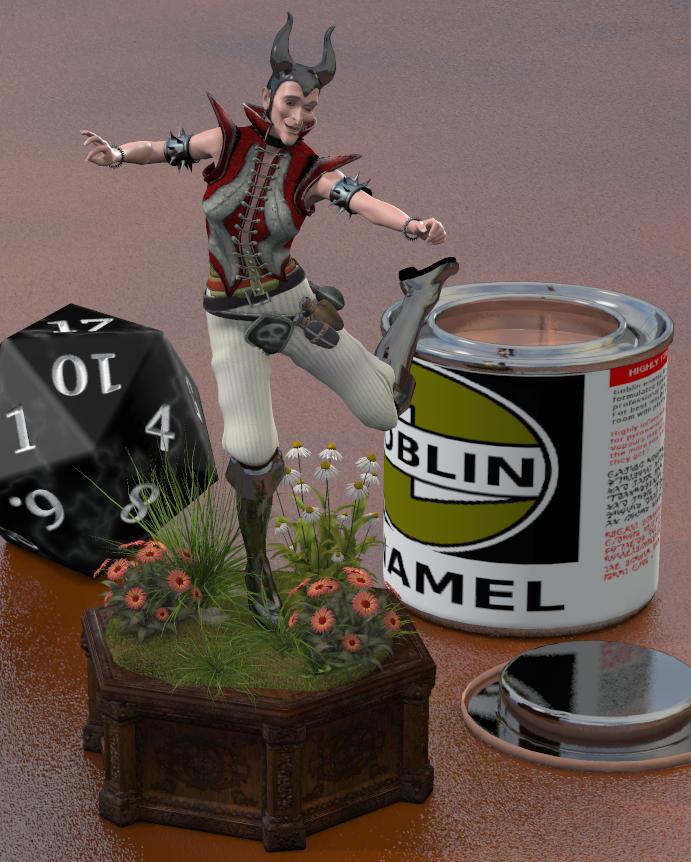
Like I said elsewhere this is a Poser (PP2014) render of Victoria 2 with Snarleygribbley's EZSkin2. She's using one of Sydd's Dragonessa face morphs (and hat), Ella (I think?) skin texture, V2 swashbuckler gear, and a some cyberpunk spikey stuff. All old freebies from the sadly-missed RDNA.
Novica & Forum Members Tips & Product Reviews Pt 9Trying out The Flock Butterflies - It's quite nice really, this is six "mini flocks" set to different materials (four in the package).
Figure: Mynx for V7 (mostly) with a run of Sintaro's Randomizer done on her face
Hair: Sapphire hair - this has really nice adjustability - lots of morphs to position things
Top: Mechanic outfit for G3F - nice to pair with the skirt
Skirt: from the Moto Girl Outfit for G3F again - I like the set - though I made the texture darker since it was too light to match the top.
That looks really nice. I've got the butterfly product from The Philosopher. This looks a bit easier to use, but TP's allows for multiple colors within a group. Trade offs, I guess. I was sorely tempted to get The Flock Butterflies anyway, but the wallet won the "debate."
 Novica & Forum Members Tips & Product Reviews Pt 9
Trying out The Flock Butterflies - It's quite nice really, this is six "mini flocks" set to different materials (four in the package).
Figure: Mynx for V7 (mostly) with a run of Sintaro's Randomizer done on her face
Hair: Sapphire hair - this has really nice adjustability - lots of morphs to position things
Top: Mechanic outfit for G3F - nice to pair with the skirt
Skirt: from the Moto Girl Outfit for G3F again - I like the set - though I made the texture darker since it was too light to match the top.
Retro Renders, anyone?You should take a look at this thread if you haven't found it yet. It's all about images for the older generations. There are some really great images in there.
Retro Renders, anyone?As it happens I just did one yesterday, posted on another thread in this forum.
It's Victoria 2 with one of Sydd's Dragonessa morphs (and headdress) and some old RDNA freebies for clothing. PP2014 render using Snarleygribbley's EZSkin 2.
There's still life in the old girl !
Novica & Forum Members Tips & Product Reviews Pt 9Here's BD Aspen for Victoria 8 Karissa Hair for Genesis 3 and 8 Females FG Ultra Tee for Genesis 8 Female(s) ...
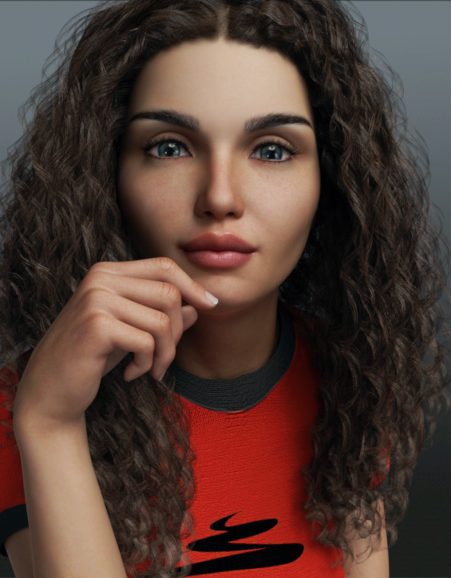
I love that hair - don't know how I missed it (perhaps it was released during my penniless phase). I'm very tempted as April's store is on sale, but I already blew a (small) fortune on SIckleyield and DestinysGarden in mega fastgrab today...
What Daz character bundle will be released next?I want an adult male with a face that doesn't look angry, really narrow,or with Vulcan or Victoria eyebrows. A guy I can morph into handsome hunks and please less Goth, Mohawks, and makeup. Also please without victoria's hairline or orange skin, and whose eyes are easy to render. Please also include body hair, since adult men have that. Please make sure the genital textures of all characters are looked at by someone with an understanding of anatomy.
That is all
Novica & Forum Members Tips & Product Reviews Pt 9Here's BD Aspen for Victoria 8 Karissa Hair for Genesis 3 and 8 Females FG Ultra Tee for Genesis 8 Female(s)
Showing you the original and then after I tweaked the nose, mouth, and jaw width. I elongated the chin a bit but it doesn't really show much. I changed up the reflectivity/glossy a bit on the materials too. FYI Karissa Hair renders fast, for those of you with slower computers.
Mine, with changes. Click back and forth between the two windows and you'll see the changes. I did a lot with the nostril wings and nostril height. The mouth is totally different. I also dislike puckering at the end of the mouth, so you can change the depth there and the puckers are softened.
 * closed* RRRR The're ba....ack! Render contest
And now it's time for the next one: pull #3.
2658 - i13 100 Essential Expressions for Victoria 7
3569 - Hayden for Young Teen
5517 - Dress Code Violation Outfit
596 - Genesis 3 Male(s) Expressions and Face AniBlocksHmm, so all I have to do is have Mike and Vicky sit there, mugging the camera, and we're good? Works for me...!
Um, it turned out to be not quite as simple as that....
Also used:
Preppy for Genesis
Ashe for Genesis (Shoes)
Crazy Male Hair
Belle 6
Skyler Long Hair
FWSA Cole HD for Gianni 7
Adam Hair for Genesis 3 Male(s)
Everyday Casual Outfit for Genesis 3 Male(s)
Carmilla for Victoria 7
Casual Style for Genesis 3 Female(s)
Long Shag Hair for Genesis 3 Female(s)
i13 Steakhouse Environment
i13 Steakhouse Poses
Bijou for Genesis 2 Female (She seems to turn up in a lot of my renders; I wonder why...?)
Leyton Hair
Piratess for Genesis 2 Female(s)
Dinnerware for Iray
MHE: Glasses
Moonshine's Diner Interior II (Yep; there's a Tomalin something in everything I do!)
Diner Food 4Okay, I've wrestled with this damned thing long enough! I aborted the first render after an hour because there was a scaling issue with the food. I aborted the second render after four hours due to an issue with the shaders applied to the glasses. The third render ran for a little over nine hours (pretty much overnight, actually), when the system lapsed into a coma, and I had to restart. I started the fourth render this morning, and after some six hours, it's still saying it's only 1% complete.
Well, screw it! I'm entering it "as-is", graininess and all! Like I said earlier, I'm gonna be dead in thirty years; I don't have time for this crap!
TAG: obanion#03
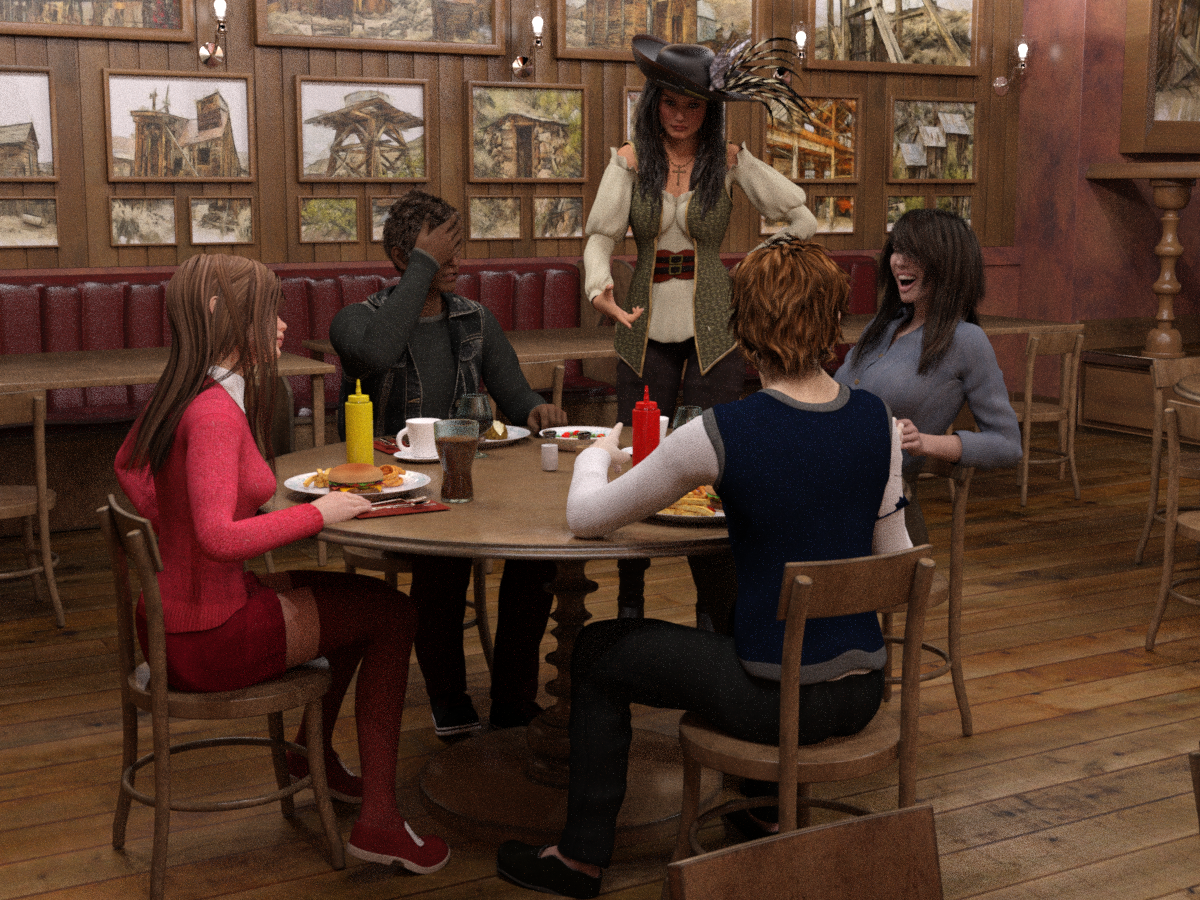
Title: Family Night Out: "Can't Take This Kid Anywhere!"
Back by popular demand, we're celebrating National 'Talk Like a Pirate Day' at the Sizzler Steakhouse!Hayden's parents could always count on him to say or do something to embarrass his family in public; it was practically his superpower! And he did not disappoint, when he told their waitress that she "can walk my plank anytime!" His mother thought it was hysterical -- especially when the server 'returned fire'! His dad..., um, not so much.
Server: "No, thanks, kid. I have this rule: anytime I'm forced to fraternize outside my own species, I always at least try to date UP!"
Ken this is really neat - love it!
Stephanie 8 !I would buy that if the brows were adjustable and they made a more universal brow which would’ve been the way to go...But they aren’t and the position of the eyebrows in Josie is different from where you might want them on Victoria 8 or Stephanie.
I suspect given the cobbled together nature of Stephanie’s bundle that this was a rush job and there was no time for development of the extras.
There is a flaw in this argument; the Stephanie and Josie body morphs were done well before the products were released. How else would other PAs be able to make content using them or to fit them?
Is it possible to allow V4 to wear G2f clothingIf you are using Poser then you can buy support for Genesis 1 and Victoria 4 for Wardrobe Wizard. Wardrobe Wizard is included in Poser 11 and some earlier versions (I don't know how far back it goes), it is in the Pro versions, I don't know about the standard versions. Warbrobe Wizard can convert either way between any two figures that you have support for.
Is it possible to allow V4 to wear G2f clothingYou can convert clothes from V4 to G2F with this. There's no equivalent product to convert from G2F to V4 as V4 can't use autofit at all.
However Evilinnocence's Crossdresser program (with the V4 licence) can be used to convert from G1 to V4, so if you have the G2 autofit clones for G1 you can first convert your clothes from G2F to G1, then use Xdresser to go from G1 to V4.
Stephanie 8 !I would buy that if the brows were adjustable and they made a more universal brow which would’ve been the way to go...But they aren’t and the position of the eyebrows in Josie is different from where you might want them on Victoria 8 or Stephanie.
I suspect given the cobbled together nature of Stephanie’s bundle that this was a rush job and there was no time for development of the extras.
DAZ please Belle 8 pleaseYou have a good argument that if a base character is named after an earlier series base character, as in your request for Belle 8, that character should look substantially the same as the earlier series character. Belle 8 should look very similar to Belle 7 etc. Why else would you give them the same root name?
The named characters series are basically characters illustrating a given concept / style (anime for Aiko, stylized pinup for The Girl, and so on), so they can be quite different even if they share the same series name.
PAs will sometime use one of the named character as part of their characters as it's closer to what they intend to create than the default genesis base, so it saves them time.
Perhaps the notion of stereotypes was originally the idea. Certainly Victoria has remained somewhat similar, throughout the various generations. Aiko and The Girl are clearly different styles but now there are dozens of "6s" and "7s" (and "8s" to come) which actually don't look very similar to their coresponding predecessors. In many cases it is very UNclear what is "specific" concerning one "7" over another. Perhaps DAZ3d would care to clarify this?
Further, are you suggesting that PAs are so lazy or unskilled that they need to base their figures on a specific "6" or "7"; forcing their clients (us!) to have to buy a second character to get theirs? I doubt it. Consider Xanthe for Stephanie 8, are you seriously suggesting it was easier to get to her face from Stephanie 8 than it would have been to start from G8f base? Again, I doubt it.
Xanthe is not really using a lot Stephanie 8. It use only 5% of her.. Look the Stephanie 8 thread for more clarifications.Thank you Atanacius, you make my point exactly. Xanthe is a character which does not really need to be based on Stephanie 8.
The original poster asked for Belle 8. I wonder if a character very much like Belle 7 were to be released, obviously using G8f as the base, but not as a new Base character in itself, just a separate character, would he not be happy? I suspect so. Me too.
DAZ please Belle 8 please
Xanthe is not really using a lot Stephanie 8. It use only 5% of her.. Look the Stephanie 8 thread for more clarifications.You have a good argument that if a base character is named after an earlier series base character, as in your request for Belle 8, that character should look substantially the same as the earlier series character. Belle 8 should look very similar to Belle 7 etc. Why else would you give them the same root name?
The named characters series are basically characters illustrating a given concept / style (anime for Aiko, stylized pinup for The Girl, and so on), so they can be quite different even if they share the same series name.
PAs will sometime use one of the named character as part of their characters as it's closer to what they intend to create than the default genesis base, so it saves them time.
Perhaps the notion of stereotypes was originally the idea. Certainly Victoria has remained somewhat similar, throughout the various generations. Aiko and The Girl are clearly different styles but now there are dozens of "6s" and "7s" (and "8s" to come) which actually don't look very similar to their coresponding predecessors. In many cases it is very UNclear what is "specific" concerning one "7" over another. Perhaps DAZ3d would care to clarify this?
Further, are you suggesting that PAs are so lazy or unskilled that they need to base their figures on a specific "6" or "7"; forcing their clients (us!) to have to buy a second character to get theirs? I doubt it. Consider Xanthe for Stephanie 8, are you seriously suggesting it was easier to get to her face from Stephanie 8 than it would have been to start from G8f base? Again, I doubt it.
Flying Fabric - Artistic Flowing Cloth Pieces - where to find the poses used?It looks like one or several of the dance pose sets from the shop, like
- https://www.daz3d.com/modern-dance-poses-for-genesis-8-female-and-victoria-8
- https://www.daz3d.com/classical-ballet-poses-for-genesis-2-female-s
- https://www.daz3d.com/60-ultimate-dance-poses-for-victoria-6
etc.
But your best bet is to ask the PA who created the set, as he did the renders himself, as far as I understood it. Here's the product thread: https://www.daz3d.com/forums/discussion/189631/just-released-flying-fabric-artistic-flowing-cloth-pieces-commercial#latest
Is it possible to allow V4 to wear G2f clothingI know that things have moved on since the olden days when Vitoria was queen but I still find lots of things for her to do. It would really help however if I could use the content I have for G2F on Victoria. I think I remember a v4 to G2f conversion thing but cant find anything by searching the forums, so if anyone can help it would be a real help.
Thank you
Daz 3D is part of

Connect
DAZ Productions, Inc.
7533 S Center View Ct #4664
West Jordan, UT 84084Licensing Agreement | Terms of Service | Privacy Policy | EULA
© 2026 Daz Productions Inc. All Rights Reserved.