-
Iray Materials RSL/MDL problems (MDL doesn't work?)
I have a lot of confusion with the MDL and RSL materials.
I have an Nvidia GTX 960 card and selected Nvidia Iray as Engine in the Render Settings and Draw Settings.
I am testing with the Victoria 8 Model and as I understood it, for the Iray engine it is necessary to apply the MDL materials.
But it seems that when I apply a MDL- Victoria 8 All Maps material nothing happens (or almost nothing).
However, when I apply the RSL material if it looks better to the model and obvious changes are seen.Default without All Maps applied

MDL All Maps Applied ( nothing change?)

RSL All Maps applied, (The figure has more volume (the skin), the color of the skin has changed, shine on the lips, the eyebrows disappear to have to apply later ... it seems that there are changes to better).

So, according to these tests, it seems that RSL does something and MDL does not work, am I right? Do I have something wrong? Is there something I do not understand well?
Thanks for the helpWhy are we losing so many ancient PAs this year?I think its nothing to be overly concerned about. Most of these people hardly put any content on the daz store to begin with.
Adam has his own online store which I've purchased a few things from.
Darkworld has a strong store on Renderosity and I've purchased from him too.
People's priorities change overtime. Sometimes making products is a temporary inspiration and it comes and goes. For others on Daz store like Fred Winker, Lyoness, Zeddicuss, Marcius, Stonemason, DzFire for example, it may be a way of life thus there is committment. Look at Thorne for example. Lots of products during Victoria 4, not so much now, just the occasional morph kits and a character or two from time to time.
Its the ebb and flow of Daz3D. Life happens and people adjust or stay the course.
I should have waited to post. You wrote it better than me :D
Why are we losing so many ancient PAs this year?I think its nothing to be overly concerned about. Most of these people hardly put any content on the daz store to begin with.
Adam has his own online store which I've purchased a few things from.
Darkworld has a strong store on Renderosity and I've purchased from him too.
People's priorities change overtime. Sometimes making products is a temporary inspiration and it comes and goes. For others on Daz store like Fred Winker, Lyoness, Zeddicuss, Marcius, Stonemason, DzFire for example, it may be a way of life thus there is committment. Look at Thorne for example. Lots of products during Victoria 4, not so much now, just the occasional morph kits and a character or two from time to time.
Its the ebb and flow of Daz3D. Life happens and people adjust or stay the course.
Clothes didn't fitHere is a video that should help you get the fit you need on most any figure. This doesn't always work, especially for morph extreme shapes ie: if the figure you want to morph to is way tiny the cloth will be way too big (could be useful for lost waif type renders though!) If you want to save the sim result as a morph you'll want to set mesh resolution back to base, export obj and then load in as a morph in morph loader pro. Please note this video is by no means professional, there is no sound but should give you the basics of using Timeline with dForce to fix mesh crumpling.
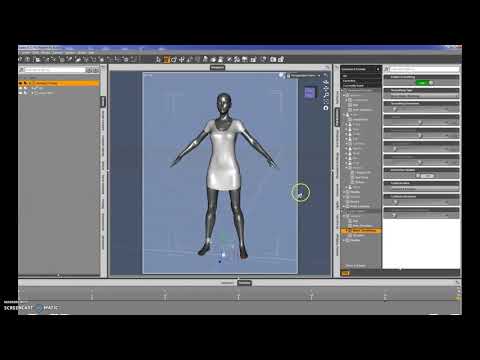
Hm... I didnt get it. You did simulation 3 times. It was 3 different situation? Or It was all necessary steps to fit one t-shirt?
LosingSignal Thank you for your answer. I tried using dForce as you wrote, but not very successfully :( Shoulders didnt fit and Mesh Smoothing not helping.
And i dont understand why use timeline tab? To fit figure to clothes? But then if i need to use this figure in not one but couple of renders with different clothes then figure would be different in other renders?
You're really, really close. That looks just like mine did before I set the T-Shirt's Enable Smoothing button to On. I'd love to see Aave Nainen's video, especially if it shows how to save the fit as a morph. That would save a ton of work over the course of several renders.
EDIT: Man, I'm slow on hitting that Post button...
And yeah, the Timeline is needed to make the clothes fit the morphed figure. If you were using Victoria 8 or the base Genesis 8 Female body, you could skip the business with the timeline and the Simulation settings, just apply the dForce modifier and hit Simulate. But since Elizabeth and Rebekah have custom scultped figures, the t-shirt's mesh doesn't really know what to do with it. Just hitting Simulate will leave the underside of the breasts misshaped. I'm imagining that the software takes the shape of the shirt at the start of the timeline and then uses the physics engine to determine the drape of cloth over the course of the simulation. Since the shirt looks nice without the character morph, dForce thinks that's how its supposed to look and rolls forward, even as the timeline slowly shifts your character to the full morph you want.
One other thing I learned the hard way is that just hitting Simulate to get a dForce outfit to fit a pose, even with no other problems, is that if the cloth crosses itself during the simulation process, it explodes (very Ghostbusters Proton Pack-like, now that I think about it...). Using the time line would let you control that pose midway through so that the simulation doesn't try to move the character's arm through its own torso (for example).
Ah, tnx man, I understand now.
I set smoothing at 20, work fine (though all morph became very slow. Have to wait 10 sec for every change. ), but now there is problem with jeans ...
Damn, using marvelous designer way easier (on video tutorials anyway).
Extreme Closeup: Makeup for Genesis 3 Female(s) (Commercial - it's here!)I went ahead and bought it after 3D Outlaw posted. So glad I did! It's very cool and it DOES work with Genesis 8 Female. It takes a few seconds for the makeups to load. Other than that, it's super-easy to use. It's definitely worth buying.
I bought it mainly because I have been converting old Victoria 4 character MATs to Genesis 3/8 using Texture Transformer 2 and didn't want to bloat up my runtime with all the converted makeups and lipsticks. But I'll be using this extensively for Gen 3/8 characters as well.
@chevybabe25 - you should have them add Genesis 8 to the title and description. And, please release yet another product like this. Would love more lipsticks and natural makeup options. <3
Who is this?For Crocodile Liu's Racing Queen Outfit (https://www.daz3d.com/racing-queens-outfit-for-genesis-8-females), who is the main promo model? Is that just Victoria with a different base skin?
Thanks!
Clothes didn't fitLosingSignal Thank you for your answer. I tried using dForce as you wrote, but not very successfully :( Shoulders didnt fit and Mesh Smoothing not helping.
And i dont understand why use timeline tab? To fit figure to clothes? But then if i need to use this figure in not one but couple of renders with different clothes then figure would be different in other renders?
You're really, really close. That looks just like mine did before I set the T-Shirt's Enable Smoothing button to On. I'd love to see Aave Nainen's video, especially if it shows how to save the fit as a morph. That would save a ton of work over the course of several renders.
EDIT: Man, I'm slow on hitting that Post button...
And yeah, the Timeline is needed to make the clothes fit the morphed figure. If you were using Victoria 8 or the base Genesis 8 Female body, you could skip the business with the timeline and the Simulation settings, just apply the dForce modifier and hit Simulate. But since Elizabeth and Rebekah have custom scultped figures, the t-shirt's mesh doesn't really know what to do with it. Just hitting Simulate will leave the underside of the breasts misshaped. I'm imagining that the software takes the shape of the shirt at the start of the timeline and then uses the physics engine to determine the drape of cloth over the course of the simulation. Since the shirt looks nice without the character morph, dForce thinks that's how its supposed to look and rolls forward, even as the timeline slowly shifts your character to the full morph you want.
One other thing I learned the hard way is that just hitting Simulate to get a dForce outfit to fit a pose, even with no other problems, is that if the cloth crosses itself during the simulation process, it explodes (very Ghostbusters Proton Pack-like, now that I think about it...). Using the time line would let you control that pose midway through so that the simulation doesn't try to move the character's arm through its own torso (for example).
I need advice on one of my iray rendersHow did you create the skin? Did you start from a light skin and try to darken it? I think a little of the difference might be that if the base skin you used has a glossy strenght map applied, people with dark skin tend to have slight differences in where the highlights are on their skin.
Other than that, there is probably a lot to do with the lighting involved. The three inspirational images you shared have some very strong directional lighting with a lot of contrast. I'm not sure if you'll get there easily just using an HDRI. In my signature, I have a little tutorial on a "3 light setup" using spot lights. This which is a fairly common way that photographers light portrait style images.
I started with a dark skin and lightened it, Jazmine HD for Victoria 7 is what I’m using. Where can I find your tutorial on 3 light setup?
Creating Morphs for Zbrush Fibermesh HairHi, you are thinking at least two steps ahead.
You now have the fibermesh hair in your DazStudio scene but its a static object. You first need to 'fit' it to the Genesis 8 Female figure base shape. You have used the Victoria 8 shape that is actualy not the base shape of the genesis 8 figure but a character morph for genesis 8 female.
The best would be to start over with the Genesis 8 Female figure base shape before you start using the Transfer Utility to create a so called conforming figure out of the static fiber mesh hair. Once this is done the conforming figure hair item can be 'fitted' to the figure. This will enable you to fit this hair on different character shapes. Lateron you can create additional hairstyle morphs.
I've tried something like this before but with no useable results. I was starting like you by creating a fibermesh hair on a character morph, was using the Reverse Deformation setting in the Transfer Utility but this gave me ugly distortions because some of the hair strands stretched to big polygons.
This is the main issue, you don't want the smale polygon strands that the fibermesh is made of to stretch with the variouse morphs you project onto this mesh.
I've read somewhere that there is a solution for that, haven't tried this yet but had planed to do so someday. If I remember right the idea was to first create the fibermesh hair in ZBrush with a very short length. Use this as the base mesh for your Transfer Utility morph projection attempts.
The idea is the short hair mesh is close enougth to the head mesh so that it can pick up all shaping morphs and rigging weightmaps evenly distributed on the short strand meshes by using the Transfer Utility projection. Then go back to ZBrush and turn up the length and use this as a length morph. Don't change any other values of the fibermesh hair in ZBrush because you would need the same "vertex count" for all morphs you export. Good luck.
Beautiful Angel Clothing/HairstyleIgnisserpentus also has a few clothing and hair models that might fit what your looking for. https://www.daz3d.com/ignisserpentus Theres also Equine Dreams for Victoria 7 if your looking for flowing angelic robes https://www.daz3d.com/equine-dreamsIt's Raining Men! Annual Contest - Winners Announced!I have often found a contest/challenge gives me the motivation and/or direction I need to create an image.
+1 It was a Daz contest I really wanted to win that took me from not knowing squat, to finally apply myself to learn Daz Studio.
It's great motivation, and when you don't have the skills to match your vision, it can be a great learning experience, too. (Search the forums for answers when you get stumped, but use Google. Type in site:www.daz3d.com/forums/ followed by what you're trying use. For example: "site:www.daz3d.com/forums/ dForm weight map" without the quotes. I include the "www." to prevent G from including results from other versions of the site, many of which have answers in languages I don't know.)
I'm really looking forward to this contest. I've had a couple of ideas for male based images for a while now, but never found the motivation needed to work on them. This contest is providing that. :) So far about 1/4 of the way to composing my first image.
I'm looking forward to seeing your art. You're a "newbie" by the rules definition, aren't you? Regardless, I'm pretty sure you're going to have a lot of fun. Welcome to the other MM, (Male Madness!)
While it would be my first Raining Men entry, I've been using Daz Studio since Victoria 4 was released, so way more than 18 months I'm afraid. ;)
I've been working on my first entry. I've composed pieces and parts of it. My main character (a Highland Scot) is trying to feed his toddler daughter breakfast, but is being challenged by their small clowder of kittens who want the milk. :)
Clothes didn't fitI love FWArt's textures and faces, but those ZBrush designed body shapes have always given me trouble with clothing. The absolute easiest fix is to set the character's body morph to 0% and then dial spin a new shape that's kind of close with the standard morphs (Breast Size, Hip Size, Waist Width, ect...).
EDIT: At least for me, that's the easiest. If I could do weight mapping for dForce, that'd probably be a better solution.
Problem start at 7% ... so that wont work :(
Ah, I might not have explained that well.

The one on the right is FWSA Elizabeth at 100%. Because of the body shape, Victoria 8 is at 65%. For the one on the left, I dialed the Elizabeth Body morph down to 0%. After that, I ramped Victoria 8 Body up to 65%. Elizbeth was a bit more full figured, so I dialed the Voluptuous morph up to 65% and, since that was a bit of overkill, Body Size to -20%. Now the bodies are fairly close and there's no funkiness around the breasts.
That top looks like it should work with dForce, if you use animation time line and at zero have the figure at base G8 shape and set the figure morph further down the timeline it may just fix that right up for you.
I am noob, so i have no idea what you said. I dont use animation. Just normal renders.
Same boat here. I can see the potential of dForce, it just looks a bit complicated for where I'm at. But still...
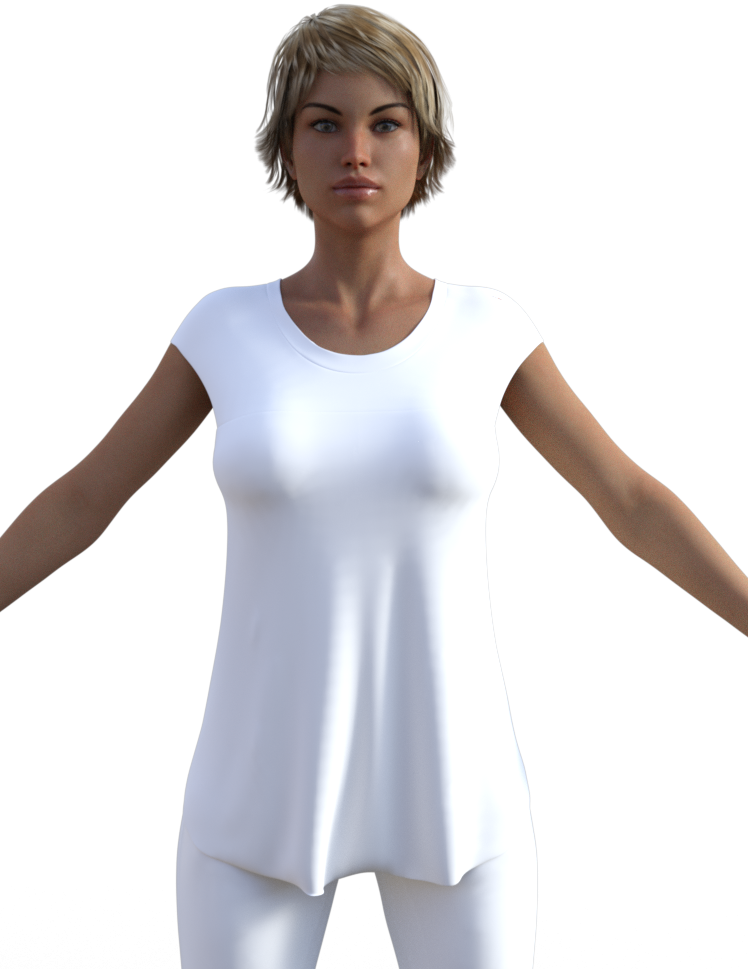
Hey! That kinda worked! Now let's see if I can remember how I did it.
Loaded Elizabeth, the hair, SuperJeans, and T-Shirt. With T-Shirt selected, I went to Edit -> Figure -> Geometry -> Add dForce Modifier: Dynamic Surface. Also, it will save you some grief to set the Fit-OverSuperJeans morph to 100% under Parameters now as well. With Elizabeth selected, go to the Parameters and set the Elizabeth morph to 0% (full Elizabeth, not just the body or head). I had to turn on the Timeline Tab because, like you, I only do single images. Go to the Timeline Tab and advance the slider bar to 30. Now go back and set the Elizabeth morph back to 100% and apply a pose if you want (I didn't, but I know you have to do it here instead of earlier). Switch to the Simulation Settings Tab and set Frames to Simulate to Animated (Use Timeline Play Range). Now, hit the Simulate button at the top and hope for the best. The first time I did it, the shirt exploded (probably because I didn't have that Fit morph set). But the second time, you see above. You'll probably have to turn the Mesh Smoothing back on, since I think the Simulation process turns it off.
Art Deco Statuettes complete imageryThe new pack is fabulous.
My question is that I can see that you've used various outfits in the promos, and would be interested in knowing which ones they are. Are the promo sources listed anywhere like in a Read Me? Posted anywhere?
I can see that DAZ probably wouldn't want it on the store page. But knowing what some of the promos used as a starting point would be awfully helpful.
Well..., good and bad news I would say - all what you see in the promos is also what you get when you buy it, but... there's always a "but" - the clothes are no clothes, bras and skirts, capes and headwear are not rigged, all items are static props fitting only that statuette and it's pose they're on.

Forgot: Here's also a comparison chart again - 3D statuettes vs. Reality (photos/sources): https://www.deviantart.com/jepegraphics/gallery/67622470/Art-Deco-Statuettes-II-for-Victoria-8
The second set is just wonderful, @jepegraphics. I think the static props in the presets are perfect. They fit the style of the statuette and give us the option of nude or not nude. And Hair! I so appreciate the hair and headdresses you've created. I found it so difficult to find conforming hair that looked "right" once the metal materials are applied. (I'm experimenting with some toon hair I picked up just for this purpose. I'll report back if I'm successful.)

Thank you Anita, yes, that's indeed it. And of course everyone is free to try out all the already existing outfits for the females for ever new statuettes in different styles. All shaders are included in my packs and can be used on other surfaces. :)
I've been so enamored with the finished statuettes and the ability to use any figure I want, I completely forgot to mention what a great resource these sets are. To anyone who's thinking about buying one or both sets—all? Will there be more? Fingers crossed—don't forget about the shaders.
The shaders in set 2 are completely different from the shaders in set 1. Not only can you use shaders from one set on the other, but you can use these shaders on anything. I have both sets, and the second set more than doubles the shaders for Glass, Marble and Metal, and added 2 more Ivory shaders.
So not only are these sets a lot of fun to play with, but they're a versatile addition to one's runtime. (Did I mention, I'm quite impressed with these? Well, yeah, I am.)
 How to install OLD content in DS4
Which products specifically are you trying to install? I'm assuming https://www.daz3d.com/victoria-3-0-body-morph-pack and https://www.daz3d.com/victoria-3-0-head-morph-pack . I appear to have both of them in the newer zipped runtime format, not the old .exe installer format, which would sidestep any .exe installer issue you might have, but you indicated that even on a fresh download you were still seeing exes. Is it possible that you are still looking at one of your original files and you just overlooked one of your new downloads? Or that DIM somehow gives something different than the files you get from a manual download? Or maybe there's something in a bundle that's different? You should be able to get these two from your content library:
IM00001106-01_Victoria30BodyMorphPack.zip
IM00001100-01_Victoria30HeadMorphPack.zip
Art Deco Statuettes complete imageryThe new pack is fabulous.
My question is that I can see that you've used various outfits in the promos, and would be interested in knowing which ones they are. Are the promo sources listed anywhere like in a Read Me? Posted anywhere?
I can see that DAZ probably wouldn't want it on the store page. But knowing what some of the promos used as a starting point would be awfully helpful.
Well..., good and bad news I would say - all what you see in the promos is also what you get when you buy it, but... there's always a "but" - the clothes are no clothes, bras and skirts, capes and headwear are not rigged, all items are static props fitting only that statuette and it's pose they're on.
Forgot: Here's also a comparison chart again - 3D statuettes vs. Reality (photos/sources): https://www.deviantart.com/jepegraphics/gallery/67622470/Art-Deco-Statuettes-II-for-Victoria-8
The second set is just wonderful, @jepegraphics. I think the static props in the presets are perfect. They fit the style of the statuette and give us the option of nude or not nude. And Hair! I so appreciate the hair and headdresses you've created. I found it so difficult to find conforming hair that looked "right" once the metal materials are applied. (I'm experimenting with some toon hair I picked up just for this purpose. I'll report back if I'm successful.)
Thank you Anita, yes, that's indeed it. And of course everyone is free to try out all the already existing outfits for the females for ever new statuettes in different styles. All shaders are included in my packs and can be used on other surfaces. :)
Legacy UVs for Genesis 8: Victoria 4 can't apply texturesIt looks like you don't have Legacy UVs for Genesis 8: Victoria 4 at all! Not having the product might be quite a good explanation for it not working.

The Prep pose is not the same as the Prepare script, and the UVs you are using are for Genesis 2 Female.
My product was created to solve the sorts of problems you have been having, so if you decide to buy it I think you'll find that you can get Camielle for V4 on Genesis 8 Female without a hitch.
All the best!
Hi,
Can you tell me what I have to do to apply correctly only a LIE preset from V4 to G8?To be clear, I want to keep the G8 basic skin and I'd like to apply a Tattoo LIE made for V4.
According to my understanding, this doesn't work. You can have either the G8 UV mapping or the V4 UV mapping with geografts as helpers.
That's why I abandoned this product and switched to the Texture Converter 2, which makes a bitmap conversion from V4 to G3/G8.
Dam... I really need it for a job and I already bought Texture Transformer 2 but I can't do what I need, please can you tell me if Texture Converter 2 can do it? And what I have to buy? I see there are various addons.
You have to save a V4 figure, with just the tatoo applied and then go through TT2 (you need the Add-On pack Victoria 4 to Genesis 3 Female) and then you should have a map that fit to G3/G8.
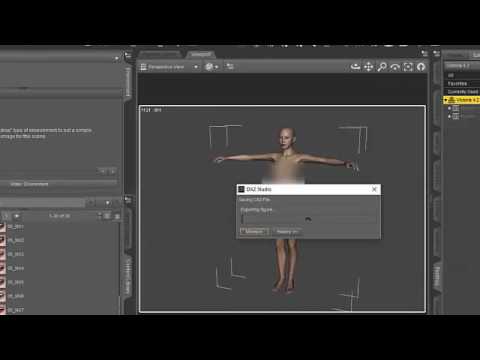
If a map is missing it can easily be converted by assigning it as material/diffuse map in the right place to V4.2 before exporting it. This allows to convert any maps for Genesis 3, as Texture Transformer simply works on RGB files.
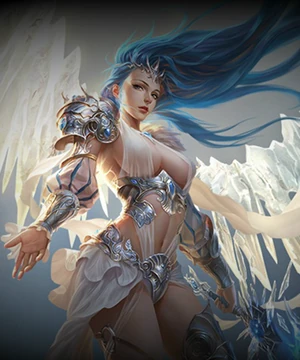
Beautiful Angel Clothing/HairstyleI'm trying to model an angel character but I can't quite find the right clothing or hairstyle for her. I'm looking for a light silk and armor outfit like in the images below as well as a long angelic hairstyle for Genesis 8. I really like the Melody Hair for Victoria 4 so I would definitely purchase a Genesis 8 version of it. Thank you very much for anyone who would be willing to make such products for the store.

 Art Deco Statuettes complete imagery
The new pack is fabulous.
My question is that I can see that you've used various outfits in the promos, and would be interested in knowing which ones they are. Are the promo sources listed anywhere like in a Read Me? Posted anywhere?
I can see that DAZ probably wouldn't want it on the store page. But knowing what some of the promos used as a starting point would be awfully helpful.
Well..., good and bad news I would say - all what you see in the promos is also what you get when you buy it, but... there's always a "but" - the clothes are no clothes, bras and skirts, capes and headwear are not rigged, all items are static props fitting only that statuette and it's pose they're on.
Forgot: Here's also a comparison chart again - 3D statuettes vs. Reality (photos/sources): https://www.deviantart.com/jepegraphics/gallery/67622470/Art-Deco-Statuettes-II-for-Victoria-8
The second set is just wonderful, @jepegraphics. I think the static props in the presets are perfect. They fit the style of the statuette and give us the option of nude or not nude. And Hair! I so appreciate the hair and headdresses you've created. I found it so difficult to find conforming hair that looked "right" once the metal materials are applied. (I'm experimenting with some toon hair I picked up just for this purpose. I'll report back if I'm successful.)
Art Deco Statuettes complete imageryThe new pack is fabulous.
My question is that I can see that you've used various outfits in the promos, and would be interested in knowing which ones they are. Are the promo sources listed anywhere like in a Read Me? Posted anywhere?
I can see that DAZ probably wouldn't want it on the store page. But knowing what some of the promos used as a starting point would be awfully helpful.
Well..., good and bad news I would say - all what you see in the promos is also what you get when you buy it, but... there's always a "but" - the clothes are no clothes, bras and skirts, capes and headwear are not rigged, all items are static props fitting only that statuette and it's pose they're on.
Forgot: Here's also a comparison chart again - 3D statuettes vs. Reality (photos/sources): https://www.deviantart.com/jepegraphics/gallery/67622470/Art-Deco-Statuettes-II-for-Victoria-8
voting closed ♥♣♠ᴥCarrara challenge 43 ᴥ♠♣♥♦ the Horror♦♥♣♠ᴥEntry #2
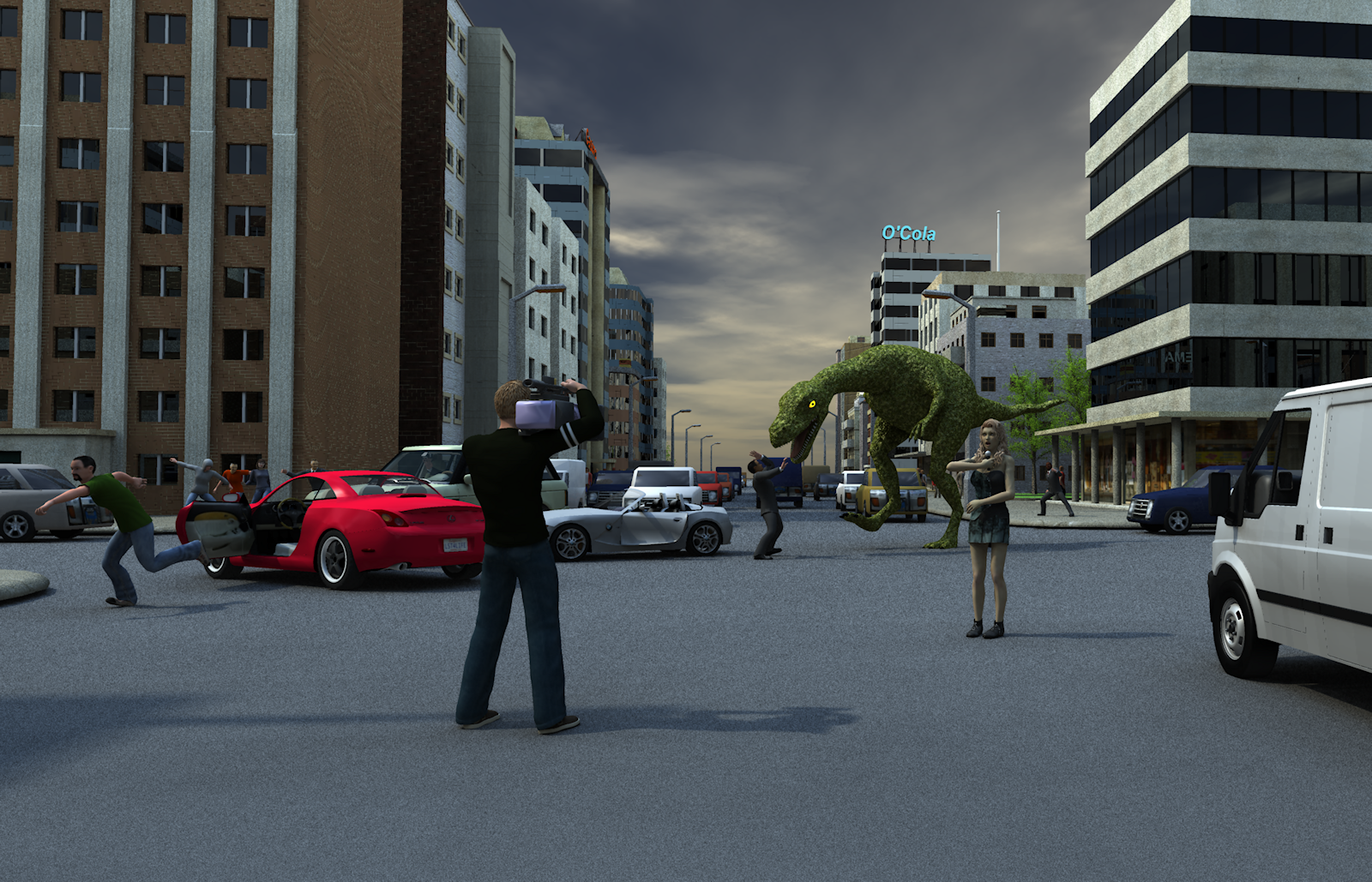
Title: 8 News
Author: Bunyip02
WIP Links: https://www.daz3d.com/forums/discussion/comment/4049391/#Comment_4049391
https://www.daz3d.com/forums/discussion/comment/4049681/#Comment_4049681
Song/Poem: "Horror Movie" by Skyhooks

Freebie(s) Used: Dino by Vyusur https://www.daz3d.com/forums/discussion/comment/4045736/#Comment_4045736
Products used: Victoria 4 - https://www.daz3d.com/victoria-4-2-base
Tatiana Hair - https://www.daz3d.com/tatiana-hair
Professional Style (Skirt Corset) - https://www.daz3d.com/professional-style
Aussie Girl Outfit (Boots) - https://www.daz3d.com/aussie-girl-outfit
Microphone - DAZ Productions ps_fr180
Michael 4 - https://www.daz3d.com/michael-4-base-male-3d-model
Alexios Hair - https://www.daz3d.com/alexios-hair
M4 Casual Wear - https://www.daz3d.com/m4-casual-wear
Camera video television - Archive3D
Loretta Lorez - https://www.daz3d.com/loretta-lorez
Lorenzo Lorez - https://www.daz3d.com/lorenzo-lorez
2003 JP Sport Convertible - https://www.daz3d.com/2003-jp-sport-convertible
Ranger - https://www.daz3d.com/car-ranger
2003 BMW Z4 - https://www.daz3d.com/2003-eu-roadster
Transit Van, right steering version. - 2nd World - Renderosity
Night and Day City - https://www.daz3d.com/night-and-day-city
Tim Payne Lightdomes - https://www.daz3d.com/carrara-skies-lightdomes-1 (no longer available)
Tim Payne Skies - https://www.daz3d.com/carrara-skies-volume-1 (no longer available)Additional Notes:
Daz 3D is part of

Connect
DAZ Productions, Inc.
7533 S Center View Ct #4664
West Jordan, UT 84084Licensing Agreement | Terms of Service | Privacy Policy | EULA
© 2026 Daz Productions Inc. All Rights Reserved.