-
Is there a way to convert genesis 8 textures to genesis 9?
kaincypher84 said:
I woke up today to work on this for a game project I am making in Unity and conveniently had looked it up to see what solutions there were and saw this thread and can't believe someone posted same day about it when I was planning on trying to find a quick solution.
I used an old template, and lining it up perfectly wasn't right...
So, I decided to start from scratch, so anyone can do it in a matter of minutes.
This took about 5 minutes from opening Daz to taking the video showing the results.
I used Blender 2.79, I can't get it to bake properly on newer Blenders.
Daz steps:
1. Load Genesis 9 dev load into scene, set to base, change to show hidden in parameter preferences, search Genesis 8 Female, dial it up to 100
2. Load Genesis 8 Female, set to base
3. Move left thigh -7 and right thigh 7 on side to side on Genesis 9 to line the thighs
Your Genesis 9 will now match your Genesis 8 perfectly and you are done with Daz after export.
Export your two Genesis 8 and Genesis 9 FBX together to Blender with Collect textures
Blender steps:
1. Import FBX with pre/post rotation set to off
2. Select Genesis9.Shape, go to UV editor, deselect all, under materials click Select so it is the only thing selected in blender, you should see the UV editor is blank with the arms to the right of the UV map.
3. Press A in the UV editor and drag the arms, body, head, or legs (whatever currently you need) with G and hold CTRL to snap it into place
4. Click NEW texture in the uv/editor still, set a texture as 4096x4096 name it G9_Arms. "Save as" and save the image <- This is very important! (or you will get circular dependency errors and your texture will not complete)
5. Repeat this for the legs, head, torso.
6. You should have template files now on your HD called G9_Arms, G9_Head, G9_Body, G9_Legs
7. Check your Genesis 8 has materials assigned, you DO NOT NEED UV EDITOR for the Genesis 8.
8. Shift Click the Genesis 8 first and then the Genesis 9 as your active object.
9. Go to the Render settings (The camera icon). Make sure you are in Cycles or you will not see the bake settings. Go to the bake settings. Change it to "Texture" (and not Full Render) Click Bake.
You now have any Genesis 8 texture on Genesis 9 and as long as you can line up any generation this process is the same.
Here is a video of the texture baking from a Genesis 8 to a Genesis 9. I am working on scripts to automate this process in Blender since right now swapping textures to make roughness, specular, normal maps is a lot of clicking and re-saving the template files etc.
NSFW for nudity texture:https://streamable.com/jrmcdf
I'll post more screenshots or a video of the whole process if needed.Hi, I can't seem to get it to work. Could you upload a video showing the entire process, please?
cowdog said:
kaincypher84 said:
I used Blender 2.79, I can't get it to bake properly on newer Blenders.
I managed to get this working in Blender 4.4.3, which,I believe, is the latest version (as of this post). Also, I exported/imported Wavefront (.obj) meshes into Blender.
I did manage to bake the skin textures, i.e. Head, Body, Arms and Legs. Basic workflow involved setting up the UV maps under UV Editing, then moving to Shading and creating a new image texture for G9. After that, baking the selected G8 textures into the newly created G9 texture image. There were a lot of steps in this process, and each texture image variant required creating the diffuse, bump, normal, specular and SSS maps.
In a nutshell, it was a tedious process.
crosswind said:
I could also get it done with Blender 4.4.0 though I usually do it with FaceForm Wrap, which is more accurate. With Blender, I recommend using Simple Bake which can make your conversion process faster.
I also tried newer versions of Blender, but I still couldn't get it to work. How did you guys do it?
Nvidia shelves 2026 new card releasesnote for me copied from Google AI
To switch from BF16 to FP16 in pre-compiled applications without touching code, you will primarily rely on environment variables, command-line arguments (flags), or configuration files.
Because you cannot change the underlying code, your success depends entirely on whether the app's developers built in a toggle for precision formats.
Here is how you can check for and apply these changes across different types of applications:
1. Command-Line Arguments (Flags)
Many pre-compiled AI tools, loaders, and command-line apps accept flags when you launch them.
- How to use them: Open your terminal or command prompt, type the app executable name, and append the flag.
- Common examples:
- --precision fp16
- --dtype fp16
- --float16
- --no-bf16
2. Environment Variables
Some frameworks (like PyTorch or Hugging Face utilities running inside compiled packages) check your system's environment variables before launching.
- Windows (Command Prompt): Run set ACCELERATE_MIXED_PRECISION=fp16 before running your app.
- Windows (PowerShell): Run $env:ACCELERATE_MIXED_PRECISION="fp16" before running your app.
- Linux / macOS: Run export ACCELERATE_MIXED_PRECISION=fp16 before running your app.
3. Configuration Files (.json, .yaml, .ini, .toml)
Look inside the application's installation folder for configuration files.
- Search for files named config.json, settings.yaml, or ui_config.json.
- Open them with a standard text editor (like Notepad).
- Look for lines like "precision": "bf16" or "dtype": "bfloat16" and manually change them to "fp16".
4. Graphic User Interfaces (GUIs)
If the app has a visual interface (like WebUIs for Stable Diffusion or LLM runners):
- Look for a Settings, Advanced, or Generation tab.
- Look for dropdown menus labeled Dtype, Computation Precision, or Mixed Precision.
- Switch the selection from BF16 to FP16.
⚠️ Important Compatibility Warning
If you are changing this because your hardware does not support BF16 (e.g., older NVIDIA GTX 10-series or 16-series cards), be aware that some older GPUs suffer from a "black image" or "NaN" error when running certain tasks in FP16. If your app crashes or produces corrupted outputs after switching to FP16, you may need to drop down to full FP32 precision instead.
Nvidia shelves 2026 new card releasesMy question is why doesn't DAZ 3D look into recoding DS to use other video cards then? I realize that iRAY is NVIDIA but man I guess DAZ would once again have to go out and find a replacement for that and then there's that learning curve all over again but there ARE options out there. Poser would work with just about any modern card but not DS without it falling back to CPU rendering, which we all know is like slogging through mud. Here's Claude AI once again addressing things for my concerns about my own video card:
"The budget worry is a real concern, and after the RAM saga I'd be gun-shy too. Here's the practical side, which is less grim than it might feel.Your card is on the safe side of the divide. A 40-series card like your 4060 Ti runs Iray fine in DS 4.x, and GPUs fail far less often than RAM does. Nothing about this news puts it at risk.
If it ever did die, you'd have a ladder of fallbacks, cheapest first:
- Warranty: check your card's purchase date and the manufacturer's coverage. Many brands give around three years, but confirm yours, and see whether the purchase had an extended warranty.
- Integrated graphics: your i7-13700K (the "K", not "KF") has built-in graphics, so the PC would still boot and run DAZ Studio. Iray would fall back to CPU rendering, which is slow, but you could keep working, test, and do lighter renders while you sort out a replacement. That's a real safety net.
- A used card, not a new one: a used RTX 30-series card with plenty of VRAM works fine in DS 4.x. Forum regulars have long recommended the RTX 3060 12GB for Iray on a budget. I haven't checked current used prices, and the shortage has probably pushed them up, so verify before counting on that.
- Stretch what you have: the Scene Optimizer and lower-res textures on background items help scenes fit in less VRAM, so a smaller card goes further.
- Blender as the escape hatch: it renders on AMD and Intel cards too, which broadens your options if Nvidia pricing is out of reach.
To catch problems early, keep an eye on GPU temperatures under render load in HWiNFO64. Sustained high temps are the early warning worth watching for.
If you want, I can look up current used-market pricing on 12GB-class Nvidia cards so you know what a worst-case replacement would actually cost."
Nvidia shelves 2026 new card releasesHere's what Claude AI was able to print out for me concerning the NVIDIA issues we are all seeing happening in real time:
"Here's a post-ready version. It uses simple bold headers and bullets, which should paste cleanly into most forum editors:
Nvidia and consumer GPUs: what's actually going on (and what it means for us Iray folks)
TL;DR: Nvidia is not quitting consumer GPUs, but AI is clearly job #1 now, and gaming cards are getting the leftovers. Don't panic, but don't panic-buy either.
What's real
- It's mostly a memory problem. A global high-bandwidth memory shortage is hitting Nvidia and the whole consumer electronics industry, since the same specialized RAM goes into both gaming GPUs and AI accelerators. Nvidia is likely saving limited memory inventory for its higher-margin AI chips.
- The money explains the rest. Data center is now about 91.5% of Nvidia's revenue. Its compute and networking margins have averaged 69% over three years, versus 40% for the consumer graphics segment.
- New cards are drying up. Reports say Nvidia won't launch any new consumer graphics cards in 2026, the RTX 50 Super refresh is postponed or canceled, and the RTX 60 series is delayed. Note that this came from press reports rather than a full Nvidia announcement.
- Old cards are being dusted off. The RTX 3060 has been reintroduced as a stopgap for supply gaps, not because of demand.
What's overblown
- "Nvidia has officially quit gaming" isn't supported. Nvidia told CNBC that gamers are "hugely important" and that it's still releasing gaming technologies. Some posts calling the cancellations "official" are low-quality sources, so check where a claim comes from before repeating it.
- The realistic picture is less "leaving the market" and more "starving it of new products and supply while AI eats the wafers."
Will this hurt Nvidia long-term? (Just my take, not fact.)
- Short term: it's rational. If a memory chip earns far more in a data center card, that's where it goes.
- Long term: there's real risk. GeForce is where a lot of developers and students grow up on CUDA, so neglecting it means fewer future customers and an opening for AMD, Intel, and Apple. Their revenue is also now heavily tied to one boom, so if AI spending cools, they'll miss that broad customer base.
What it means for DAZ Studio / Iray users
- Iray only accelerates on Nvidia GPUs. Unlike gamers, we can't just shrug and switch brands.
- VRAM is our bottleneck, and it's exactly the resource that's tight right now. If a scene doesn't fit in VRAM, Iray drops to CPU rendering, which is much slower.
- Your current card isn't going anywhere. Nothing here breaks existing hardware or drivers.
Practical tips
- Don't panic-buy at inflated prices unless you truly need to.
- If you must upgrade, a used card with plenty of VRAM may beat waiting on a next generation that keeps slipping.
- Before spending money, try optimizing scenes: lower texture resolutions on background items, use instances, and hide what the camera can't see. It's a free way to stretch the card you have.
Sources:
barbult's take on the lives of Jack and RichardRichard Haseltine said:
Actually I think on reflection that it might be muricide - Latin is deliberately confusing - but having exerted myself to check the dictionary it didn't have either version.
And now I feel betrayed - an online search did confirm muricide where the Concise Oxford didn't.
I was busy creating the "Musicide!" render and didn't see your muricide message. So I stuck with musicide.
barbult's take on the lives of Jack and RichardActually I think on reflection that it might be muricide - Latin is deliberately confusing - but having exerted myself to check the dictionary it didn't have either version.
And now I feel betrayed - an online search did confirm muricide where the Concise Oxford didn't.
EZFinder - Advanced Content Manager for Daz Studio [Commercial]st33lj0ker said:
Hello, just wanted to say EZFinder is great and I've been very happy with it so far. The one problem I've come across happened when I saved a panel and loaded it into another panel. The panel had about 40 folders and the .dsx files in the folders have the incorrect directory now, meaning all the products pictures are not there. When loading the product assets it still works fine and the assets load properly. When I search the .dsx files the products come up correct but unlinked, like I never added them to a folder but the broken files still show in the folder. Deleting the broken files and then adding the working ones seemed to work fine but, I was wondering if there was a way to avoid having to do that for all the folders in the panel. It also worries me about trying to move a panel in the future if that will just happen again. The directory for the broken files changed from H:\Daz 3D\My DAZ 3D Library\Runtime\Support\ to H:\Daz 3D\My DAZ 3D Library\My DAZ 3D Library\Runtime\Support\. For some reason it added another 'My DAZ 3D Library' folder.
To st33lj0ker:
Thank you for the kind words and for such a precise report. The doubled "My DAZ 3D Library" in the path told me exactly where to look, and you found a real bug.
What happened: when a folder is loaded into another panel, EZFinder re-based each item's path against the library root, and in a setup like yours it could apply the root twice. The product .duf files still worked because Daz Studio resolves those itself, but the .dsx entries carried the wrong path, so the pictures were gone and search saw them as not linked to any folder.
This is fixed in the next EZFinder update, and you will not have to redo your work:
- Loading a folder or panel now re-checks every item against your actual library before storing it, so the doubling cannot happen again.
- Saved folders now carry their product pictures and details with them, so a loaded panel looks right immediately.
- Any folder that already has doubled entries is repaired automatically the first time you open it. EZFinder checks the disk, corrects the path, and the search "linked" markers follow. No deleting and re-adding.Moving panels in the future is safe. The update will arrive through Install Manager, and I will post here when it is out.
EZ3DTV
ID badge on lanyardIf you look at some fo the ones in the clothign sets you pointed out, there are soem nicely modelled badges with hinges, clips and swivel attachements to theclip on the lanyards. Much better than a simple plane or flattened cuboid. So a variety of bages that go on a lanyard that is adjustabele for length, and set to be used on G8F and G8M and G9, plus clip-on badges that fasten to breast pocket or trouser belt, a metal-type name badge - and all with UV mapping made for eaase of customisation. I'd buy a set like that for a reasonable price. Actually I've finally found soemthing I knew I had but couldn't find - a set of Everyday Labels by Maclean, a selection of wear-type id and name badges of various types and shapes, sew-on fabric badges, luggage labels, bumper stickers, fridge magnets and all sorts: bought from here, but so long ago they're in Poser format and were in my Poser runtime (but with - 3DL of course - .dsa DS material files). They only show up in the DAZ store search if you search on the product specific name, which I couldn't remember. Were $10.95, but as a very old item now $2.99. So, I'm talking about a modernised version and id focused plus modern lanyard version of something that is actually for sale here.
ID badge on lanyardTnanks!
Wow: just goes to show how lousy the search is here. I searched on badge, id badge, id card, lanyard etc, got nothing.
Still, those are all pretty expensive when all I want is the id. And when yout think how many places it's actually also what you have to use to open doors. Could still do with a small set of 1anyard and clip on id badges (for boht female and male figures) and not have to buy some whole clothign set one has no interst in just to get one.
In Search of: Saving Filter or Script for Genesis 9 Pose PresetsI'm trying to find a way to either script the saving process of a preset pose so that each file is exactly the same, and cuts down on time sorting through all of the nodes, or even go so far as to create a script... though I'd prefer not to because I don't know the first thing about creating scripts. Does anyone know a way that I can streamline saving preset poses - specifically for Genesis 9 (optomisticlly for the DAZ Dog 8 as well).
I'm using DS 4.24 and DS 6.25
In case it matters, I use the Darkside layout. I don't know if that would be hiding any special menus or not.
Thanks in advance.
Genesis 10With my limited experience so far of G9, I have to say that the HD versions look awesome when rendered. However, G9 HD versions of the same character take my PC 3x as long in 4k as their G8 HD counterpart. I don't exactly have a low spec rendering PC either. For occasional use, I'll tolerate the increased production time, it's only to be expected. File size is somewhat of a concern, especially hair products - I have several hairs over 2Gb in size

One thing that does really bug me is that virtually all the sliders have different names. For instance, if I want to open a mouth, in G8 I type "mouth" into the parameter search box and "mouth open" is there. Not in G9 though. It took me ages to figure out that it is now "jaw open". Seriously? Who coded that? It makes no logical sense whatsoever. Same with lip actions, they've all changed and some of what is in G8 is not in G9. Slider naming in G9 makes no sense at all.
For this reason, I've decided to build a third PC, purely for G9 and, likely as not, DS6, so I can keep everything completely separated.
Genesis 10Yui said:
Richard Haseltine said:
Moved to the Common as it is not a Daz Studio application topic.
How in the heck is it not!? All this time I thought my topic was deleted! Tried searching for it, and nothing came up. No notification whatsoever as to what happened, or when people reply! I'm now only finding it after mentioning it in another topic, and someone gave me the link! >:{
Figures are, for the most part, software-agnostic. The Daz Studio forum is for questions directly related to DS software.
DX12 support!Leana said:
It has not been deleted, just moved to another subforum as it's not about Daz Studio application but content: https://www.daz3d.com/forums/discussion/770661/genesis-10
Thanks for the info. I had tried doing a search for it, and couldn't find it! It's so lazy & dumb you don't get any notification whatsoever for your topics!
Reminder To Myself: Never again SBH Hairlilweep said:
kpr said:
omvendt said:
... Also, Meshgrabber might help.
I've tried this quite a few times, particularly when trying to emulate 'wetlook' hair. IME, you're right that it can help but it seems to depend a lot on how the hair is originally styled and especially what type it is (kinda like this thread). I found it's a big help on card-based / hair-with-bones / hair-with-'presets' but other types can make tweaking with it quite frustrating (I'm not sure I've ever tried with SBH).
This one worked quite well: https://www.daz3d.com/gallery/user/5444756578500608#gallery=newest&page=1&image=1348524
Which uses: https://www.daz3d.com/nirv-fashion-stylized-bob-hair (other than no mention of dForce, see how little info is available on what type it is etc ... though whatever it is, it is great to work with and gives great results)
Hair-gurus might know whether 'moelling with Ornatrix' makes any difference to what's produced for folk to work with?
imagine buying a product after seeing the hands in the promo do this
This product is six years old so that isn't AI, it's just a bad pose. But what's weird is, it's only now someone called it out on the forum. There's a four page who's the model thread for this hair. Not a peep about that particular promo image.
Daz Studio 6 - Elgato Stream deck(+) Bridge Plugins [Commercial]Daz Studio 6 - Elgato Stream deck(+) Bridge Plugins (Not live yet)
Daz Elgato Bridge connects Daz Studio to an Elgato Stream Deck, so the actions and settings you already use inside Daz Studio can be triggered, adjusted, and watched from the physical buttons and dials on your deck. A key on your Stream Deck can trigger any action registered in Daz Studio — anything from adding a new camera, to maximizing your working area, to any other action Daz Studio already offers, without needing a separate list here to spell each one out. A dial on a Stream Deck+ goes a step further: turning it can smoothly adjust a node’s rotation, translation, or scale, while its small touch-strip screen shows what that dial is currently controlling.
Many Stream Deck add-ons for other applications work by simulating keystrokes or mouse clicks — quietly pretending to type a shortcut or click a button on your behalf. That approach is fragile: it depends on the target application’s window having focus, breaks the moment a keyboard shortcut or menu layout changes, and can’t show you anything back, since a simulated keystroke has no way to report what actually happened. Daz Elgato Bridge instead talks to Daz Studio directly, triggering the same real, named action Daz Studio itself would run internally. This means it works whether or not Daz Studio’s window is focused, keeps working even if you rearrange your own keyboard shortcuts, and — since it’s a genuine two-way connection rather than a one-way simulated keypress — can also report information back, which is what makes a button’s label showing live, up-to-date feedback possible at all.
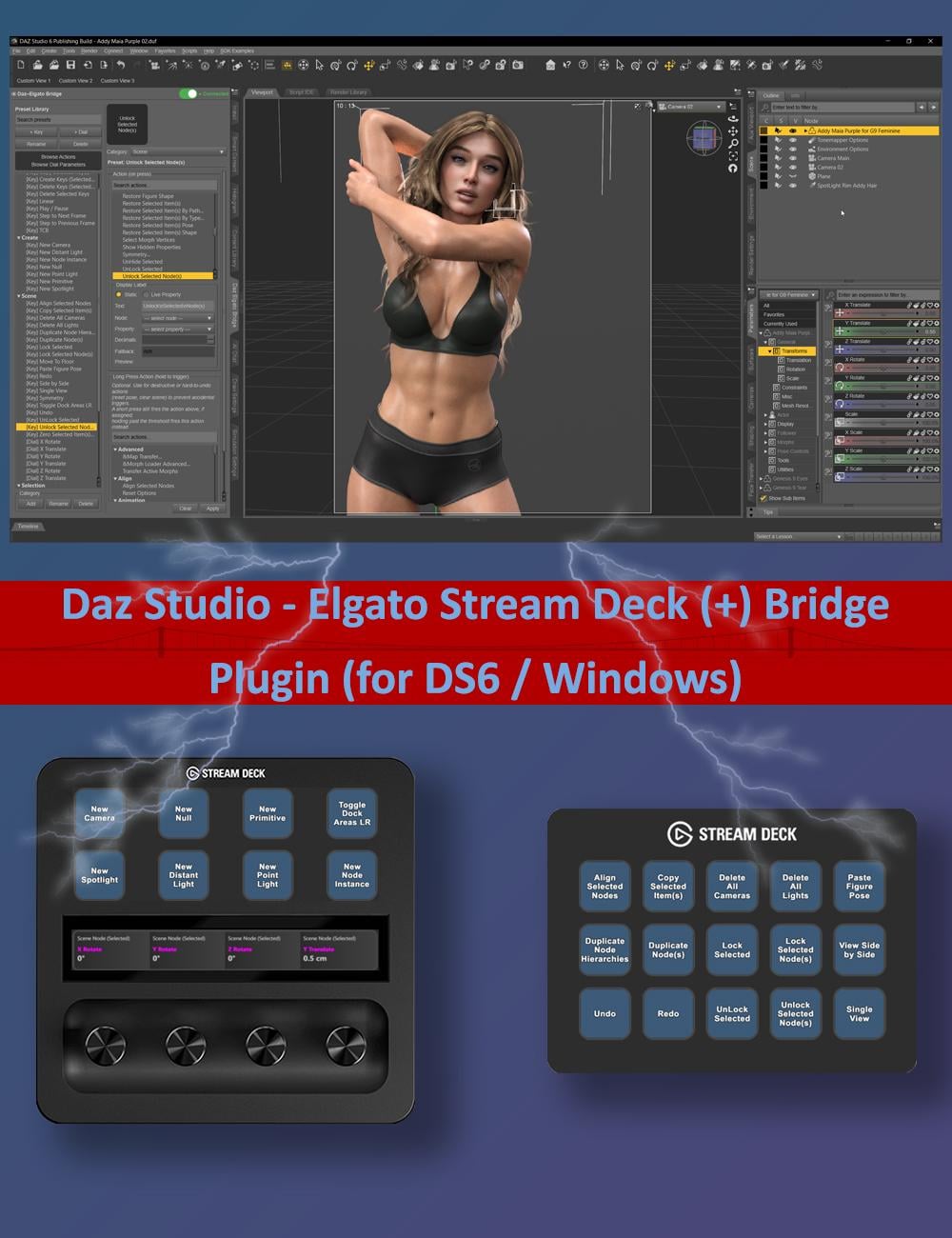
Everything you assign lives in a single Preset Library inside Daz Studio. You build it once, and every key and dial on your Stream Deck simply picks a preset from that library by category — so if you rearrange your physical deck, change your mind about a label, or move to a new Stream Deck, your presets are still there waiting to be picked again.
Workflow
The typical workflow looks like this: open the Daz Elgato Bridge pane in Daz Studio, and use its Preset Library to build a small collection of Key Presets (things a button can trigger or display) and Dial Presets (things a dial can adjust). Then switch to the Stream Deck software, drag a DAZ Action Button or DAZ Dial onto one of your Stream Deck’s keys or dials, and pick one of your presets from a dropdown list. That’s the whole loop — build presets once in Daz Studio, assign them as many times as you like on the Stream Deck side.
Features
- Native Daz Studio ↔ Elgato Stream Deck integration — actions trigger directly through Daz Studio’s own systems, not simulated keystrokes or mouse clicks.
- One reusable Preset Library, built once inside Daz Studio and shared across every Stream Deck device, profile, and page.
- Key Presets trigger any registered Daz Studio action from a button press, with an optional Long Press action for a second behavior on the same key.
- Dial Presets assign one or two continuous parameters (Mode A and Mode B) to a Stream Deck+ dial, with Toggle Mode switching between them on a press.
- Live button and touch-strip labels — Static text or Live Property text that resolves at runtime, including $SELECTED and named-node references.
- Free-text categories and instant search keep large libraries organized and easy to navigate.
- Browse Actions and Browse Dial Parameters panels let you explore everything available and build presets straight from the tree.
- Strip Designs — reusable, up to three-line touch-strip layouts with solid color, gradient, or image backgrounds for Stream Deck+ dials.
- A live status indicator (Off / Waiting… / Connected) and a one-click switch to enable or disable the Bridge without unloading the plugin.
- One-click JSON backup and restore for the entire Preset Library, plus Clear Preset Library and Clear Strip Design Presets safety actions.
- Configurable preferences — tooltips on/off and remembered expanded/collapsed states for the action and parameter trees.
- Experimental Voice/AI Assistant support through Elgato’s MCP integration (e.g., NVIDIA Project G-Assist), with per-action AI descriptions.
- An open, documented C++ SDK so third-party Daz Studio plugins can register their own actions and dial parameters with the Bridge.
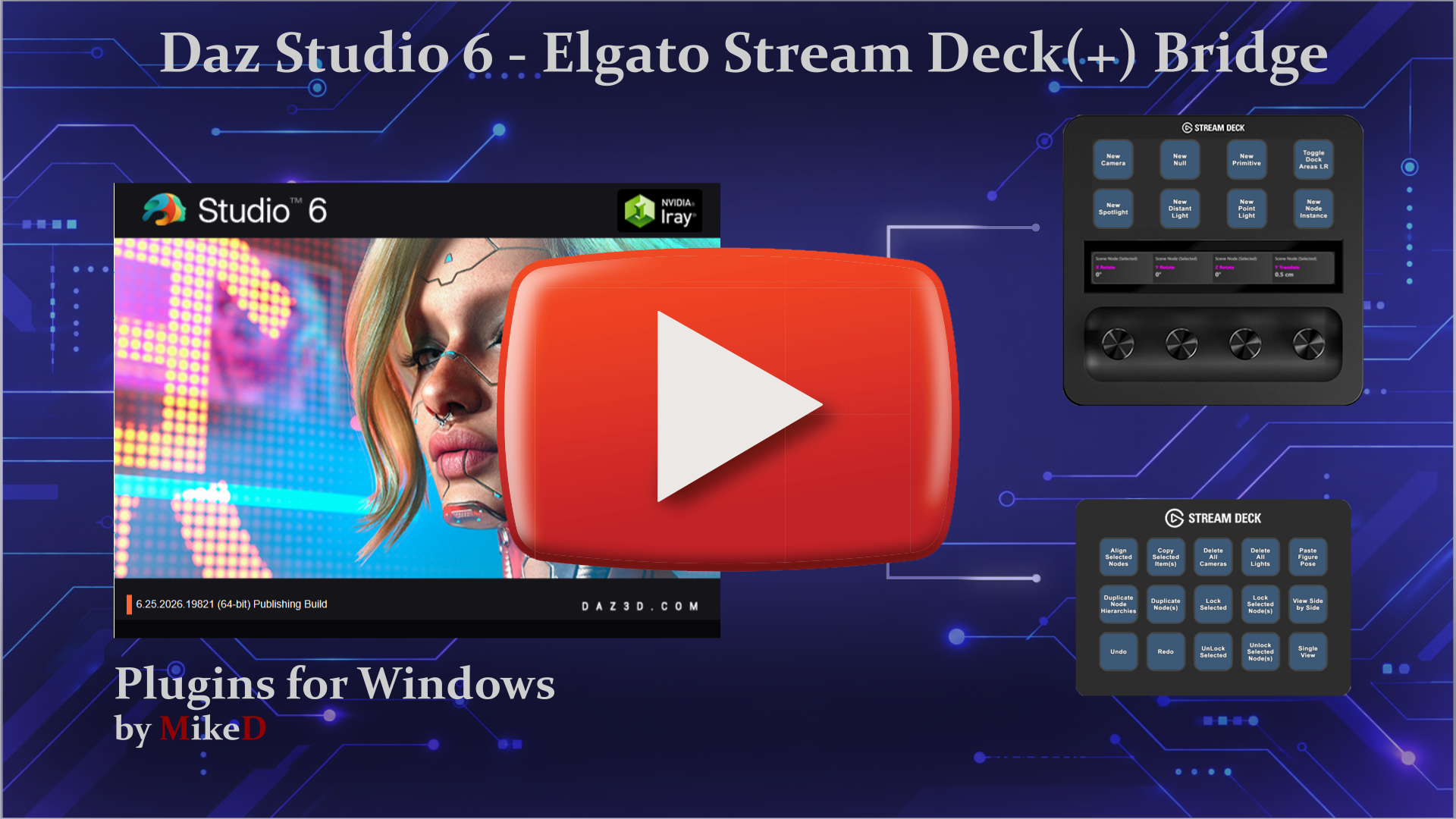
The link for the video is here, as the image link doesn't seem to work!
 Convert OBJ to Daz3D rigged
WendyLuvsCatz said:
links need their own line or use the forum link icon to avoid this
Just pasting the link can work, but the important point is not to have a space then a line break after a link. A space and then other text on same line works, a line break just after the link too. But if there's just a space and a line break, the forum software interprets it as "the space is part of the link", which is what generates the wonky links.
Daz Studio 6 Beta - version 6.26.2026.26903! (Updated September 29, 2026)bluejaunte said:
DoctorJellybean said:
bluejaunte said:
DoctorJellybean said:
bluejaunte said:
bluejaunte said:
If it is intended design it's questionable for two reasons. First reason obviously already been discussed, I press a shortcut and nothing happens. Terrible workflow killer But the other reason is that it did not work like that in DS4. Making such a fundamental change from one version to the next makes no sense. Make it optional, and default to off.
Just to confirm it's still an issue after finally jumping to Win11 and despite clean installing. When in Scene tab, 1 to 0 keys don't work as shortcuts. Regular letters don't either I'm assuming. If at least those letters did something, like jumping to an item whose name starts with that letter like Windows Explorer. But nope, nothing happens. Brilliant design. And then I switch to DS4 and the exact same thing works.
FIX IT.
Please submit a bug report.
So it's a bug?
The bug report is for the devs to see it and to investigate to establish if it is a bug or not.
Does this mean that reporting stuff in the forum or on Discord is absolutely pointless? Such things will never result in bug reports being submitted by staff? We've been talking about this for months after all. Which served absolutely no purpose apparently.
There have been many instances where people were experiencing issues that other users or mods here helped them troubleshoot, so it's definitely not "pointless".
I would view posting here as a pre-bug report step; post here, if no one can help or offer suggestions that fix the issue, then file a bug report.
By posting here first, we eliminate a number of "issues" that *aren't* bugs and reduce the number of false bug reports filed, allowing the devs to instead focus on *actual* bugs.
Convert OBJ to Daz3D riggedTorquinox said:
WendyLuvsCatz said:
links need their own line or use the forum link icon to avoid this
its actually impossible to go to those appended links on iPad in Safari as I cannot scroll along them to edit out the ; like I can on desktop or select anc copy them without it
the only way is to quote the post, switch to source and select text there then have to browse away and remove the draft post
I did not know that. I'll keep that in mind for the future and I'll fix the above links when I get a chance. IDK about the forum links.
50% or more of forum users don't know
its the forum software, not the users fault

just pasting should work
Convert OBJ to Daz3D riggedWendyLuvsCatz said:
links need their own line or use the forum link icon to avoid this
its actually impossible to go to those appended links on iPad in Safari as I cannot scroll along them to edit out the ; like I can on desktop or select anc copy them without it
the only way is to quote the post, switch to source and select text there then have to browse away and remove the draft post
I did not know that. I'll keep that in mind for the future and I'll fix the above links when I get a chance. IDK about the forum links.
Convert OBJ to Daz3D riggedlinks need their own line or use the forum link icon to avoid this
its actually impossible to go to those appended links on iPad in Safari as I cannot scroll along them to edit out the ; like I can on desktop or select anc copy them without it
the only way is to quote the post, switch to source and select text there then have to browse away and remove the draft post
Daz 3D is part of

Connect
DAZ Productions, Inc.
7533 S Center View Ct #4664
West Jordan, UT 84084Licensing Agreement | Terms of Service | Privacy Policy | EULA
© 2026 Daz Productions Inc. All Rights Reserved.