-
New project : PyCarrara V2
I really hope your work continues. I am working with a kinect v2 sensor (old but inexpensive and great HD face depth data, uses FACS) and trying to figure out how to either stream or import files to control facial animation (I could use Blender, but am more familiar with Daz and Carrara). That Carrara has useful SDKs is wonderful. PyCarrara is something I would love to try. Maybe Openface would help me figure out kinectv2-Windows to Carrara functions. In any case, I hope you are doing well, and continuing with your projects.
2 User Data Export files all of a sudden?I have my answer. I deleted all of the export data information. It then disappeared from the re-import list. I backed it up again and two Data files appeared. So, you're right about the file size.
any news on the hd plugin?? :DWendyLuvsCatz said:
there has been some great deals on G1&2 stuff lately too, I have almost given up on G3&8 now even with Misty's presets because the earlier figures are just so easy to animate and import BVH to using the Carrara plugin called DAZ studio too.
When I first started Carrara, I was not really focused on anything. Everything was new. Then I noticed that Generation 1-3 stuff was disappearing fast, so I focused on that for years. Now that I understand the HD plugin, and know how to use normal maps better, G2 is like a new door opening. A while back Diomede said that G2 was his main character set. I am coming around to that point of view. :)
2 User Data Export files all of a sudden?You mean in Reimport Metadata?
Export a Facebuilder custom head to Daz with Wrap3: Eyelids do not closeThis might be a more general question, not blender specific, as this deals with import into DAZ.
Also, there are people who use wrap3d to create DAZ figures, most of them are on DeviantArt.
When will the developers of Carrara Pro iRAY from nVidia add to it as an additional render?You can get pretty nice results out of the native renderer for carrara but as it's CPU based the render time will be much higher than with a GPU based render engine.
This character was rendered with the native render engine from Carrara, pretty close to what i made with Octane renderer but render time was higher.
https://www.renderosity.com/gallery/items/2621133/siad-sandjar-kaweh
https://www.renderosity.com/gallery/items/2621135/siad-sandjar-kaweh-2
This one i've rendered in Octane
https://www.renderosity.com/gallery/items/2651642/siadOn the other hand, as there was said, there are a few alternative solutions for external render engines as you don't really need a render plugin but some features of Carrara might be missing there.
So a standalone renderer would also do a great job but for example, Carrara hair won't render in Octane standalone but it will render in the Octane Renderer for Carrara but the Standalone is needed for Octane Renderer for Carrara to work but as long as you use normal modeled hair, any standalone render engine will do it's job, just have to save the file as obj for example, import it to the renderer and render it.
You can also import to blender and use the cycles render engine as it's pretty good too but cpu based, but there are also gpu based render engines for blender available like VRay.
I've also have Indigo RT for iClone which is pretty nice but this is also available for blender.
Just wanted to add, if you stick with the internal renderer, there would be an option for speeding up the render time if you use Network rendering. Good thing is, if you have multiple PC's or PC and Notebook for example, you can LAN them together (also WLAN them together) and install Carrara on all of them but you just need to open Carrara RenderNode on the other systems, on the main system you just do the render. I did that a few times with my old i7 920 and my W510 Notebook with an i7-720QM.Export a Facebuilder custom head to Daz with Wrap3: Eyelids do not closeBack in daz it is just normal that the standard g8f morphs may not work fine for a custom face. You need to import custom morphs too as any daz figure does. Then don't ask me the details I'm not a PA and I go from daz to blender not the reverse.
Naturally Real Material Options for Victoria 8.1This is a full set, with metadata, of improved material presets for Victoria 8.1. These presets will increase realism, especially in the eyes and mouth. Resulting in a more attractive and expressive Victoria 8.1. Just unzip and copy the two folders (People and Runtime) into your DAZ runtime (on my system it is here C:\Users\Public\Documents\My DAZ 3D Library). Enjoy!
If you want to see these in action, I used these materials for the promo renders for my newest product out today https://www.daz3d.com/dforce-lt-sci-fi-outfit-for-genesis-81-female
Export a Facebuilder custom head to Daz with Wrap3: Eyelids do not closeAs for diffeomorphic, if the figure works fine in daz studio then you have to import the custom morphs for the face.
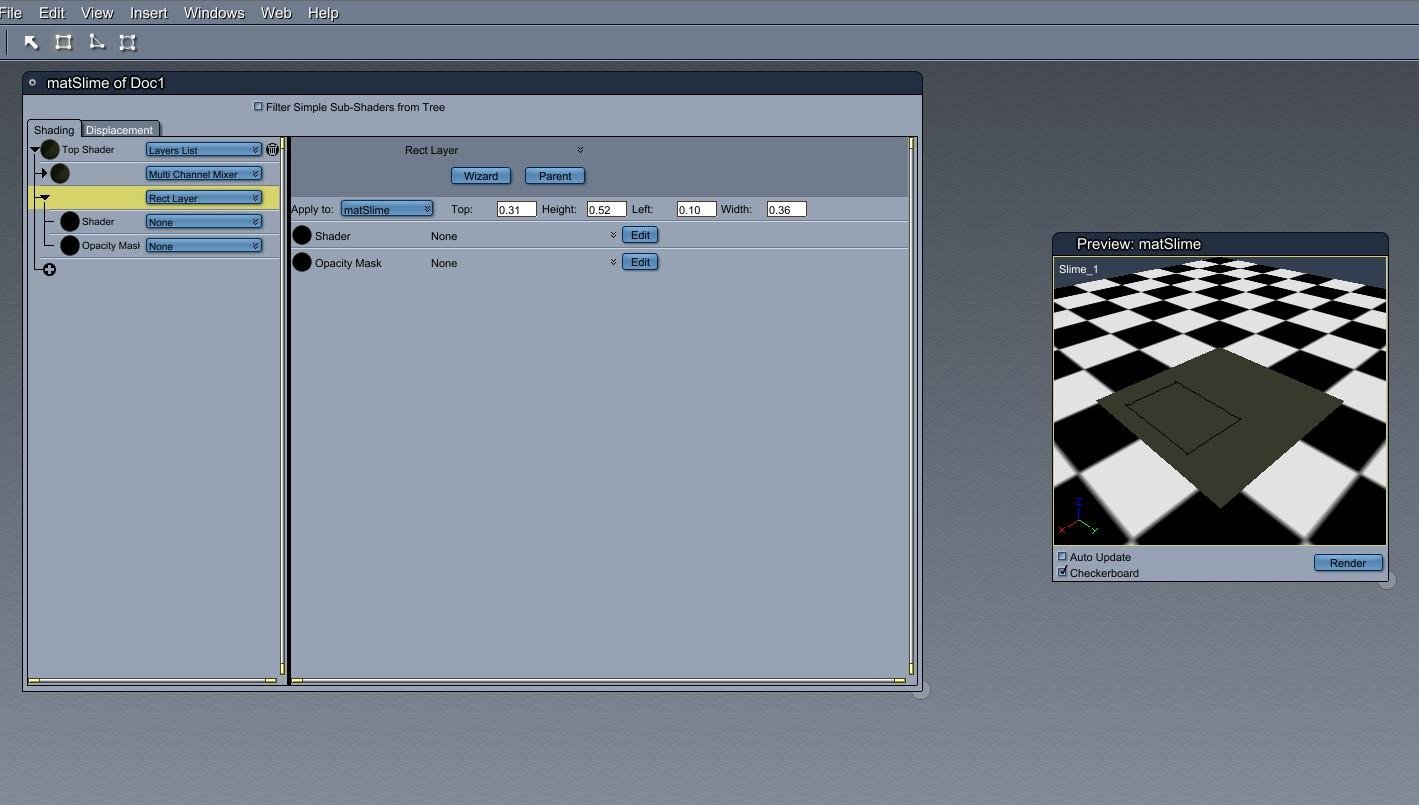
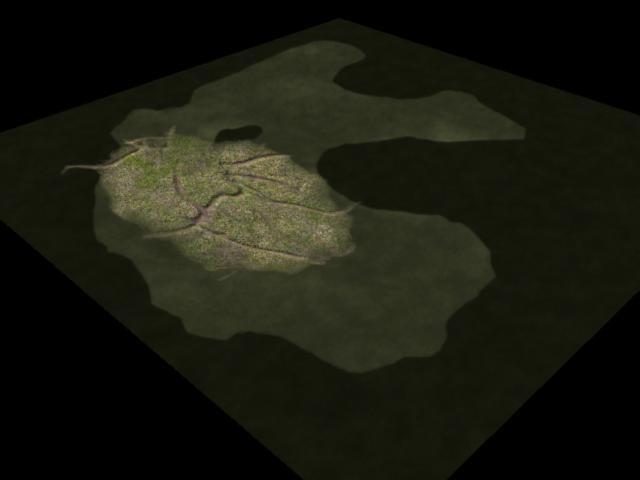
No one asked me - Diomede screenshots on whatever - Warning AI Discussion OKThis is probably worth reporting in the Carrara forum. Some of the 'decal' offerings can work in Carrara using the shader room. For example, there is a decal to add dirt or grass or (whatever) patches to ground planes. Ignoring the decal object, you can simply apply the maps with the opacity masks in Carrara using the layers list shader.
Example in this thread. https://www.daz3d.com/forums/discussion/558291/solved-ground-decal-new-release-what-is-required-what-is-aotp-ground
Here is a Carrara application.
- choose a ground plane or similar object.
- in the shader room, choose the layer pen tool in the upper right. For this example I choose the rectangle.
- draw your location in the shader room preview window.
- import the decal maps to the new layer created by the pen.
- if the decal includes opacity maps, import them to the opacity mask channel.
.
 Maya 2022 DaztoMaya 1.8 - "Nothing to import" error
vbqgyy_1dca8656f4 said:
got the same problem: "Oops! - Nothing to import".
then
open myDocuments\maya\modules\DazToMaya\scripts\d2m.py (open with notepad2)
then change the code in line 2380: change the path at your file location
daz_file_path = os.path.abspath(r"C:\Users\XXX\Documents\DAZ 3D\Bridges\Daz To Maya\Exports\FIG\FIG0\B_FIG.fbx")
save the file
problem solved
Fixed! This soved the problem. I set my documets folder on another drive, I changed the daz_file_path to the correct location and it imported.
UltraSceneryXT - large terrain/landscape generatoralexhcowley said:
memcneil70 said:
I will try, but Daz Connect is offline. I hate it. It has caused both of my Win 10 computers major problems and years of extra work and no fun for me. I had seen that Iray GeoLocator line before, but since Iray doesn't work on Mac's, not sure what affect it can have.
Getting rid of the scene file is easy.
Iray doesn't work on Macs? As far as I am aware it will run on the Intel Macs but, since Apple fell out with Nvidia, it will take hours to render.
Cheers,
Alex.
Well it does, on CPU, right?
I checked my Geolocator plug-in and it showed green on the chart. But I deleted it in DIM and deleted the file, then redownloaded it and reinstalled it and updated the metadata. I then reopened D|S 4.20.0.2 and looked at the log file. And the error remains. I just opened up one of my Win 10 computers and that line appears with that error on line 227 as well. And to my knowledge, it has not given me grief on previous renders.
I will freely admit I am hopeless at reading the error log, not only for its small size but also for its language. But, I also notices a series of errors on something given as '.../pluginsource/DzIrayRender... and not seeing a path ... due to error -2' (I really need to open the forum on the computer I have the issue on!)
I want to note that the installment of USXT does not cause D|S to not load on the Win 10 computers, and they have these same errors.
To be honest, the log so often shows so many errors due to morphs/character/eyelashes... that I tend to ignore the whole thing as a waste of my time, since it will refer to something I don't have installed and is not a required product. And I have tried to track down duplicate IDs and stuff.
I really appreciate any help I can get. This is so far above my pay grade I am at a dead loss.
Mary
New! Novica & Forum Members Tips & Product Reviews Pt 14Short review of "Cloth Helper for Genesis 8 Male" and "Cloth Helper for Genesis 8 Female" by biala, discounted by 70% now on Renderosity.
I'm writing this review after experimenting with these products for only a short time, and as someone who knows basically nothing about DAZ content creation, rigging, transfer utility, importing and exporting, and all that.
The Cloth Helper appears to be a kind of invisible figure that mimicks the Genesis 8 figure. It works on G8.1 as well.
Load the Cloth Helper onto your G8. As you change the pose and shape of your G8, the Cloth Helper automatically morphs and moves with it.
I made the Cloth Helper visible for these screen shots, but it's invisible by default:
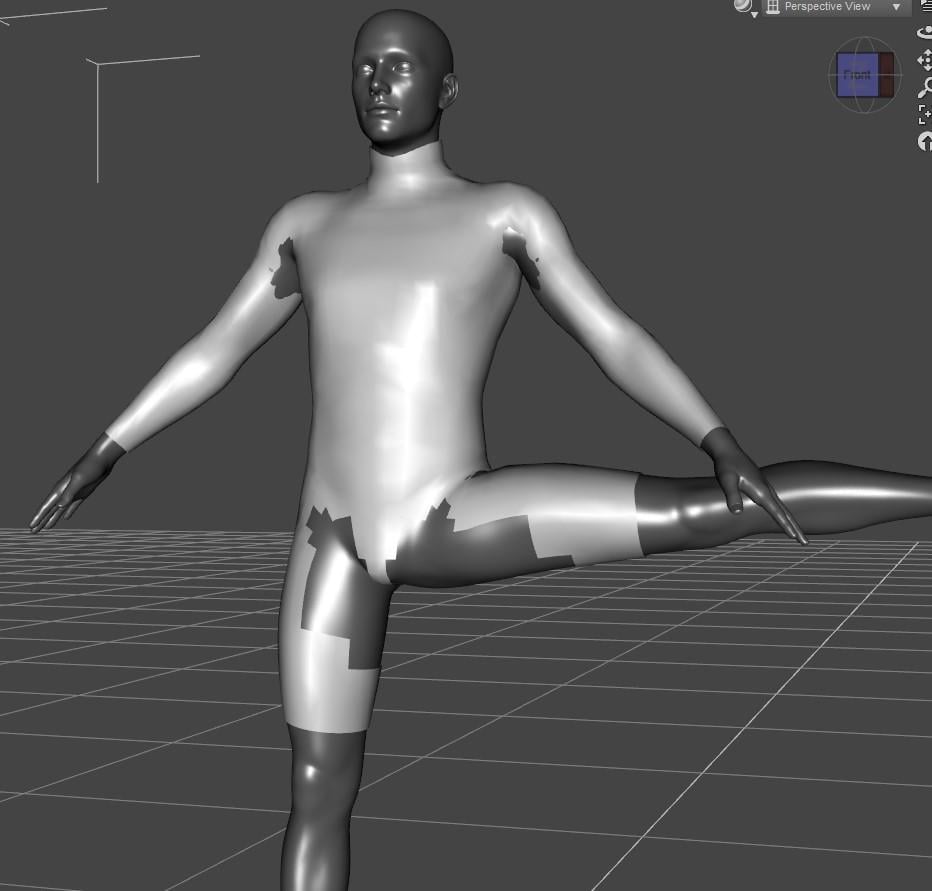
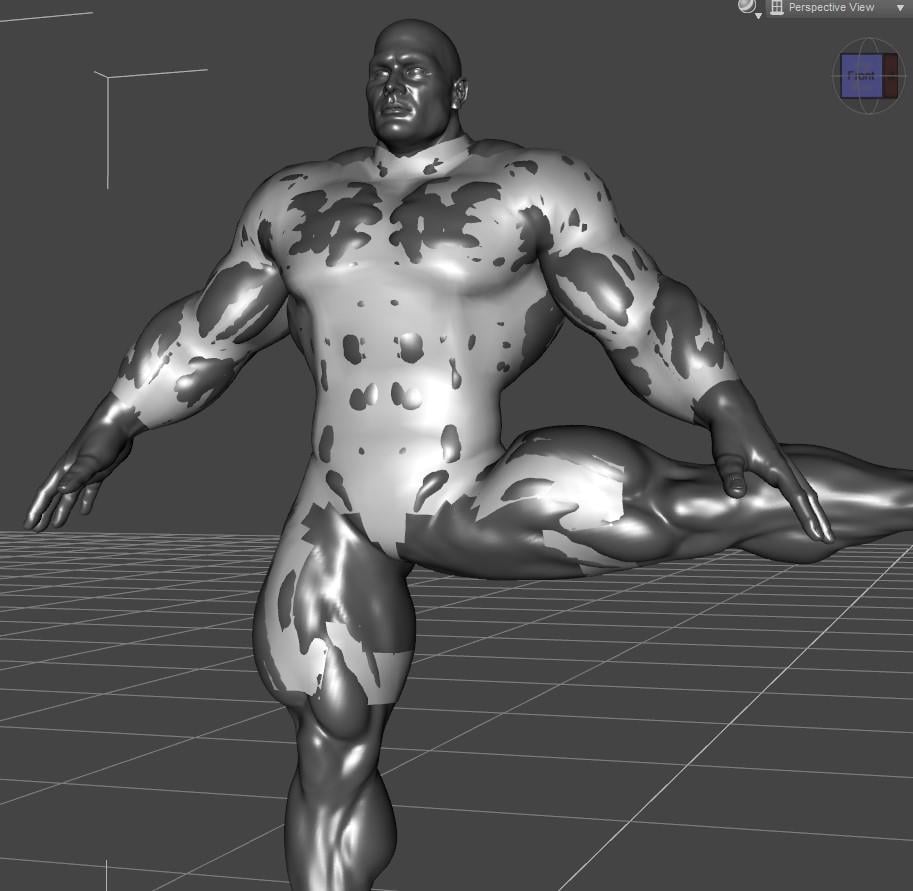
There's a user manual. It's written in broken English and the various steps are explained out of order - the thing that you have to do first is explained last for some reason. Never the less, I was able to figure it out without too much trouble.
Basically, you load the problematic garment into the scene, export it as an OBJ, import it again. Then something something Transfer Utility, this part is explained well enough. Now the garment is fitted to the Cloth Helper (which is invisible, and follows the movements and shapes of your G8)
Here's the thong from Xandra for Genesis, autofitted to G8.1M:
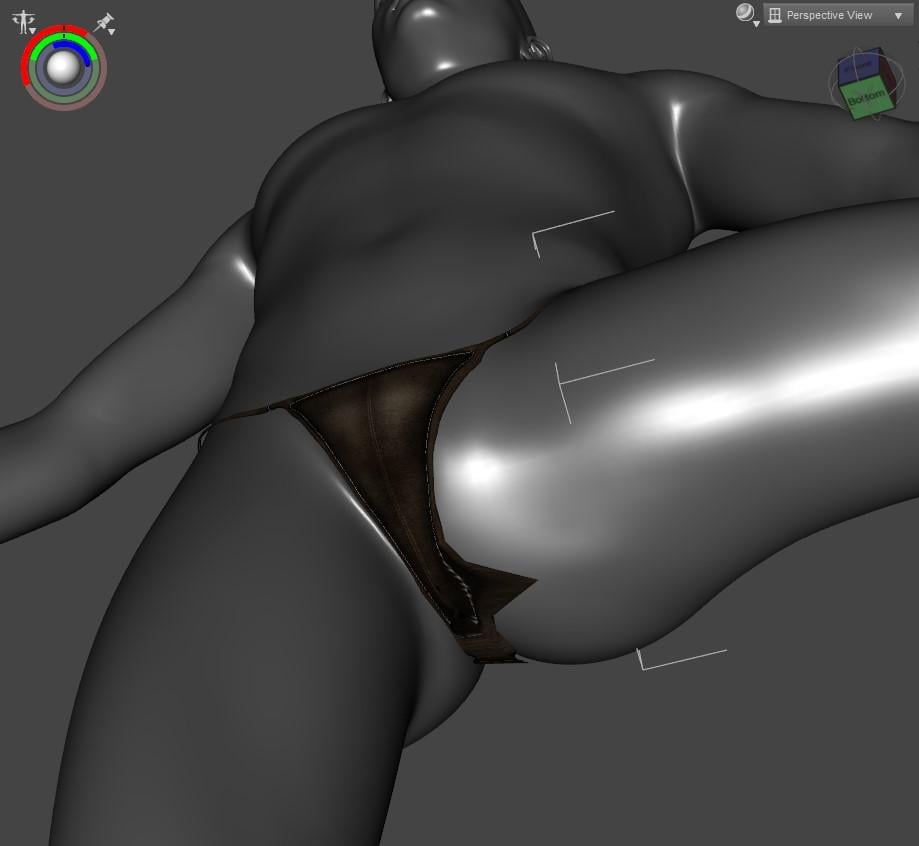
Here is the result after using Cloth Helper:
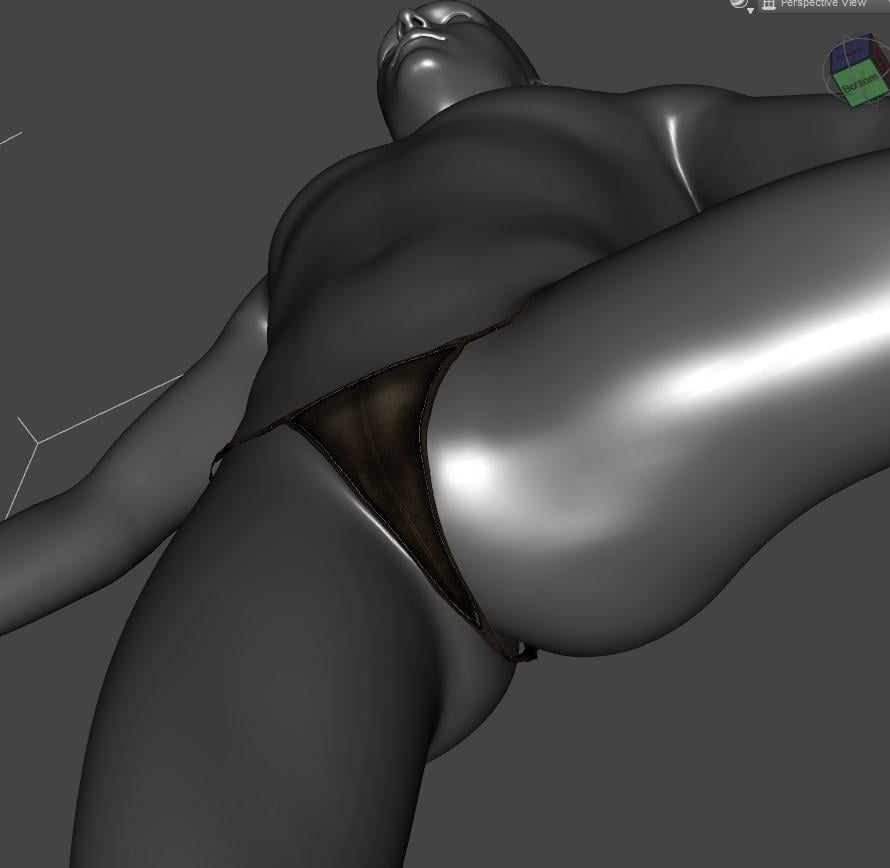
Pretty good, I'd say.
Here's Aeon Soul's AlphaKini for G3F, autofitted to G8.1M:
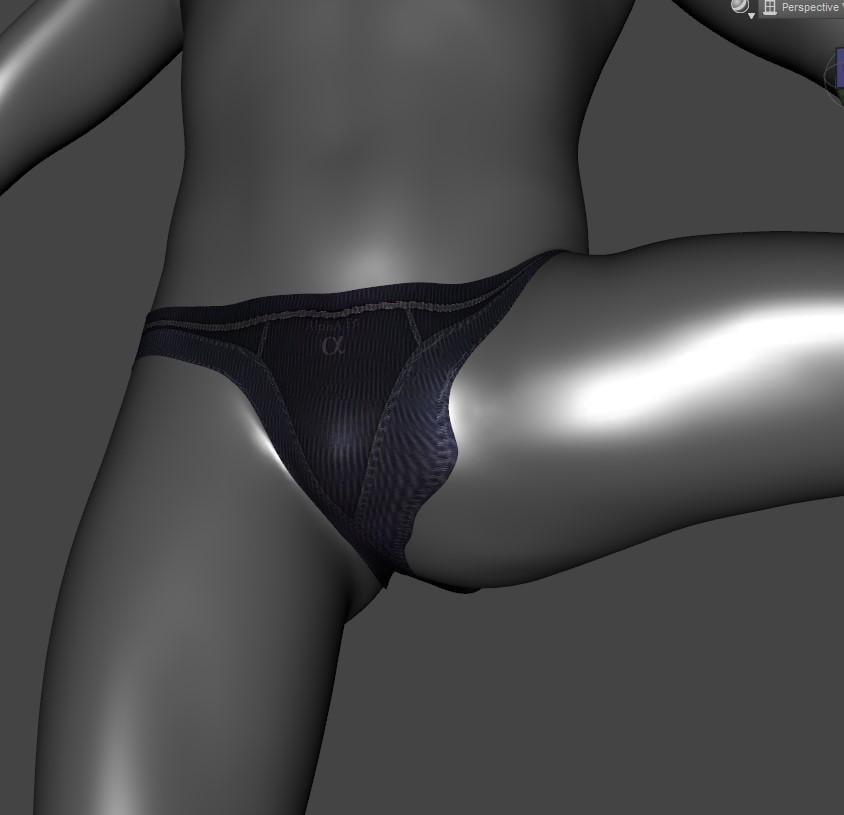
Here is the result after using Cloth Helper:
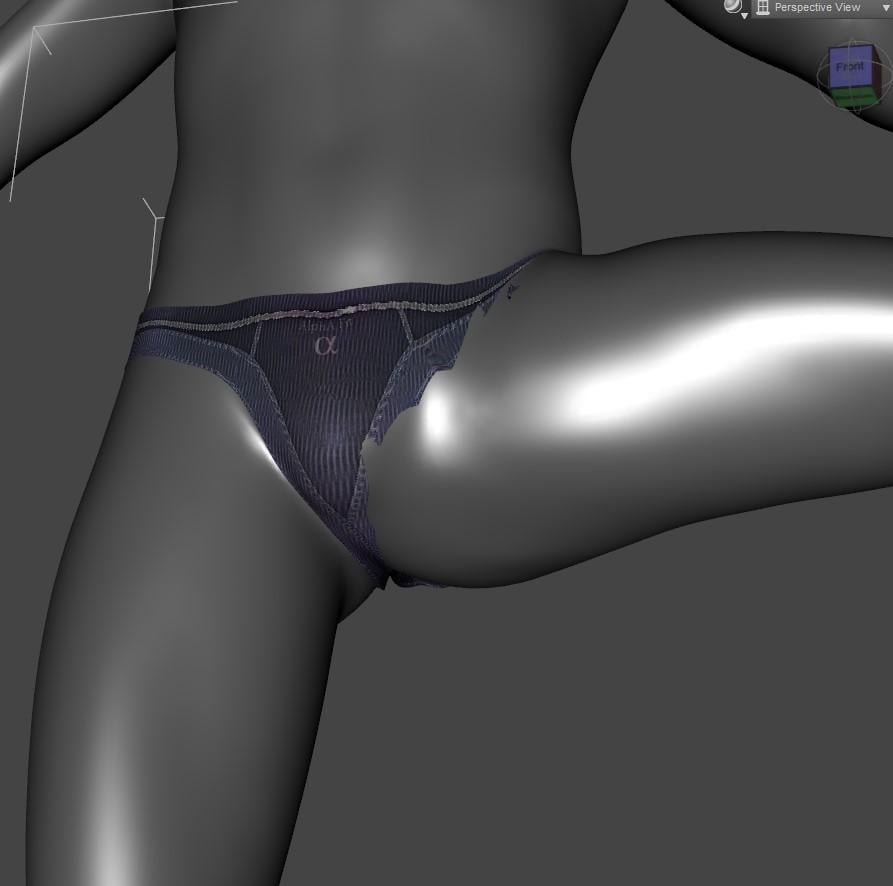
Here is the result after using Cloth Helper, with Mesh Smoothing applied:
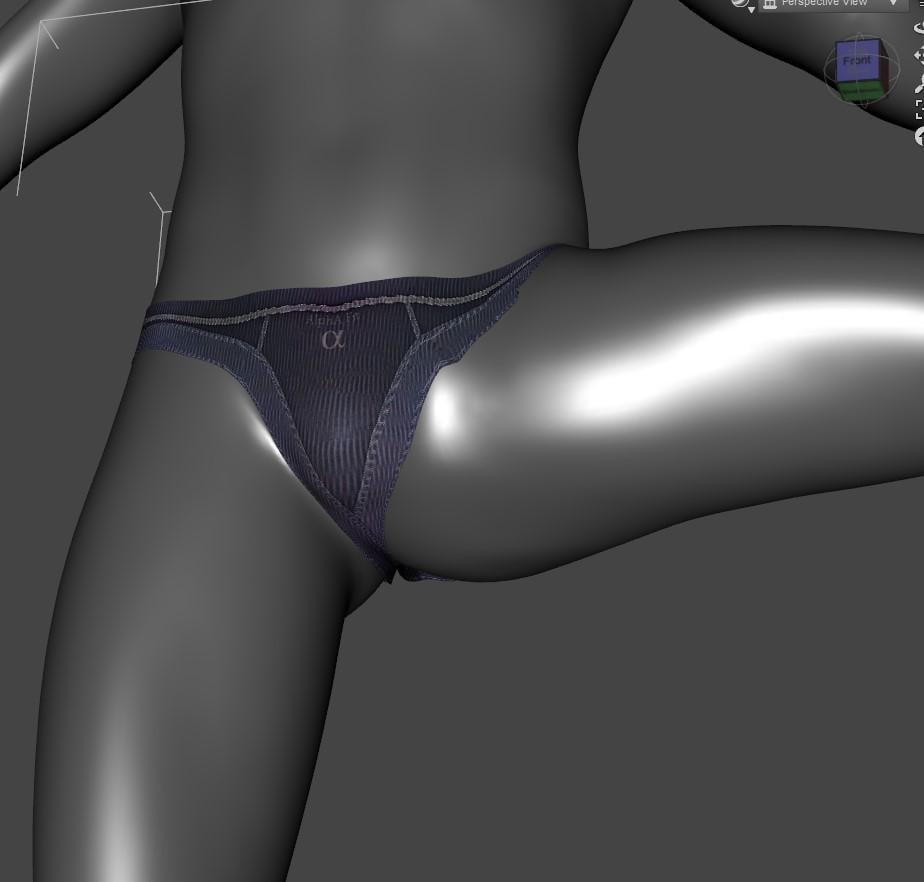
Not as successful, but still an improvement.
The presentation and attention to detail of this product definitely leaves something to be desired. But it seems to help with some of the "funky crotch" issues, even if it doesn't seem to always solve them.
Ultra SceneryXT - Expansive Landscape System don´t workHello together,
some days ago i bought Ultra SceneryXT - Expansive Landscape System by HowieFarkes from which i allready bought every Ultra Scenery part. Till now every product always everytime worked perfectly, but now it´s the first product from Howiefarkes which won´t work ! Well first i thought, it would be my fault, because i install everything manually and then Re - Import the Metadata and Process Metadate Queue. It´s because my Daz3D stuff, together with many things from Renderosity, are on 4 different hard drives.
So very long i didn´t understand how to split install or better how to install products to different harddrives where i have my Daz3D Content Directories with Daz Install Manager.
Anayway i manually deinstalled the Ultra SceneryXT - Expansive Landscape System again and then used the Daz Install Manager. Unfortunally that didn´t also work. So i deinstalled all products from Ultra Scenery and installed them by Daz Install Manager again. While everything else is working, the new Ultra SceneryXT still isn´t !
2022-03-22 10:58:07.527 [INFO] :: Locking viewport redraw...
2022-03-22 10:58:07.527 [INFO] :: Viewport redraw locked.
2022-03-22 10:58:07.601 [INFO] :: Native format content directories: 3
2022-03-22 10:58:07.601 [INFO] :: Poser format content directories: 4
2022-03-22 10:58:07.601 [INFO] :: Other import format content directories: 1
2022-03-22 10:58:07.601 [INFO] :: Begin asset load (open): /Environments/Landscapes/UltraSceneryXT/Presets/USX Preset 01 Vernon.duf
2022-03-22 10:58:07.999 [INFO] :: *** Scene Cleared ***
2022-03-22 10:58:08.000 [INFO] :: Determining missing assets...
2022-03-22 10:58:08.189 [WARNING] :: Invalid node selection for "preset_properties" type.
2022-03-22 10:58:08.189 [INFO] :: Error loading asset: F:/My DAZ 3D Library Laufwerk F/environments/landscapes/ultrasceneryxt/presets/usx preset 01 vernon.duf
2022-03-22 10:58:08.215 [INFO] :: Operation failed
2022-03-22 10:58:08.285 [INFO] :: Unlocking viewport redraw...
2022-03-22 10:58:08.285 [INFO] :: Viewport redraw unlocked.Does anyone have this problem too or could maybe help me with this problem ?
Thanks in advance !
Hex GalleryYes that would certainly look good, thanks, I will implement it. Sometimes there are blockages in building where you do not get further, such small discussions help.
@ that you can import 2D paths into Hexagon with apps like Adobe Illustrator?
No I didn't know that, do they have more info or videos on the subject. Would appreciate it.
We have Z-Brush on the computer here, but haven't found time to try it yet.
Diffeomorphic DAZ Importer version 1.6.0 releasedhighStrangeness said:
What about transfering a shapekey with the HD mesh's shape to the base resolution mesh, with multires?
When you import HD expressions or any HD morph they're already transferred to the base mesh. This is what the new morph system in 1.6 was for. But this is limited to the base mesh since multires doesn't support HD shapekeys. Again this is a limit with multires itself, not with diffeo.
The alternative is to bake to displacement with the addon by Xin.
https://diffeomorphic.blogspot.com/p/hd-meshes-version-16.html
Sylvan New Releases: Little Friends Insect Bundle [Commercial]Sylvan said:
Hi Lorraine! I am glad you like the critters!
As far as I know SBH (strand based hair) can't be rendered in 3DL :(
I just tried exporting the bumblebee as an obj and then import it. That seems to work, except the textures don't behave well anymore.
Sorry I don't have a better solution, I just did a few tests with 3DL but no luck!Hi Sylvan, thanks so much for trying, I really appreciate it.
Hex Gallery
zbrush is a little rich for my budget. the tank looks futuristic. on the display cases you might try some compound curves that lathe to a circle or hex/octagon shape if you are wanting to get away from rectangular or square shapes. you know that you can import 2d paths into hexagon using apps like adobe illustrator? found a old project that needs fixing and finishing: the desk needs some attention and i think the telescope needs that chainBruder Aural said:Thank you, I think I played too much with LEGO as a kid ^^
But I think there are enough other artists here at DAZ who do their work well and better.
I always wonder if they work with Hexagon.
I am trying to build glass cases for the museum but I can't get out of the basic shape, if anyone has any ideas please post here or link.
Sylvan New Releases: Little Friends Insect Bundle [Commercial]Hi Lorraine! I am glad you like the critters!
As far as I know SBH (strand based hair) can't be rendered in 3DL :(
I just tried exporting the bumblebee as an obj and then import it. That seems to work, except the textures don't behave well anymore.
Sorry I don't have a better solution, I just did a few tests with 3DL but no luck!any news on the hd plugin?? :Dthere has been some great deals on G1&2 stuff lately too, I have almost given up on G3&8 now even with Misty's presets because the earlier figures are just so easy to animate and import BVH to using the Carrara plugin called DAZ studio too.
Daz 3D is part of

Connect
DAZ Productions, Inc.
7533 S Center View Ct #4664
West Jordan, UT 84084Licensing Agreement | Terms of Service | Privacy Policy | EULA
© 2026 Daz Productions Inc. All Rights Reserved.