• Daz 3D
  • Shop
  • 3D Software
    • Daz Studio Premier
    • Daz Studio
    • Install Manager
    • Partnerships
    • AI Training data
    • Exporters
    • Daz to Roblox
    • Daz to Maya
    • Daz to Blender
    • Daz to Unreal
    • Daz to Unity
    • Daz to 3ds Max
    • Daz to Cinema 4D
  • 3D Models
    • Genesis 9
    • Genesis 8.1
    • Free 3D Models
  • Community
    • Gallery
    • Forums
    • Blog
    • Press
    • Help
  • Memberships
    • Daz Premier
    • Daz Plus
    • Daz Base
    • Compare
  • Download Studio
ADVANCED SEARCH
  • Menu
  • Daz 3D
ADVANCED SEARCH
Add image
  • Shop
  • 3d Software
    • Daz Studio Premier
    • Daz Studio
    • Install Manager
    • Partnerships
    • AI Training data
    • Exporters
    • Daz to Roblox
    • Daz to Maya
    • Daz to Blender
    • Daz to Unreal
    • Daz to Unity
    • Daz to 3ds Max
    • Daz to Cinema 4D
  • 3D Models
    • Genesis 9
    • Genesis 8.1
    • Free 3D Models
  • Community
    • Our Community
    • Gallery
    • Forums
    • Blog
    • Press
    • Help
  • Memberships
    • Daz Premier
    • Daz Plus
    • Daz Base
    • Compare

Notifications

You currently have no notifications.

Loading...
Daz 3D Forums > Search
  • How long until Gen9?


    G1 was brilliant. Honestly I consider G2 and even the later generations a solid step back conceptually. The universal mesh made making exotic characters much less painful... I can see why some PAs didn't like it, beause they had to account for a greater degree of deformation... and it also had the issue that Daz hadn't overtaken poser completely yet, and because of that V4/M4 still held on because of greater compatability.

    IMHO, Genesis was the only real genesis. The later are just Micheal/Victoria with a borrowed name.

    Only way I'll really get into G9 is if it goes back to a universal figure in some way.

    Personally, I think a 1/2 step would be best. Universal core mesh but with two in built gender morphs that are markted as the core figures. Allow shared textures, geoshells, and morphs, but without the promiss of absolute inter-gender intercompatability as the core mesh is just there to serve as a bridge, not as a foundation as it was in Genesis.

    I like exotics and one of the things that's always pissed me off is the impossibility of mixing genders due to most "exotic" characters being completely mono-gender.

    ...I agree and still use Genesis "classic" for the many toon characters that were released for it as well as alien and other exotic morphs.

    By

    kyoto kid kyoto kid November 2019 in The Commons
  • What hair on Paloma?

    What hair on Paloma? 

    Thanks in advance

    image

    https://www.daz3d.com/fwsa-paloma-hd-for-victoria-7

    By

    rav4 rav4 November 2019 in The Commons
  • How long until Gen9?

    It may not be obvious, but G3 was a significant change

    Since G3 the figures also became more industry friendly. It is easier now to use them and animate them in external programs, like Maya, Unreal or Blender.


    The new twist bones made G3/8 LESS animation friendly. Anyone who animates characters knows this.

    In my experience Daz isn't a very animation friendly program on the whole. It lacks a lot of basic fundimental physics features and those that it does have tend to be a bit janky and are half locked behind the PA access barrier.

    I'm to the point that the most I do with daz is use it as a character design program then feed the result into blender to do the actual work.

    Now if it uses dForce maybe I will change my mind

    • dForce autofit
    • dForce body and face
    • dForce pose adjustment (no figure passing through the surfaces, for example adjust the leg bend when the foot meet the ground)

    These days, I wouldn't count on any new features like that not being in some way paywalled or PA limited.


    G1 was a major game changer, but enough of the market (and the content creators) was not willing to take up the banner to cut its development cycle short. G1 barely got two full years.

    G1 was brilliant. Honestly I consider G2 and even the later generations a solid step back conceptually. The universal mesh made making exotic characters much less painful... I can see why some PAs didn't like it, beause they had to account for a greater degree of deformation... and it also had the issue that Daz hadn't overtaken poser completely yet, and because of that V4/M4 still held on because of greater compatability.

    IMHO, Genesis was the only real genesis. The later are just Micheal/Victoria with a borrowed name.

    Only way I'll really get into G9 is if it goes back to a universal figure in some way.

    Personally, I think a 1/2 step would be best. Universal core mesh but with two in built gender morphs that are markted as the core figures. Allow shared textures, geoshells, and morphs, but without the promiss of absolute inter-gender intercompatability as the core mesh is just there to serve as a bridge, not as a foundation as it was in Genesis.

    I like exotics and one of the things that's always pissed me off is the impossibility of mixing genders due to most "exotic" characters being completely mono-gender.

    By

    Psyckosama Psyckosama November 2019 in The Commons
  • Leisa 8
    DAZ heights are out of control.

    Well, for technical reasons you do want to have the male and female bases the same size

    What reasons would those be? Explain at any level you like, I'll keep up.

    - which is 180cm for pretty much every generation I can recall, (or 5' 11" for those who think in those terms), which isn't unusual for a male. It impacts things like auto-fit and other cross-model transfer.

    They do then seem to have got stuck in that rut, however, building models off that as if that should be the average for both men and women, so a woman that's supposed to be slightly taller than average has to start getting very very tall in real world terms.

    That's a side effect of having the majority of your women being either model types or warrior types. The fashion industry considered 5'8" the minimum for a fashion model, and that's 95th percentile for women.

    Next generation won't even fit in cars

    On that front, I don't believe the figures have been getting significantly taller over time. Lining up all the versions of Victoria I have (4 through to 8), the only one that isn't about the 180cm average of the base figures is V5, who's about 10cm/4" shorter than her other generations.

    Victoria is just the "first base" figure.

    By

    wiz wiz November 2019 in The Commons
  • Is there a reliable figure comparison chart somewhere?

    I only use dynamic clothing on my figures, and knowing that most dynamic clothes will fit most figures, I don't worry too much about which figure a garment was designed for when I download freebies. However, there are so many figures I simply have no experience or access to, that I think it would be helpful to know how figures literally measure up as far as scale goes. For example, I know a dress made for dawn will normally drape fine on victoria ... so is there a comparison chart somewhere that's already done the research for me?

    By

    WillowRaven WillowRaven November 2019 in The Commons
  • How long until Gen9?

    I think releasing Genesis 9 forces Daz to start over and cover their bases again, Victoria, Michael, etc...  After they finish with their bases, what's their objective?  What gap are they trying to fill?  Age, race, gender?  Do they become random with their releases, or does it give them more opportunity to explorer something that they have never released before?
     

    By

    Seven193 Seven193 November 2019 in The Commons
  • You know you've got too much stuff when...

    When you find out that the IRS won't let you claim Victoria, Michael, Aiko and Josie as dependents.

    yes lol

    By

    Ivy Ivy November 2019 in The Commons
  • You know you've got too much stuff when...

    When you find out that the IRS won't let you claim Victoria, Michael, Aiko and Josie as dependents.

    By

    Cybersox Cybersox November 2019 in The Commons
  • Leisa 8
    DAZ heights are out of control.

    Well, for technical reasons you do want to have the male and female bases the same size - which is 180cm for pretty much every generation I can recall, (or 5' 11" for those who think in those terms), which isn't unusual for a male. It impacts things like auto-fit and other cross-model transfer.

    They do then seem to have got stuck in that rut, however, building models off that as if that should be the average for both men and women, so a woman that's supposed to be slightly taller than average has to start getting very very tall in real world terms.

    Next generation won't even fit in cars

    On that front, I don't believe the figures have been getting significantly taller over time. Lining up all the versions of Victoria I have (4 through to 8), the only one that isn't about the 180cm average of the base figures is V5, who's about 10cm/4" shorter than her other generations.

    By

    Matt_Castle Matt_Castle November 2019 in The Commons
  • Leisa 8

    I was thinking that Leisa was one of the more credible mature characters, and Allesandra kept that theme going (Gabi is a bit too WTF for me) useful for a CEO, scientist, librarian, etc. but then I saw one little item that just blew everything for me.

    Height: 6' 0" (182.8 cm)

    Seriously? That's 99.92 percentile. Less than 1 in 1000. That won't look realistic in a car, at a desk, going through a doorway, etc. Kitchen counters are at the wrong height for her. ( 50% for the US is 5'3.6"). Oh, and the standard weight for a 6' woman is 188 pounds. 

    Teen Josie 8 is 5'5", which is 75th percentile for adult women. Teen Raven 8 is 5'6". Fortunately, it appears that all the DAZ teens are 18-19, so they've basically stopped growing.

    DAZ heights are out of control. Next generation won't even fit in cars, will bump their heads in doorways,  I'm picturing Victoria 9 coming in at 6'4". What do we use these characters for, aside from the obvious NVITWS?

    By

    wiz wiz November 2019 in The Commons
  • Converting Victoria 4 to IRay

    Is there a product that is specifically focused on this type of conversion with the old Mil 4 figures? Please advise.


    By

    Greybro Greybro November 2019 in Technical Help (nuts n bolts)
  • KHImage studio does it again, now for GENESIS 8!


    +1.  That's a nice concise explanation of why some users aren't totally happy.  The morphs themselves are fantastic.  Have been using the precious Victoria ones all along for all my characters.

    Phrased another way.  Not having the beautiful neck deforms applied automatically to all your poses feels like not getting all that was promised.  Which isn't really true.  But you have to redo your poses for the head-neck bends to get them.

    Cos neck-head is a dramatic deform area, and there are 3 bones affected, so don't know that PA had much choice but to do it this way to keep their work looking fabulous as they are.

    Thanks for saying so, yeah, I've been using these morphs since Genesis 2 and I actually did not use my G/V8 until these morphs were made available, I'm really excited that they applied the morphs to Genesis 8 herself and not just V8! Now I can use these morphs for every single 1st party DAZ character as they're based on G8 rather than just V8!

    By

    takezo_3001 takezo_3001 November 2019 in The Commons
  • KHImage studio does it again, now for GENESIS 8!


    Right, so you just dial the Ultimate Bend Morph setting to 100%, and it adjust everything automatically, right? 

    This was how it worked in all the other implementations and it worked fantastic. I'm not sure what folks are upset about.

    They are mostly using pre-pose packages, which already have the head/neck posed by the node... (Bones) and for the UNP's neck pose, the morphs are applied to the multi node pose control, which is separate, you can still match the head/upper/lower neck poses using the pose control, basically it's made for doing your own posing outside and/or alongside of using pose packages

    +1.  That's a nice concise explanation of why some users aren't totally happy.  The morphs themselves are fantastic.  Have been using the precious Victoria ones all along for all my characters.

    Phrased another way.  Not having the beautiful neck deforms applied automatically to all your poses feels like not getting all that was promised.  Which isn't really true.  But you have to redo your poses for the head-neck bends to get them.

    Cos neck-head is a dramatic deform area, and there are 3 bones affected, so don't know that PA had much choice but to do it this way to keep their work looking fabulous as they are.

    By

    Saxa -- SD Saxa -- SD November 2019 in The Commons
  • Identify character model

    *Resets the clock*

    General opinion is that it's about 70% Osuine (from Renderosity) with 30% Victoria 8 and maybe a few other tweaks mixed in. However, no-one has an absolutely definitive recipe for her.

    By

    Matt_Castle Matt_Castle November 2019 in The Commons
  • Some legal questions

    Uh, how would you build something from a base figure and also not contain any original geometry? How exactly do you envision that working?


    I mean, you could sculpt a new figure and use Daz Studio to rig it and do weight maps... but that's not using a base figure.

    that pretty easy

    you create a script that modifies the base figure it is not even intended to be a separate figure but unfortunately, it has to be.

    consider this idea, as we make geograft resembling victoria 4/genesis 1 and fit it on the genesis 8. this way we get to use V4 textures and g1 morps on G8 with its advanced rigging and morphs.

    in fact, it could be theoretically possible to create some monster figure which contains all morphs from G1 to G8 and has compatibility with all textures and geografts

    But I wonder if that would be legal.as imagine that if Daz decides that this compatibility breaks their business and demands to cease distribution of such item

    My question was more as if Daz can just tell you to stop distributing something they don't like without any reason.

    By

    onix onix November 2019 in The Commons
  • Black Is Beautiful II

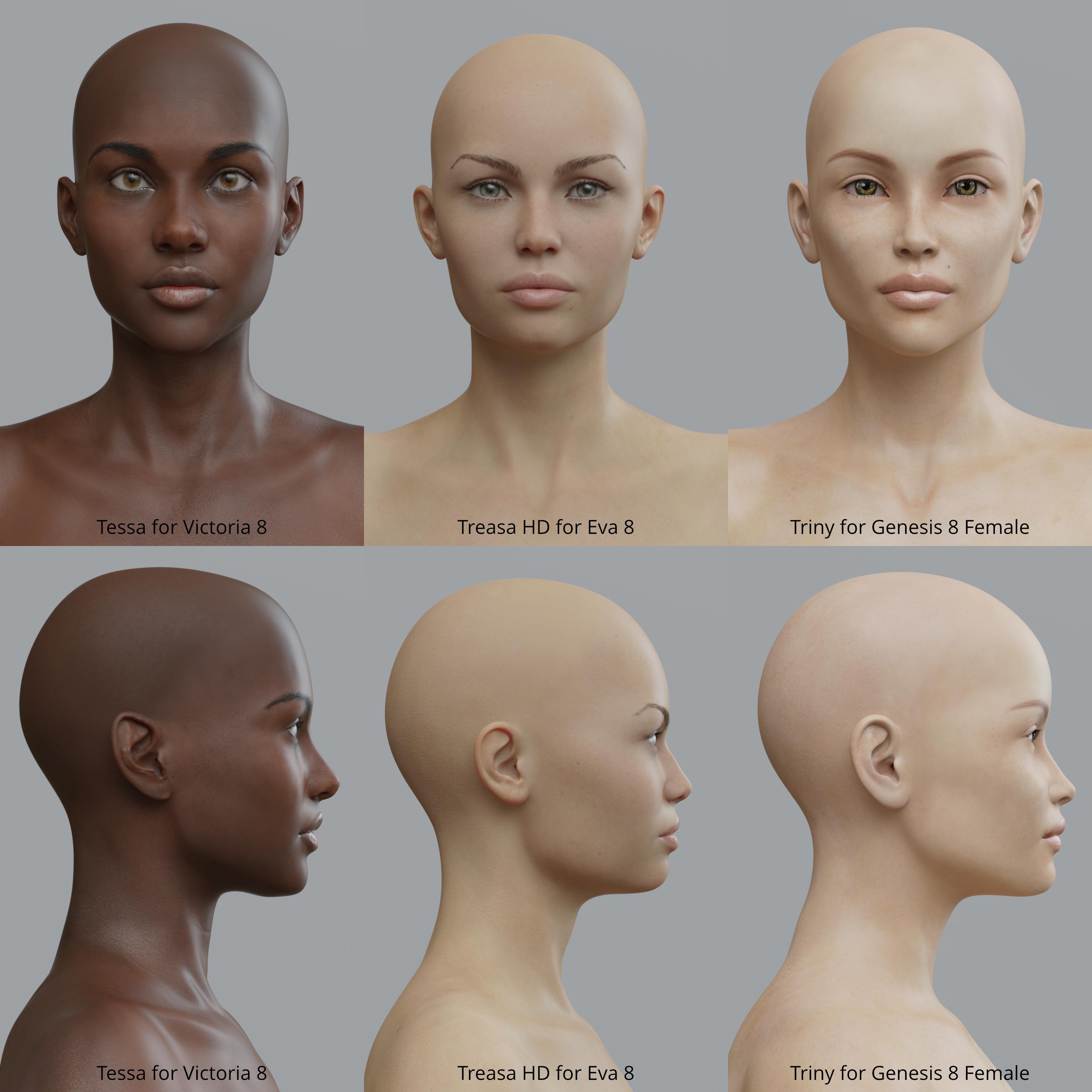
    Tessa at work in her ATLAS Armored Suit.(Sorry, can't recall which DZFire vehicle that is at the moment).  Just playing around with this, not sure if it is done or not yet.


    That is an awesome render!


    Thanks, I always get GREAT results from the BOSS Pro lights.

    By

    Gogger Gogger November 2019 in The Commons
  • Black Is Beautiful II

    Tessa at work in her ATLAS Armored Suit.(Sorry, can't recall which DZFire vehicle that is at the moment).  Just playing around with this, not sure if it is done or not yet.


    That is an awesome render!


    By

    Toyen Toyen November 2019 in The Commons
  • Black Is Beautiful II

    Tessa at work in her ATLAS Armored Suit.(Sorry, can't recall which DZFire vehicle that is at

    Wow, gorgeous! Singelhandedly sold me on that character. Did you so any tweaking or is she out of the box like this?

    Thanks! She's gorgeous enough straight out of the box. :)

    By

    Gogger Gogger November 2019 in The Commons
  • Black Is Beautiful II

    Tessa at work in her ATLAS Armored Suit.(Sorry, can't recall which DZFire vehicle that is at the moment).  Just playing around with this, not sure if it is done or not yet.


    Wow, gorgeous! Singelhandedly sold me on that character. Did you so any tweaking or is she out of the box like this?

    By

    Hylas Hylas November 2019 in The Commons
  • Making Studio Content Poser Native

    Working With Genesis 2


    The Genesis 2 line expands the number of character bases open to users quite dramatically and enjoys some better rigging and morphs, along with the improved efficiency of having separate male and female base figures.

    However, we are going to have to go about setting them up a tad differently to the previous figures thanks to some quirks of the Importer and it’s behaviour with Poser 11. First of all, if you export a CR2 from Studio and open that up in Poser, you’ll find that it has no tongue. Grand! The solution to that is to open the figure in Poser using the provided Poser Companion file and then re-saving a new CR2 – sadly, this can also result in a strange bug in the jaws, albeit only in Poser 11, which has a simple fix, given below.

    Once again, we are going to want to end up with an obj file for each of the base characters, so that we can use their individual UV mapping. We’ll also want to end up with a CR2 for each character but with just the one pmd file for all the morphs – again, you might not feel the need to bother with doing that but I like to be tidy. While I do have the creature creator morphs, I don’t have much in the way of special creature characters, so I’m not going to work separately on them as I did for Genesis.


    Preparation.


    You’ll want to create a folder for the Genesis 2 geometries. I created separate folder sets for the Male and Females, each with folders for Figures, Clothes, Hair, and Props.

    You’ll also want to create folders in the Characters directory of the Library for the Characters, Clothing, and Hair.

    Also, if you are have the Fit Control products for Genesis 2, then you will need to uninstall them again.

    So, now you need to navigate to the PCFs for all of the Genesis 2 characters you have and which have their own UV mapping. Find the Genesis 2F Base, open it in Poser and then save it out again, with a pmd file, to the prepared folder. Run this CR2 through the File Optimizer, as you did for the Genesis figures, which will make it Poser native and create a geometry which, again, you’ll save to your prepared folder. Now open the figure again and set the skinning method to Poser Unimesh, uncheck Include Morphs in the Body part’s Properties tab and then add some subdivision. Finally, you might want to edit the dials to an arrangement that best suits you before saving it out once more.

    Finally, try posing the head and checking the jaw parts. Some people have found the jaws take on a life of their own in Poser 11 – this is not a bug that I’ve encountered but there is a fix here: https://www.daz3d.com/forums/discussion/232296/genesis-2-jaw-issue-after-dson-import#latest. I believe it is a bug that only occurs when using shapes created with Generation X.

    Of course, you now need object files for all your Base Characters – generating these is best (by which I mean fasted) done using the method employed for the previous Genesis line (the problem of the missing mouth parts is in the exported CR2s, not the obj files generated from them, so this will work fine). Open up Studio and load Genesis 2 Female, then, switching the UV set on the Surface tab, you’ll need to export a CR2 for each Base Character with it’s own UV (save for the Base as you’ve already done that one in Poser).

    Back in Poser, run these new CR2s through the File Optimizer to generate the obj files, after which you can delete them, along with their pmd files. Make as many copies of the Genesis 2F Base CR2 as you have Base Characters and name them accordingly, then open them in a text or reference editor and point them to the correct obj file for the character.

    You can now re-install the Fit Control products if you have them.

    Rinse and Repeat

    Now you can repeat the same procedure for the Genesis 2 male.


    Materials – Normal Maps


    While the Genesis materials applied by the PCFs are perfectly fine, there is a quirk with those applied by the Genesis 2 PCFs. DAZ have a long history of not supporting some of the material options available in Poser, in particular, displacement and normal maps, leaving customers to apply those features themselves. Genesis 2 characters all come with some normal maps which add a little extra detail to the bodies but, true to form, the PCFs supplied by DAZ don’t apply them. It’s not a great problem though – open up the materials tab and open a texture file, navigating to the DAZ textures to find the normal maps, then apply them. When you are done, save out your new material files in Poser for future use.

    And that is all there is to say about Genesis 2 – you are now all set up with the bases and converting clothes and hair items for them is the same process as used for the Genesis line.


    Table of Products


    Below is a table of products that I have attempted to convert for Poser native use. The first column is the product name and store link, the second is the type of product, which will largely be either clothing or hair, the DSON column is to indicate if the product was advertised in store as being compatible with Poser via the DSON Importer, Converted is for a conversion rating (either No, Limited, Good, Excellent), followed by some notes about it.

    Product Type DSON Converted Conversion Notes
             
    70's Romper Clothing Yes Excellent Method #1
    Air Defender Clothing No Excellent Method #1
    Alternate Identity Clothing Yes Excellent Method #1
    Ashleigh Jumpsuit Clothing Yes Excellent Method #1
    Autumn Clothing Yes Excellent Scarf converts with Method #1 but a tear in the dress requires Method #2
    Autumn Rain Clothing No Good

    All parts convert well with Method #1

    There is a quirk with the dress that I haven't figured out yet. It appears transparent, as if there was a problem with the normals perhaps. Anywho, it render well enough and fits well too but this is something I will want to fix at some point.

    Avery Dress Clothing No Excellent There is a very small tear with Method #1, so you will want to use Method #2
    Bar Maid Clothing No Good All itmes seem to convert well using Method #1 - save for the panties, which don't show up at all. Their absence is not going to be seen and if it were, then there are so many similar items I can use from other products that I'm not troubled by this niggle.
    Basic Hair Hair Yes Excellent Method #1
    Bath Wear Clothing No Excellent All items convert with Method #1.
    Bellissima Clothing Yes Excellent

    All can be converted using Method #1

    However - there is a tiny bit of mesh separation in the skirt, I won't notice it because I paint over everthing but you might want to use Method #2 on it which will avoid the problem.

    Bold Hair Hair Yes Excellent Method #1
    Boudoir Clothing No Excellent All itmes convert with Method #1
    Bounce Clothing No Good All items convert with Method #1 but the body required a little fitting with both its own adjustment morphs and Fit Control
    Brian Hair Hair No Excellent Method #1
    Cutting Loose Clothing No Excellent Method #1
    Desert Dancer Clothing Yes Excellent Method #1 for all items save for the pants, which will need Method #2 
    DM Suit Clothing No Partial The suit and hat look to work well with Method #1 but I'm sorry to say that the cape and scarf aren't Poser compatible.
    Drifter Hair Hair Yes Excellent Method #1
    Duffle Dream Clothing No Excellent The skirt will convert with Method #2 but everything else converts well with Method #1.
    Edwardian Hair Hair Yes Excellent Method #1
    Elite Ponytail Hair Yes Excellent Method #1
    Firefly Hair Yes Excellent Method #2
    Hazmat Suit Clothing No Excellent Method #1
    Heartbeat Clothing Yes Excellent All items converted with Method #1
    Helena Outfit Clothing Yes Excellent The dress has a very small tear with Method #1, so you'll probably want to use Method #2
    Hongyu's Bikini Clothing No Excellent Converts well with Method #1
    Jungle Girl Clothing Yes Excellent All items converted with Method #1
    Just Wet Clothing No Excellent All conformers can use Method #1 - the umbrella is a prop
    Kami Hair Hair Yes Excellent Method #1
    Kung Fu Hair Hair Yes Excellent Method #1
    Kyle Hair Hair No Excellent Method #1
    Leather Body Suit Clothing No Excellent Converted with Method #1, a lot of poke through to start but it has its own morphs to deal with that.
    Lena Hair Hair Yes Excellent Method #1
    M601 Clothing No Excellent Method #1
    Mary Janes Clothing No Excellent All pairs of shoes and the socks convert with Method #1
    Milk Maid Clothing Yes Excellent Sleeves and Shoes Method #1, use Method #2 for the dress
    North Hair Hair Yes Excellent Method #1
    Omri Hair Hair Yes Excellent Method #1
    OOT Retro Swimwear Clothing Yes Excellent

    You can convert all three parts with Method #1

    However - there is a tiny bit of mesh separation in the skirt, I won't notice it because I paint over everthing but you might want to use Method #2 on it which will avoid the problem.


    OOT Superhose Clothing No Excellent Really needed as a compliment to the Vintage Lingerie - converts with Method #1 just fine.
    OOT Vintage Lingerie Clothing Yes Excellent All pieces convert with Method #1
    Prehistoric Princess Clothing Yes Excellent Converted with Method #1
    Princess Zyanya Clothing Yes Excellent All converted with Method #1
    Ranger Hair Hair Yes Excellent Method #1
    School Loafers Clothing No Excellent Method #1
    Sexy Librarian Clothing Yes Excellent

    The shirt converts well with Method#1

    The skirt has to be converted with Method #2

    The classes are a smart prop.

    SI Battle Kimono Clothing Yes Excellent All items convert with Method #1 (the weapons are a single CR2 - not smart props) The materials don't transfer with the CR2 but there are PCFs to do the job.
    SI Domina Clothing No Limited

    The skirt is no Poser compatible but I don't consider that a deal breaker and recommend the set regardless.

    All other parts convert with Method #1

    Note that the exported CR2s don't seem to retain any material information, so you'll need to start from scratch in Poser - not a big problem.

    SI High Garden Clothing No Limited The Boots are not Poser compatible but the Tunic will convert under Method #2.
    SI Medieval Morphing Dress Clothing No No Well, the belt converts but sadly the dress is not.
    SI Swashbuckler Clothing No Excellent All clothing items converted with Method #1 - though the materials don't transfer, so you will have to set them  yourself. The swords are smart props.
    Sinful Nights Clothing No Excellent The lingerie items all convert under Method #1 but the trench coat that you're probably buying this for needs Method #2.
    Starlight Clothing Yes Excellent All with Method #1
    Storybook Clothing Yes Excellent  The clothing items all convert with Method #1 - the broom and pumpkin are props.
    Tangled Clothing No Excellent All items convert with Method #1
    Temptress Hair Hair Yes Excellent Method #1
    Time For School Genesis Female Clothing No Excellent with work All items seem to look good using Method #1 - but you are going to have to make some effort. The geometries of these items are a little odd (I believe with regards to the normals) - I've tried fixing it it Hexagon but don't have the know how to do it, if a fix is possible. The problem you will have in Poser is with visibility in preview. Under render settings, uncheck Hide Backfacing Polys and in materials, make sure that Normals forward is checked in all. The preview will be a little dark but the clothes will function and render properly. These are the only good school uniforms I know of that actually look appropriate for children, so the effort is worth it for that alone.
    Tulip Hair Hair No Excellent From what I've tried, this works fine and imports well with Method #1
    Urban Survivors Clothing No Partial/Good This clothing set uses HD morphs for finer details, including pockets. However, there are some very good normal maps which help bring those out in Poser, so on balance, I'm pleased with the purchase.
    Vintage Aviator Clothing Yes Excellent Method #1
    Uniform Dress Clothing No No I had really wanted this to work but sadly, due to some random grouping, it just won't work. The problem stems from it being a simple Studio conversion from the Genesis 3 version (I tried it and got exactly the same groups). If you use Genesis 3 in Poser, then you can use it's version of this product but that's the only way you will.
    Viking Male Hair Yes Excellent Method #1
    Waitress Uniform Clothing Yes Excellent Use method #2 for the skirt but everything else will convert with Method #1
    Wave Hair Hair No Excellent From what I've tried, this works fine and imports well with Mothod #1
    Winson Dress Clothing Yes Excellent All items convert with Method #1
    Women's Business Suits B Clothing Yes Excellent All items converted with Method #1


    By

    philebus philebus November 2019 in Poser Discussion
Previous Next
Adding to Cart…

Daz 3D is part of Tafi

Connect

DAZ Productions, Inc.
7533 S Center View Ct #4664
West Jordan, UT 84084

HELP

Contact Us

Tutorials

Help Center

Sell Your 3D Content

Affiliate Program

Documentation Center

Open Source

Consent Preferences

JOIN DAZ

Memberships

Blog

About Us

Press

Careers

Bridges

Community

In the Studio

Gallery

Forum

DAZ STORE

Shop

Freebies

Published Artists

Licensing Agreement | Terms of Service | Privacy Policy | EULA

© 2026 Daz Productions Inc. All Rights Reserved.