-
Redacted
I'm back on my daz computer now. I see that I own SKU 30728 Bundle Bast for Genesis 3 Female. I have installed it with DIM. Upon installation, I get many warnings from ..\..\..\..\..\src\sdksource\cloud\dzcloudtasknotifier.cpp(178) about thumbnail problems (indeed, the metadata file has no product thumbnail image included) and errors in metadata because no corresponding file. The same warnings occur if I reimport the metadata for the product. However, the product does show up for me in Smart Content Files and Smart Content Products. As you saw in the metadata dsx file, there are no categories, types, or compatibilities defined, so everything shows up in Lost and Found. The product is useable, although inconvenient, because of the missing metadata. In cases like this, I have given up [ pause for the GATEWAY TIMEOUT INTERRUPTION
 ] on waiting for Daz to create proper metadata. I do it myself.
So, I can't answer the details of why you get these errors exactly, but I can tell you that you are not alone. The difference is that you say the assets don't show up in Smart Content, but they do for me. Maybe you mean they don't show up as compatible with G3F or hair materials don't show up for the selected hair. That is also true for me, because of the incomplete metadata.
Edit: I see that to make the Bundle Bast for Genesis 3 Female usable, the rest of the bundle also has to be installed to get the data files installed. But that has nothing to do with metadata. This is just a product dependency thing.
Help find options to weld vertexes occupying same coordinatesGreetings.
Situation - have obj with unwelded parts (reasons vary). Intended result will be multi-planar. I don't remember the offical name. Classic example is a pocket on a shirt. The shirt base is a plane. The pocket is sewn onto the base shirt. Therefore, the edges where the pocket is sewn are interior to a flat plane of the shirt yet form another edge of a perpendicular plane where the pocket joins. Was hoping that Daz Studio would have a weld option in the import dialogue, or in the menu for edit : geometry. Don't see a weld option. The pockets fall off in DForce for example, and pull apart in smoothing without DForce. My next check was sending the object through the bridge to Hexagon. I found some weld options in the vertex modeling menu of Hexagon but so far I have to go vertex pair by vertex pair. Tedious and I suspect unnecessary. But I haven't found a setting to automatically weld vertexes at same coordinates or a menu to set 'weld by distance tolerance.' I suspect in each case that the possibility might be there but that I am ignorant.
Any help would be appreciated. Preference for welding either within Daz Studio or through bridge to Hexagon.
OFFICIAL DazToCinema4D Bridge 2022 (SEPTEMBER UPDATE): What's New and How To Use ItWould delete this post, but can't. But editing to point out that this post and the next several are irrelevant now - it was a dumb mistake on my part and not the Bridge's. FBX Import preferences had Materials disabled this whole time, and I never noticed until just now.
[Released] Content Wizard [Commercial]RiverSoftArt said:
arstropica said:
Not sure if this has already been addressed in a previous post, but is there a way to completely remove products installed through CW?
I've tried copying the zip file to the DIM directory and install/uninstall from there, but the files and metadata are unaffected.
Thanks
No, there is not. You need to uninstall the product (using DS Smart Content) and then delete files (which can be tricky and very manual unfortunately)
If you have to stick to a one-machine workflow, that is indeed a limitation of mainly DIM, not CW.
DIM tries to be smart, and does not allow to delete files it has not installed. If you install a CW ZIP file with DIM, it checks if a file already exist. If it does, it will not install the file (as it have to overwrite the original). Thus, it will "know" that it has not installed the file - so it won't uninstall it, no matter what.
There is a work-around, but it requires a workflow involving a second machine. I am using a virtual machine on my primary system. I create all CW sets using that "second" installation. Then, I am moving the ZIP file CW creates to the primary system's DIM install directory and let DIM continue. This time, as DIM installes it "fresh" without overwriting existing files, it can also fully uninstall the product should need be.
As said, this requires a sort of "second" machine with a minimum installation of DS plus its default products plus CW.
Issue when importing custom poses in BlenderHi, when I try to import custom poses in blender I have an issue. Usually, I create a character, add a pose downloaded from the Daz store and export to blender using the Daz to Blender official addon. When the character is loaded in blender he always has a pose that doesn't correspond with the daz avatar, which is not a big problem because there is the "Import Pose" button and I can directly load the .duf file.
The issue comes when I make my own custom pose (image 1). I go to save as>pose preset, then import the character on blender (image 2, as you can see the torso is straight and not tilted, the thumb is towards outwards etc. etc.), and when I import the pose I get a tilted A pose (image 3). I'm gonna attach the save options too.
Can someone help me solve this issue? Am I missing something?
PS. One thing I notice is that other poses weight between 2-3 kb, while mine are 189kb. Maybe I'm saving something that shouldn't be included?
Thanks in advance
Error when importing a Daz G8F into Blendertayloranderson2047 said:
There is an error message when I import a Daz G8F obj model into blender... does anyone know why to fix it?
I have set the model resolution to be low. When I import the obj in Blender, I only unchecked "Split by object" box in geometry and left everything else unchecked.
I am using the 3.21 version of Blender and my error message is a little different from this post
I have attached the obj file (in zip). If by any chance it can be loaded into your Blender, please let me know.
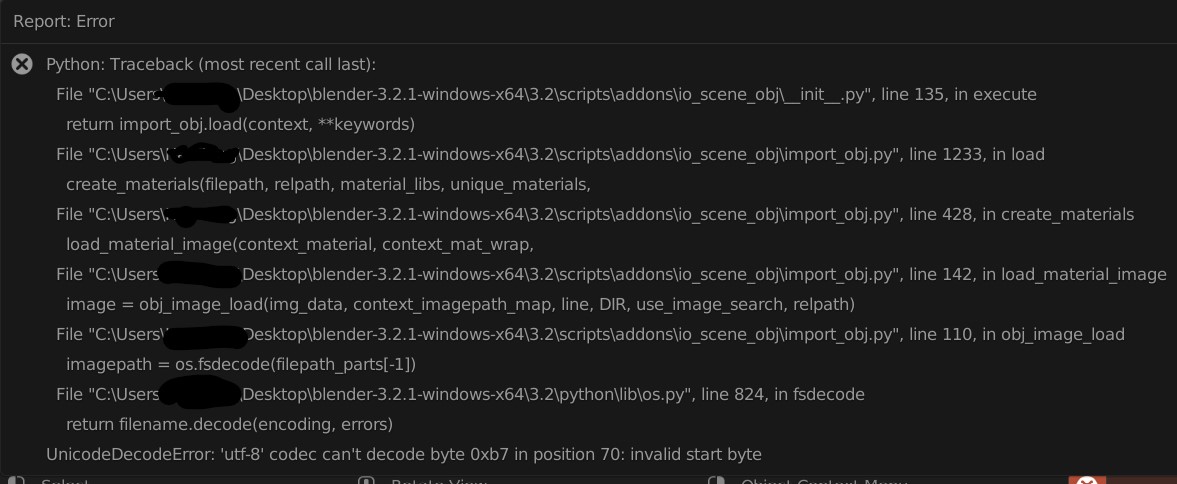
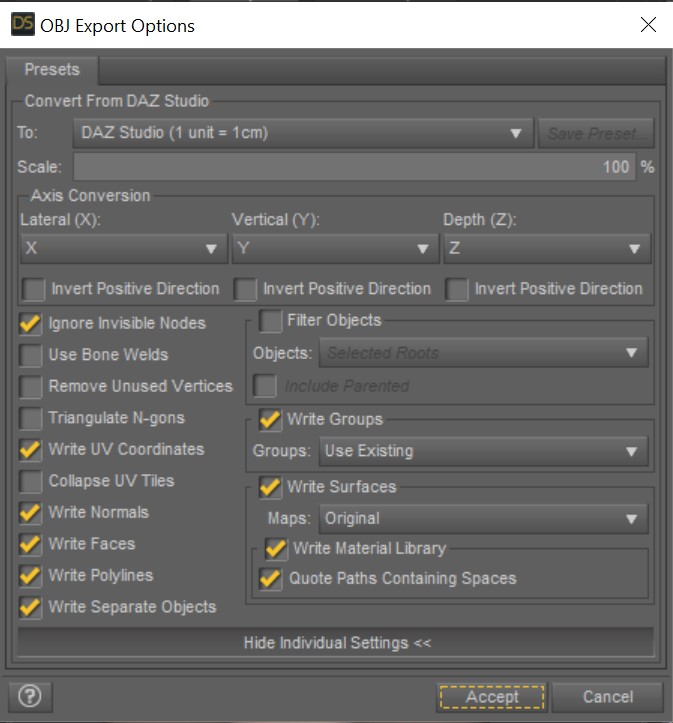
Your OBJ file loads in Blender 3.2.0 for me with no error, though the system console does report that the MTL file can't be found. Looking at your traceback, the issue is with loading an image file and it seems the filename isn't UTF-8 compatible. Perhaps it is an image referred to in the MTL file, in which case without that and the image referred to we can't hope to reproduce your error.
I suggest you make sure the images referred to in the MTL file have names that only use UTF-8 valid characters, or better still only ASCII characters, and see if that helps.
Maya 2023 Daz Import Menu ErrorIn Maya 2023 when I click "Daz Import" on the Maya shelf I get this error. How do I fix it? Thanks
In Script Editor it says:
DazToMaya.run()
# Error: ModuleNotFoundError: file C:\Users\X9Main\Documents\maya\modules\DazToMaya\scripts\d2m.py line 31: No module named 'pymel'CARRARA CHALLENGE #63: There be Dragons..... WIPSteve K said:
WendyLuvsCatz said:
CMS Content Management service installs with DS AFAIK, or at least DIM I really don't know but Carrara uses it for duf, D|S doesn't need to be open but I do always open it first on a new install and import all the metadata to populate the smart content and that seems to help in Carrara even if I don't use smart content there.
I consider DAZ studio a useful Carrara plugin and it really doesn't take up much space.
I finally broke down and installed Daz Studio Pro 4.2. Not (yet) to get DUF files into Carrara, but just to render a product that comes in DS and Poser format. Neither Poser nor Carrara gave the great quality of renders in the product samples, e.g. the "ELITE" glass sign above the revolving door (see attached). As always, I floundered around in DS, new to me, but finally got it to do some great renders. The bad news is it took Iray to do it, about 60 to 90 minutes for a 1280x720 image. (!) Not gonna do any animations at that rate, but backgrounds for Carrara animations look promising.
Thanks Wendy et al.
As a Carrara plugin it does have it's uses !!!
OFFICIAL DazToCinema4D Bridge 2022 (SEPTEMBER UPDATE): What's New and How To Use ItAbsolutely thrilled that work on the Bridge is back! I've given it a quick try with a few figures, some old and some new, and here's my results:
Cinema 4D R23 / D|S 4.20 Pro
'Hydra' ( https://www.daz3d.com/hydra )
-Imported badly deformed. Needed to reset the figure in D|S before export to solve.
-Morphs were selected for Export, but no Morph Tag was present in Cinema 4D
'MGM' ( https://www.daz3d.com/mean-green-mutha )
-A dialogue saying "Import Failed" pops up. (Plugin suggests checking the console. Console only says "Import Failed" after trying to load the FBX from the temporary folder.)
-Only the plant's Body imports. The 'Maw', 'Petals', and 'Tendrils' do not.
-No morphs are imported.
Morphing Python
-Morphs import correctly!
-Half of the 'Jaw' joint's weighting is applied to the head. This is not the case inside D|S
Dinoraul's Brachiosaurus
-No morphs import
-Wieghting on the neck-spikes bleeds over into other joints (Older versions of the Bridge did this too, but much worse)
Dragon 3.0 with Chain Saddle
-Plugin says "Import Failed" when loading
-Some morphs do not function (In the batch that I tested with, only Dragon__PHMHornsRidgedHD 1, 2, and 3 did not work)
-All Joint axes are aligned incorrectly and do not match their alignment in D|S (All joints orient with Y perfectly up)
-Chain Saddle imports/merges just fine(1)(1) I noticed that the Chain Saddle copies the Dragon 3's rigging information instead of using a separate joint hierarchy like I've experienced in the past with other figures. Interesting to know and saves a lot of time messing with Constraint Tags!)
I haven't gotten around to testing with human figures - legacy (Michael 3, Hiro 3, etc) or Genesis-eras. As for steps taken, it's just 'load figure -> Send to C4D -> Import via Genesis option'. In the case of the UD Hydra however, I needed to reset the figure in D|S first otherwise it'd import incorrectly.
Overall I'm seeing some wonderful improvements, huge thanks to everyone working on this!
Daz to Wavefront Obj Export: Naming of ObjectsAs Richard mentions, the names are taken from the Daz scene file. For OBJ that's larely set with the surface naming. Shouldn't be an issue renaming after the export.
I'm not familiar how Blender handles that, but you are at the mercy of the import hosts implementation of OBJ for both import & export options, but Blender should be pretty robust. Remember, a single object can have dozen of surfaces. A single surface can be used on hundreds of different objects. Look into how you can seach those parameters & what they allow you to do with that info.
My question is why OBJ in this case? With Daz characters and wardrobe, you loose all of the Morphs and Weight mapping nad rigging, but maybe you need just a static, lighter weight object.
For things that aren't "organic" (vehicles, sets) where you really don't need that stuff in most cases sure, go with OBJ. Makes it much easier to set up pivots and such.
CARRARA CHALLENGE #63: There be Dragons..... WIPWendyLuvsCatz said:
CMS Content Management service installs with DS AFAIK, or at least DIM I really don't know but Carrara uses it for duf, D|S doesn't need to be open but I do always open it first on a new install and import all the metadata to populate the smart content and that seems to help in Carrara even if I don't use smart content there.
I consider DAZ studio a useful Carrara plugin and it really doesn't take up much space.
I finally broke down and installed Daz Studio Pro 4.2. Not (yet) to get DUF files into Carrara, but just to render a product that comes in DS and Poser format. Neither Poser nor Carrara gave the great quality of renders in the product samples, e.g. the "ELITE" glass sign above the revolving door (see attached). As always, I floundered around in DS, new to me, but finally got it to do some great renders. The bad news is it took Iray to do it, about 60 to 90 minutes for a 1280x720 image. (!) Not gonna do any animations at that rate, but backgrounds for Carrara animations look promising.
Thanks Wendy et al.
Transfer from one computer to another.How was the content installed? If you transferred the AppData I assume that included the actual database, does it mostly seem to work or ddi you have to reimport metadata to get anything?
RedactedJason Galterio said:
myotherworld said:
kyoto kid said:
Cybersox said:
The thing that really bugs me is that some of these are so blatantly obvious, like a g8f product being in a folder labled "Genessis 8 Female" or a character being in a folder labled "character" instead of the proper "characters". I've even got a Dragon 3 product that shows up in its own folder under "people" I can understand PAs making these kinds of mistakes, but even the most rudimentary product testing should have caught stuff like that.
...this is why some like myself have taken the time to set up our own custom library/runtime structures to create a more logical organisation of items.
This was a lot worse when we still just used the old Poser runtime structure as for example, items like shaders ended un in places like the "Poses" instead of "Materials" folder. Often times product folders used the names of the creator instead of what the item was. (this latter situation still does persist).
Yeah, there is the database and smart content, but when it breaks it is a pain to deal with, and any products without metadata will not show up (particularly freebies not from here).unless you find a way to make them to. Sometimes even products from the Daz store don't show up. and end up in the "lost & Found" requiring a refresh of the database.
With you on this.
That's why I have 425 products out of 17,000 installed.
I install what I need for whatever project I might be working on or items I want to experiment with / test.
Then when I am done, I uninstall them. After I've backed up the project so that I know what needs to be reinstalled if I want to revisit it.
This way my unmanaged, haphazard, impentrable forest of content is only a small garden with a couple of weeds.

Maybe Studio 5.0 will have something to get around this?
Is Diffeomorphic reliable enough for commercial production purpose?Padone said:
Then diffeomorphic is specific to blender and not targeted to game engines. So you may also try the daz bridge for UE and see if it works better for you.
Understand that Diffeomorphic is made specific for Blender renders not for game engines, that's why it imports with multires or subdivision modifier and not bake the HD mesh, since 3D software can't handle high poly models.
Daz bridge does very nice job exporting baked HD mesh and rebuild the materials, plus it gives a nice Daz skeleton retargeter for UE5, and those features are done automatically in just a few clicks. Would be perfect if it can merge geograft and transfer the morphs for some special types of games.
Although Daz to Unreal is very useful and dummy proof, it's most suitable for quick rendering in Unreal. For game production purpose I have to use Diffeomorphic to import textures into Blender. There're too many layers of textures need to be merged for game performance, and editing UV coordinates of surfaces / material slots that share the same texture to avoid overlapping. The rendering process in Unreal is very different from 3D modelling software though the shading calculation methods are similar, so the shaders need to be rebuilt in Unreal. It would take a few weeks for me to setup the material process, after that the character materials can be easily modified and swapped.
So... how broken is the current version of DAZ Studio?It took me days to reinstall many of my things, I got CMS connection or something like that error.
DAZ still starts with updating metadata and for 2-5 minutes program is not answering.
It really should be a major update for me to touch DAZ again.
Importing mocap into DAZ : degraded animationI'm following this workflow for months now :
Performing a mocap animation with the Rokoko smarsuit > Rokoko studios > Maya 2022 for retargeting > Daz for rendering
The raw mocap file is retargeted on a gen8.1 character in Maya (imported with the bridge), baked then saved as a FBX2014. I import that file into DAZ, save the raw animation as a pose preset then merge that animated pose with a character. It took me weeks months to find that viable routine, because rendering an animation with DAZ isn't the standard.
The animation quality/smoothness is pristine in Maya, but becomes a bit messy in DAZ. The main inconvenience are the feet severely sliding along with any hip movements. I know there is some tricks to stick the feet on the ground, but maybe is there a cleaner way, with some settings I may have missed, to keep my animation from deteriorations. I mean, those mocap animations there are perfectly retargeted: https://www.daz3d.com/scared-animation-collection-p1-michael-8
How to achieve something similar ?
How to fix this after transfer utiliy?When running transfer utility, you should use the same character you modelled towards as source for transfer utility, with Reverse Source Shape From Target checked (if not the default shape). Then the clothing shouldn't change shape.
If you select your clothing in the scene tab, then in parameters enable 'show hidden' and select currently used, then you can see some projected morphs autogenerated (if not already existing for morphed characters) to adjust your clothing to your morphed character.
For creating a morph, I would suggest you save your clothing. Then export it unmorphed into your modelling app, and then do adjustment there. You can only move verteces. For both exsport and import you must keep vertex order checked, and you can then load it with morph loader pro.
You can then dial the autogenerated morphs back, and dial your new morph in, or you can when saving the morph use the same name as the autogenerated, as it then will be used intead of the autogenerated.
I remember that Sickeyield has a video on generating morph, but couldn't find it right now. Here is a text version https://www.deviantart.com/sickleyield/journal/Tutorial-Requested-Loading-Morphs-in-DAZ-Studio-450007378
Need help reinstalling Daz to Blenderacatmaster said:
It needs to manually clean the old version of Daz to Blender bridge and then install the new version, but the old Daz to Blender plugin installs scripts accross different locations so it's not easy to uninstall. Try the Diffeomorphic plugin instead it has more features to import Daz characters to Blender.
The general information of where the files are installed would be nice. If I had an idea of what folders or files are installed where then I could work from there to clean the junk out of my computer. I don't want to leave files that don't work sitting on my mechine if I'm not going to be using it.
Are there any "smart" ways of making an asymmetric imported G8F model symmetric in Blender?"Also please don't change the mesh since I need to import it back to Daz."
There is no quick or 'smart' button way that I know of, but utilizing an advanced work-flow will allow you to symmetrize the mesh to send back to DS as a morph target.
Symmetry fixed :
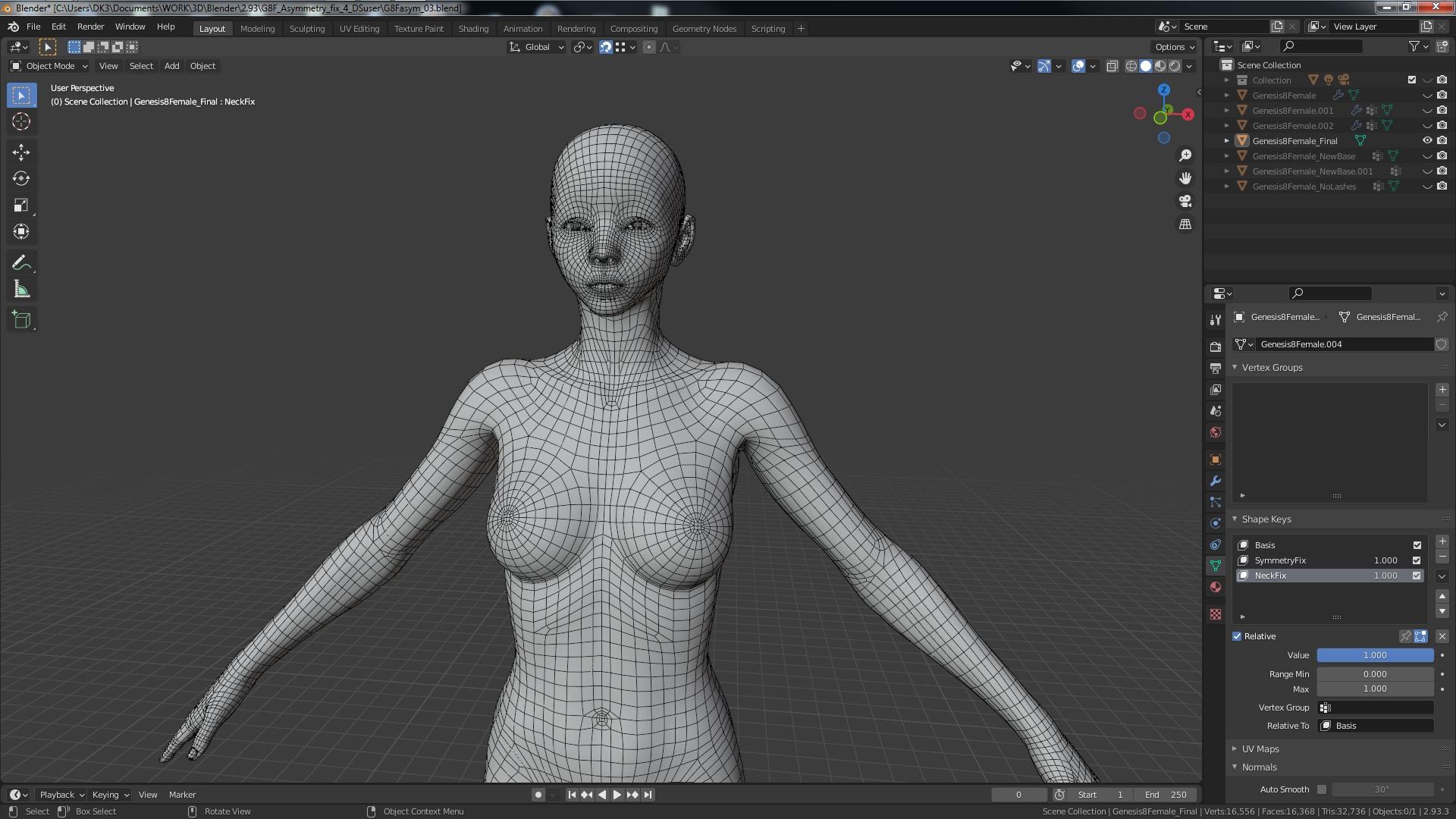
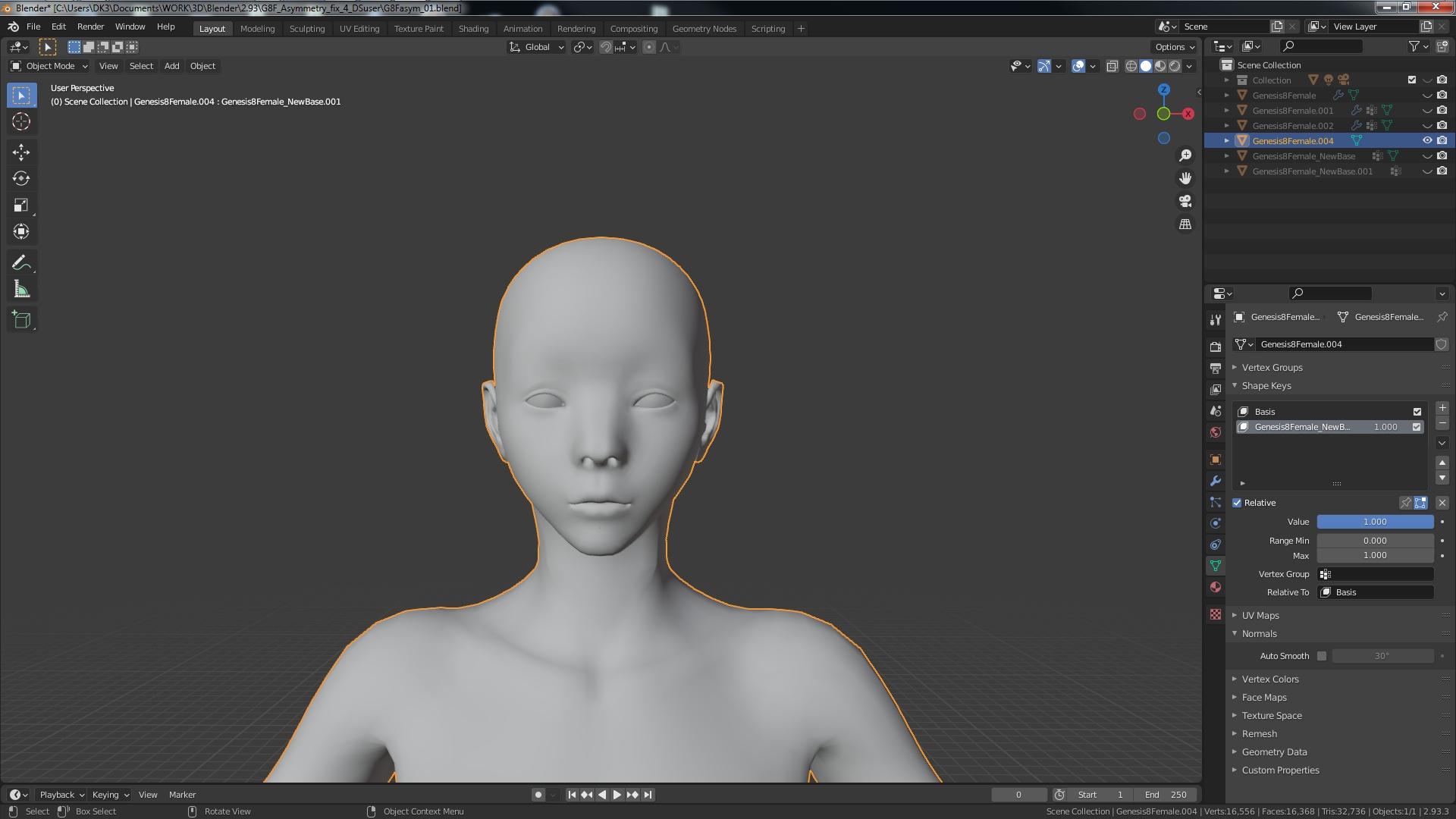
* Let me know if you would like a write up of what you need to achieve this...
And Richard, it is not a professional (purchased) mesh. It looks like his attempt at creating a morph target that got away from him on the default G8F that everyone already has available with DS.
Don't worry, I deleted the file.
* EDIT : Nevermind -- Editing the post fixed the images not opening up in a new window as set...
Jessa HD for Genesis 8 and 8.1 Female Breaks Smart Content, How to Fix?Reimporting the metadata for Genesis 8 starter essentials would probably also have worked. I've looked through the metadata file in Runtime/Support, and I think I've spotted the problem:
<ObjectCompatibilities><br /> <ObjectCompatibility VALUE="/data/Daz%203D/Genesis%208/Female%208_1/Genesis8_1Female.dsf#Genesis8_1Female" REF="/Jessa HD for Genesis 8 and 8.1 Female/Jessa HD 8.1"/><br /> <ObjectCompatibility VALUE="/data/DAZ%203D/Genesis%208/Female/Genesis8Female.dsf#Genesis8Female" REF="/Jessa HD for Genesis 8 and 8.1 Female/Jessa HD 8.0"/>If I'm reading this correctly, these lines change the metadata for the base figures.
(Edit: don't know what went wrong copying the code. It looks right in the post box, but not after submitting. It's right near the end of the file.)
Daz 3D is part of

Connect
DAZ Productions, Inc.
7533 S Center View Ct #4664
West Jordan, UT 84084Licensing Agreement | Terms of Service | Privacy Policy | EULA
© 2026 Daz Productions Inc. All Rights Reserved.