-
I have an object I cannot map an UV image onto
If it was an FBX format file on sales, it should be UV mapped otherwise those who buy it would have no way to use it directly ~~
So, how did you import FBX into DS ? or what was the software with which the model was made (described on the product's webpage...) ?
New User Challenge Ideas ThreadHello!
In January, I thought of participating for the second time - and when didn't because I had too less time. Very banal reasons with which the challanges themself have nothing to do. Anyway.
There are two problems I see: DS depends on assets. There is no alternative if you want to create something. If you're starting out with 3D and DS is your first contact, it takes time to collect stuff, or you just need money to buy it.
So maybe it would be interesting to do a kitbash challenge with items from different origins and formats – how to import, scale, texture. AI is relevant for people who want *some outcome*. For process-oriented craftsmen, AI will never be an alternative. And I doubt that there are many people interested in AI "art" if it is clear that it is AI-generated. Or do any of you remember the last big world chess championship of supercomputers? Who play so much better than humans, faster and more intelligent?Second: The step-by-step challenges – starting with composition and later with more specialised DS functions – are a good idea when all new users start in January. But they don't. Opening up the challenges to themes instead of special features could be great. "Could" because there are many 3D challenges that have nothing more than themes. Does the world really need another one?
PLEASE Make A Modern Day Power Wheelchair!I am severely disabled and make comics, and I am unable to make anythig about a character like myself because you only have hospital wheelchairs, ultralight manual wheelchairs, and a sci-fi tank wheelchair. It is so incredibly deflating to never be able to see yourself in your own art because nobody has bothered to make the prop you need. There are one or two non-DAZ power wheelchairs, but they don't import well, have no color or style choices accessible in DS, and therefore are incredibly difficult to work with.
In fact, DAZ is pretty lacking in disability content in general. We exist. I spend money regularly with you. I'm open to consulting and sharing disabled models/actors I've made, and so on. Feel free to reach out.
Ice Dragon Art A Glimpse Into My WorldWell I think I finally have everything the way it should be. I did get 4.24 working again, the alpha is working and so is 4.10. I do want to comment on some things. Because I have a 5060 rtx card, I can only render with the cpu for 4.24 and 4.10. Can't use most of the scripts or plug ins in the Alpha. Again, no big deal, do it in 4.24 and move it over. Well.... its not quite so simple. The alpha is not recognizing the files for the skin builder when saved with a character in a scene subset. Also not a big deal but you do have to import your scene, then go to the materials folder where those skins are stored and re apply. Again, no big deal unless you don't know. So, now you know lol.
Also, none of the converted characters (G2f and g3f to G8F) will transfer to the Alpha. For me, this is not a big deal, my CPU will render most anything so I can render it in 4.24 it just takes a little bit longer, but it can definitely be a problem if you have a machine that struggles in CPU.
Please HelpI am currently trying to figure out how to package a model I created but when I import, most of the materials are not correct. I have white eye lids, white eyes (Think I learned how to fix this) but I have no clue where to start. Some have said to adjust opacity cutout but there are so many tabs, I'm unsure of what to adjust next. Is there a YT video on how to get past this issue? Pointers/tips or instructions would be helpful. Willing to Venmo for the help if it gets me somewhere.
How Do I Fix The Discrepancy Between G8 Skin and G8.1 SkinElor said:
The cloud they are speaking about is something active inside Daz Studio, it's not related to iCloud or any other clouds solution you may use: I do have iCloud active on my Mac (with a paid plan on top of that) but I don't have your problem.
Here's how the default ressources look in Smart Content on my Mac:
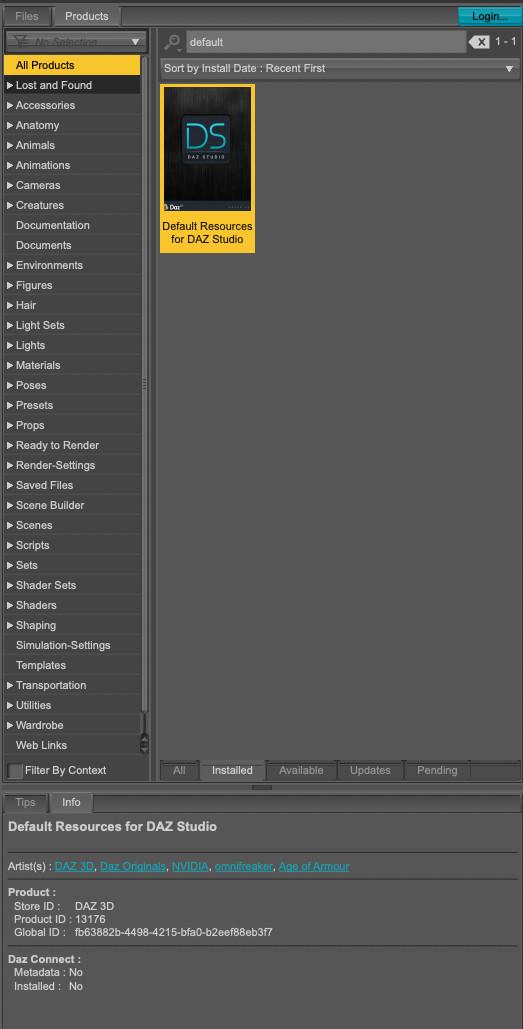
Notice Daz Connect at the bottom of the pictures, with No for both lines. If you can share a screenshot of the same information on your computer, it will likely provide useful information to people who know how to deal with Connect. I never use Connect, not even to try to get the various products I could access with a Premier membership.
Here is the equivelant screen shot from my computer. There are three differences. The icon for the Deault Resources is different. The Artist(s) are different. and at the bottom the Daz Connect Metadata says NO, but the Installed says YES. So it looks like I have the wrong package of Default Resources installed, and DAZ Connect says YES to Installed.
Ai animate ?1. "I'm asking if we can already create figures using AI."
yes you can create them in 2d and work with them in an AI tool or you just use the AI picture of a char in some daz plugins to create morphs for
genesis figurs.
2. "Imagine if you asked AI in animation to (let character one go to character 2 :D it would do it :D"
yes this is possible! Make your render with two characters in daz, then import the render in an AI animation tool and write your prompt.
the character will do whatever you want them to do and it will still look like your daz render.
You never spoke about a Daz integration!
There is no need for an integration into daz.
If Daz will have such a tool it will cost the same money like the external tools and it will do the same job.
With external tools you can choose the one which fits the best your needs.
If you want "some help" from AI for your character creation and animation like you've written in your question it would be a good start to learn a little
bit about what AI is capable of currently, what the differences are and what the prices will be. There are enough video tutorials on youtube
about this topic.
Problem importing expressions after merging model the genesis 9 in blenderPadone said:
To merge geografts there's the option in easy import, or the command in setup > finishing. But this only works for geografts, not for other meshes.
There's no "merge" command in the rmb menu, perhaps you mean "join" that's what you should avoid as the daz morphs may break this way.
p.s. As a second thought, in version 5 Thomas stores the original mesh data in extra structures so that the user can modify the mesh then load extra morphs there, so may be join can work, but personally I'd not risk unless necessary. Also if we finalize the meshes the extra stuctures are removed.
p.s. I never used it but I believe I found what you need. This should preserve the daz morphs and update the extra structures.
setup > mesh > merge meshes
p.s. However, keep in mind that different meshes have different uv maps and those are merged as well, which may not work fine in some cases as tiles or offsets. So in general it is best not to merge meshes.
That's right, I was referring to the “join” option. I use autocorrect when I write, and maybe it changed the word ‘join’ to “merge.”
As for what you mentioned about “UV maps,” it's true, I had a problem related to that, but luckily in Blender you can copy and paste “UV maps” to other models (although this will depend on the model's vertices).
Forgive my ignorance. Regarding the process you mentioned, I'm talking about “Settings > Mesh > Combine Meshes.” In which program is that process found, in DAZ Studio or in Blender? Where would it be located?
Problem importing expressions after merging model the genesis 9 in blenderTo merge geografts there's the option in easy import, or the command in setup > finishing. But this only works for geografts, not for other meshes.
There's no "merge" command in the rmb menu, perhaps you mean "join" that's what you should avoid as the daz morphs may break this way.
p.s. As a second thought, in version 5 Thomas stores the original mesh data in extra structures so that the user can modify the mesh then load extra morphs there, so may be join can work, but personally I'd not risk unless necessary. Also if we finalize the meshes the extra stuctures are removed.
p.s. I never used it but I believe I found what you need. This should preserve the daz morphs and update the extra structures.
setup > mesh > merge meshes
p.s. However, keep in mind that different meshes have different uv maps and those are merged as well, which may not work fine in some cases as tiles or offsets. So in general it is best not to merge meshes.
Problem importing expressions after merging model the genesis 9 in blenderPadone said:
diffeomorphic 5.1.0.2792, blender 5.0.1
Seems to work fine here. What do you mean by "merging" ? I mean merging rigs is ok and it is done by default in "easy import", while merging the geometries of course will break the daz morphs and it's not to be done. An exception is geografts where geometries are merged with a special tool preserving the morphs.
Now that you mention the Blender version and diffeomorphic, I have updated my Blender version to the latest one and everything seems to be working fine.
By merging models, I mean this
Step 1: I select all the skeletons of the models and choose the “merge rig” option from the Daz Studio panel
Step 2: After merging the skeletons, I select several models at once in Blender, right-click, and select the option called “merge.”As for what you mention at the end, “there is a special function that preserves the morphs,” what do you mean by that? Or better yet, where can I find that tool?
Sagan: A DAZ Studio to Blender Alembic ExporterPPPan said:
Well, the issue is that when I use the model in Blender now with the Soft Breasts/Buttocks addon, the model breaks in a way it didn't with v3. When I export these models to Blender and import them they look fine, but as soon as the add-on is used like I did before, the breasts turn into a broken polygon mess. Blender and these add-ons haven't been tampered with.
I don't doubt that what you are saying is true, nor that something has changed with v4. That's the nature of the beast.
My point is that without very specific info on what version of everything you are using, the precise steps you took, what you thought the results should be, and what were the actual results you got, I am unable to reproduce the problem and know how to fix it.
How Do I Fix The Discrepancy Between G8 Skin and G8.1 SkinThose products that is installed with Connect, must be uninstalled from inside Daz Studio, by right-clicking a product and select uninstall. Untill that, the database will consider it installed and try to use that.
If the Connect library is there no longer, a more radical method is to reset the database, and then reload metadata. But that will remove all changes done by yourself in the database.
Art QuestionThe first solution: doing one render with both eyebrows, then, after hidding them both, you'll only need to do a Spot Render of the area around the now hidden eyebrow, taking into account any shadow it would cast (in case you don't know: by opening the Tool Settings panel with the Spot Render tool active, you can set it to do the spot render in a new window). Then, you merge the two in Photoshop/Affinity Photo/GIMP/etc.
Biggest advantage of this technics, you don't have to modify the eyebrows, biggest drawback, it'll get old really fast to have to do the spot render.
My suggestion would be to create a conditional graft on the eyebrows: I never did it with eyebrows, but I think it should be possible because eyebrows are a figure. It should be easy to create one for the eyebrow you're planning to hide. Mada has a video on the subject, to hide sleeves on a shirt, but the principles should be the same with eyebrows.
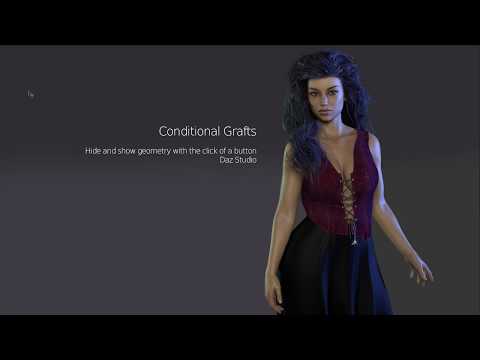
Once done, you'll only have to activate the conditional graft you created and it will remove (temporarly) all polygons from the eyebrows, allowing you to do one render.
The biggest advantage of this solution: the eyebrows stay the same outside of having a new conditional graft and it doesn't impact the files created by the artist, it doesn't change how metadata (if any) are working and it doesn't change the folder in your Content Library.
If you're planning on hidding geometry regularly, Easy Geometry Hider by Utiltarian will take care of a lot of the boring stuff, but if you are only planning of doing it once or twice, doing it manually will work the same:
https://www.daz3d.com/easy-geometry-hider
Another possible solution, advertised by Chevybabe25 in her various brows products, could be to create a version with only one eyebrow (to be fair she's adverstising removing some part of the geometry of eyebrows, not one eyebrow completly but it should work for a whole eyebrow too). I never did it either with eyebrows and it's bit more complex than creating a conditional graft so it should be a last resort solution IMO:
- activate the Geometry Editor tool with the eyebrows selected in the Scene Panel.
- select all the polygons of the eyebrow you want to remove
- hide them with a right click in the viewport > Geometry VIsibily > Hide Selected Polygons (ideally, you should get all polygons in one selection, but by hiding the ones you selected, you'll be able to see if you missed some)
- Right click in the viewport > Geometry Editing > Delete Hidden Polygons
At that point, the last step is, with the eyebrows selected, to go to 'File > Save As > Support Asset > Figure/Prop Asset…' and to save the eyebrows as a new eyebrows in your My Library folder.
Daz Studio 6 Beta - version 6.25.2026.19821! (Updated July 23, 2026)Do bear in mind that we do not yet know how plug-ins will be updated - some may well require a full new version, with or without an upgrade price, but others may not f the conversion process is not to painful. The same is true of scripts, though some PAs have said they do intend to offer free updates in at least some cases.
You can always do set-up in DS 4, with all your tools, then open the scene file in DS 2025 solely to render - the only potential issue is needing to bake Mesh Grabber modifiers down to morphs (if you are not a Premer member, Geometry Sculptor in DS 2025 will import Mesh Grabber modifiers from DS 4).
Sagan: A DAZ Studio to Blender Alembic ExporterWell, the issue is that when I use the model in Blender now with the Soft Breasts/Buttocks addon, the model breaks in a way it didn't with v3. When I export these models to Blender and import them they look fine, but as soon as the add-on is used like I did before, the breasts turn into a broken polygon mess. Blender and these add-ons haven't been tampered with.
How Do I Fix The Discrepancy Between G8 Skin and G8.1 Skin2026-01-28 12:30:02.001 Iray [INFO] - IMAGE:IO :: 1.0 IMAGE io info : Loading image "/Volumes/3D CONTENT 2TB 31 October 2014/My DAZ 3D Library/Runtime/Textures/Matari3D/Thomas for M81/M3DThomasEyesolor05.jpg", no selector, pixel type "Rgb", 2048x2048x1 pixels, 1 miplevel.
2026-01-28 12:30:02.042 Iray [INFO] - IMAGE:IO :: 1.0 IMAGE io info : Loading image "/Volumes/3D CONTENT 2TB 31 October 2014/My DAZ 3D Library/Runtime/Textures/Matari3D/Thomas for M81/Character/M3DThomasHead.jpg", no selector, pixel type "Rgb", 4096x4096x1 pixels, 1 miplevel.
2026-01-28 12:30:02.057 Iray [INFO] - IMAGE:IO :: 1.0 IMAGE io info : Loading image "/Volumes/3D CONTENT 2TB 31 October 2014/My DAZ 3D Library/Runtime/Textures/Matari3D/Thomas for M81/Character/M3DThomasHeadNormal.jpg", no selector, pixel type "Rgb", 4096x4096x1 pixels, 1 miplevel.
2026-01-28 12:30:02.090 Iray [INFO] - IMAGE:IO :: 1.0 IMAGE io info : Loading image "/Volumes/3D CONTENT 2TB 31 October 2014/My DAZ 3D Library/Runtime/Textures/Matari3D/Thomas for M81/Character/M3DThomasHeadBump.jpg", no selector, pixel type "Rgb", 4096x4096x1 pixels, 1 miplevel.
2026-01-28 12:30:02.162 Iray [INFO] - IMAGE:IO :: 1.0 IMAGE io info : Loading image "/Volumes/3D CONTENT 2TB 31 October 2014/My DAZ 3D Library/Runtime/Textures/Matari3D/Thomas for M81/Character/ThomasEyeLashes (2).jpg", no selector, pixel type "Rgb", 2048x2048x1 pixels, 1 miplevel.
2026-01-28 12:30:02.188 Iray [INFO] - IMAGE:IO :: 1.0 IMAGE io info : Loading image "/Volumes/3D CONTENT 2TB 31 October 2014/My DAZ 3D Library/Runtime/Textures/Matari3D/Thomas for M81/Character/ThomasEyeLashes (1).jpg", no selector, pixel type "Rgb", 2048x2048x1 pixels, 1 miplevel.
2026-01-28 12:30:02.193 Iray [INFO] - IMAGE:IO :: 1.0 IMAGE io info : Loading image "/Volumes/3D CONTENT 2TB 31 October 2014/My DAZ 3D Library/Runtime/Textures/Matari3D/Thomas for M81/Character/YhomasTear.jpg", no selector, pixel type "Rgb", 1024x1024x1 pixels, 1 miplevel.
2026-01-28 12:30:02.300 Iray [INFO] - IMAGE:IO :: 1.0 IMAGE io info : Loading image "/Applications/DAZ 3D/DAZStudio4 64-bit/shaders/iray/resources/DTHDR-RuinsB-500.hdr", no selector, pixel type "Rgb_fp", 512x256x1 pixels, 1 miplevel.
2026-01-28 12:30:02.303 Iray [INFO] - TRAV:DATABASE :: 1.0 TRAV db progr: Traversing scene.
2026-01-28 12:30:03.950 Iray [INFO] - TRAV:DATABASE :: 1.0 TRAV db info : Traversing scene took 1.647 s.
2026-01-28 12:30:04.177 Iray (Scene Traversal) : Initializing update
2026-01-28 12:30:04.177 Iray (Scene Traversal) : Retrieving journal and checking for changes
2026-01-28 12:30:04.177 Iray (Scene Update) : Updating LPE labels
2026-01-28 12:30:04.177 Iray (Scene Update) : Updating geometry contexts
2026-01-28 12:30:04.177 Iray [INFO] - IRAY:RENDER :: 1.0 IRAY rend info : Updating geometry contexts.
2026-01-28 12:30:04.177 Iray (Scene Update) : Updating geometry
2026-01-28 12:30:04.177 Iray [INFO] - IRAY:RENDER :: 1.0 IRAY rend info : Updating geometry.
2026-01-28 12:30:04.177 Iray [INFO] - IRAY:RENDER :: 1.0 IRAY rend info : Importing scene graph.
2026-01-28 12:30:04.487 Iray [INFO] - IRAY:RENDER :: 1.0 IRAY rend info : Auto instancing compression 1.0x (Full instancing compression 1.0x)
2026-01-28 12:30:04.487 Iray (Scene Update) : Retrieving geometry
2026-01-28 12:30:04.487 Iray [INFO] - IRAY:RENDER :: 1.0 IRAY rend info : Importing geometry for motion time 0
2026-01-28 12:30:05.199 Iray [INFO] - IRAY:RENDER :: 1.0 IRAY rend info : Geometry import (1 triangle object with 11 M triangles, 1 instance yielding 11 M triangles) took 711.661 ms
2026-01-28 12:30:05.199 Iray (Scene Update) : Updating motion transform data
2026-01-28 12:30:05.199 Iray [INFO] - IRAY:RENDER :: 1.0 IRAY rend info : Updating motion transforms.
2026-01-28 12:30:05.199 Iray (Scene Update) : Updating section objects
2026-01-28 12:30:05.199 Iray [INFO] - IRAY:RENDER :: 1.0 IRAY rend info : Updating section objects.
2026-01-28 12:30:05.199 Iray (Scene Update) : Updating materials
2026-01-28 12:30:05.199 Iray [INFO] - IRAY:RENDER :: 1.0 IRAY rend info : Updating materials.
2026-01-28 12:30:05.310 Iray [INFO] - MATCNV:RENDER :: 1.0 MATCNV rend info : found 188 textures, 0 lambdas (0 unique)
2026-01-28 12:30:05.310 Iray (Scene Update) : Updating environment
2026-01-28 12:30:05.310 Iray [INFO] - IRAY:RENDER :: 1.0 IRAY rend info : Updating environment.
2026-01-28 12:30:05.326 Iray (Scene Update) : Updating code
2026-01-28 12:30:05.326 Iray [INFO] - IRAY:RENDER :: 1.0 IRAY rend info : Updating compiled material code.
2026-01-28 12:30:05.326 Iray [INFO] - IRAY:RENDER :: 1.0 IRAY rend info : Updating compiled environment code.
2026-01-28 12:30:05.326 Iray (Scene Update) : Updating textures
2026-01-28 12:30:05.326 Iray [INFO] - IRAY:RENDER :: 1.0 IRAY rend info : Updating material textures.
2026-01-28 12:30:05.330 Iray [INFO] - IRAY:RENDER :: 1.0 IRAY rend info : Updating environment textures.
2026-01-28 12:30:05.330 Iray [INFO] - IRAY:RENDER :: 1.0 IRAY rend info : Updating BSDFs.
2026-01-28 12:30:05.330 Iray (Scene Update) : Updating volumes
2026-01-28 12:30:05.330 Iray [INFO] - IRAY:RENDER :: 1.0 IRAY rend info : Updating volumes.
2026-01-28 12:30:05.330 Iray (Scene Update) : Updating lens data
2026-01-28 12:30:05.330 Iray [INFO] - IRAY:RENDER :: 1.0 IRAY rend info : Updating lens.
2026-01-28 12:30:05.330 Iray (Scene Update) : Updating lights
2026-01-28 12:30:05.330 Iray [INFO] - IRAY:RENDER :: 1.0 IRAY rend info : Updating lights.
2026-01-28 12:30:05.330 Iray (Scene Update) : Updating instance topology
2026-01-28 12:30:05.330 Iray (Scene Update) : Updating flags
2026-01-28 12:30:05.330 Iray [INFO] - IRAY:RENDER :: 1.0 IRAY rend info : Updating object flags.
2026-01-28 12:30:05.331 Iray (Scene Update) : Updating backplate
2026-01-28 12:30:05.331 Iray [INFO] - IRAY:RENDER :: 1.0 IRAY rend info : Updating backplate.
2026-01-28 12:30:05.331 Iray [INFO] - IRAY:RENDER :: 1.0 IRAY rend info : Updating compiled backplate code.
2026-01-28 12:30:05.331 Iray [INFO] - IRAY:RENDER :: 1.0 IRAY rend info : Updating backplate textures.
2026-01-28 12:30:05.331 Iray (Scene Update) : Updating decals
2026-01-28 12:30:05.331 Iray [INFO] - IRAY:RENDER :: 1.0 IRAY rend info : Updating decals.
2026-01-28 12:30:05.335 Iray [INFO] - IRAY:RENDER :: 1.0 IRAY rend info : Using iray core convergence estimate.
2026-01-28 12:30:05.336 Iray [INFO] - IRAY:RENDER :: 1.0 IRAY rend info : Allocating 1-layer frame buffer
2026-01-28 12:30:05.340 Iray [INFO] - IRAY:RENDER :: 1.0 IRAY rend info : Using batch scheduling, caustic sampler disabled
2026-01-28 12:30:05.340 Iray [INFO] - IRAY:RENDER :: 1.0 IRAY rend info : Initializing local rendering.
2026-01-28 12:30:05.341 Iray [INFO] - IRAY:RENDER :: 1.0 IRAY rend info : CPU: using 16 cores for rendering
2026-01-28 12:30:05.341 Iray [INFO] - IRAY:RENDER :: 1.0 IRAY rend info : Rendering with 1 device(s):
2026-01-28 12:30:05.341 Iray [INFO] - IRAY:RENDER :: 1.0 IRAY rend info : CPU
2026-01-28 12:30:05.341 Iray [INFO] - IRAY:RENDER :: 1.0 IRAY rend info : Rendering...
2026-01-28 12:30:05.342 Iray [INFO] - IRAY:RENDER :: 1.48 IRAY rend progr: CPU: Processing scene...
2026-01-28 12:30:05.342 Iray (Scene Access) : Retrieving geometry
2026-01-28 12:30:05.342 Iray [INFO] - IRAY:RENDER :: 1.25 IRAY rend info : Initializing Embree
2026-01-28 12:30:06.693 Iray (Scene Access) : Retrieving volumes
2026-01-28 12:30:06.694 Iray (Scene Access) : Retrieving textures
2026-01-28 12:30:20.476 Iray (Scene Access) : Retrieving flags
2026-01-28 12:30:20.476 Iray (Scene Access) : Retrieving section objects
2026-01-28 12:30:20.476 Iray (Scene Access) : Retrieving lights
2026-01-28 12:30:20.476 Iray [INFO] - IRAY:RENDER :: 1.25 IRAY rend info : Importing lights for motion time 0
2026-01-28 12:30:20.476 Iray [INFO] - IRAY:RENDER :: 1.25 IRAY rend info : Initializing light hierarchy.
2026-01-28 12:30:20.477 Iray [INFO] - IRAY:RENDER :: 1.25 IRAY rend info : Light hierarchy initialization took 97.990 us
2026-01-28 12:30:20.477 Iray (Scene Access) : Retrieving materials
2026-01-28 12:30:20.481 Iray (Scene Access) : Compiling custom code
2026-01-28 12:30:20.481 Iray (Scene Access) : Retrieving environment
2026-01-28 12:30:20.485 Iray (Scene Access) : Retrieving backplate
2026-01-28 12:30:20.485 Iray (Scene Access) : Retrieving decals
2026-01-28 12:30:20.485 Iray (Scene Access) : Retrieving motion transform data
2026-01-28 12:30:20.485 Iray (Scene Access) : Retrieving lens data
2026-01-28 12:30:20.486 Iray [INFO] - IRAY:RENDER :: 1.48 IRAY rend info : CPU: Scene processed in 15.143s
2026-01-28 12:30:20.488 Iray [INFO] - IRAY:RENDER :: 1.48 IRAY rend info : CPU: Allocated 13.486 MiB for frame buffer
2026-01-28 12:30:20.684 Iray [INFO] - IRAY:RENDER :: 1.48 IRAY rend info : Allocating 1-layer frame buffer
2026-01-28 12:30:20.753 Iray [INFO] - IRAY:RENDER :: 1.0 IRAY rend info : Received update to 00001 iteration after 15.411 s.
2026-01-28 12:30:20.774 Iray (Scene Traversal) : Initializing update
2026-01-28 12:30:20.774 Iray (Scene Traversal) : Retrieving journal and checking for changes
2026-01-28 12:30:20.888 Iray [INFO] - IRAY:RENDER :: 1.0 IRAY rend info : Received update to 00002 iterations after 15.546 s.
2026-01-28 12:30:21.259 Iray [INFO] - IRAY:RENDER :: 1.0 IRAY rend info : Received update to 00004 iterations after 15.917 s.
2026-01-28 12:30:21.974 Iray [INFO] - IRAY:RENDER :: 1.0 IRAY rend info : Received update to 00008 iterations after 16.633 s.
2026-01-28 12:30:22.864 Iray [INFO] - IRAY:RENDER :: 1.0 IRAY rend info : Received update to 00013 iterations after 17.522 s.
2026-01-28 12:30:23.751 Iray [INFO] - IRAY:RENDER :: 1.0 IRAY rend info : Received update to 00018 iterations after 18.409 s.
2026-01-28 12:30:24.632 Iray [INFO] - IRAY:RENDER :: 1.0 IRAY rend info : Received update to 00023 iterations after 19.291 s.
2026-01-28 12:30:25.534 Iray [INFO] - IRAY:RENDER :: 1.0 IRAY rend info : Received update to 00028 iterations after 20.192 s.
2026-01-28 12:30:26.466 Iray [INFO] - IRAY:RENDER :: 1.0 IRAY rend progr: 6.70% of image converged
2026-01-28 12:30:26.487 Iray [INFO] - IRAY:RENDER :: 1.0 IRAY rend info : Received update to 00033 iterations after 21.145 s.
2026-01-28 12:30:26.500 Iray (Scene Traversal) : Initializing update
2026-01-28 12:30:26.501 Iray (Scene Traversal) : Retrieving journal and checking for changes
2026-01-28 12:30:27.337 Iray [INFO] - IRAY:RENDER :: 1.0 IRAY rend info : Received update to 00038 iterations after 21.995 s.
2026-01-28 12:30:28.404 Iray [INFO] - IRAY:RENDER :: 1.0 IRAY rend info : Received update to 00044 iterations after 23.063 s.
2026-01-28 12:30:29.685 Iray [INFO] - IRAY:RENDER :: 1.0 IRAY rend info : Received update to 00051 iterations after 24.343 s.
2026-01-28 12:30:31.146 Iray [INFO] - IRAY:RENDER :: 1.0 IRAY rend info : Received update to 00059 iterations after 25.805 s.
2026-01-28 12:30:32.880 Iray [INFO] - IRAY:RENDER :: 1.0 IRAY rend progr: 16.15% of image converged
2026-01-28 12:30:32.894 Iray [INFO] - IRAY:RENDER :: 1.0 IRAY rend info : Received update to 00068 iterations after 27.552 s.
2026-01-28 12:30:33.013 Iray (Scene Traversal) : Initializing update
2026-01-28 12:30:33.013 Iray (Scene Traversal) : Retrieving journal and checking for changes
2026-01-28 12:30:34.923 Iray [INFO] - IRAY:RENDER :: 1.0 IRAY rend info : Received update to 00078 iterations after 29.581 s.
2026-01-28 12:30:37.125 Iray [INFO] - IRAY:RENDER :: 1.0 IRAY rend info : Received update to 00088 iterations after 31.784 s.
2026-01-28 12:30:39.381 Iray [INFO] - IRAY:RENDER :: 1.0 IRAY rend progr: 31.03% of image converged
2026-01-28 12:30:39.397 Iray [INFO] - IRAY:RENDER :: 1.0 IRAY rend info : Received update to 00099 iterations after 34.055 s.
2026-01-28 12:30:39.416 Iray (Scene Traversal) : Initializing update
2026-01-28 12:30:39.417 Iray (Scene Traversal) : Retrieving journal and checking for changes
2026-01-28 12:30:42.203 Iray [INFO] - IRAY:RENDER :: 1.0 IRAY rend info : Received update to 00112 iterations after 36.861 s.
2026-01-28 12:30:44.849 Iray [INFO] - IRAY:RENDER :: 1.0 IRAY rend info : Received update to 00124 iterations after 39.508 s.
2026-01-28 12:30:44.868 Iray (Scene Traversal) : Initializing update
2026-01-28 12:30:44.868 Iray (Scene Traversal) : Retrieving journal and checking for changes
2026-01-28 12:30:47.907 Iray [INFO] - IRAY:RENDER :: 1.0 IRAY rend progr: 57.07% of image converged
2026-01-28 12:30:47.907 Iray [INFO] - IRAY:RENDER :: 1.0 IRAY rend info : Received update to 00138 iterations after 42.566 s.
2026-01-28 12:30:51.986 Iray [INFO] - IRAY:RENDER :: 1.0 IRAY rend info : Received update to 00153 iterations after 46.645 s.
2026-01-28 12:30:52.007 Iray (Scene Traversal) : Initializing update
2026-01-28 12:30:52.007 Iray (Scene Traversal) : Retrieving journal and checking for changes
2026-01-28 12:30:54.223 Iray [INFO] - IRAY:RENDER :: 1.0 IRAY rend info : Received update to 00162 iterations after 48.882 s.
2026-01-28 12:30:57.090 Iray [INFO] - IRAY:RENDER :: 1.0 IRAY rend progr: 72.22% of image converged
2026-01-28 12:30:57.116 Iray [INFO] - IRAY:RENDER :: 1.0 IRAY rend info : Received update to 00173 iterations after 51.775 s.
2026-01-28 12:30:57.137 Iray (Scene Traversal) : Initializing update
2026-01-28 12:30:57.138 Iray (Scene Traversal) : Retrieving journal and checking for changes
2026-01-28 12:30:59.623 Iray [INFO] - IRAY:RENDER :: 1.0 IRAY rend info : Received update to 00184 iterations after 54.282 s.
2026-01-28 12:31:01.366 Iray [INFO] - IRAY:RENDER :: 1.0 IRAY rend info : Received update to 00192 iterations after 56.025 s.
2026-01-28 12:31:03.336 Iray [INFO] - IRAY:RENDER :: 1.0 IRAY rend info : Received update to 00201 iterations after 57.994 s.
2026-01-28 12:31:03.358 Iray (Scene Traversal) : Initializing update
2026-01-28 12:31:03.358 Iray (Scene Traversal) : Retrieving journal and checking for changes
2026-01-28 12:31:05.408 Iray [INFO] - IRAY:RENDER :: 1.0 IRAY rend progr: 82.34% of image converged
2026-01-28 12:31:05.408 Iray [INFO] - IRAY:RENDER :: 1.0 IRAY rend info : Received update to 00211 iterations after 01:00.066.
2026-01-28 12:31:07.692 Iray [INFO] - IRAY:RENDER :: 1.0 IRAY rend info : Received update to 00222 iterations after 01:02.350.
2026-01-28 12:31:09.202 Iray [INFO] - IRAY:RENDER :: 1.0 IRAY rend info : Received update to 00229 iterations after 01:03.860.
2026-01-28 12:31:09.222 Iray (Scene Traversal) : Initializing update
2026-01-28 12:31:09.224 Iray (Scene Traversal) : Retrieving journal and checking for changes
2026-01-28 12:31:10.793 Iray [INFO] - IRAY:RENDER :: 1.0 IRAY rend info : Received update to 00236 iterations after 01:05.451.
2026-01-28 12:31:12.390 Iray [INFO] - IRAY:RENDER :: 1.0 IRAY rend progr: 88.08% of image converged
2026-01-28 12:31:12.390 Iray [INFO] - IRAY:RENDER :: 1.0 IRAY rend info : Received update to 00243 iterations after 01:07.048.
2026-01-28 12:31:14.036 Iray [INFO] - IRAY:RENDER :: 1.0 IRAY rend info : Received update to 00250 iterations after 01:08.694.
2026-01-28 12:31:15.219 Iray [INFO] - IRAY:RENDER :: 1.0 IRAY rend info : Received update to 00255 iterations after 01:09.877.
2026-01-28 12:31:15.249 Iray (Scene Traversal) : Initializing update
2026-01-28 12:31:15.249 Iray (Scene Traversal) : Retrieving journal and checking for changes
2026-01-28 12:31:16.325 Iray [INFO] - IRAY:RENDER :: 1.0 IRAY rend info : Received update to 00260 iterations after 01:10.983.
2026-01-28 12:31:17.460 Iray [INFO] - IRAY:RENDER :: 1.0 IRAY rend info : Received update to 00265 iterations after 01:12.118.
2026-01-28 12:31:18.682 Iray [INFO] - IRAY:RENDER :: 1.0 IRAY rend info : Received update to 00270 iterations after 01:13.340.
2026-01-28 12:31:19.795 Iray [INFO] - IRAY:RENDER :: 1.0 IRAY rend progr: 90.57% of image converged
2026-01-28 12:31:19.795 Iray [INFO] - IRAY:RENDER :: 1.0 IRAY rend info : Received update to 00275 iterations after 01:14.454.
2026-01-28 12:31:21.068 Iray [INFO] - IRAY:RENDER :: 1.0 IRAY rend info : Received update to 00281 iterations after 01:15.726.
2026-01-28 12:31:21.092 Iray (Scene Traversal) : Initializing update
2026-01-28 12:31:21.092 Iray (Scene Traversal) : Retrieving journal and checking for changes
2026-01-28 12:31:22.095 Iray [INFO] - IRAY:RENDER :: 1.0 IRAY rend info : Received update to 00286 iterations after 01:16.753.
2026-01-28 12:31:23.149 Iray [INFO] - IRAY:RENDER :: 1.0 IRAY rend info : Received update to 00291 iterations after 01:17.807.
2026-01-28 12:31:24.173 Iray [INFO] - IRAY:RENDER :: 1.0 IRAY rend info : Received update to 00296 iterations after 01:18.831.
2026-01-28 12:31:25.260 Iray [INFO] - IRAY:RENDER :: 1.0 IRAY rend info : Received update to 00301 iterations after 01:19.918.
2026-01-28 12:31:26.384 Iray [INFO] - IRAY:RENDER :: 1.0 IRAY rend progr: 91.88% of image converged
2026-01-28 12:31:26.391 Iray [INFO] - IRAY:RENDER :: 1.0 IRAY rend info : Received update to 00306 iterations after 01:21.049.
2026-01-28 12:31:26.413 Iray (Scene Traversal) : Initializing update
2026-01-28 12:31:26.413 Iray (Scene Traversal) : Retrieving journal and checking for changes
2026-01-28 12:31:27.509 Iray [INFO] - IRAY:RENDER :: 1.0 IRAY rend info : Received update to 00311 iterations after 01:22.167.
2026-01-28 12:31:28.498 Iray [INFO] - IRAY:RENDER :: 1.0 IRAY rend info : Received update to 00315 iterations after 01:23.156.
2026-01-28 12:31:29.381 Iray [INFO] - IRAY:RENDER :: 1.0 IRAY rend info : Received update to 00319 iterations after 01:24.039.
2026-01-28 12:31:30.266 Iray [INFO] - IRAY:RENDER :: 1.0 IRAY rend info : Received update to 00323 iterations after 01:24.924.
2026-01-28 12:31:31.080 Iray [INFO] - IRAY:RENDER :: 1.0 IRAY rend info : Received update to 00327 iterations after 01:25.738.
2026-01-28 12:31:32.158 Iray [INFO] - IRAY:RENDER :: 1.0 IRAY rend info : Received update to 00332 iterations after 01:26.816.
2026-01-28 12:31:32.231 Iray (Scene Traversal) : Initializing update
2026-01-28 12:31:32.231 Iray (Scene Traversal) : Retrieving journal and checking for changes
2026-01-28 12:31:33.180 Iray [INFO] - IRAY:RENDER :: 1.0 IRAY rend progr: 93.30% of image converged
2026-01-28 12:31:33.180 Iray [INFO] - IRAY:RENDER :: 1.0 IRAY rend info : Received update to 00337 iterations after 01:27.838.
2026-01-28 12:31:34.151 Iray [INFO] - IRAY:RENDER :: 1.0 IRAY rend info : Received update to 00342 iterations after 01:28.809.
2026-01-28 12:31:34.942 Iray [INFO] - IRAY:RENDER :: 1.0 IRAY rend info : Received update to 00346 iterations after 01:29.600.
2026-01-28 12:31:35.732 Iray [INFO] - IRAY:RENDER :: 1.0 IRAY rend info : Received update to 00350 iterations after 01:30.390.
2026-01-28 12:31:36.741 Iray [INFO] - IRAY:RENDER :: 1.0 IRAY rend info : Received update to 00355 iterations after 01:31.399.
2026-01-28 12:31:37.778 Iray [INFO] - IRAY:RENDER :: 1.0 IRAY rend info : Received update to 00360 iterations after 01:32.436.
2026-01-28 12:31:37.810 Iray (Scene Traversal) : Initializing update
2026-01-28 12:31:37.810 Iray (Scene Traversal) : Retrieving journal and checking for changes
2026-01-28 12:31:38.822 Iray [INFO] - IRAY:RENDER :: 1.0 IRAY rend info : Received update to 00365 iterations after 01:33.480.
2026-01-28 12:31:39.700 Iray [INFO] - IRAY:RENDER :: 1.0 IRAY rend progr: 94.44% of image converged
2026-01-28 12:31:39.700 Iray [INFO] - IRAY:RENDER :: 1.0 IRAY rend info : Received update to 00369 iterations after 01:34.358.
2026-01-28 12:31:40.530 Iray [INFO] - IRAY:RENDER :: 1.0 IRAY rend info : Received update to 00373 iterations after 01:35.188.
2026-01-28 12:31:41.376 Iray [INFO] - IRAY:RENDER :: 1.0 IRAY rend info : Received update to 00377 iterations after 01:36.034.
2026-01-28 12:31:42.234 Iray [INFO] - IRAY:RENDER :: 1.0 IRAY rend info : Received update to 00381 iterations after 01:36.892.
2026-01-28 12:31:43.070 Iray [INFO] - IRAY:RENDER :: 1.0 IRAY rend info : Received update to 00385 iterations after 01:37.728.
2026-01-28 12:31:43.090 Iray (Scene Traversal) : Initializing update
2026-01-28 12:31:43.090 Iray (Scene Traversal) : Retrieving journal and checking for changes
2026-01-28 12:31:43.870 Iray [INFO] - IRAY:RENDER :: 1.0 IRAY rend info : Received update to 00389 iterations after 01:38.528.
2026-01-28 12:31:44.679 Iray [INFO] - IRAY:RENDER :: 1.0 IRAY rend info : Received update to 00393 iterations after 01:39.337.
2026-01-28 12:31:45.505 Iray [INFO] - IRAY:RENDER :: 1.0 IRAY rend info : Received update to 00397 iterations after 01:40.163.
2026-01-28 12:31:46.330 Iray [INFO] - IRAY:RENDER :: 1.0 IRAY rend progr: 95.01% of image converged
2026-01-28 12:31:46.330 Iray [INFO] - IRAY:RENDER :: 1.0 IRAY rend info : Received update to 00401 iterations after 01:40.988.
2026-01-28 12:31:46.343 Iray [INFO] - IRAY:RENDER :: 1.0 IRAY rend progr: Convergence threshold reached.
2026-01-28 12:31:47.368 [INFO] :: Saved image: /Users/anon/Library/Application Support/DAZ 3D/Studio4/temp/render/r.png
2026-01-28 12:31:47.369 [INFO] :: Finished rendering.
2026-01-28 12:31:47.691 [INFO] :: Total Rendering Time: 2 minutes 1.43 seconds
2026-01-28 12:31:47.702 [INFO] :: Loaded image: r.png
2026-01-28 12:31:47.726 [INFO] :: Saved image: /Users/anon/Library/Application Support/DAZ 3D/Studio4/temp/RenderAlbumTmp/Render 4.jpgFree textures for Overalls (by yomiuri)To give you an idea, here's how it looks (I'm using an icon I created, using the figures I'm using to create icons for the various yomiuri's products I created metadata for):
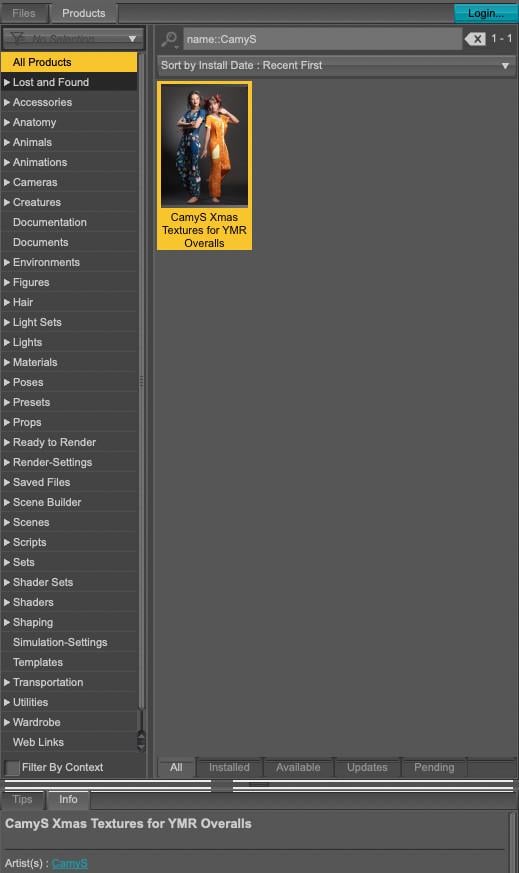
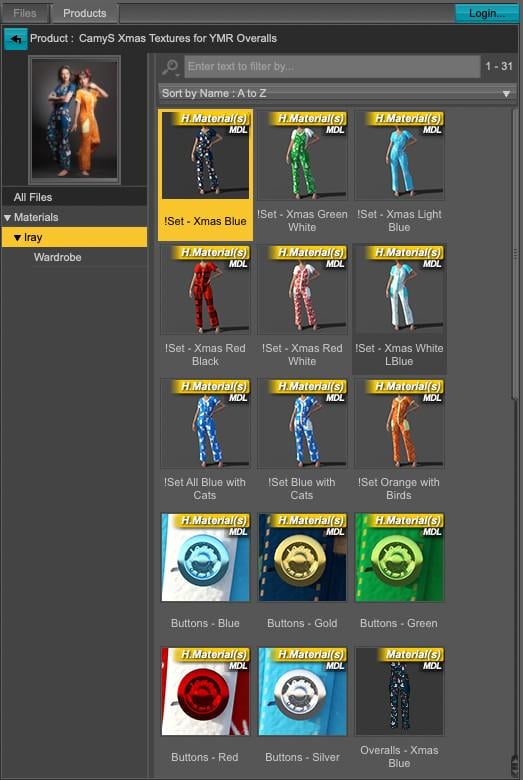
For the artist's name, visible on the first screenshot, I put CamyS but if you prefer another one, it only takes a couple of seconds to change it.
Fatal Error 4.24 With Windows Update SOLVEDHmm, this made me remember that I was working on my Windows 11 computer, after that OS update and while I was doing metadata checks and looking at products, only bringing a few hairs into the view screen for a better look, when D|S crashed twice yesterday.
Prior to that update I had no issues with the latest Nvidia update to my RTX 4090 card and what it was working on.
I had assumed those crashes were to just doing too much and stressing the computer and needing to reboot more often. Now I wonder.
Problem importing expressions after merging model the genesis 9 in blenderdiffeomorphic 5.1.0.2792, blender 5.0.1
Seems to work fine here. What do you mean by "merging" ? I mean merging rigs is ok and it is done by default in "easy import", while merging the geometries of course will break the daz morphs and it's not to be done. An exception is geografts where geometries are merged with a special tool preserving the morphs.
An Attempt of a "Limited Time Freebie" Message Only Email Alert Thread Part 2New batch of twice-per-month “Limited-Time Free” from Fab (until Feb 10 at 9:59 AM ET).
- Medieval Castle. Envrionment, interiors, props. Unity and Unreal formats.
- Stylized Log Cabin. Environment, interior, forest, shrubs, and rocks. Unreal format.
- The third item isn’t useful with Daz: LXR - Light Detection. Unreal plugin only.
With Fab freebies, you can choose a Personal or Professional license. I always switch to the Professional license (since it’s free and gives you more).
Note that these are usually in Unreal or sometimes Unity, Godot, Blender, or generic 3D formats, so will require a little work to convert for use in Daz.
There isn’t a straight conversion from Unreal to Daz. First, convert from Unreal Engine to Blender format, then export/import between Blender and Daz. This article covers some ways of doing the conversion from Unreal to Blender: “Exporting from Unreal Engine to Godot, Unity or Blender”. Then from Blender to Daz, you can use one of the various tools, such as Diffeomorphic.
Please take discussion to the discussion thread. Let’s keep this thread “Announcements Only”, as it was intended.
Daz 3D is part of

Connect
DAZ Productions, Inc.
7533 S Center View Ct #4664
West Jordan, UT 84084Licensing Agreement | Terms of Service | Privacy Policy | EULA
© 2026 Daz Productions Inc. All Rights Reserved.