-
Toyen What character is this?
To me at least looks like a mix of Victoria and Tuesday
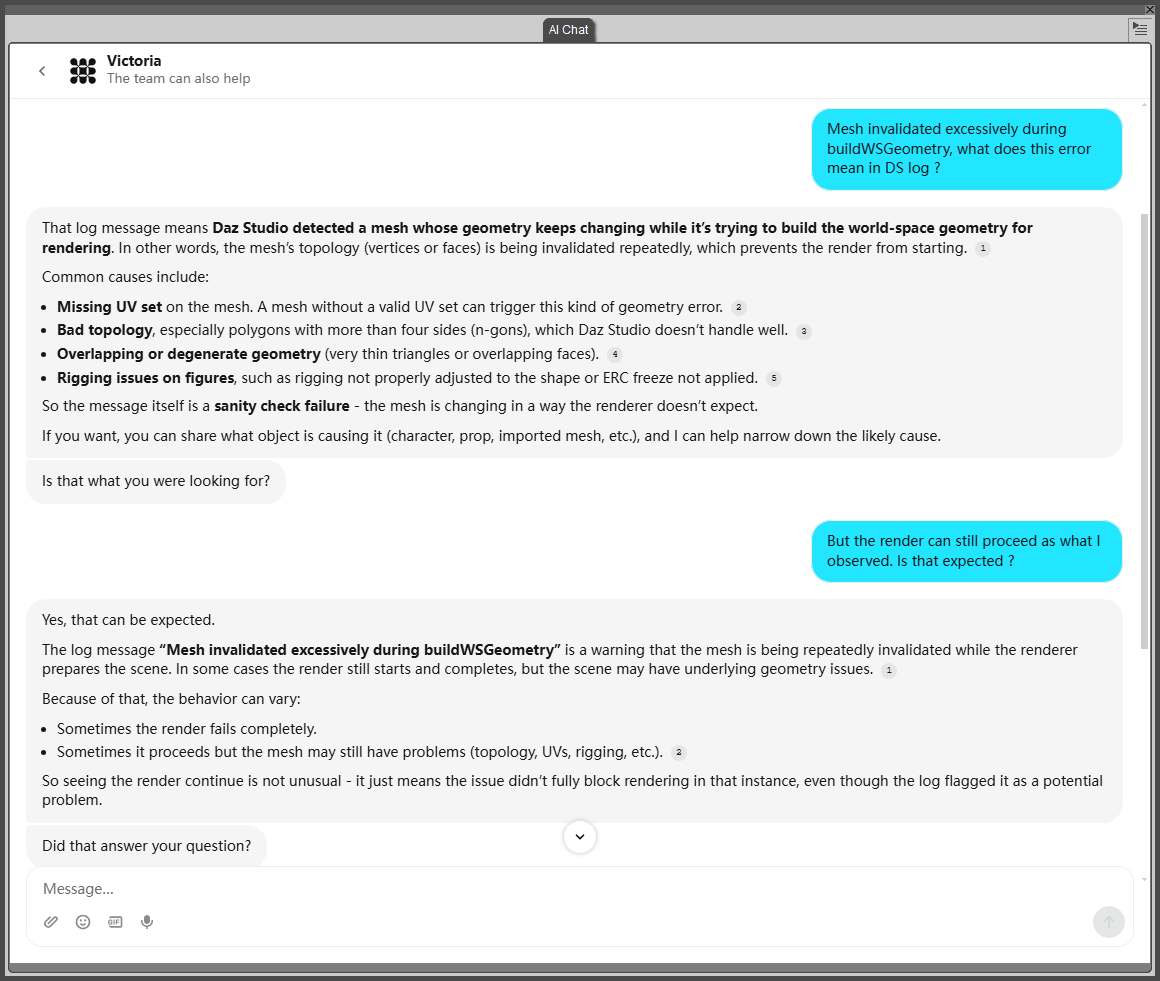
Mesh invalidated excessively during buildWSGeometryWell then, I asked Victoria, here's the message for your reference... so it seems not a big issue to me ~~
 ErgoSum Carrara Animation - 48 Second Trailer
Thanks, folks. We drew genres Comedy and/or Buddy film (can do either or a mix of both). The prop is a balloon, the line "Hot or humid, we're gonna sweat", and the character is Victor or Victoria Reynolds, a pet sitter. I always sweat the genre, we could have drawn Musical and/or Moral Dilemma, in which case I would probably have just taken the penalty for missing the genre altogether. Comedy is good, lots of room to do almost anything, and most teams do funny entries anyway, whatever genre they draw, e.g. a comedy horror video.

Diomede, give it a try, it's fun. If you do the "Cogito" promo poster, I'll share all the royalties with you.
 LIVE! In the store NOW!! LowPi - the Low Poly Figure, and Crowd Creator Scripts
I also agree that it'll be nice to mostly adopt LowPi's advantages but bringing better morphs as well as textures to LowPi could be even better.
I ever experimented wrapping a LowPi on Victoria 9 and projecting V9's diffuse + normal maps to LowPi by using Texture Atlas UV. The result seemed pretty acceptable, like the attached Ss. Small size diffuse + normal maps just consume a little bit more VRAM.
I did the process in Faceform Wrap but I believe the process can also be done in Blender by creating wrap and texture projection templates (though texture projection in Blender is not 100% perfect but should be good enough for LowPi). The templates can be reused for wrapping any Genesis characters as well as converting their texture maps ~~
Is this Victoria?I found this YouTube video with this goth girl? She reminds me of a Victoria or Genesis figure. But not sure which one. The hair seems to be rendered in DS.
Please help me find a Dforce skirt with a ruffle that starts out as a circle around waistWendyLuvsCatz said:
LOL, don't thank me yet, looking at it, its a tad more complicated than I thought, not being able to use DAZ Studio because I am rendering isn't helping
I am working on a project, as well. Please only do this if it interests you and only when you are not working on something else.
None of you guys have said that you see my point about starting a skirt at the waist in full circle to allow for pretty draping on the ground. If I am not right, please tell me.
I did it here in my work:
 This was in Poser and the outfit is .Victoria 4 - Summer Fashion | Daz 3D. This dress did really well and did NOT start around the waist.
All I know is, several dresses I have with ruffles blew up when I used them a few months ago.
dForce SU Maid Uniform for Genesis 9, 8.1, and 8 Female | Daz 3D
dForce Princess Petra's Maid Outfit for Genesis 9 | Daz 3D
dForce KuJ Cute Maid Cafe Outfit for Genesis 9 | Daz 3D
I am VERY obsessed with these clothes because my mom made them for me when I was little.
She has to be the real life Victoria 9!3DIO said:
Same here, I cannot tell whether she's the real Victoria 9, or an A.I. reworking of the Daz Victoria 9 character.
There are things about the levels of the image that suggest it could be A.I. But at the same time, there are details such as sheer on the fabric at the elbows. that make me think it could be a photo. Either way, it's a dangeous new world we live in when we can no longer tell the difference between real, and artificial human beings!
Might be a real photo with AI enhancements.
She has to be the real life Victoria 9!Same here, I cannot tell whether she's the real Victoria 9, or an A.I. reworking of the Daz Victoria 9 character.
There are things about the levels of the image that suggest it could be A.I. But at the same time, there are details such as sheer on the fabric at the elbows. that make me think it could be a photo. Either way, it's a dangeous new world we live in when we can no longer tell the difference between real, and artificial human beings!
The New Mac FAQTotte said:
Sounds like permissions on the drive was screwed up.
Looks like it. I'm already having a good time with Daz on my iMac, and thanks to the 32 GB RAM and SDD hard drive, rendering is a lot faster compared to my Windows Laptop and my previous HDD and 16 GB RAM.
Now, I have to convert my Victoria 4/Girl 4/Aiko 4 figures to DUF...Products not compatible with Daz Studio 6, zero warnings on store pages + crashes on DS4future_boy_f2de9c36c5 said:
Having issues with Aiko 4 on Daz Studio 6, as it doesn't load at all.
Victoria 4 works fine(aiko 4 is just a morph preset) it's the DSB script that's no longer supported.
You'll need to remove the DSB script, or make a sub directory containing only the CR2 to use it in studio now.
The issue here, you won't get the Powerloader screen, nor will 3delight materials be loaded.
Other file formats that have been retired are daz, dso, dsd, dsv, and ds.
This means many material presets won't work either as they are ds format files.
The only way to get around some of these problems is to load them in DS 4 and save as a scene subset(for full figures) and Material preset for materials.
Now, before anybody freaks out about needing to go back and forth between the poser and daz studio formats, you don't need to.
What i recommend is to create a "Link" directory for your poser assets, and you won't ever have to leave the daz studio format again.
This script, will create Link(DJL) files for every asset in the directroy or drive selected in content library when run. NOTE: THIS SCRIPT WON'T CREATE A LINK FOR THE DSB FILE ONLY THE CR2.
One thing to be aware of, the script will put the link files in the highest folder listed in CDM(content directory manager) by default(though you can select a different folder in the popup), and the file path will be one directory down from what's listed in CDM.
The "default" top directory in CDM is "My Daz 3D Library", and the poser format link directories will start at "Runtime".
I recommend making a new directory, adding it to CDM, and putting it at the top of the list of Daz Studio formats.
After the links are created you can move the directory to any folder you want, and keep or remove the links folder
Be aware that you should not move link(DJL) files in daz studio, as it will create copy of the original file and not a copy of the link file. If you want to move stuff around, do it in explorer.
She has to be the real life Victoria 9!A blog I visit periodically posted this photo and I almost fell over. She's so Victoria 9...
What do you think about Globalskin addon?luckydurians said:
LiliumVA said:
I use GS for a variety of reasons. While I do love a lot of the skins that DS has, they don't go far enough with realism. That said, GS is still not the most profound tool you can use to approach realism. It is still one of the best I have seen thus far in terms of giving you great results right out of the gate for Blender. It also allows you a lot of adjustments. HOWEVER, it has it's own quirks and issues that the devs need to address when it comes to seamless application on G8 and G9 models, and their lack of support for 8.1. There's also the issue of their pre-created bitmaps and makeups that are super generic. You can adjust all this though, and you can even use Daz skin in place of theirs while still retaining the pores, imperfections etc.... Or use substance painter or something else like UCpaint.
(CLICK TO OPEN TO SEE FULL VIEW)
This is Victoria 9 and 8 in Blender, no adjustments at all.

This is Victoria 9 and 8 with GS skin mostly out of the box. I reduced the specular, roughness, displacement and a few other things to my liking.

When it comes to using HDR lighting in blender with GS, it can sometimes hinder the skin's overall realistic look, but it does a better job than Daz. The body skin itself I do not find to be the best compared to Daz does some advantage in that regard.Because you're not seeing private parts, or skins for said modified parts. It's the generic nipples and barbie bottom. Which, again, you can use Daz skin with GS.
Personally, having used their Humanify (which sucked IMO), and now using GS, I am happy with it.There's also the added bonus if you use humanGen, Meta Human or CC4
Hey, do you still use global skin? I am trying to find a way to get more realistic looking skin on g9 conversions. I couldnt find any information on wether global skin is meant for g8 or g9 uvs.
Yes, I do. I use GS on both G8 and G9. GS does not work with 8.1 .
Daz Studio 6.25[.0.x], General Release!t_daw said:
Richard Haseltine said:
t_daw said:
Richard Haseltine said:
t_daw said:
Richard Haseltine said:
t_daw said:
DoctorJellybean said:
t_daw said:
Is there a way to completely remove the AI chat pane / plugin from daz?
Disable the plugin in About Installed Plugins.
Not 'disable', remove.
If it is disabled it isn't doing anything at all. You could remove the matching .dll, but any update will reinstall it.
I asked because crash log I get every few hours when Daz closes unexpectedly after I click something or select something mentions "libdsp_dzaichatpane.dylib" - And I've already disabled it, and restarted a few times (Daz and Computer)
Mentions it as a culprit or mentions it in the list of plug-ins? It gets noticed, otherwise it wouldn't show in Help>About Installed Plug-ins to be reactivated, but it isn't active (which is why you have to restart DS for an activation or deactivation to take effect).
Dropping the crash log into ai returns that file as the culprit. I'm in no position to interpret the log. That ai is disabled in Daz, and the box next to it is not checked when I go to About Plugins after restart.
I would trust AI about as far as I could throw a server rack - what does the actual crash dialogue say?
Interesting, since Daz trusted AI enough to include it in the app. I'll look for more detail.
and I have used Victoria on th wsaite (same thing) - but it can give wrong answers, or fail to address the question, and I wouldn't trust it without verification (it is a good way to search the forum, though, which is self-verifying).
Material lighting issue with Fireworks SKU 4099Iray does convert the default shader to uber before rendering, including emission, but the emission value is too low thus you can't see it.
Try this:
- Select the mesh and apply the uber shader, this will make an explicit conversion that's the same iray does.
- Pump up the luminance in the emission channel until it's good for you.
edit. However, yes, old products intended for 3DL may have some glitches with iray, though the conversion is generally quite good. The procedure above to convert to uber gives you control to eventually tweak the iray conversion. To avoid old products you should stay above Victoria 8 that's SKU 43673. But again 3DL shaders convert quite fine in general so old content is mostly usable.
My Hip! My Hip!I bought Victoria 1 and Micheal 1 on a physical CD. I ordered it from a physical catalog. I still have them somewhere.
My Hip! My Hip!My first order was Victoria 2.0. Just bought it on July, 29th 2002. At this time I still worked with Poser. I even had a store at Renderosity a few years later under the name of TFX2000.
My Hip! My Hip!Know what you mean. I joined Renderosity on 30 March 2000 after seeing an article in the 'PC Plus' magazine. How is it possible it's 26 years ago? My first purchase at DAZ was Victoria 3 Base on 15 December 2004, which I used with Poser 4. Regards, Richard.[Resolved] Geograft hiding base polygonsStan Nice said:
Thank you all for your replies.
The package I want to use is indeed a creator's package. It's the "Pig Tail" from the "Pearlette" bundle.
At first, I thought the polygons still existed (since they reappear when I remove the geograft), so I assumed there had to be a way to make them visible again. But since that doesn't seem to be the right approach, I'll go with the more painful method instead: matching the Genesis 8.1 textures to the geograft's UVs, then using a geoshell with a cutout.
If it's the Pig Tail from Pearlette, actually what you mentioned would be still a doable way which'll be much much easier than any ways of re-making textures ~~ Here's the way if you have interest.
1) Make a Cutout Opacity map as per the Pigtail's Base color map (I believe you've made one). You need PBRSkin Plus if that's the shader used on your character's skin... so has to have a Cutout Opacity slot.
2) Now let's handle AutoHide issue.
a) Alt Shift + G to switch to Geometry Editor tool. Unfit Pig Tail (Fit to None!) and Hide it in Scene pane, select your character. Select a Polygon on the back of Body surface as shown in (Screenshot 1).
b) Right-click in Viewport, Geometry Assignment > Set Auto-Hide Faces for Attachement... (Screenshot 2) Select Pig Tail in the dialogue. (Screenshot 3)
c) Fit Pig Tail to your character. Unhide it. Alt Shift + T. Assign the Opacity map to Cutout Opacity Slot of the Pig Tial in Surface pane (Screenshot 4)
d) Finetue the shader settings ~~~ Iray Preview. I used Victoria 8.1 as the example (Screenshot 5) The tail played well !Edit: For the final render, you further can re-touch the render image by using Healing Brushes in Image Editors like Affinity or GIMP... so as to further make more natural visual effect on the tail seams if you'd like...
If I understand correctly, if I want to take this further, I'll need to learn how to use a third-party application (such as ZBrush or Blender) to modify the geograft's UVs. That would allow me to directly copy and paste the Genesis 8.1 shaders onto the geograft. Is that correct?
Blender can be a better tool which is strong and free. And for this Pig Tail which has a unique UV map though, you don't have to unwrap a new UV Set. Making as geoshell can be a much better and easier way to have a good blending effect as we mentioned above ~~
You export the geo-shell to Blender, paint the texture on the areas of Body + Pigtail and bake the diffuse + opacity map. And setup the maps back in DS accordingly. You can use and learn this free add-on: ucupaint and learn tutorials from the creator on his youtube channel... well if you have more time ~~~
In the meantime, thank you all for taking the time to help me. :)
New Store and Features Discussion ThreadUnfortunately, search options still seem to run like mulch*.
For example, trying to search for "Genesis 2 F" (including the quotes in the search bar) in the shop gives me tons of Genesis 9 products and almost nothing of Genesis 2 like I'm specifically looking for., and yet, a search for "Victoria 6" gives me most everything there is that is a V6 with only a few that are not V6. Very inconsistent! I think I get better results searching in the Forums!
*--preedited so that Richard Hasteltine doesn't have to
Daz Studio 6 + Diffeomorphic 5.1 + Bforartists Blender fork 5.1.2 workssidcarton1587 said:
Valiska said:
Daz Studio version: 6.25.2026.14722
Diffeomorphic version: 5.1.0
Bforartists Blender fork version: 5.1.2
I'm on Windows 11 Professional.
I have successfully installed Diffeomorphic in Daz Studio v6. The extra file menu items installed successfully. I have exported a landscape successfully (ShaaraMuse3D Rusty Blue Rockscape).
Bforartists is a Blender fork that closely tracks Blender but alters the interface. I've just started checking it out. Diffeomorphic installation is as normal and the import worked fine.
I've been exporting my Daz library as a long-term project, but I've been doing the non-figure parts first. I haven't done more than simple test exports in earlier Daz-Diffeomorphic-Blender versions either. So I'm not commenting on the figure exports, particularly. Just noting that the export workflow is working for me, with the new Daz & Diffeo versions and the Bforartists fork.
Is there a specific workflow that you are using to export your Daz library? I've been looking for more use cases for my Script Server project and this sounds like something that is open to automation.
(I'm having trouble pasting this in where I want it. I hope it comes out formatted OK.)
First thing: I divided my libraries into about a dozen so I had some hope of finding products and the parts thereof.
- Smart Content is useless for these purposes because too many items are missing or miscategorized or uncategorized. I use the Content Library.
- PA-named folders: the organization of Daz content as installed is often markedly unhelpful, since stuff gets stuffed under the Published Artist's name instead of under a name that tells you what it's a model of.
- There is some consistency in where different kinds of items end up, but not a lot. Settings, usually the simplest kind of item to move, may be stored under Architects, Environments, Environments/Architecture, Props, Props/Architecture, or occasionally Scenes. Vehicles are likely be in Props, Figures, or Vehicles.
- The relatively recent items are still decidedly better than the old items. In recent years, texture sets and add-ons have mostly been designed for Daz libraries, which means they are right there with the item they belong to. Easy to find once you find the item itself.
- Poser era stuff is really, REALLY bad.
- The Poser library organization forces you to break a single product into multiple top-level categories. This sounds like a better idea than it really was. The pieces of products are scattered through multiple high-level directories. The subdirectories they're actually in could be named blasted near anything: the item itself, the figure they belong to, the artist who made them, the figure they belong to THEN the artist who made them then the item itself, etc.
- The texture setters might be in Poses or Materials and if they're in materials there's a good chance they don't work in Daz Studio, because for some benighted reason, in spite of the fact that it's a simple script conversion, Daz never made the later Poser material setters work. And the subdirectories they're in might, as usual, be named anything.
- PA names are used but they don't stick to a single version of the name. One PA might have three different spelling-forms of their name, and other products not in any PA folder anyway.
- Add-ons to products include both texture sets, and additions to the product itself not necessarily produced at the same time. The texture-set maker may well not be the modeller. So you get stuff like:
- Original models and supplied textures.
- New texture set for original model, the setters for which may be located practically anywhere a texture-setter could conceivably be found.
- Add-on for the models including new models.
- Texture set for the original model *and* the add-ons. May be anywhere.
- Yet another add-on with more models.
- Texture set for original model and both add-ons which also may be anywhere.
- Now here's the fun part of this: once you manage to track down the texture setters, nothing in the Daz library itself that tells you immediately what variation of the original model set and its add-ons it applies to. In fact, there is nothing to tell you, just from looking at the library with everything installed, that there even might be such a source of confusion.
- Unlike Renderosity, Daz rips down the original page for any item that's no longer sold or any PA that's no longer selling, and leaves you with a skeleton page with part of the information about what it does and what it's for missing.
- If the product page still exists the software it's useful for gets updated in a fashion that's not very accurate or very useful, being a blanket update to newer versions even when old content has a tendency to break over time.
- The chaos of bad Poser organization is at its worst for the Millennium figure eras. I have enough for/made at the time of Victoria 4 and Michael 4, and a few things for Millennium 3, to have plenty of examples.
- It starts getting better some time for Genesis 1/5, but there's still a lingering habit of putting things that belong to a particular item in another high-level directory in a Daz Studio library, as if it were Poser. Mercifully the very worst of tendency mostly dies with Generation 5, except in the case of the PA folders, which persist and ruin organization to this day.
- You export the products whose pieces you can easily find first. Then you uninstall each product as you export it. (If you still want to use it in Daz Studio, install it in another library.) So, as you remove the simpler-to-understand products, you are gradually left with fewer and fewer directories you have to understand and keep track of, in a given library, in order to find and understand the pieces of the insanely disorganized products. By the time you get down to the worst of the worst, there are only a few directories left in the whole library and only a few products they could possibly belong to.
- Enough of the products are borked, one way or the other, that I wouldn't want to attempt to export a large range of products at once. It'd probably be handy to batch some of what I describe below, but you have to take a look at the results after every set, to make sure you got exports you can use.
My general procedure for Daz to Blender exports:
- Install characters or items for characters in a Daz/Poser library for that generation, or for that kind of item. (I have Millennium 3, Millennium 4, Genesis generations, Main (Settings and general), Nature, Vehicles, Animals 1 (old animals), Animals 2 (newer animals), Hivewire, etc.
- Use Daz Install Manager if possible. Don't try to change where DIM puts anything, except make sure it ends up in the right library. Remember old stuff is mostly going to be in Poser libraries, except for some texture-setters that ended up in Daz Studio libraries.
- In the case of items that belong to multiple generations, like sets for Victoria 4 and Michael 3, install it in the library of the generation you're working on first. Then you can uninstall it and reinstall it in the other generation's library, to get the other half.
- Find an item you think you've found the pieces of.
- Load a version of it you want to save. Save it as a full Scene File.
- Save it as a Diffeomorphic *.dbz. No advice from me on options for figures yet, because I really have only done the simplest tests. I almost always export with rigging, no matter what the item is. Clothes of course need the rigging.
- Load the exported item in Blender.
- If no model appears, you can try a Diffeomorphic import into another version of Blender. Occasionally that works.
- If that doesn't work, try an FBX export from Daz Studio.
- If that doesn't work, try a Wavefront object export from Daz Studio. You will lose any rigging, but you might get the geometry and the textures.
- If that doesn't work either, you're probably not going to get that model. But you could try some of the newer formats I haven't done anything with.
- If you get a model with warnings, it's probably complaining about something you can cope with. Save it in Blender.
- Blender will show Z-fighting with models where it doesn't show in Daz Studio. You may have to nudge some surfaces or resize something very slightly to stop this.
- Find the textures in the Daz/Poser libraries and save them in a subdirectory with the Blender model. Occasionally textures don't show up, or look bad, when they look OK in Daz Studio. You want them handy if you need them. Textures are usually stored under vendor directories in Runtime/Textures. The catch is, they're not necessarily always in one subdirectory. Sometimes the vendor uses some of their own textures from another product which is not in the same directory with the main set. Sometimes some or all of the textures are provided by another PA altogether and her textures are under her name. The easiest way to find all these is to have installed the product and its add-ons with Daz Install Manager. In DIM you can right-click on the product to see the Installed files, and that will show you if you have textures to grab from multiple directories.
- DIM is also usually the easiest way to find any UV maps. Otherwise they tend to show up under the product directory, in a high-level directory called Templates then named by vendor or product or vendor/product, or sometimes in Documentation with a similar range of variations.
- Put the now-Blender models, textures, uv-maps if any, web pages, add-ons, their web-pages together in a directory. Put one of the best illos for the product at its top level. Set the directory to display the illustration instead of just the folder icon if that works in your system. (It doesn't work reliably in Windows, so I use Directory Opus instead of File Explorer. I use it for everything but it was inspired by the need to be able to tell what's in my graphics folders.)
- If the product has multiple textures, or multiple configurations, load up the next configuration, texture set, etc. Export the variation to Blender, save it if it worked well enough as above.
- For exporting clothing for most generations, you can just load the clothing and export that.
- But Genesis 1/5 and Genesis 9, the unisex base figures, are a pain because the base form of the clothing is usually conformed to the epicene base that is not usually directly useful. In this case you have to load the figure, add the clothing to the male or female version of the figure, and export clothing and figure together. (The clothing will usually revert to epicene base if you remove the male or female version of the figure before you export.) Then, in Blender, you can eliminate the figure itself before saving the clothing, if you don't want large numbers of copies of Genesis 1/5 or 9 stored with the clothing. (I suspect it would be more convenient in the future to keep the model and the clothes together, but this devours drive space, so I don't.)
- The most likely thing to be broken in Daz Studio is texture-setters. Sometimes these can be fixed in Daz without too much difficulty (it usually involves Notepad++ and the setter files). Sometimes it's just mislabelling/duplication of colors or something easy to correct. Sometimes it's worse and I figure I'll deal with it manually in Blender.
I would like to stop saving variations of the same model with different textures, as that takes up a lot of drive space and is tedious. But in the past it's been obvious that I wouldn't be likely to get much use out of the models if I always had to apply the texture variants manually, as that's time consuming. The first time I tried Blender's asset manager for anything, it was more nuisance than help and I abandoned it. I'm going to try it again to see if it'll allow me a reasonably easy way to make texture-setters in Blender. In that case, I could export only variations of products that involved altered geometry, instead of exporting for texture variants.
Daz 3D is part of

Connect
DAZ Productions, Inc.
7533 S Center View Ct #4664
West Jordan, UT 84084Licensing Agreement | Terms of Service | Privacy Policy | EULA
© 2026 Daz Productions Inc. All Rights Reserved.