-
DIM operation
Joe.Cotter said:
Thank you Richard,
Is there anyway to modify the drive letter in the DIM mainifests so that I could assign a common higher drive letter designation to a removeable drive on both systems I want to access the content on?
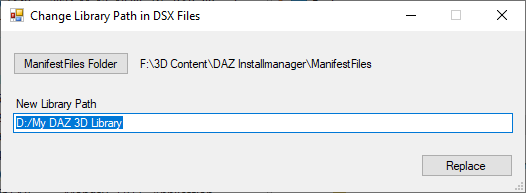
Here's a small Windows app which can do it, it works for both DIM and DAZ Central. Just select the ManifestFiles folder, edit the library path to the new one, and click Replace. All the manifest files in the folder will then be updated.
WARNING: do not use it if you are installing to multiple libraries with different paths as they all will get the selected path.
Included a file compare report showing how it modifies the files, and a virus report.
Sorry, forgot the link: https://3dcontentmanagers.com/freeware/3d-related/clpdsx/updates/clpdsx-1.000.zip
 Is something missing in "SY Mysterious Magic VDB"?
Using SYMYM.
When I load in the snowburst 02 prop, it shows up as a solid block. When I try to apply an effect to it, nothing happens. What am I doing wrong?
Log says:
2025-09-22 15:15:15.844 [INFO] :: Begin asset load (merge): /Props/SickleYield/Mysterious Magics VDB/00 Magic/SYMYM Colored Smoke 01.duf
2025-09-22 15:15:15.854 [INFO] :: Determining missing assets...
2025-09-22 15:15:15.861 [WARNING] :: \src\sdksource\cloud\dzcloudtasknotifier.cpp(203): Invalid reason for encrypted file: "F:/MAIN/Applications/Data/DAZ 3D/CENTRAL/data/cloud/1_91829/data/sickleyield2023/mystmagic/symym aura frame/symym atmosphere cube.dsf.enc"
2025-09-22 15:15:15.861 [WARNING] :: \src\sdksource\cloud\dzcloudtasknotifier.cpp(203): Invalid file header for encrypted file: "F:/MAIN/Applications/Data/DAZ 3D/CENTRAL/data/cloud/1_91829/data/sickleyield2023/mystmagic/symym aura frame/symym atmosphere cube.dsf.enc"
2025-09-22 15:15:15.861 [ERROR] :: Open Stream Error - No stream for CloudFile: F:/MAIN/Applications/Data/DAZ 3D/CENTRAL/data/cloud/1_91829/data/sickleyield2023/mystmagic/symym aura frame/symym atmosphere cube.dsf.enc
Log says: (this is apparently symptomatic of the above)
2025-09-22 14:41:16.433 [WARNING] :: \src\sdksource\fileinput\dzassetdaz.cpp(6679): Shape for material instance not found.
2025-09-22 14:41:16.433 [WARNING] :: \src\sdksource\fileinput\dzassetdaz.cpp(2323): Material not created: Snow01-1!
2025-09-22 14:41:16.433 [WARNING] :: \src\sdksource\fileinput\dzassetdaz.cpp(6679): Shape for material instance not found.
2025-09-22 14:41:16.433 [WARNING] :: \src\sdksource\fileinput\dzassetdaz.cpp(2323): Material not created: Snow03-1!
2025-09-22 14:41:16.433 [WARNING] :: \src\sdksource\fileinput\dzassetdaz.cpp(6679): Shape for material instance not found.
2025-09-22 14:41:16.433 [WARNING] :: \src\sdksource\fileinput\dzassetdaz.cpp(2323): Material not created: Snow02-1!
2025-09-22 14:41:16.433 [WARNING] :: \src\sdksource\fileinput\dzassetdaz.cpp(6679): Shape for material instance not found.
2025-09-22 14:41:16.433 [WARNING] :: \src\sdksource\fileinput\dzassetdaz.cpp(2323): Material not created: Volume!EDIT: I have restarted my system, uninstalled and reinstalled this product and still no joy.
How do I find my Genesis and pre-Genesis characters?If you're on Windows and use DIM or DAZ Central for installing your content, and use the DS Library for finding stuff, you could try this one, it's free:
https://3dcontentmanagers.com/software/pm-daz
It is designed specifically for DAZ content so you can search for a specific genesis generation, male or female content only, hairs or poses only, etc.. It's also integrated with the DS library so that with two clicks it will find all parts of any installed product, also Poser content, in the DS library.
The screenshot shows how to find genesis 1 content only.
Demo video: https://3dcontentmanagers.com/software/pm-daz/doc/SearchDemo/
'A valid CMS connection could not be established' (Solved)Thanks but that didn't help.
So was the CMS Cluster Directory present?
Here is a good set of troubleshooting steps"
To "turn on" the Content Management System (CMS) for Daz Studio, open the Smart Content tab and click the "blue button" at the bottom to start the connection. If it doesn't start, try restarting Daz Studio or reinstalling Daz Studio and the PostgreSQL CMS via Daz Central or Daz Install Manager (DIM).
Start the CMS Connection
- Open Daz Studio.
- Navigate to the Smart Content tab.
- Look for a blue button at the bottom of the Smart Content pane and click it to initiate the connection to the CMS.
Troubleshooting Steps
If the CMS does not start or connect, try these steps:
-
Restart Daz Studio:
Close and reopen Daz Studio to see if the CMS starts automatically.
-
Check the Windows Firewall:
On Windows, ensure that the CMS and its components are not blocked by the firewall.
If none of that helps, you might try reinstalling PostgreSQL CMS which you can dowbload through DIM
Announcing: Daz Deals Browser Add-on IIOver the coming days/weeks, I will be transitioning the notification emails to a new sender email address. Instead of a personal account, they will be sent from a central dazdeals email address. I will be doing the transitioning one type of email at a time to see if there are any errors with it.
What this means for you:
- The sender of the email will be different. The email itself will remain the same, it will simply come from a different sender address.
- During the transitioning period, you will get some emails from the old (extsting) address, some from the new address, until eventually all of them will be coming from the new address.
- If you have any filters or whitelists set up, you may beed to add our new address to them.-- Ati
An Airport for small planes?I tend to think of small GA airfields as being mostly grass. That could be done with UltraScenery 2 for the 256m central grassy area using a flat-ish height map, grassland with a mask to make sure the strip in the middle is the shortest grass only, and then use UltraSceneryXT for the surrounding terrain of the type you want. The problem is that 600m is considered a short grass runway - could you scale the sircraft down if the camera isn't too near them or maybe put in false perspective by tombstoning the short grass mask.
In WW2 places like Biggin Hill (UK fighter station) only had grass strips at the beginning of the war - much easier to repair if the runway was bombed and little planes like Hurricanes & Spitfires didn't chew the ground up any more than modern 4 seat Cessna's & the like in wetter weather. The heavy bombers (like the Lancaster, Halifax etc) or medium bombers like the B17 could use grass, but prefered hard runways due to reduced drag, less load on the fragile airframes and as a result a shorter takeoff run (the designed fatigue life of a Lancaster was 24 hrs of flying - the airframe was that pared back to reduce metal requirement. As it turned out, some of the calculations were quite conservative, but very little of the 'Battle of Britain Memorial Flight' Lancater is original, having been replaced multiple times for fatigue reasons). Towards the middle of the war the UK front line airfields mostly had hard surfaces, and almost all of them are still visible with Google Earth.
Regards,
Richard
Installation issue with "Pirate’s Bride Bundle" by PAMAWOHello everyone,
I recently bought the Pirate’s Bride Bundle by PAMAWO. Unfortunately, the product will not install properly.
-
Automatic installation via DIM / Daz Central doesn’t work – nothing shows up in the library.
-
Manual installation doesn’t work either – the files don’t appear or can’t be used in Daz Studio.
Has anyone else experienced this issue? Any ideas or solutions would be very welcome.
Thank you in advance!
Samara Blue
Hallo zusammen,
ich habe mir kürzlich das Pirate’s Bride Bundle von PAMAWO gekauft. Leider lässt sich das Produkt nicht korrekt installieren.
-
Die automatische Installation über DIM / Daz Central funktioniert nicht – es erscheint nichts in meiner Bibliothek.
-
Auch die manuelle Installation bringt keinen Erfolg – die Dateien tauchen nicht auf oder lassen sich in Daz Studio nicht verwenden.
Hat jemand ähnliche Erfahrungen gemacht? Oder weiß jemand eine Lösung?
Vielen Dank im Voraus!
Samara Blue
Looking for Central Station files...Central Station Iray? Where exactly did that come from?
Looking for Central Station files...Graygecko_63b06fd4c9 said:
I noticed the model "Central Station" was on sale for $1.99. I realized I purchased it long ago but never used it. I tried to open it and all I found was a set of cameras.No lights or files under "figures" as directed by the info page. I re-downloaded it in case the file got misplaced and still I only have cameras and nothing else. I tried going to the folder but while it contains parts listed as wall, floors etc, none of them are a type to open in Studio. There is a UV folder for each and dyson file. Clicking on either does not load anything. Anyone else have this issue?
There're separate installation packages (IM00005138-02_CentralStationDS.zip and IM00005138-03_CentralStationIray.zip) for Daz format as well as Iray... and the metadata has been updated in 2016.
I you have both them installed in DIM, you can find all the user-facing files in Smart Content ~~
Looking for Central Station files...Graygecko_63b06fd4c9 said:
I noticed the model "Central Station" was on sale for $1.99. I realized I purchased it long ago but never used it. I tried to open it and all I found was a set of cameras.No lights or files under "figures" as directed by the info page. I re-downloaded it in case the file got misplaced and still I only have cameras and nothing else. I tried going to the folder but while it contains parts listed as wall, floors etc, none of them are a type to open in Studio. There is a UV folder for each and dyson file. Clicking on either does not load anything. Anyone else have this issue?
Using SmartContent only shows cameras, however when navigating in content library to Environments\Architecture\Central Station\Scenes there are several scenes loading geometry:
Environments\Architecture\Central Station\Scenes\Tkt_Booth.duf
Environments\Architecture\Central Station\Scenes\!Preload.duf
Environments\Architecture\Central Station\Scenes\Back_Wall.duf
Environments\Architecture\Central Station\Scenes\Ccourse.duf
Environments\Architecture\Central Station\Scenes\Floor.duf
Environments\Architecture\Central Station\Scenes\Front_Wall.duf
Environments\Architecture\Central Station\Scenes\Roof.duf
Environments\Architecture\Central Station\Scenes\Side_Wall.dufLooking for Central Station files...@Felis is correct:
-
You can find new icons for loading this product in the following DAZ Studio Folders:
-
“Environments:Architecture:Central Station:Cameras”
-
“Environments:Architecture:Central Station:Scenes”
-
-
You can find new icons for this product in the following DAZ Studio Categories:
-
“Cameras”
-
“Props:Architecture”
-
From: http://docs.daz3d.com/doku.php/public/read_me/index/5138/start
Looking for Central Station files...This product https://www.daz3d.com/central-station
I don't have it.
According to the file list http://docs.daz3d.com/doku.php/public/read_me/index/5138/file_list
you should be able to find icons in the Environment group.
Maybe try to look in the Content Library instead of Smart Content.
Looking for Central Station files...I noticed the model "Central Station" was on sale for $1.99. I realized I purchased it long ago but never used it. I tried to open it and all I found was a set of cameras.No lights or files under "figures" as directed by the info page. I re-downloaded it in case the file got misplaced and still I only have cameras and nothing else. I tried going to the folder but while it contains parts listed as wall, floors etc, none of them are a type to open in Studio. There is a UV folder for each and dyson file. Clicking on either does not load anything. Anyone else have this issue?
For those of us easily amused...yeah, HOAs are bad. They're like adding a whole extra set or rules and restrictions on top of the existing city and county codes.. Never coul;d see the attractio to co ndow nd you are basically paying good money for what anounts ot an apartment or a portion of a "multi-plex" were you have to deal with property taxes as well as HOA fees and restrictions.
In that respect I am glad I'm a renter in a multi unit multi floor building even though I've never built any equity like a homeowner can . Then again I don't have to file property taxes every year. deal with assessments, replacing major appliances, or having to physically and financially maintain a home and the property it's on. So there are also advantages. to not being tied down.
Home prices here in Portland are also stupidly expensive unless you look t the far flung burbs (and even in some areas they can be a bit pricey). In the more central neighbourhoods of the city even a small single floor 2 BR bungalow can easily go for 400 to 500K..
Anyone Else Having DIM Issues Again?No issues here. Have you tried the add account option from that same dropdown? You may be able to enter your account email again if the extra character's in the saved account's email are recognised as different.
Otherwise, you could try switching to Daz Central: https://www.daz3d.com/blog/dazcentral-your-new-content-manager It has been depracted but still works. It's essentially a different interface into the same DIM application. Could help while you wait on support.
New Year, New Sales Thread: Report Issues Here 2 "Reporting Only"Cris Palomino said:
HoMart said:
MickyBe said:
Asha9 HD Character Bundle doesn't appear in Premier Free Character Bundle,
and trying to use the premier coupon code gives "coupon code is not valid".same here "coupon code is not valid"
Our understanding is that if it is not on the character list on the linked page in the coupon, then it's not eligible. That said, I've emailed Daz to verify it wasn't left off in error.
It can't be an error, because since Centaur 9 at the latest, it always takes until (Central European) lunchtime or even until the afternoon of the release date for the character bundles to appear in the list.
New! Novica & Forum Members Tips & Product Reviews Pt 14nonesuch00 said:
A very beautiful home & congrats to the buyers and to you the seller and enjoy you new home in St Augustine!
Thank you so much! An update for everyone-
The buyer was supposed to do a walkthrough sometime after 9am on Wednesday (today) and I was going to spend the night Tuesday night and enjoy one last evening. Well, they asked for the walkthrough to be moved to Tuesday at 5:30pm! (And that was 9am Tues morning) We went ahead and agreed as I had already taken all the movies/videos and while getting my car serviced the previous day (Monday) spent that 3 hours writing all the notes to the buyer. Made sure Pip the squirrel was mentioned, and left a bag of pecans and sunflower seeds lol. So it was hectic getting the house swept, mopped, and everything done again with the pool so it was leaf-free, but we got most of it, closed on our part, went back, and out by 6pm. Then I drove over to St Augustine, arriving at 1am their time (Eastern, 1 hour ahead of Central.) Today, my agent let us know the walk-through went fine and the buyer closed today at 3pm. We're officially SOLD!So I have two "My Library" Folders...I'm sure that I'm the only person that this has happened to, lol.
Still using Windows 10 for now. Problem happened some time around the Daz Central Connect era, which I no longer use, and made it a point to opt out as quickly as possible when I could. I am using both Alpha (I like what I see so far) and Public Beta 4.24. Both of them have content that is fetchable by DAZ, so it's holding together and I can use Daz, but....I like ot keep things simple, and would prefer a setup that Daz prefers.
Paths are:
C> Users > Public > Public Documents > My DAZ 3D Library (this is the oldest and with the most content)
C> Users > Public > Public Documents > Daz 3D > InstallManager > Applications > Data > Daz 3D > My Daz 3D Library (about a third of content, and seems to be newer)
Edit, actually I have 3 when I open up Daz itself under Content Directory Manager. I have an additional "My library" listed under Users > "my name" > Documents > Daz 3D > Studio > My Library (probabably really old, and I'm thinking very little is in there, and I have probably moved content from here to the second oldest ages ago), but there is a catch. I have some very new content in there populating from "Daz Alpha" it seems. It has grabbed some of my custom characters (morphs including files not used on the one scene I have edited and played with while testing ALPHA) and the only saved scene I've worked on while using Daz Alpha. Under DSON cache files, the location points to: C:/Users/"my name"/AppData/Roaming/DAZ 3D/dson/cache. Should it be that way or should it be using C:Users/Public/AppData/Roaming/Daz. I think this might cause more problems. Daz4.24 turns out also using this path, but all of my old "saved scenes" are not at that location, but rather in the "Users > Public > Public Documents > My DAZ 3D Library > Scenes" location. I'm cool with whatever Daz wants to do, but I'd like to know the proper way if possible.
Using DIM, I have found that under "Basic Settings," Content Database Base lists the second path "Users > Public > Public Documents > Daz 3D > InstallManager > Applications > Data > Daz 3D > Content Database. Also "Content Base Path has Users > Public > Public Documents > Daz 3D > My Daz 3D Libarary"
The odd thing is, older DIM content is still visible and accessible (I'm assuming through a mapped folder (terminology?) line within Daz Preferences perhaps. I just want the application to be happy (bless the machine spirits) and maybe It will preform better for me on the machine I'm using until I put together a new one. Also, when I do set up a new machine, I will have a better idea of how to set things up so as to keep that version of Daz happy.
Is there a world in which I can just Copy Paste, from Old to New (I'm assuming that Daz3d prefers the second path(?) without any trouble? Update Metadata required? Or will I be required to re-install DIMs? I have a fair bit of 3rd Party content as well, but those should just be a matter of copy paste AFAIK. I can keep using both, but for the sake of simplicity, I'd rather just have the one "My Library" folders. I presume, if I can pull this off, I can also remove some line in preferences where it points to the first, and older "My Library," as a suplemental "mapped folder," pardon if my jargon isn't quite right.
Am I just asking for a heap of trouble by doing this. It's a bit broken but it works, should I avoid fixing it? Thank you in advance.
HELP MY FIGURES ARE BLOCKS AND I HAVE ALL THE GENESIS STUFFHELP ME PLEASE I Recently Got back my Victus laptop and i reinstall Daz But now my figures are blocks and i have my stuff install PLEASE HELP ME I EVEN TRIED INSTALLING FROM DIM INSTEAD OF CENTRAL IT LOOKS LIKE MY 8.1 Stuff is affected even though its supposed to be installed the other genesis figures are running good i even tried uninstalling the figures and reinstalling on the actual daz3d AND NOW THEY ALSO LOOK GREY FIGURES INSTEAD OF COLORS PLEASE HELP ME NOW I DONT KNOW WHAT ELSE TO DO, Also for context the second image is that of Erin HD for Genesis 8.1 Female instead of her textures shes in grey which never happens i even have it on texture
Why doesn't my daz central respond when opened on macDo you get an error message? Have you tried Install Manager? Daz Central is being withdrawn, but Install Manager will use the same settings.
Daz 3D is part of

Connect
DAZ Productions, Inc.
7533 S Center View Ct #4664
West Jordan, UT 84084Licensing Agreement | Terms of Service | Privacy Policy | EULA
© 2026 Daz Productions Inc. All Rights Reserved.