-
Reinstalled Items No Longer "New"
I think if you want to have sort by isntall date work in DS you need to install via Connect - so I was told, anyway, but that was when it was a new feature.
That makes and doesn't at the same time. I will need to try it and see. I know it sorts by Install Date to the original Install Date. But that could just be an accident and not actually the DIM install date.
In any case, for my work flow, Connect won't work. I can't handle G8F taking over a minute to pop into a scene just because it has five million morph dials installed that I have no interest in using.
Connect lets you install what you want just as DIM does (as long as you aren't using Victoria/Michael/Kids 4, or one or two other legacy figures).
Genesis 3 Female example and improvement discussionThanks for starting this, I could have sworn I did it myself a while back but I didn't. :)
Here's a link to my full G3F example collection: https://www.deviantart.com/snowsultan/art/Genesis-3-Female-Character-Examples-1-823228707
It contains the following examples: Bethany, Brooke, Ceridwen, Draupadi, Elisse, Hannah, Isa, Jolina, Lexi, Lien, Marinanne, Mei Lin 7, Olympia 7, Ophelia 7, Phoenix, Rachelle Vampire, Rune 7, Samira, Song, Tara (normal and devil), and Victoria 7.
So, L'HommeI haven't seen the new male, but I didn't really care for the new female either. Even in the promos (supposed to be used to sell) the expressions just sent me right back to Daz3d store. Don't get me wrong here, I know that modeling (and especially rigging) believeable humans is not easy work - which is why I've been a Daz3d fan since discovering Victoria and Michael. Just for the sake of what they're trying to do, I hope they get better at it.
Smith Micro (in my opinion) really dropped the ball when they backed out of accepting Daz's support for Genesis in Poser. But that's another story altogether - except that Daz3d has ALWAYS been the premier source of humans for Poser.
Anyway, this is the original Genesis Base Male with morphs from Genesis 2 Male and M4 ported in via Genesis Generation X2. We still have to be mindful when adding new shapes, but I love how GenX2 brings such great shapes into that wonderful unisex figure - even the Generation 4 Creature Creator stuff, RawArt, whatever we want. I have a nice collection of expressions for V4 that now can be used on Males as well! And some cool male morphs that can work very well on females. Thinking just a little outside the box becomes really simple once that GenX2 plugin is installed! And with the Genesis 2 expansion we also have access to the amazing shapes from the next gen!
Now if I start collecting Genesis 3 shapes, I'll also grab the Genesis 3 addon for GenX2 as well. Love this thing!!!
 Required morphs
Good heavens, Michael 3 and Victoria 3 are years out of date (2002). You need to look at Generation 4 M4 and V 4 at least. If you bought Gen 3 stuff you can return it as long as the purchase was within the last 30 days.
Just to avoid confusion, it might be helpful here to elaborate a bit more on the term "Gen 3" for all new(ish) users.
Generation 3 does not equal Genesis 3.
Michael 3 is a Generation 3 figure.
Genesis 3 is a Generation 7 figure.
Required morphsGood heavens, Michael 3 and Victoria 3 are years out of date (2002). You need to look at Generation 4 M4 and V 4 at least. If you bought Gen 3 stuff you can return it as long as the purchase was within the last 30 days.
Required morphsHi there.
I am a relatively new amateur enthusiast with regard to Poser & DAZ Studio. I purchased Poser 4 Pro on eBay (yes, it is old but my tiny budget could not stretch very far, especially with the huge cost of overseas postage I needed to account for) & thought to get started with the Michael M3 & Victoria V3 figures which appeared most popular.
Searching for those figures & their related content, I came across the following DAZ forum link: https://www.daz3d.com/forums/discussion/108001/the-older-generation-victoria-2-3-michael-2-3-and-their-children-renders/p1.
On the web page, I clicked the links which stated (Michael 3.0) Head and Body Morphs (http://www.daz3d.com/michael-3-0-head-body-morphs) & Victoria 3.0 Head and Body Morphs (http://www.daz3d.com/victoria-3-0-head-body-morphs) but they took me to a DAZ web page which mentioned "page that doesn’t exist or is no longer active" ... I do not understand why it says that when I was able to get the Michael M3 & Victoria V3 figures from DAZ without any issues, but their morphs appear to be missing.
Would someone please be kind enough to direct me to where I can get the requisite M3 & V3 Head & Body Morphs please? You assistance in this regard would be sincerely appreciated.
Thank you very much & God bless.
Ricky
2020 "There's Always Another Sale™" (Report sales errors here.)Well, I own everything in the $5 group too, but I tested the cart to see what the prices were.
Plopped Victoria 7 in, went to $5
Then two new releases which were 30%
https://www.daz3d.com/jeans-jacket-mayhem was 15.37 30% off and went to 12.30 and 44% off. So that's $3.07 saved
https://www.daz3d.com/dforce-greyson-hair-for-genesis-8 was 30% off and 17.47 and went to 13.97 and 44% off. So that's 3.50 savedTa-Dah, I'm saving....6.57 minus $5 had to spend equals....
$1.57 "SAVED" and having to SPEND 31.27 to do it!
PASS. Not to mention the featured artist stores only go to 55% off. Having to spend 31.27 to get that percentage is a no-go.I don't quite see your logic here. You spent $5 to save an extra $6.57, as presumably you would want to buy the two new items. You got the Character for $5 regardless, you don't need to go on and trigger extra discounts unless you actually want the products on offer.
I think you may have missed the fact she already owns all the characters. The only way she can access the extra discounts for the new releases and/or the featured artists is to purchase a core character she's purchased in the past. Of course we've seen offers like this in the past, but then Daz would provide an exclusive offer to those who already owned everything that was free, or triggered the discounts. They didn't do that with this offer, which is surprising.
Personally, I think most offers in January seem a bit lackluster. It isn't the sales as much as the period of adjustment coming off the Holiday Rewards sale with the additional Loyalty discounts and amazing offers every single day. (Even if not all the offers hit my sweet spot of great price and must have products!)
44% off new releases is a good offer. 55% off featured artist products is also a good offer. In another week or two, we'll get used to 'normal' sales again, (and by "we" I mean me,) where the new releases get a straight 30% discount, and I'll be longing for an offer that makes it 44% instead.
2020 "There's Always Another Sale™" (Report sales errors here.)Well, I own everything in the $5 group too, but I tested the cart to see what the prices were.
Plopped Victoria 7 in, went to $5
Then two new releases which were 30%
https://www.daz3d.com/jeans-jacket-mayhem was 15.37 30% off and went to 12.30 and 44% off. So that's $3.07 saved
https://www.daz3d.com/dforce-greyson-hair-for-genesis-8 was 30% off and 17.47 and went to 13.97 and 44% off. So that's 3.50 savedTa-Dah, I'm saving....6.57 minus $5 had to spend equals....
$1.57 "SAVED" and having to SPEND 31.27 to do it!
PASS. Not to mention the featured artist stores only go to 55% off. Having to spend 31.27 to get that percentage is a no-go.I'll be honest in saying I didn't even get as far as running the numbers that far. As soon as I see that I see that a sale doesn't apply to me, I stop reading and wait to see if there is an alternate deal. If there isn't, then DAZ gets no business that day... especially since Renderosity has been running at least two vendors everyday at 70% off.
2020 "There's Always Another Sale™" (Report sales errors here.)Well, I own everything in the $5 group too, but I tested the cart to see what the prices were.
Plopped Victoria 7 in, went to $5
Then two new releases which were 30%
https://www.daz3d.com/jeans-jacket-mayhem was 15.37 30% off and went to 12.30 and 44% off. So that's $3.07 saved
https://www.daz3d.com/dforce-greyson-hair-for-genesis-8 was 30% off and 17.47 and went to 13.97 and 44% off. So that's 3.50 savedTa-Dah, I'm saving....6.57 minus $5 had to spend equals....
$1.57 "SAVED" and having to SPEND 31.27 to do it!
PASS. Not to mention the featured artist stores only go to 55% off. Having to spend 31.27 to get that percentage is a no-go.I don't quite see your logic here. You spent $5 to save an extra $6.57, as presumably you would want to buy the two new items. You got the Character for $5 regardless, you don't need to go on and trigger extra discounts unless you actually want the products on offer.
2020 "There's Always Another Sale™" (Report sales errors here.)Well, I own everything in the $5 group too, but I tested the cart to see what the prices were.
Plopped Victoria 7 in, went to $5
Then two new releases which were 30%
https://www.daz3d.com/jeans-jacket-mayhem was 15.37 30% off and went to 12.30 and 44% off. So that's $3.07 saved
https://www.daz3d.com/dforce-greyson-hair-for-genesis-8 was 30% off and 17.47 and went to 13.97 and 44% off. So that's 3.50 savedTa-Dah, I'm saving....6.57 minus $5 had to spend equals....
$1.57 "SAVED" and having to SPEND 31.27 to do it!
PASS. Not to mention the featured artist stores only go to 55% off. Having to spend 31.27 to get that percentage is a no-go.Linday appreciationResized some more renders so I could fit em here:
Is the Kate from your last render from the shop? All your render looks nice but she looks really nice .
Thanks!
Nothing "out of the box". It's a character that I started working with in September when I finally got a computer and could get back into DAZ. She's "evolved" over time, as I get new items, & fiddle with settings.
I have no idea what morphs I've applied anymore lol - she's a blend of a whole bunch of different ones from morph packs and characters. Materials-wise, here's the current make-up.
The skin is slightly modified from Penny 8 by DAZ (two faces - one for the skin, one for the lips), with Kala 8 normal maps and Victoria 8 HD morphs (body and head)
The eyes are from Elysa from Raiya. I can't remember what I use for her nails. I think they're usually something from Mousso, or sometimes left alone.
And of course I usually couple that with some awesome Linday hair!
Glad you like her!
Yes, she's really beautiful, nice job on her! Penny has the brows included in the texture right?
And which hair is it? Is it https://www.daz3d.com/classic-long-wavy-hair-with-dforce-for-genesis-8-females but somehow not wavy anymore?
Oh right, the brows! Yes, Penny comes with brows & textures, but they don't line up with the Kala normal maps, so I'm using Kala's brows to match up.
One of the hairs is https://www.daz3d.com/side-layered-messy-hair-with-dforce-for-genesis-8-females and the other is https://www.daz3d.com/classic-long-hair-with-dforce-for-genesis-8-females
It's funny how those 2 pieces of hair were the ones ones from Linday that I didn't already own or were not in my wishlist. They are in my wishlist now :).
Linday appreciationResized some more renders so I could fit em here:
Is the Kate from your last render from the shop? All your render looks nice but she looks really nice .
Thanks!
Nothing "out of the box". It's a character that I started working with in September when I finally got a computer and could get back into DAZ. She's "evolved" over time, as I get new items, & fiddle with settings.
I have no idea what morphs I've applied anymore lol - she's a blend of a whole bunch of different ones from morph packs and characters. Materials-wise, here's the current make-up.
The skin is slightly modified from Penny 8 by DAZ (two faces - one for the skin, one for the lips), with Kala 8 normal maps and Victoria 8 HD morphs (body and head)
The eyes are from Elysa from Raiya. I can't remember what I use for her nails. I think they're usually something from Mousso, or sometimes left alone.
And of course I usually couple that with some awesome Linday hair!
Glad you like her!
Yes, she's really beautiful, nice job on her! Penny has the brows included in the texture right?
And which hair is it? Is it https://www.daz3d.com/classic-long-wavy-hair-with-dforce-for-genesis-8-females but somehow not wavy anymore?
Oh right, the brows! Yes, Penny comes with brows & textures, but they don't line up with the Kala normal maps, so I'm using Kala's brows to match up.
One of the hairs is https://www.daz3d.com/side-layered-messy-hair-with-dforce-for-genesis-8-females and the other is https://www.daz3d.com/classic-long-hair-with-dforce-for-genesis-8-females
Linday appreciationResized some more renders so I could fit em here:
Is the Kate from your last render from the shop? All your render looks nice but she looks really nice .
Thanks!
Nothing "out of the box". It's a character that I started working with in September when I finally got a computer and could get back into DAZ. She's "evolved" over time, as I get new items, & fiddle with settings.
I have no idea what morphs I've applied anymore lol - she's a blend of a whole bunch of different ones from morph packs and characters. Materials-wise, here's the current make-up.
The skin is slightly modified from Penny 8 by DAZ (two faces - one for the skin, one for the lips), with Kala 8 normal maps and Victoria 8 HD morphs (body and head)
The eyes are from Elysa from Raiya. I can't remember what I use for her nails. I think they're usually something from Mousso, or sometimes left alone.
And of course I usually couple that with some awesome Linday hair!
Glad you like her!
Yes, she's really beautiful, nice job on her! Penny has the brows included in the texture right?
And which hair is it? Is it https://www.daz3d.com/classic-long-wavy-hair-with-dforce-for-genesis-8-females but somehow not wavy anymore?
Linday appreciationResized some more renders so I could fit em here:
Is the Kate from your last render from the shop? All your render looks nice but she looks really nice .
Thanks!
Nothing "out of the box". It's a character that I started working with in September when I finally got a computer and could get back into DAZ. She's "evolved" over time, as I get new items, & fiddle with settings.
I have no idea what morphs I've applied anymore lol - she's a blend of a whole bunch of different ones from morph packs and characters. Materials-wise, here's the current make-up.
The skin is slightly modified from Penny 8 by DAZ (two faces - one for the skin, one for the lips), with Kala 8 normal maps and Victoria 8 HD morphs (body and head)
The eyes are from Elysa from Raiya. I can't remember what I use for her nails. I think they're usually something from Mousso, or sometimes left alone.
And of course I usually couple that with some awesome Linday hair!
Glad you like her!
CMS Connection & How Do I Get It?I'll attach the message that pops up when I open DAZ Studio. Maybe this is why by database of content seems invisible and why my metadata is nowhere to be found and no smart content?
Is this Valentina? I find i get that on my mac after a crash; have you never been able to see your smart content? I would check in DIM if the CMS is howing as downladed first (see attached). Next check in Daz Studio's Content Manager to see if everything is properly configured (see attached). For all this to work, you have to have a working PostGreSQL CMS (the database manager), a proper content folder with a Data folder, runtime tec... and finally, there should be a Daz 3d folder in your Shared User account on your Mac that contains the Install Manager> Manifest Files and the files that tells Smart Content what is smart content... make sure that that isn't empty.
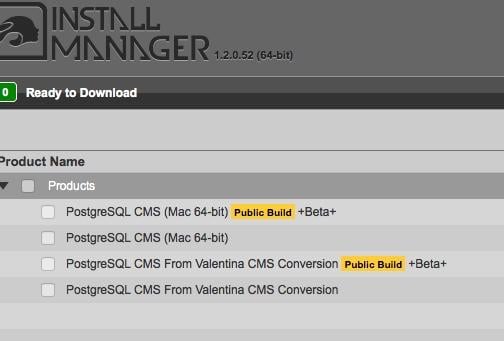
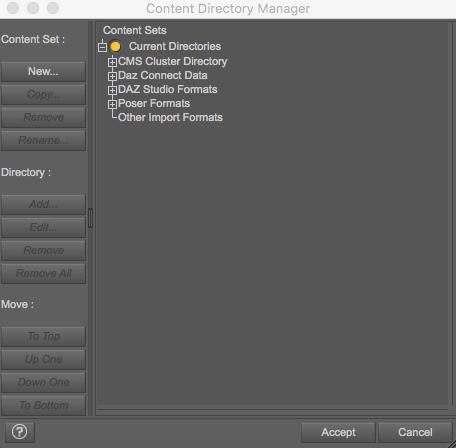
I think I have a ton of the SQL stuff installed, both on my computer, and on the external hard drive where I keep the content. I'll attach screenshots. I have a feeling I need to check a box in the Content Directory Manager?
Yep, Daz Studio knows where things are by the mapping of content folders and runtimes on your hard disk. Smart Content uses the mapping of the location, the metadata of the product, and manifest files to decide "ah, this is Victoria 8 hair!" for example. There are a million tutorials but here is a start... skip down to the content manager portion: http://docs.daz3d.com/doku.php/artzone/pub/software/dazcontentconfiguration
HD Body Shapes & Head MorphsI guess I'm being misunderstood because I'm not suggesting we don't need HD morphs or that we can accomplish sculpt-like mesh deformations with maps. All I want to know is why aren't we using maps to create the kinds of things that current DAZ HD morphs give us - lip, knuckle, and knee detail, small wrinkles, moles, and such. Do we really need to use high definition morphs at subdivision 3 to see large veins in an elderly figure's hands?
There are a few out there -
https://www.daz3d.com/ultra-detailed-displacement-maps-for-victoria-7
https://www.daz3d.com/ultra-detailed-displacement-maps-for-genesis-3-base-female
I use these often, but you really have to crank up the subd in Iray to make the details shine.
I guess I'm being misunderstood because I'm not suggesting we don't need HD morphs or that we can accomplish sculpt-like mesh deformations with maps. All I want to know is why aren't we using maps to create the kinds of things that current DAZ HD morphs give us - lip, knuckle, and knee detail, small wrinkles, moles, and such. Do we really need to use high definition morphs at subdivision 3 to see large veins in an elderly figure's hands?
Could be that DAZ wants to have a hold on something DS specific which would be the HD tool only avaliable to PAs. Since using HD mesh to create quality maps is the norm outside of DAZland, maybe this method isn't accepted in the store, you never know. DAZ is a business afterall.
It's less of an issue now we have the Iray preview mode, but most preview modes won't show displacement while they will show HD morphs (albeit, by default, at a lower maximum resolution).
HD Body Shapes & Head MorphsI guess I'm being misunderstood because I'm not suggesting we don't need HD morphs or that we can accomplish sculpt-like mesh deformations with maps. All I want to know is why aren't we using maps to create the kinds of things that current DAZ HD morphs give us - lip, knuckle, and knee detail, small wrinkles, moles, and such. Do we really need to use high definition morphs at subdivision 3 to see large veins in an elderly figure's hands?
There are a few out there -
https://www.daz3d.com/ultra-detailed-displacement-maps-for-victoria-7
https://www.daz3d.com/ultra-detailed-displacement-maps-for-genesis-3-base-female
I use these often, but you really have to crank up the subd in Iray to make the details shine.
I guess I'm being misunderstood because I'm not suggesting we don't need HD morphs or that we can accomplish sculpt-like mesh deformations with maps. All I want to know is why aren't we using maps to create the kinds of things that current DAZ HD morphs give us - lip, knuckle, and knee detail, small wrinkles, moles, and such. Do we really need to use high definition morphs at subdivision 3 to see large veins in an elderly figure's hands?
Could be that DAZ wants to have a hold on something DS specific which would be the HD tool only avaliable to PAs. Since using HD mesh to create quality maps is the norm outside of DAZland, maybe this method isn't accepted in the store, you never know. DAZ is a business afterall.
Victoria 8 pro bundleNone of the genesis pro bundles came with the default head and body morphs. Victoria 6 or 7 didn't
Victoria 8 pro bundleDoes the probundle include the body morphs like the previous versions? It doesn't seem to be a pagage.
HD Body Shapes & Head MorphsI guess I'm being misunderstood because I'm not suggesting we don't need HD morphs or that we can accomplish sculpt-like mesh deformations with maps. All I want to know is why aren't we using maps to create the kinds of things that current DAZ HD morphs give us - lip, knuckle, and knee detail, small wrinkles, moles, and such. Do we really need to use high definition morphs at subdivision 3 to see large veins in an elderly figure's hands?
There are a few out there -
https://www.daz3d.com/ultra-detailed-displacement-maps-for-victoria-7
https://www.daz3d.com/ultra-detailed-displacement-maps-for-genesis-3-base-female
Daz 3D is part of

Connect
DAZ Productions, Inc.
7533 S Center View Ct #4664
West Jordan, UT 84084Licensing Agreement | Terms of Service | Privacy Policy | EULA
© 2026 Daz Productions Inc. All Rights Reserved.