-
Kitchen Stool Prop and Poses
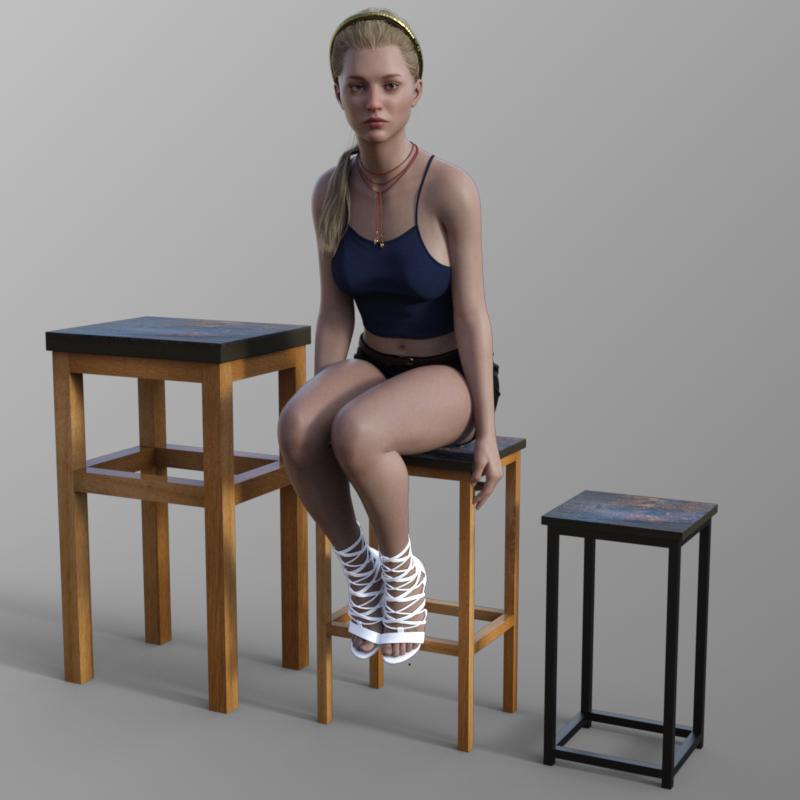
Please find below a prop inspired by a kitchen stool I saw on a recent holiday.
There are six morphs and two material settings for the stool. The morph maximum and minimum limits are illustrated below. The stool seat material is based around a photo I took of the original stool.
Regards,
Richard
Daz Studio 6 Beta - version 6.25.2026.19821! (Updated July 23, 2026)DoctorJellybean said:
Dolce Saito said:
One thing to mention between lines is for the people who use daz4 saves in daz6 to render stuff: Create a copy of your .duf file first! I completely forgot about my manual edits on Mesh Grabber on daz4, openning it in daz6, making a few adjustments and hit "save" (old habit). Since daz6 doesn't have it yet, all the meshes I manually edited was gone and pokethroughs appeared out of nowhere when I opened back in daz4. It was already too late for me with my silly mistake, but by mentioning it here, maybe I save a few of you :)
For essential tools like Mesh grabber, measure metrics (for g9), dforce companion (for me at least), Is there any info regarding their daylight into the daz6 yet? :(
Mesh Grabber is now Geometry Sculptor. Measure Metrics and dForce Companion updates depend on the creators.
If you are using an older Mesh Grabber then, as far as I know, it will not be updated - but you can bake its effects to morphs, which will transfer.
Looking for Morphing G8F underwearMy best attempt so far has been using Zero One, dropping the underwear into the scene without parenting it. Then I spent time lining it up just below the knees and tried simulating it with a dForce modifier. In the end, it sort of passed, but only if I used some odd camera angles, since it always clipped somewhere.
The issue seems to be that, while I own a decent amount of Aeon Soul, I think Sparkman or RedzStudio/RedQ Lips content, “undressing” poses might fail as has Zero One once the figure is posed. If I pose my G8F first, or pose her after setting the underwear to the correct placement with a slider or script, the underwear never stays where it was, or where it is supposed to be.
Someone mentioned that these products are designed around the body area, so I’m guessing the morphs or poses do not transfer well when the model’s body shape does not match the intended pose.
I’m not really looking for fancy lingerie styles. The scene is just supposed to be a generic morning routine with three camera angles, but I’m trying to get a realistic seated look with her underwear lowered. Dahlia [Zero One] does allow for a separate underwear prop on the floor, so it can be pooled at her feet, but that makes it look like she is not planning to pull them back up in the next scene when she stands.
Maybe this is just an area I’m not strong with yet, but I’m wondering if anyone has found a good workflow or product for this kind of practical lowered-underwear pose on a seated G8F figure. or mybe a video of someone doin g something simialr to what I'm attempting?
There's Always Another Sale Thread -- Discussions Only Pt 6...finally picked up Face Transfer Unlimited (which has been on my wishlist for a while) 90% off (5 USD) and the Eleganssi setting (D+) This is the second time that I have been able to use a new D+ item to unlock an a bonus discount.
Looking for Morphing G8F underwearMatt_Castle said:
garrett_3d said:
I have both of those, they're not just a single click affair. You need to do quite a bit of adjustment to make them look right. I think they were posed on V8, that's the figure with the least amount of adjustment that I've found. Shame they don't auto-adjust for different morphs.
Alas, shape following defaults to being calculated from the base shape of both meshes.
I have got a method that can kind of address this, but it's flipping tedious, even with heavy scripting. I could see that it might be usable to get alternate clothing styles to better support the same character shapes as the base clothing, but I wouldn't even want to try to get it to work on complicated poses.
3DSaga said:
Are you sure you can't get Aeon Soul's Zero One to work in a seated position? They show it working that way in some of the promos.
The morphs are only usable as is on basically exactly those poses and on close to the base figure shape, and can end up a mangled mess otherwise. You can use a timeline dForce sim to try to transistion between the provided pose and base morph to exactly what you want, but this can be finicky.
So there are some challenges getting between the ready-cooked poses and the ways you might need to alter it for a given scene.
This is true, though the OP stated both the type of clothing they wanted to use and the pose he would be using- a fairly standard pose that can be used succesfully with Aeon Soul Zero One with poses. I've done the same pose he was asking about. Some of the other sets I mentioned will accomplish the same pose with the included clothing as well. All of these simulate very simply and easily for the dedicated poses, though it's not absolutely required.
Looking for Morphing G8F underweargarrett_3d said:
I have both of those, they're not just a single click affair. You need to do quite a bit of adjustment to make them look right. I think they were posed on V8, that's the figure with the least amount of adjustment that I've found. Shame they don't auto-adjust for different morphs.
Alas, shape following defaults to being calculated from the base shape of both meshes.
I have got a method that can kind of address this, but it's flipping tedious, even with heavy scripting. I could see that it might be usable to get alternate clothing styles to better support the same character shapes as the base clothing, but I wouldn't even want to try to get it to work on complicated poses.
3DSaga said:
Are you sure you can't get Aeon Soul's Zero One to work in a seated position? They show it working that way in some of the promos.
The morphs are only usable as is on basically exactly those poses and on close to the base figure shape, and can end up a mangled mess otherwise. You can use a timeline dForce sim to try to transistion between the provided pose and base morph to exactly what you want, but this can be finicky.
So there are some challenges getting between the ready-cooked poses and the ways you might need to alter it for a given scene.
There's Always Another Sale Thread -- Discussions Only Pt 6daveso said:
that G8/8.1 sale is pretty nice for sure. 90% off nothing to sneeze at. Only caveat is the minimum pricing at $1.99. I see quite a bit in that selection that I had passed on mainly becasue I didn't want to spend so much on the item before.
10 items freed from the WL for $25

For anything oither than very close-up work, I find G8 still stands up very well against G9... And if you have the skins transfer product(s) then even in very close-up work too
How to rotate a cuspid?It can be done with a morph.
Maybe a PA has made such one. But if not you can make it yourself if you know a modeller software.
Which generation are we talking about?
Looking for 'Otter Person' morphAs the title, says, I'm looking for an 'Otter Person' morph I recently picked up, but now can't remember the name (or even if I downloaded it, as I switch between direct download and Install Manager often).
I can't even recall if it was for the Genesis 3 or Genesis 8 (male or female) model, but I quickly went throgh my library and can't seem to find it.
If anybody knows what its name is, I'd appreciate a heads up (and than I'll just go and rename it 'OTTER PERSON" so I'll know what it is ^_^
Looking for Morphing G8F underwearjodhan322 said:
Most underwear products I’ve found like fit control, don't give enough range of adjustment.
This is because Fit Control can't do this. Morphs can't change which part of the body clothing is weighted to. Lowering the underwear a bit down the legs might work in something close to the base pose if you throw enough smoothing at it, but if you pull it all the way down the legs, it's still weighted to the pelvis.
For this, you need one of the following:
- A product that specifically has a version of the clothes weighted to the lower legs.
- A product that specifically has matching pose and morph combinations (but this will struggle with heavily morphed figures and will have little capacity for reposing, so it will need to already be a seated pose)
- A product with fully-dynamic dForceable underwear (or underwear you can make fully dynamic), and then simulating to get everything into place - dForce can supersede clothing's original weights.
The last option is generally going to be the most likely thing for you to find and the most versatile approach.
In this case, I probably recommend something like https://www.daz3d.com/dforce-ceecee-basics-06-bra-and-panty-for-genesis-9-and-genesis-8-female which is dForce capable, and already has morphs that move the clothes to the lower legs. (But like I say, do be aware that those morphs will not work in a seated pose without you also using dForce to simulate into that pose).
How to remove breasts?if you export the character as an obj at base resolution, you could reimport it in morphloader apending it by only the pectoral section and create a morph slider for that
or use the Dformer tool in DAZ studio
or send to Hexagon and use the smoothing tool
also https://www.daz3d.com/shape-splitter
the Premier member build also has the advanced Mesh Grabber but you can buy the original bundle still
https://www.daz3d.com/mesh-grabber-bundle-win
too much to explain how to do each of these but all basically the same thing, reshape the mesh and create morphs
I myself use Zbrush and morphloader/obj import/apend (for the morph creation)which is probably the most expensive option but since I own it, having bought it a decade ago, I never really bother much with alternatives
Let's appreciate/discuss today's new releases - more ongoinger threadI like Ansiko's work in general and the new one today is no exception, other than it appears the pants cannot close in front. I would truly like to know how many women, or men, ride around on a tractor doing their work with their pants open like that. I don't see a morph in the file list to close them, or in the promo images. Too bad, the clothing set is great, as is the tractor detail.
https://www.daz3d.com/fields-of-memory-tractor-and-clothing-set-for-genesis-9I wish collision was more advancedThanks, that's a good idea. I'm not sure if i have tools which can smooth vertices while keeping the same shape, the smoothing I usually see tries to remove ' bumps' in the mesh rather than sliding the vertices over a mesh of the same shape.
It's along time ago, but I think when I did the dress in the picture I used dforce to drape it over the morphed G8F figure shape, and then an external UV editor to relax the UV's. And then saved the dforce draped mesh as a morph target and the relaxed UV's as a new UV mapping, all in all quite a lot of messing about. The render is from August 2022 so I've slept a few times since then and don't remeber clearly. I do recall deciding it was too much work to do manually except in extreme circumstances.
How to remove breasts?If you go to the chest sliders on the shaping tab there should be a "breasts gone" morph.
I wish collision was more advancedAnd self-collision would be useful, to get an indent where hands are gripping fleshier parts of the body.
Going further, a lot further in concept, an invisible internal solid stiffness reference model would be useful, to indicate how elastic the body parts are, getting elbows, head & ribcage to be stiffer and tummy, thighs and buttocks less stiff. The reference model could be pretty small in number, having only a few hundred brick elements to approximate a Lo Pi quality stiffness skeleton and insides, and use the deflections generated by that to feed in as a morph to the rest of the body after a simulation. The invisible solid stiffness reference model could have a very stiff brick element down each limb to simulate a limb bone, and then an approximation of a flesh layer around it. This could be done over the whole body, with maybe 3 brick stiffnesses; bone stiffness, muscle stiffness and low stiffness for other body areas.
The simulation routine for clothes and hair already does a great deal of a finite element simulation using shell elements, and a few hundred bricks would not add a large overhead to the simulation time - 8 noded bricks are actually faster to analyse than the 4 noded shell elements already incorporated in the model because thay have 6 axes of movement at each vertex (x,y & z as well as rotx, roty and rotz), while the bricks only have 3 axes of movement (X, Y & Z).
So, DS already has a lot of the infrastructure to incorporate a full 3D solid person model, but it would require a lot of programming. The results, well, they'd be beyond awesome.
Regards,
Richard
I wish collision was more advancedIf you don't have it, Morph Master is a useful product to streamline the process of managing smoothing modifiers:
https://www.daz3d.com/morph-master
Commercial thread: https://www.daz3d.com/forums/discussion/716971/morph-master/p1
V3D Magic Extract And Append Bundle (Commercial)Thank you so much for your kind words, and also for your support. It really means a lot. This bundle took a lot of persistence indeed, because DUF files can be surprisingly deep and tricky, but I am very happy that it is finally out in the world and already useful. I hope the three sets of scripts will save you a lot of time once you start exploring them more.
Thank you so much! This is exactly the kind of workflow problem I hoped the scripts would help with. In my own 3D development work, I often need to retrieve, compare, or reuse specific elements from previous scenes, scene subsets, or development files, without constantly reopening and navigating through the whole source scene. So I am really glad to read that it is already saving you time in real use.
Thank you very much, I’m really glad it worked beautifully for you.
About the “monks robes” message in a doctors-in-scrubs scene: yes, that is exactly the kind of strange DUF filtering case I am very interested in investigating. Sometimes when I correct a DUF filter, the fix covers a whole family of cases, but DUF files are so complex and nested that some extra node-related data can hide in places where you would not expect it at all.
So I would be very interested in the DUF file, because it would allow me to confirm whether the fix I implemented yesterday already covers your case, or whether this is a new hidden case that I should handle properly too. Of course, only if you are OK with that and if it is not a problem for you to share it. If you prefer not to, I completely understand, no worries at all.
If you are OK with sharing it for analysis, we can continue by PM and find the easiest way to transfer it depending on the file size.
KimWrite Idea said:
Feng usually does a good job with their male characters. I was flip-flopping on getting it today or not. The only drawback is the HD details appear to be baked into the actual morph. It makes it hard to mix-n-match with other morphs, I find. Some of Feng's male characters seperate the HD details (John & Ethan for example).
Honestly, that was one of my worries, and there is no separate non-hd morph, but I am finding it not so difficult to use other body or face morphs. I tend to render beefier guys, but I have struggled to get the thinner ripped body of, say, a swimmer, and this one nails it. But I could beef him up a bit without an issue. Feng also did Erwin for Gen 8.1 and that is still my favorite body for adding hd veins and muscle detail.
KimFeng usually does a good job with their male characters. I was flip-flopping on getting it today or not. The only drawback is the HD details appear to be baked into the actual morph. It makes it hard to mix-n-match with other morphs, I find. Some of Feng's male characters seperate the HD details (John & Ethan for example).
ai training dataWendyLuvsCatz said:
but the EULA explicitly forbids this using DAZ content for redistribution
This comes with a massive dose of "I am not a lawyer", but Daz has the option to sell content under different licences.
We're already familar with this with the Interactive and 3D print licences, which provide permissions that allow you to do things the standard licence disallows.
They can, of course, provide an "AI licence" which does grant this permission.
3DIO said:
I had no idea they added that stuff about AI to the "Standard Licence". Every Daz product I ever purchased was purchased believing the licence could not restrict what I do with rendered images of Daz content, and as far as I'm concerned, that right was always covered by default in the Standard Licence.
Again, this has a massive "I am not a lawyer" disclaimer, but the standard licence has granted the permission use use the assets for the purpose of "the creation and presentation of two-dimensional animations and renderings" and with the restriction that the "User may not in any case publish, market, distribute, transfer, sell or sublicense any renderings, animations, software applications, data or any other product from which any Content, or any part thereof, or any substantially similar version of the Content can be separately exported, extracted or de-compiled into any re-distributable form or format".
Even without the AI clause being added later on, I think it would be a stretch to claim that this covered you to distribute a LORA; As AI advocates repeatedly like to tell us, models do not actually contain the original dataset (so it's not reasonably argued that the LORA is a rendered image and subject to the specified freedom of use), and there's also a strong argument that the model is highly imitatitive of the original content and ineligible on those grounds.
There's always been these back-up clauses of a sort in the licence, because there are cases that would, quite reasonably, count as taking the mickey.
For some examples, you probably culdn't just point a camera squarely at a flat plane with a texture on it, render out the image, then claim you have full commercial rights to that texture. Similarly, I imagine that rendering out a model from 40 different angles and feeding that all back into photogrammetry software to get a new 3D mesh out of it would, even though it has been gone purely via your rendered images, not be something you could claim full rights to.
Once again - still not a lawyer, but while for many purposes you can think of yourself as being able to the rendered images mostly as you will, that is not actually the literal text of the licence, and I advise that you read the specific text to get a sense of what limitations might exist.
Daz 3D is part of

Connect
DAZ Productions, Inc.
7533 S Center View Ct #4664
West Jordan, UT 84084Licensing Agreement | Terms of Service | Privacy Policy | EULA
© 2026 Daz Productions Inc. All Rights Reserved.