-
Converting V4/M4 MAT's to Genesis 8Converting V4/M4 MAT's to Genesis 8
I figured out how to go from V4 to Genesis...I need it to work for Genesis 8 / Michael/Victoria 8....how to I go from Genesis to Genesis 8? Thanks!
Morphs ++ file pathThe actual morphs are not accessible directly, rather you use a Morph Injection set, under Runtime/Pose/DAZ's Victoria 4 (or DAZ's Michael 4)/Morph Injections. If you installed with DIM, the ExP files will have been prepared by the DIM Helper application. If not, in the folder you mention (actually Runtime/Libraries/!DAZ) there is a DzCreateExPFiles for each independent character that needs to be run before you can use them. If that is all gobbledygook to you, no worries, there is more help available.
Rose HD and Expressions for Genesis 8 Female overwrites pix FWSA Rose HD for Victoria 8I think I saw a fix for this in the forum somewhere. Rose HD by FWSA (https://www.daz3d.com/fwsa-rose-hd-for-victoria-8) picture is overwritten by the picture for Rose (https://www.daz3d.com/rose-hd-and-expressions-for-genesis-8-female) in my content library, The image for Cherubit show but when I hover the mouse the FWSA image shows.
Just fun Michael trivia r.e. release dates.I think the Wiki pages are wrong to say that Millenium Man Michael released at the same time as Victoria 1 aka Millenium Woman in Feb 1999. That's been 21 years ago but I had just bought a Poser at a local book store in 1999 and I seem to remember Victoria 1 aka Millenium Woman being sold for a shocking $99.95, which I wouldn't pay for and so used the Poser figures, and as the link you gave shows, Michael 1 aka the Millenium Man being sold for $39.95, which was still expensive but I did buy as $39.95 (eventually) was much more affordable, but he wasn't available until much later in terms of digital product lifecycle. So I think it was Victoria released in February 1999 as it coincided only maybe a month after my purchase of Poser 4 for a whopping 600 Swiss Francs (it may of been and probably was Poser 4 Pro I bought). So Victoria 1 aka Millenium Woman would of cost about 200 Swiss Francs! Wow, that's a lot of cash! Michael 1 aka Millenium Man, I remember and I thought it odd that Victoria 1 aka Millenium Woman didn't have a male counterpart and seem to remember it releasing in January 1, 2000 just like your link says but I waited a while because at $39.95 I thought still expensive too but not crazy expensive like Victoria 1 was.
Yes this correlates with my memories as well. I forget which caveman version of Poser I was using at that point but it was an early one!
It was Poser 4. It had a trapeze artist in a unitard hanging upside down by her knees in mid swing I think. Not long after that I bought the Poser 4 Pro expansion via the internet. I still remember having to go about 20 miles by tram, train, bus, and walking another couple of miles or so to the UPS office near the airport because the UPS man never could deliver that type of item to me apartment. It would take the enitire Saturday to fetch those types of deliveries. Really, a delivery service where I'm the one actually delivering the package is not much of a delivery service.
So... Should *I* Become a PA? Sample Render IncludedSimple sets, well lit? As long as they can deliver what people want, then it's good. If you have interesting locations? (Where Victoria can be naked in a temple with a sword?) I mean... it's not just a good photo, but also a setting where the story can happen. (Or, at minimum, a place to put a scantily clad Victoria, which is a popular thing to render.)
I know I still use the mutliplane cyclorama and millennium environment. If you can deliver that kind of simple, effective functionality in a more modern package, I think people would want that.
LJ Studios - Art Work and TipsHow to Fit Clothing when Smoothing Blows Up
Here again is Lt. Mia. This time Lt. Mia is based loosely on the British TV show called UFO. Released in 1970 the show is very much a 60's piece. JoEtzold created several of the costumes worn by the actors, the moon base and cars driven by the main characters. For this post I want to add to my discussion on how to make a clothing item fit a figure other than the original. In the below image I have taken the bodysuit created for V4 and converted it to V2. As in the previous example I used EvilInnocense's Crossdresser to transfer the bodysuit from V4 to V2. I converted the suit to Triax Weight Mapped. When I fitted the suit onto Mia there was a lot of poke through. I added the smoothing parameter but when I did that I got spiky things again. After further inspection I found that the side leg lacings intersected in some places making the poor smoothing operation go bonkers. This problem is then definitely not a weight map problem, although I did have to do some corrections on her right arm. With smoothing not working for this model I had to come up with another way to make the fit work for this suit. I used the Mesh Grabber to adjust the bodysuit over Mia's body. I also put Mia in several of the poses I was going to possibly use in the image and made more adjustments. I exported out the bodysuit as an object and then created a morph for the suit.
Tools I used in correcting my spikes
Clothing:Conversion * CrossDresser V2 by EvilInnocense.
Geometry Modification * Mesh Grabber by ManFriday.Instructions:
0. The only things in your scene should be the figure and the garment. Makes life easier latter on.
1. Convert garment to Tri-Axe weight mapping.
2. Make corrections using the directions in post How to Fit Clothing when Spikes Show Up After Posing with regards to weight map issues.
3. Fit the bodysuit onto the figure.
4. On the Tool Settings Tab, select the Mesh Grabber. 5. In the viewport rotate the camera around the figure observing where the poke throughs occur.
5. In the Scene tab select the figure and hide it and select the suit. In the viewport click one of the areas that poke through is occurring. Make the figure visible again to make sure you clicked in the correct area. Move the sphere out. I try to go in a direction that is perpendicular to the polygon I have selected. Most of the time I used the Falloff type of Smooth and left everything else in default. Make the changes to the mesh small so to try and keep the topology of the garment intact as much as possible.
6. Continue to adjust the mesh until no poke through is observed. Apply a pose you are interested in and look for poke through again. Repeat step 6. I used three poses that were close to what I was thinking I wanted for the image.
7. Return the figure to default pose and unfit the garment. Delete the figure. The only thing in the scene tab should be your modified suit.
8. Export out you suit as an obj. I named my obj what I wanted the morph to be called in the suit.
9. Load the original corrected weight mapped suit into the scene. Not the one that has been messed with with Mesh Grabber.
10. Select the suit and go to Asset and select Morph Loader Advanced. Make sure you have the preset set to the same format as you exported your modified suit. Click Accept.
11. Load your figure and fit the suit to the figure. Find the morph you just made and slide it to 1 or 100% depending on your choice of using percent or not. Rotate the camera around the figure and see what your handy work has accomplished. No poke through, then you can save out the figure. Poke through, then use the Mesh Grabber and do some more tweaking. Repeat steps 4 thru 11 again.
12. You have fixed your problem. If you want to keep this version of the garment and not have to make these fixes each time you use it. I would highly recommend saving it out as a figure.So here she is:
Title: Hanging Out with Her Best Friends Forever
Rendered in iRay. Postwork in PaintShop Pro to add the sig.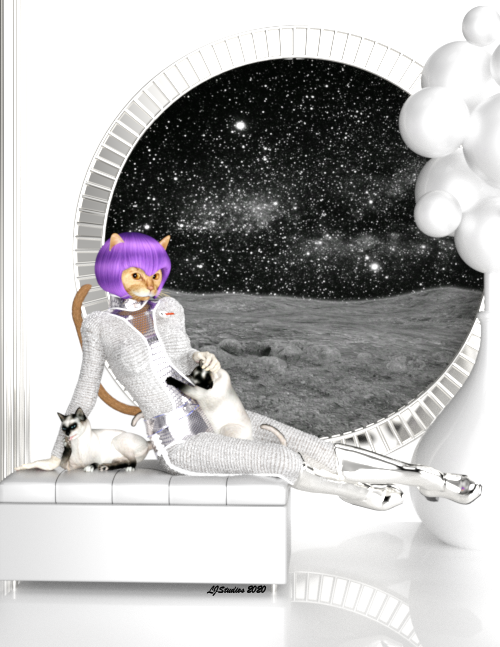
Freebies:
Character:Lt. Mia:Actor * Millennium Catwoman v1.2 by Little_Dragon.
Character:Lt. Mia:Tail Bushy Tail 2 by Little_Dragon.
Character:Lt. Mia:Texture * MilCatwoman Red Tabby Texture by Little_Dragon.
Character:Lt. Mia: Hair Sumire Hair by Yamato.
Clothing:Suit and Boots * S.H.A.D.O. Uniforms for V4 by JoEtzold.
Clothing:Suit:Belt * S.H.A.D.O. Uniforms V4 - Addon by JoEtzold.
Clothing:Suit:Textures * MoonBase Uniform DS Texturing, V1 by luqu.
Best Friends Forever: Pose * Odd Poses for MilCat by Carrie58.
Best Friends Forever: texture * Thai Cat for DAZ MillCat by czarny_jednorozec84.
Environment:Bench Sofa N200816 by Oishe. (3ds format)
Environment:Décor:Vase Grass vase décor 3D Collection by 3DBar. (3ds format)
Environment:Décor: Window Wall Floor * Window Prop by A. Gunsolley.
Environment: Window Space BGs for pulp poses by RedeyeCat.
Shader: Clothing, Boots, Window Frame * DAZ Studio 4.10 by DAZ 3D.
Shader: Room, vase and spheres * Iray car related shader presets 'megapack' by Tom2099.
Paid fors:
Character Base:Lt. Mia:Head * Millennium Cat by DAZ 3D.
Character:Lt. Mia:Texture # Classic Cats Combo by LaurieS Lisa's Botanicals.
Clothing:Conversion * CrossDresser V2 by EvilInnocense.
No Counts:
Character Base:Lt. Mia:Body # Victoria 2.0 by DAZ 3D.
Environment:Lighting # FWSA Soft Light Probes by Fred Winkler Art Sabby.3D Art Freebie Challenge-August 2020-"Cats, Cats, All Kinds Of Cats" -Main Thread OnlyNAE
Title: Hanging Out with Her Best Friends Forever
Rendered in iRay. Postwork in PaintShop Pro to add the sig.
Here again is Lt. Mia. This time Lt. Mia is based loosly on the Britsh TV show called UFO. Released in 1970 the show is very much a 60's piece. JoEtzend created several of the costumes worn by the actors, the moon base and cars driven by the main characters. I have not seen the show but the introduction is quit hip if I don't say so myself. There I have dated myself.So here she is:
Freebies:
Character:Lt. Mia:Actor * Millennium Catwoman v1.2 by Little_Dragon.
Character:Lt. Mia:Tail Bushy Tail 2 by Little_Dragon.
Character:Lt. Mia:Texture * MilCatwoman Red Tabby Texture by Little_Dragon.
Character:Lt. Mia: Hair Sumire Hair by Yamato.
Clothing:Suit and Boots * S.H.A.D.O. Uniforms for V4 by JoEtzold.
Clothing:Suit:Belt * S.H.A.D.O. Uniforms V4 - Addon by JoEtzold.
Clothing:Suit:Textures * MoonBase Uniform DS Texturing, V1 by luqu.
Best Friends Forever: Pose * Odd Poses for MilCat by Carrie58.
Best Friends Forever: texture * Thai Cat for DAZ MillCat by czarny_jednorozec84.
Environment:Bench Sofa N200816 by Oishe. (3ds format)
Environment:Décor:Vase Grass vase décor 3D Collection by 3DBar. (3ds format)
Environment:Décor: Window Wall Floor * Window Prop by A. Gunsolley.
Environment: Window Space BGs for pulp poses by RedeyeCat.
Shader: Clothing, Boots, Window Frame * DAZ Studio 4.10 by DAZ 3D.
Shader: Room, vase and spheres * Iray car related shader presets 'megapack' by Tom2099.
Paid fors:
Character Base:Lt. Mia:Head * Millennium Cat by DAZ 3D.
Character:Lt. Mia:Texture # Classic Cats Combo by LaurieS Lisa's Botanicals.
Clothing:Conversion * CrossDresser V2 by EvilInnocense.
No Counts:
Character Base:Lt. Mia:Body # Victoria 2.0 by DAZ 3D.
Environment:Lighting # FWSA Soft Light Probes by Fred Winkler Art Sabby.* - Requires free registration
# - No longer legally availableI forget how I did it...V4 body suit questionSome time ago I managed to make a cleavage corset-like bodysuit using the V4 bodysuit onto a Genesis female, which I saved as a wearable; which I could then use on Genesis 8 female/Victoria 8. Okay...computer crash, long story short, while I could salvage most of my work, I couldn't save the wearables...I know there's a way to remove parts of the bodysuit so I'm left with a cleavage corset and a bottom, but I forget how!
Under what tab/sub-menu do I find the separate bodysuit parts?
Thanks guys!
Honni 8I know everybody likes to talk deals, and bundles, and add-one, and value, but has anybody picked her up, yet, that has any thoughts to share with the class? Do ya like her?
Honni 8 is dififcult to deal with right now because she's in Lost and Found. Her files are not set up properly, so nothing appears under "Figure", "Materials", etc. (You still can dial in her shape in Parameters, however.)
The parts seem good. I really like makeup in the Diffuse Overlay channel, and this is another base figure that does that... so that's positive.
It's rare that I dislike a Daz Original base figure, however.
In this generation of figures? I don't know if she's the top tier, and she's difficult to use right now. She's in a useful band of shapes, and the face is pretty and different. She doesn't look instantly like a Victoria 8 sister, so that moves her up a little.
2nd of nine lives Cat Girrrl render thread prrrI would have to defer to being able to buy my way to a nice fit. EvilInnocense did all of the heavy lifting on that one. Many years back EvilInnocense had a sale on her bundle of licenses 60 bucks or something like that. You got 160 different figures, Furrette being one of them. Her software performs really well for what I have converted. Below is Lt. Mia as a S.H.A.D.O officer based on the moon. The bodysuit was originally fit to V4. I tried to just convert it to Victoria 2 but there was still some poke through so I tried smoothing and it blew up so I have Mesh Grabber. My new secret love fixed the fit and got something to work. So I call this one Hanging Out with Her Best Friends Forever. Rendered in iRay.
kids 4 creating issueThe clothes do not parent themselves like they do with Genesis 1-8 figures, but if you choose a cloth you have loaded in the scene and select "Fit", it will fit (and parent) itself to the figure, although these are over 10 year old figures and technology that predates any and all Genesis figures -> they do not function the way Genesis figures do.
The problems in fitting clothes to generation 4 figures (Victoria 4, Michael 4, ... Kids 4) were a constant headache as the clothes do not autofit -> If you created a morph for the base character, you had to make the same morph also for each and every piece of clothing you were going to use with that figure+morph.
If you would design a core character and bundle, what would it be?My G8 wishlist is pretty simple - mostly fleshing out some horror and fantasy niches and bringing back some iconic characters:
- Male vampire to complement Tasha, preferably inspired by Gerard Butler in Dracula 2000, and with man-bat form (similar to Narkissa but with optional wing-arms) add-ons for both the new character and Tasha.
- Female werewolf to complement Landon, preferably with multiple werewolf forms and an outfit inspired by Katharine Isabelle's wardrobe in Ginger Snaps.
- Lilith 8, preferably with artists such as Hinkypunk/SR3 and Jessaii at the helm - because they deliver sexy in spades!
- Rune 8 to complement Scar and Ashan, because existing G8 female warrior-type characters (Olympia, Angharad, Kayo) are not suitable replacements for the Red Queen.
- Male fey to complement Karyssa/Mika/Rynne/Daisy, with character add-on inspired by the MTG card Rankle, Master of Pranks.
- Merfolk 8, female and male, with many options for customizing appearance.
- Naga 8, female and male, with full-body scales option for both humanoid and "no-feet snake-tail" forms.
- Anneka 8 and Damien 8, with extensive options for customization (to compete with the very nice options that we already have for these types of characters).
Also maybe a slasher (horror genre) themed bundle. And definitely more modern male clothing, but that doesn't have to require a bundle.I'd like to sign this, like, extremely hard.
Kind of shocked that there is no Bethany 8 so far. DAZ has gotten a bit better with more ethnically diverse figures and different age ranges. But then just canceled the one figure that was not as thin as a supermodel. I mean there is Latonya and she is pretty great, but c'mon, give us Beth as well.
Rune I am also missing a lot. I like CJ and she does come close, but she feels more like an athlete. There is no real other fantasy Barbarian character and that's a shame. Hell there is only one other freckled G8 character (that I can remember ^^;). Olympia used to be more a voluptuous goddes-like character but is just Victoria again this generation. Kayo is a - pretty decent - MMA fighter and Angharad looks more like a misplaced small goth chick.
Speaking of goth, yeah, there also has not been a real replacement for Lilith. Which I always thought was a hugely popular figure. Really weird that one.
Also, fantasy characters of all kinds are appreciated. Zelara is one of DAZ's best releases this generation, imho, wouldn't mind more in that direction.
LJ Studios - Art Work and TipsHow to Fit Clothing when Spikes Show Up After Posing
This was a recent find for me. The Millineum Catwoman. After some discussion with Redfern I found out that she was called Mia. So as normal for my entries in this thread I have listed the stuff I used. I do however have a tip. Mia's bodysuit was orginally made for Furrette. I decided that I wanted a better fit to Victoria's body so I converted the clothing using Crossdresser by EvilInnocense. I wasn't quite happy with the fit so I added a smoother but that put to much distortion in the suit. So I decided to try to convert it to a weight mapped figure. When I did that every pose I used with the suit gave me spikes. They were on the arms and legs. I have seen this happen before and I finally did some research and found out 1 of the reasons for this occuring. Bottom line DAZ and Poser use different ways in dealing with how mesh is positioned at the joints. So there is a lot of leaway for DAZ to confuse a poor mesh and make spikes happen. Here is what I did to fix this issue when it happens to be a weight map issue.
Instructions:
1. Convert garment to Tri-Axe weight mapping.
2. Bend the garment and note where the spikes are created. You should be able to tell which bend direction causes the problem for what bone. So for the bodysuit it was the Z bend in the right and left shoulder bones.
3. On the Tool Settings Tab, select the Node Weight Map Brush Tool
4. In the Scene tab select the(one of) bone(s) where the spike or spikes occurred. In my case I had multiple places that needed attention so this process become iterative from this point on.
5. In the viewport right click and select the Brush Mode->Paint Brush. You will see two circles a green inside a red appear in the Viewport when you move the mouse over the garment.
6. Select the Rotation map for the previously identified bend. In my example it is the Z Rotation map that was not performing like it should, i.e. spiky. Upon selection you should see on the garment the area which the map identifies as having influence. Represented by red, blue and/or yellow fields of color. It is now, that you should be able to see some areas where the garment colors show through.
7. With the left button held down move the mouse over these areas to turn them red.
8. Rotate the bone within the Parameter tab or the pose wheel in the upper left corner of the view port. If you still see deformation then pass the mouse over the area again.
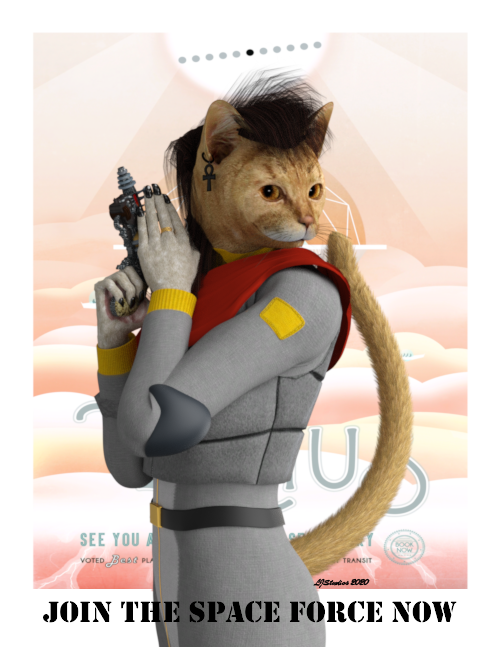
9. You have fixed your problem. If you want to keep this version of the garment and not have to make these fixes each time you use it. I would highly recommend saving it out as a figure.Title: Join the Space Force Now
Rendered in iRay. Postwork in Gimp to add the text and sig.
An imaginary recruitment post for the US Space Force. Featuring one of their own Lt. Mia Tabby. Lt. Mia as she is called, is a combination of Victoria 2 body and Millineum Cat. A creature created by Little_Dragon with the help of Redfern and others. The poster behind her is from the JPL site. Lt. Mia is based loosly on Redfern's Mzzkiti, both being service girls and all. I want to thank Redfern for all of his information about this character, where she came from, who was involved. I love history.So here she is:
Freebies:
Character:Lt. Mia:Actor * Millennium Catwoman v1.2 by Little_Dragon.
Character:Lt. Mia:Tail Bushy Tail 2 by Little_Dragon.
Character:Lt. Mia:Texture * MilCatwoman Red Tabby Texture by Little_Dragon.
Clothing: Jewelry: Earrings * Ankh Earrings for Poser by Chris Cox.
Clothing:Bodysuit and Vest Furrette SPF Uniform by Little_Dragon.
Clothing:Jewery:Ring * Shardz Elven Ring for V3 by Shardz.
Environment:Background Visions of the Future - Venus by Jet Propulsion Laboratory.
Hair Little_Dragon's Ziggy Hair for Furrette 2.0 by Little_Dragon.
Pose:Lt. Mia Inspired by Louis Royo by Schlabber.
Prop:Lt. Mia:Weapon * Angry Hornet Raygun by Archeopterix.
Shader: Lt. Mia:Claws * Iray car related shader presets 'megapack' by Tom2099.
Shader: Suit: Jewelry: Gold * jewelry_iray_shaders by AllenArt LaurieA.
Shaders:Clothing * Iray Leather Shaders by Tom2099.
Paid fors:
Character Base:Lt. Mia:Head * Millennium Cat by DAZ 3D.
Character:Lt. Mia:Claws # Cat Character (w/ poseable nails) by DAZ 3D.
Character:Lt. Mia:Texture # Classic Cats Combo by LaurieS Lisa's Botanicals.
Clothing:Conversion * CrossDresser V2 by EvilInnocense.
No Counts:
Character Base:Lt. Mia:Body # Victoria 2.0 by DAZ 3D.
Clothing:Bib # RDNA Roma by Traveler.
Environment:Lighting # FWSA Soft Light Probes by Fred Winkler Art Sabby.* - Requires free registration
# - No longer legally available2nd of nine lives Cat Girrrl render thread prrrAs promised I have work a bit on Mia. I am going to add this entry in my art thread because I learned something about spikey stuff and I want to add that discussion there.
Title: Join the Space Force Now
Rendered in iRay. Postwork in Gimp to add the text and sig.
An imaginary recruitment post for the US Space Force. Featuring one of their own Lt. Mia Tabby. Lt. Mia as she is called, is a combination of Victoria 2 body and Millineum Cat. A creature created by Little_Dragon with the help of Redfern and others. The poster behind her is from the JPL site. Lt. Mia is based loosly on Redfern's Mzzkiti, both being service girls and all. I want to thank Redfern for all of his information about this character, where she came from, who was involved. I love history.So here she is:
Freebies:
Character:Lt. Mia:Actor * Millennium Catwoman v1.2 by Little_Dragon.
Character:Lt. Mia:Tail Bushy Tail 2 by Little_Dragon.
Character:Lt. Mia:Texture * MilCatwoman Red Tabby Texture by Little_Dragon.
Clothing: Jewelry: Earrings * Ankh Earrings for Poser by Chris Cox.
Clothing:Bodysuit and Vest Furrette SPF Uniform by Little_Dragon.
Clothing:Jewery:Ring * Shardz Elven Ring for V3 by Shardz.
Environment:Background Visions of the Future - Venus by Jet Propulsion Laboratory.
Hair Little_Dragon's Ziggy Hair for Furrette 2.0 by Little_Dragon.
Pose:Lt. Mia Inspired by Louis Royo by Schlabber.
Prop:Lt. Mia:Weapon * Angry Hornet Raygun by Archeopterix.
Shader: Lt. Mia:Claws * Iray car related shader presets 'megapack' by Tom2099.
Shader: Suit: Jewelry: Gold * jewelry_iray_shaders by AllenArt LaurieA.
Shaders:Clothing * Iray Leather Shaders by Tom2099.
Paid fors:
Character Base:Lt. Mia:Head * Millennium Cat by DAZ 3D.
Character:Lt. Mia:Claws # Cat Character (w/ poseable nails) by DAZ 3D.
Character:Lt. Mia:Texture # Classic Cats Combo by LaurieS Lisa's Botanicals.
Clothing:Conversion * CrossDresser V2 by EvilInnocense.
No Counts:
Character Base:Lt. Mia:Body # Victoria 2.0 by DAZ 3D.
Clothing:Bib # RDNA Roma by Traveler.
Environment:Lighting # FWSA Soft Light Probes by Fred Winkler Art Sabby.* - Requires free registration
# - No longer legally available3D Art Freebie Challenge-August 2020-"Cats, Cats, All Kinds Of Cats" -Main Thread OnlyNAE
Title: Join the Space Force Now
Rendered in iRay. Postwork in Gimp to add the text and sig.
An imaginary recruitment post for the US Space Force. Featuring one of their own Lt. Mia Tabby. Lt. Mia as she is called, is a combination of Victoria 2 body and Millineum Cat. A creature created by Little_Dragon with the help of Redfern and others. The poster behind her is from the JPL site. Lt. Mia is based loosly on Redfern's Mzzkiti, both being service girls and all. I want to thank Redfern for all of his information about this character, where she came from, who was involved. I love history.So here she is:
Freebies:
Character:Lt. Mia:Actor * Millennium Catwoman v1.2 by Little_Dragon.
Character:Lt. Mia:Tail Bushy Tail 2 by Little_Dragon.
Character:Lt. Mia:Texture * MilCatwoman Red Tabby Texture by Little_Dragon.
Clothing: Jewelry: Earrings * Ankh Earrings for Poser by Chris Cox.
Clothing:Bodysuit and Vest Furrette SPF Uniform by Little_Dragon.
Clothing:Jewery:Ring * Shardz Elven Ring for V3 by Shardz.
Environment:Background Visions of the Future - Venus by Jet Propulsion Laboratory.
Hair Little_Dragon's Ziggy Hair for Furrette 2.0 by Little_Dragon.
Pose:Lt. Mia Inspired by Louis Royo by Schlabber.
Prop:Lt. Mia:Weapon * Angry Hornet Raygun by Archeopterix.
Shader: Lt. Mia:Claws * Iray car related shader presets 'megapack' by Tom2099.
Shader: Suit: Jewelry: Gold * jewelry_iray_shaders by AllenArt LaurieA.
Shaders:Clothing * Iray Leather Shaders by Tom2099.
Paid fors:
Character Base:Lt. Mia:Head * Millennium Cat by DAZ 3D.
Character:Lt. Mia:Claws # Cat Character (w/ poseable nails) by DAZ 3D.
Character:Lt. Mia:Texture # Classic Cats Combo by LaurieS Lisa's Botanicals.
Clothing:Conversion * CrossDresser V2 by EvilInnocense.
No Counts:
Character Base:Lt. Mia:Body # Victoria 2.0 by DAZ 3D.
Clothing:Bib # RDNA Roma by Traveler.
Environment:Lighting # FWSA Soft Light Probes by Fred Winkler Art Sabby.* - Requires free registration
# - No longer legally availableWhere are the directions for manual offline install?Some progress has happened. I found a better nVIDIA driver and D|S now detects the correct GPU, both Iray and dForce, so I ran tests.
Default settings, a Victoria 8 face closeup rendered at HD...
- CPU - 35 minutes
- GPU - 14 minutes
- Both - 10.6 minutes
I was hoping for at least one order of magnitude speedup, but I'm glad for this improvement. Pic attached.
dForce didn't fare so well. I started again with a default Victoria 8, eased her into a tiptoe pose over 70 frames, and rotated her 2.25 times in Y over 90 frames, hoping for a twirling skirt on her dForce dress. The simulation took about 38 minutes to run, and went unstable after frame 71, disappointing. I did a similar test on a dynamic Jessi dress in the old Poser 6 cloth room for comparison. The models are much lower resolution, I know, but even so. Poser's sim ran on a single core of my old Athlon, finished in 2.75 minutes, and didn't break. Pic attached.
That's two more things solved from the checklist. Not the greatest, but they're not dead anymore. I'm still looking for the other list items, especially more Iray information, how to enable some basic animation-friendly features, like multipass rendering, HDR output, and motion blur. Anybody? Thanks for reading.
Hallelujah!
Disciple
Edit: That was an animated GIF when I attached it. Embedding it failed. Can anyone see it move? Well, I'll attach the frame where the dForce dress detonates. Why are these forums better than the old ones again?
Does Daz Studio auto adjust texture based on camera distance?Yes it can.
Studio has a LoD system built into it, but only Victoria 4 and Michael 4 have LoD mesh, you would need to make your own for every other mesh you have.
3Delight can't use the texture formats you get with content, so it converts it all into temporary TDL files, these are a mip-mapped TIF format, and at different distances from the camera the further down the mips 3Delight uses.
With Iray however I very much doubt if any of that still works.
Commercial Use of Daz ContentYes, with a limited exception for the Anne Marie goddard Digital Clone for Victoria 3, you can sell 2D rendered images - both still images and animations - as long as they are not competing with the original product (e.g. you might slap one of Ron's Photoshop brushes one a plane, render that - selling or giving away the resultant PNG would not be allowed since that could be used instead of the original brush).
KHImage studio does it again, now for GENESIS 8!Here is a side-by-side comparison at 1220 x 4880 (lol, this site won't accept long strips - but will accept this with some padding top-bottom, which is 2440x4880).
The fourth image is of UNBM-G8F at 200% . The third was G8F with Victoria Body at 100% with scale slider to 97% to shrink the height back to something similar as before, and then only Victoria Bend moprhs applied.
Made sure I zeroed my own shoulder blade morphs first.
It may be worth asking the vendor via DAZ-tickets if the subtle effect was intended? In this pose, the shoulder blades are sure better with 100% UNBM than default G8F without. Am on a 1440p monitor, so think it stands out pretty good as is. But yeah it is a big diff compared to Victoria. If I had to guess as someone who makes tons of morphs and sees how they apply to other unintended characters with different proportions, I would guess maybe? that the G8F Version was meant to be more subtle so that it's less likely to look off for other G8F models with different mesh-rigging. LOL, or maybe not. Just one explanation.


Ya know...I think what I'm going to do going forward is just use V8 for everything. I did that for most of my G3 characters as well...just use Victoria as a base and dial-spin tweak her from there to create different looks...becuase *everything* seems to be more compatible with the Vicky bases than anything else, lol.
Daz 3D is part of

Connect
DAZ Productions, Inc.
7533 S Center View Ct #4664
West Jordan, UT 84084Licensing Agreement | Terms of Service | Privacy Policy | EULA
© 2026 Daz Productions Inc. All Rights Reserved.