-
Was the V4 Era the Golden Age of Creativity?
Just a personal observation: such questions or discussions should almost have two forks - one for content creators, and another for users. The two perspectives are rarely coincident. I am not a PA, have never been a PA and probably never will be. So my perspective on the subject of a "Golden Age" of creativity is probably very different from that of a content creator producing content during various times gone by. As an ordinary user I can only answer the question in terms of what I have seen others doing, going all the way back to the original Victoria and the Poser figures. For a long time the limitations imposed by the technology of the day forced people to be more creative with what they had (again, users not commercial content creators, although they needed to be creative in order to stretch the technology, too). So, in terms of having the solutions provided, rather than needing to devise our own solutions, yes, the old days tended to enforce creative use of the resources moreso than today. As for the quality of the products offered in the store, yes they are more advanced today than they were when the 3D community was much smaller and everybody was still figuring things out. But I also believe that there was more risk-taking then, with not a united focus on more of the same because it sells. That's not creativity, thats just marketing.
Khemsit 8...The mouth on the Nirv hair thing made me think it was something combined with this girly:
https://www.daz3d.com/margot-for-victoria-8Switching storage drive from c:/ to d:/I've also had tech people suggest that programs run better if they're on the c:/ drive,Note that they're talking about programs; the DAZ|Studio content files are totally different. Not that it matters, the program and content can safely be installed anywhere, and it doesn't have to be the same anywhere.
and I've read in the forums that everything needs to be on the same drive for it to work.Some very old Poser-format content (the old pre-Genesis Generation 4 figures, Victoria 4, Michael 4, etc.) needs to all be in the same content folder, but anything that must be in the same drive is one of the "messed up assets" mentioned upthread. It's not supposed to work that way, but some old freebies were made by people who almost-but-not-quite understood the content file structure.
I went from V4 & Poser to Genesis 8 & Daz Studio, tell me what happened in between, pleaseJan_Scrapper:
IRAY on Genesis 2? IRAY was introduced late in the Genesis 2 product cycle. Generally, if a product has a SKU of 21000 or higher, it might have IRAY materials.
You may want to invest in InaneGlory's https://www.daz3d.com/ig-iray-essentials-victoria-6-michael-6.
And https://www.daz3d.com/rssy-3delight-to-iray-converter. It doesn't work 100% of the time, but it usually works well
For hair, https://www.daz3d.com/backlight--hair-shaders-for-iray is wonderful.
Don't be afraid to test render 3Delight materials in IRAY. The results range from unusably bad to just fine.
I didn't mention dForce, which has been disappointing. Ideally, PAs would've used dForce to create clothes that drape over the body naturally, going a long way to solving the 'shrink-wrapped' boobs problem, among other conforming clothes problems. Instead, PAs have given us capes, dresses with absurd trains, wizard's sleeves, etc.
I went from V4 & Poser to Genesis 8 & Daz Studio, tell me what happened in between, pleaseI can't view your images. Can you reupload to other hosting OR attach directly into a forum post?
edit:
Genesis 1 was very experimental with one base for both male/female so you could blend any shape into anoter, also monsters etc.Genesis 2 went back to different male and female bases. Also Genesis 2 had highest "base" polycount out of all Genesis figures as far as i know, which is why some still use it. Subjectively, both G1 and G2 eras were a bit short-lived, especially G2. I mean, amount of products created for them.
Genesis 3, when they decided to have it less about polycount (mind you, through subdivision it's high, but i talk of base value) and more about making figure better suited for flexible posing etc. Also iRay happened with PBR materials.
Genesis 8 is like further improved/polished Genesis 3, and up to this day is a platform for most. And currently seemingly DAZ focuses on adding other things as well, like Dforce cloth simulation, or new hair approach etc. etc.
This is very briefly how i remember things. Anyone please correct or add more.
p.s.
Also, i think, around Genesis 3 role of "main figures" changed. Base male/female figures became more like what Victoria was in days, while Victoria, Stephanie, Michael became more like "yet another character". With Genesis 8 this new way of things became even more. As many custom characters were not requiring Victoria etc., but base figure + morphs (or without).Rigging of V3 & V3 clothingOK. Thinking on it.
It sounds a fair bit of effort to get to somewhere I regard as a bit of a distraction from the main, long term goal of getting the GV3 figure shape onto G8F. I think I will stop chasing down this rabbit hole and go towards the main goal of transferring the GV3 shape as a morph to G8F. There, I am in much more comfortable territory as I can program whatever tools I need and I don't have to flounder around with a hopelessly inadequate documentation system (such as in DS).
I know Blender can do it, but for some reason the Anti Virus system on my main PC objects to Blender and deletes the installation file when I try to get it to run.
I understand that the GenX2 package with all addons and one further morph can get me to a G3F morph, and the G3 to G8 convertor by RiversoftArt (that I already have) can get me to G8F, but the amount of cash involved means I couldn't finish the conversion this year on my budget, and it's a lot of cash to invest in one or two conversions and no more. Instead I think I'll re-vamp my 3D finite element modeller program with the aim of doing two tasks: that of converting GV3 (https://www.daz3d.com/glamorous-vicki-set-for-victoria-3-0) and GND2 (https://www.renderosity.com/mod/bcs/the-girl-next-door-2-athletic/39673/) to G8. Don't think any other V3 figure I got ages ago is worth the conversion effort. Then I can probably stop trying to work around or hide the joint limitations of V3 based figures.
So, can I thank you for your help & bring this aborted experiment to the end it deserves.
Regards,
Richard
My Project: Brash Lonergan adventures - Warning AI Discussion PossibleAnother familiar comic style used by many artists in many different comic strips was perfected by Dan DeCarlo with the Archie, Betty, Veronica / Riverdale high school kids. I always thought that Daz's The Girl 4 looked very much like Betty and Veronica, while Victoria 6 and Michael 6 were closer to the Flash Gordon / Prince Valiant styles. Hopefully, my Brash and Moxie meshes are somewhere between.
Here are some examples of Dan DeCarlo's stuff for Archie along with a loarger cover by Craig Yo.
Rigging of V3 & V3 clothingI wonder if someone might be able to help me.
Explanation of source of problem: One of my preferred characters is Jim Burton's Glamorous Vickie 3 (GV3), a version of Victoria 3 sold with an entirely separate CR2 file. Jim Burton added various ERC morphs so the hip joints would bend better etc. Anyway, because the character is separate from V3, it's difficult to get clothes to fit because of her shape (far from the short, dumpy, clumpy shape of V3). In the past (2005) I used 'Clothes Converter 2.0' (CC2) to do this. That worked fine when I had a machine with Poser on it, as all my Poser files were in the Poser directory structure. Now, many years later, the directory structure is fine for 64 bit Daz Studio (DS), but I think CC2 must be running out of filename characters as it cannot recognise the V3 or GV3 CR2 files as unimesh characters (I've checked and they both go above the 80 character filename limit of some of the older 32bit compilers - and as CC2 dates to 2004? it's possible it was compiled with one of those compilers). So, I can't use CC2 easily, and possibly not even with difficulty.
Then I thought.. 'How about adding the GV3 shape as a morph to V3 and using that as a shape to create a clothing morph for GV3?'
So, I saved GV3 as an obj file in the zero pose for GV3, and loaded her shape as a morph using menu option 'Edit| Figure| Advanced Morph Loader' (the simpler one as I there is no documentation on the more sophisticated one & I cannot figure it out by simple guesswork - also my rendering PC is not attached to the web, which makes proper on machine documentation vitally important - and DS has exactly none, pfft).
I got the GV3 shape in as a 'GV3' whole body morph into V3 and she worked. Clothes stayed attached to the original V3 shape.' Ah ha', says I, 'Need to change the rigging'. So, I switch the 'Bones Visible' parameter to on in the root node of V3, and the problem becomes visible. GV3 is taller than V3, and now the arm bones are a long way below the GV3 arms, as in the image below, and you can imagine, the further the arm bends down, the worse the distortion.
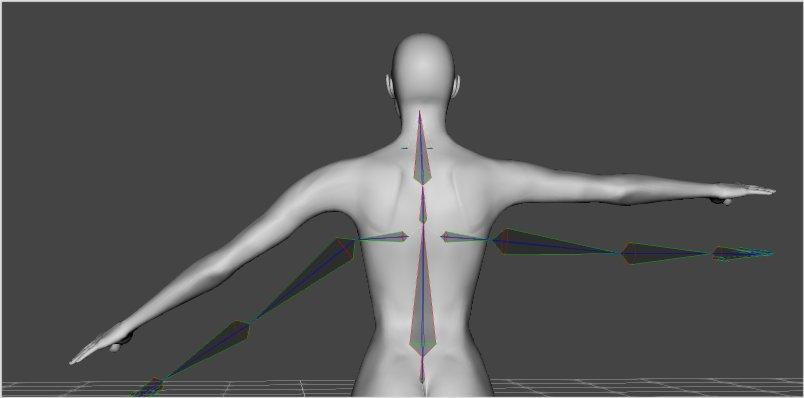
I then go to menu option 'Edit| Figure| Rigging| Adjust Rigging to Figure' which according to Sickleyield's tutorial on DeviantArt works for G1-G8. And... Nothing.
The Problem: I presume the problem is that V3 is just too early to be covered by the 'Adjust Rigging to Figure' option. So, I probably need to manually edit the rigging.
Could someone point me to a step-by step description of how to do this or write a method how I could do it. (I'm sorry, I find video tutorials long winded, skimp on the bits I need to understand and cannot be easily referred to - I need to print a list of instructions out so I can follow them one by one, go back as necessary etc. Often a 10 point list can summarise a 30 minute video with precision and no havering/wavering/unintelligable accents). It seems to me that each end of the bones visible in the 'Bones View' needs to be edited somehow to match the ends in the GV3 character and then that saved with a reference so it is linked to the GV3 morph. Then (hopefully) the clothing would then fit the GV3 morph on V3, next step is to save the new clothing shape as an obj file. Then load the clothing again, add the obj file as a 'GV3 fit' morph, and then edit the clothing's rigging in the same manner to end up with a proper GV3 fit morph that would do the job CC2 cannot do any more. It is long winded, but I am fond of the character & it's a challenge.
I look forward to any suggestions anyone can make. And even if I am barking up entirely the wrong tree with making the clothes fit, it'll teach me a great deal about rigging and how to modify/adjust/play with it.
Regards,
Richard.
3D Art Freebie Challenge-September 2020-"In the Sky" -Main Thread OnlyThis is an NAE
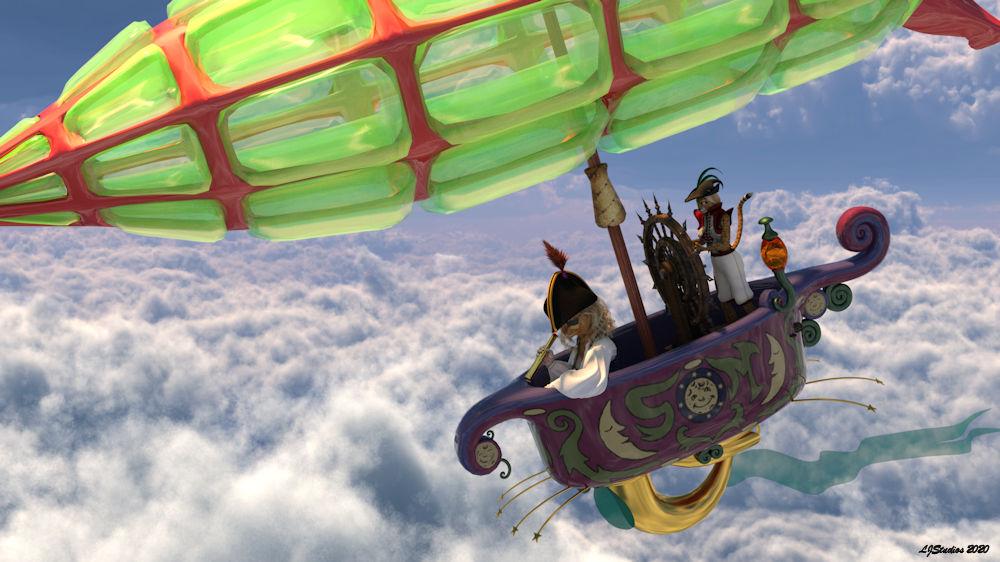
Title: The Good Ship Flying Bathtub
Rendered in iRay. Post work to add sig.
I had the image in my head for last month's challenge but didn't get around to doing it. I think it fits both months. In this one I did some kit bashing, like using parts of Helmut Schaub's air vechile. I only used his under carriage for the bath tub all the rest of the model is hidden. Same for the balloon part of the ship. I used the balloon part of the Steampunk airship and hid the carriage and such. The mast is the banner in the Drakkorian Battle Gear and the wheel is the wheel from DM's freebie from last year's Renderosity's newsletter. I just hide the base. This is also a continuation of Lt. Mia's adventures. This time she is captain of the good ship Flying Bathtub with her trusted first mate Tobi. Both characters are Little Dragon's work. Tobi is a stand alone character and needs no additional figures to make her. With a bit of fussing you can get Victoria 2 clothing to work on her.Freebies
Character:Captain Mia:Actor * Millennium Catwoman v1.2 by Little_Dragon.
Character:Captain Mia:Hair * Amante Hair by AprilYSH.
Character:Captain Mia:Hat * M4 Bicorne Hat 02 by Varsel.
Character:Captain Mia:Spyglass Collapsible Spyglass by Stegy.
Character:Captain Mia:Texture * MilCatwoman Red Tabby Texture by Little_Dragon.
First Mate: Hair Flo Hair Version 2.1 by English Bob.
First Mate:Character Tobi 2.0 by Little_Dragon.
Shader:ship:Flying Bathtub:Gold * jewelry_iray_shaders by AllenArt LaurieA.
Shader:ship:Grid structure on Balloon * Iray car related shader presets 'megapack' by Tom2099.
Shaders: Spyglass * vMaterials 1.5 AEC IRay Shaders by MCDLabs.
Ship:Balloon * UV Mapped Steampunk Airship Model .obj format by Urdwolf.
Ship:Flying Bathtub * Flying bathtub by ghonma.
No CountsCharacter:Captain Mia:Base * Victoria 2.0 by DAZ 3D.
Character:Captain Mia:Eyepatch * Cyber Punk 01 by Traveler.
First Mate:Clothing:vest and pants * RDNA Swashbuckler For V2 by Traveler.
Shader:ship:Flying Bathtub:Flag * AllenArt Shimmery Sheer Fabric - Iray by AllenArt LaurieA.
Ship:Mast * Drakkorian Battle Gear by SpiritFoxy.
Ship:Underbelly structure of Bathtub airvehicle by Helmut Schaub.
Ship:Wheel * DM's Wheel by Danie marforno DM Productions.Paid fors
Character:Captain Mia:Head * Millennium Cat by DAZ 3D.
Character:Captain Mia:Texture * Classic Cats Combo by LaurieS Lisa's Botanicals.
Character:Captain Mia:Top * Pirate, pants, top and hair for vicky 2 by PoserWorld.
Environment: Lighting and background * Skies of iRadiance - Sunny Sky HDRIs for Iray by DAZ 3D DimensionTheory.
Shader:ship:Balloon material * Equine Dreams by Jepe Muscleman.* - Registration is required.
All of the No counts are products that are no longer available. The Classic Cats Combo and the Pirate, pants, top and hair for vicky 2 from the paid for list are no longer available to buy. If you had a membership to Poser World prior to the their new store opening then you do have access to the pirate top.
The "Animators Assemble!" thread for Daz animation WIPs, clips, and tips So, Fenric's Carrara plugins (all of them) are Free now. So are the Digital Carver's Guild and others. (see Carrara Plugins)
Well VWD can make conformed clothes dynamic, but then the shapes from the fit are 'tailored' into the cloth, so it can often try to keep that shape, even if the shape is no longer over that shape of the figure. Perhaps it's my inexperience.
Anyway, I use Fenric's Unlock Figure feature, and then Animate > Detach Skeleton, and remove the Actor from the rig. Now it's a prop and I can delete or add polygons, add or delete materials zones, etc., and then make it a dynamic cloth. Fun way to design clothing without actually modeling it. I mentioned this stuff already in my Character Design video on YouTube.
Well I just picked up Aussie Girl Outfit because it looks like it would make excellent dynamic clothing. Holy Cow!
I barely had to try!
Genesis 1 is funny this way, because its base shape is male. So Genesis 1 clothing looks like it fits Mike and Bill, even Paul... but not Suzy, Rose or Victoria. Well Aussie Girl Outfit includes a V4 version. So I loaded that up today and really changed it up quite a bit. Not really on purpose, but as I was shaping it to my Character, inspiration hot and I made a really cool, still Aussie Girl-looking top.
I didn't nail it at all, just used the Cotton srtting in the assistant and ran it. Rendering now but did it ever look great in the realtime post view after the simulation was complete. So excited!
Mine still looks like the Aussie Girl outfit, but for cloth simulation on an action girl, I opted to bring more shirt onto the shoulders so it doesn't fall off without glue.
I conformed the shorts, but the action was causing poke-through between the thighs and hip, so I ran them through VWD fully nailed and it worked like a charm. No dynamics and no poke through! ;)
Perfect, great achievement.
And I also currently use that trick of placing the city on one or more standard geometric figures with a texture or even just a color. In my case as it is round, I used about 3 cylinders for it.
Today I owe a big one to Carrara. It just saved me from desperate situation due to damn OBJ and FBX formats. As interchangeable 3D file formats between programs, both leave a lot to be desired.The "Animators Assemble!" thread for Daz animation WIPs, clips, and tipsSo, Fenric's Carrara plugins (all of them) are Free now. So are the Digital Carver's Guild and others. (see Carrara Plugins)Well VWD can make conformed clothes dynamic, but then the shapes from the fit are 'tailored' into the cloth, so it can often try to keep that shape, even if the shape is no longer over that shape of the figure. Perhaps it's my inexperience.
Anyway, I use Fenric's Unlock Figure feature, and then Animate > Detach Skeleton, and remove the Actor from the rig. Now it's a prop and I can delete or add polygons, add or delete materials zones, etc., and then make it a dynamic cloth. Fun way to design clothing without actually modeling it. I mentioned this stuff already in my Character Design video on YouTube.
Well I just picked up Aussie Girl Outfit because it looks like it would make excellent dynamic clothing. Holy Cow!
I barely had to try!
Genesis 1 is funny this way, because its base shape is male. So Genesis 1 clothing looks like it fits Mike and Bill, even Paul... but not Suzy, Rose or Victoria. Well Aussie Girl Outfit includes a V4 version. So I loaded that up today and really changed it up quite a bit. Not really on purpose, but as I was shaping it to my Character, inspiration hot and I made a really cool, still Aussie Girl-looking top.
I didn't nail it at all, just used the Cotton srtting in the assistant and ran it. Rendering now but did it ever look great in the realtime post view after the simulation was complete. So excited!
Mine still looks like the Aussie Girl outfit, but for cloth simulation on an action girl, I opted to bring more shirt onto the shoulders so it doesn't fall off without glue.
I conformed the shorts, but the action was causing poke-through between the thighs and hip, so I ran them through VWD fully nailed and it worked like a charm. No dynamics and no poke through! ;)
Beads of sweatRight, that's interesting. It works with Genesis 3, Victoria 7 and Brooklyn HD. Now I'm starting to think, as with my eye problem earlier (different thread), it's dependent upon the environment.
If I remove draw dome and go for scene only lights, with one spotlight and nothing else in the scene except the figure with its water geo, I get the effect I outlined at the start. If I add an environment dome, it works. This would seem to rule out using it at night and/or indoors and must surely be a bug.
Dartanbeck's Journey - CG FilmmakingAs I await my renders, I often go in and dabble on the website. Since it's such a vast and growing place, I often find little things that I've left out accidentally and there are always pages that are started but need continuation. So I progress some things, add updates and entirely new content as I go.
In the filmmaker endeavors I'm having a lot of fun in the time that I have - rendering animations, building scenes, and experimenting with new possibilities. I've also been writing and recording new episodes for the YouTube tutorials series. More to come, and hopefully soon!
In the meantime, here are some highlights of the site at Dartanbeck.com:
Victoria 4 - Another look at the absolute most widely supported 3D human figure - period!
DaVinci Resolve - What video editor are you using?
Fusion - VFX Compositing on the Hollywood level!
Particle Illusion is free? - Particle Illusion is Free!!!
Project Dogwaffle Howler - Digital Painting with Doggy Attitude... and Animation Creation and Editing Tools
Carrara Zone - Let's Model. Let's Animate. Let's Render!
Carrara Info - from Cripeman Tutorials to Plugins
Carrara CG Workshop - Character Setup Pages
DAZ Zone - Welcome to the Magic of Daz 3D!
Daz Studio - Learn to become a 3D Artist!
Some of My Personal Favorites is a page that will be growing as I get the time to fill it.
It's a page dedicated to some of my favorite content from Daz 3D that I use in Carrara. I thought it would be a helpful showcase of product both legacy and new and everywhere in between that is known to work in Carrara. Helps take some of the guess work out of it.
I'll also try and make notes about the author - some of these content artists have a knack for making things that just plain work - and work well!
(this last entry is brand new and still has a l o n g way to go - but I like what I have so far!)
beginner questionsHello again. Wow, I am so happy with the answers! It really made a huge difference, now I can use so many locations as well as props.
I did download catwoman, see this link:
https://www.renderosity.com/mod/freestuff/catwoman/75325
when I try to load\import her (what is it really called??), I get an error saying "cannot find a file for blMilWom_v4b.obj". How do I solve this? I cannot find that file in the downloaded folder. Do I need to download something else for this to work?
Thanks alot guys, it really helps! :)
That is a character for Victoria 4, it requires https://www.daz3d.com/victoria-4-2-base
*Released dforce Desert Queen Hair* Commercialhttps://www.daz3d.com/dforce-desert-queen-hair-for-genesis-3-and-8-females
YAY for Strand Based Hair!!!
I'd like to include some general information and helpful tips for you to use my new sets in the store :)
What is the difference between strand based hair and fibermesh?
Strand Based Hair is generated inside Daz Studio. Fibermesh is actual mesh generated within Zbrush. Fibermesh can bring even the nicest computers to a painful crawl once it is imported into Daz Studio. Strand Based Hair is so much lighter!! There are a lot less hairs in your viewport, and the rest are generated during the render. I don't know all the magic behind that part, but its really awesome.
SBH ( Strand Based Hair ) is DYNAMIC! - Yes!!!!!!!!!!!!!. As an artist that has been working with Daz Studio and Poser for almost 20 years, this is what I always dreamed of!!!!!! Well I have also dreamed of being a millionaire too, but I'll settle for this
 .
.But what if I don't want to run a simulation? With the ones currently in the store, you do not need to run a simulation unless you want to. There are morphs that will move the hairs around like a traditional hair model too! The coolest part is that you can use the morphs before a simulation, without a simulation, and/ or after a simulation.
How do I use it? Select your figure and load the model like you normally would. Make sure that you do not have the geometry editor tool or the awesome Mesh Grabber Tool selected, pose your figure and render.
How do I use the morphs? These SBH hair models are currently in pieces to add more versatility. Selecting it in the scene tab will make the morphs appear in the parameters tab ( They are parented to the head) . Keep in mid that because these hairs are separate pieces they are grouped. So you will have to expand the options in the scene tab to find the individual pieces. Then just play with the sliders to your liking!
How do I simulate the hair? Welll there are several ways to do this, but the easiest way is to click on the simulate tab and click simulate. No extra settings needed. You can also use a timeline animation, or use the settings provided to use just gravity.
There will be so much versatility!! I have added a ton of separate surfaces so you will be able to easily kitbash these. Shut off certain surfaces to combine them with other SBH hairs orrrr maybe even combine them with some of the regular 3d hair models in the store and make a hybrid!
Technical Stuff:
Line Start With & Line End Width - This is how thick your hair is and how it tapers. I kept mine slightly thicker @ .09. and .03 to keep the amount of generated hairs to a minimum. If you want the hair to be thinner or taper more, you can turn this amount down, but oviously you will have to add more hairs.
Root Radius - This is the mode I have chosen to favor. It doesn't require painted maps or interpolation algorithms ( where hairs can go off in crazy directions for almost no good reason) and it is much more predictable for me when I import my hair from outside programs. With that said, there are no options for the cool stuff like frizz. Sorry guys :(
PS Points (per hair) - for those of you that model this is similar to CVS in a curve. It can control how smooth the hair will look. If you do a simulation and the hair just turns to a straight mess, try turning this down. The lower the setting, the more stiff the hair itself will behave and keep it's shape. Too low and you may end up with some jaggy edges. I feel like 20 to 30 is a good start for these stiffer styles.
PS Hairs (Per guide)- This is fairly self explanatory. If you want a fuller look, you can try adding more hairs. More hairs will probably require more computing power. But feel free to play with the setting.
PS Hair Tip Separation - This is a clumping option. Positive direction moves the hair away from the tip. Negative direction forms a clump at the tip.
Bias and Gain - This also has to do with clumping.
Bias is where along the hair shaft the clumping/non clumping starts. The lower the number the higher up the hair shaft the tip separation starts and vice versa.
Gain is how the bias transitions along the hair shaft.
I don't bother messing with these too much, but feel free to play with them.
PS Hairs and PR Hairs - PS hairs are supposed to be more accurate when simming than PR hairs. Also, I have found that PS hairs have a more delicate, natural look to them. PR hairs are great for adding a little extra bulk or frizz depending on how you use it. To get hair more dense looking, you can add PR hairs one or two at a time. I like to think of PR hairs as a multiplier, so you don't need to add a whole lot. If you want to make the hair appear a little more frizzy, you can play with the distribution radius and the tip separation for the PR hairs.
More Technical Questions * This will be added to as questions come up so all info can be placed in one convenient place
I like to use the NVIDIA Iray Preview. The hair is not chowing up in it. How can I preview the hair in that window?
You can view the hairs by going into the parameters tab: viewport line tesselation sides. You can change this setting from 0 to 2 or higher.
I want a certain section of my hair to drape more. Is there a way to do that? Yes! There are a few options you can use to adjust the draping so it suits your particular scene better. You can adjust the PS Points on the surface you select to something higher. The double dutch braids in particular are kept fairly low around 20. This keeps the whole hairstyle fairly stiff. I would start fairly high at maybe 60 and see what results you get and what you are exactly looking for. If it drapes better but its lost too much of your shape you can adjust other options as well.
You can also adjust the Local Shape Constraint Stiffness. Turning this down lower will also make the hair drape more while keeping the shape of the hair more in tact.
You can also adjust the tips of the hair with Local Shape Constraint Tip Stiffness. This will loosen up how the tips drape more. A lower number will spread those tips out more during a simulation.
All of this is a process of trial and error and what exactly you are looking for in an end result.
I want to simulate hair on a figure that is on a floor. When I sim the hair it makes an explosive mess. Help! This wasn't a question posed here yet but I know it's on the way :) You have a few options to handle this situation. If you are on an older computer that doesn't do so well with simulations, try keeping the model's head height as the same level the default figure loads in. I hope that makes sense. When a simulation is going it is essentially pulling those hairs to the end pose. Further away from default equals more pulling.
If you have a decent computer and you don't have an issue with simulations then you can simply change the simulation settings - Pose Transition Time to something higher than 1. The promos I did with Victoria on the floor all had a pose transition time of 3 - but I believe 2 probably would have done just fine.
Some general dhair issues were discussed in a different dforce hair thread and I want to share them here along with solutions.
"Needs greater stability when dealing with hair not pretty much falling straiht down, but with head/neck at 'strange' angles.
Hair falls with gravity. If you bend the head to the right, then the hair should essentially fall to the right. However, depending on the style of the hair; you may need to use a pose, a morph, or a simulation setting to nudge the hair in that direction. If it is a stiffer style, you will more than likely need to adjust the points or the stiffness.
I have had on several occassions tried to get a hair to flow a certain way. Case in point : https://www.daz3d.com/dforce-soft-curls-for-genesis-8-and-genesis-3-females the promo with victoria on the ground. I tried several animations to get her hair to fall like that. Using morphs i was able to nudge the hair the way i wanted but it still didn't fall the way i had hoped. Simply changing the simulation controls "Start Bones from Memorized Pose" to off used gravity instead of an animation. It's a lot of trial and error. Understanding your options, settings, and little tricks along the way can give some wonderful results. The key is really to be patient. Learning takes time.
"Needs to be affacted by wind nodes in a consistent fashion"
I am not quite sure I understand what the author meant by this, so for the time being.. Im going to guess.
Hair that is lodged into a figure will not move. No matter how hard the wind blows.
" Needs to be able to cope with morphs that could produce poke-thru (such as elf ears) without crashing"
If you have poke through, you will get a mess. Plain and simple. The bigger the mess the more likely chance you will have a crash.
I understand you will want these products to do everything and then some that you can throw at it, but please understand we can't forsee all of your creative visions :)
I will look into seeing if morphing within daz studio can potentially be done by a customer. If it can, I will share some info here.
"Needs to handle motion in animations without leaving a 'trail' of hair floating in the air behind the figure."
I'm guessing that this is referring to producing a still render with a simulated hair animation.
Easy fix. Change the pose transition time to something greater than 1. If you still have trails, adjust to 2. You can also increase the stabilization times to something greater than1.
You can also try and move the figure closer to world center so there is less "pulling" on the hair during the animation.
Now go have some fun and be creative already!
I will be here checking this thread as often as I can to help, should you get stuck, have questions, or just wanna show off pretty pictures :)
 Novica & Forum Members Tips & Product Reviews Pt 13
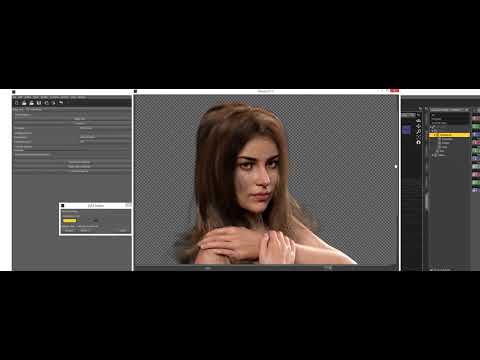
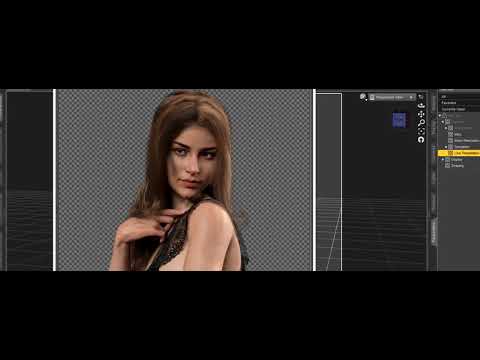
I got fed up with no thumbnails for new and old items and spent all day yesterday on two computers tracking down missing ones and creating new thumbnails (and yes, I also found a number of newer items now missing from the store too, along with older ones) and trying to decide where to place them data/cloud/meta or runtime/support. There just didn't seem to be any rhyme or reason to where they went. And sometimes, one computer had working thumbnails, while the other didn't. And I have to give the generation 3 era folks props, none of the items I owned was missing a thumbnail. Now, Victoria 4, Michael 4, The Kids 4, Freak 4, Stephanie 4, She Freak 4... a mess. 12,396 products. My eyes hurted.
Then I exported my user data.
Questions about DIMThen I did a compare between the files in the zips and the installed files, (CRC32 value in zip versus CRC32 value of installed files). The program I used reported that two files (apparently two different copies of the same file) were different, while the other file had no different files.
I checked some other things and found that a file in the corrupted zip is different when extracted with DIM than when extracted with WinRAR. It contains a version number so maybe it has to do with how DIM installs updated files:
Extracted with DIM:
{
version
{
number 4.01
}
}Extracted with WinRAR:
{
version
{
number 5
}
}
It's the same file that has different CRC values in the zip versuWs after being installed with DIM. So apparently DIM changes the version number in that file during installation, though strangly enough to an earlier version number (5 > 4.01). So not sure what's going on here.While it is certainly possibly that DIM is doing this, it seems very unlikely. There are two much more likely possibilities.
- The ZIP file was corrupt because there are two copies of the file in the archive. This can happen when software for editing zip files (for example replacing a file in an existing archive) does so incorrectly. This can create what is referred to as a "duplicate entry" and one program may keep the first instance of the file it comes across while extracting, and another may keep the last instance.
- The file already existed on your system because another archive contained a file with the same path. If I recall correctly, DIM does not overwrite existing files, while WinRAR probably does. If you installed everything with DIM, you can check this by looking at the file "InstallManagerFileRegister.json" in the root of the runtime directory you installed to - it records every file that already existed when extracting and keeps a counter, and decrements the counter when uninstalling.
You're right, it appears to be 2. I also installed the expansion pack for the product with DIM and it appears that it contains the same files at the same location, and overwrites the existing files from the base pack with files containing an older version number (5 -> 4.01).
But double checking it appears that DIM does overwrite existing files, or it's told to do so in some cases, depending on some parameters somewhere. In any case I uninstalled both packs and checked that all files were removed, then I installed the base pack and checked the CRCs for the files in question, and they matched. Then I installed the expansion pack with DIM and checked again, which revealed that the CRC for the installed files now had changed, meaning they had been overwritten.
I now recall that I saw something similar some time ago with Victoria 1 - installing Victoria 2 overwrites/updates some of the files in the V1 installation. However, after uninstalling V2 these files are now missing for V1. See screenshots. So something isn't working correctly here. Uninstalling V1 does not break V2 though, so at least that seems to be working correctly.
As for the "InstallManagerFileRegister.json" I've scanned for all .json files in my main DAZ Library but I can't find it there. It does exist in the root of a test library on another PC though but I can see that is has an older version of DIM (1.4.0.58) installed while the PC where the file is missing has 1.4.0.67 installed, so maybe they have changed something lately?
Why do outfits need FBM for Daz Original female characters?I don't own any Daz Original and only G8F characters made by PA. Almost all clothings have FBM made for specific Daz Name 8 females. Some even include support for non-Daz Original G8F. Do they make the outfit better? I own G8M fantasy characters of odd shape and clothing seems to fit them fine.
Also, if Victoria 8 is the flagship character then why some outfits that come with Name 8 female FBM do not have Victoria 8? There is also zero support for Daz's own HD Body Shapes https://www.daz3d.com/hd-body-shapes-for-genesis-8-female ?
Editing Cars... or get a car that has working wipers. I don't have an extensive collection but these cars I checked. They all have working wipers.
Car Boss
Car Mark
Car Victoria
Family Car 1950when did they pull the Millennium CatI only just discovered the Millennium Cat and it's bundles are no longer in the store, as I own them all I never had reason to look,
is the end for those using Poser?
Is Victoria 4 etc next?
At least as a Carrara 8.5 user I can still use the newfangled dual quaternion converted to blended weight in the plugin DAZ studio, not sure how new Poser users would fare.
So much content such as Lynes creations cats cannot work with this new weighmapped but old mesh feline also.
you can still get the base cat in this bundle https://www.daz3d.com/animal-starter-bundle
Daz 3D is part of

Connect
DAZ Productions, Inc.
7533 S Center View Ct #4664
West Jordan, UT 84084Licensing Agreement | Terms of Service | Privacy Policy | EULA
© 2026 Daz Productions Inc. All Rights Reserved.