-
chatbot? not clicked to find out
Sorel said:
Why do we apparently need these chat bots?
Here is Victoria's answer
Why do we need a chat bot?
Great question! Chatbots like me can provide immediate assistance when you need quick answers or help with common questions, rather than waiting for forum replies which can sometimes take days.
We're here to help you get faster support for urgent issues, guide you through troubleshooting steps, and provide information about our products and services right when you need it. This way, you can get back to creating amazing 3D art without delays!
Of course, for complex technical issues or account-specific matters, our human support team is always available when you need that extra level of assistance.
chatbot? not clicked to find outWell, as an experiment, I thought I'd ask the AI Victoria this question:

My expectations were that I'd either get a "No, you can't" answer... which is probably the useful answer for most people, but not strictly true when it's me asking the question...
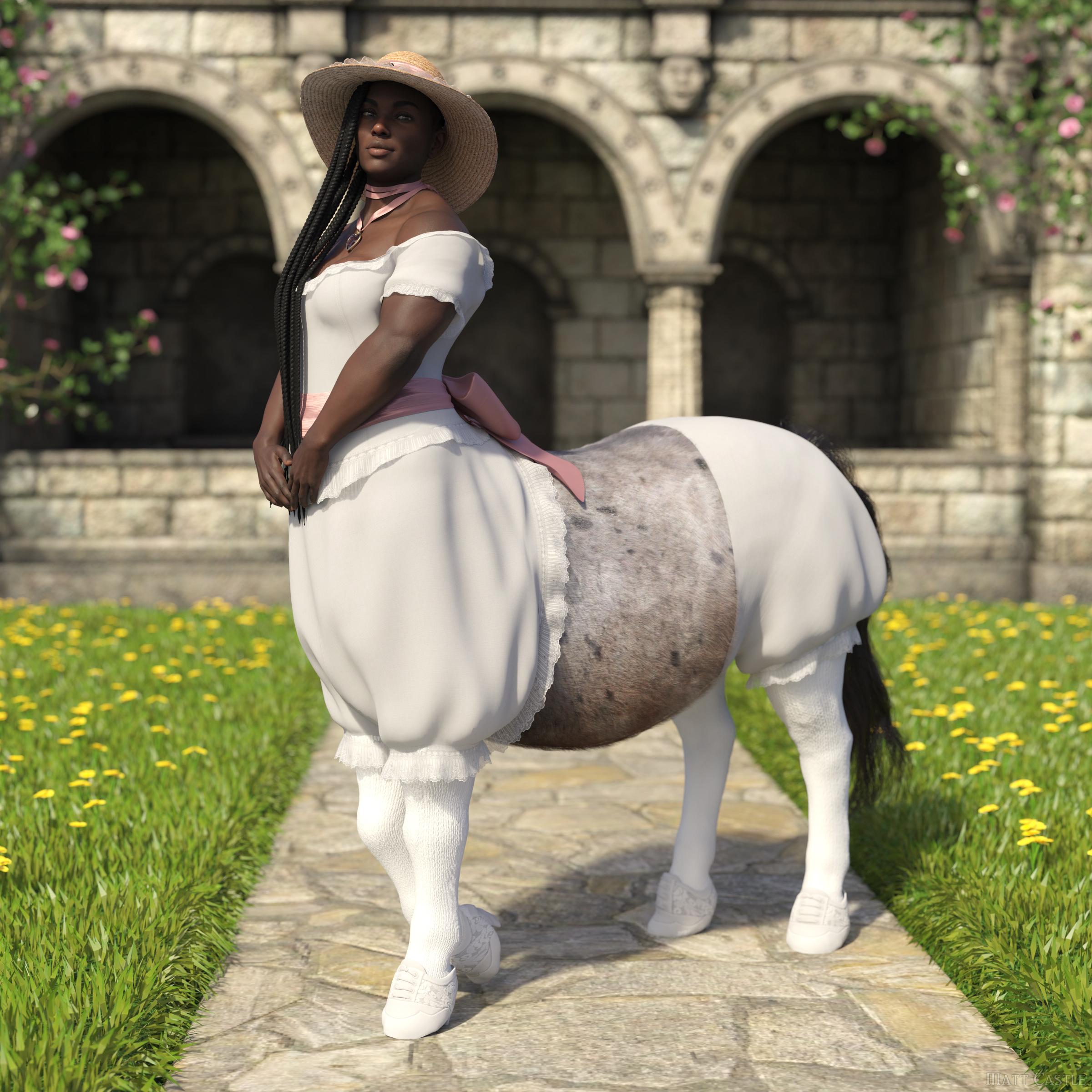
... or a canned "Yes, Daz Studio has an auto-fit function that allows [...]" answer that would be unhelpful to anyone, because you can't autofit like that (there's no clone, and even if you make one there's technical problems).
I wasn't really expecting this answer, which implies a lot about how the AI has been trained:
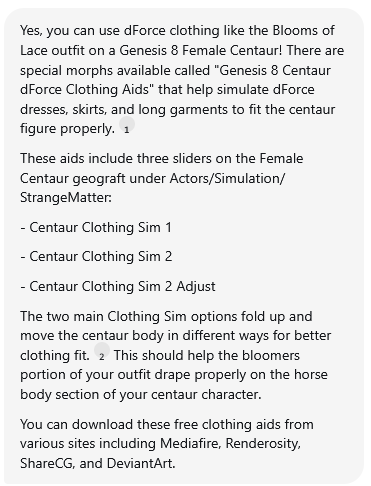
Firstly, it's wrong; You cannot use the Genesis 8 Centaur dForce Clothing Aids to fit bloomers to the centaur - I know, because I made them. (Drape skirts, cloaks or coats over the horse body, yes. Won't work on other things).
Secondly, parts of the answer are a near-verbatim quote from my forum freebie thread:

... which to me sounds a lot like it's been trained using forum posts, and in this case a pretty obvious regurgitation has come out because of how little training data would exist for a niche question like this.
chatbot? not clicked to find outWendyLuvsCatz said:
forum has gained a help agent
presumably a little Ai to replace Richard
not tried it yet

turned my ad blocker off to see it...
gave it a try and found out that:
1. Carrara isn't getting updated
2. Victoria isn't dating Michael
3. Victoria doesn't get annoyed.
make of that what you will
 Render your buys! ALL TIME Challenges
Elor said:
joanna said:
It seems that I'm hogging this thread. No one else rendering older buys? ;)
Your covers look very nice. I'll read your blog latter :)
Otherwise, it's just that real life was a bit hectic for me and I slept on the following render for a week (I didn't find the time to answer your previous answer, but I'll try, in the meantime, thank you for that), which was not a bad thing in the end: it gave me time to tweak the cup a little with Blender (by default the bottom is empty and while it was not that visible, I knew and it was enough) and to remove the glassy part of the coffee machine (because I didn't know how to add some coffee at its bottom).
One regret: I don't have breadcrumbs and didn't find either a way to create them myself or a product with them.
I think there is 7 items I never used before (in a render published in the gallery).
Two for Lacey's poses:
Her pajamas was also the first time I used it. As I said in the description, it's from Nelmi on Renderosity.
Four (five if Elleque's nice freebie counts) as part of the decors:
- Dream Kitchenware Collection (really nice to feel a kitchen)
- PT Modern Apartment Props
- Market Stall and Props (I created two crude morphs to change the level of the jam in the jar)
- ROG Red Crow Inn
Other items should be linked in the gallery (the ones visible at least: Victoria is fully clothed to take care of unwanted reflection but I don't think she visible at all outside of her arms and hands).
So, 'Morning routine', an entry for the 'Llola Lane’s RENDER A MONTH Challenge 2025' (theme of August, shape and I have chosen to use a rectangle):
Every morning it’s the same routine: Lacey wakes up, makes herself a cup of coffee and spend a bit of time revealing in the smell of hot coffee.
Victoria find it both cute and funny, not that she would ever explain to Lacey the why of the later.
The truth is, as a non-believer in coffee, she thinks that coffee smells nice but doesn't taste great.
So, each time she saw Lacey’s doing her morning routine, she could not avoid imagining that the first step of that routine was saturating Lacey’s nose’s smell receptors, to make her brain unable to process the taste of coffee.
Not that she was willing to test her theory, of course, especially because in the end, it didn’t matter: after all, coffee did put a smile on both her faces.

That is all kinds of adorable.
Render your buys! ALL TIME ChallengesElor said:
Every morning it’s the same routine: Lacey wakes up, makes herself a cup of coffee and spend a bit of time revealing in the smell of hot coffee.
Victoria find it both cute and funny, not that she would ever explain to Lacey the why of the later.
The truth is, as a non-believer in coffee, she thinks that coffee smells nice but doesn't taste great.
So, each time she saw Lacey’s doing her morning routine, she could not avoid imagining that the first step of that routine was saturating Lacey’s nose’s smell receptors, to make her brain unable to process the taste of coffee.
Not that she was willing to test her theory, of course, especially because in the end, it didn’t matter: after all, coffee did put a smile on both her faces.
Oh my gosh this is adorable and gives me such warm fuzzies. :) Thank you for sharing! <3
Render your buys! ALL TIME Challengesjoanna said:
It seems that I'm hogging this thread. No one else rendering older buys? ;)
Your covers look very nice. I'll read your blog latter :)
Otherwise, it's just that real life was a bit hectic for me and I slept on the following render for a week (I didn't find the time to answer your previous answer, but I'll try, in the meantime, thank you for that), which was not a bad thing in the end: it gave me time to tweak the cup a little with Blender (by default the bottom is empty and while it was not that visible, I knew and it was enough) and to remove the glassy part of the coffee machine (because I didn't know how to add some coffee at its bottom).
One regret: I don't have breadcrumbs and didn't find either a way to create them myself or a product with them.
I think there is 7 items I never used before (in a render published in the gallery).
Two for Lacey's poses:
Her pajamas was also the first time I used it. As I said in the description, it's from Nelmi on Renderosity.
Four (five if Elleque's nice freebie counts) as part of the decors:
- Dream Kitchenware Collection (really nice to feel a kitchen)
- PT Modern Apartment Props
- Market Stall and Props (I created two crude morphs to change the level of the jam in the jar)
- ROG Red Crow Inn
Other items should be linked in the gallery (the ones visible at least: Victoria is fully clothed to take care of unwanted reflection but I don't think she visible at all outside of her arms and hands).
So, 'Morning routine', an entry for the 'Llola Lane’s RENDER A MONTH Challenge 2025' (theme of August, shape and I have chosen to use a rectangle):
Every morning it’s the same routine: Lacey wakes up, makes herself a cup of coffee and spend a bit of time revealing in the smell of hot coffee.
Victoria find it both cute and funny, not that she would ever explain to Lacey the why of the later.
The truth is, as a non-believer in coffee, she thinks that coffee smells nice but doesn't taste great.
So, each time she saw Lacey’s doing her morning routine, she could not avoid imagining that the first step of that routine was saturating Lacey’s nose’s smell receptors, to make her brain unable to process the taste of coffee.
Not that she was willing to test her theory, of course, especially because in the end, it didn’t matter: after all, coffee did put a smile on both her faces.
Llola Lane’s RENDER A MONTH Challenge 2025 (ALL are welcome to join)The shape I have chosen is the rectangle, and it's front and center (sort of :o) in 'Morning routine':
Every morning it’s the same routine: Lacey wakes up, makes herself a cup of coffee and spend a bit of time revealing in the smell of hot coffee.
Victoria find it both cute and funny, not that she would ever explain to Lacey the why of the later.
The truth is, as a non-believer in coffee, she thinks that coffee smells nice but doesn't taste great.
So, each time she saw Lacey’s doing her morning routine, she could not avoid imagining that the first step of that routine was saturating Lacey’s nose’s smell receptors, to make her brain unable to process the taste of coffee.
Not that she was willing to test her theory, of course, especially because in the end, it didn’t matter: after all, coffee did put a smile on both her faces.
As usual, paid products from Daz3D are linked in the gallery. One was bought on Rendersoty, created by Nelmi.
----
sueya > The doors in the backgroud looks a bit like they are from West Park Ward :D
Nice render and I like how even the light is casting a squared shadows around the saxophonist :)
stezza > Nothing to add except 'mmm pie' indeed :D
SimonJM > I like the way the rule was twisted with star :D Lights feel better in the second version :)
acb > Poor Cupidon, forced to work longer because Zeus decided to raise the retirement age :D
Genesis 2 Appreciation Threadpaulawp (marahzen) said:
I downloaded this week's new freebies and bought Victoria 6 to put them on.
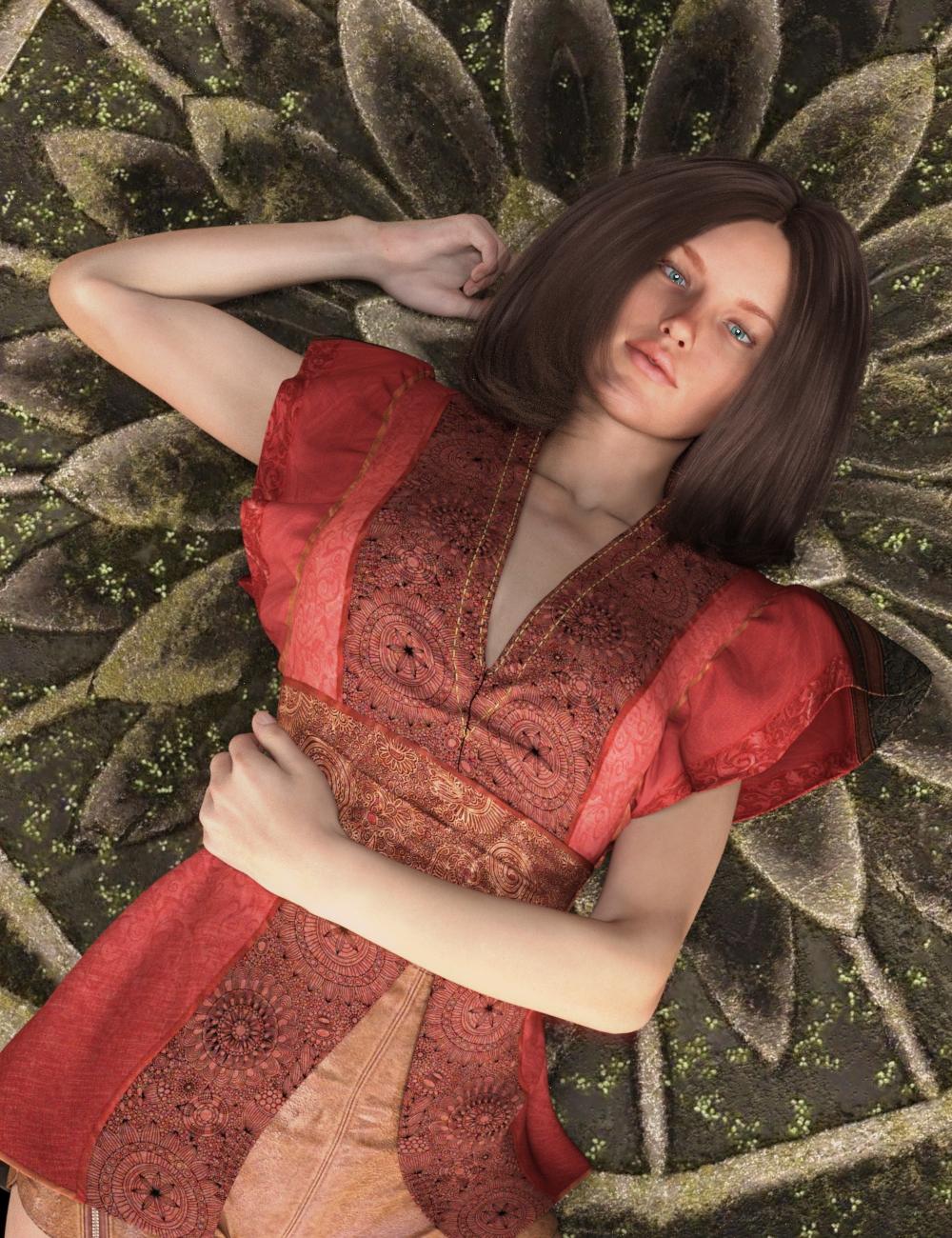
https://www.daz3d.com/victoria-6
https://www.daz3d.com/ronya-hair
https://www.daz3d.com/actual-eyes-4
https://www.daz3d.com/battle-kimono-for-genesis-2-femalesI'm using the original Victoria 6 textures with 1-Click PBRSkin. The eyes are significantly modified from the original freebie, as that product was presumably intended for 3DL.
Paula, that render is so nice! And thanks for the tip with the mandalas, I'm putting them on my wishlist. I'll also try 1-click-PBR skin next time with the older models, that seems to work much better than my manual conversion to Iray Uber.
Genesis 2 Appreciation ThreadI downloaded this week's new freebies and bought Victoria 6 to put them on.
https://www.daz3d.com/victoria-6
https://www.daz3d.com/ronya-hair
https://www.daz3d.com/actual-eyes-4
https://www.daz3d.com/battle-kimono-for-genesis-2-femalesI'm using the original Victoria 6 textures with 1-Click PBRSkin. The eyes are significantly modified from the original freebie, as that product was presumably intended for 3DL.
Can someone please identify the character?Head shape of Victoria 9 as the base + skin textures of other characters from... e.g. mousso, P3D...
Live In Store Now! - Ivy Scatters for Ultrascatter 2 (Commercial)felis said:
HowieFarkes said:
Richard Haseltine said:
Martinjfrost said:
felis said:
@Martinjfrost have you seen in the Ultrascatter Pro thread that Ultrascatter Pro under certain conditions crashes Daz Studio?
I am aware that there are crashes sometimes,. but these have been quite well tested and should be ok, as with everything to do with scattered objects, its always best to use the fewest possible instancees that helps avoid freeze ups and crashes.
The issue is that importing Victoria 4.2, and possibly other ExP figues, crashes DS if Ultra Scatter 2 is installed. This has been posted to the US 2 thread.
An update for UltraScatter2 (v2.0.0.19) that fixes this problem should be available for download now.
Installed update, and confirmed not crashing Daz Studio when loading Victoria 4.2

Thank you for the update, and for the confirmation that it works.
Live In Store Now! - Ivy Scatters for Ultrascatter 2 (Commercial)HowieFarkes said:
Richard Haseltine said:
Martinjfrost said:
felis said:
@Martinjfrost have you seen in the Ultrascatter Pro thread that Ultrascatter Pro under certain conditions crashes Daz Studio?
I am aware that there are crashes sometimes,. but these have been quite well tested and should be ok, as with everything to do with scattered objects, its always best to use the fewest possible instancees that helps avoid freeze ups and crashes.
The issue is that importing Victoria 4.2, and possibly other ExP figues, crashes DS if Ultra Scatter 2 is installed. This has been posted to the US 2 thread.
An update for UltraScatter2 (v2.0.0.19) that fixes this problem should be available for download now.
Installed update, and confirmed not crashing Daz Studio when loading Victoria 4.2
Live In Store Now! - Ivy Scatters for Ultrascatter 2 (Commercial)HowieFarkes said:
Richard Haseltine said:
Martinjfrost said:
felis said:
@Martinjfrost have you seen in the Ultrascatter Pro thread that Ultrascatter Pro under certain conditions crashes Daz Studio?
I am aware that there are crashes sometimes,. but these have been quite well tested and should be ok, as with everything to do with scattered objects, its always best to use the fewest possible instancees that helps avoid freeze ups and crashes.
The issue is that importing Victoria 4.2, and possibly other ExP figues, crashes DS if Ultra Scatter 2 is installed. This has been posted to the US 2 thread.
An update for UltraScatter2 (v2.0.0.19) that fixes this problem should be available for download now.
I might eventually buy it now

I do use Ultrascatter 1 quite a lot but also use V4 quite a lot and when I saw this issue mentioned I held off
Live In Store Now! - Ivy Scatters for Ultrascatter 2 (Commercial)Richard Haseltine said:
Martinjfrost said:
felis said:
@Martinjfrost have you seen in the Ultrascatter Pro thread that Ultrascatter Pro under certain conditions crashes Daz Studio?
I am aware that there are crashes sometimes,. but these have been quite well tested and should be ok, as with everything to do with scattered objects, its always best to use the fewest possible instancees that helps avoid freeze ups and crashes.
The issue is that importing Victoria 4.2, and possibly other ExP figues, crashes DS if Ultra Scatter 2 is installed. This has been posted to the US 2 thread.
An update for UltraScatter2 (v2.0.0.19) that fixes this problem should be available for download now.
How do I export Gen9 w high heels to Blender to .glb?Geo-shells should also work as expected with glb... and the process is all the same but just make sure you check Include Props when exporting to blend file.
Here's an example of using Victoria 9 + shell make-ups... and the imported glb figure.
Victoria 4 loading issuedeeahr2169 said:
I am really grateful to you Richard, your knowledge and expertise is a real help. I am still struggling to get this issue with V4 sorted despite feeling closer to a solution thanks to you. Each step I take seems to involve more complications, for example running DzCreateExPFiles-v4 command gets blocked by Mac because of security issues. To date nothing I try has resolved this extra issue...Which leads me to ponder the question of why this is necessary. On starting with Poser content I loaded the V4 and M4 from my content library via the Daz website, so one would have thought all the content I obtained would be good to go. Indeed the M4 base and power loader once installled allows me to load M4 into DS with no issues whatsoever. As can be seen from this thread the case with V4 is that some part of the package fails to load properly if at all. Surely this cannot be correct. If one downloads content from Daz it should load without having to resort to trying to load parts of tht content package using Terminal. I am not exactly tech savvy, so this entire saga is a real effort for me and I am once again of the verge of giving up on thisPoser based content....
With the previous generation figures adding extra morphs (beyond a few for a character) required a whole new figure file, so it was not possible to mix morph sets without using an external editing tool on the figure files. Even where characters used the supplied morph slots they could end up competing for the same slot. The ExP system is an attempt to avoid these by allowing each expansion (character or morph set) to add its own sloys, but it does require that the list Poser/DS read be updated for each addition or removal. The batch/command file was how this was done initially for Poser, Daz Studio has the Power Loader tool which can do the building on loading so that the process is more configurable. Do you in fact have the Power Loader extensions installed (the base for the figure is the important one)? If you see a little scroll icon at top-left of the Victoria 4 thumbnail in DS but don't get the dialogue try holding down the cmd key while you double-click on the file to force it to show the UI.
How do I export Gen9 w high heels to Blender to .glb?Makpah said:
(edited - I answered before watching the video, I'm gonna try that right now! THANKS)
So - that works when I start with an unmodified Gen9 and add Heels and Foot/Toe pose. But if I do the same but start with a character, the eyes/lashes/etc end up in the wrong place. I feel like there is some checkbox I'm missing.
Make sure you check Merge Followers as well as Include Animation in FBX Export Options.
The attached example was an export / import of Victoria 9's glb ~~
Victoria 4 loading issueHow about on disc? The support folder is /Runtime/Libraries/!DAZ/Victoria 4/with a large list of sub-folders for the various bones of the figure (Poser stores morphs per bone). Thatv is the sAME /Runtime/Libraries/!DAZ/ folder as I sent you to for the DzCreateExPFiles-v4.command file.
How do I export Gen9 w high heels to Blender to .glb?Hi there, I am an old time Daz (Victoria) user. I have successfully exported Gen9 figures Daz>Blender>glb and they work great. But, now I am trying to export figures with High heels and poses and the pose is lost in process. I have spent the last couple days trying everything I can find online.
To eliminate possible issues I am using the Gen9 base, I have the Gumball high heels from the store - they come with H-Pose for feet and toes. At this point I have dropped the shoes and just trying to get the Base figure to export with the pose intact. Is this possible?
Can someone please walk me through the steps?
TIA
Cannot find Victoria 4.2 in my daz libraryIf the morphs aren't showing up in Powerloader, Parameters tab, or the Shaping tab when you run the INJ file, it's prossibly because the DzCreateExPFiles.exe didn't run or glitched, or files are not in their proper paths for the exe to add the channels.
The path to this file is Runtime\Libraries\!DAZ.
Try running this manually, and it should create the channels for the morphs in V4.
When you load the V4 figure after this, the morphs should be there, and you can verify it by running the INJ, or by enabling Show Hidden in the parameters or shaping tabs.
The channels should appear in their appropriate paths as EMPTY-(Morph name) and be greyed out if the exe ran properly and the morph files were in the correct path.
If they're still not showing up, make sure the morphs you're adding are in the correct path, which is the same as the script, but one level down in the Victoria 4 directory.
Runtime\Libraries\!DAZ\Victoria 4.
If they're not there, there may be a problem with your install path, or the file itself.
Check DIM or what ever install method you're using to make sure the path is correct.
Daz 3D is part of

Connect
DAZ Productions, Inc.
7533 S Center View Ct #4664
West Jordan, UT 84084Licensing Agreement | Terms of Service | Privacy Policy | EULA
© 2026 Daz Productions Inc. All Rights Reserved.