-
error when downloading content from library
How old are those? I had to go back a way (25 pages) to find something from September, and that seems to be working OK. I was also able to download the old Victoria Clothing pack from 2001.
Almost Starting OverThey skipped 3-7 so there wouldn't be confusion over Genesis 4 vs. the pre-Genesis Victoria/Michael 4.
My understanding is that G8 is similar to G3. I don't use it, as I still prefer to use DS 4.8 and mostly use Genesis 1. Pre-G8 products often go on steep sale. I also have tools to convert everything to Genesis 1.
Best Options for 1920's Wearif you don't mind converting:
https://www.daz3d.com/roaring-20s-gangster-set-for-m3-and-the-freak
https://www.daz3d.com/roaring-20s-flapper-dress-for-victoria-3Genesis in Carrara question-- Welcome Back! You have been missed. --
Could be a couple of different things, so I apologize for the parts of this that are unnecessary.
----- In Browser Tray ---- Under Content tab ----
1) Do not load Genesis figures from a 'runtime' folder or 'figures' folder. Yes, even though Genesis, Gensis 2 Female, Genesis 2 Male, etc may appear there, it is because there is a way to convert from there to Poser. Do NOT do it to load to Carrara.
2) Do load Genesis, Genesis 2 Female, Genesis 2 Male, etc. from content "My Daz3D Library" or "My Library" or something. I renamed mine and don't remember the default name but it does NOT have the word Runtime in it. Once inside 'My Daz3D Library' or whatever it is called, the subfolder is People \ Genesis for the default Genesis load. Or, see People \ Genesis \ Characters for the likes of Victoria 5 or Michael 5.
3) The items designed specifically for Genesis should appear in subfolders of the respective People Genesis folder. For example, hair designed for Genesis 1 would be in People \ Genesis \ Hair, while hair designed for the Genesis 2 Male would be in People \ Genesis 2 Male \ Hair.
The first page of the following should help. See posts # 2-5 or so on the first page of the thread to see where they have placed the default carrara shaders for Genesis. You can safely ignore the other 40 pages of the thread. https://www.daz3d.com/forums/discussion/119181/no-one-asked-me-diomede-posts-screenshots-on-whatever/p1
Holy Zowies! I never knew that! Thanks Diomede! I fell in love with the whole Genesis design during the 8.5 beta phase, and Spooky kinda told me what I needed to know, so never even checked a Runtime path for it!
Hey BooksbyDavid! Great seeing you again! Just seeing your name always reminds me of HeadWax's very first of the Carrara Challenges! That garden pool scene you dod was/is Su-freaking-perb!!!
Since you're looking to get invloved woth Genesis, I thought that I should let you know that I have a very Genesis-in-Carrara centric websire going at Dartanbeck.com
I even have a nice little freebie Character Template scene with video instructions

Here's a fun little intro to the character on the cover of that video

There's a lot of Genesis info in there. Have a poke around if you like ;)
Here are some quick links that may help:
Cheers! :)
Genesis in Carrara question-- Welcome Back! You have been missed. --
Could be a couple of different things, so I apologize for the parts of this that are unnecessary.
----- In Browser Tray ---- Under Content tab ----
1) Do not load Genesis figures from a 'runtime' folder or 'figures' folder. Yes, even though Genesis, Gensis 2 Female, Genesis 2 Male, etc may appear there, it is because there is a way to convert from there to Poser. Do NOT do it to load to Carrara.
2) Do load Genesis, Genesis 2 Female, Genesis 2 Male, etc. from content "My Daz3D Library" or "My Library" or something. I renamed mine and don't remember the default name but it does NOT have the word Runtime in it. Once inside 'My Daz3D Library' or whatever it is called, the subfolder is People \ Genesis for the default Genesis load. Or, see People \ Genesis \ Characters for the likes of Victoria 5 or Michael 5.
3) The items designed specifically for Genesis should appear in subfolders of the respective People Genesis folder. For example, hair designed for Genesis 1 would be in People \ Genesis \ Hair, while hair designed for the Genesis 2 Male would be in People \ Genesis 2 Male \ Hair.
The first page of the following should help. See posts # 2-5 or so on the first page of the thread to see where they have placed the default carrara shaders for Genesis. You can safely ignore the other 40 pages of the thread. https://www.daz3d.com/forums/discussion/119181/no-one-asked-me-diomede-posts-screenshots-on-whatever/p1
!! Store Issues - Known Problems - Please Read !!I know some folks have had issues with DIM and not seeing their products. I have a different one that started yesterday.
Products show up and download ok, but many of them (15 out the last 30 or so I have downloaded) fail to install. It appears the install process fails on the very first texture file in each product - not sure why - lots of space on the drive, and I can extract the files and install them manually outside of DIM.
DIM Log extract
2020-11-14 13:28:46.212 WARNING: QAccessibleWidget::rect: This implementation does not support subelements! (ID 3 unknown for QWidget)
2020-11-14 13:28:46.332 Installing: 51417-1 : Maria for Victoria 8
2020-11-14 13:28:52.930 Could not extract file: E:/DAZ/TryMeStudio/content/Runtime/Textures/Virtual_World/VWMaria/VWMaria_Arms_1004.jpg
2020-11-14 13:28:54.268 Install Failed: Maria for Victoria 8
2020-11-14 13:28:54.272 WARNING: QAccessibleWidget::rect: This implementation does not support subelements! (ID 2 unknown for QWidget)
2020-11-14 13:28:54.272 Install Queue Finished: 0 min 7.9 sec
2020-11-14 13:28:57.941 WARNING: QAccessibleWidget::rect: This implementation does not support subelements! (ID 6 unknown for QWidget)
2020-11-14 13:28:58.044 Installing: 64727-1 : The Colosseum
2020-11-14 13:29:29.210 Could not extract file: E:/DAZ/TryMeStudio/content/Runtime/Textures/Protozoon/Colosseum/Arch/Face_Bump.jpg
2020-11-14 13:29:32.217 Install Failed: The Colosseum
2020-11-14 13:29:32.226 WARNING: QAccessibleWidget::rect: This implementation does not support subelements! (ID 2 unknown for QWidget)
2020-11-14 13:29:32.226 Install Queue Finished: 0 min 34.1 sec
2020-11-14 13:34:25.583 WARNING: QAccessibleWidget::rect: This implementation does not support subelements! (ID 4 unknown for QWidget)
2020-11-14 13:34:25.667 Installing: 73417-1 : MMX Resource Saver Shaders Collection 2 for Iray
2020-11-14 13:34:40.651 WARNING: QAccessibleWidget::rect: This implementation does not support subelements! (ID 5 unknown for QWidget)
2020-11-14 13:34:55.642 Could not extract file: E:/DAZ/TryMeStudio/content/Runtime/Textures/Mattymanx/MMX-RSSCV2/MMX-RSSC2-G1-Eyes-01-D.png
2020-11-14 13:34:57.195 Install Failed: MMX Resource Saver Shaders Collection 2 for Iray
2020-11-14 13:34:57.199 WARNING: QAccessibleWidget::rect: This implementation does not support subelements! (ID 2 unknown for QWidget)
2020-11-14 13:34:57.200 Installing: 50863-1 : PS Onishi for Genesis 8 Female & Victoria 8
2020-11-14 13:35:00.740 Could not extract file: E:/DAZ/TryMeStudio/content/Runtime/Textures/Pixeluna/PS_Onishi/Fiber_Strand_Dif_00.jpg
2020-11-14 13:35:01.456 Install Failed: PS Onishi for Genesis 8 Female & Victoria 8
2020-11-14 13:35:01.458 Install Queue Finished: 0 min 35.7 sec
2020-11-14 13:35:13.948 WARNING: QAccessibleWidget::rect: This implementation does not support subelements! (ID 3 unknown for QWidget)Character skin seams.Oh hey, this is great! Thanks guys for checking.

Don't have Latonya nor Millawa.
So below are some of the other G8F characters.
I did update/merge menus and opened and closed several sessions. Just in case need to activate something in backend. Doubt it. But just to be safe. That said I still don't get the auto addition of Filament Draw Properties. So I added again via Create sumbmenu. When mipmaps is toggled, it redraws the filement preview every time. So it is recognizing it.Interestingly, Victoria 8 is pretty much without seams. Very hard to see. Freja & Josephine are the worst and very visible. Babina head is perfect without a seam, but arms have slight seams. I did disable skin normals maps for all, and standardized Skin Bump to 2.0 for all. And all these screenshots is with MipMaps off.
The stark difference in visibility of seams between these Das Originals would lead me to believe they likely have different UV padding values when they were baked. Did not look because, I have so much other stuff to do. But with you guys being here and testing stuff, I put my stuff aside so I could at least test too.
Any chance either of you have Freja or Josephine? And could test sometime?
!! Store Issues - Known Problems - Please Read !!Just for context, here's the list of store issues from April 2013, 11 months after the Magento site went live. I'm not excusing the problems from this new store, just noting that Magento was way worse and my estimate would be that the proportion of the major issues they've fixed in 12 days took months back then.
Operational issue:
1) Shopping cart display default option to open as a page and not a drop down
2) "You already purchase this item warning" not active (Might need a special Script, Most stores don't check for this)
3) "You are buying an item in your wishlist" (Okay this is a New Feature that was not in the old site, but I did suggest it.)
4) Correct Item classification - I was in the People/woman while I did find models Mods, I also found Hair, Hair textures, clothes.
One of the more interesting, I found several previous generation models under Genesis shapes, like V3 Base.5) Items appear multiple times in the displayed list of items.
-- -- Haven not seen this is a while, so I may be fixed
6) Vendor Stores, and Links from their other products.
-- -- ** Known Issue --"The shop by vendor is being worked on."
7) Sale termination date - The sale on this product ends on
-- -- ** Known Issue
8) No file sizes for products listed on both the product pages and download pages
9) Ability to see add-ons to a product ( Thank you a_silberman)
-- -- I have seen add-on's for new product come up in the 'You may also like' (Which just seemed to vanish with the latest Reboot) 5/31
10) Ability to view Wiki or Read Me file about the product - from (digitell
-- the Old Art Zone Wiki is still reachable and you can lookup the product.
11) Unstable Prices, system seems to forget the pricing on objects.
12) Items showing up multiple times with multiple Prices
-- This might be fixed between the time I saw it and when I went back to Double check.
13) Could we please have the "You may also like" under the Description or over the the right side? (i know minor)
Searching or Sorting:
1) Search Within - to narrow down the thousand of things that are for Victoria 4
-- -- If you want to find only V5 items, Type: "Victoria 5" with the quotes. Search is not looking for exact parse.
-- Well it worked earlier today when found it, but now it isn't working again.
2) On Sale Only - That was a nice little search
-- -- No solution yet
3) SORTING - Any where you have things in columns we should be able to sort by the column headings.
-- -- Wishlist Sorting
-- -- No solution yet
4) Search within -- (** The web group is aware.)
Itemized Order History
My Orders
My Wishlist
-- -- No solution yet
5) Sort by price range -- you can sort by price, so we are talking about a price range
-- -- The Catalog Advanced Search allows for a price range, still doesn't display it's results.
6) Hiding Mac / PC items during product download. **Known issue
7) Searching for anything is faster if you use Google or Bing, You will find what you want faster that way of you know something about it.Daz Studio Pro BETA - version 4.12.2.60! (*UPDATED*)I can recreate this iRay section plane crash every time:
1. start DAZ with new empty scene
2. create section plane
3. translate y (of plane) to 111 (it doesn't crash with y=0)
4. from Smart content, add figure "Benita for Victoria 8"
(other figures may or crash after a while)
Result: DAZ crash, 8 out of 8 times.Debug message:
"DAZStudio.exe caused ACCESS_VIOLATION in module "C:\Program Files\DAZ 3D\DAZStudio4 Public Build\libs\iray\libiray.dll" at 0033:0000000098794523, mi_plugin_factory()+1270611 byte(s)"
Notable msgs from the log:
CUDA device 0 (GeForce RTX 2070 SUPER): Tail kernel failed after 0.002s
CUDA device 0 (GeForce RTX 2070 SUPER): an illegal memory access was encountered (while launching CUDA renderer in <internal>:705)
CUDA device 0 (GeForce RTX 2070 SUPER): an illegal memory access was encountered (while de-allocating memory)*if* it is related to "de-allocating memory", this would explain why it only happens sometimes, after a while, after switching draw styles and the like.
Note: beta 4.14, rtx2070s, latest studio driver, win10
All in iRay photoreal. In Interactive mode crashes much more often.Here's a possible solution, is working fine for me:
https://www.daz3d.com/forums/discussion/comment/6213281/#Comment_6213281
It seems like any intersecting geometry makes Section Cap totally confused. I don't know how it is supposed to work, but this result just seems strange to me. How does one use it effectively in a scene with real Daz Studio assets, which are usually pretty complex?
Here are an overlapping primitive cube and sphere. I expected it to look more like the Clip Lights example, but with a color controlled with the render setting.
Here's an example:
https://gcdn.daz3d.com/p/74225/i/interior-light-pro-for-filament-and-iray-10-daz3d.jpg
I'm not an expert in Iray/materials/etc, but I use it in indoor scenes, I can apply a HDRI dome and that light penetrates inside and it's easier to illuminate the scene, especially in low light situations; besides, Daz will only render the scene that is between the Iray planes... all this improves the lighting and reduces the rendering times considerably, as well as avoiding possible "white spots" in the image generated by lack of light.
It's especially useful in animations, where time per frame is really important; it's not the same to take 30s/frames or 2m/frame in an animation of 500 frames or more (4h25m vs 16h40m, lol).Daz Studio Pro BETA - version 4.12.2.60! (*UPDATED*)I can recreate this iRay section plane crash every time:
1. start DAZ with new empty scene
2. create section plane
3. translate y (of plane) to 111 (it doesn't crash with y=0)
4. from Smart content, add figure "Benita for Victoria 8"
(other figures may or crash after a while)
Result: DAZ crash, 8 out of 8 times.Debug message:
"DAZStudio.exe caused ACCESS_VIOLATION in module "C:\Program Files\DAZ 3D\DAZStudio4 Public Build\libs\iray\libiray.dll" at 0033:0000000098794523, mi_plugin_factory()+1270611 byte(s)"
Notable msgs from the log:
CUDA device 0 (GeForce RTX 2070 SUPER): Tail kernel failed after 0.002s
CUDA device 0 (GeForce RTX 2070 SUPER): an illegal memory access was encountered (while launching CUDA renderer in <internal>:705)
CUDA device 0 (GeForce RTX 2070 SUPER): an illegal memory access was encountered (while de-allocating memory)*if* it is related to "de-allocating memory", this would explain why it only happens sometimes, after a while, after switching draw styles and the like.
Note: beta 4.14, rtx2070s, latest studio driver, win10
All in iRay photoreal. In Interactive mode crashes much more often.I can recreate this following your instructions. I have a GTX 980 Ti and game driver in DS 4.14.0.8 Public Beta. If I turn on either Clip Lights or Section Cap Enable, it doesn't crash.
2020-11-13 16:05:57.898 Iray [INFO] - IRAY:RENDER :: 1.2 IRAY rend info : CUDA device 0 (GeForce GTX 980 Ti): Allocated 864.000 MiB of work space (1024k active samples in 0.000s)
2020-11-13 16:05:57.970 WARNING: ..\..\..\..\..\src\pluginsource\DzIrayRender\dzneuraymgr.cpp(353): Iray [ERROR] - IRAY:RENDER :: 1.3 IRAY rend error: CUDA device 0 (GeForce GTX 980 Ti): an illegal memory access was encountered (while launching CUDA renderer in <internal>:947)
2020-11-13 16:05:57.970 WARNING: ..\..\..\..\..\src\pluginsource\DzIrayRender\dzneuraymgr.cpp(353): Iray [ERROR] - IRAY:RENDER :: 1.3 IRAY rend error: CUDA device 0 (GeForce GTX 980 Ti): Failed to launch renderer
2020-11-13 16:05:57.974 WARNING: ..\..\..\..\..\src\pluginsource\DzIrayRender\dzneuraymgr.cpp(353): Iray [ERROR] - IRAY:RENDER :: 1.2 IRAY rend error: CUDA device 0 (GeForce GTX 980 Ti): Device failed while rendering
2020-11-13 16:05:57.974 WARNING: ..\..\..\..\..\src\pluginsource\DzIrayRender\dzneuraymgr.cpp(353): Iray [WARNING] - IRAY:RENDER :: 1.2 IRAY rend warn : All available GPUs failed.
2020-11-13 16:05:57.974 WARNING: ..\..\..\..\..\src\pluginsource\DzIrayRender\dzneuraymgr.cpp(353): Iray [WARNING] - IRAY:RENDER :: 1.2 IRAY rend warn : No devices activated. Enabling CPU fallback.
2020-11-13 16:05:57.977 WARNING: ..\..\..\..\..\src\pluginsource\DzIrayRender\dzneuraymgr.cpp(353): Iray [WARNING] - IRAY:RENDER :: 1.2 IRAY rend warn : Re-rendering iteration because of device failure
2020-11-13 16:05:57.977 WARNING: ..\..\..\..\..\src\pluginsource\DzIrayRender\dzneuraymgr.cpp(353): Iray [ERROR] - IRAY:RENDER :: 1.2 IRAY rend error: All workers failed: aborting render
2020-11-13 16:05:57.977 WARNING: ..\..\..\..\..\src\pluginsource\DzIrayRender\dzneuraymgr.cpp(353): Iray [ERROR] - IRAY:RENDER :: 1.2 IRAY rend error: CUDA device 0 (GeForce GTX 980 Ti): an illegal memory access was encountered (while de-allocating memory)
2020-11-13 16:05:57.980 WARNING: ..\..\..\..\..\src\pluginsource\DzIrayRender\dzneuraymgr.cpp(353): Iray [ERROR] - IRAY:RENDER :: 1.2 IRAY rend error: CUDA device 0 (GeForce GTX 980 Ti): an illegal memory access was encountered (while de-allocating memory)
2020-11-13 16:05:57.980 WARNING: ..\..\..\..\..\src\pluginsource\DzIrayRender\dzneuraymgr.cpp(353): Iray [ERROR] - IRAY:RENDER :: 1.2 IRAY rend error: CUDA device 0 (GeForce GTX 980 Ti): an illegal memory access was encountered (while de-allocating memory)
2020-11-13 16:05:57.982 WARNING: ..\..\..\..\..\src\pluginsource\DzIrayRender\dzneuraymgr.cpp(353): Iray [ERROR] - IRAY:RENDER :: 1.2 IRAY rend error: CUDA device 0 (GeForce GTX 980 Ti): an illegal memory access was encountered (while de-allocating memory)
2020-11-13 16:05:57.982 WARNING: ..\..\..\..\..\src\pluginsource\DzIrayRender\dzneuraymgr.cpp(353): Iray [ERROR] - IRAY:RENDER :: 1.2 IRAY rend error: CUDA device 0 (GeForce GTX 980 Ti): an illegal memory access was encountered (while de-allocating memory)
2020-11-13 16:05:57.985 WARNING: ..\..\..\..\..\src\pluginsource\DzIrayRender\dzneuraymgr.cpp(353): Iray [ERROR] - IRAY:RENDER :: 1.2 IRAY rend error: CUDA device 0 (GeForce GTX 980 Ti): an illegal memory access was encountered (while de-allocating memory)
2020-11-13 16:05:57.985 WARNING: ..\..\..\..\..\src\pluginsource\DzIrayRender\dzneuraymgr.cpp(353): Iray [ERROR] - IRAY:RENDER :: 1.2 IRAY rend error: CUDA device 0 (GeForce GTX 980 Ti): an illegal memory access was encountered (while de-allocating memory)
2020-11-13 16:05:57.988 WARNING: ..\..\..\..\..\src\pluginsource\DzIrayRender\dzneuraymgr.cpp(353): Iray [ERROR] - IRAY:RENDER :: 1.2 IRAY rend error: CUDA device 0 (GeForce GTX 980 Ti): an illegal memory access was encountered (while de-allocating memory)
2020-11-13 16:05:57.988 WARNING: ..\..\..\..\..\src\pluginsource\DzIrayRender\dzneuraymgr.cpp(353): Iray [ERROR] - IRAY:RENDER :: 1.2 IRAY rend error: CUDA device 0 (GeForce GTX 980 Ti): an illegal memory access was encountered (while de-allocating memory)
2020-11-13 16:05:57.991 WARNING: ..\..\..\..\..\src\pluginsource\DzIrayRender\dzneuraymgr.cpp(353): Iray [ERROR] - IRAY:RENDER :: 1.2 IRAY rend error: CUDA device 0 (GeForce GTX 980 Ti): an illegal memory access was encountered (while de-allocating memory)
2020-11-13 16:05:57.991 WARNING: ..\..\..\..\..\src\pluginsource\DzIrayRender\dzneuraymgr.cpp(353): Iray [ERROR] - IRAY:RENDER :: 1.0 IRAY rend error: CUDA device 0 (GeForce GTX 980 Ti): an illegal memory access was encountered (while de-allocating memory)
2020-11-13 16:05:57.994 WARNING: ..\..\..\..\..\src\pluginsource\DzIrayRender\dzneuraymgr.cpp(353): Iray [ERROR] - IRAY:RENDER :: 1.0 IRAY rend error: CUDA device 0 (GeForce GTX 980 Ti): an illegal memory access was encountered (while de-allocating memory)
2020-11-13 16:05:57.994 WARNING: ..\..\..\..\..\src\pluginsource\DzIrayRender\dzneuraymgr.cpp(353): Iray [ERROR] - IRAY:RENDER :: 1.0 IRAY rend error: CUDA device 0 (GeForce GTX 980 Ti): an illegal memory access was encountered (while de-allocating memory)
2020-11-13 16:05:57.996 WARNING: ..\..\..\..\..\src\pluginsource\DzIrayRender\dzneuraymgr.cpp(353): Iray [ERROR] - IRAY:RENDER :: 1.0 IRAY rend error: CUDA device 0 (GeForce GTX 980 Ti): an illegal memory access was encountered (while de-allocating memory)
2020-11-13 16:05:57.997 WARNING: ..\..\..\..\..\src\pluginsource\DzIrayRender\dzneuraymgr.cpp(353): Iray [ERROR] - IRAY:RENDER :: 1.0 IRAY rend error: CUDA device 0 (GeForce GTX 980 Ti): an illegal memory access was encountered (while de-allocating memory)
2020-11-13 16:05:57.999 Iray [INFO] - IRAY:RENDER :: 1.0 IRAY rend info : CPU: using 11 cores for rendering
2020-11-13 16:05:57.999 Iray [INFO] - IRAY:RENDER :: 1.0 IRAY rend info : Rendering with 1 device(s):
2020-11-13 16:05:57.999 Iray [INFO] - IRAY:RENDER :: 1.0 IRAY rend info : CPU
2020-11-13 16:05:57.999 Iray [INFO] - IRAY:RENDER :: 1.0 IRAY rend info : Rendering...
2020-11-13 16:05:57.999 Iray [INFO] - IRAY:RENDER :: 1.2 IRAY rend progr: CPU: Processing scene...
2020-11-13 16:05:57.999 Iray [INFO] - IRAY:RENDER :: 1.3 IRAY rend info : Using Embree 3.10.0
Can Aiko3 be put in VRChat?I'm uncertain if this is the right place asking this, but i am curious if either of these models can be rigged and setup for VR Chat "Aiko3/4, Victoria 4, NearMe, etc" i seen a tutorial about using Genesis 8 and it talks about how easy it is using this model. But the problem i have ithere is i don't have as many moprh files or clothing files to pull off a cute enough design of what i have planned.
I don't have a good amount of funds to simply supply genesis 8. So is there a tutorial/video on doing the models properly? and can they be done?Daz Studio Pro BETA - version 4.12.2.60! (*UPDATED*)I can recreate this iRay section plane crash every time:
1. start DAZ with new empty scene
2. create section plane
3. translate y (of plane) to 111 (it doesn't crash with y=0)
4. from Smart content, add figure "Benita for Victoria 8"
(other figures may or crash after a while)
Result: DAZ crash, 8 out of 8 times.Debug message:
"DAZStudio.exe caused ACCESS_VIOLATION in module "C:\Program Files\DAZ 3D\DAZStudio4 Public Build\libs\iray\libiray.dll" at 0033:0000000098794523, mi_plugin_factory()+1270611 byte(s)"
Notable msgs from the log:
CUDA device 0 (GeForce RTX 2070 SUPER): Tail kernel failed after 0.002s
CUDA device 0 (GeForce RTX 2070 SUPER): an illegal memory access was encountered (while launching CUDA renderer in <internal>:705)
CUDA device 0 (GeForce RTX 2070 SUPER): an illegal memory access was encountered (while de-allocating memory)*if* it is related to "de-allocating memory", this would explain why it only happens sometimes, after a while, after switching draw styles and the like.
Note: beta 4.14, rtx2070s, latest studio driver, win10
All in iRay photoreal. In Interactive mode crashes much more often.Character skin seams.I have had this problem from time to time too, especially when I am using a PA created skin. I have managed to get this to go away by changing the UV maps from the Gen 3 Base Female to Victoria 7.
V4 to G8F Animated Pose ConverterI have many animated poses of Victoria 4 and Michael 4 that I purchased over the years. Is there a script available to convert these poses to the Genesis 8 figures? Cheers
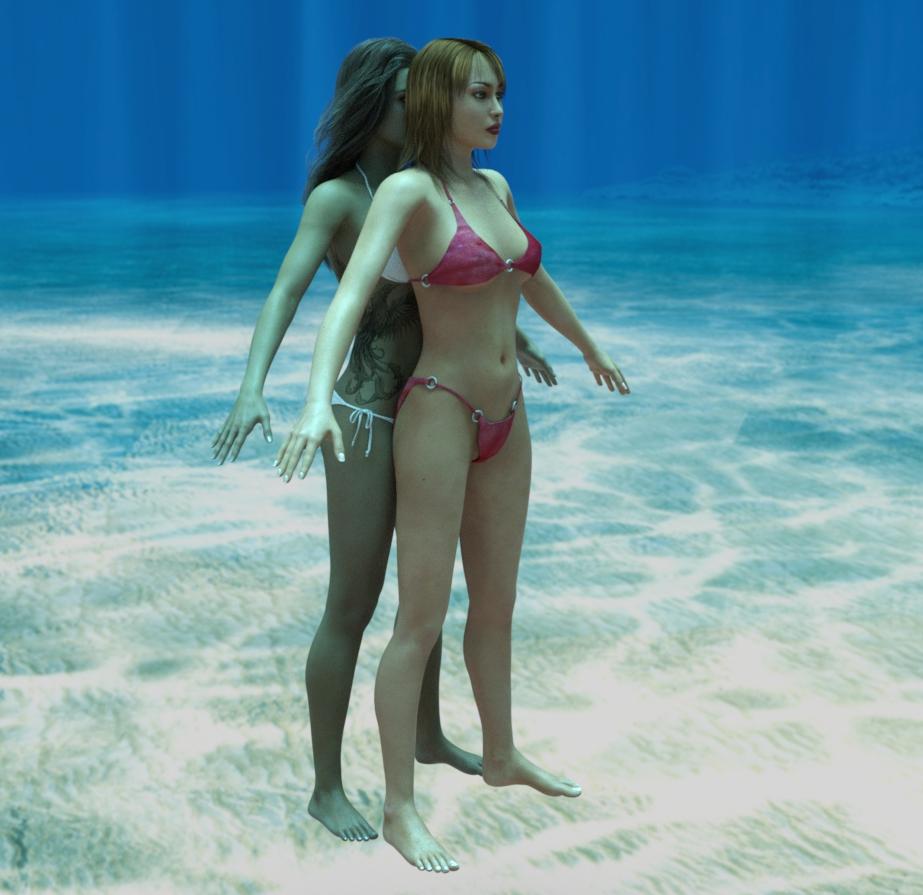
G8F Pose Transfer to V4/A4May I present another pose transfer script. This time for G8F poses to be transferred to V4/A4.
To operate, load G8F and apply the desired pose. Then load Victoria 4 or Aiko 4, and run the script. Once more you'll need to identify V4's/A4's hip in one node selection combo box, and G8F's hip in the other. Then press the 'ACCEPT' button, and the script will run. There will probably be a need to tweak the pose afterwards, but it's likely that it won't be much more than when you apply a G8F base pose to a G8F character.
Please be aware that V4/A4 do not react well to some G8F poses, the 4 generation difference between the two figures can't really be avoided on occasions.
So, now some images. First, V4 matching G8F's base pose having originally been in her own zero pose:
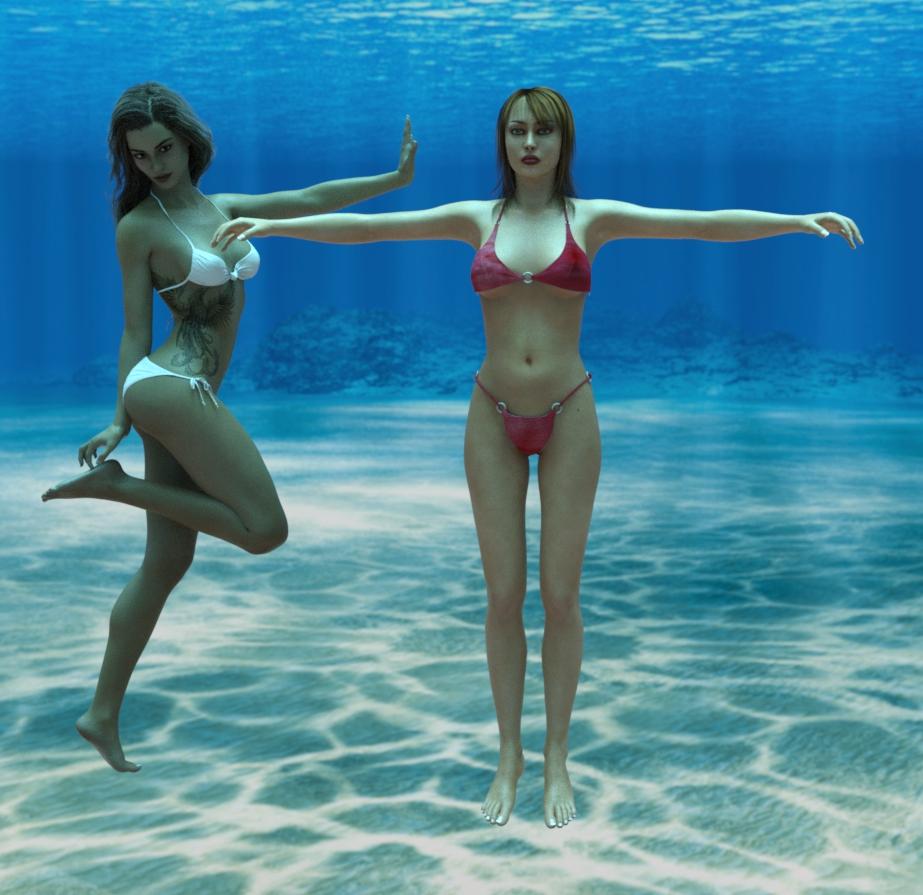
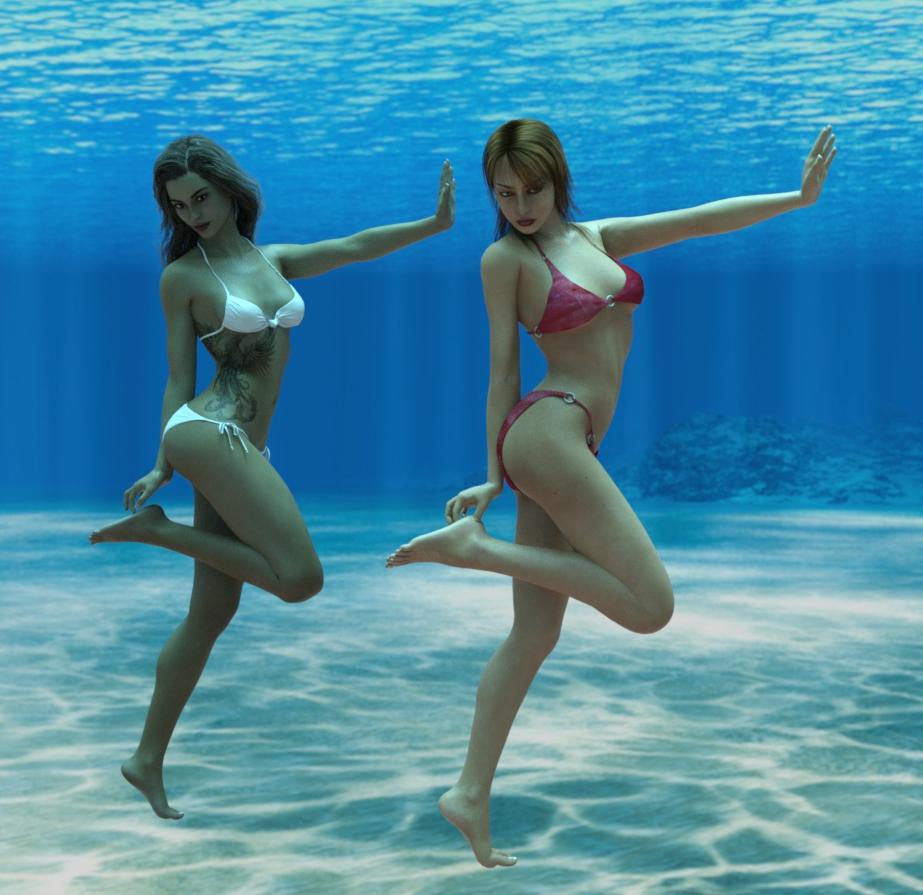
Now a before and after image of a pose being applied to V4. In order to get this to work, I had to turn the V4 rotation limits off, otherwise V4 got nowhere near the G8F pose - if the pose matching is awful, you may have to do the same.
I hope this will be of some use to a at least a couple of people.
Regards,
Richard.
daz studio 4.13 unlucky?So we can already forget the 13th generations of figure (2033 or later) with Victoria 13 and Michael 13, it will never happen.
The very existence of the idea that they would have to consider avoiding the number 13 has it's finger on one of the things wrong with society still.
 It is, of course, still prudent to avoid alternate numbered versions of Windows.
...sort of like odd numbered Star Trek films before the reboot.
No Victoria 4Given your join date you probably already have Victoria 4, but it isn't part of the free base content so you need to install it (through Daz Central/Install Manager or manually, it can't be installed through DS itself).
RetiredFor those interested, Sickleyield has a few items on sale today :-)
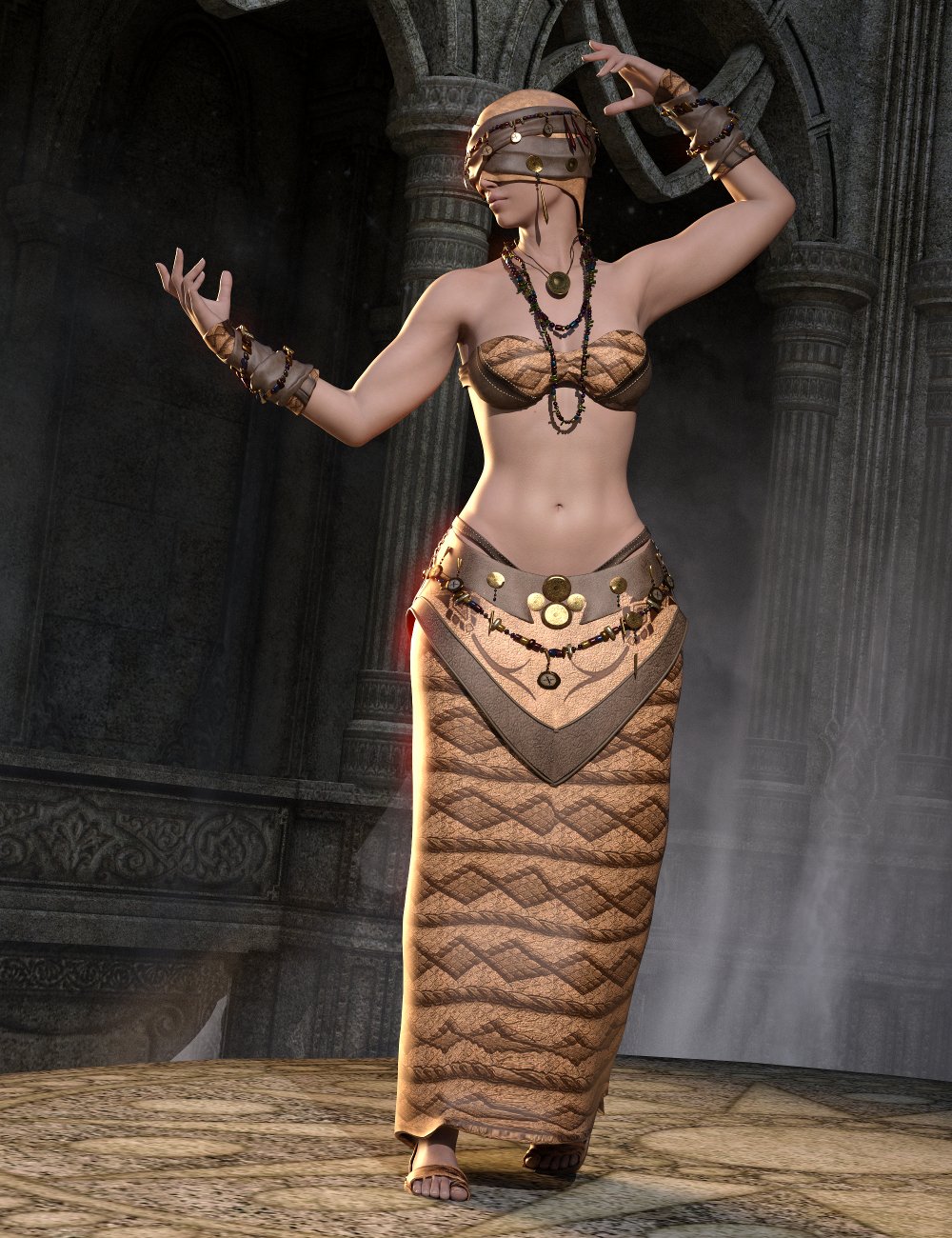 Genesis 8 clones for Genesis 3
Victoria 4 and Michael 4 clones for Genesis 8
Her clone products come with more than just the clones, she has some projection templates as well as helper morphs.
...and they're on sale Today Too!!! Argh I wish I wasn't poor!!! LOL
Victoria 2 - No texturesI started working on an "All the Vickies" scene (well, at least 2-8) and for some reason V2 only shows up as all white. I did find an "All V2 Textures" icon under materials, but when I apply it, only her lips and eyelashes show up. Any ideas on where the textures went or how to find them?
Thanks
No Victoria 4You must buy and install Victoria 4.
Daz 3D is part of

Connect
DAZ Productions, Inc.
7533 S Center View Ct #4664
West Jordan, UT 84084Licensing Agreement | Terms of Service | Privacy Policy | EULA
© 2026 Daz Productions Inc. All Rights Reserved.