-
Sagan: A DAZ Studio to Blender Alembic Exporter
Hello guys,
I have 2 questions regarding the Sagan Alembic Exporter script.
- On the Export dialogue there is a Hair tab (see attached pic). I do not understand what is the purpose of this tab, I have done some testing to try to create a scalp for my figure but when I import in C4D the scalp object is exploded and messed up. Maybe I misunderstood this feature?
My goal was to export a scalp (or hair cap) object so that when I export my alembic animation I can grow hairs on it.
- If I do not use the Hair tab and just export a default Alembic animation, my figures that have a dForce hair do not import with the hairs in C4D. Even if I set the Alembic to import curves as Splines. Is there a way to make it work? Because there are some nice dForce hairs that I'd love to use with animation outside of Daz.
Thanks for your time! :)
Irritating power pose issue.. (SOLVED - but no explanation for orignal problem)RTry reimporting metadata - Content Library option menu (the lined button in the top corner, orr ight-click the tab), select Content DB Maintenance, check reimport Metadata, and in the enxt window check Genesis 8 Starter Essentials (I guess you are doing this anyway if you install manually).
Irritating power pose issue.. (SOLVED - but no explanation for orignal problem)Alas, refreshing metadata had no effect
AniMate2 audioI just installed A2, but when I create an audio block, it will import the sound file, but when I try to play it, it crashes Daz. It's not a long file, just about 20 seconds. I wanted to use audio just as a reference for post, but it won't cooperate.
Irritating power pose issue.. (SOLVED - but no explanation for orignal problem)Have you refreshed (don't remember the actual command) the metadata in the database after you reinstalled the Genesis 8 Starter Essentials?
Irritating power pose issue.. (SOLVED - but no explanation for orignal problem)I'm not sure why loading Genesis 9 would helkp, but I suspect the base issue is that a product you have installed has messed up the basic Gensis 8 metadata (not, sadly, an unknown occurence). Try reinstalling Genesis 8 Starter Essentials.
Sagan Alembic Exporter, animation and dforce Hair exportHello guys,
I have 2 questions regarding the Sagan Alembic Exporter script.
- On the Export dialogue there is a Hair tab (see attached pic). I do not understand what is the purpose of this tab, I have done some testing to try to create a scalp for my figure but when I import in C4D the scalp object is exploded and messed up. Maybe I misunderstood this feature?
My goal was to export a scalp (or hair cap) object so that when I export my alembic animation I can grow hairs on it.
- If I do not use the Hair tab and just export a default Alembic animation, my figures that have a dForce hair do not import with the hairs in C4D. Even if I set the Alembic to import curves as Splines. Is there a way to make it work? Because there are some nice dForce hairs that I'd love to use with animation outside of Daz.
Thanks for your time! :)
Transfer Utility moving garmet up- Solved!
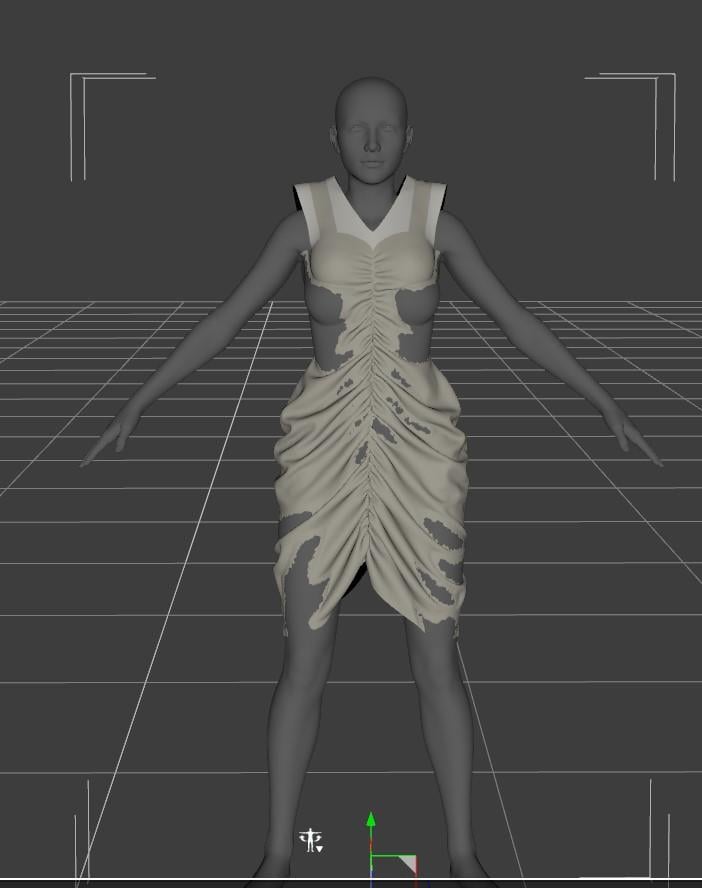
This is the shape after applying/using transfer utility. Before using it the dress fit perfectly (or at least appeared to but of course when I posed the figure the dress didn't move too). The avatar is an imported gen 8 in MD so I think the error is happening during transfer utility or with the obj import/export but I followed 3 different guides that had almost exactly the same settings that I used.lilweep said:is that actually the default Gen 8 shape? If it's not the default shape then choose the option in Transfer Utility to 'Reverse source shape' or some such
Dungeon Builder selfmade Builder Sets?!gniiial said:
Totte said:
Hi,
I did create setups for those set I could find thtb did have square floor / celing sections.
One tip I gave someone else asking about it was to create your own square presets when the sets comes with rectangular floor / celing sections and then export that as an object, import, apply the mats and then save as Figure/Prop. (Mental not to self: Maybe I should make a script to does that). It's important also to asure the floor / ceiling squares matches the walls. You can also do this with wall sections, cleverly create sections that matches the floor/celing sizes-
I've still see though that it seems that most new released prop sets still has non "square"-conforming props.Cheers,
/ Totte
Hey, thanks for the tip. I already did it by exporting and importing again. Since I had to give the floor an other scale, it was necessary to zero everything again, so the script does not place only the first piece right and the other ones all to a position or with a scale that did not match everything else. What I really would like to see would be more options, like for randomized rubble on the floor or lets say broken walls, bigger chunks of stones or something like that. Kind of like with the doors and arches, but with other props, that we would have to place manually right now. Just imagine one would use this function then again for other props, like torches on the walls, barrels, chests, crates or something else, that a user would like to include on specific places. I'm sure this thing can get more powerful and with enough efford and some users that may create building sets and maps, it could spare a lot of time creating environments.
Does this script gain some sort of boost when someone would have this product of yours? https://www.daz3d.com/c66-graphics-plug-inHi, no, I looked at trying to optimize DungeonBuilder but it is som extremely optimized with some really advanced cacheing so there was nothing to gain from it so I dropped the idea to move the drawing code to it. If I had writte DungeonBiuilder after C66 Graphics Plugin, I would have used it an saved 100s of of hours optimizing drawing cache,
gniiial said:
(Mental not to self: Maybe I should make a script to does that) - would be nice, since it is a little annoying and you could also put in a function to copy the shader and materials back on it again. This would fasten up the process. But if you'd do that, you could do it from scratch right away, by adding the floor, do this fuction, place the new, resized, scaled, materialized prop at a specific folder the user has in mind (or comes with the/a product) and then execute the function for adding in the floor piece. So nobody had to switch back and forth.
Might look at adding this to something I have in mind.
gniiial said:
By the way, just an idea for vendors like you that do scripts. Maybe create an overall script checker or caller script, that acts like some sort of base of operations. One possibility would be to add in the scripts a user has by the user himself or an automatic process that checks the scripts folder for your stuff. In this kind of main area your verry helpful scripts won't ever get lost. Like wendy says, but not in the shop, I kind of forget sometimes that i already have one or the other tool... I can't really understand why this is not "a thing" in general for vendors. I mean it's like product advertisement and positive experiences every time a user creates something with those tools.Interesting, as I do have something like this coming up sooner that you think, and I was planning to do exactly that in a another add on (to be able to put all my srcript easy acessible. Glad you mentioned it, looks like I'm on the right track there.
Diffeomorphic: locking bones in place MHX and RigifyMost lights should transfer fine, emission too. If you use old assets with ghost lights be sure to have the option checked in the global settings. Of course also be sure to import the HDRI always in the global settings.
Transfer Utility moving garmet up- Solved!Hello~! Just as the title says when I import an item I created or a default Marvelous Designer outfit into Daz as an obj it fits the gen 8 model in her default pose. However when I go to transfer utility the outfit stays fine up until the 100% point when it hits weight mapping and the garment rises several inches. I'm not sure how to fix this and help would be greatly appreciated.
Thanks!
 Dungeon Builder selfmade Builder Sets?!
Totte said:
Hi,
I did create setups for those set I could find thtb did have square floor / celing sections.
One tip I gave someone else asking about it was to create your own square presets when the sets comes with rectangular floor / celing sections and then export that as an object, import, apply the mats and then save as Figure/Prop. (Mental not to self: Maybe I should make a script to does that). It's important also to asure the floor / ceiling squares matches the walls. You can also do this with wall sections, cleverly create sections that matches the floor/celing sizes-
I've still see though that it seems that most new released prop sets still has non "square"-conforming props.Cheers,
/ Totte
Hey, thanks for the tip. I already did it by exporting and importing again. Since I had to give the floor an other scale, it was necessary to zero everything again, so the script does not place only the first piece right and the other ones all to a position or with a scale that did not match everything else. What I really would like to see would be more options, like for randomized rubble on the floor or lets say broken walls, bigger chunks of stones or something like that. Kind of like with the doors and arches, but with other props, that we would have to place manually right now. Just imagine one would use this function then again for other props, like torches on the walls, barrels, chests, crates or something else, that a user would like to include on specific places. I'm sure this thing can get more powerful and with enough efford and some users that may create building sets and maps, it could spare a lot of time creating environments.
Does this script gain some sort of boost when someone would have this product of yours? https://www.daz3d.com/c66-graphics-plug-in ;
(Mental not to self: Maybe I should make a script to does that) - would be nice, since it is a little annoying and you could also put in a function to copy the shader and materials back on it again. This would fasten up the process. But if you'd do that, you could do it from scratch right away, by adding the floor, do this fuction, place the new, resized, scaled, materialized prop at a specific folder the user has in mind (or comes with the/a product) and then execute the function for adding in the floor piece. So nobody had to switch back and forth.
By the way, just an idea for vendors like you that do scripts. Maybe create an overall script checker or caller script, that acts like some sort of base of operations. One possibility would be to add in the scripts a user has by the user himself or an automatic process that checks the scripts folder for your stuff. In this kind of main area your verry helpful scripts won't ever get lost. Like wendy says, but not in the shop, I kind of forget sometimes that i already have one or the other tool... I can't really understand why this is not "a thing" in general for vendors. I mean it's like product advertisement and positive experiences every time a user creates something with those tools.Please help, Fibermesh from Zbrush and DazHey guys,
Thank you so much for taking time to read my question and I hope you may have some insight for me. It's kind of a long post but I want to be sure to provide you with as much detail as I can.
Back about a month ago I got into Zbrush and it has really changed my life with Daz studio, such an amazing tool.
As some of you may know already I make animal characters, so having a good workflow for fur and hair is of upmost importance.
I have gathered a good understanding with Strand Based Hair and Look At My Hair however I've always wanted a better way of styling. Two days ago I decided to give Fibermesh a try in Zbrush and... well it's very close to exactly what I've been needing in my life.
I have hit a wall though that I have not been able to get over for the last day or so. I have screenshots to hopefully help with this discussion.
Inside of Zbrush I have been able to figure out how to take a texture, convert it to polypaint, apply the polypaint to the base mesh, and then pull that color data from the mesh so that is shows on the fibermesh that I created.
Here is a screenshot of a tail I have been working with in Daz. This image is a Strand Based Hair example.
As you can see the result looks ok but I've always wanted a little more out of the fur I have been making. Better styling options and workflow would be a huge help.
Here is a screenshot of the texture underneith the fur. Strand Based Hair is using this same texture to map the colors to the fur.

This leads us to Zbrush. I have noticed that you can bake a texture onto a mesh with polypaint and send it to daz via GoZ with it's color data. Here is an example of a new .obj tail sent from zbrush as a new object / mesh to daz. The shader is wrong so it's all polished and shiny but there is no issue yet with this.

Now to the issue I am having. In Zbrush, I have created a fibermesh that I wish to send back to Daz with color data or at least find a way to import the color data seperately if I can. This is the Zbrush example with the color being pulled from the polypainted tail underneith. Even though this is an unstyled quick example, this looks very promising to me, the coloring is off compared to what I want but that can be resolved later.

I would really like to get this polypaint into Daz that is on this fibermesh but when I send the fibermesh to Daz using GoZ, no color data is baked or brought with the new mesh. Example below.

Another method I have tried but have failed miserably at is creating a new Texture Map from the polypaint of the fibermesh. This method freezes zbrush and I get the spinning mouse cursor of doom. I've read up on this and they say to lower the subd to it's lowest when creating the FiberUV. Then bring the subd back up before clicking the Create Texture from Polypaint option. However doing this still results in a freeze for Zbrush.
I hope we can figure this out and thank you for your time.
Kind regards,
- Donteinstalled contentFirst, make sure you've installed PostgreSQL CMS and the database service is started. Open Install Manager and check that 'database icon' :

If you're not able to start database service, disable you anti-virus, firewall etc. and retry~~
Products' metadata could be written to database as long as the cms service has been started:

If you cannot find the products in Smart Content. Start cms service first! Then reinstall the products , or re-import the metadata by using Content DB Maintenance~
Dungeon Builder selfmade Builder Sets?!Hi,
I did create setups for those set I could find thtb did have square floor / celing sections.
One tip I gave someone else asking about it was to create your own square presets when the sets comes with rectangular floor / celing sections and then export that as an object, import, apply the mats and then save as Figure/Prop. (Mental not to self: Maybe I should make a script to does that). It's important also to asure the floor / ceiling squares matches the walls. You can also do this with wall sections, cleverly create sections that matches the floor/celing sizes-
I've still see though that it seems that most new released prop sets still has non "square"-conforming props.Cheers,
/ Totte
What the heck with the missing morphsAre you "logged in" on Daz Studio? If so then something may have changed during the "metadata update" that runs after the application launches.
installed contentAs the message says, check that your antivirus and firewall have not blocked postgreSQL from running or even being installed. You wouldn't be the first to have that happened. So perhaps try disabling your firewall and AntiVirus and use DIM to reinstall PostgreSQL and see if that fixes it.
Also, bear in mind that if PostgreSQL was not available when re-installing your content then you'll have to go to COntent DB Maintenance and reimport all the metadata to populate Smart Content.
Diffeomorphic: locking bones in place MHX and RigifyPadone said:
1. There are already ik goals for the feet.
2. You can use fk or ik for the limbs, please watch some rigify tutorial.
3. Your plan is a mess if you ask me, I'd rather animate and render in blender.
So I've been doing hours of research ever since this post and decided to use MHX instead of rigify since there's actually no way to get the feet perfectly in place with it.
For my first question I found out you have to bake them to FK.
For the third question, you call it a mess but I feel like it's much simpler for a newb like me. I don't think I have the brain power to import daz assets not to mention lightings in working order to create a proper scene for rendering everytime I make a short animation loop, which I have to come by often. I saw up to half way 4 hour tutorial video of using diffeomorphic but oh my God, it seems so complicated. Perhaps because I'm new with blender.
How to apply Genesis 8.1 skin on Genesis 8?...ugh getting tired of these bloody bad gateway errors. Daz tech support needs to seriously address this rubbish as it is getting very very old.
...that said redeited the post to ftry and make what I am seeing more clear.when the Daz forums server went south.
What was the destination to where you exported 8.1 UV to? I didn't see a folder pop up. Also When you say "save" where do you save to as again, I don't see any folders opening up.
I didn't see a separate "import" after exporting the 8.1 UV. is that the one which uses the sequence Edit > Figure > Geometry > Load UV set. This is where I think the Daz programme is looking for the UV set .obj in an internal folder, not the Carrara one in C:/Documents. . This is also likely why I feel the "Base 8.1 Female " UV set it did not appear the dropdown menu of the UV Set channel in the surfaces tab.
How to apply Genesis 8.1 skin on Genesis 8?kyoto kid said:
...I never save anything from Daz to Carrara as like I mentioned, there is no transfer bridge like for Bryce and Hexagon. I do have an .obj folder under Other Formats in the Content Tab which is for .obj content (usually freebees but also for items form CGTrader and Trubosquid).
Again the tutorial wasn't totally clear on where the 8.1 UV is to be exported to in order to save it to G8 and call it up in the Surfaces Tab. Obviously it isn't the Carrara folder I keep seeing.
It doesn't matter where you save the OBJ as long as you can find it when it's time to import it.
Daz 3D is part of

Connect
DAZ Productions, Inc.
7533 S Center View Ct #4664
West Jordan, UT 84084Licensing Agreement | Terms of Service | Privacy Policy | EULA
© 2026 Daz Productions Inc. All Rights Reserved. - On the Export dialogue there is a Hair tab (see attached pic). I do not understand what is the purpose of this tab, I have done some testing to try to create a scalp for my figure but when I import in C4D the scalp object is exploded and messed up. Maybe I misunderstood this feature?