-
Combine facial meshes and morphs for game engines
As for 'combination of facial expressions / morphs', yes you can.
- Load a Base Figure. Dial the expressions you want. Set figure's Resolution Level to Base. Export to obj file.
- Zero figure's pose or press CTRL SHIFT + F. Use Morph Loader Pro(default settings) to import obj file into the figure
- Go to Parameters Pane, Morphs - Morph Loader, dial the imported morph to 100%, then ERC Freeze in Edit Mode. Rename it as needed..
- Save it as a Morph Asset.This is the standard way of make a single dial of 'combined morphs'. FACS on G8.1 can well supports 'blend shapes' Mocap in UE, but I know nothing about Unity, so you have to further figure it out...
Object imported from blender into Daz don’t import materials1. Check the obj file name first ~ never type in any space character in the file name when exporting. Continuous string or with underscores will be fine..
2. In Export dialogue box, Scale 1%, tick Material - Export; ( ... while using blender 3.3 - 3.5. I cannot remember legacy obj export options in older blender version...)
3. Import obj to Ds...Obj format has limitations, e.g.: normal map goes to bump slot, no metallic, roughness map assigned, etc... You still have to configure the maps and params. manually.
Object imported from blender into Daz don’t import materialsObject imported from blender into Daz don’t import materialsAnything I import from blender into Daz that has embedded materials imported as all grey no materials. The models are usually fbx files with materials applied and work fine in blender but when imported from blender into Daz as obj (which I do to make multiple mesh objects one single mesh which is a MUST) they lose their materials and import as grey objects. I tried 2.9x to 3.x blender versions. Is there a fix or am I doing something wrong or not doing something I should be?
Genesis 9 DTB bridge rig missingWhen attempting to import Genesis 9 characters using the Daz to Blender Bridge all goes as expected though the result is missing the Rigging. Bones appear to be intact just no rig. When I use the bridge for Genesis 8 characters everything works perfectly, no issues... The missing rig seems to be exclusively a Genesis 9 problem.
Is this a known issue? Any advice?
Facial Deformation on Import From CascadeurHi, super confused as to why this is happening, but it happens to all characters in all keyframes, regardless of whether or not I animated the facial bones in Cascadeur or Daz. The first image is upon applying the pose, the second is after zeroing the expression and eye poses. Everything involving facial posing is zeroed out before exporting from Daz as well.
Elf-looking ears are cool and all, but not for what I'm currently trying to accomplish.
If anyone has any information, that would be awesome.
Need homes/rooms with pet flaps (doggy doors) built inBlando Calrissian said:
To be honest, I have no idea how to import a cloth modifier into Daz from Blender. That would be sweet, of course, because the door flap looks good in Blender as designed. Alas...
For simplicity's sake, my Daz version of the door works more like a roll-up garage door and is divided into "slices," each of which can rotate along one axis. I think I mostly like it for what it is.
The latest version includes a separate outer, inner, and middle frame so that it can be narrowed or widened to fit various door thicknesses. All of the parts are also grouped so that they can be scaled up or down as appropriate.
Nice! Do you have a link to it or willing to share it here? :) The DAZ version. Don't need the flappy part. The sliding door is also nice. I'd greatly appreciate it especially if it comes already installed in a door I can use.
Can we Set Undo Amount?rwetmore said:
ShelLuser said:
marble said:
Sorry to resurect such an old thread but, as far as I know, this serious limitation is still with us.
But is it actually a limitation? I kinda disagree, because I'm changing and customizing so many things besides the actual pose (think morphs, lighting settings, render settings, environment nodes, etc, etc.) that the last thing I would want to rely on to change a pose is the undo function. For the simple reason that it would change so many more things in my scene besides the figure I'm working on.
Not to mention that it's very easy to prevent any of these issues from happening. Have a pose you may want to use again? Save the pose! If you think you'll be in need of multiple poses or something like that? Use the timeline pane!
Seriously, the timeline pane is something not to be underestimated. If you specifically set up the types which you want to save then you can easily limit this to the transforms. This will make it very easy to undo as much of the pose as you want, assuming that you saved enough snapshots.
Yes, it's a limitation. Just because your workflow wouldn't accomodate this feature doesn't mean the rest of ours wouldn't. The most common reason for me to want to undo some 10's of steps is because while posing assets, I accidentally change the current camera position instead of switching to Perspective View first. This bit me tonight, which is why I was looking for the same solution. I only got about 20 undos in before running out. I have a 128GB RAM system, and many TBs of free disk storage. I also find it incredibly hard to believe that the problem is a cache "set by memory." If Daz isn't allocating enough arbitrarily-determined memory, then let me set a parameter for how much to utilize on an undo cache and Daz can preallocate the space all the live long day.
<soapbox>I'm happy to have new omnisex character figures to play with. I'm happy to have smoke/fog for the once a year I need it. But when Daz crashes 8-10 times a day;
takes hours to shut down;
If that is literally true then there is an issue with the system, or possibly the content.
has such limited posing tools for figures (which is what it was originally designed for) which were fine in 2000 but horribly outdated today;
"modern" is not a useful term - describe what tools you want and make a feature request for them, no one can do anything with outdated or modern as feature descriptions.
hard-coded addresses in JSON files that make it difficult to organize assets effectively;
They are relative paths (unless you have saved a file pointing to content that is not in a content directory). Most user-facing files can be moved, if you do it inside Daz Studio you can create links which will preserve all metadata and so on; you can also use categroies to organise content. Most applications that I am aware of that use external resources, whether 3D content or the likes of brushes, need the correct relative paths in order for the cotnent to work.
such limited documentation that no one can tell me what some of the menu items do; when I can't find assets because of the lack of a coherent storage strategy for assets from both Daz and 3rd parties (and its use of a CMS database? really?);
using a database is much flexible than using files on a disc - a single file can be in multiple categories. The database also allows for filtering by type or compatibility, which should make finding things easier if you are willing to use the available tools.
etc., etc., which makes day-to-day use a royal PITA, I remember where the priorities lay. Selling new assets, period.
</soapbox>LAMH2 + Render Queue?In case you don't already know, the Catalyzer plugin does not render LAMH hair; it specifically renders CATALYZER hair, which is LAMH hair that AM has done some magicks that only he knows to. Many, if not most AM animals in the back catalog have been updated with Catalyzer presets, but you can't create your own LAMH or import someone else's and render that with Catalyzer.
Getting on the 9 train, or notSerene Night said:
The proportions of genesis 9 are my biggest hurdle. I keep waiting for male figures like Toment 8.1 or official shapes to be imported because it matches the style I am used to for genesis 8. Yes, I can import official shapes by using the morph transfer clone method but it is not a perfect process and there is no hd which you need to get the complete look.
so while I love the clothing, hair and and accessories of gen 9, I struggle with the choice to go real world on the base human figures shap since it's just not what I need. I think more morphs bringing back the older figure proportions would be welcome. I do attempt to lengthen legs, shorten torso, and make the heads smaller, but it's not an exact process.
I'd love to see a G9 version of Torment. He's one of the best figures. On the other hand, I don't miss the G8 female proportions; they were lollypop girls–skinny body and huge head. I always had to at least increase shoulder width.
A Thread for Items with the "Editorial License"NotAnArtist said:
Why is there a Volkswagen (bus), literally named as such, on sale at the R-word's site? Lots of other cars, planes, etc like that, too.
Their licenses say: "You are completely free to use this figure in any commercial or non-commercial render, image, or animation."
So there! I rest my case! And, of course, I don't understand my case.
Do they at any point state that they take legal responsibility? Stock photo sites do. Because if you use that Volkswagen for something commercial and get sued you're on the hook. You can point at the store where you bought the 3D file, they'll just shrug. Here are some known image restrictions from Shutterstock:
https://support.submit.shutterstock.com/s/article/Known-Image-Restrictions-Brands-and-Trademarks
https://support.submit.shutterstock.com/s/article/Known-Image-Restrictions-Objects-and-Subjects
Specifically about Volkswagen:
"
-
The names "Volkswagen" and "VW," as well as all vehicle names and designs, such as the VW Beetle and Camper Van, are trademarked
-
Volkswagen, VW, and all vehicles names cannot be included in the metadata for commercial use
-
Illustrations/vectors of any Volkswagen vehicle, or ones that closely resemble a VW, are unacceptable for commercial and editorial use; this includes icon sets
-
Photographs and footage that include VW vehicles are only acceptable for editorial use with a proper caption."
Getting on the 9 train, or notThe proportions of genesis 9 are my biggest hurdle. I keep waiting for male figures like Toment 8.1 or official shapes to be imported because it matches the style I am used to for genesis 8. Yes, I can import official shapes by using the morph transfer clone method but it is not a perfect process and there is no hd which you need to get the complete look.
so while I love the clothing, hair and and accessories of gen 9, I struggle with the choice to go real world on the base human figures shap since it's just not what I need. I think more morphs bringing back the older figure proportions would be welcome. I do attempt to lengthen legs, shorten torso, and make the heads smaller, but it's not an exact process.
Show Us Your Bryce Renders Part 12NGartplay - thank you. You can import a photo into the Terrain Editor, see on page 5 Pictures near the top in the PDF https://horo.ch/docs/mine/pdf/TE-TerrainEditor.pdf
[Released] RSE Mirror Geometry for Genesis 8 [Commercial]esha said:
Hmmm... I don't have that particular hair, but I have Windfield Hair by the same artist: https://www.daz3d.com/windfield
So I used that for testing the script, and it worked fine for me. I used Genesis 8 Female as a base figure, not 8.1 - not sure if that makes a difference, just thought to mention it.It's true that the Update Geometry dialog has changed. I used the second option, "Update Vertex Positions from File" and chose the file that the script exported during the previous part of the process. It is located in the Working Directory which you specify in the script's settings.
You do have a point about updating the instructions. I'll talk to RiverSoft Art about the best way to do that.
Regarding your specific problem, I can only guess, but my guess would be that perhaps your scaling factor was wrong? In the import dialog, make sure you use the "Daz Studio" preset.
Thank you for the response. I definitely had the scaling factor correct, but I just typed in 100%, I didn't specifically click on the Daz Studio preset, so I don't know if that changes anything other than scaling factor. I haven't had time to test it again, in the meantime I just used the "-100%" x-scale trick and that worked well enough for my purposes, but I will try some other hairs and see if I have the same problem. I'm not sure which of Windfield's hairs you were referring to, I don't think there's one actually called Windfield Hair, at least I couldn't find it in the store.
Daz to Blender import export makeup?I have a problem importing from Daz to Blender. I add makeup to the character in Daz, but when I import it into Blender it disappears, I already tested it with another makeup and it keeps disappearing!
i upload 2 images to example
Im lost in cuteness.. [Commercial]
I will do research :)thank you!WendyLuvsCatz said:
video
I know they are old and Melody and Micah already have lots of cuteness in morphs and skins
but there can never be too many can there

actually it was the Aiko and Hiro clothes they wear I thought could do with some cuteness, Beatrice Potter type cuteness, little waistcoats etc, finding it in my massive library the thing I struggle with as no metadata, I own a lot
 smart content doesn't see them as A3 & H3 evenUnable to save animations file error name??
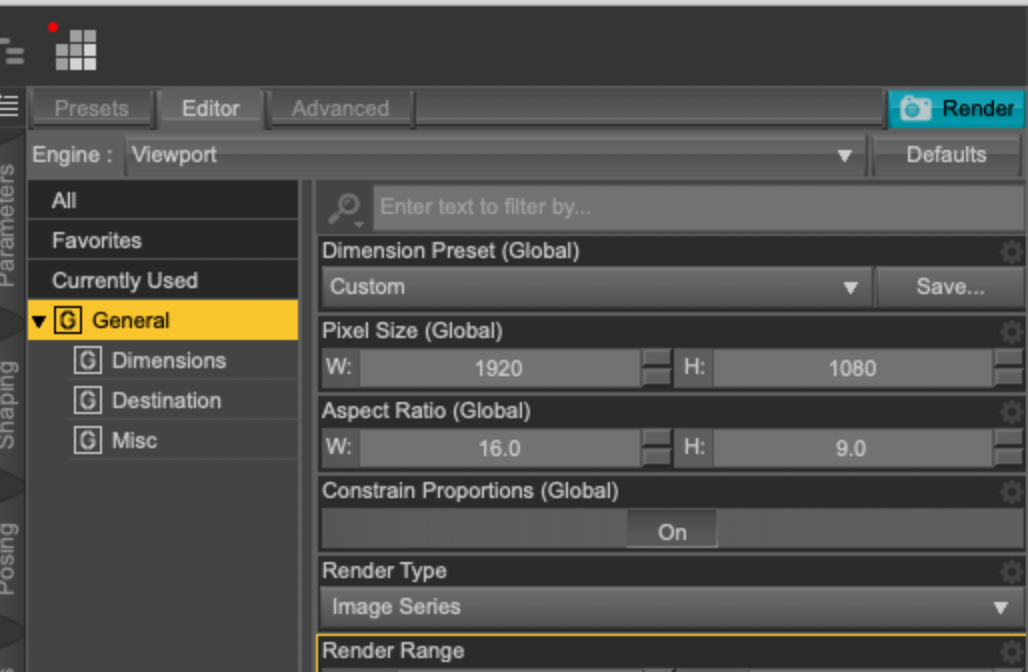
You can't save a movie file on a Mac, it hasn't worked for quite a while. You can render the movie out as frames ("Image Series"), then import the frames ("Image Sequence") into QuickTime Player and save as whatver format you'd like. If you have sound, it can be merged with your movie in iMovie.
Export:
Import:
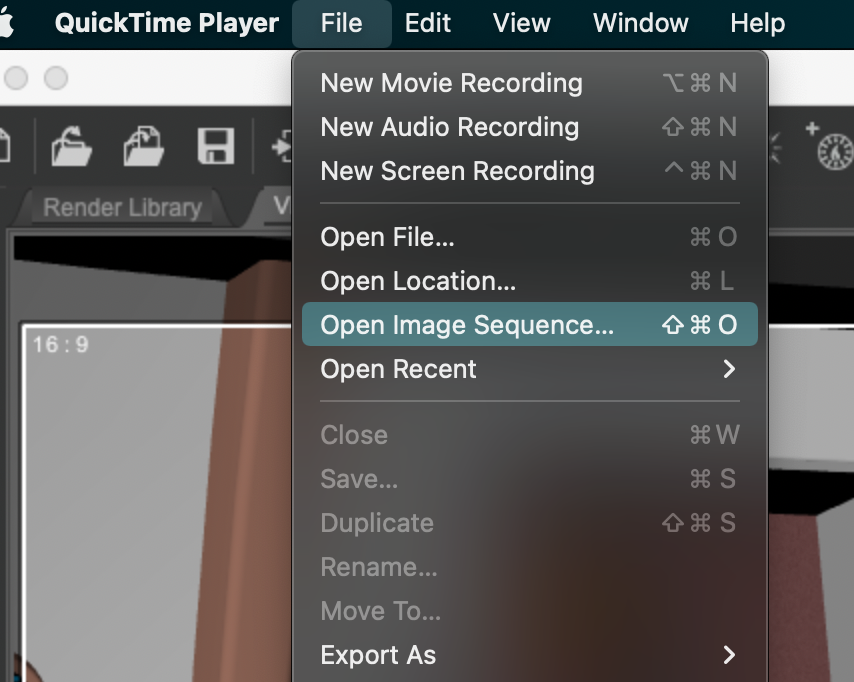
Hope that helps.
--- Walt Sterdan
-- Updated to add screenshot
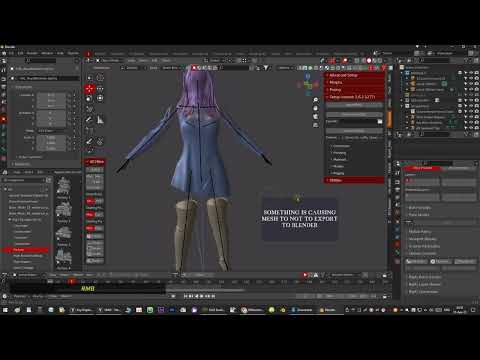
Diffeomorphic error - missing mesh or materials when exporting to blender. Please HelpHi, im working on a project time is runnig out and trying to import daz character to blender. After many attempts i still dont know what is causing this problem? Is there solution for this problem im superthankful for any answer! Here is a video of problem
 Im lost in cuteness.. [Commercial]
video
I know they are old and Melody and Micah already have lots of cuteness in morphs and skins
but there can never be too many can there
actually it was the Aiko and Hiro clothes they wear I thought could do with some cuteness, Beatrice Potter type cuteness, little waistcoats etc, finding it in my massive library the thing I struggle with as no metadata, I own a lot
smart content doesn't see them as A3 & H3 evenTrying and failing to import OBJ file into DAZI bought this rose bouquet on CGTrader. It's very nice, so I knew there would be trouble but I was feeling reckless.
It comes with a number of files.
1. When I import the obj file into DAZ it's sort of there. The wireframe is visible when I hover over it, but there are not material zones.
2. When I import the fbx file, there are material zones but the whole thing is all jumbled up.
Btw, this happened before with different product and I could apply textures fine, but rearranging the part would take forever.
3. There was a Blender file included too, so I opened it and imported an obj file. When I import that into DAZ I get an invisible bouquet. Material zones are there in Surfaces, but nothing makes the thing visible.
Any advice?
UPDATE: I took a closer look at the second (from blender) obj, and apparently it is there but tiny. I exported again but at 5000% magnification.
Daz 3D is part of

Connect
DAZ Productions, Inc.
7533 S Center View Ct #4664
West Jordan, UT 84084Licensing Agreement | Terms of Service | Privacy Policy | EULA
© 2026 Daz Productions Inc. All Rights Reserved.