-
Performance improvement suggestion when loading scenes
chris-2599934 said:
I don't think you'd see a big improvement in performance from this change, and probably a degradation in performance when the scene you're loading isn't a version of the one you already have. Think about what you have to do.
- Retain the old scene in memory.
- Load the new scene, and for each element it contains determine (somehow) if it's already in the old scene. If so, retain the old element, otherwise load the new one.
- When you've got to the end of the new scene, unload anything from the old one that wasn't retained.
If you're actually loading a new and different scene, you'll end up with both of them in memory at the same time as laoding nears completion - which might be more than your machine can handle. And the whole process is made more complex, which means potential bugs can be introduced. You don't want bugs in something as fundamental as loading a new scene.
If you have scenes that have a large number of never-changing objects, and a small number of changing ones, it might be possible to rig up an approximation of the set-up you propose using scene subsets. Produce the big background scene and call it stage.duf. Pose your foreground figures, put them in a group and save it as a scene subset called actors01.duf. Move them around and save them as actors02.duf. Rinse and repeat ad nauseam. You can get to any scene by deleting the actors group and loading a new one from the appropriate subset. You might even be able to use a hierarchical pose preset instead of a subset. It's probably not worth the added complication for the amount of time it would save.
It's not exactly like that, this is just the old and well known cache invalidation problem. From what you said:
chris-2599934 said:
- Retain the old scene in memory.
No need to retain anything, the old scene is already loaded in memory when you are using it (obviously) and that doesn't need to change. It remains as it is today.
chris-2599934 said:
- Load the new scene, and for each element it contains determine (somehow) if it's already in the old scene. If so, retain the old element, otherwise load the new one.
- When you've got to the end of the new scene, unload anything from the old one that wasn't retained.
The steps in Daz are different. At the moment Daz does:
- Reading asset
- Clearing the scene
- Deleting objects
- Load new scene
Basically it deletes data generated from the current scene, just... (in most cases) to load and generate it again. After reading the asset in the first step, it should be trivial to check what you should unload/destroy, and what you shoud load/create, actually Daz do this for some assets (I believe), as in the logs you can see a "Determining missing assets..." line when loading a new scene.
Unfurtunatelly without access to the source code or more detailed logs I can just guess what is really happening behind the scenes, but all I see makes me think it shouldn't be complicated reuse more stuff and not only the assets Daz reuses now.
As example, If I load a scene and I load the same scene again without changing anything, it takes 23 seconds to load, according to the logs this is what happens:
2023-04-19 15:52:43.881 [INFO] :: Prepare asset load (open): PATH_TO_MY_SCENE(4 seconds!! glad to see this line here, but it takes a lot :( )
2023-04-19 15:52:43.881 [INFO] :: Locking viewport redraw...
2023-04-19 15:52:43.881 [INFO] :: Viewport redraw locked.
2023-04-19 15:52:43.928 [INFO] :: Native format content directories: 4
2023-04-19 15:52:43.928 [INFO] :: Poser format content directories: 3
2023-04-19 15:52:43.928 [INFO] :: Other import format content directories: 0
2023-04-19 15:52:43.928 [INFO] :: Begin asset load (open): PATH_TO_MY_SCENE
2023-04-19 15:52:44.562 [INFO] :: Clearing the scene...
2023-04-19 15:52:47.812 [INFO] :: *** Scene Cleared ***
2023-04-19 15:52:47.812 [INFO] :: Determining missing assets...2023-04-19 15:52:51.136 [INFO] :: Setting textures...(3 seconds!! do we need to create the same materials again?)
2023-04-19 15:52:51.292 [INFO] :: Scanning for addons...
2023-04-19 15:52:53.488 [INFO] :: Creating node geometry...
2023-04-19 15:52:53.543 [INFO] :: Creating UV sets...
2023-04-19 15:52:53.543 [INFO] :: Creating materials...2023-04-19 15:52:56.382 [INFO] :: Resolving legacy figures...(7 seconds!! Do we need to process this again?)
2023-04-19 15:52:56.382 [INFO] :: Preparing modifiers...
2023-04-19 15:52:56.407 [INFO] :: Creating modifiers...
2023-04-19 15:52:56.939 [INFO] :: Creating property aliases...
2023-04-19 15:52:56.946 [INFO] :: Resolving 164038 formulas...
2023-04-19 15:52:56.946 [INFO] :: Finding formula properties...
2023-04-19 15:52:57.000 [INFO] :: Sorting formula properties...
2023-04-19 15:52:57.002 [INFO] :: Creating ERC Links...
2023-04-19 15:52:57.493 [INFO] :: Finished resolving formulas.
2023-04-19 15:52:57.504 [INFO] :: Applying animations...
2023-04-19 15:52:57.915 [INFO] :: Processing scene data...
2023-04-19 15:52:57.923 [INFO] :: Finalizing modifiers...
2023-04-19 15:52:57.924 [INFO] :: Finalizing channels...
2023-04-19 15:52:57.924 [INFO] :: Finalizing materials...
2023-04-19 15:52:57.924 [INFO] :: Finalizing simulation providers...
2023-04-19 15:52:57.924 [INFO] :: Sorting property groups...
2023-04-19 15:52:57.930 [INFO] :: Setting up follow targets...
2023-04-19 15:52:58.150 [INFO] :: Setting current camera...
2023-04-19 15:52:58.150 [INFO] :: Finalizing scene data...
2023-04-19 15:52:58.151 [INFO] :: Finished asset load (open): PATH_TO_MY_SCENE
2023-04-19 15:52:58.152 [INFO] :: Processing morph projection queue2023-04-19 15:53:05.684 [INFO] :: Unlocking viewport redraw...
2023-04-19 15:53:05.684 [INFO] :: Viewport redraw unlocked.
2023-04-19 15:53:05.743 [INFO] :: Loaded morph deltas
2023-04-19 15:53:06.436 [INFO] :: Processing morph projection queue
2023-04-19 15:53:06.754 [INFO] :: Morph projection queue processedImporting iClone into DAZ?WendyLuvsCatz said:
the FBX will import a mess if it's a rigged figure
props and scenes it will vary, I would personally use obj instead
I have no means to conf8rm this but we have been told that FBXs from Motion Builder will work.
Importing iClone into DAZ?the FBX will import a mess if it's a rigged figure
props and scenes it will vary, I would personally use obj instead
Importing iClone into DAZ?Even if you can get the FBX file to import, you will probably have to rerig (add bones) it from scratch since DS uses it's own type of rigging.
Importing iClone into DAZ?I'm curious if anyone knows of a way to import iClone models/props/etc into DAZStudio....
There are a few things out there that I'd love to have access to in DS but the price of iClone is way outside of my budget.
Trouble creating morph for Gen9 using Blender 3.4lilweep said:
his.royal.duckness said:
- Imported in Blender using Wavefront (legacy) option - it looked closer to 2.8's presets - with "Keep Vert Order" and Poly Groups checked.
That setting is fine. However, for peace of mind, you dont actually need to use Legacy options for import and export in 3.2+.
You can just use the normal obj importer in the latest Blender versions and they will automatically preserve vertex order, so you dont need to worry about reading vert groups etc, just leave everything logical unchecked and it will work fine for creating and exporting morphs.
Awesome, thanks! After a lot of trial and errror I eventually figured out how to import using the legacy one by checking "OBJ Groups", but knowing that the newer obj importer does the job makes it much simpler.
DAZ To Unreal - Characters importing into Unreal 5.1 rotated 90 degrees offThe Daz UE5 bridge thinks the Unreal forward axis is X, but it doesn't know that Unreal uses different orientations for asset editor, in the asset editor the forward axis is Y, and all the bone managing tools and retargeting tools inside asset editor were coded based on using Y axis as the forward axis.
Diffeomorphic is still the king for exporting Daz characters to Unreal via Blender, just need basic Blender knowledge to use it.
Checked the last Daz bridge update still can't support geografts, so Diffeomorphic is needed if you need geografts.
The best approach as I've tested is to use Diffeomorphic to import them into Blender, then use Auto Rig Pro to rig them with Epic skeletons and then export them into UE5, this method doesn't generate better skin weights than original Daz skin weights though, so there is reason to keep Daz skeletons for better weights and the JCMs. Use the materials conversion for Daz available on Unreal market place to rebuild the materials after importing Daz characters from Blender, it has better results compared to characters imported by the official bridge. There are some even better material methods but they need more knowledge to use.Trouble creating morph for Gen9 using Blender 3.4his.royal.duckness said:
- Imported in Blender using Wavefront (legacy) option - it looked closer to 2.8's presets - with "Keep Vert Order" and Poly Groups checked.
That setting is fine. However, for peace of mind, you dont actually need to use Legacy options for import and export in 3.2+.
You can just use the normal obj importer in the latest Blender versions and they will automatically preserve vertex order, so you dont need to worry about reading vert groups etc, just leave everything logical unchecked and it will work fine for creating and exporting morphs.
Create instance - geometry does not match the original?Thank you all for the feedback and info. I'm totally invested in the project atm, and when you hit a wall like this it's very discouraging.
They ought to be identical, but I suppose there could be some kind of rounding error involved.
That's what I thought, about the result I'm getting. To counter this I've just restarted as I leave my computer on indefinitely. Hopefully that will clear any residual problems related to corrupted memory or the like.
If you can't get the original unit to line up with the instances, how about burying the original somewhere way out of site (say at Y= -10000), and then composing your street only from instances?
I mused on that while thinking about the issue after Richard's input, and my corrected reading comprehension. I think I'll save that as a last resort. (coincidentally) I suspect other instances of other objects are behaing the same way, though I have not tested/explored it. lining up walls with foundations, seems off. So that may be the option if the computer restart doesn't help.
[Added] I have that product, but couldn't reproduce your issue - an instanced road section lined up perfectly with its original. Could you post a simple duf file that shows your problem? Anyone with that product should be able to open it.
Well that's encouraging. I hope it's not a case that the duf save series I'm working with corrupted earlier due to the long up time, and I have to start from scratch and save import sets.
Going to try that now, and will reply with results and duf if the issue persists.
I used Section 2 from the props, isntanced it, copied the settings from the original and pasted them onto the copy (which is a 16cm Y Translation), and X translated it 1600CM - as far as I can see the two join prfectly.
 Made me smile as I recognized the numbers immediately.
instances don't load in the same spot as the originals, there are 2 choices given in the creation dialogue one they will have the same pivot unparented one they won't, I always mix it up but the geometry is the same, it also differs in position if instanced groups or parented props
Yes reading this brings some insight. I do have most objects in groups for organizational puposes. I also don't totally understand the "default settings" versus "copy original", but I suspect the later is what you mention first as it throws off those numbers Richard mentioned above.
I suspect that if all is well with a new duf trying to duplicate, if it suceeds (meaning I can't duplicate), I may have to unparent all the groups in the original duf, and test making new instances. if it fails, it will mean saving out prop sets of the originals, then loading them all into a new duf, and test making duplicates and thereby recreating the scene.
Well off to testing. Will know shortly with the basic test.
Polish - Prestige Business Office Bundle -Missing files.It's a headache. But after my experiences of fixing Poser 11 fbx imports of TurboSquid sets (because Studio is not interested in fbx import) and reapplying materials or reshadering them, I think I can handle putting props in their places. If you ever tried maneuvering 70 bits called "Cylinder" into place---based only on promo renders---then you'd appreciate the relative ease that this Polish conundrum affords. Granted, I'll only do it once. And I do have better things to do. But Daz has proven to me that they are in the business of selling stuff, not fixing stuff that's been sold.
Help with focused learning in CarraraLooking for a bit of guidance on what I should focus my learning time on. Just picked up Carrara Pro, I'm hoping it will be a little easier to learn and more focused workflow than something like Blender for trying to do model deformations, painting, and eventually, character creation. I'm about an hour into the basic Phil Wilkes 8.5 tutorial, trying to get more familiar with the concepts as I go, but I can see that there's a lot of parallel functions to Daz Studio, like animations, rendering, etc. I'm guessing those types of functions it doesn't do nearly as well as Daz, and I've been reading that it doesn't natively import Genesis models after the first gen, although I've seen posts such as https://www.daz3d.com/forums/discussion/597316/genesis-9-we-are-back-in-the-game-carrara-users and it makes me hopeful that I'm not completely wasting my time, but these types of posts are geared towards people much more familiar with the workflow than I am and I'm hoping someone can explain to me what this means in laymens terms. Is it possible to import and work on Genesis 9 models and create new characters from the base?
Do I need to be able to do that in order to work on individual pieces of a character's mesh and textures?
Does the Particle System carry over into Daz Studio? Sounds like an exciting feature, but I don't want to waste time on learning it if it's not exportable.
And does anyone have any experience overcoming a weird issue on Mac OS Monterey where after installing and giving it root permissions, Carrara freezes when trying to create or load a scene (even a completely empty one)?
Object imported from blender into Daz don’t import materialsmilliethegreat said:
And why scale 1% when the original fbx files are not all the same scale?
Blender uses meter as default unit. If the dimensions of the object you made refer to the actual size, for instance an iPhone... You can either specify 1% when exporting from blender and use default Ds unit (100%) to import, or use 100% to export from blender and 1% to import to Ds... Otherwise you'll have a huge iPhone in the scene and still have to re-scale it.... FBX format is the same and you have to specify FBX Unit Scaling when exporting...
but anyway, it's up to you loh~~
Show Us Your Bryce Renders Part 12mermaid010 said
S Ray very interesting set of renders, couldn't you do the assembling in Bryce instead of Poser ?
Yes, but it would be difficult. I would have to set the move, static & select wireframe options to their max. Then Bryce would turn the selected objects to box mode as the structure gets bigger. You would probably have to do it in section using solo mode. Where posers has 9 or more wireframe & solid viewing modes. Like I said their modeled are made for gaming engines which shows the objects with the textures applied while moving them in real time. Some like unreal even shows global illumination in real time, which is why you need a really high-end video card to build worlds in it. Also, most gaming engines don't export meshed (Only import them) Blender or other 3d apps could probably be used, as long as they will export the UVs.
Sculpting Your Own Character?Crosswind, thanks for the quick response, I think I had forgotten about the "deltas only" option, that seems to do what I wanted, I didn't want the "extra detail" morph to be tied to any particular emotion, so I imported it with reverse:yes and deltas only, so I can then dial it manually whenever I want it, the only "issue" is having to remember to load it before doing any additional shaping or posing:)
and I figured I'd try this with G9, since it has more base detail, getting this to work with G8 probably isn't feasible, since the base mesh is just too crude and mere mortals can't import hd morphs (which I think, with the recent developments in other 3d softwares, will eventually lead to people dropping Daz altogether, having to fix all issues with creditcard after waiting for PAs to finally produce a product that actually does what you want just isn't a solution)
here's an example of almost default V9 with Smile Show Teeth at 50%, then a custom head I sculpted with bone adjustment done (not manual, the automatic one), and the 3rd one was the 2nd exported again to blender (with morphs, and had to dial in the show teeth smile in blender, and take it from there) and sculpted in the extra detail and fixes (I'm no artist btw, just a regular amateur, so don't judge too harshly :D )

I know some of the "lizardness" can be fixed fiddling with dials and face in PowerPose, but what I was looking for is extra wrinkles, dimples and creases, and that is just too painful to do using meshgrabber, that author has their work cut out for them to add sculpting to it, not just simple mesh manipulation if they want Daz to continue to be relevant
here the "helper" morph on the 1st head (the custom head dialed out), now if only Daz would figure out that adding assymetry to "default" expressions isn't a great idea...
 Sculpting Your Own Character?
Let's use Smile Open Full Face that you mentioned as the example. An FACS expression on G8.1 is not a 'true morph' but just a single Pose Control dial controlling a series of sub-expressions and bones as default, so there's no geometry data in its dsf file. You current way will not work. Now in this case, a quickest way is to create a delta morph which could be controlled by Smile Open Full Face. For instance, let's add more crease on asolabial fold based on this expression:
1. Dial this expression 100% on G8.1F base figure. Set figure's Resolution Level to Base and export to obj file.
2. Import obj to blender and sculpt more crease, then export to obj file.
3. Use Morph Loader Pro to import obj file with these settings: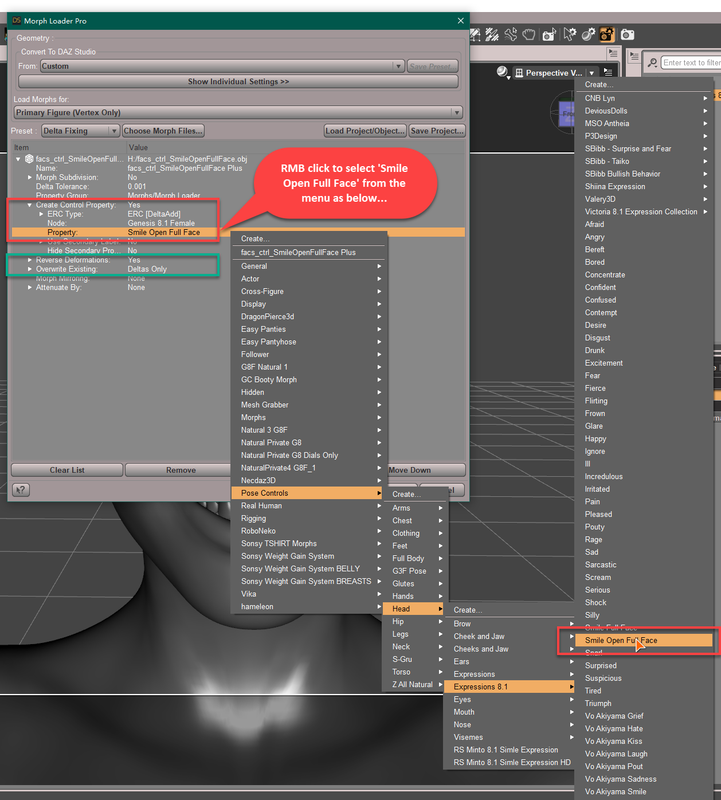
4. Then when you dial Smile Open Full Face, this 'delta morph with more crease' will be automatically triggered.
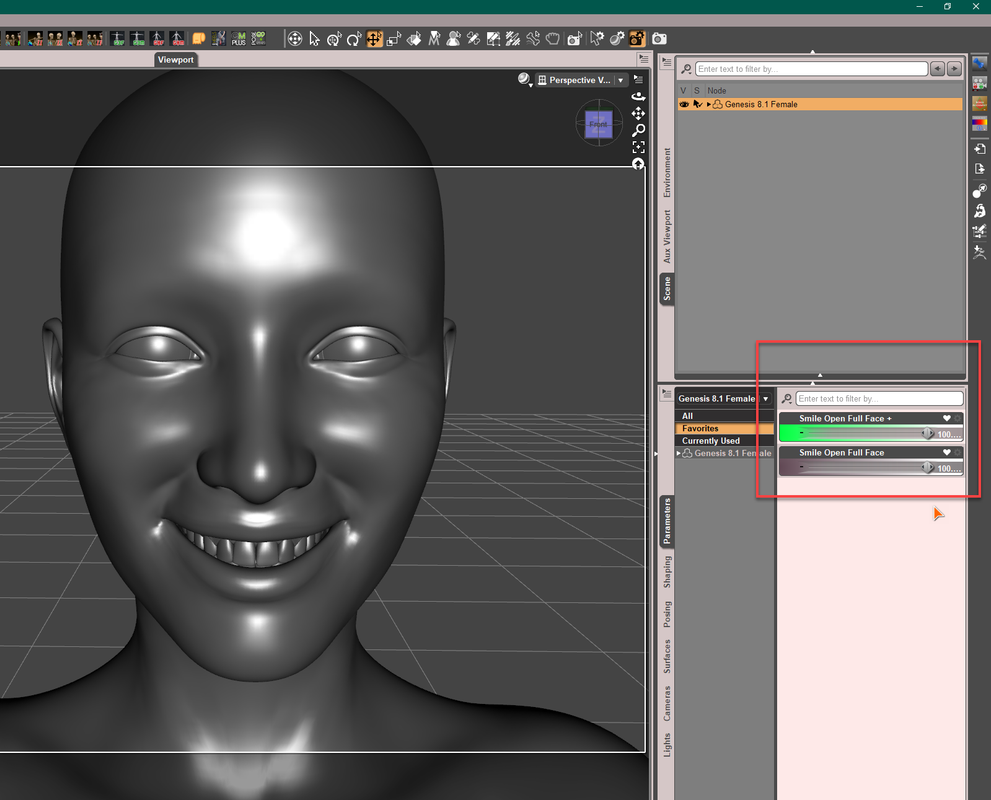
5. Save this 'delta morph' as a Morph Asset to your vendor folder.In this way, you're able to use a FACS control dial + any delta morph of subtle variations that you made.
PS: You surely can create a uniqe morph based on this expression then make change on it but that'll take more steps and time, not really necessary... and you'll have no way to separately control partial expression with it..
Sculpting Your Own Character?I thought I'd append my question to this, since it already contains quite a bit of info regarding morphs and Blender
Could someone explain basic steps of how to export/import between Daz and Blender emotion morphs? What I want to do is create a bit different smile morphs, change how the creases are around cheek/mouth area.
I'm pretty comfortable sending a genesis figure back and forth between Daz and Blender if I want to sculpt the face or body in neutral pose using Morph Loader Pro and "Reverse Deformations: Yes", everything works as expected, but I can't find any tips on how to customize let's say a G8.1F "Smile Open Full Face" expression, I'm somewhat aware of JCMs, weight maps etc, and how they interact, I've even did some "helper" morphs inside Daz using meshgrabber, but I was wondering how to go about doing that using Blender, since Beshgrabber is very lacking when it comes to sculpting.
tip regarding the issue mentioned previously regarding sculpting aroung mouth and eye area, to avoid deforming eyes for instance when sculpting eyelid area, in Blender, while in Sculpt mode, and Draw (or any other brush) selected, on the right side (default layout), there is a Active Tool and Workspace settings tab (screwdriver and wrench icon), then under Brush Settings>Advanced> check the "Topology" setting, what this does for a Grab brush for instance is that if you grab a vertex on the eyelid next to the eye, it will no longer pull the eye mesh geometry with it, don't ask me to explain why, it just works... but you have to check that setting for each brush you're going to use.
Basic Graphics Engine.Its been a long time since I've updated DAZ, I remember using gray scale "Smooth Shaded" models and then "Rendering them using the Basic Engine and a .pgn was a good way to create images/poses for import and painting in Clip Studio, as a base layer, but its been awhile and everything I see DAZ related is all about IRAY now days, So I was just wondering if the current iteration of DAZ still supports the older Basic Engine, and or 3Delight. No need for a long Answer, but a simple. Yes/No would be appreicated. BB.
obj is deformed in daz but looks fine in blender or 3dsLooks quite similar to me but the sole and heel itself are missing? The missing parts may just have zero opacity?
Perhaps if opacity is not the issue, as a quick solution you can just export the Blender one as obj, if it looks fine, and then import that version into Daz.
Sometimes it is best to import obj while unchecking the "read material library" option as the associated .mtl file may introduce some unwanted Shader settings, such as opacity changes, diffuse overlay, etc. It may also assign maps to incorrect shader paramaters.
obj is deformed in daz but looks fine in blender or 3dsobj is deformed in daz but looks fine in blender or 3ds
the third image is the shoe in 3ds where it looks fine-there are my import options
does anyone have any idea what may be causing this to heppen?
I did restart daz and reimport but same problems
OBJ export/import settings?Padone said:
You are right, with 4.21 I can import objects without uv map. I remembered this limitation from old versions and didn't check.
It has always (or at least long) been possible to import an unmapped object - hence the need to ask if the item is mapped when people cannot apply maps.
Daz 3D is part of

Connect
DAZ Productions, Inc.
7533 S Center View Ct #4664
West Jordan, UT 84084Licensing Agreement | Terms of Service | Privacy Policy | EULA
© 2026 Daz Productions Inc. All Rights Reserved.