-
SketchUp Importer - Early Progress Report
Hello all,
I posted a little while ago about an idea I had for making a direct SketchUp-to-Daz transfer path, based on a set of tools I had previously implemented for the Trainz Railroad Simulator. I am pleased to report that -- while I am by no means even close to being finished, and there is considerable work yet to be done -- I have made significant progress and it seems that this is going to be a viable project worth pursuing to the proper conclusion.
Here is a model from the SketchUp 3D Warehouse, displayed in SketchUp 2017 (free version). It's the "Salty Dawg Saloon", the author is JCHarrist.

Here is the same model in Daz Studio. It was exported from SketchUp using the Ruby plugin portion of my tool, then imported into Daz and reconstructed using a very early version of what will eventually be the Daz Script portion of my tool.

As you can see the model comes in already scaled properly -- note the human figure vs. the building (it looks correct to me, at least).

It took 27 seconds to export this model from SketchUp (screen snip from the export log created by the Ruby script).

It took less than 5 seconds to import it into Daz and reconstruct it (screen snip from the Daz Script output window).

So... the total transfer time for this model, direct from SketchUp to Daz Studio, was about 1 minute, including the time needed to switch between applications. The PC used in this example is a Lenovo ThinkPad laptop running Windows 10 Pro 64-bit, with a Core-i7 at 2.5GHz, 16GB of memory and an SSD main drive.
As you can see, the model sems to have transferred with good fidelity (at least I think it looks acceptable so far). I do realize that I still need to work on texture transparency; in Trainz we have the luxury of having the graphics engine create opacity maps automatically based on the alpha channel of the image, but in Daz it appears that I will need to generate true opacity maps as separate images. For the moment, for my "does it even work at all" testing, I am simply using the same image as is used for the texture, but will of course be pursuing the correct solution.
As I said: Lots more work to do, but it appears this is a feasible project worth pursuing.
Thanks for your attention... comments are welcome.
Regards,
MikeJeanZ Skirt for Genesis 3 Females (Commercial)Beautiful work on the new Jeanz skirt. I do have one small request. If you ever do an updae on it add a few morphs to pull the skirt up. Your skirt made me think of a skirt that my girlfreind used to wear. She loved to drink beer and would regularly hike up her skirt and releive herself of said beer when she was inebriated at lake parties (she also used to not wear underwear with this particular skirt either). This outfit brought back some memories of partying in the late seventies (yes I'm that old) with a beautiful girl. It is a nice addition to my runtime.
Thanks, glad you like it. I like the idea of hiking the skirt and will keep it in mind.
I have it this morning (0946 CDT)
is the discount for the previous owners over? or did I just close the banner or something?
It's valid through may 18.
It is May 18 but I do not see the discount anymore, oh well
I thought it was through today, it doesn't show up when you check out?
Cheers!
Can confirm the discount no longer shows up in the cart. I was waiting to get paid on a job and... well, shouldn't have waited. Obviously.
The hiking morph wold be very nice but, now that you are doing the Real Fit items, have you given any thought to doing some generic pressure morphs? Like thigh indents at different heights, waistlines, strap pressures, etc? That would really add realism to a lot of images and, depending on variety, could really help with some outfits. I mean, obviously, custom morphs for any given outfit would give a better result, but a generic solution would be a day one purchase.
Have you visited my Facebook page? I posted a preview of my next release, you might like it ;) You don't need a Facebook account to see it, though they do have a nag screen. When it gets closer to release time I may start a thread here.
Cheers!
JeanZ Skirt for Genesis 3 Females (Commercial)Beautiful work on the new Jeanz skirt. I do have one small request. If you ever do an updae on it add a few morphs to pull the skirt up. Your skirt made me think of a skirt that my girlfreind used to wear. She loved to drink beer and would regularly hike up her skirt and releive herself of said beer when she was inebriated at lake parties (she also used to not wear underwear with this particular skirt either). This outfit brought back some memories of partying in the late seventies (yes I'm that old) with a beautiful girl. It is a nice addition to my runtime.
Thanks, glad you like it. I like the idea of hiking the skirt and will keep it in mind.
I have it this morning (0946 CDT)
is the discount for the previous owners over? or did I just close the banner or something?
It's valid through may 18.
It is May 18 but I do not see the discount anymore, oh well
I thought it was through today, it doesn't show up when you check out?
Cheers!
Can confirm the discount no longer shows up in the cart. I was waiting to get paid on a job and... well, shouldn't have waited. Obviously.
The hiking morph wold be very nice but, now that you are doing the Real Fit items, have you given any thought to doing some generic pressure morphs? Like thigh indents at different heights, waistlines, strap pressures, etc? That would really add realism to a lot of images and, depending on variety, could really help with some outfits. I mean, obviously, custom morphs for any given outfit would give a better result, but a generic solution would be a day one purchase.
Skinchangers - More fabulous from Sixus1I bought skinchangers as soon as it came out. Fantastic work. I have noticed though, that some of the JCMs are applying to all G3Ms rather than only when the skinchamgers morph is applied. It's most obvious on the shoulder bends. Anyone else noticed this? I've submitted a ticket and hope it will be corrected soon.
Strange distortion in the back of shoulders, upper arms and upper back on G3MI found this too and came to the forum to see if it had been reported. I think the problem is with the Skinchangers Shoulder bend JCMs, which are triggering with all G3M and not just when the morph is applied. I'll put in a support ticket.
Moving DAZ Studio & my content to a new PCIf you have the data on a separate drive in the old PC just transfer the drive to the new PC and point Studio and DIM to it when you have them installed.
S.H.A.D.O.ws from the past - [WIP]"Note that if your target is G3F I'm not sure if GenX has the clones in it to make the conversion, (Yet?)."
Yes, it does, Gary. You need GenX2 and the accompanying GenX2 AddOn for Genesis 2 and GenX2 AddOn for Genesis 3. Since you cannot go directly from V4 to G3F, you need both addons to effect the transfer. I did a transfer of your Lt.Ellis Morph, and it wasn't too bad, although it needed a little tweaking. I'll post a render if I get the time.
Motion Capture in CarraraSweet! Thanks for the added info!
So there's no retargeting? I thought ipisoft's original promos talked about retargeting the animation data to the appropriate figure to be used... or do you just do that directly during the mocap process?
The process goes like this. Open Daz Studio and load the figure you want to transfer your animation to. Now go to the File menu, choose export and save as type .bvh.
Now in ipisoft once you're ready to export, all you do is click on the export tab and you will see a drop down menu with different skeleton options and one that says import from file. Import the bvh you saved from daz studio. There is the option to choose which bones are assigned to which, but I didn't have to change anything in there. Then just click the export animation button and ipisoft saves a bvh file that is compatible with that figure in daz studio. Really simple process.
hi i am trying to make supergirl this pic is what she looks likeOK, I took a crack at this. I have a LOT of morphs at my disposal.
I used GDN Kelly, who in turn requires Victoria 7 and Genesis 3 Female Head Morphs. You'll probably want Vic 7 in your collection anyways if you don't have her yet.
I set Kelly's head at 100%, and Genesis 3 Female Head at 100% Then I started nudging things around with various morphs, starting with some Quickface Morphs and then using other morphs I've acquired here and some free ones I've found on Rendo and ShareCG. Skin tones are GDN Kelly's with some minor color tweaks. I used Long Shag Hair because it's the closest I have to the base photo, but you'd probably want to get Streaming Hair or some other hairdo for SG.
Here is how far I've gotten so far:
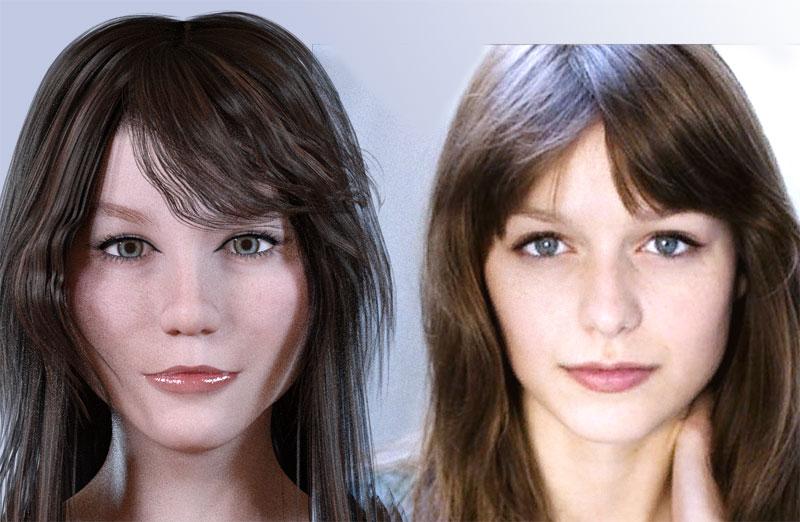
Still a number of minor adjustments that are needed, but if you want to attempt this using the morphs route, just showing you what's possible. I like to exercise my face building skills, so this was mainly for fun and to increase my Daz skills. The cheeks could use some more nudging (it's a balancing act), that's probably the one area I'm struggling with the most morph wise, but you get the idea here.
Melissa's .jpg is INSIDE of Daz Studio in the render above, on a plane (create a plane primitive, then set the base color texture to Melissa's JPG, and resize the plane to match the dimensions of the original .jpg using x and y scaling, then use the universal scale to size it to match your G3F figure's size for comparison purposes). This makes it easier to compare faces side by side while you are working.
Unfortunately, I'm not seeing a way to identify all of the different morph packages I have that I've used/installed. Morphs are on the top of the list of things I snag, for this very reason (making new and intersting faces, or replicating faces).
GoZ to modify clothingI think I didn't transfer something correctly. It didn't have all the clothing controls that came with the clothing. I figured out a work around though. Instead of breaking appart the object, I had zbrush generate polygroups and then I could hide or move individual parts of the model without ungrouping it.
I'll revisit again when I have more time.
Thanks!
Strange distortion in the back of shoulders, upper arms and upper back on G3MI just noticed yesterday that my characters I created with G3M have this strange distortion. At first I thought there was something wrong with the morph I created with GenX2, but it happens with older morphs I converted months ago. I loaded a fresh G3M, and the distortions appear on it as well. Figure 1 is from the back. Figure 2 is from the front. I did purchase Cthulhiana HD, Classic Toon Duckie for Genesis 3Male. and Skinchangers. I can't see Cthulhiana HD as the culprit because it's for G3F, but I thought I would mention it anyways.
Josh Crockett Suggestion Page for Monster Characters!Further to other suggestions, I'd like a shark-human hybrid. I know Raw Art did one ('Jawz'), but was disappointed to find it can't be 'bulked down' by using emaciated and thinning shaping morphs. I ideally want one which looks like it's more properly streamlined, rather than overly muscular (nothing wrong with that, of course, but the option should be there and Jawz doesn't have a seperate head shaping morph to be dialled in with a different body).
Could easily see a streamlined shark-like hybrid being useful for both genders of base character.
Might be interesting to do a shark of some sort...
Something like the goblin shark I think would be cool
https://i1.wp.com/bloody-disgusting.com/wp-content/uploads/2017/04/goblin.jpg
love it, now I NEED a goblin shark on my runtime
Toon Generation 2 Clothing Issues.hello, thank you very much Richard Haseltine for your help
i made it by zeroing the the figure in the edit menu. then export it to Zbrush; after modeling the cloth i export it back to Daz via goz
ther i used transfert utility to morph the cloths over the zeroed figure and finally i applied the character that i want to use it fits to oit very good
Josh Crockett Suggestion Page for Monster Characters!Further to other suggestions, I'd like a shark-human hybrid. I know Raw Art did one ('Jawz'), but was disappointed to find it can't be 'bulked down' by using emaciated and thinning shaping morphs. I ideally want one which looks like it's more properly streamlined, rather than overly muscular (nothing wrong with that, of course, but the option should be there and Jawz doesn't have a seperate head shaping morph to be dialled in with a different body).
Could easily see a streamlined shark-like hybrid being useful for both genders of base character.
Might be interesting to do a shark of some sort...
Something like the goblin shark I think would be cool
https://i1.wp.com/bloody-disgusting.com/wp-content/uploads/2017/04/goblin.jpg
I'm confuseOk so am I right in thinking that if I have any Daz morph'sinstalled that can be use to pose bodies that will effect the export?, and thus be the reason the pose moves a little when I export it, might be easyer and better then to try set a T pose on anything I'm going to export to work on if that the case
I'm just trying to learn this stuff and set me up a work flow to do these things when I wish to, develop a process so tospeak
Need help, growing up for G3F is not working correctly anymoreIn any event, if a particular morph set develops an issue (and I do agree, if you are still seeing the problem it's unlikely to be NPM) then reinstalling the base figure won't help. Moprhs (UV sets, projection templates, etc.) do not modify the base files but add their own which DS finds when it loads the base figure.
Applying Hercules shape/materials to g3female?The easiest way to transfer morphs is with GenX2. This product has 2 required other packages.
https://www.daz3d.com/genx2-addon-for-genesis-3
https://www.daz3d.com/genesis-generation-x2
https://www.daz3d.com/genx2-addon-for-genesis-2
The other way is quite messy. You have to save the rename the morphs for Hercules to end in .zip and then unzip them to uncompress them. Then with a text editor you change all instances of "male" to "female." I used to do it before GenX2 came out so I don't remember all the little nit picky details. Also, if you are interested in the HD shape, that won't transfer at all with either GenX2 or the brute force method. So this would only work for Hercules SD morph.
I thought about buying Hercules but I have one question if you could please answer. Does the head have a separate morph from the body? Is there both a full Hercules morph and a "Hercules Head" and "Hercules Body" morph? SimonWM's previous characters called "Swole" had this. It made it so you could have different face shapes on the bodybuilder.
So if the head morph isn't seperate, then you probably wouldn't want to port it over to G3F anyway. You would just end up with a G3F who has both Hercules' body and face.
Otherwise, try this Massive morph for G3F:
https://www.daz3d.com/massive-morphs-for-genesis-3-female-s
Motion Capture in CarraraIt really is quite easy. I couldn't get ipi to work directly with Carrara though.
So once you've created your animation in ipisoft follow the insructions on their website to import it into Daz Studio. Then just create an aniblock from studio keyframes, save the aniblock to disc. Then open Carrara and import the aniblock with the aniblock importer. This works great for Genesis and Genesis 2 and I assume it'll work fine with M4 and V4 but haven't tried them. The only problem I ran into was with an original figure like Mestophales' Brute X. I originally intended this animation for Brute X. The animation imported into studio just fine, but I tried several different ways to transfer the animation over to Carrara with no luck. So I switched to the Infernal Behemoth and it works just fine with him. (maybe even better because of his oversize arms)
Also the animation was not edited in either studio or Carrara. That's how it looks straight out of ipisoft. I would recommend it to anyone that's interested, I'll be diving in more myself. This is for a music video for a friend, Xoe Fitzgerald the time traveling transvestite.
Need help, growing up for G3F is not working correctly anymoreTry reinstalling and unisntalling the NPM product, reisntalling Genesis 3 female won't do anything to other morph sets.
Josh Crockett Suggestion Page for Monster Characters!Further to other suggestions, I'd like a shark-human hybrid. I know Raw Art did one ('Jawz'), but was disappointed to find it can't be 'bulked down' by using emaciated and thinning shaping morphs. I ideally want one which looks like it's more properly streamlined, rather than overly muscular (nothing wrong with that, of course, but the option should be there and Jawz doesn't have a seperate head shaping morph to be dialled in with a different body).
Could easily see a streamlined shark-like hybrid being useful for both genders of base character.
Do you know philosopher's egg website? he has fantastic shark hybrid morhs, they are for V4 and M4 but you could transfer the morphs to genesis 3 with those three products
https://www.daz3d.com/genesis-generation-x2
https://www.daz3d.com/genx2-addon-for-genesis-2
https://www.daz3d.com/genx2-addon-for-genesis-3
here is the philosopher's egg sharks bundles:
shark:
http://philosophersegg.com/index.php?main_page=product_info&cPath=1_10&products_id=81
hammerhead shark:
http://philosophersegg.com/index.php?main_page=product_info&cPath=1_10&products_id=85
and the skins could be transfered with Texture transformer:
https://www.renderosity.com/mod/bcs/texture-transformer-version-2/120633/
addon v4 to genesis 3 female
https://www.renderosity.com/mod/bcs/v4-to-g3f-add-on-pack-for-texture-transformer/112851/
addon m4 to genesis 3 male
https://www.renderosity.com/mod/bcs/m4-to-g3m-add-on-pack-for-texture-tranformer/113499/
Daz 3D is part of

Connect
DAZ Productions, Inc.
7533 S Center View Ct #4664
West Jordan, UT 84084Licensing Agreement | Terms of Service | Privacy Policy | EULA
© 2026 Daz Productions Inc. All Rights Reserved.